
Stern Engineering NARA 2032 Manuale del prodotto

1
INSTALLATION AND MAINTENANCE GUIDE
ELECTRONIC FLUSH VALVE FOR WC
WITH DUAL FLUSH INFRARED SENSOR
NARA 2032 / E / P / PE / K / KE

INDEX
INDEX
1 TECHNICAL DATA
2-3 PACK CONTENTS
4 NARA 2032 K / KE (PN: 800271 / 800276)
5 PRE-INSTALLATION INFO
INSTALLATION
6-7 NARA 2032 (PN: 160310)
8-9 NARA 2032 E (PN: 160410)
10-11 NARA 2032 P (PN: 160610)
12-13 NARA 2032 PE (PN: 160510)
14 BATTERY REPLACEMENT INSTRUCTIONS
15-17 SETTINGS ADJUSTMENT
18 MAINTENANCE AND LIMITED WARRANTY
19 SPARE PARTS LIST
20-21 TROUBLE-SHOOTING
OPERATION
Nara is a touch free electronic flush valve
for W.C. operated by a self adjusting infrared
sensor. Water will start flushing when the user
will walk away from the W.C.
If the user was present in front of the W.C. for
less than one minute, a reduced flush will take
place to remove liquid waste.
If the user was present in front of the W.C. for
one minute or more, a full flush will occur to
remove solid waste.
Nara includes a mechanical override push
button for alternative manual operation.
Nara P includes a piezo button for alternative touch operation.
Once the manual push button / piezo button has been used, the system will discharge
a full flush.
1
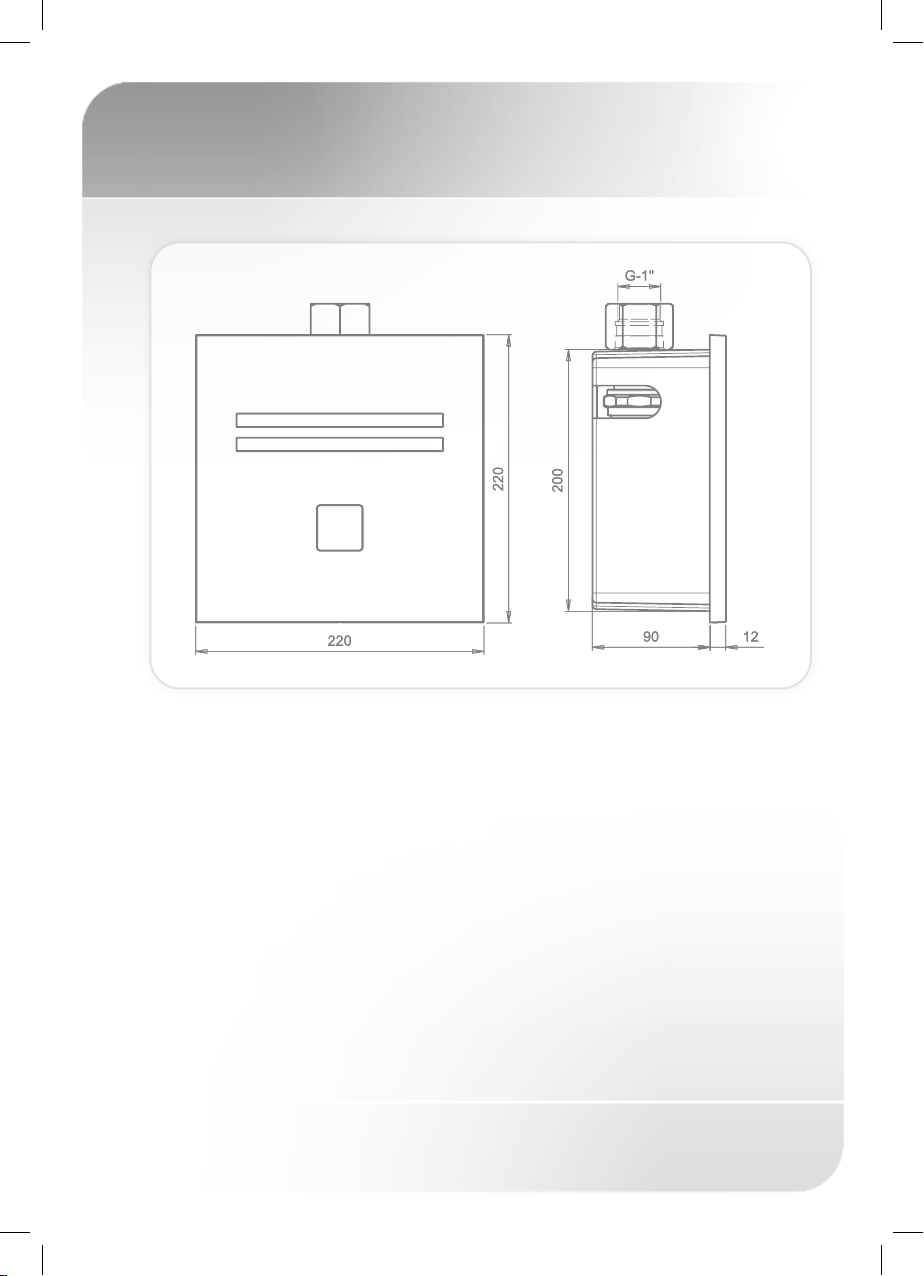
TECHNICAL DATA
Power specification: 9V low voltage system
Power Supply
Nara 2032and Nara 2032 P: 9V Battery
Nara 2032 E: 9 V Transformer
Nara 2032 PE: 9V Transformer with Battery Back Up Device
Operating water pressure: 1.0-8.0 bar (14.5 – 116.O PSI).
With water pressure of more than 8 Bars,
use a pressure reducing valve for reduction.
Sensor range: Self adjusting sensor range. Adjustable with
Stern’s remote control
2
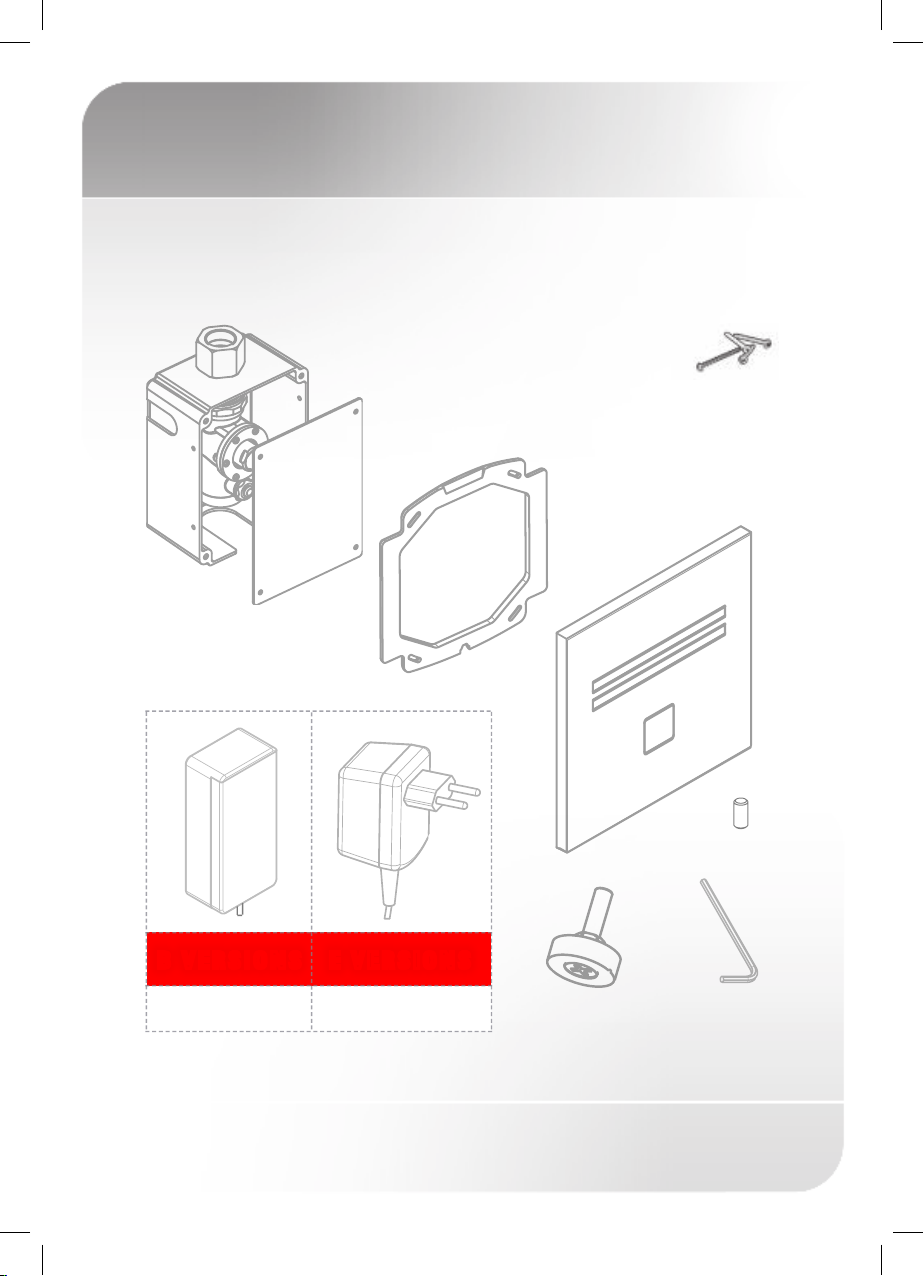
PACK CONTENTS
NARA 2032 / 2032 E
1 x Plastic box
with concealed flush valve
Familiarize yourself with the part names and confirm that the parts are included:
1 x Plastic seat
for the cover plate
1 x Wall cover plate
with the electronic unit
Adjusting screw 1 x Allen key
4 x Screws
9V Battery box Transformer
B VERSIONS E VERSIONS
1 x Screw M4x10
1 x Temporary
protective panel

3
PACK CONTENTS
NARA 2032 P / 2032 PE
1 x Plastic box
with concealed flush valve
Familiarize yourself with the part names and confirm that the parts are included:
1 x Plastic seat
for the cover plate
1 x Wall cover plate
with the electronic unit
9V Battery box
B VERSIONS E VERSIONS
1 x Temporary
protective panel
Transformer and
back up device
1 x Screw M4x10
4 x Screws
1 x Allen key

4
NARA 2032 K / KE
WITH IRON FRAME
1 x Plastic box
with concealed flush valve
1 x Plastic seat
for the cover plate
1 x Wall cover plate
with the electronic unit
2
3
4
2
3
4
Note:
1. Keep a minimum distance of 500mm between the upper surface of
the bowl and the infra red sensor.
2. The maximum thickness of the plaster wall covering the frame
should be up to 50mm.
1 x Iron frame
and accessoires
1
1

5
PRE–INSTALLATION INFO
Check contents
Separate all parts from packaging and check each part with the pack
contents section.
Make sure all parts are accounted for before discarding any packaging
material. If any parts are missing, do not attempt to install the electronic
flush valve until you obtain the missing parts.
Warnings
Do not install the system facing a mirror or any
other electronic system operated by an infra-
red sensor.
To prevent reflection problems, it is recommended
to keep a minimum distance of 1.50 meters
between the flush valve and other objects.
Preparation for installation
Flush water supply lines thoroughly before
installing the flush valve. Do not allow dirt,
Teflon tape or metal particles to enter the flush
valve.
All plumbing is to be installed in accordance
with applicable codes and regulations.
Important: For the optimal performance of this flush valve, the entire
piping infrastructure from the main big water-supply pipe down to
the W.C. would have 1” diameter.

6
INSTALLATION NARA 2032
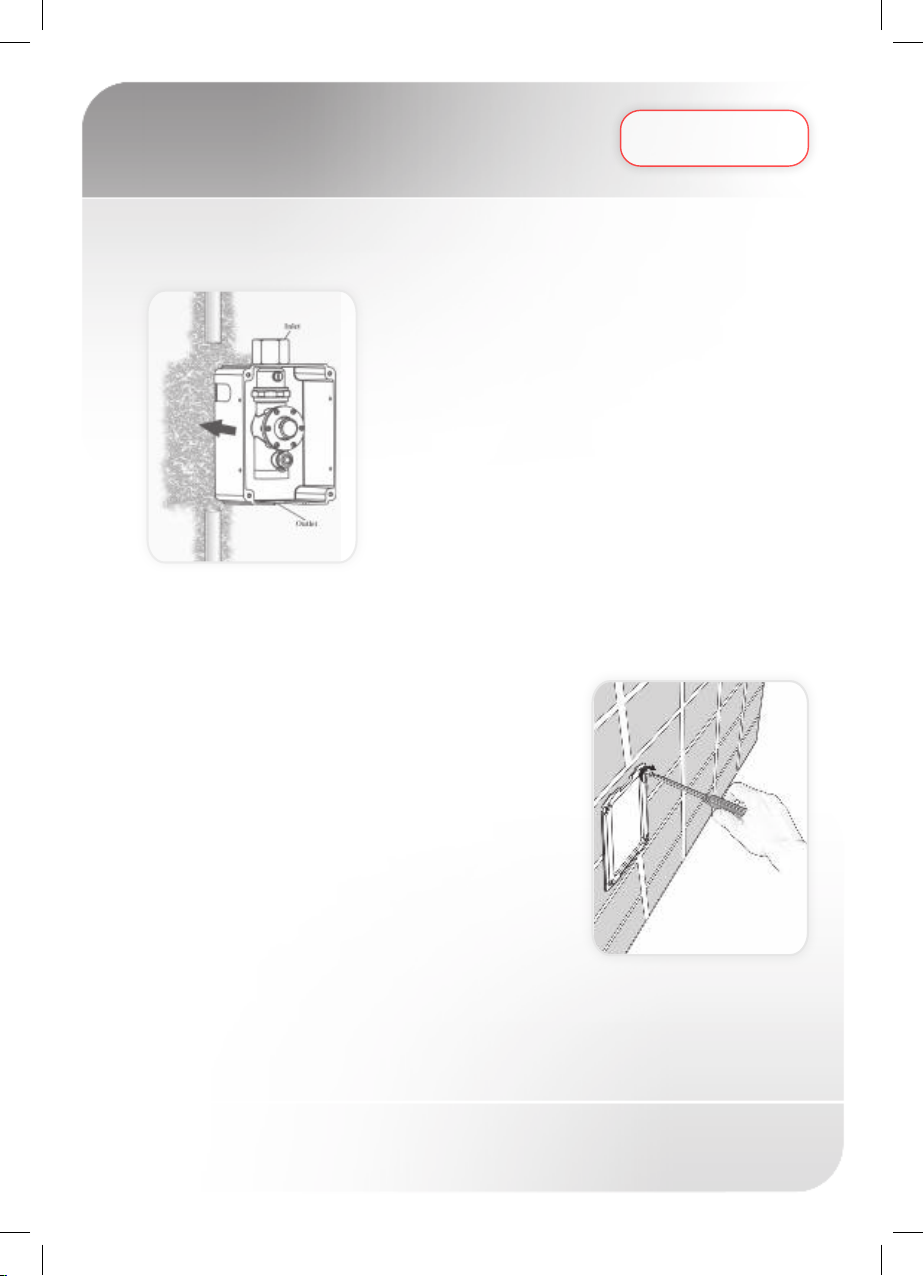
Step 1 – Installing the flush valve and connecting the water supply
1) Shut off the water supply.
2) Cut an adequate opening in the wall for the dimensions
of the box and the sleeve (not supplied).
3) Insert the electronic flush valve’s box through the
opening.
4) Connect the flush valve inlet to the water supply.
5) Connect the flush valve outlet nipple to the pipe
leading to the W.C.’s inlet.
6) Turn on the water supply. Make sure there is no water
leakage.
7) Assemble the temporary protective cover to protect the flush valve.
Step 2 – Connecting the power source
1) Once the electricity, plumbing and tiles works are
finished, replace the temporary protective cover
with the plastic seat. Adjust it using the four screws
provided.
2) a. Connect the electronic unit connector that leads
to the solenoid valve to the solenoid connector.
b. Connect the electronic unit connector that leads
to the power source to the battery box connector.
3) Before assembling the panel, consider using
the provided adjusting screw in order to optimize
the operation of the mechanical button. If needed,
assemble the adjusting screw to the mechanical button at the internal side
of the panel and adjust it to the desired distance.

7
NARA 2032
INSTALLATION
Pay atention, steps 4-7 must be completed within 30 seconds:
4) Insert the battery into the battery box.
5) Assemble the panel to the cover seat. Do not tighten the
bottom screw yet.
6) The ideal sensor range for the specific
location will be set automatically. Right
now, check that no objects are in front of
the sensor.
7) Remove the protective sticker covering the
sensor and move away from the sensor range.
8) Wait about 30 seconds before you step or put your hand within the sensor
range. As an indication that the self adjusting is taking place, a red light in the
sensor eye will flash continuously. The solenoid valve will be opened and closed
for 1 second as an indication that the ideal sensor range was set and the product is
ready for use.
9) To operate, step within the sensor range for a minimum of 8 seconds.
Move away and the flush valve will flush a few seconds after your departure.
10) If needed adjust the flow rate by turning the regulating valve. In order
to avoid entering into the self adjusting mode, do not
disconnect the cables between the electronic unit and
battery box.
11) If the range is unsatisfactory, refer to the section
entitled “Settings Adjustment”.
12) Tighten the panel to the cover seat with the bottom screw.
30
sec
8
INSTALLATION NARA 2032 E
Step 1 – Installing the flush valve and connecting the water supply
1) Shut off the water supply.
2) Cut an adequate opening in the wall for the dimensions
of the box and the sleeve (not supplied) where you will
accommodate the transformer cable.
3) Insert the electronic flush valve’s box through the
opening.
4) Connect the flush valve inlet to the water supply.
5) Connect the flush valve outlet nipple to the pipe
leading to the W.C.’s inlet.
6) Turn on the water supply. Make sure there is no water
leakage.
7) Assemble the temporary protective cover to protect the flush valve.
Step 2 – Connecting the power source
1) Place the transformer near the electricity plug, insert the transformer cable wire
through the box.
2) Once the electricity, plumbing and tiles works are
finished, replace the temporary protective cover
with the plastic seat. Adjust it using the four screws
provided.
3) Connect the electronic unit connector that leads to
the solenoid valve to the solenoid connector.
4) Connect the other electronic unit connector to the
transformer cable connector.
5) Before assembling the panel, consider
using the provided adjusting screw in order to optimize the operation of
the mechanical button. If needed, assemble the adjusting screw to the
mechanical button at the internal side of the panel and adjust it to the
desired distance.
Questo manuale è adatto per i seguenti modelli
5
Indice
Altri manuali Stern Engineering Unità di controllo


Manuali Unità di controllo popolari di altre marche

Festo
Festo Compact Performance CP-FB6-E Manuale elenco delle parti

Elo TouchSystems
Elo TouchSystems DMS-SA19P-EXTME Manuale utente

JS Automation
JS Automation MPC3034A Manuale utente

JAUDT
JAUDT SW GII 6406 Series Guida rapida

Spektrum
Spektrum Air Module System Manuale utente

BOC Edwards
BOC Edwards Q Series Manuale utente


