
TCL MOVEAUDIO Air Manuale utente
User Manual
Model: TW12V1.0

2
Contents
Read this first ........................................................................................................................... 3
Chapter 1. Welcome................................................................................................................. 4
What’s in the box................................................................................................................................ 4
Overview............................................................................................................................................. 4
Chapter 2. Get started.............................................................................................................. 5
First Time Using - Activation................................................................................................................ 5
Replace ear tips.................................................................................................................................. 5
Wear the earphones ........................................................................................................................... 6
Chapter 3. Charging ................................................................................................................ 6
Charge the case ................................................................................................................................ 6
Check the battery status..................................................................................................................... 7
Chapter 4. Bluetooth ................................................................................................................ 8
Connect with a Bluetooth device for the fisrt time ............................................................................... 8
Disconnect from a Bluetooth device.................................................................................................... 9
Reconnect with your devices ............................................................................................................. 9
Restart the earbuds ............................................................................................................................ 9
Reset the earbuds .............................................................................................................................. 9
Chapter 5. Use your earbuds................................................................................................. 10
Music mode...................................................................................................................................... 10
Call mode ......................................................................................................................................... 10
Low latency mode ............................................................................................................................ 11
Voice assistant.................................................................................................................................. 11
Important safety information ................................................................................................... 12
Important handling information.......................................................................................................... 12
Bluetooth.......................................................................................................................................... 12
Hearing loss...................................................................................................................................... 12
Medical device interference............................................................................................................... 13
Choking hazard ................................................................................................................................ 13
Charging........................................................................................................................................... 13
Battery.............................................................................................................................................. 13
Operating temperature...................................................................................................................... 13
Regulatory compliance information ......................................................................................... 13
Eelectromagnetic fields (EMF) ........................................................................................................... 13
Radio Equipment Directive Declaration of Conformity........................................................................ 14
FCC compliance statement............................................................................................................... 14
Canadian compliance statement....................................................................................................... 15
California battery charger efficiency................................................................................................... 15
Disposal and recycling information.................................................................................................... 15
Troubleshooting...................................................................................................................... 16
Trademarks ............................................................................................................................ 20

3
Read this first
•Before using this documentation and the device it supports, ensure that you read and
understand the "Important safety information" on page 12.
•Illustrations in this documentation might look different from your device.
•Instructions in this documentation may vary depending on your device model and software
version.
•Documentation content is subject to change without notice. We make constant
improvements on the documentation of your device, including this user manual.
•TCL Communication Ltd. does not assume any liability that may occur due to the use or
application of the product described herein. Every effort has been made in the preparation of
this documentation to ensure accuracy of the contents, but all statements, information and
recommendations in this documentation do not constitute the warranty of any kind, express
or implied.
4
Chapter 1. Welcome
Congratulations on the purchase of your new TCL headphones! After it is set up and connected,
you can enjoy wireless music and phone calls with high quality sound. You are recommended
to read through this user manual which helps you set up, connect and operate the product
easily and properly. For more information, visit www.tcl.com.
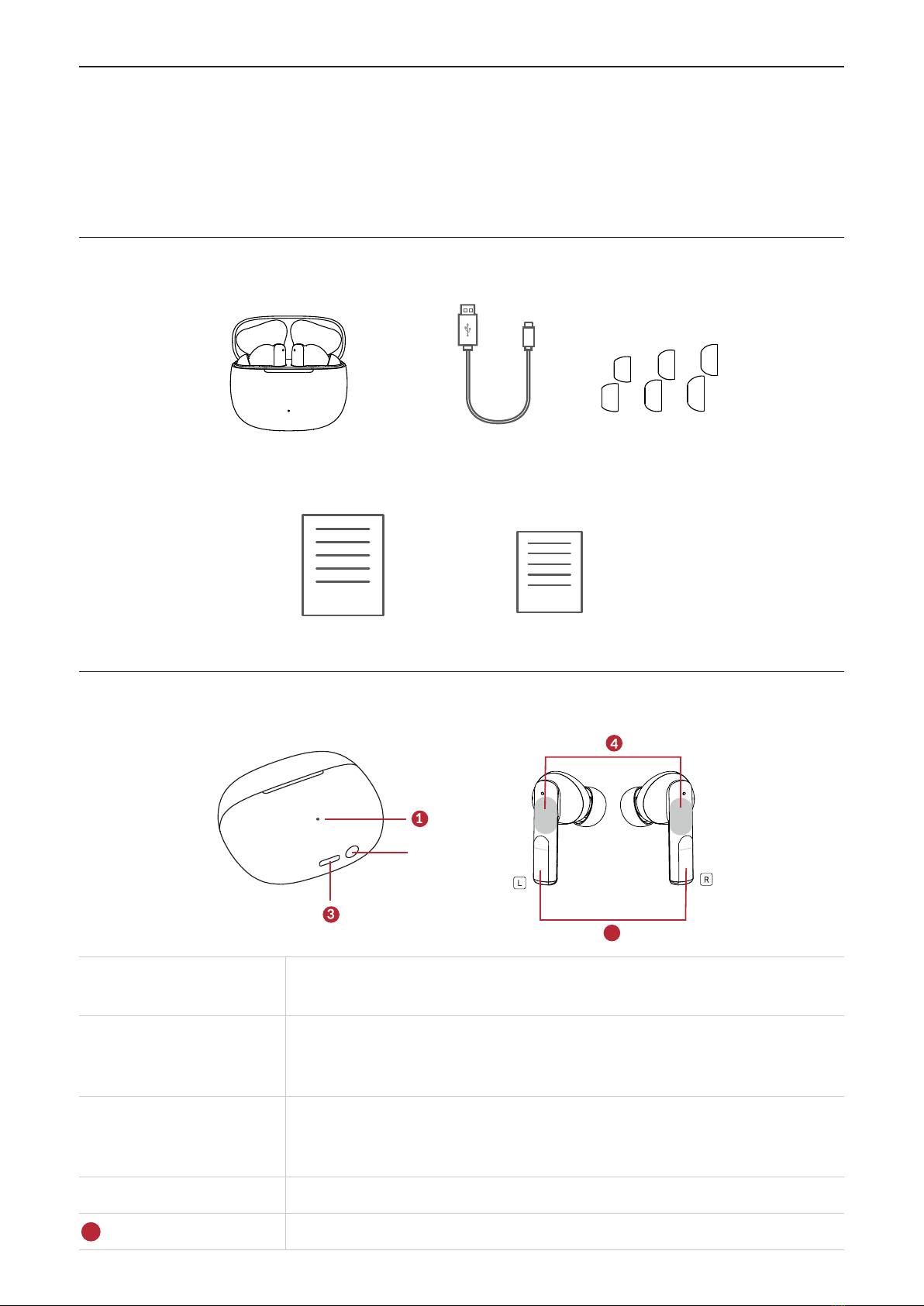
What’s in the box
S M L
Charging Case & Earbuds USB cable Earplugs
Quick start guide Warranty card
Overview
5
❷
❶LED indicator The indicator flashes blue colour to indicate the charge or
communication status of the earbuds or the charging case.
❷Function button
The button allows for you to check the charge status of your earbuds
or the case, reset your earbuds, and pair earbuds with Bluetooth®-
enabled devices such as smartphones.
❸ USB Type-CTM port
Connect the charging case to a computer or a compatible USB
adaptor with the supplied USB Type-C cable to simultaneously
charge both the earbuds and the charging case.
❹Touch control area Tap or press to operate earbuds.
5Insulation tape Peel off the insulation tape before using the earbuds for the first time.
5
Chapter 2. Get started
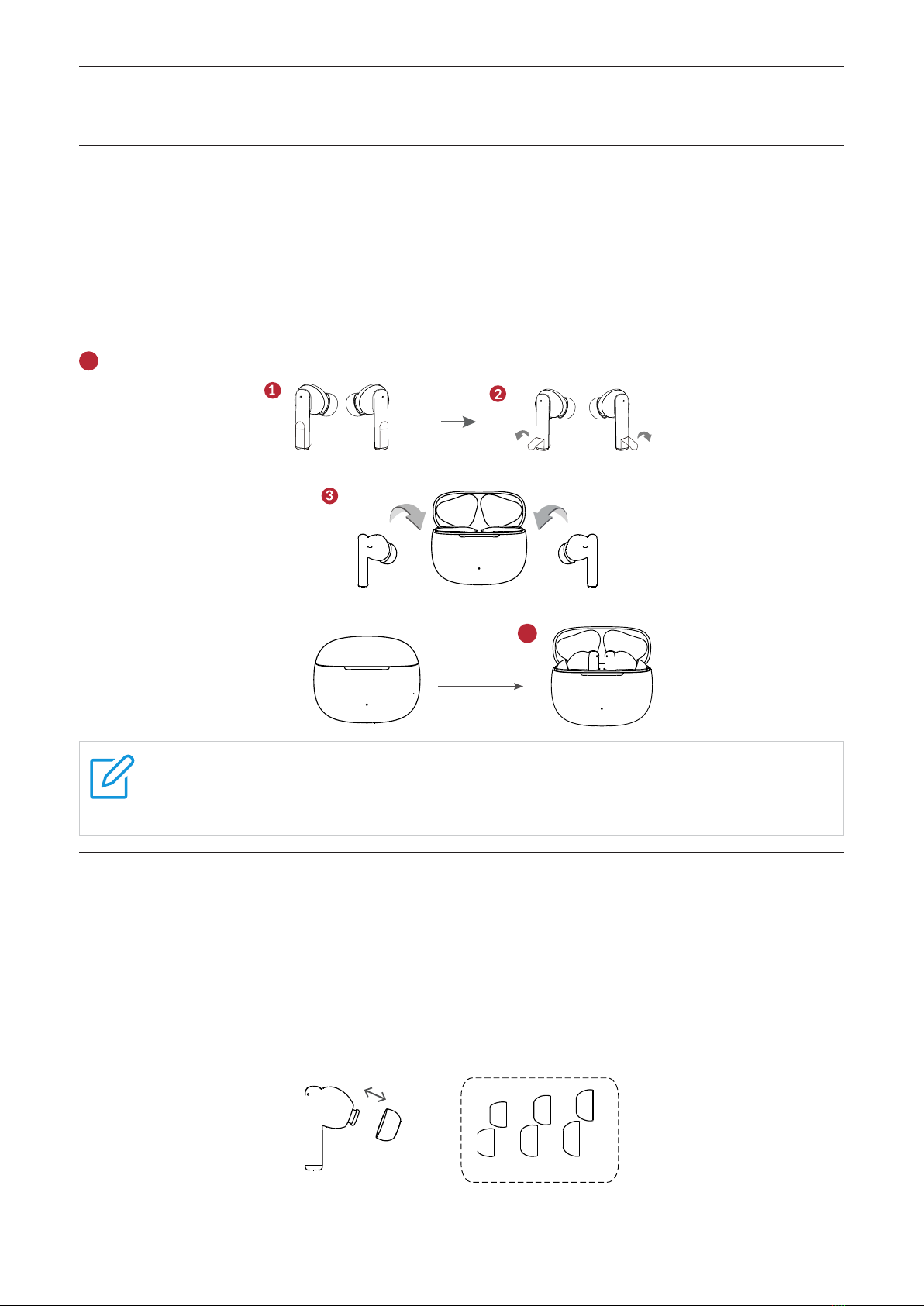
First Time Using - Activation
Follow these steps to activate your earphone for the first time using.
❶Take out the earbuds from the charging case.
❷Peel off the insulation tape on the earbuds.
❸ Place the earbuds in the charging case.
❹ Close the charging case, the LED indicator will turn off.
5Open the case to complete the activation.
❹5
Note
If earbuds cannot be activated successfully, please charge it for a while and then
repeat the activation process again.
Replace ear tips
To get the most use and enjoyment out of your earbuds, select the most comfortable tips for
your ears.
To replace an ear tip, follow these steps:
1.Pull firmly to remove the tip.
2.Choose a new tip.
3. Align the new tip with the earbud, then push until it clicks.
S M L
6
Note
For more tip sizes, see inside the box.
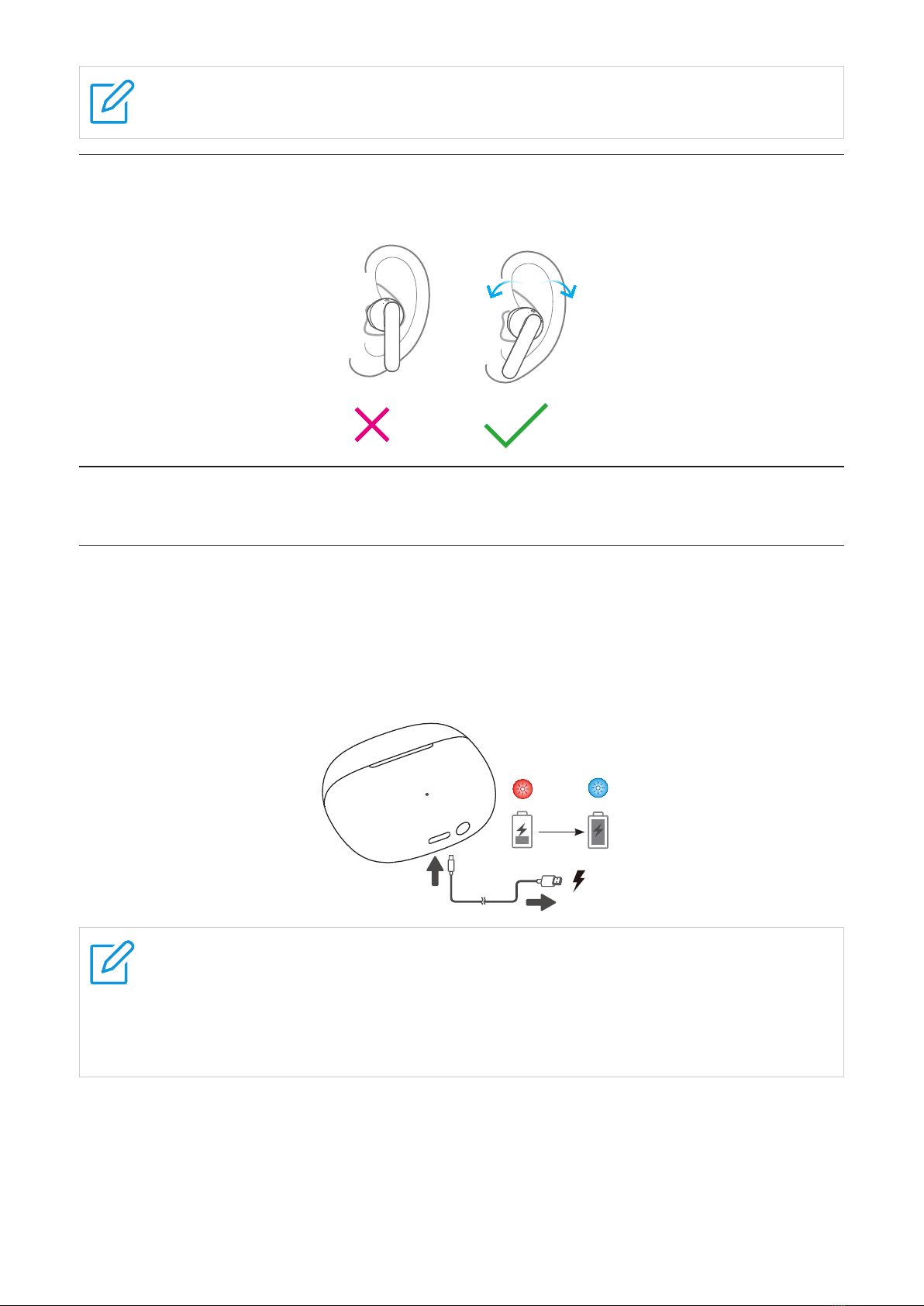
Wear the earphones
Put on the earphone, twist it to the proper position and fix it.
Chapter 3. Charging
Charge the case
Charging case
To charge the charging case, connect the case to a computer or a compatible USB adaptor
with the supplied USB Type-C cable.
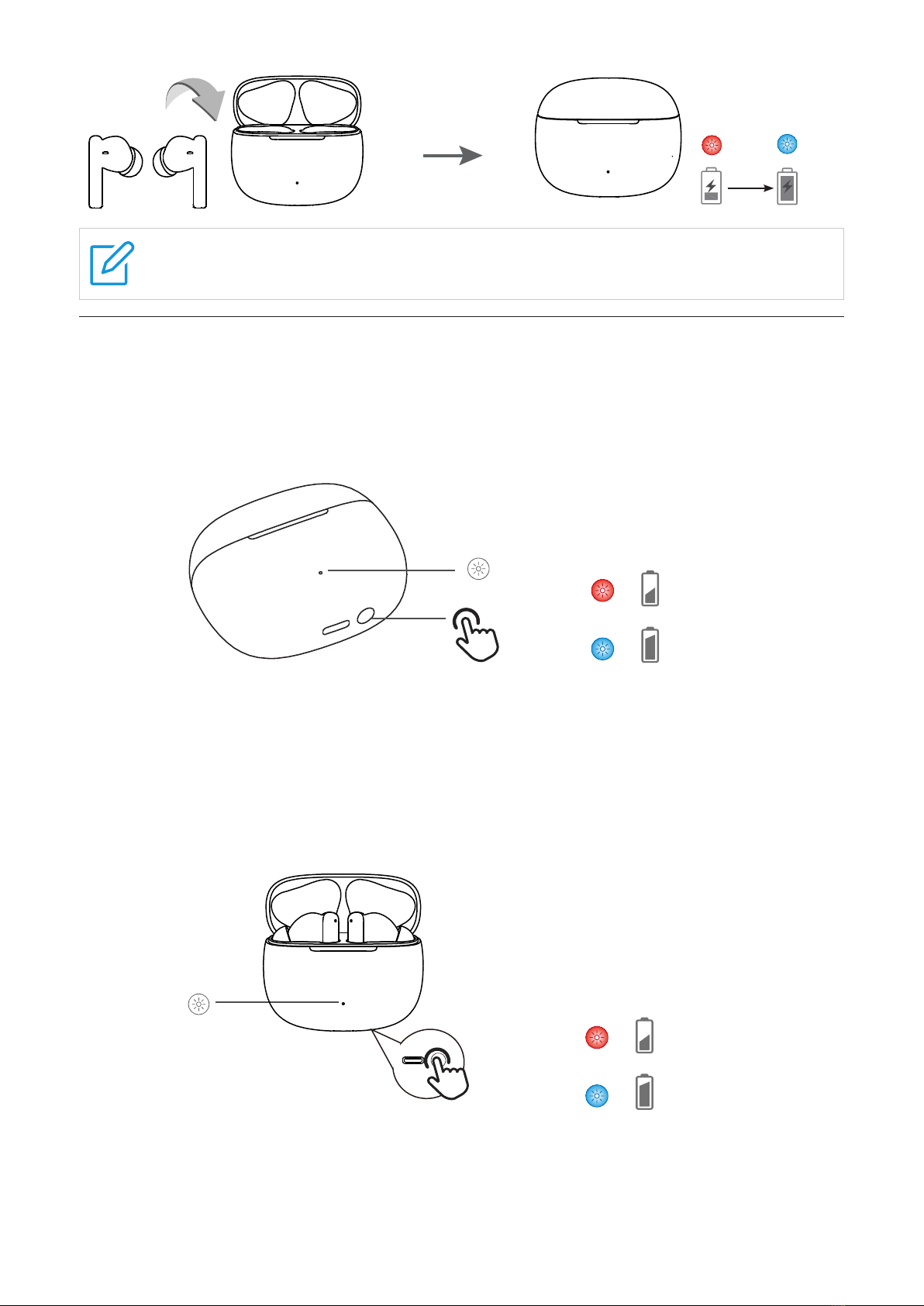
The LED indicator flashes in red when charging, and flashes in blue when charging is complete.
1.5H
Notes
•It takes approximately 1.5 hours to fully charge the case using the supplied USB
Type-C cable. The charging time may vary depending on the battery usage
conditions.
•Use only the supplied USB charging cable for charging to prevent product damage.
Earbuds
Your charging case is a charger. To charge your earbuds, place the earbuds in the case, then
close the lid. The case LED indicator flashes in blue for 3 seconds when charging starts.
7
1.5H
Note
For best results, do not insert your earbuds in the charging case if they are wet or dirty.
Check the battery status
Charging case
With no earbuds in the case, press the function button or open the charging case to check the
charge status of the case from the LED indicator lights.
X1
<20%
≥20%
•The LED indicators red in 10 seconds when the charging case battery power is less than
20%.
•The LED indicators blue in 10 seconds when the charging case battery power is more than
20%.
Earbuds
With earbuds in the case, press the function button or open the charging case to check the
charge status of the earbuds from the LED indicator lights.
X1
<20%
≥20%
•The LED indicators red in 10 seconds when the charging case battery power is less than
20%.
•The LED indicators blue in 10 seconds when the charging case battery power is more than
20%.
8
Notes
•The low battery prompt tone is heard via the earbuds when the battery level for the
earbuds is less than 10%.
Chapter 4. Bluetooth
Enjoy music and hands-free calling with your earbuds by using the Bluetooth function of your
device.
Connect with a Bluetooth device for the fisrt time
Pair your Bluetooth device to use it with the earbuds for the first time. Before you make the
pairing operation, make sure your earbuds and the charging case are charged sufficiently.
To pair the earbuds with your device for the first time after purchase or after resetting the
earbuds, follow these steps:
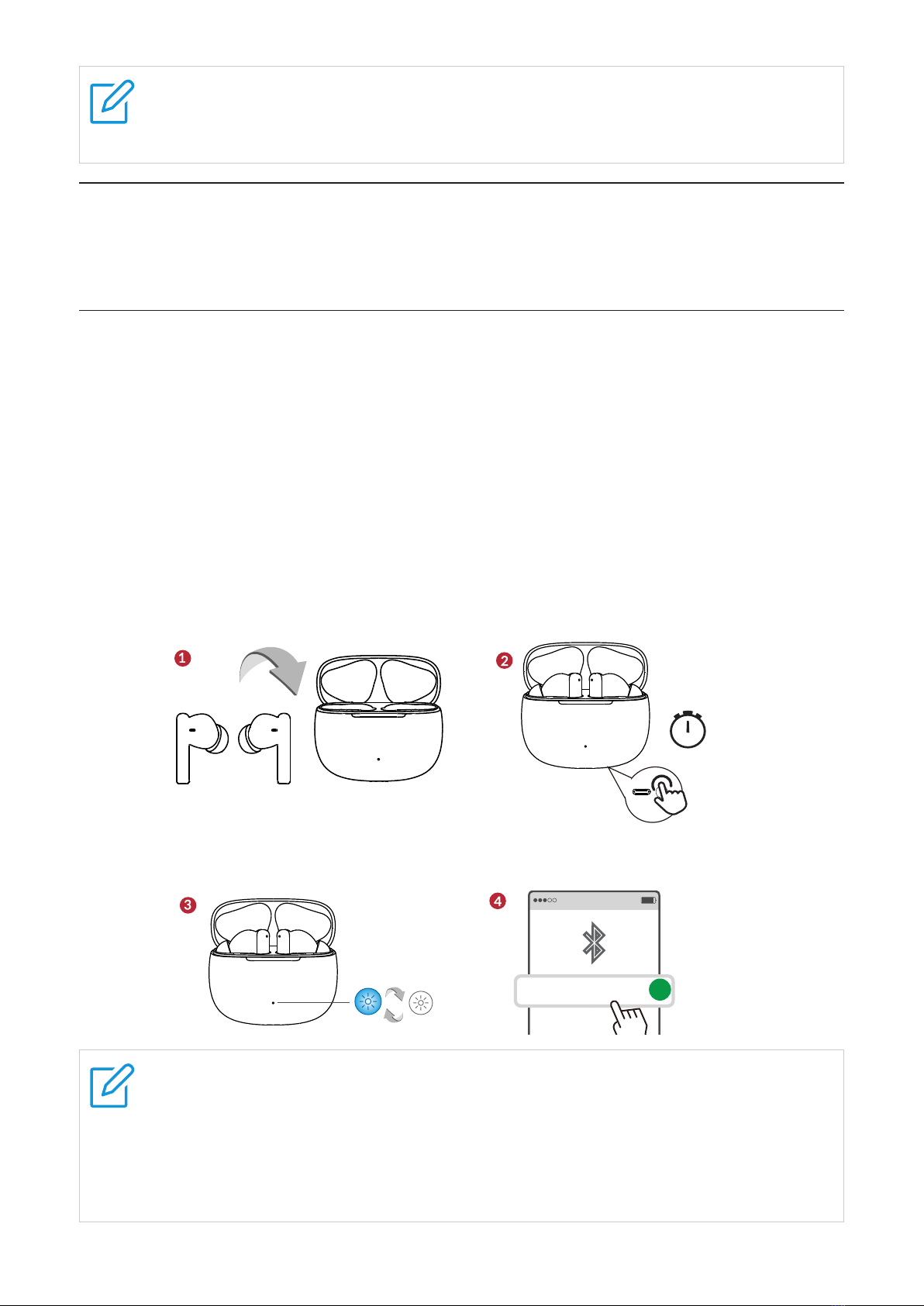
1.Take out your earbuds from the charging case, remove the insulation tape before using the
earbuds for the first time, then place the earbuds in the case.
2.Press and hold the function button for 3 seconds.
3.The case LED indicator flashes in blue in cycle.
4.Unlock your device, and turn on the Bluetooth function on your device.
Select TCL MOVEAUDIO Air from the list of available devices to complete the connection.
00:03
90%
TCL MOVEAUDIO Air
√
Note
•When you pair the earbuds with a device for the first time after purchase or after
resetting the earbuds, the earbuds enter pairing mode automatically if you open the
charging case.
•If pairing is not established within 5 minutes, the pairing mode will be cancelled and
the earbuds will turn off.
9
Disconnect from a Bluetooth device
Disconnect your earbuds from the Bluetooth device using these methods:
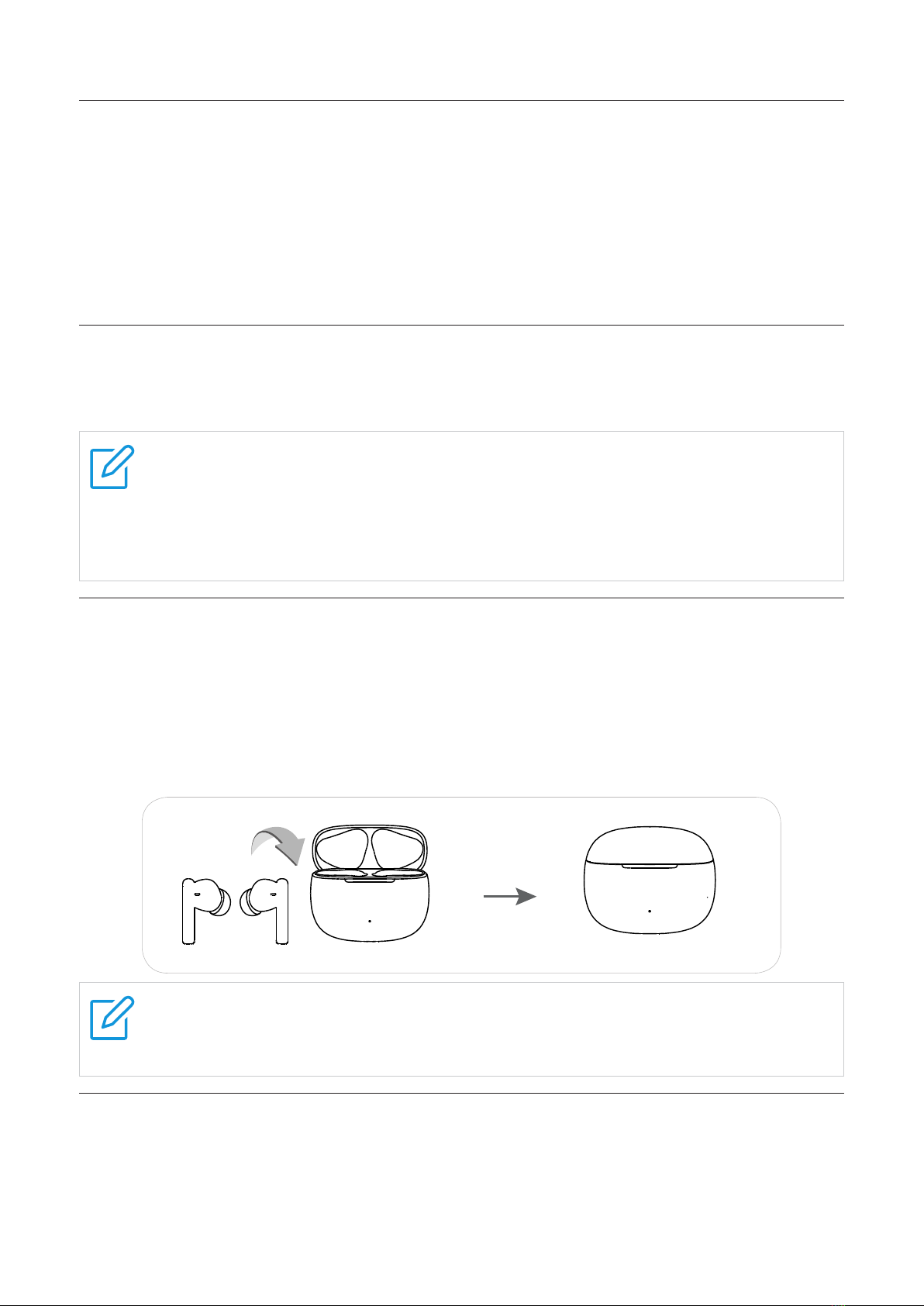
•Put both earbuds in the charging case, and close the case.
•Turn off the Bluetooth function on your device.
Go to the Bluetooth menu of your device, tap your earbuds from the list of paired devices, and
select disconnection option.
NOTE: The disconnection procedure may vary depending on your device model.
Reconnect with your devices
After successful pairing, the earbuds will automatically connect to the last paired device if taken
out of the charging case.
NOTES
•The earbuds and Bluetooth device must be turned on and within connection range.
•If the earbuds cannot find and connect to the last paired device, they will enter pairing
mode shortly. You can still reconnect your earbuds to the device from the Bluetooth
menu of your device.
Restart the earbuds
If you encounter connection or pairing issues when using your earbuds, try restarting them by
following these steps:
1.Put both earbuds in the charging case, and close the case.
2.Wait for more than 2 minutes.
3.Take your earbuds out of the case. The earbuds have been restarted.
NOTE
The pairing information is retained even if the earbuds are restarted. The earbuds will
automatically connect to the last paired device if taken out of the case.
Reset the earbuds
If you have to reset your earbuds due to connection or pairing issues, follow the steps below:
1.Place the earbuds in the charging case with the lid open.
2.Press and hold the function button for 10 seconds.
10
When reset completed, the LED indicator on the charging case will flashing red for 3 times.
00:10
X3
Chapter 5. Use your earbuds
Tap or press the touch control area on the earbuds to control your music, phone calls, and
other useful functions without getting out your phone. Both earbuds can be used separately.
When you use one earbud, please keep the unused earbud in the case to prevent loss or
battery drain.
Music mode
Playback controls
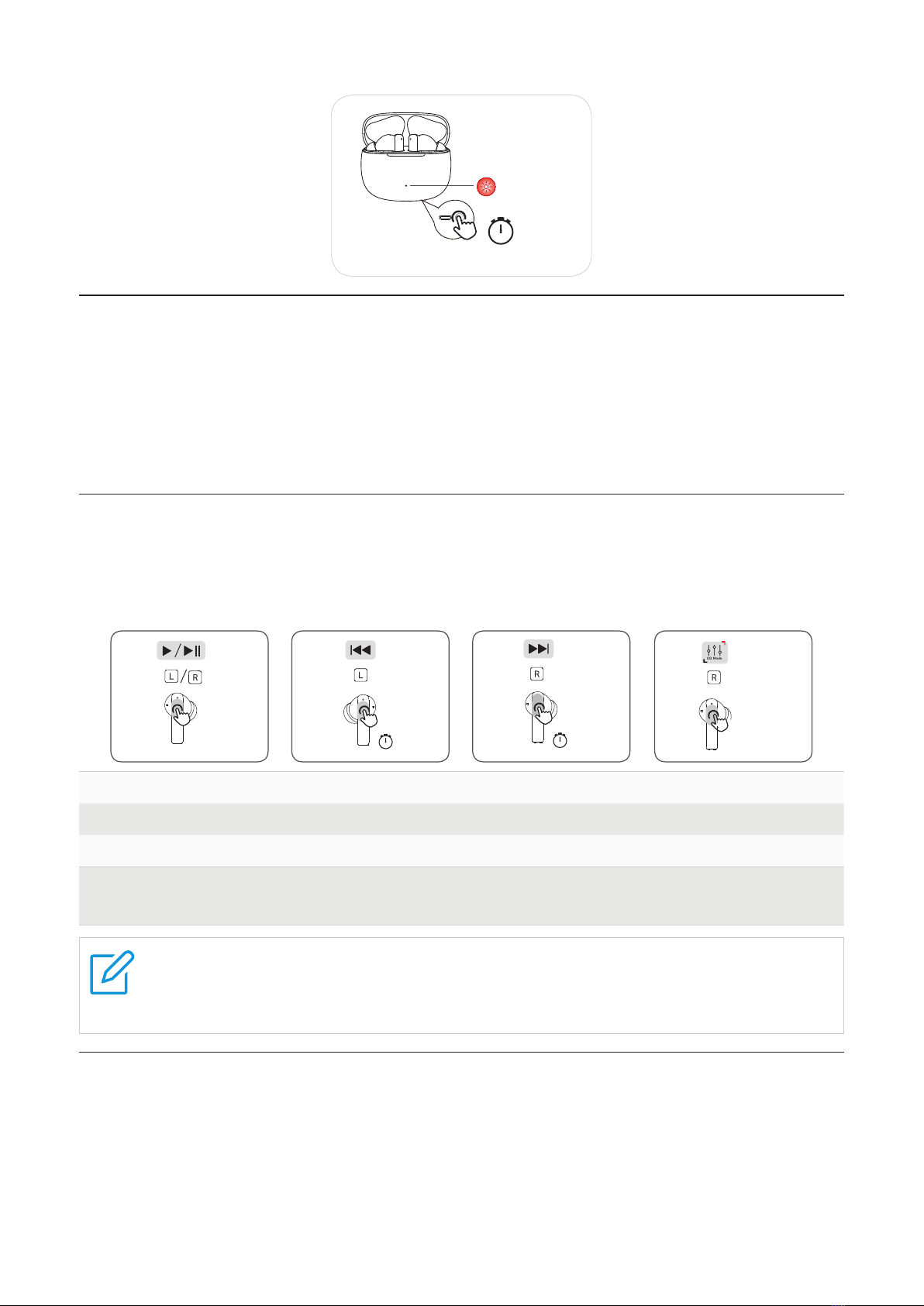
You can perform the playback controls by tapping your earbuds. This function is assigned to
your right earbud by default.
X2 00:02 00:02 X3
Double tap either earbud Play or pause
Press and hold right earbud for 2 seconds Next song
Press and hold left earbud for 2 seconds Previous song
Triple tap right earbud Switch EQ mode
Blanace(default), Bass, Podcast
Notes
•Total 3 preset EQ modes, Balance, Bass and Podcast. The default is Blanace, switch
between Bass and Podcast in return by triple tapping right earbud.
Call mode
Answer and control calls using your earbuds.
Phone controls
Manage calls by tapping and holding either of your earbuds.
Questo manuale è adatto per i seguenti modelli
1
Indice
Altri manuali TCL Cuffie

TCL
TCL MTRO100BT Manuale utente

TCL
TCL ELIT400NC Manuale utente

TCL
TCL MTRO200NC Manuale utente

TCL
TCL MOVEAUDIO S200 Manuale utente

TCL
TCL ELIT200NC Manuale utente

TCL
TCL MOVEAUDIO S180 Manuale utente

TCL
TCL MOVEAUDIO S180 Manuale utente

TCL
TCL SOCL100BT Manuale utente

TCL
TCL ACTV100BT Manuale utente

TCL
TCL ACTV500TWS Manuale utente

TCL
TCL MOVEAUDIO Neo Manuale utente

TCL
TCL MOVEAUDIO S150 Manuale utente

TCL
TCL MOVEAUDIO S180 Manuale utente

TCL
TCL ELIT400BT Manuale utente

TCL
TCL MOVEAUDIO S180 Manuale utente

TCL
TCL MOVEAUDIO S600 Manuale utente

TCL
TCL MOVEAUDIO S600 Manuale utente

TCL
TCL SOCL200BT Manuale utente

TCL
TCL MTRO200BT Manuale utente

TCL
TCL TW20 Manuale utente


