
Tenda AC1750 Manuale utente

Wireless AC1750 Dual-band Gigabit Router
0

Wireless AC1750 Dual-band Gigabit Router
1
Copyright Statement
is the registered trademark of Shenzhen Tenda
Technology Co., Ltd.All the products and product names
mentioned herein are the trademarks or registered trademarks of
their respective holders. Copyright of the whole product as
integration, including its accessories and software, belongs to
Shenzhen Tenda Technology Co., Ltd. Without prior expressed
written permission from Shenzhen Tenda Technology Co., Ltd,
any individual or party is not allowed to copy, plagiarize,
reproduce, or translate it into other languages.
All photos and product specifications mentioned in this manual
are for references only. Upgrades of software and hardware may
occur; Tenda reserves the right to revise this publication and to
make changes in the content hereof without obligation to notify
any person or organization of such revisions or changes. If you
would like to know more about our product information, please
visit our website at http://www.tendacn.com.

Wireless AC1750 Dual-band Gigabit Router
2
TABLE OF CONTENTS
TABLE OF CONTENTS..................................................................................................2
CHAPTER 1 PRODUCT OVERVIEW .............................................................................5
1.1WHAT IT DOES.........................................................................................................5
1.2 FEATURES..............................................................................................................5
CHAPTER 2 QUICK INTERNET CONNECTION SETUP...............................................7
2.1 PACKAGE CONTENTS ..............................................................................................7
2.2 MINIMUM SYSTEM REQUIREMENTS:..........................................................................7
2.3 HARDWARE INSTALL ................................................................................................8
2.4 WEB UTILITY LOGIN ..............................................................................................11
2.5. INTERNET CONNECTION SETUP.............................................................................14
2.6 VERIFY INTERNET CONNECTION SETTINGS .............................................................15
2.7 WIRELESS SETTINGS.............................................................................................19
2.7.1 Wireless-Basic Settings...............................................................................19
2.7.2 Wireless-Security Settings...........................................................................20
2.8 CONNECT TO DEVICE WIRELESSLY.........................................................................21
CHAPTER 3 RUNNING STATUS..................................................................................24
3.1 WAN STATUS .......................................................................................................25
3.2 LAN STATUS ........................................................................................................27
3.3 WIRELESS STATUS................................................................................................27
3.4 SYSTEM INFO........................................................................................................29
CHAPTER 4 NETWORK...............................................................................................29
4.1.LAN SETTINGS.....................................................................................................30
4.2.WAN SETTINGS....................................................................................................31
4.3 DHCP SERVER.....................................................................................................38
4.4 DHCP CLIENTS....................................................................................................40
4.5 STATIC ASSIGNMENT .............................................................................................40
4.6 MAC CLONE ........................................................................................................41
4.7 PORT MODE .........................................................................................................42

Wireless AC1750 Dual-band Gigabit Router
3
CHAPTER 5 SECURITY...............................................................................................44
5.1 IPGROUP ............................................................................................................44
5.2 TIME GROUP.........................................................................................................45
5.3 CLIENT FILTER......................................................................................................46
5.4 URLFILTER..........................................................................................................52
5.5 MAC FILTER.........................................................................................................55
5.6 REMOTE WEB MANAGEMENT.................................................................................59
CHAPTER 6 ADVANCED .............................................................................................61
6.1 VIRTUAL SERVER ..................................................................................................61
6.2 DMZ.................................................................................................................. 64
6.3 UPNP..................................................................................................................65
6.4 DDNS .................................................................................................................66
6.5 ROUTING..............................................................................................................69
6.6 STATIC ROUTING...................................................................................................69
6.7 BANDWIDTH SETTINGS ..........................................................................................70
CHAPTER 7 WIRELESS SETTINGS............................................................................71
7.1 BASIC SETTINGS...................................................................................................72
7.2 WIRELESS SECURITY ............................................................................................76
7.3 WPS ................................................................................................................. 81
7.4 WDS................................................................................................................. 83
7.5 GUEST NETWORK .................................................................................................85
7.6 WIRELESS ACCESS CONTROL................................................................................86
7.7 CONNECTION LIST.................................................................................................88
7.8ADVANCED SETTINGS............................................................................................88
CHAPTER 8 USB..........................................................................................................90
8.1 USB STORAGE.....................................................................................................90
8.2 USB PRINTING .....................................................................................................93
8.3 DLNA................................................................................................................101
CHAPTER 9 IPTV.......................................................................................................102
CHAPTER 10 TOOLS.................................................................................................105

Wireless AC1750 Dual-band Gigabit Router
4
10.1 TIME &DATE ....................................................................................................106
10.2 FIRMWARE UPDATE...........................................................................................107
10.3 BACKUP &RESTORE .........................................................................................108
10.4. RESTORE TO DEFAULT......................................................................................108
10.5 USER NAME &PASSWORD.................................................................................109
10.6 REBOOT...........................................................................................................109
10.7 STATISTICS.......................................................................................................110
10.8 LOG.................................................................................................................111
APPENDIX 1 CONFIG TCP/IP SETTINGS.................................................................111
APPENDIX 2 GLOSSARY..........................................................................................119
APPENDIX 3 TROUBLESHOOTING..........................................................................125
APPENDIX 4 REMOVE WIRELESS NETWORK FROM YOUR PC...........................128
APPENDIX 5 SAFETY AND EMISSION STATEMENT...............................................131

Wireless AC1750 Dual-band Gigabit Router
5
CHAPTER 1 PRODUCT OVERVIEW
1.1 What it does
Thanks for purchasing this Tenda W1800R Wireless AC1750
Dual-band Gigabit Router! The Tenda W1800R is a 5th
generation dual-band Wi-Fi router that delivers wireless speeds
up to 1750Mbps, currently the fastest available. Compatible with
next generation WiFi devices and backward compatible with
802.11 a/b/g and n devices, it enables HD streaming throughout
your home. The W1800R with simultaneous dual band WiFi
technology offers speeds up to 450+1300Mbps and avoids
interference, ensuring top WiFi speeds and reliable connections.
This makes it ideal for larger homes with multiple devices. In
addition, four Gigabit Ethernet ports offer ultra-fast wired
connections. Wirelessly access and share USB hard drive and
USB printer using the two USB 2.0 ports. Plus, the DLNAmedia
server feature enables sharing of digital media such as music,
photos and videos between consumer devices such as
computers, TVs, printers, cameras, cell phones, and other
multimedia devices.
1.2 Features
2.4GHz: IEEE802.11n, IEEE802.11g, IEEE 802.11b;
5GHz: IEEE 802.11n, IEEE 802.11a, IEEE 802.11ac;
IEEE802.3, IEEE802.3u;

Wireless AC1750 Dual-band Gigabit Router
6
Operate in 2.4GHz and 5GHz wireless bands
simultaneously;
Wireless rate up to1.3Gbps;
1 * Gigabit WAN port for Internet connection;
3 * Gigabit LAN ports for LAN connection; 1* IPTV port for
IPTV service;
2* USB ports for storage or wireless printing service sharing;
Support DLNA media server;
3* high gain external antennas;
WDS support for extending existing wireless coverage;
Supports WEP, WPA-PSK, WPA2-PSK and Mixed
WPA/WPA2-PSK encryption methods to secure your
wireless network;
Hidden/invisible SSID;
MAC-based wireless access control;
WPS one-touch encryption;
Provides Wireless guest network feature;
WMM streams your video and audio;
Combines the function of a wireless AP, router, switch and
firewall;
Provides Internet connection types: Dynamic/ static
IP,L2TP,PPTP,PPPOE/ PPPOE dual access;
Built-in firewall supports domain name/MAC address filter
SNTP to synchronize local time with Internet time servers;

Wireless AC1750 Dual-band Gigabit Router
7
Bandwidth control;
Supports UPnP and DDNS features;
Provides virtual server and DMZ features;
Provides logs to record device's usage status;
CHAPTER 2 QUICK INTERNET CONNECTION
SETUP
2.1 Package Contents
Unpack the box and verify the following items:
W1800R Wireless AC1750 Dual-band Gigabit Router;
Power Adapter
Quick Install Guide
Resource CD
3* 5dBi omni-directional antennas
Ethernet Cable
If any of the above items are incorrect, missing, or damaged,
please contact your Tenda reseller for immediate
replacement.
2.2 Minimum System Requirements:
200MHz or better CPU
64MB or larger memory
Windows 98/2000/XP/Vista/7
Installed Network Adapter
Internet Explorer 6.0 or higher
Wireless AC1750 Dual-band Gigabit Router
8
Netscape Navigator 4.7 or higher
Broadband Internet Service (through xDSL/Cable
Modem/Ethernet)
2.3 Hardware Install
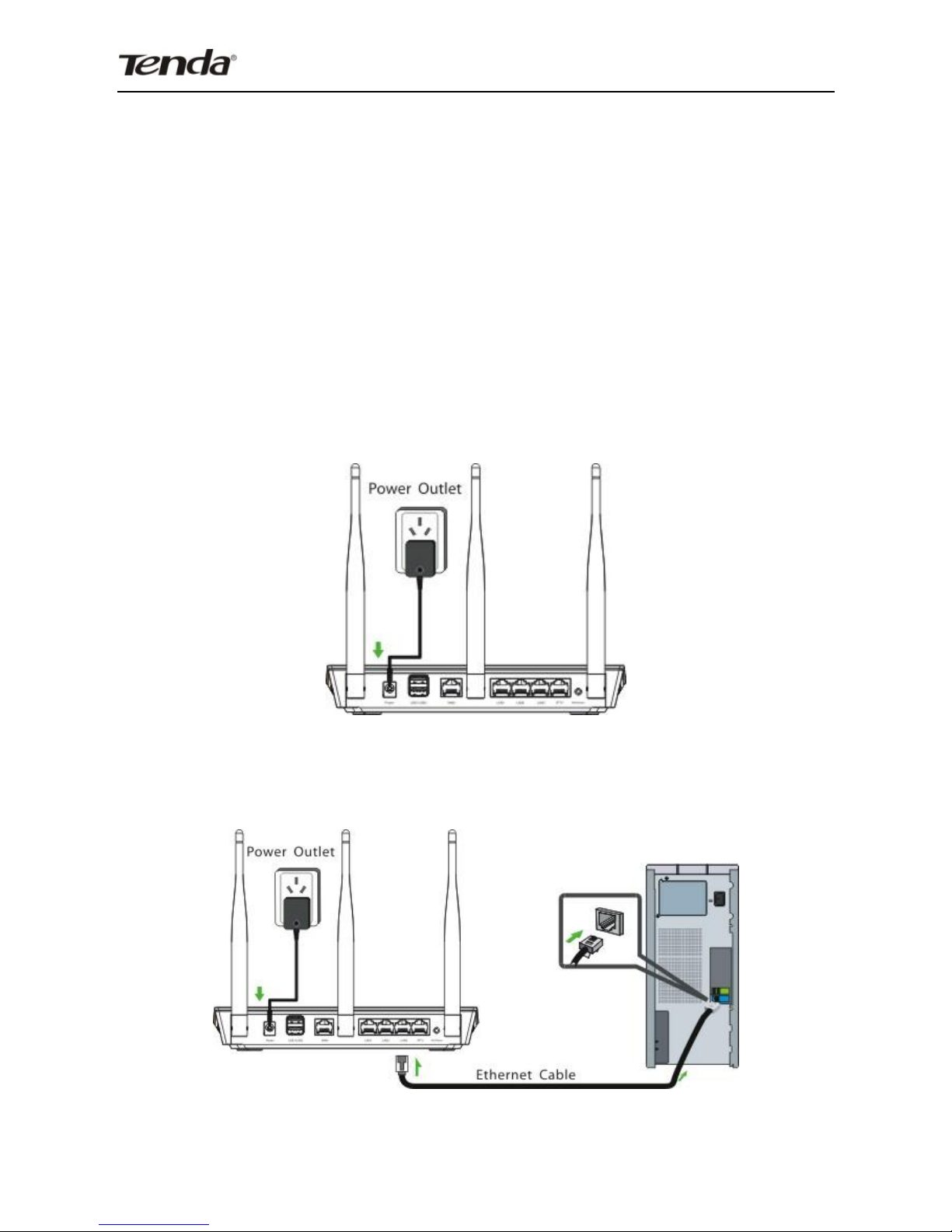
1. Connect one end of the included power adapter to the Device
and plug the other end into a wall outlet nearby. (Using a power
adapter with a different voltage rating than the one included with
the Device will cause damage to the Device.)
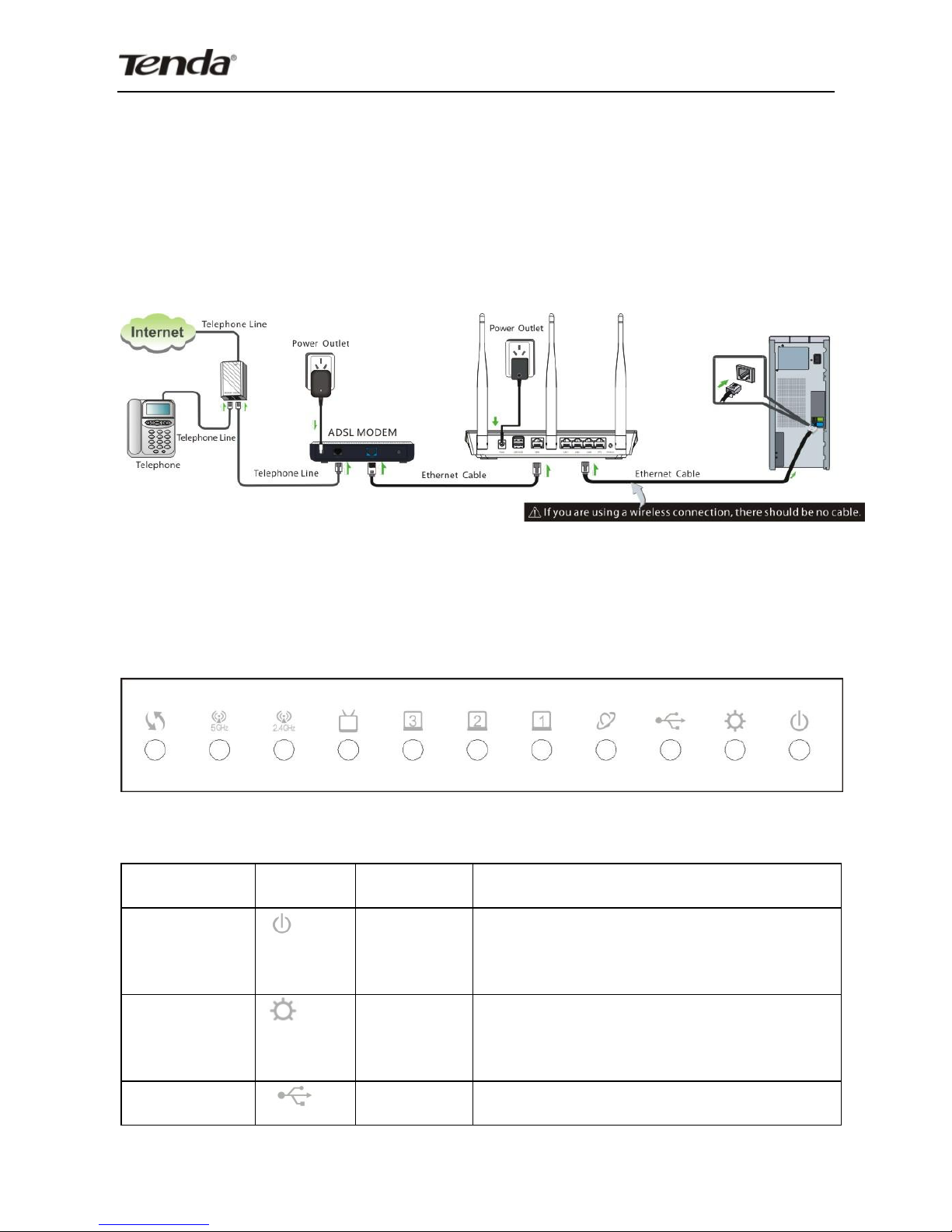
2. Connect one of the LAN ports on the Device to the NIC port on
your PC using an Ethernet cable.
Wireless AC1750 Dual-band Gigabit Router
9
3. Connect the Ethernet cable from your ISP side to device's
WAN port.
4. Observe status of LEDs on the device and ensure that they
are functioning correctly as stated in the table below.
Front Panel:
LED Overview:
LED
Icon
Status
Description
Power
Solid
Indicates a proper connection
to the power supply
Sys
Blinking
Indicates system is functioning
properly
USB
Solid
USB port connected correctly
Questo manuale è adatto per i seguenti modelli
1
Indice
Altri manuali Tenda Router wireless

Tenda
Tenda W302R Manuale utente

Tenda
Tenda 3G186R Manuale utente

Tenda
Tenda AC8 Manuale utente

Tenda
Tenda 11N Wireless AP Manuale utente

Tenda
Tenda 4G180 Manuale utente

Tenda
Tenda A5s Manuale utente

Tenda
Tenda 3G622R+ Manuale utente

Tenda
Tenda F3 Manuale utente

Tenda
Tenda F300 Manuale utente

Tenda
Tenda W330R Manuale utente

Tenda
Tenda 5G03 Manuale utente

Tenda
Tenda 3G611R+ Manuale utente

Tenda
Tenda 4G180 Manuale utente

Tenda
Tenda AC6 Manuale utente

Tenda
Tenda F6 Manuale utente

Tenda
Tenda W300D Manuale utente

Tenda
Tenda W311R+ Manuale utente

Tenda
Tenda 3G150B Manuale utente

Tenda
Tenda AC19 Manuale utente

Tenda
Tenda Portable 3G Wireless Router Manuale utente


