Skin irritation
Earphones can lead to ear infections if not properly cleaned.
Clean the earphones regularly with a soft lint-free cloth. Don’t
get moisture in any openings, or use aerosol sprays, solvents,
or abrasives. If a skin problem develops, discontinue use. If the
problem persists, consult a physician.
Hearing loss
Listening to sound at high volumes may permanently damage
your hearing. Background noise, as well as continued exposure
to high volume levels, can make sounds seem quieter than they
actually are. Check the volume after inserting the earphones in
your ear and before playing audio.
WARNING: To prevent possible hearing damage, do not listen
at high volume levels for long periods.
Driving hazard
Usage while operating a vehicle is not recommended and is
illegal in some areas. Check and obey the applicable laws and
regulations on the use of earphones while operating a vehicle.
Be careful and attentive while driving. Stop listening to your
audio device if you nd it disruptive or distracting while operating
any type of vehicle or performing any activity that requires your
full attention.
Safety and handling
Handle with care
Handle the earphones and case with care. They contain
sensitive electronic components, including batteries, and
can be damaged, impair functionality, or cause injury if
dropped, burned, punctured, crushed, disassembled, or
if exposed to excessive heat or liquid or to environments
having high concentrations of industrial chemicals, including
near evaporating liquied gasses such as helium. Don’t use
damaged damaged products.
Choking hazard
The earphones, the case, and small parts included with in the
packaging may present a choking hazard or cause other injury
to small children. Keep them away from small children.
Batteries
Don’t attempt to replace earphone or case batteries yourself,
you may damage the batteries, which could cause overheating
and injury.
Charging
Charge the case with the charging cable and a power adapter
or computer. Only charge with an adapter that is compliant with
applicable country regulations and international and regional
safety standards, including the International Standard for
Safety of Information Technology Equipment (IEC 60950-1).
Other adapters may not meet applicable safety standards, and
charging with such adapters could pose a risk of death or injury.
Using damaged cables or chargers, or charging when moisture
is present, can cause re, electric shock, injury, or damage to
the case or other property.
Prolonged heat exposure
Avoid prolonged skin contact with a device, its power adapter,
the charging cable and connector, or a wireless charger
when plugged into a power source, because it may cause
discomfort or injury. For example, while the case is charging
using the charging cable and a power adapter plugged into a
power source, don’t sit or sleep on the case, charging cable,
connector or power adapter, or place them under a blanket,
pillow, or your body. Take special care if you have a physical
condition that aects your ability to detect heat against your
body.
Electrostatic shock
When using the earphones in areas where the air is very dry, it
is easy to build up static electricity and possible for your ears
to receive a small electrostatic discharge from the earphones.
To minimize the risk of electrostatic discharge, avoid using the
earphones in extremely dry environments, or touch a grounded
unpainted metal object before inserting the earphones.
Medical device interference
The earphones and case contain components and radios that
emit electromagnetic elds. The earphones and case also
contain magnets. These electromagnetic elds and magnets
may interfere with pacemakers, debrillators, or other medical
devices. Maintain a safe distance of separation between your
medical device and the earphones and case. Consult your
physician and medical device manufacturer for information
specic to your medical device. Stop using the earphones and
case if you suspect they are interfering with your pacemaker,
debrillator, or any other medical device.
Contact
The led indicators on the earphones are white when they
are charging in the charging box, and o when they are fully
charged.
When you take out the earphones from the charging box and
the led indicator of the charging box blinks once, it means the
charging box is low on power. In order to fully recharge the
earphones after using them, you should recharge the box.
As soon as you put the earphones into charging box, they turn
o automatically and start charging.
Charging status display
The charging box led displays the power status while charging
0%-25% Blinks once every two seconds
25%-50% Blinks twice every two seconds
50%-75% Blinks three times every two seconds
75%-100% Blinks four times every two seconds
Fully Charged Stays on
This function can be used when the earphones have pairing
issues. First make sure the box and earphones are charged.
Take out the earphones, they will turn on automatically. Hold the
MFB for four seconds on both left and right earphones until you
hear “power o” and / or the leds are turned o.
Then hold the MFB for ten seconds on both left and right
earphones until you hear a ve tone tune. The earphones led
indicators flash in white and blue quickly and then turn o.
Put the earphone back into the charge box. Now take them
both out simultaniously and hold them together for ten seconds.
Then put the earphones back into the chargebox, they are now
reset to the factory settings.
Pair name: Thone TW3
Pair Password: 0000
IOS7.0, Android5.0 and above display the remaining battery
power
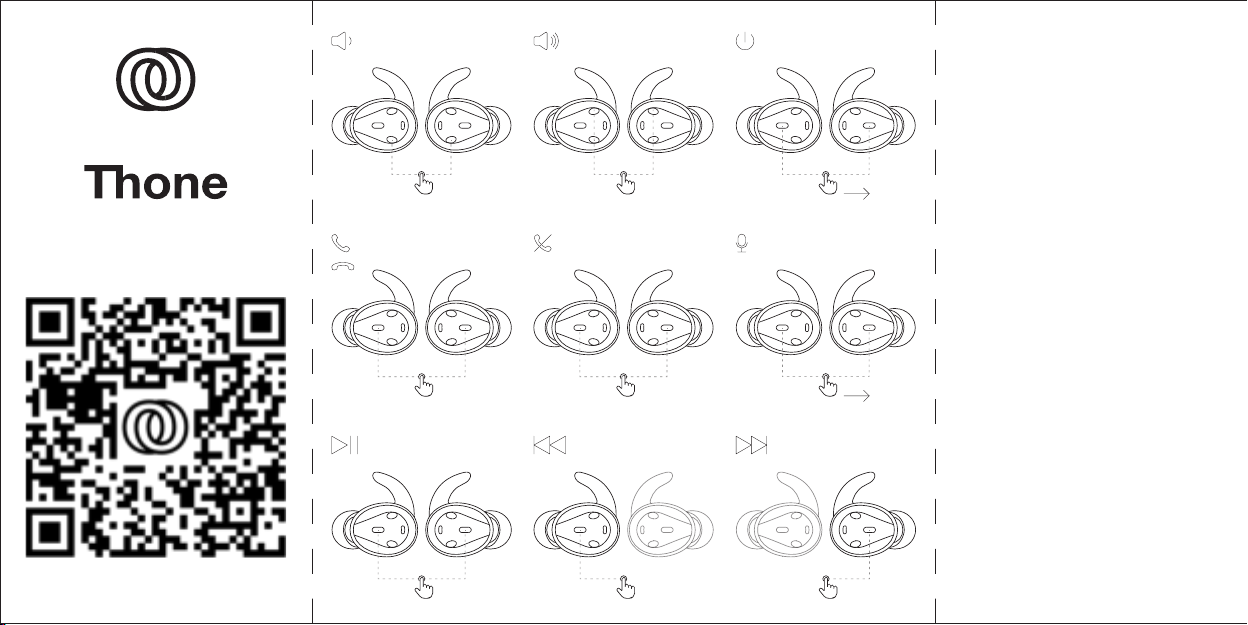
Earphone prompts:
Power on
Pairing mode
Connected
Left channel / Right channel
Low battery
Power o
Call ended
Call rejected
Earphones working status and prompts
Thone
Abel Veldhoven B.V.
Het Groen 1B
5511 AC Knegsel
The Netherlands
www.Thone.pro
Dutch Design, Assembled in China
When the earphones do not connect