Tokyo IPG-80XG Manuale utente

IP PBX
Operation Manual
November 2007

2010-04-09 2
Table of Content
1. INTRODUCTION ..........................................................................................................................................................4
1.1. OVERVIEW ................................................................................................................................................................. 4
2. FEATURES....................................................................................................................................................................5
3. STANDARD COMPLIANCE.......................................................................................................................................5
4. PACKING CONTENT................................................................................................................................................... 6
5. LED INDICATORS & INTERFACE CONNECTORS............................................................................................... 6
6. INSTALLATIONS..........................................................................................................................................................8
7. RESET TO FACTORY DEFAULT..............................................................................................................................8
8. IP PBX CONFIGURATIONS BY WEB BROWSER................................................................................................9
8.1 NETWORK..................................................................................................................................................................... 11
8.1.1 Network Status...................................................................................................................................................11
8.1.2 LAN Setting........................................................................................................................................................ 12
8.1.3 WAN Settings.................................................................................................................................................... 12
8.1.4 DHCP Server..................................................................................................................................................... 14
8.1.5 DDNS Settings.................................................................................................................................................. 14
8.1.6 VPN Settings..................................................................................................................................................... 16
8.2 SYSTEM ........................................................................................................................................................................ 18
8.2.1 SIP Port.............................................................................................................................................................. 18
8.2.2 Rate Settings..................................................................................................................................................... 19
8.2.3 DMZ Settings..................................................................................................................................................... 19
8.2.4 Trust Host........................................................................................................................................................... 20
8.2.5 Music ON Hold.................................................................................................................................................. 21
8.2.6 Hot Lines............................................................................................................................................................ 22
8.2.7 Admin Account .................................................................................................................................................. 27
8.2.8 USB Disk Setting .............................................................................................................................................. 27
8.2.9 Voicemail Setting.............................................................................................................................................. 28
8.2.10 Time-Zone Setting.......................................................................................................................................... 29
8.3 INCOMING CALLS SETTINGS ......................................................................................................................................... 30
8.3.1 Calls from FXO ports........................................................................................................................................ 30
8.3.2 Calls from VoIP ................................................................................................................................................. 31
8.3.3 Access Number................................................................................................................................................. 33
8.4 OUTGOING CALL .......................................................................................................................................................... 35
8.4.1 Outgoing Calls via FXO ports.......................................................................................................................... 35
8.4.2 Outgoing Calls via VoIP................................................................................................................................... 37

2010-04-09 3
8.5 SWITCHBOARD (AUTO ATTENDANT SETTINGS)............................................................................................................ 39
8.5.1 Prompt Message............................................................................................................................................... 39
8.5.2 Operator Settings.............................................................................................................................................. 39
8.5.3 Auto Attendant................................................................................................................................................... 40
8.6 USERS MANAGEMENT .................................................................................................................................................. 41
8.6.1 Single User Account Opening
→
Add User ................................................................................................ 42
8.6.2 Group Users Account Opening
→
Add Users............................................................................................... 42
8.6.3 Bindings.............................................................................................................................................................. 43
8.6.4 Delete User Accounts....................................................................................................................................... 44
8.6.5 User Information Update.................................................................................................................................. 44
8.6.6 Function Settings.............................................................................................................................................. 45
8.6.7 User List............................................................................................................................................................. 47
8.6.8 On-Line User List.............................................................................................................................................. 48
8.7ADVANCED SETTINGS ................................................................................................................................................... 48
8.7.1 Phone Self Config............................................................................................................................................. 48
8.7.2 Queue Settings.................................................................................................................................................. 50
8.7.3 Voice Conference Rooms................................................................................................................................51
8.7.4 Network Parameter........................................................................................................................................... 54
8.7.5 Caller ID ............................................................................................................................................................. 55
8.8 CALL DETAIL RECORDS QUERY.................................................................................................................................... 56
8.8.1 System Call Records query............................................................................................................................. 56
8.8.2 User Call Records............................................................................................................................................. 57
8.9 UPGRADE &REBOOT.................................................................................................................................................... 58
8.9.1 User information Export & Import................................................................................................................... 58
8.9.2 System Upgrade............................................................................................................................................... 59
8.9.3 Reboot................................................................................................................................................................ 59
9. APPLICATIONS..........................................................................................................................................................60

2010-04-09 4
1. Introduction
1.1. Overview
The IPG-80XG is an embedded Voice over IP (VoIP) PBX Server with Session Initiation Protocol (SIP)
to provide IP extension phone connections for global virtual office of small-to-medium business (SMB)
companys. IPG-80XG integrates the telephony network and the data network into a manageable
converged network to provide an efficient and economical PBX for global long distance voice
communications.
IPG-80XG IP PBX works with various IP phones (Desktop, WiFi, Bluetooth, and DECT), VoIP
gateways, and analog telephone adapters (ATA) to route calls among client phones, analog phones,
and PSTN network. Call features such as conferencing, auto attendant, and voicemail can be
seamlessly enabled for all phone devices. In addition, it also provides Internet access to all LAN
devices through VPN NAT router.
IPG-80XG IP PBX provides call control and media relay services to SIP clients, and it performs many
primary functions, such as SIP Registrar, SIP Outbound Proxy with media relay, SIP Gateways (FXO),
SIP PBX for extension calls, Auto Attendant Interactive Voice Response (IVR), and Find-Me
Conferencing.
IPG-80XG IP PBX has a built-in suite of PBX applications for supplemental services. This lowers
down the total cost of a converged network enabled by IPG-80XG IP PBX than building separated
infrastructures for legacy telephony network and data network. In addition, with a web-browsable
interface to the data network configuration and voice service provisioning, IPG-80XG brings the
manageability of both networks together to facilitate administration locally and/or remotely.
Note that IPG-80XG requires an IP address, a subnet mask, and its gateway Router IP address for its
own use to connect to Internet. These three are available from your Internet service provider.
IPG-80XG may enable PPPoE or DHCP features to automatically get an assigned dynamic IP from
the ITSP. Please refer to Web Configurations for detailed information.

2010-04-09 5
2. Features
The IPG-80XG IP PBX is equipped with RJ45 & RJ11 connectors and is featuring as the following:
¾SIP v1 (RFC2543), v2 (RFC3261) with MD5 authentication (RFC2069 and RFC 2617)
¾Supports ITU-T G.711a, G.711u, GSM/MS-GSM, G.729A/B, VAD and CNG for Speech Codec
¾Configurations by Web Browser
¾Embedded NAT/DHCP Server
¾PPPoE/DHCP Client for Dynamic IP plus NAT, VPN, DNS, and DDNS Clients
¾Support STUN server and DMZ functions for NAT Traversal
¾Support VPN function
¾Support Call features; Call Forward/Waiting/Transfer/Hold, and Voice Conference Room
¾Support E.164 ENUM Dial Number via SIP server
¾Incoming Call Pickup for Group users
¾Incoming Call Ringing for Group users
¾Number Bonding and Call restrictions.
¾Find Me function
¾Extension Pickup for Attendant
¾Bill Rate Table with Voice Mail
¾Interactive Voice Recording (IVR) Settings by XML
¾Programmable Prompt messages
¾On-Line Subscriber Status
¾Remote Firmware Upgraded by HTTP Web Interface
¾Auto Provision Settings
¾Out-Band DTMF (RFC 2833) / In-Band DTMF / Send DTMF SIP Info
3. Standard Compliance
The IPG-80XG IP PBX supports for the following standards
VoIP Protocols: IETF RFC3261 and RFC 2543 for SIP
SIP Authentication: IETF RFC2069 and RFC 2617 for MD5
Speech Codec: ITU-T G.711a, G.711u, GSM/MS-GSM, G.729A/B, VAD and CNG
Echo Cancellation: ITU-T G.165/168

2010-04-09 6
4. Packing Content
Inside the package you should find:
(1) One IPG-80XG IP PBX
(2) One AC100~240V to 12VDC/1A Power Adaptor
(3) One Cat 5 Ethernet Cable
(4) One User Manual CD
5. LED Indicators & Interface Connectors
LED Indicators
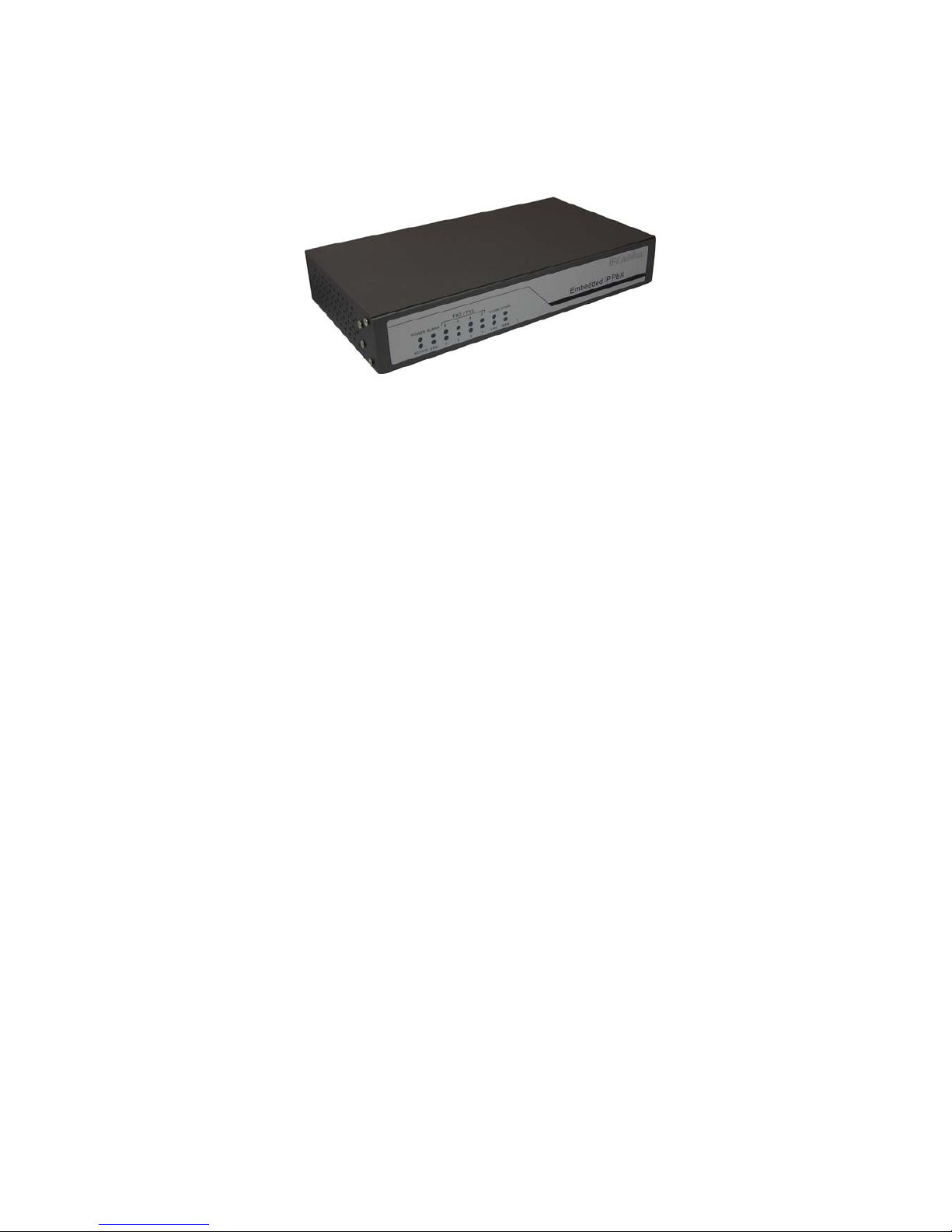
On the front panel of IPG-80XG, there are 12 LED indicators as the following table
LED Status Descriptions
POWER ON Power is Normal.
ACTIVE ON IP PBX is in Normal Operation
ALARM ON IP PBX is at alarm status
VPN ON Virtual Private Network function is ON
FXO 1 ON PSTN Line 1 is enabled and IDLE
Flashing PSTN Line 1 is in use
FXO 2 ON PSTN Line 2 is enabled and IDLE
Flashing PSTN Line 2 is in use
FXO 3 ON PSTN Line 3 is enabled and IDLE
Flashing PSTN Line 3 is in use
FXO 4 ON PSTN Line 4 is enabled and IDLE
Flashing PSTN Line 4 is in use
FXO 5 ON PSTN Line 5 is enabled and IDLE
Flashing PSTN Line 5 is in use
FXO 6 ON PSTN Line 6 is enabled and IDLE
Flashing PSTN Line 6 is in use
FXO 7 ON PSTN Line 7 is enabled and IDLE
Flashing PSTN Line 7 is in use
FXO 8 ON PSTN Line 8 is enabled and IDLE
Flashing PSTN Line 8 is in use

2010-04-09 7
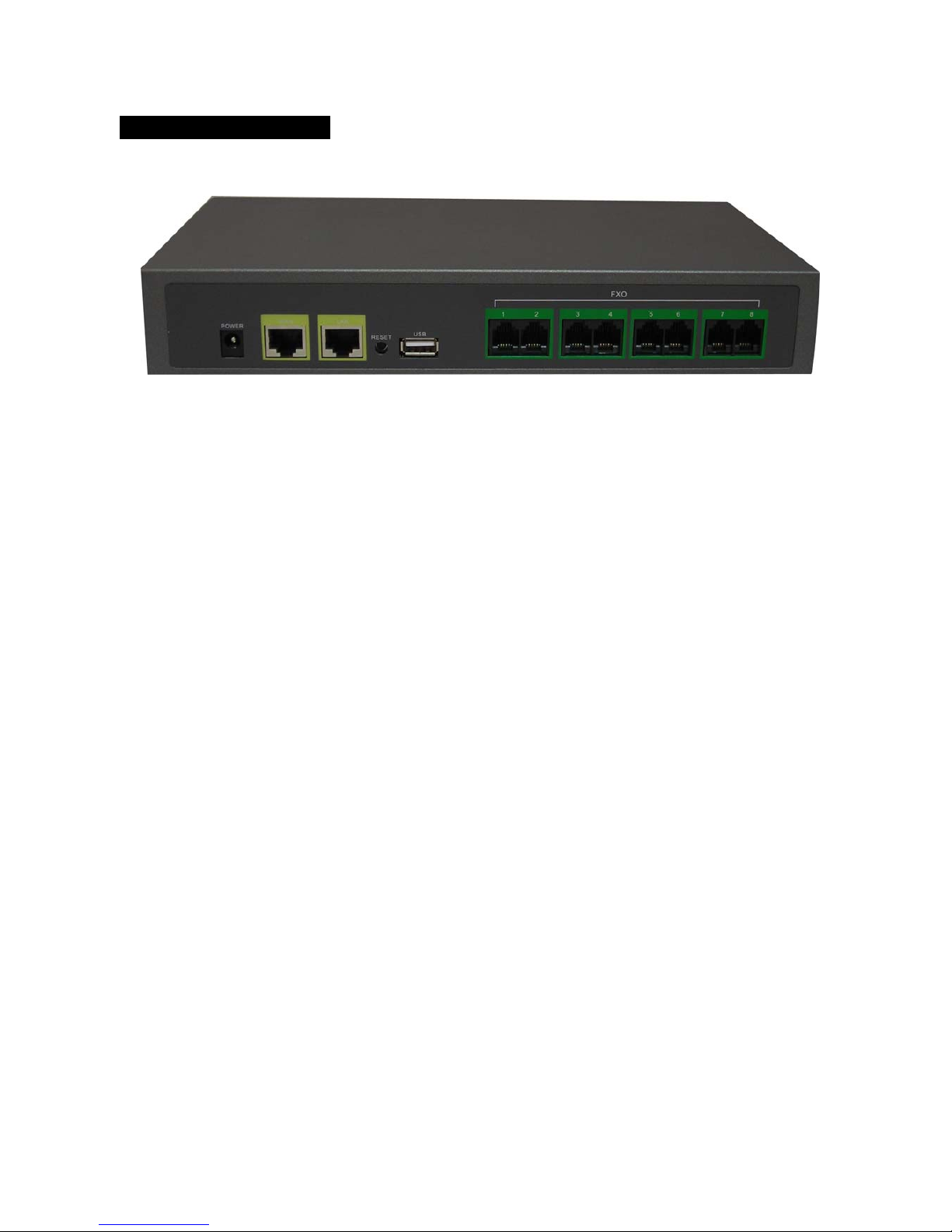
Interface Connectors
1. DC Power 12Volt DC / 1A Power Adaptor with 100~240V AC power input
2. FXO ports 4 FXO ports are for connection to PSTN lines, and numbered 1, 2,
3 and 4 from left to right.
3. Life Line port Life Line FXS port connects to an analog telephone. When power
is down, the Life Line will switch to FXO port 1 for PSTN line 1.
4. WAN port Connect to a broadband ADSL/Cable modem or a WAN router.
5. LAN port Connection to PC for Web configurations or Laptop, IP Phones, or
VoIP Gateways/ATA, etc.
6. USB port Connect to an external USB drive for backup internal system
storage. Click the Backup icon in Web configurations and follow
instructions to insert the USB connector of an external USB drive.
Note: If PC is directly connected to the LAN port of IPG-80XG for web configurations, please
use the enclosed Ethernet CAT5 Cable.

2010-04-09 8
6. Installations
7. Reset to Factory Default
IP PBX IPG-80XG can be reset back to factory default when IP address is not accessible for web
configurations. The procedures are as follows:
1. Power off.
2. Press the RESET button and hold continuously, then power on.
3. Hold the RESET button until all the LED indicators start flashing for three times. It may take 15-20
seconds to reset, and the RESET button can then be released after flashing.
4. The LED indicators will begin flashing for 3 times again to activate the IP PBX. Note that the
firmware version and IP settings will be reset back to factory defaults and users data base will be
cleared.
5. It is suggested that the user data base be exported and backed up to PC before reset.
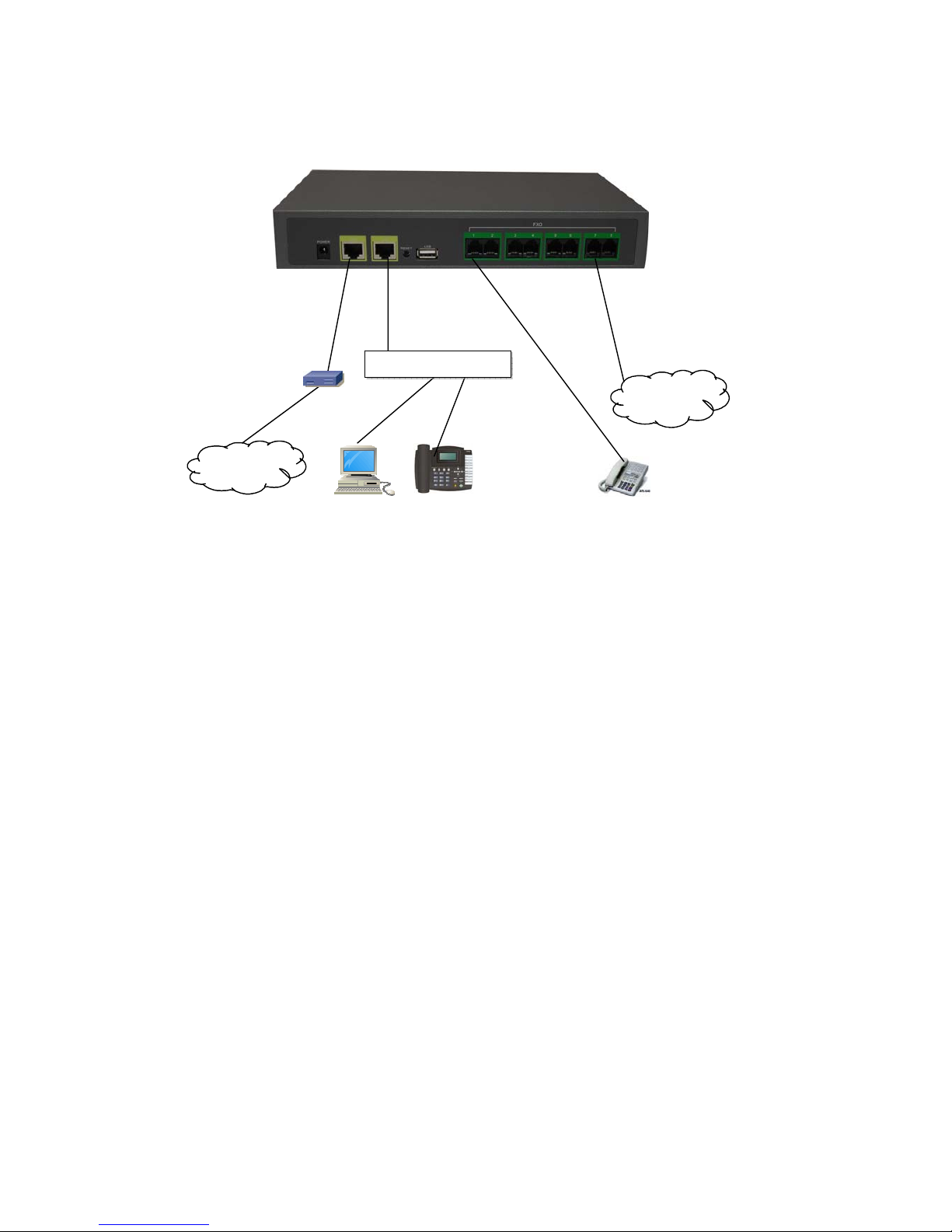
Internet
A
DSL
modem
IP Phones FXS
FXO
LAN
WAN
PSTN
Ethernet Switch Hub

2010-04-09 9
8. IP PBX Configurations by Web Browser
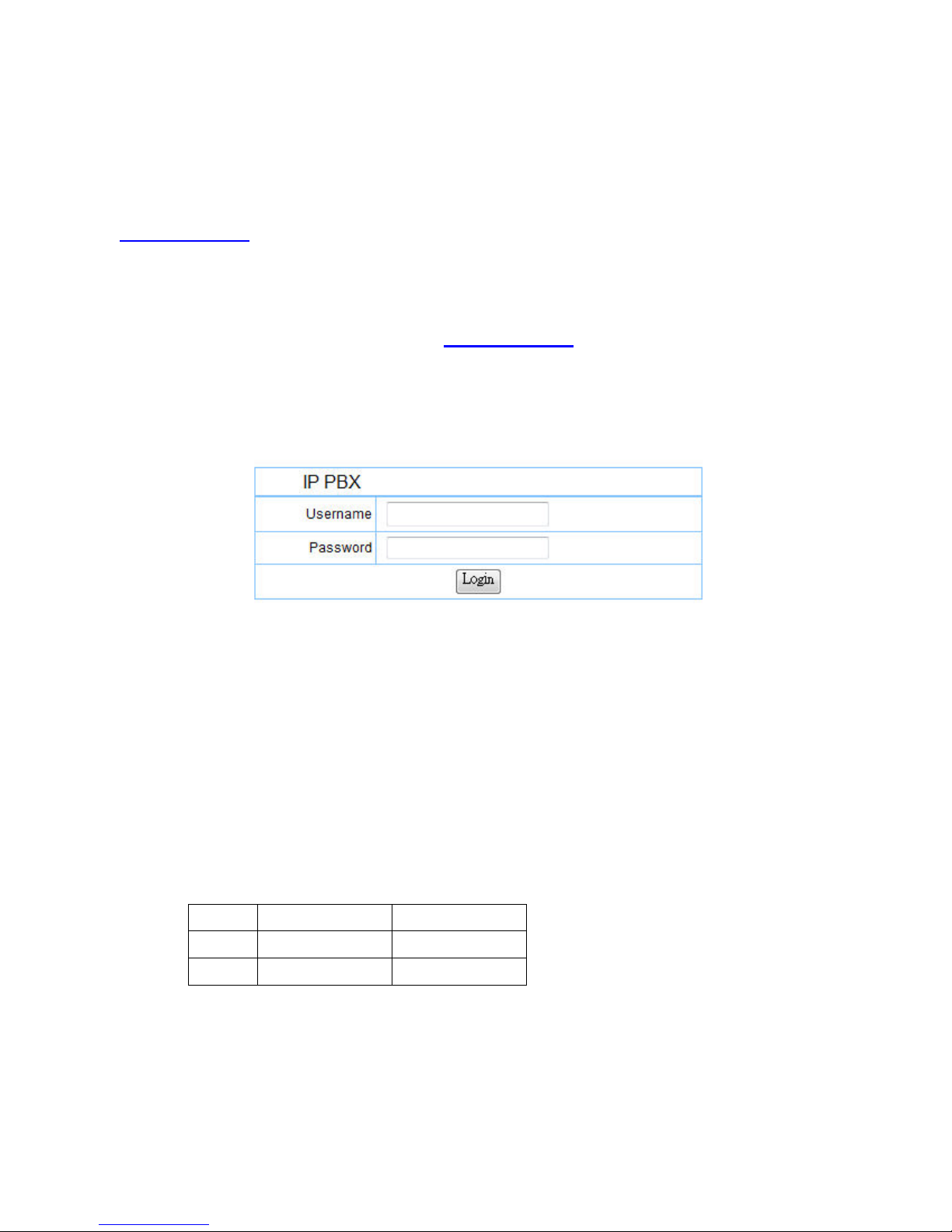
You may enter the IP address from PC Web browser to configure IPG-80XG. For example, enter
http://192.168.1.1 from IE web browser to display login page as follows. Note that IPG-80XG
support auto-MDIX for LAN port. If a notebook PC is directly connected to the LAN port of IPG-80XG
for web configurations, the user may use the Ethernet CAT5 cable included in the accessory.
1). Please enter the default IP address http://192.168.1.1 from PC Web browser.
The following Web page shall be displayed on PC. If you have difficulties accessing the
Web page from the PC Web browser, the subnet IP of PC might be different from
192.168.1.xxx.In this case, please refer to Chapter 9 for trouble shooting.
2). Please enter the username and password into the blank field. The default settings are:
Username: admin
Password: 123456
3). Click the “Login” button to enter the IPG-80XG for web configurations.
Whenever you change the setting in each Web page, remember to click the “Submit” button
to save into the non-volatile memory and click the “Reboot” button to activate the new
settings.
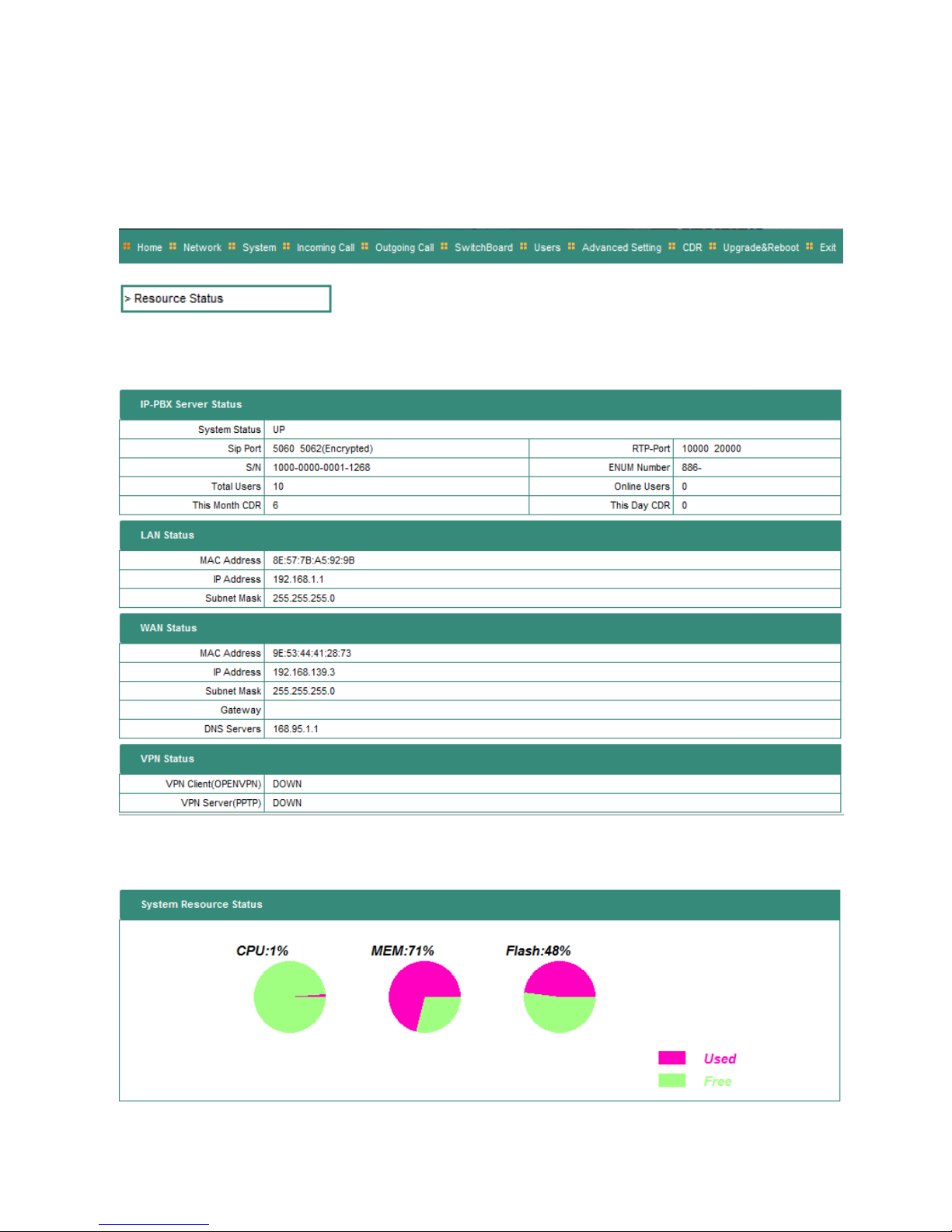
WAN & LAN Network IP Address and Mask
NIC IP Address Mask
WAN 192.168.139.3 255.255.255.0
LAN 192.168.1.1 255.255.255.0

2010-04-09 10
4). IPG-80XG provides 100 SIP user ID number accounts which can be configured as well by
Web browser. The preset user ID numbers are from 2001~2010 with same password
123456. The SIP service port is default at 5060.
Resource Status
Indice
Manuali Centralino popolari di altre marche

Rauland-Borg
Rauland-Borg Telecenter IV Manuale utente

Grandstream Networks
Grandstream Networks UCM6208 Manuale utente

ATCOM
ATCOM IPPBX IP02 Manuale utente

Panasonic
Panasonic KX-TVS50 - 2 Port Voicemail System Manuale utente

bintec elmeg
bintec elmeg elmeg hybird 600 Manuale utente

Panasonic
Panasonic KX-NS300 Manuale utente