Transystem DVB-T Manuale utente

DVB-T USB SET-TOP BOX
User Manual
Version: 1.0
(February 2005)
TRANSYSTEM INC.
No.1-2 Li-Hsin Rd.I Science-Based
Industrial Park, Hsinchu, Taiwan
Tel:+886-3-5780393 Fax:+886-3-5784111
website: www.transystem.com.tw

Table of Contents
Chapter
1
DVB-TUSBSET-TOPBOXIntroduction
...................…..........……......3
1.1 Introduction
............................................................................................…….... 3
1.2 Package Content
....................................................................................….….... 3
.
1.3 System requirements
......................................................................…..................3
1.4 Features
.....................................................................................................….........4
1
.
5 Hardware specification
……………………………………………….…….…...4
Chapter 2 Installation Procedure
..................................................…...….….......5
Chapter 3 System Setup
.....................................................................……...........12
3.1 How to scan
................................................................................…...........…..….12
3.2 Control panel introduction
....................................................................……......13
3.3 Functional setting
.................................................................................... .….….15
3.4 Rightclickmenu
...........................................................................................…........20
Chapter 4 Trouble Shooting
.................................................................. . .…...…21
2

Chapter 1. DVB-TUSBSET-TOPBOXIntroduction
1.1 Introduction
DVB-USB is an advanced-designed digital television receiver for PC users,
especially for viewing and recording digital programs. Recordings can be
made while viewing the programs or prescheduled in advance.
DVB-USB enables viewing multiple
channels
simultaneously, and also allows
you to switch to your favorite channel instantly after browsing through the
channels.
What’s more, the convenient
“TimeShift”
function provides a new
television watching experience by allowing you to pause, replay, and even
fast-forward or rewind the ongoing programs.
1.2 Package Content
△
DVB-T USB SET-TOP BOX x 1
△
Quick Installation Guide x 1
△
USB Cable x 1
△
DVB-T Active Antenna x 1
△
Driver CD (Multi-language Software and User’s Manual) x 1
1.3 System Requirements
△
Microsoft Windows 2000/XP
△
Desktop PC or Notebook PC
△
750MHz CPU or above
△
128M RAM or above
△
VGA Card with at the least 16MB Memory
△
Sound Card
△
Free USB Port
△
Microsoft Direct X 9.0b or above
△
Digital Terrestrial TV Antenna
△
64QAM @ USB2.0 only
△
10MB Hard Disk Space for running the software
3

1.4 Features
△
Support DVB Protocol (ETS 300 744)
△
Digital
Terrestrial
TV and Radio Program Receiving
△
Real
Time Digital
Video Recording (DVR) and Scheduling Recording
△
Time-Shifting
△
Electronic Program Guide (EPG)
△
Snapshot
△
Multi Channel Preview
△
Channels
Auto Scan 6/7/8 M
△
Teletext *
△
Favorite List
△
MPEG-II Software Decoding
Note: The Digital Radio mentioned here is not the same with DAB
(Digital Audio Broadcasting), it means the audio broadcasting by the
DVB-T content provider.
Note:
* Depends on Content Provider
1.5 Hardware
Specification
△
Support DVB-T(EN300744)
△
USB 2.0/1.1 interface
△
DC 5V±5% Power Input
△
Tuner 5V±5% Power output
△
USB Bus-Powered, current<500mA @ 5V DC
△
DVB-T IEC connector
△
Green LED: Signal Lock
△
Red LED: Power Indicator
4

Chapter 2. Installation Procedure
Before you proceed with the installation, it is important that you to know: A
complete installation includes “Driver” and “Application Program”,
both
parts can be installed easily from
the
software
CD.
Please
follow
the instructions.
It is strongly recommended that you use the DVB-T Active
Antenna included in the product packaging to avoid possible
short-circuit and device damage.
Note1: The following installation is operated under Windows
2000. (Procedures are the same in Windows XP)
Note2: Be sure the
DVB-T USB SET-TOP BOX is connected to your PC
when you are installing the software.
Note3:
After
connecting DVB-T SET-TOP BOX
to
your
computer,
a
pop-up window
saying “Found New Hardware Wizard”
will
appear. Please
click
“Cancel”
to
quit the wizard, the driver
will be installed automatically from CD.
5

A.
Execute
the
“Setup.exe”
program from the CD.
The InstallShield Wizard
will check the operating system version first. Please follow the directions after
it finishes checking.
B.
Click
“Next”
to continue.
C.
Choose “
I agree….
” and click
“Next”
to continue.
6

D.
Enter your user information and click
“Next”
to continue.
E.
Please input 16 serial numbers and click
“Next”
to continue.
(Serial number can be found on the software CD label)
7

F.
Please read the information and click
“Next”
to continue.
G.
Please select the user interface
language that you want to install and
click
“Next”
to continue.
H.
Select an installation folder and click
“Next”
to continue.
8

(Or click “Change” to switch to an existing folder)
I.
Select a shortcut folder and click
“Next”
to continue.
9

J.
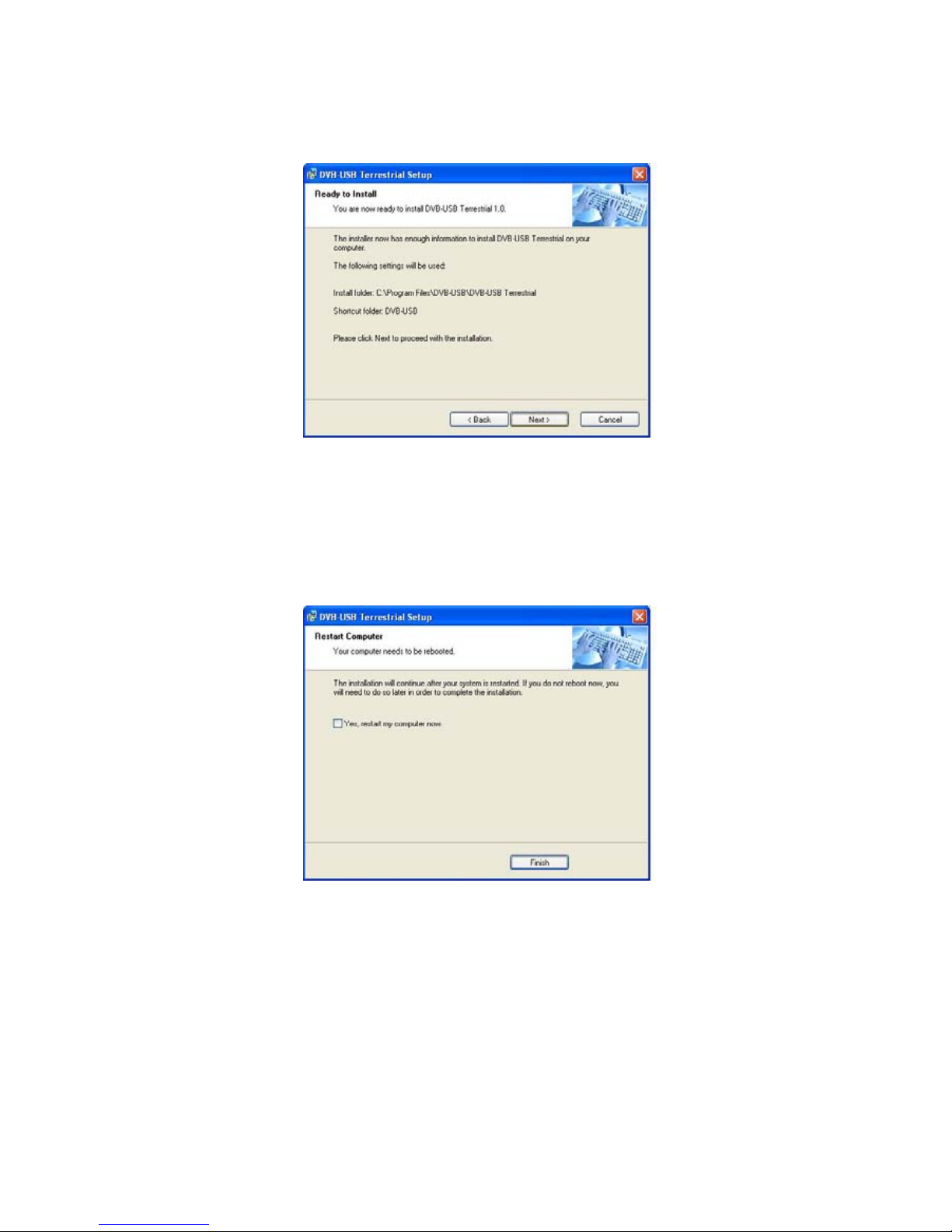
Please click
“Next”
to process with installation
K.
Restart the computer and make sure the DVB-T USB SET-TOP BOX is connected
to your computer correctly. Please wait 2-3 minutes for the system to find the
device.
The DVB-T USB SET-TOP BOX is now successfully installed.
10
Questo manuale è adatto per i seguenti modelli
1
Indice