
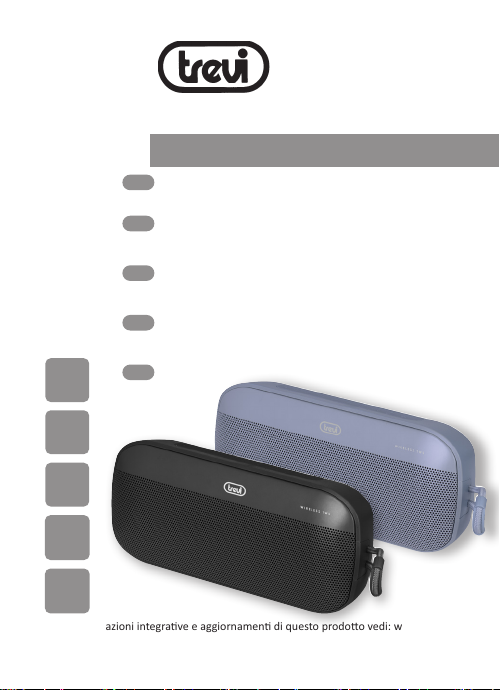
Trevi XR 8A18 Manuale utente
USB/MICRO
SD CARD
READER
* Per informazioni integrave e aggiornamen di questo prodoo vedi: www.trevi.it
* For addional informaon and updates of this product see: www.trevi.it
AUX IN
MP3
PLAYER
BLUETOOTH
CONNECTION
TWS
XR 8A18
Guida d’uso - User guide
MINI ALTOPARLANTE AMPLIFICATO
con Bluetooth/Leore MP3-USB-micro SD
MINI PORTABLE SPEAKER
with Bluetooth/MP3-USB-Micro SD player
MINI HAUT-PARLEUR
avec Bluetooth/Lecteur MP3-USB-Micro SD
TRAGBARER MINI-LAUTSPRECHER
mit Bluetooth/MP3-USB-Micro-SD player
MINI ALTAVOZ AMPLIFICADO
con Bluetooth/MP3-USB-Micro SD
ita
eng
fra
deu
esp

XR 8A18 Italiano
NOTE D’USO
Non usare alimentatori con un voltaggio superiore a 5V , causa il danneggiamento
del riproduore.
• Ascoltare a volume alto per lungo tempo, potrebbe danneggiare il vostro udito.
• Evitare di posizionare il riproduore:
- Vicino a campi magneci.
- Vicino a fon di calore come caloriferi e stufe.
- In luoghi molto umidi come stanze da bagno, piscine, ecc...
- In luoghi molto polverosi.
- In luoghi sogge a for vibrazioni.
• Posizionare l’apparecchio in modo che ai suoi la ci sia sempre abbastanza spazio
per la libera circolazione di aria (almeno 5cm).
• Se dei liquidi penetrano all’interno dell’apparecchio scollegare immediatamente la spi-
na dalla presa e portare l’apparecchio al più vicino centro assistenza autorizato TREVI.
• Controllare sempre prima di ricaricare l’apparecchio, che i cavi di alimentazione e di
collegamento siano installa correamente.
• Nessuna sorgente di amma nuda, quali candele accese, dovrebbe essere posta
sull’apparecchio.
• L’apparecchio non deve essere esposto a sllicidio o a spruzzi d’acqua e nessun
oggeo pieno di liquido, quali vasi, deve essere posto sull’apparecchio.
• Conservare il presente manuale per futuri riferimen.
CURA E MANUTENZIONE
Per la pulizia si consiglia l’uso di un panno morbido, leggermente inumidito.
Evitate solven o sostanze abrasive.
IMPORTANTE
La buona costruzione di questo apparecchio ne garansce per lungo tempo il perfeo
funzionamento. Se tuavia dovesse presentarsi qualche inconveniente, sarà opportuno
consultare il più vicino Centro Assistenza autorizzato.
TREVI persegue una polica di connua ricerca e sviluppo. Pertanto i prodo possono
presentare caraerische diverse da quelle descrie.
AVVERTENZA PER IL CORRETTO UTILIZZO DELLA
BATTERIA RICARICABILE
- Ricaricare la baeria ad una temperatura compresa tra i 5°C e i 35°C.
- Non ricaricare la baeria per un tempo superiore alle 4 ore.
- Non prolungare la ricarica oltre i tempi indica per evitare il rischio di surriscalda-
mento e scoppio.
- La ricarica della baeria oltre i tempi indica o un prolungato periodo di inavità
possono ridurne la durata.
- La baeria ricaricabile è soggea ad usura e la sua capacità diminuisce gradualmente.
- Per prolungare la durata della baeria, ulizzarla quando è completamente carica
no al completo esaurimento, quindi ricaricarla completamente di nuovo prima di

XR 8A18 Italiano
riulizzarla. Meedo in carica una baeria non completamente esaurita, la sua durata
risulterà ridoa. In questo caso, ripetere il ciclo caricamento/scaricamento completo
più volte.
- Evitare di tenere la baeria soo carica tua la noe.
DESCRIZIONE COMANDI
RICARICA
Il diusore deve essere ricaricato da spento.
1. Tramite il cavo USB/Type-C in dotazione, collegare il lato con la presa Type-C alla
presa (1) del diusore e l’altra estremità alla presa USB di un alimentatore (5V
1A non incluso);
2. L’indicatore luminoso (3) si illuminerà di rosso. A carica ulmata l’indicatore si
spegnerà.
Nota:
- Quando la baeria è in fase di esaurimento, l’apparecchio emeerà, per alcune
volte, una noca sonora prima di spegnersi automacamente.
- Per proteggere le prestazioni della baeria, evitare di ulizzare l’apparecchio duran-
te la carica.
FUNZIONAMENTO DI BASE
Per accendere il diusore, tenere premuto per 3 secondi il tasto di accensione/spegni-
mento (9).
Premere il tasto M (8) per scegliere tra:
- Modalità Bluetooth.
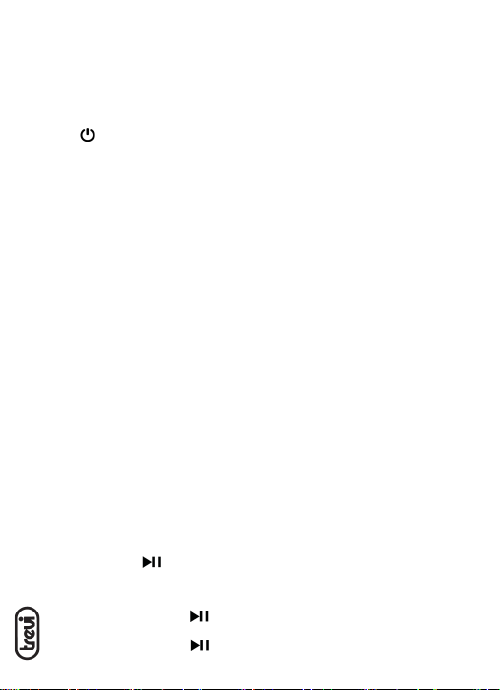
1. Presa Type-C per ricarica.
2. Ingresso AUX IN.
3. Indicatore stato di ricarica.
4. Microfono interno.
5. Tasto +, Volume+/Traccia successiva.
6. Tasto , Play/Pausa.
7. Tasto -,Volume-/Traccia precedente.
8. Tasto M, selezione funzione; premere
due volte per avare la funzione
TWS.
9. Tasto , Accensione/Spegnimento.
10. Led blu, indicatore funzione.
11. Ingresso micro SD Card.
12. Presa USB.
56 8 9107
12
4
11
3
2
1
XR 8A18 Italiano
- Modalità Radio (presente solo in versioni export).
- Modalità USB, se presente una memoria di po USB nella presa (12), l’apparecchio
comincerà la riproduzione dei brani musicali automacamente.
- Modalità micro SD, se presente una memoria di po micro SD nella slot (11) l’appa-
recchio comincerà la riproduzione dei brani musicali automacamente.
- Modalità AUX, se collegato un apparecchio esterno tramite ingresso AUX IN (2).
Per spegnere il diusore, tenere premuto per 3 secondi il tasto di accensione/spegni-
mento (9).
REGOLAZIONE VOLUME
Premere il tasto - (7) o il tasto + (5) per diminuire o aumentare il volume.
FUNZIONAMENTO BLUETOOTH
ACCOPPIAMENTO AI DISPOSITIVI
1. Posizionare il diusore vicino al disposivo Bluetooth da accoppiare;
2. Accendere il diusore; in assenza di memorie esterne collegate, l’apparecchio si
porterà subito in modalità Bluetooth, altrimen premere il tasto M (8) no a quan-
do non si udirà un suono di noca e l’indicatore (10) comincerà a lampeggiare
velocemente;
3. Seguire le istruzioni del vostro disposivo per ricercare lo speaker;
4. Ricercare ed accoppiare lo speaker nominato “XR 8A18” e inserire il PIN “0000” se
richiesto;
5. Ad accoppiamento avvenuto, si udirà un suono di conferma e l’indicatore (10) ri-
marrà a luce blu ssa. Da questo momento sarà possibile riprodurre i brani musicali.
Per eliminare un collegamento precedente, tenere premuto il tasto M (8) per qualche secondo.
Note:
- L’altoparlante Bluetooth funziona solamente con una connessione alla volta, la
connessione non può essere interroa durante il normale funzionamento.
- Quando l’accoppiamento Bluetooth con disposivi esterni fallisce, eliminare un altro
disposivo Bluetooth nell’elenco delle connessioni, riavviare l’altoparlante Bluetooth
e cercare nuovamente il segnale.
COMANDI DISPONIBILI IN MODALITÀ BLUETOOTH
IN RIPRODUZIONE MUSICALE
- Tenere premuto il tasto - (7) o il tasto + (5) per passare al brano precedente o
successivo.
- Premere il tasto (6) per meere in pausa, premerlo nuovamente per riprendere
la riproduzione.
IN CHIAMATA TELEFONICA
Quando si riceve una chiamata, si udirà un avviso sonoro.
- Premere una volta il tasto (6) per aprire la chiamata ed avare la funzione
vivavoce, premerlo nuovamente per terminare la chiamata;
- Premere due volte il tasto (6) per richiamare l’ulmo numero di telefono;
XR 8A18 Italiano
- Premere a lungo il tasto (6) per riutare la chiamata.
FUNZIONE TWS (TRUE WIRELESS STEREO)
Tramite questa funzione è possibile accoppiare 2 altoparlan (da acquistare separatamen-
te) per una riproduzione musicale stereo; questa funzione è disponibile solo in modalità
Bluetooth con disposivi compabili.
1. Spegnere la funzione Bluetooth sul telefono o altro disposivo Bluetooth;
2. Accendere i due diusori e selezionare la modalità Bluetooth su entrambi;
3. Premere due volte il tasto M (8) di uno degli altoparlan (avazione dell’accop-
piamento TWS, si udirà un suono). Dopo pochi secondi i due altoparlan saranno
accoppia (si udirà un suono di conferma);
4. Avare la funzione Bluetooth sul telefono o altro disposivo, ricercare ed accoppia-
re lo speaker nominato “XR 8A18” e inserire il PIN “0000” se richiesto.
In caso di mancato accoppiamento tra i 2 diusori, spegnere entrambi gli apparecchi
e ripetere i passi 1, 2 e 3.
FUNZIONAMENTO MICRO SD CARD/ MEMORIA USB
1. Accendere il diusore;
2. Inserire una scheda micro SD nell’apposito ingresso (11) tenendo i conta elerici
rivol verso il basso, oppure inserire una memoria USB nella presa USB (12). La
riproduzione parrà in automaco;
3. Tenere premuto il tasto - (7) o il tasto + (5) per passare al brano precedente o
successivo;
4. Premere il tasto (6) per meere in pausa, premerlo nuovamente per riprendere
la riproduzione.
FUNZIONAMENTO AUX IN
1. Accendere il diusore;
2. Collegare il cavo audio Jack/Jack alla presa AUX IN (2), si udirà un suono di noca,
e l’altra estremità all’apparecchio esterno;
3. Avviare la riproduzione dall’apparecchio esterno.
FUNZIONAMENTO RADIO (solo per versioni export)
1. Accendere il diusore;
2. Premere il tasto M (8) no ad accedere alla modalità Radio;
3. Tenere premuto il tasto (6) per avviare la ricerca automaca delle stazioni radio.
4. Tenere premuto il tasto - (7) o il tasto + (5) per passare alla stazione radio prece-
dente o successiva;
5. Premere il tasto (6) per silenziare il volume, premerlo nuovamente per ripren-
dere la riproduzione della stazione radio.
XR 8A18 Italiano
CARATTERISTICHE TECNICHE
Baeria Ricaricabile: ............................... Interna al Lithio 3.7V, 1200mAh
Alimentazione: ........................................ 5V 1A
Potenza audio: ........................................12W
Potenza max di trasmissione Bluetooth: . 0,8mW
Frequenza di trasmissione Bluetooth: ....2,4GHz
Banda di frequenza FM: .......................... 87,5 - 108MHz
Dimensioni: ............................................. 210 x 90 x 53mm
Peso:........................................................ 498gr
INFORMATIVA SULLA RIMOZIONE E LO SMALTIMENTO DELLE
BATTERIE
Aenzione: l’operazione di rimozione e smalmento è riservata esclusivamente al
personale tecnico specializzato!
Qualunque sia il po di baeria esaurita, essa non deve essere geata tra i riu domesci,
nel fuoco o nell’acqua. Ogni po di baeria esaurita deve essere riciclata oppure smalta
presso gli apposi centri raccolta dedica.
Per rimuovere la baeria:
1. Rimuovere la griglia di copertura sopra gli speaker;
2. Svitare tue le vi presen e separare la parte frontale del mobile da quella posteriore;
3. Fare leva tra i due mobili, facendo molta aenzione a non danneggiare i ganci in plasca;
4. Individuare la baeria, rimuoverla e sostuirla con una di uguali caraerische e capacità.
INFORMAZIONI AGLI UTENTI ai sensi del Decreto Legislavo N° 49 del 14 Marzo 2014
“Auazione della Direva 2012/19/UE sui riu di apparecchiature eleriche ed
eleroniche (RAEE)”
Il simbolo del cassoneo barrato riportato sull’apparecchiatura indica che il prodoo alla
ne della propria vita ule deve essere raccolto separatamente dagli altri riu. L’utente
dovrà, pertanto, conferire l’apparecchiatura integra dei componen essenziali giunta a
ne vita agli idonei centri di raccolta dierenziata dei riu eleronici ed elerotecnici,
oppure riconsegnarla al rivenditore al momento dell’acquisto di nuova apparecchiatura
di po equivalente, in ragione di uno a uno, oppure 1 a zero per le apparecchiature aven
lato maggiore inferiore a 25 cm. L’adeguata raccolta dierenziata per l’avvio successivo
dell’apparecchiatura dimessa al riciclaggio, al traamento e allo smalmento ambientale
compabile contribuisce ad evitare possibili ee negavi sull’ambiente e sulla salute e
favorisce il riciclo dei materiali di cui è composta l’apparecchiatura. Lo smalmento abusivo
del prodoo da parte dell’utente comporta l’applicazione delle sanzioni amministrave
di cui al D.Lgs n. Decreto Legislavo N° 49 del 14 Marzo 2014.

XR 8A18 English
USAGE NOTES
Do not use power supply with a voltage higher than 5V , cause damage to the player.
• Listen at high volume for long periods of me, may damage your hearing.
• Avoid using it in the following cases:
- Near strong heat sources, such as central heang plants or stoves.
- In very humid places such as bathrooms, swimming pools, etc.
- In very dusty places.
- In places subject to strong vibraons.
- Posion the appliance in such a way that there is always enough room for free air
circulaon (at least 5 cm).
• Do not block the air inlets.
• If any liquid enters the appliance, unplug it immediately from the socket and take it
to the nearest TREVI authorised service centre.
• Before switching on the appliance, always check that the power cable and the
connecon cable are properly installed.
• No naked ame sources, such as lighted candles, should be placed on this.
• The apparatus shall not be exposed to dripping or splashing water and no object
lled with water, such as vases, should be placed on the unit.
• Keep this manual for future reference.
CARE AND MAINTENANCE
For cleaning it is recommended to use a so, slightly damp cloth. Avoid solvents or
abrasive substances.
IMPORTANT
The construcon of this device guarantees long awless operaon. However, if come some
problem, you should consult your nearest authorized service center.
TREVI pursues a policy of connuous research and development. Therefore, the products
may show dierent characteriscs from those described.
WARNING FOR A CORRECT USE OF RECHARGEABLE
BATTERY
- Recharge the baery in an ambient temperature between 5°C and 35°C.
- Don’t recharge more than the suitable period to prevent the risk of overheang and burst.
- Recharging the baery over the suitable period or an extended period of inacvity
may reduce baery duraon.
- Rechargeable baery is liable to wear and tear and its performance will reduce
gradually.
- To extend the duraon of the baery use it when is completely charged up to the
complete discharging, then recharge it fully before use it again. Recharge a baery
not completely consumed, will result a reduced duraon. In this case, repeat the
full charging/discharging cycle many mes.
- Avoid recharge the baery for the whole night.
XR 8A18 English
CONTROLS
CHARGING
The speaker must be recharged when switched o.
1. Using the supplied USB/Type-C cable, connect the side with the Type-C to the
socket (1) on the speaker and the other end to the USB socket of a power supply
(5V 1A not included);
2. During the charging process, the red light (3) is steady On and the red light is O
aer the charging is complete.
Notes:
- When the baery is running low, the device will emit a sound nocaon a few
mes before switching o automacally.
- To protect the performance of the baery, avoid using the machine while charging.
- The machine has no power bank funcon, it is forbidden to connect other devices
through the USB interface.
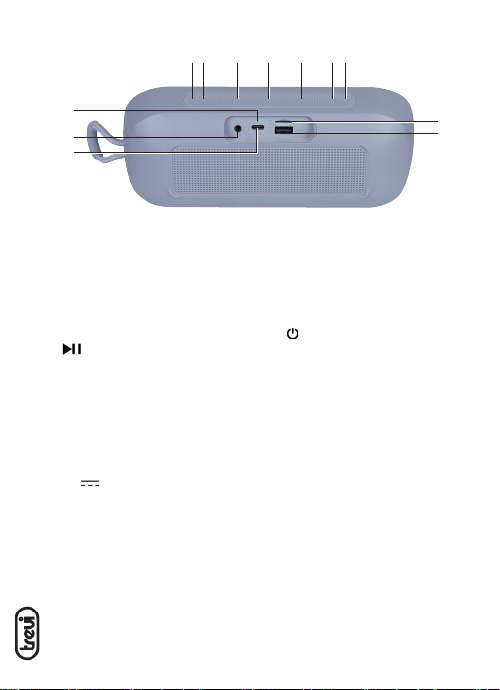
1. Type-C socket for charging.
2. AUX audio input.
3. Charging indicator.
4. Mcrophone inside
5. + buon, short press to increase volu-
me. While playing music, long press
to play the next song/next radio
staon when in FM mode.
6. buon, short press to play/
pause and long press to automacally
search for channels in FM mode.
7. - buon, short press to decrease vo-
lume. While playing music, long press
to play the previous song/previous
radio staon when in FM mode.
8. M buon, press once to select the
funcon. Press twice to acvate the
TWS funcon.
9. buon, long press to power On/O.
10. Blue Led light, funcon indicator.
11. TF Card slot.
12. USB socket.
56 8 9107
12
4
11
3
2
1

XR 8A18 English
BASIC OPERATION
To switch On the speaker, press and hold the buon (9) for 3 seconds.
Press the M buon (8) to choose from:
- Bluetooth mode.
- Radio mode.
- USB Mode, if present a USB memory in the slot (12), the device will start playing
the music automacally.
- TF card mode, if present a TF card memory in the slot (11) it will start playing the
music automacally.
To switch O the speaker, press and hold the buon (9) for 3 seconds.
VOLUME ADJUSTMENT
Press the - buon (7) or the + buon (5) to decrease or increase the volume.
BLUETOOTH OPERATION
PAIRING DEVICES
1. Place the speaker near the Bluetooth device to pair;
2. Switch On the speaker, in the absence of connected external memories, the device
will immediately go into Bluetooth mode, otherwise press the M (8) buon unl
you hear a nocaon sound and the indicator (10) will start blinking rapidly, the
speaker is waing for pairing;
3. Go to Sengs on your device, turn on Bluetooth funcon;
4. Search and tap the device named “XR 8A18” and click Connect. If necessary, enter
“0000” and click OK;
5. Once pairing is complete, you will hear a conrmaon sound and the indicator (10)
will remain solid blue. Now is possible to play the music tracks.
Long press the M (8) buon to directly disconnect the bluetooth connecon.
Notes:
- The Bluetooth speaker only works with a connecon at a me, the connecon can
not be interrupted during normal operaon.
- When the Bluetooth pairing with external devices fails, delete another Bluetooth
device in the list of connecons, restart the Bluetooth speaker and search for the
signal again.
CONTROLS AVAILABLE IN BLUETOOTH MODE
MUSIC PLAYBACK
- Press and hold the - (7) or + (5) buon to go to the previous or next song;
- Press (6) buon to pause, press it again to resume music playback.
IN PHONE CALL
When a call is received, a sound warning will be heard.
- When you receive a call, click once on (6) buon to open the call and acvate
the speaker phone feature, press again to end a call.
XR 8A18 English
- Double click on (6) buon for call back to last phone number;
- Long press (6) buon to reject a call.
TWS OPERATION (TRUE WIRELESS STEREO)
This funcon allows you to pair 2 speakers (to be purchased separately) for stereo music
playback; This feature is only available in Bluetooth mode with compable devices.
1. Turn o the Bluetooth funcon on your phone or other Bluetooth device;
2. Turn on the two XR 8A18 units and choose the Bluetooth mode;
3. Double click the M (8) buon of one of the speakers for a few seconds (TWS pairing
acvaon, a sound will be heard). Aer a few seconds, the two speakers will be
paired (a conrmaon sound will be heard);
4. Using your device to search the pairing name “XR 8A18” and enter the PIN “0000”
if required, music is ready to play for the two units together aer paired.
In case of non-pairing between the 2 speakers, switch o both devices and repeat
steps 1, 2 and 3.
TF CARD/ USB
1. Switch On the speaker;
2. Insert a micro SD card into the micro SD card slot (11) keeping the electrical con-
tacts facing up, or insert a USB memory into the USB socket (12). Playback will start
automacally;
3. Press and hold the - (7) or + (5) buon to go to the previous or next song;
4. Press (6) buon to pause, press again to resume playback.
AUX IN
1. Switch On the speaker;
2. Connect the Jack/Jack audio cable to the AUX jack (2), you will hear a nocaon
sound, and the other end to the external device;
3. Start from the external device playback.
RADIO MODE
To use the speaker in Radio mode, you must connect the supplied USB/Type-C cable so
that it acts as an antenna.
1. Switch On the speaker;
2. Press the M buon (8) unl you enter in Radio mode;
3. Press and hold the (6) buon to start the automac search for radio staons;
4. Press and hold the - (7) or + (5) buon to switch to the previous or next radio
staon;
5. Press the (6) buon to mute the volume, press it again to resume playback of
the radio staon.
Indice
Lingue:
Altri manuali Trevi Altoparlanti

Trevi
Trevi XP 72 BT Manuale utente

Trevi
Trevi XR 8A15 Manuale utente

Trevi
Trevi SB 8320TV Manuale utente

Trevi
Trevi SB 8312 TV Manuale utente

Trevi
Trevi XR 74 BT Manuale utente

Trevi
Trevi XR 8A20 Manuale utente

Trevi
Trevi XR 90 BT Manuale utente

Trevi
Trevi XR 73 BT Manuale utente

Trevi
Trevi XF 4000 DJ Manuale utente

Trevi
Trevi AVX 575USB Manuale utente

Trevi
Trevi XB 65 USB Manuale utente

Trevi
Trevi AVX 575 BT Manuale utente

Trevi
Trevi XF 4500 DJ Manuale utente

Trevi
Trevi XR 200 BT Manuale utente

Trevi
Trevi XF 500 Manuale utente

Trevi
Trevi SR 8410BT Manuale utente

Trevi
Trevi AVX 560 USB Manuale utente

Trevi
Trevi XF 1850KB Manuale utente

Trevi
Trevi XR 86 BT Manuale utente

Trevi
Trevi X Jump XJ 90 Manuale utente


