Triax CCAV 300 Manuale utente

AssemblyInstruction
CCAV300
Model Itemno.
CCAV 300 325129
Version 3Date 03/2017 EN

- 2 - CCAV 300
Contents
1 Safety regulations and notes ..............................................................................3
2 General information ..........................................................................................4
2.1 Scope of delivery ............................................................................... 4
2.2 Meaning of the symbols used ............................................................... 4
2.3 Technical specifications ....................................................................... 4
2.4 Description ........................................................................................ 5
Display of the control unit software version ............................................ 5
3 Installation ........................................................................................................6
3.1 Installing the cassette .......................................................................... 6
3.2 EMC regulations ................................................................................ 7
3.3 Overview of the cassette ..................................................................... 8
3.4 Connecting the cassette ....................................................................... 8
4 The control unit at a glance ................................................................................9
4.1 Menu items ........................................................................................ 9
4.2 Control panel ..................................................................................... 9
5 Programming ..................................................................................................10
5.1 Preparation...................................................................................... 10
5.2
Programming procedure .........................................................................11
5.3 Programming the cassette ................................................................. 12
Selecting the cassette ........................................................................ 12
Selecting the channel strip ................................................................. 13
RF output level .................................................................................. 14
Switching the modulator off/on .......................................................... 14
Channel / frequency setting .............................................................. 15
TV standard of the output signal ......................................................... 15
Output channel ................................................................................ 16
Fine tuning ...................................................................................... 16
Output frequency ............................................................................. 16
Audio type ...................................................................................... 17
Setting the audio output level ............................................................. 17
Saving settings ................................................................................. 17
6 Final procedures .............................................................................................. 18
7 Channel and frequency tables ..........................................................................19

- 3 - CCAV 300
1 safety regulations and notes
• Assembly, installation and servicing should be carried out by authorised
electricians.
• Switch off the operating voltage of the system before beginning with assem-
bly or service work or pull out the mains plug.
• Do not perform installation and service work during thunderstorms.
• Install the system so it will not be able to vibrate…
- in a dust-free, dry environment
- in such a manner that it is protected from moisture, fumes, splashing wa-
ter and dampness
- somewhere protected from direct sunlight
- not within the immediate vicinity of heat sources
- in an ambient temperature of 0 °C to +50 °C. In case of the formation of
condensation wait until the system is completely dried.
• Ensure that the head-end station is adequately ventilated. Do not cover the
ventilation slots.
• Beware of short circuits
• No liability is accepted for any damage caused by faulty connections or
inappropriate handling.
• Observe the relevant standards, regulations and guidelines on the installa-
tion and operation of antenna systems.
• The standards IEC/EN/DIN EN 50083 resp. IEC/EN/DIN EN 60728 must
be observed.
• For further information please read the assembly instructions for the head-
end station used.
• Test the software versions of the head-end station and the cassette and
update them if necessary. The current software versions can be found at
"www.triax.com".
Take action to prevent static discharge when working on the device!
Electronic devices should never be disposed of in the household rubbish. In
accordance with directive 2002/96/EC of the European Parliament and the
European Council from January 27, 2003 which addresses old electronic and
electrical devices, such devices must be disposed of at a designated collection
facility. At the end of its service life, please take your device to one of these
public collection facilities for proper disposal.

- 4 - CCAV 300
2 general information
2.1 sCope of delivery
1 CCAV 300 cassette
1 CD (assembly instructions)
1 Brief assembly instructions
2.2 meaning of the symbols used
Important note
—> General note
• Performing works
2.3 teChniCal speCifiCations
The requirements of the following EU directives are met:
2011/65/EU, 2014/30/EU, 2014/35/EU
The product fulfils the guidelines and standards for CE labelling.
Unless otherwise noted all values are specified as "typical".
Input Video:
Type of signal: ...................................................................... CVBS signal
Input level: .....................................................................................1 Vpp
Input impedance: ............................................................................75 Ω
Frequency range: .......................................................... 20 Hz … 5 MHz
Input Audio
Input level: ............................................................................. 500 mVrms
Input impedance: .......................................................................... 10 kΩ
Frequency range: ..........................................................20 Hz … 15 kHz
Output:
RF level: ................................................................................... 95 dBμV
Channels: ............................................C02 … C69 including S02 … S41
Frequency range: ................................................. 42.00 MHz … 870.00
Standard: .........................................................................PAL B/G, PAL I
Output impedance: .........................................................................75 Ω

- 5 - CCAV 300
Connections:
Video inputs: .............................................................3 (1 per modulator)
Audio inputs: ............................................................6 (2 per modulator)
RF output: ........................................................................... 1 IEC socket
Connection strip (10-pin): ..................for supply voltages and control circuits
RS 232 socket: ..................................... serial interface for software update
Remote maintenance
Remotely controllable (via
CCRS 1000
*): ...............................................yes
Remote update (via BEflash*): .............................................................yes
(* and a corresponding management unit)
2.4 desCription
The cassette is used to feed standardised audio and video signals into a ca-
ble system from completely different audio and video sources (e.g. audio and
video reproduction devices, test picture generators, observation cameras etc.).
The audio and video sig
nals fed in via the cinch sockets of the cassette are
modulated to adjustable carrier frequencies in the modulators and supplied to
the combiner. There they are combined and are sent to the RF output collector
of the head-end station via the RF output socket of the cassette. The common
output level can be set at the RF output collector of the head-end station.
When the head-end station is switched on, the two-line LC display shows the
software version of the control unit. To operate this cassette the software ver-
sion of the control unit must be "V 45" or higher. You can find the current op-
erating software for the control unit and the cassette, the software "BE-Flash"
and the current assembly instructions on the website "www.triax.com".
displ ay of the Control unit software version
If necessary, you can activate the indication of the software version of the
control unit manually:
• Press any two keys on the control unit of the head-end station simultaneously
until the display goes dark and the software version, e.g. "V 45" appears.

- 6 - CCAV 300
3 installation
3.1 installing the Cassette
– Ensure the head-end station is mounted so it will not be able to vibrate.
Avoid, for example, mounting the head-end station onto a lift shaft or any
other wall or floor construction that vibrates in a similar way.
– Before installing or changing a cassette unplug the power cable from the
mains power socket.
• Remove the fastening screws 1 of an unoccupied slot from the bracket of
the head-end station.
• Insert the cassette in this slot and push it into the housing.
• Align the cassette and apply slight pressure to connect it to the connections
of the board and the RF bus bar.
• Fasten the cassette with the screws 1.
1
1

- 7 - CCAV 300
3.2 emC regulations
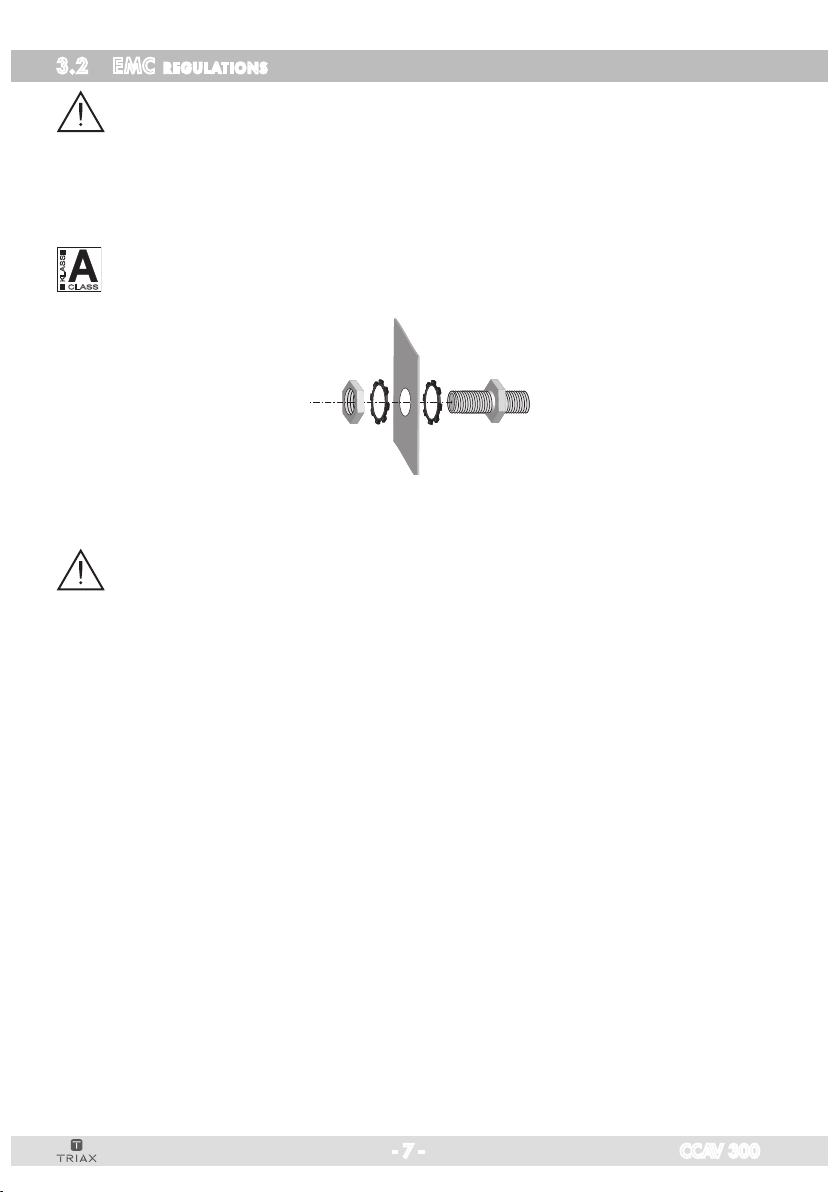
To comply with the current EMC regulations, it is necessary to connect the lines
leading in and out of the head-end station using cable terminals.
When mounting the cassette in a head-end station which is installed in a 19"
cabinet, make sure the connections leading in and out for the 19" cabinet are
made using cable terminals.
CLASS
KLASSE
The attenuation of shielding of the connection lines for ASI and antenna must
meet the requirements for "Class A".
• Insert the required number of cable terminals in the openings provided in
the head-end station or in the 19
"
cabinet.
Tighten the nuts of the cable terminals until the teeth on the lock washers
put un-
der
have penetrated the exterior coating and a good connection is made between
the housing
/ 19" cabinet
and cable terminals.

- 8 - CCAV 300
3.3 overview of the Cassette
B
A
C
L
R
V
L
R
V
L
R
V
1
A Inputs of channel strip
"
A
"
R Audio input "right"
L Audio input "left", "mono"
V Video input
B Inputs of channel strip
"
B
"
R Audio input "right"
L Audio input "left", "mono"
V Video input
C Inputs of channel strip
"
C
"
R Audio input "right"
L Audio input "left", "mono"
V Video input
1 D-SUB socket "RS 232"
The operating software of the cassette can be updated via the 9-Pin D-SUB
socket "RS 232" using a PC or notebook and the software "BE-Flash".
You can find the current operating software on the website "www.mygss.
eu".
3.4 ConneCting the Cassette
• Connect the peripheral devices to the cinch input sockets V (video - yel-
low), R (audio right - red) and L (audio left, mono - white) of the modula-
tors A, B and C.
•
Connect the head-end station to the mains power supply.

- 9 - CCAV 300
4 the Control unit at a glanCe
4.1 menu items
Program the
cassette
using the buttons on the control unit of the head-end sta-
tion. The two-line display of the control unit then shows the menus.
The parameters and functions to be set are underlined.
Use the button to select the following main menu items:
– Cassette
– Channel strip (modulator)
– RF output level,
switching the modulator on / off
– Channel or frequency setting, TV standard
– Output channel / Output frequency
– Audio type / Audio level
4.2 Control panel
The key pad on the head-end station is used to scroll through the menus:
scrolls forward through the menus.
select parameters in the menus.
set values, initiate actions.
selects sub-menus.
scrolls backward through the menus.
saves all entries.
BE-Remote V 45
please wait . . .

- 10 - CCAV 300
5 programming
5.1 prepar ation
• Connect the test receiver to the RF output or the test output of the head-end
station.
• Set the output channels / output frequencies of the
cassette
(page 16) and 16) and ) and
adjust the test receiver to the respective channel / frequency.
• Switch on the modulator if necessary (page 14).
• Measure the output levels of the channel strips and adjust them to
a uniform
output level (
page 17)
.
Indice
Altri manuali Triax Unità di controllo

Triax
Triax TDH 800 Manuale utente

Triax
Triax TDH 800 Manuale utente

Triax
Triax 692855 Manuale utente

Triax
Triax CSE 816 Manuale utente

Triax
Triax TDX Pro:Idiom IP output module Manuale utente

Triax
Triax TDH 800 Manuale utente

Triax
Triax TDX Manuale utente

Triax
Triax TDH 800 Manuale utente

Triax
Triax TDH 800 Manuale utente

Triax
Triax CGS 470 Manuale utente
Manuali Unità di controllo popolari di altre marche

Festo
Festo Compact Performance CP-FB6-E Manuale elenco delle parti

Elo TouchSystems
Elo TouchSystems DMS-SA19P-EXTME Manuale utente

JS Automation
JS Automation MPC3034A Manuale utente

JAUDT
JAUDT SW GII 6406 Series Guida rapida

Spektrum
Spektrum Air Module System Manuale utente

BOC Edwards
BOC Edwards Q Series Manuale utente