Tribe Crystal Manuale utente

USER MANUAL
MANUALE UTENTE
CRYSTAL
SPOT MOVING HEAD
EN - IT

All rights reserved by Music & Lights S.r.l. No part of this instruction manual may be
reproduced in any form or by any means for any commercial use.
In order to improve the quality of products, Music&Lights S.r.l. reserves the right to modify the
characteristics stated in this instruction manual at any time and without prior notice.
All revisions and updates are available in the ‘manuals’ section on site www.musiclights.it
REV.004-12/14

1
CRYSTAL
Packing content • CRYSTAL
• Mount bracket
• User manual
TABLE OF CONTENTS Safety
General instructions
Warnings and installation precautions
1 Introduction
1. 1 Description
1. 2 Technical specifications
1. 3 Operating elements and connections
2 Installation
2. 1 Mounting
3 Functions and settings
3. 1 Operation
3. 2 Basic
3. 3 Menu structure
3. 4 Slave Receive mode
3. 5 Operation in automatic mode
3. 6 Scenes Record mode
3. 7 Music mode
3. 8 Sensitivity microphone
3. 9 Linking
3. 10 DMX mode
3. 11 DMX configuration
3. 12 DMX addressing
3. 13 Connection of the DMX line
3. 14 Construction of the DMX termination
3. 15 DMX control
3. 16 Colors and gobos wheels
3. 17 Wireless control settings
3. 18 Fixture settings
3. 19 Lamp settings
3. 20 Display settings
3. 21 Fixture information
3. 22 Reset functions
3. 23 Special functions
4 Maintenance
4. 1 Maintenance and cleaning the unit
4. 2 Fuse replacement
4. 3 Trouble shooting
2
2
3
3
5
6
7
7
8
10
11
12
12
12
13
13
13
13
15
15
16
23
24
24
24
25
25
26
26
29
29
30

CRYSTAL
2
WARNING! Before carrying out any operations with the unit, carefully read this instruction
manual and keep it with cure for future reference. It contains important information about
the installation, usage and maintenance of the unit.
SAFETY
General instruction
• The products referred to in this manual conform to the European Community Directives and are there-
fore marked with .
• The unit is supplied with hazardous network voltage (230V~). Leave servicing to skilled personnel only.
Never make any modifications on the unit not described in this instruction manual, otherwise you will
risk an electric shock.
• Connection must be made to a power supply system fitted with efficient earthing (Class I appliance ac-
cording to standard EN 60598-1). It is, moreover, recommended to protect the supply lines of the units
from indirect contact and/or shorting to earth by using appropriately sized residual current devices.
• The connection to the main network of electric distribution must be carried out by a qualified electrical
installer. Check that the main frequency and voltage correspond to those for which the unit is designed
as given on the electrical data label.
• This unit is not for home use, only professional applications.
• Never use the fixture under the following conditions:
- in places wet;
- in places subject to vibrations or bumps;
- in places with an ambient temperature of over 45°C.
• Make certain that no inflammable liquids, water or metal objects enter the fixture.
• Do not dismantle or modify the fixture.
• All work must always be carried out by qualified technical personnel. Contact the nearest sales point for
an inspection or contact the manufacturer directly.
• If the unit is to be put out of operation definitively, take it to a local recycling
plant for a disposal which is not harmful to the environment.
Warnings and installation precautions
• If this device will be operated in any way different to the one described in this manual, it may suffer
damage and the guarantee becomes void. Furthermore, any other operation may lead to dangers like
short circuit, burns, electric shock, etc.
• Before starting any maintenance work or cleaning the projector, cut off power from the main supply.
• Always additionally secure the projector with the safety rope.When carrying out any work, always com-
ply scrupulously with all the regulations (particularly regarding safety) currently in force in the country
in which the fixture’s being used.
• For inside use only. Not designed for outside use.
• The minimum distance between the fixture and surrounding walls must be more than 50 cm and the
air vents at the housing must not be covered in any case.
• Install the fixture in a well ventilated place.
• Keep any inflammable material at a safe distance from the fixture.
• The maximum temperature that can be reached on the external surface of the fitting, in a thermally
steady state, is 70°C. After power off, please cool down over 15 minutes.
• Shields, lenses or ultraviolet screens shall be changed if they have become damaged to such an extent
that their effectiveness is impaired.
• The lamp (LED) shall be changed if it has become damaged or thermally deformed.
• Never look directly at the light beam. Please note that fast changes in lighting, e. g. flashing light, may
trigger epileptic seizures in photosensitive persons or persons with epilepsy.
• This product was designed and built strictly for the use indicated in this documentation. Any other use,
not expressly indicated here, could compromise the good condition/operation of the product and/or
be a source of danger.
• We decline any liability deriving from improper use of the product.

3
CRYSTAL
- 1 - INTRODUCTION
1.1 DESCRIPTION
CRYSTAL is a LED Spot moving that can replace traditional discharge lamp fixture. It’s equipped with a
bright white 100W LED source which allows a superior light output and keep compact sizes and light-
weight.
CRYSTAL is the ideal tool for all rental and system integration companies who may handle a compact
fixture with unprecedented performance and efficiency, reducing the management costs in terms of con-
sumption, logistics, stocking and lamp replacement.
1.2 TECHNICAL SPECIFICATIONS
LIGHT SOURCE
• Source: 100W high-power white LED
• CT: 7000K
• Luminous flux: 3000lm
• Luminous flux:
• Lux: 3073lux @5 m
• Source life expectancy: >30000 h
OPTICS
• Zoom: 10-15° manual
• Beam angle: 15°
• Lens type: high-quality glass lens optics
• Focus: motorised with auto-focus
COLOUR SYSTEM
• Colour wheel: 8 dichroic filters + open
• Macros: linear, half colours, colour bounce
DYNAMIC EFFECTS
• Rotating gobos: 7 rotating gobos + open, interchangeable, indexing
• Gobo size: outer: 23.7 mm - image: 19 mm - thickness: 0.5 mm
• Fixed gobos:
• Circular prism: 3f with bi-directional rotation
• Auto mode: built-in programs with execution speed adjustment
• Sound mode: music activation through internal microphone and sensitivity control
BODY
• Pan angle: 540°/630°
• Tilt angle: 265°
• Pan/Tilt resolution: 8 / 16 bit
• Feedback: automatic repositioning after accidental movement
• Body: aluminium structure with hi-resistance polycarbonate cover
• Body colour: black, white finishing available
CONTROL
• Protocols: DMX512, RDM

CRYSTAL
4
• DMX channels: 11/13/15/18channel
• W-DMX: optional, wireless solution receiver
• RDM: RDM ready for fixture remote monitor and settings
• Display: LCD high resolution colour display
• Firmware upgrade: yes, via USB-DMX interface (UPBOX2) not included
• Hibernation: power safe mode when lost DMX
ELECTRONICS
• Dimmer: linear 0~100% electronic dimmer
• Strobe / shutter: 1-20 Hz, electronic
• Operating temperature: -10° ~ +45°
• Flicker: flicker free operation
ELECTRICAL
• Power supply: 100-240 V – 50/60 Hz
• Power consumption (at 230V): 125W
• Output (at 230V): 16 units on a single power line
PHYSICAL
• Cooling: forced air with low noise fan
• Sospension and fixing: any position with quick-lock omega brackets
• Signal connection: Amphenol XLR 3p IN/OUT connectors
• Power connection: Neutrik powerCON IN/OUT connectors
• IP rating: 20
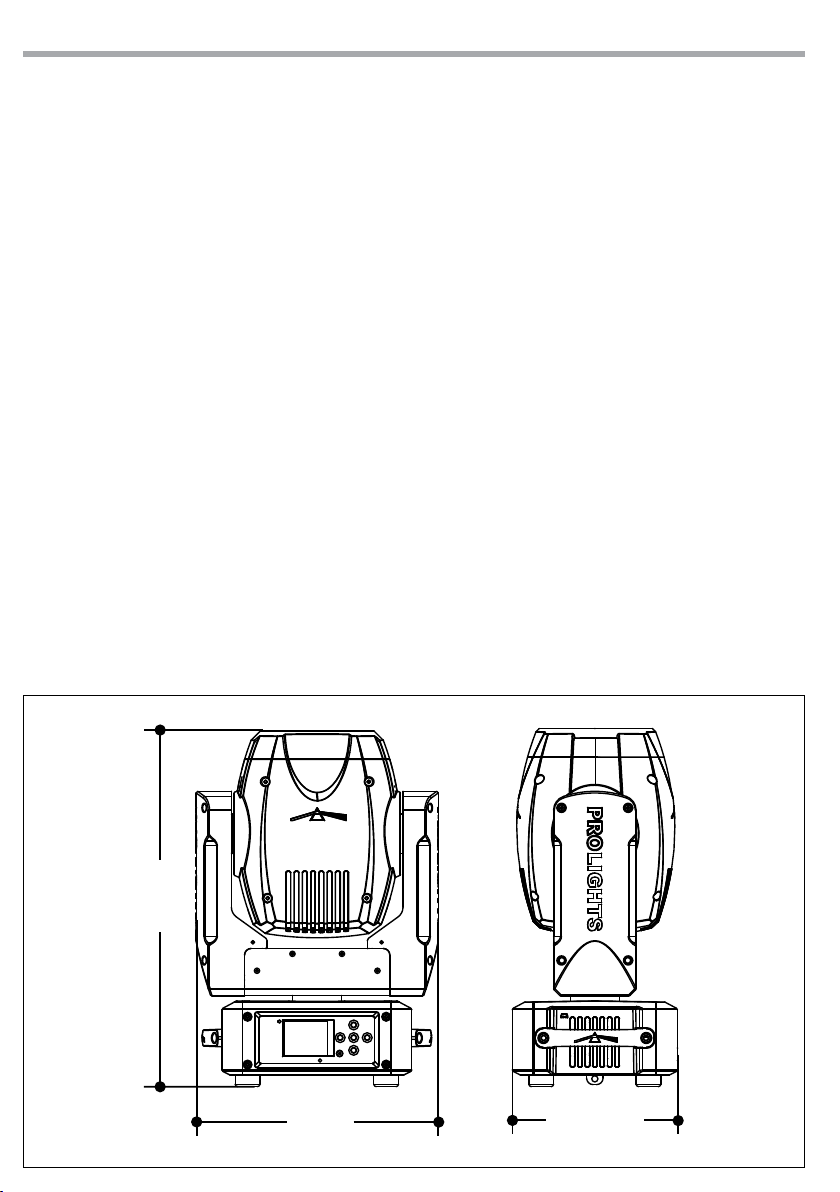
• Dimensions (WxHxD): 294x432x200mm
• Weight: 9kg
Technicaldrawing
432
294
200
Fig.1

5
CRYSTAL
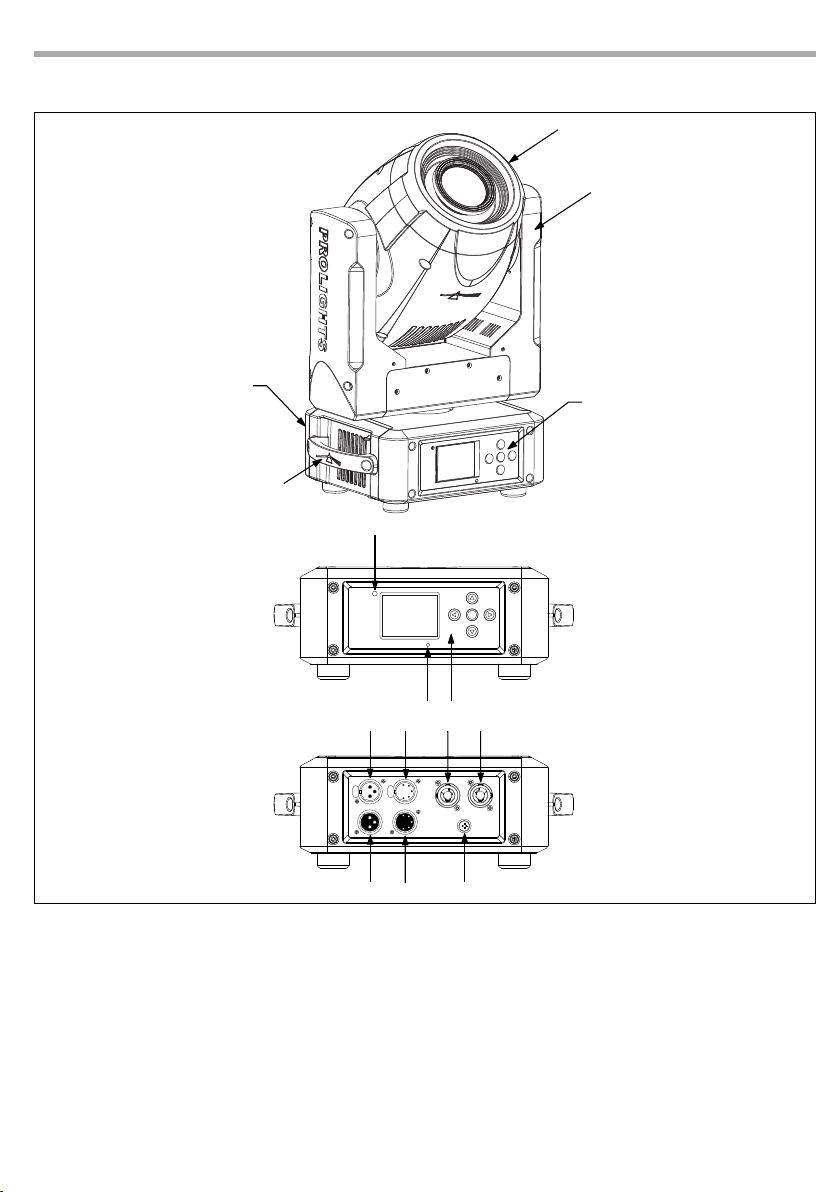
1.3 OPERATING ELEMENTS AND CONNECTIONS
View A
View B
1. MOVING HEAD
2. ROTARY ARM
3. HANDLE
4. LED INDICATOR "WDMX"
5. MICROPHONE
6. CONTROL PANEL with LCD display and 5
button used to access the control panel
functions and manage them.
7. DMX OUT ( 3-pole XLR):
1 = ground, 2 = DMX -, 3 = DMX +
8. DMX IN (3-pole XLR):
1 = ground, 2 = DMX -, 3 = DMX +
9. DMX OUT (5-pole XLR):
1 = ground, 2 = DMX-, 3 = DMX+, 4 N/C, 5 N/C
10. DMX IN (5-pole XLR):
1 = ground, 2 = DMX-, 3 = DMX+, 4 N/C, 5 N/C
11. POWER IN (PowerCON IN): for connection to a
socket (100-240V~/50-60Hz) via the supplied
mains cable.
12. POWER OUT (PowerCON OUT): power output
for connection of multiple units in series.
13. MAIN FUSE HOLDER: replace a burnt-out fuse
by one of the same type only (T3.15A/250V).
Fig.2
4
7
8
9
10
A
B
1
2
3
56
11 12
13

CRYSTAL
6
- 2 - INSTALLATION
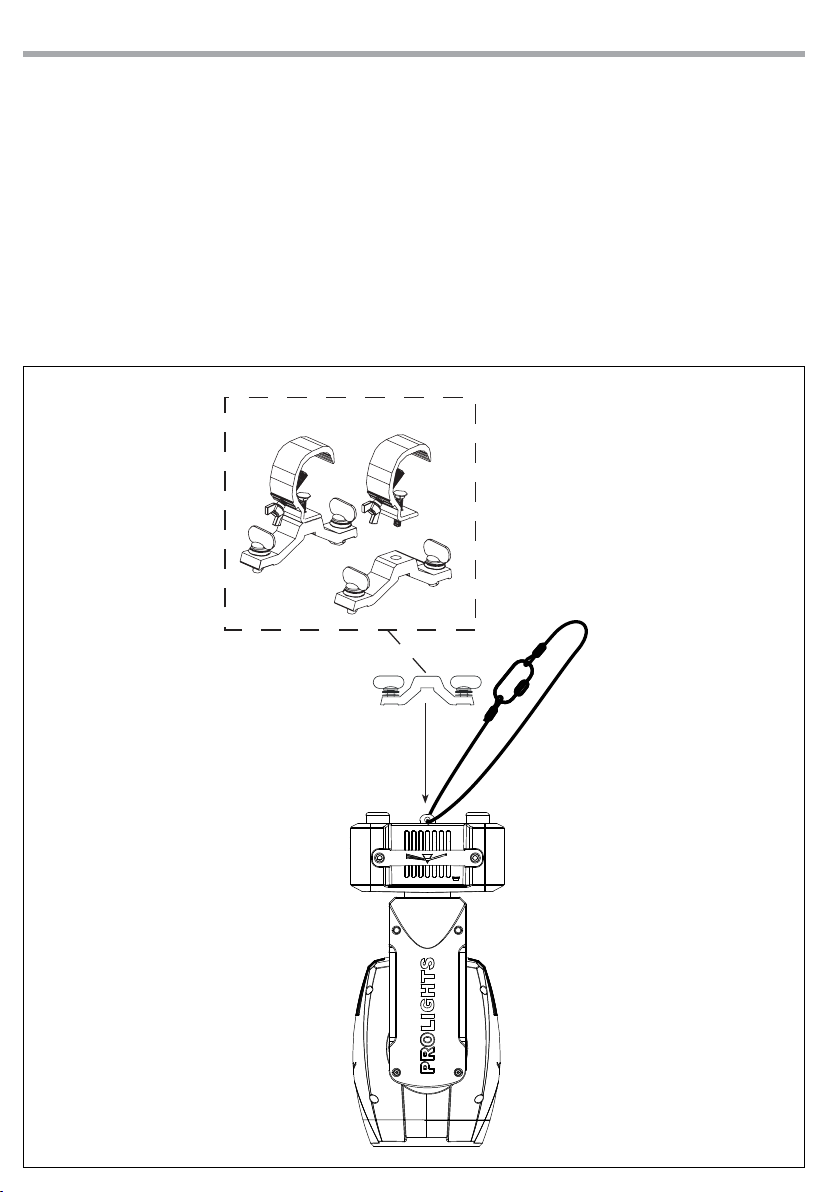
2.1 MOUNTING
The CRYSTAL may be set up on a solid and even surface. By means of the fixing facilities of the baseplate,
the unit can also be mounted upside down to a cross arm (fig.3). For fixing, stable mounting clips are
required. Always ensure that the unit is firmly fixed to avoid vibration and slipping while operating. The
mounting place must be of sufficient stability and be able to support a weight of 10 times of the unit’s
weight. When carrying out any installation, always comply scrupulously with all the regulations (particu-
larly regarding safety) currently in force in the country in which the fixture’s being used.
Always additionally secure the projector with the safety rope from falling down. For this purpose, fasten
the safety rope at a suitable position so that the maximum fall of the projector will be 20 cm.
Fig.3
CLAMP
SAFETY
CABLE
OMEGA
BRACKETS

7
CRYSTAL
- 3 - FUNCTIONS AND SETTINGS
3.1 OPERATION
Connect the supplied main cable to a socket (100-240V~/50-60Hz). The unit will run built-in program to
reset all motors to their home position. Shortly after that the CRYSTAL is ready for operation. To switch off,
disconnect the mains plug from the socket. For a more convenient operation it is recommended to con-
nect the unit to a socket which can be switched on and off via light switch.
3.2 BASIC
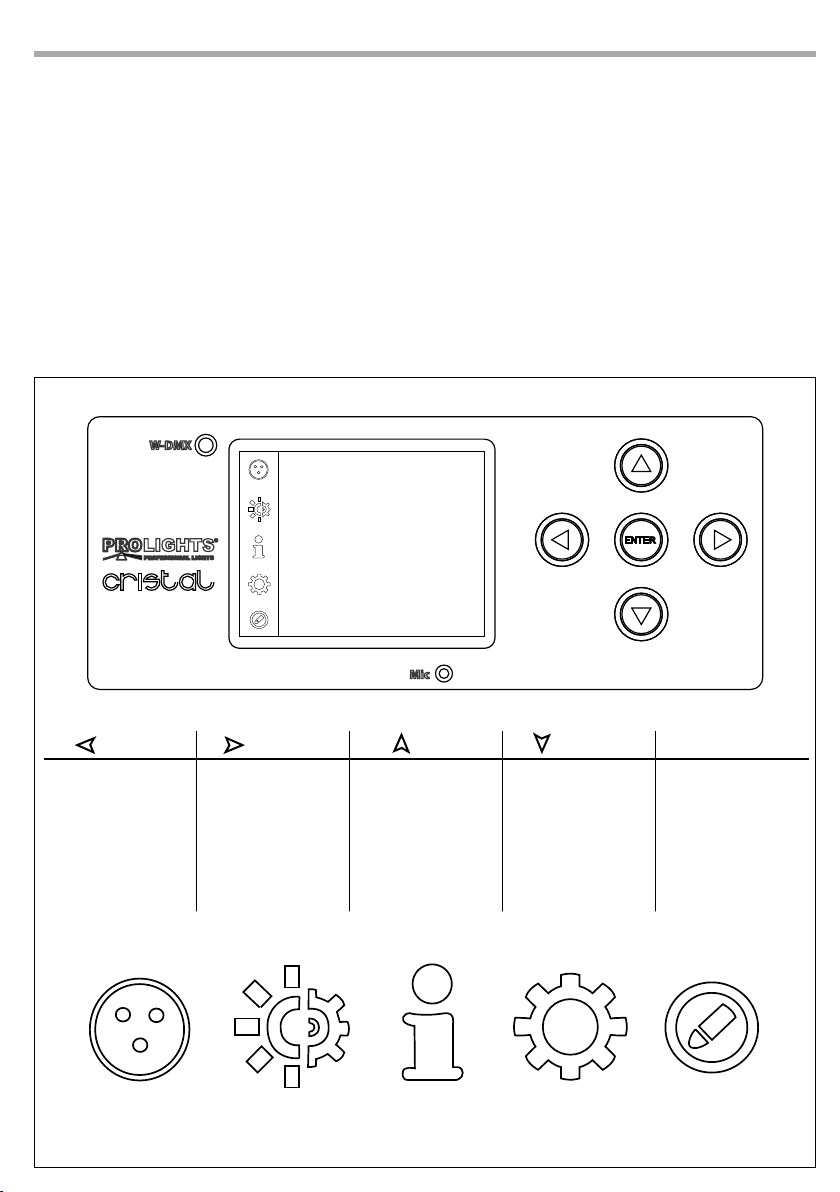
The CRYSTAL has a LCD display and 5 button used to access the control panel functions and manage them
(fig.4).
Fig.4 - Functions of the buttons and display icons
CONNECT LIGHT INFORMATION SET PROGRAM
LEFT RIGHT UP DOWN ENTER
Used to navigates
through settings
value and to exit the
menu or to return a
previous menu option
Used to navigates
through settings
value
Navigates downwards
through the menu
list and increases the
numeric value when
in a function
Navigates upwards
through the menu
list and decreases the
numeric value when
in a function
Used to select and
enter the current
menu or confirm the
current function value
or option within a
menu

CRYSTAL
8
3.3 MENU STRUCTURE
MENU
1Connect ðDMX Address ðValue (1-512)
Wireless DMX ðValue (1-512)
2Light ðMaxTemperature ðValue (60°-130° C)
Lamp Adjust ðControl ðValue (000-255)
Pan ðValue (000-255)
Pan Fine ðValue (000-255)
Tilt ðValue (000-255)
Tilt Fine ðValue (000-255)
Pan&Tilt Speed ðValue (000-255)
Pan&Tilt Fun ðValue (000-255)
Shutter Fun ðValue (000-255)
Shutter ðValue (000-255)
Dimmer ðValue (000-255)
Color1 Fun ðValue (000-255)
Color1 ðValue (000-255)
Gobo1 Fun ðValue (000-255)
Gobo1 ðValue (000-255)
Gobo1 Rot. Fun ðValue (000-255)
Gobo1 Rot. ðValue (000-255)
Prism ðValue (000-255)
Focus ðValue (000-255)
3Information ðTime Info.
Temperature
Fans Speed
Channel Value
Error Message
Fixture Model
Software Ver.
4Set ðReset ðAll
Pan & Tilt
Colors
Gobos
Others
Indice
Lingue:
Altri manuali Tribe Attrezzatura per DJ

Tribe
Tribe LUMIPIX9UHE Manuale utente

Tribe
Tribe JETSPOT3 Manuale utente

Tribe
Tribe BATGOBOIR Manuale utente

Tribe
Tribe JETBEAM1 Manuale utente

Tribe
Tribe JETSPOT4Z Manuale utente

Tribe
Tribe FLATPAR3H Manuale utente

Tribe
Tribe LUMIPAR12UAW Manuale utente

Tribe
Tribe LUMIPAR12UH3P Manuale utente

Tribe
Tribe SUNRISE2 Manuale utente

Tribe
Tribe LUMIPAR 12UQ PRO Manuale utente