
Uniden BTS200 Manuale utente
BTS200
High Denition Bluetooth®
Speaker with Mobile Charger
For more exciting new products please visit our website:
Australia: www.uniden.com.au
New Zealand: www.uniden.co.nz
is a trademark of SRS Labs, Inc.
WOW HD technology is incorporated under license from SRS Labs, Inc.
BTS200 OM.indd 1 10/8/11 12:32:14 PM
2
Important Safety Instructions
Do not use this product near water, for example, near a bath tub, wash bowl, kitchen sink or laundry tub, in a wet basement or•
near a swimming pool.
Do not use this product while driving.•
Use only the power cord indicated in this manual. Do not expose the device to ames or dispose of it in a re: the battery may•
explode. Check with local authorities for possible battery disposal instructions.
Do not disassemble, modify, or attempt to repair any component of this product.•
Check the laws and regulations on the use of mobile phones and hands-free equipment in the areas where you drive. Always give•
full attention to driving and pull o the road and park before making or answering a call if driving conditions require.
SAVE THESE INSTRUCTIONS!
is a trademark of SRS Labs, Inc.
WOW HD technology is incorporated under license from SRS Labs, Inc.
BTS200 OM.indd 2 10/8/11 12:32:14 PM

3
Table of Contents
Important Safety Instructions .......................2
BTS200 HIGH-DEFINITION
SPEAKER ...............................................4
What’s in the Box?...............................................5
SET UP YOUR BTS200 SPEAKER .............5
Install the Battery................................................5
Charge the Battery .............................................5
Turn on Your Speaker ........................................6
Pair Bluetooth Devices to Your Speaker......6
GETTING TO KNOW THE BTS200
SPEAKER ...............................................8
BTS200 Top/Front................................................8
BTS200 Side...........................................................9
BTS200 Back....................................................... 10
BTS200 SPEAKER OPERATION .............12
Basic Mobile Phone Operations..................12
Basic Music Operation....................................15
SPECIAL FEATURES ...............................16
Charge Mobile Phone using
a USB Cable .................................................. 16
Play Music through a
Wired Connection ......................................16
Manage SRS WOW HD™ On/O..................17
TROUBLESHOOTING.............................18
Reset your BTS200 Speaker..........................19
Battery Features................................................20
SPECIFICATION......................................21
Bluetooth Compatibility................................ 21
Safety and Handling Information .......21
Two-Year Limited Warranty..................22
BTS200 OM.indd 3 10/8/11 12:32:14 PM

4
BTS200 HIGH-DEFINITION SPEAKER
Uniden’s BTS200 high denition Bluetooth speaker provides clear stereo sound in a
compact, portable package. With Bluetooth V2.1 compatibility, the BTS200 pairs with
your Mobile phone to become a speakerphone for hands free conversations. You can also
connect your music player (wired or wireless) for crisp, clear audio. Charge your mobile
phone if it can be charged via a USB cable (not included).
Bluetooth V2.1 + EDR.•
Up to 2 Bluetooth devices can be paired with your speaker*.•
Supporting A2DP/AVRCP/HFP proles.•
A2DP: Advanced Audio Distribution Prole-
AVRCP: Audio/Video Remote Control Prole-
HFP: Hands Free Prole-
Rechargeable Lithium-Ion polymer battery.•
Portable•
Up to 5 hours of play from a fully-charged battery.•
Call Waiting feature•
Mute feature•
SRS WOW HD•™ : Available when playing music through a 3.5 mm minijack cable (not
included) connection.
*The Bluetooth Speaker can store pairing information for two devices but only one device can be
connected at a time.
The BTS200 speaker is not a data storage device; do not attempt to copy les to it.
BTS200 OM.indd 4 10/8/11 12:32:14 PM

5
What’s in the Box?
BTS200 Speaker•
AC Adaptor (PS-S05F0BL2)•
Lithium-Ion polymer battery (BT-1026)•
SET UP YOUR BTS200 SPEAKER
Install the Battery
Remove the battery from any protective packaging and discard the packaging1.
accordingly.
Align the battery pack with the guides along the inside of the battery area. Be sure the2.
contact slots are in the correct position to close on the contacts.
Slide the battery in until you hear the latch click.3.
Charge the Battery
Insert the adapter’s DC jack into the DC connection.1.
Plug the adapter into a 240 VAC power supply (standard wall outlet).2.
The middle LED lights to indicate the battery is charging. It goes o when charging is3.
complete.
Your battery must be fully charged (more than 7.5 hours) before you can use your speaker.
BTS200 OM.indd 5 10/8/11 12:32:14 PM
6
Turn on Your Speaker
When you turn on your speaker for the rst time, it automatically goes into pairing mode.
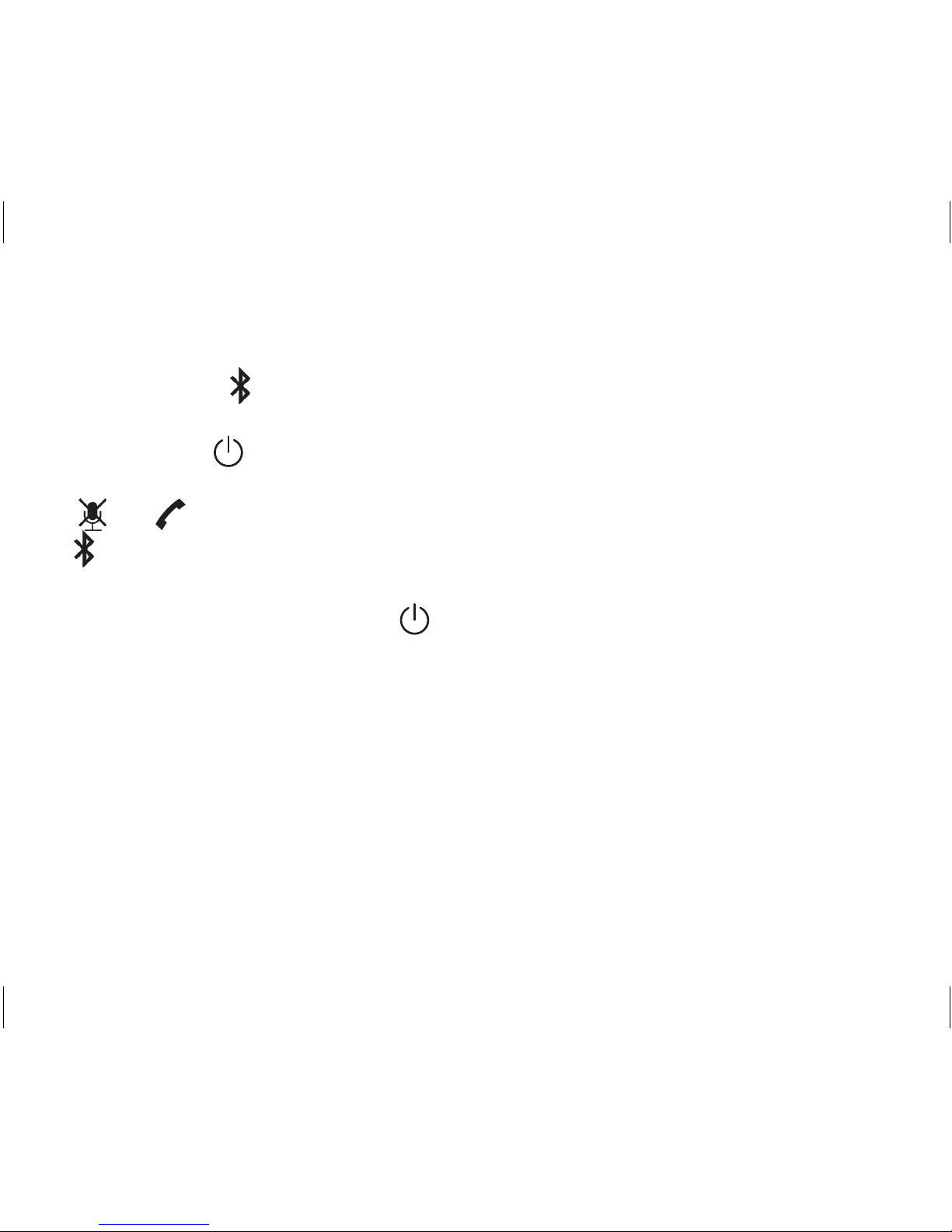
The Bluetooth LED ( ) ashes rapidly and is ready to pair (see p. 7). The next time you turn
on your speaker, it searches for already paired devices and then moves into a standby state.
Press and hold1. for at least 3 seconds.
All LEDs light and a power on tone sounds.2.
3. and LEDs go out.
4. ashes slowly while looking for Bluetooth devices. It remains steady on when
Bluetooth devices are discovered; otherwise, it goes out.
To turn o the speaker: Press and hold for at least 3 seconds.
Pair Bluetooth Devices to Your Speaker
Pair First Bluetooth Device
Pair your rst Bluetooth device to your speaker when you turn your speaker on for the rst
time. Be sure your speaker is in pairing mode when you pair your second Bluetooth device
(see step 1-2 of ‘Pair Second Bluetooth Device’ below).
Select a Bluetooth V2.1 or above device (mobile phone or music player) to pair.1.
BTS200 OM.indd 6 10/8/11 12:32:14 PM

7
Select the2. Searching mode on your Bluetooth device (refer to your Bluetooth device’s
owner’s manual for details if necessary).
Your Bluetooth device should nd3. BTS200; select it and use 0000 for a pairing code if
necessary.
Verify that you are connected to your speaker. The Bluetooth LED (4. ) moves to a
steady ON state when pairing is complete.
Pair Second Bluetooth Device
Turn on your speaker,1. and continue to press and hold until your speaker beeps
twice.
Release2. . The BTS200 is ready to pair.
Follow the same procedures for pairing your rst Bluetooth device (see above).3.
The Bluetooth Speaker can store pairing information for two devices but only one device can be
connected at a time. To switch between paired devices, disconnect the Bluetooth connection from the
existing device (see manual for your Bluetooth device) and then connect the second device.
BTS200 OM.indd 7 10/8/11 12:32:15 PM
8
GETTING TO KNOW THE BTS200 SPEAKER
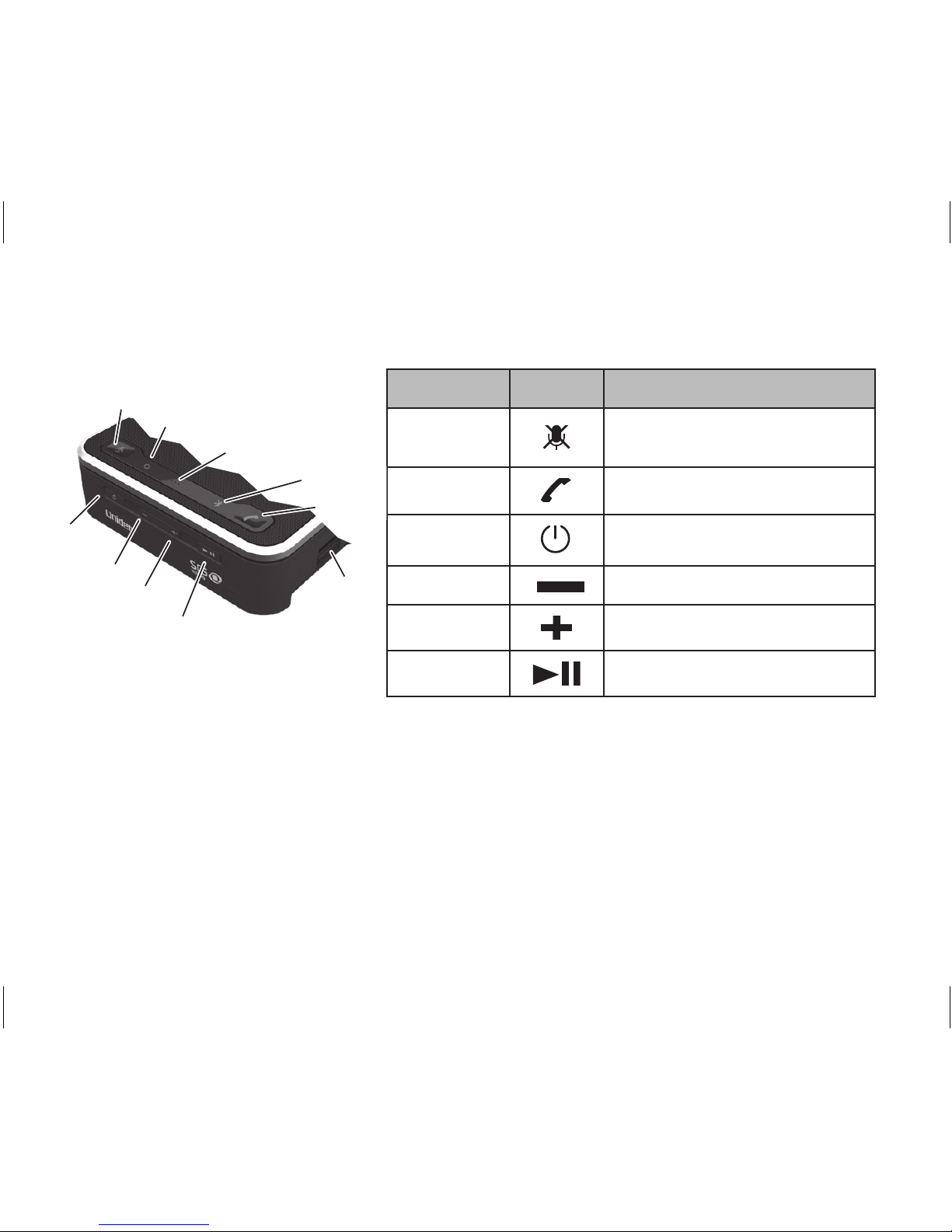
BTS200 Top/Front
Key name Icon Press to ...
MUTE
Mute the microphone on your
speaker during a call.
TALK
Handle phone calls.
POWER
Turn on your BTS200 speaker.
DOWN
Decrease the volume.
UP
Increase the volume.
PLAY/PAUSE
Start, pause, and stop music.
Bluetooth link LED
UP
POWER
Microphone
Battery
Release
MUTE
PLAY/PAUSE
Power LED
DOWN
TALK
BTS200 OM.indd 8 10/8/11 12:32:17 PM
9
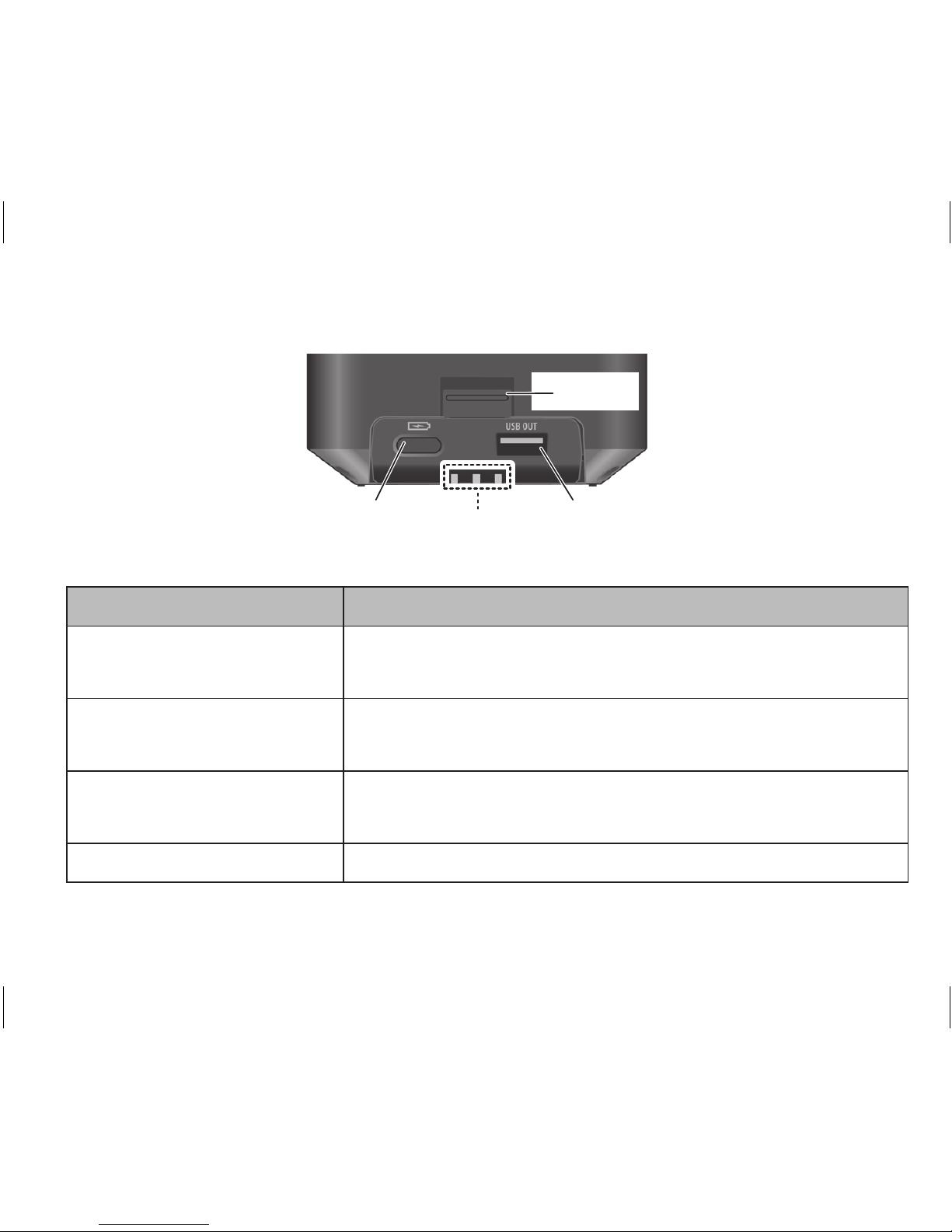
BTS200 Side
Battery release
latch
Battery
indicator
LEDs
USB portBattery
indicator
button
Use this... To...
Battery indicator button Display the level of power left in the battery through the
LEDs.
Battery Indicator LEDs Display the remaining power level when you press the
battery indicator button (see p. 20).
USB port Use the BTS200 battery to charge your mobile phone (see
p. 16).
Battery release latch Unlock the battery for removal.
BTS200 OM.indd 9 10/8/11 12:32:17 PM
10
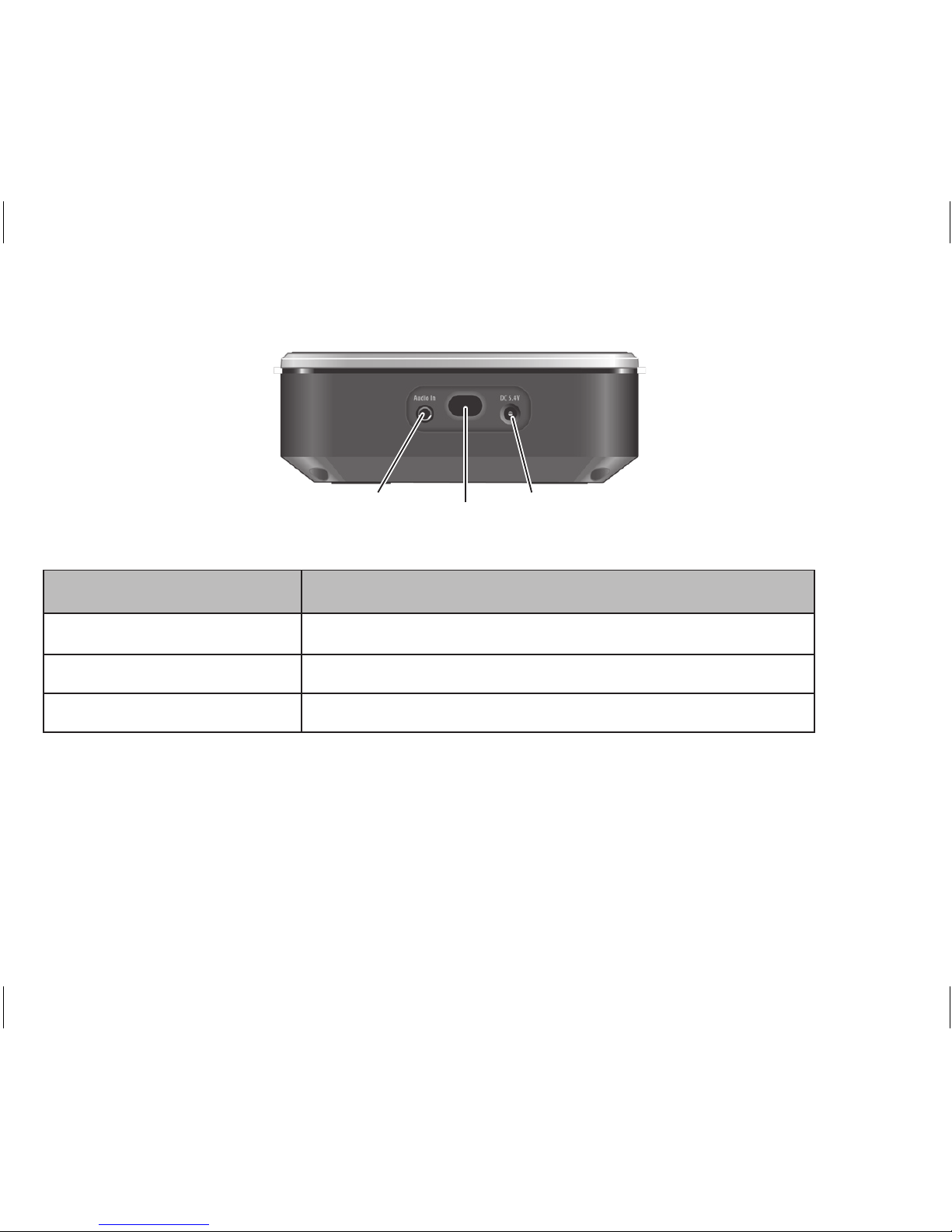
BTS200 Back
Bass
output
3.5mm Audio In
jack
Power
adapter
input
Use this... To...
Audio In Insert the audio cable’s plug.
Bass output Hear the bass sound.
DC 5.4V Insert the power adapter.
BTS200 OM.indd 10 10/8/11 12:32:18 PM
Altri manuali per BTS200
3
Indice
Altri manuali Uniden Altoparlanti

Uniden
Uniden BTS150 Manuale utente

Uniden
Uniden BTS150 Manuale utente

Uniden
Uniden BTS200 Manuale utente

Uniden
Uniden BTS150 Manuale utente

Uniden
Uniden BTS150 Manuale utente

Uniden
Uniden BTS150 Manuale utente

Uniden
Uniden XTRAK 80 Series Manuale utente

Uniden
Uniden BTSC1300 Manuale utente

Uniden
Uniden BC15 Manuale utente


