
Uraku SP1505-SS Manuale utente
HD DVB-T2 SET TOP BOX
USER GUIDE
SP1505-SS
SP1505-SS User Guide
FD Digital Pte Ltd
PAGE 1
V1.2–May 8 2014
IMPORTANT SAFETY INSTRUCTIONS
-The ventilation should not be impeded by covering the ventilation with items, such as
newspapers, table-cloths, curtains, etc.;
-No naked flame sources, such as lighted candles, should be placed on the apparatus;
-Attention should be drawn to the environment aspects battery disposal. Don’t throw used
batteries in dustbin. Please contact your retailer in order to protect the environment;
-Don’t use the apparatus in tropical climates;
-The apparatus shall not be exposed to dripping or splashing and that no objects filled with
liquids, such as vases, shall be placed on the apparatus;
-Where the mains plug is used to as the disconnect device, the disconnect device shall
remain readily operable. The main plug shall remain readily operable;
- Keep minimum distance (5cm) around the apparatus for sufficient ventilation. (Minimum
distance around the apparatus for sufficient ventilation).
- If the electric cable is damaged, it must be replaced by the manufacturer, or by the
qualification persons, in order to avoid a danger.

SP1505-SS User Guide
FD Digital Pte Ltd
PAGE 2
V1.2–May 8 2014
Contents
IMPORTANT SAFETY INSTRUCTIONS................................................................................................ 1
1 Introduction......................................................................................................................................... 4
2 Remote Control................................................................................................................................... 5
2.1 Appearance of Remote Control..................................................................................................... 5
3 Basic functions................................................................................................................................... 7
3.1 First Installation ............................................................................................................................. 7
3.2 TV/RADIO Programs Switch ......................................................................................................... 7
3.3 Channel Switch.............................................................................................................................. 7
3.4 TV & Radio Channel List / FAV List............................................................................................... 7
3.5 Display Information of Programs................................................................................................... 8
3.6 Program Recall.............................................................................................................................. 8
3.7 Multi Audio Language Switch and L/R Channel Switch ................................................................ 8
3.8 Electronic Programs Guide (EPG) ................................................................................................ 9
3.9 Teletext ........................................................................................................................................ 10
3.10 Subtitle........................................................................................................................................11
3.11 REC & Time shift functions.........................................................................................................11
3.11.1 REC (Instant Recording) .................................................................................................................11
3.11.2 Time shift........................................................................................................................................ 12
4 Installation......................................................................................................................................... 13
4.1 Auto Search................................................................................................................................. 14
4.2 Manual Search ............................................................................................................................ 14
4.3 Channel Filter .............................................................................................................................. 15
4.4 Country........................................................................................................................................ 15
4.5 LCN (Logical Channel Numbering) ............................................................................................. 15
4.6 Active Antenna............................................................................................................................. 15
5 Channel.............................................................................................................................................. 16
5.1 Channel Manager........................................................................................................................ 16
5.2 Favorite List................................................................................................................................. 17
6 Preference Setting............................................................................................................................ 19
6.1 OSD Language............................................................................................................................ 19
6.2 OSD Timeout............................................................................................................................... 19
6.3 OSD Transparency...................................................................................................................... 19
6.4 Preferred Subtitle......................................................................................................................... 19
6.5 Hard Hearing............................................................................................................................... 20

SP1505-SS User Guide
FD Digital Pte Ltd
PAGE 3
V1.2–May 8 2014
6.6 Preferred Audio............................................................................................................................ 20
6.7 PVR Configuration....................................................................................................................... 20
7 System Setting.................................................................................................................................. 22
7.1 Timers.......................................................................................................................................... 22
7.2 Child Lock.................................................................................................................................... 24
7.3 Date Time.................................................................................................................................... 24
7.4 Factory Reset .............................................................................................................................. 25
7.5 Upgrade....................................................................................................................................... 25
7.5.1 USB/Card Upgrade.......................................................................................................................... 25
7.5.2 OTA Upgrade ................................................................................................................................... 25
7.6 Version......................................................................................................................................... 25
7.7 Auto Standby ............................................................................................................................... 25
8 Audio / Video Setting........................................................................................................................ 26
8.1 SPDIF.......................................................................................................................................... 26
8.2 Aspect Ratio ................................................................................................................................ 26
8.3 Video Output................................................................................................................................ 26
8.4 Video Resolution ......................................................................................................................... 27
8.5 HDMI Audio ................................................................................................................................. 27
9 Multi-Media........................................................................................................................................ 27
9.1 Media Selection Mode................................................................................................................. 27
9.2 Movie........................................................................................................................................... 27
9.2.1 Movie File Browser........................................................................................................................... 28
9.2.2 Movie Playback................................................................................................................................ 28
9.3 Music ........................................................................................................................................... 28
9.4 Photo ........................................................................................................................................... 29
9.5 Record Manager.......................................................................................................................... 30
9.5.1 Recorder Manager Browser............................................................................................................. 30
9.5.2 Rename ........................................................................................................................................... 30
9.6 Disk Manager .............................................................................................................................. 31
9.6.1 Disk Manager Browser..................................................................................................................... 31
10 Software Upgrade........................................................................................................................... 31
10.1 USB Upgrade ............................................................................................................................ 32
11 Specifications ................................................................................................................................. 33
SP1505-SS User Guide
FD Digital Pte Ltd
PAGE 4
V1.2–May 8 2014
1 Introduction
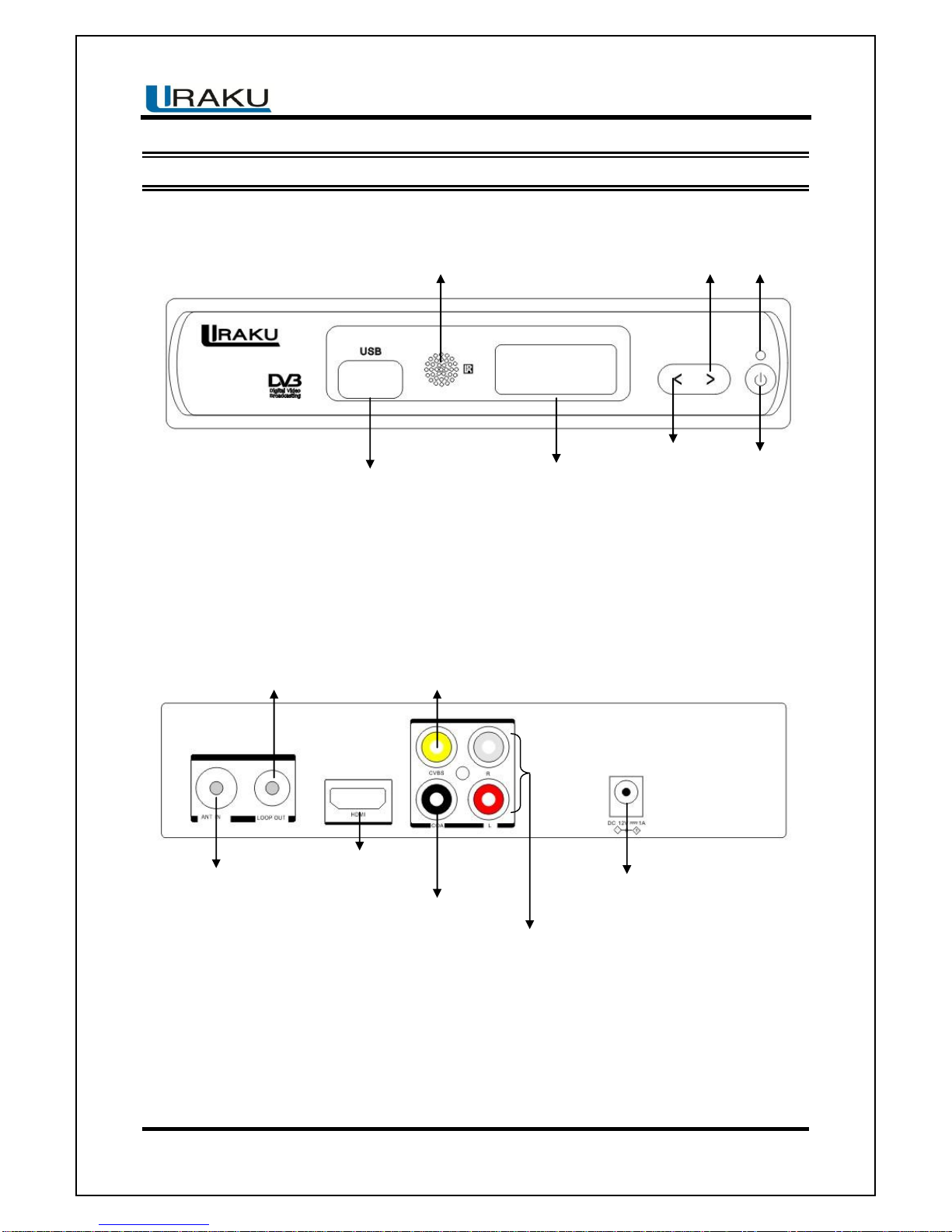
Front Panel
Rear Panel
USB Host
Remote Sensor
Display
Left Button
Power Button
Right Button
Power Indicator
DC 12V Input Jack
Down Mix Audio L & R
Coaxial Digital Audio
HDMI Video
TV Aerial Input
RF Loop out
Composite Video

SP1505-SS User Guide
FD Digital Pte Ltd
PAGE 5
V1.2–May 8 2014
2 Remote Control
2.1 Appearance of Remote Control
Photograph
Key
Function
POWER
Switch On/Off power supply
MUTE
Mute control
RED
Depend on OSD Hints
GREEN
Depend on OSD Hints
YELLOW
Depend on OSD Hints
BLUE
Depend on OSD Hints
REPEAT
Set repeat mode
SUB
Switch the different language of subtitle
TTX
Teletext
AD
Switch the audio description on / off
FR
Fast play backward while media playing
FF
Fast forward while media playing
PREV / NEXT
Play previous/next of Media in USB storage
PLAY / PAUSE
Play/ Replay/ Pause media
STOP
Stop playing media
1)Return to upper menu
2)Press “recall” while watching TV to recall previously
viewed channel
AUDIO
Press to set audio mode / press to select Language
EPG
Go to TV Program Guide
INFO
1)Display information of programs
2)Display corresponding extended information at
TV Guide state
PAGE +/ -
Page Up/Down in Teletext
OK
OK key to confirm one setting
SP1505-SS User Guide
FD Digital Pte Ltd
PAGE 6
V1.2–May 8 2014
Navigation keys: UP
/DOWN/ LEFT / RIGHT
Navigation keys to move up, down, left & right &
press
MENU
To display main menu, press again to exit current
menu
EXIT
Exit from current Menu, Back to previous menu
without saving. During multimedia playback, go back
to previous TV program.
VOL + / -
Volume adjusting
USB
Go to USB Media
REC
Enter REC menu
CH+ / -
Select previous / next channel
NUMBER 0 - 9
Numeric keys: for inputs of numbers or selecting a
TV channel
FAV
Go to Favorite List
TV/RADIO
Press to switch between TV & Radio program

SP1505-SS User Guide
FD Digital Pte Ltd
PAGE 7
V1.2–May 8 2014
3 Basic functions
3.1 First Installation
If you are using the unit for the first time or have restored the unit to Factory Default, the
installation Guide Menu will appear on your TV screen. Follow each of the option of the
Installation Menu to setup your preferred menu languages and suitable country (Region) etc.
First installation shall setup some important settings.
Use the arrow keys on the remote control to select your preferred Language, Country, Time
Zone, LCN, then select Start Search.
3.2 TV/RADIO Programs Switch
Press “TV/RADIO” to switch between Digital TV programs and Digital Radio programs when
watching TV.
3.3 Channel Switch
Press CH+/CH- to switch to the previous or next program.
Press number keys to input program number.
3.4 TV & Radio Channel List / FAV List
Press “OK” to switch to the channel program list, press “LEFT/RIGHT” to select different
program column (All Channels, Fav1, Fav2, Fav3 & Fav4), press “UP/DOWN” to select
program item.

SP1505-SS User Guide
FD Digital Pte Ltd
PAGE 8
V1.2–May 8 2014
Press “OK” to confirm program selection, press “EXIT” to exit the program list.
If there are some favorite programs that been set up, just press “LEFT/RIGHT” key to enter
into the favorite program list:
Press “UP/DOWN” to select favorite program, press “OK” to confirm the selection, press
“RECALL” to return to previous menu.
3.5 Display Information of Programs
Press “INFO” to show the information of current programs when it is in normal playing state.
Press again “INFO” to show more detail of the TV program information.
3.6 Program Recall
Press “RECALL” under state of full-screen to return to the previous played program.
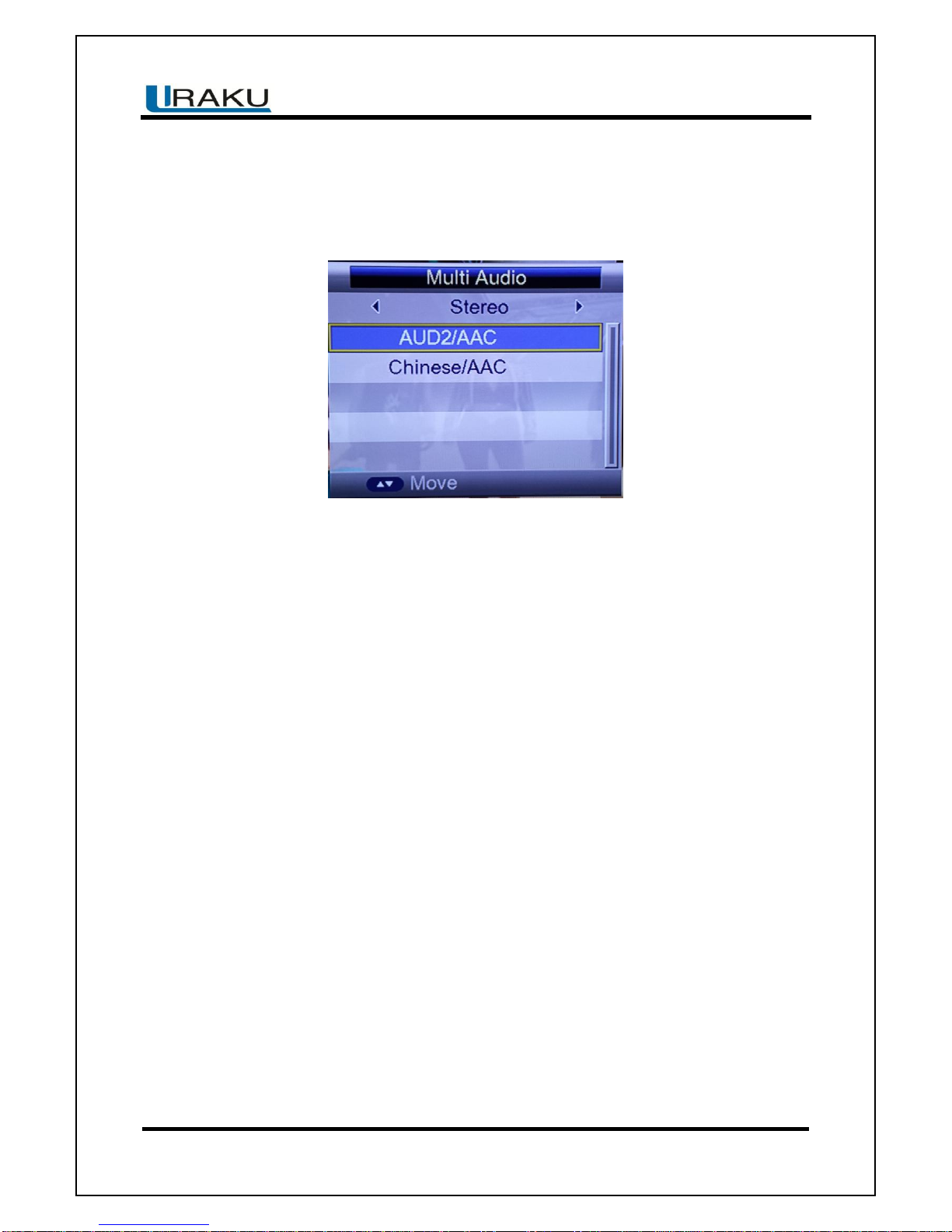
3.7 Multi Audio Language Switch and L/R Channel Switch
The program might have multilingual audio languages and the audio broadcast on different
audio mode such as Stereo, left or Right. All the available audio languages will be displayed
while you press “AUDIO” key.
SP1505-SS User Guide
FD Digital Pte Ltd
PAGE 9
V1.2–May 8 2014
The screenshot is illustrated as below. If there is no audio output after you select the audio
language, it indicates that there is no audio on the current audio mode, so you have to select
preferable audio mode.
1. Press “AUDIO” to switch the language of sound of current programs and switch among
“Stereo”“Left”“Right” (StereoLeft channelRight channel).
2. Press “LEFT/RIGHT” to switch among “stereo”“left”“right”(stereoleft channelright
channel), press “UP/DOWN” to switch the language of sound.
3. Press “OK” to confirm the selection and press “EXIT” to return to full-screen play mode
and save the setting.
3.8 Electronic Programs Guide (EPG)
1. You can press “EPG” on the remote control to enter into the EPG page to know more
about the programs to be played.
Enter into EPG mode menu default enter is Daily Mode, menu under this mode contain 7
parts:
Indice


