
Watlow Electric RUI/Gateway Manuale utente
RUI/Gateway & Modbus®TCP
Configuration & Programming Example
Using KEPServerEX 4.0
Watlow
1241 Bundy Blvd
Winona, MN 55987
Telephone: 507-494-5656
© 2008 Watlow Electric Mfg Co 1 FM 4/08
Configuring the EZ-ZONE®RUI/Gateway
1. This White Paper is not meant to be an exhaustive step-by-step discussion in configuring the
RUI/Gateway, for this work has already been done in two other published EZ-ZONE®user
manuals. For instance, if needing assistance in setting the RUI/Gateway IP (Internet Protocol)
address or if you are simply looking for general information pertaining to Modbus®TCP as it is
used with EZ-ZONE®controls point your internet browser to the Watlow website
(http://www.watlow.com) and download the EZ-ZONE®PM Communications user manual and
or the EZ-ZONE®RUI/Gateway user manual.
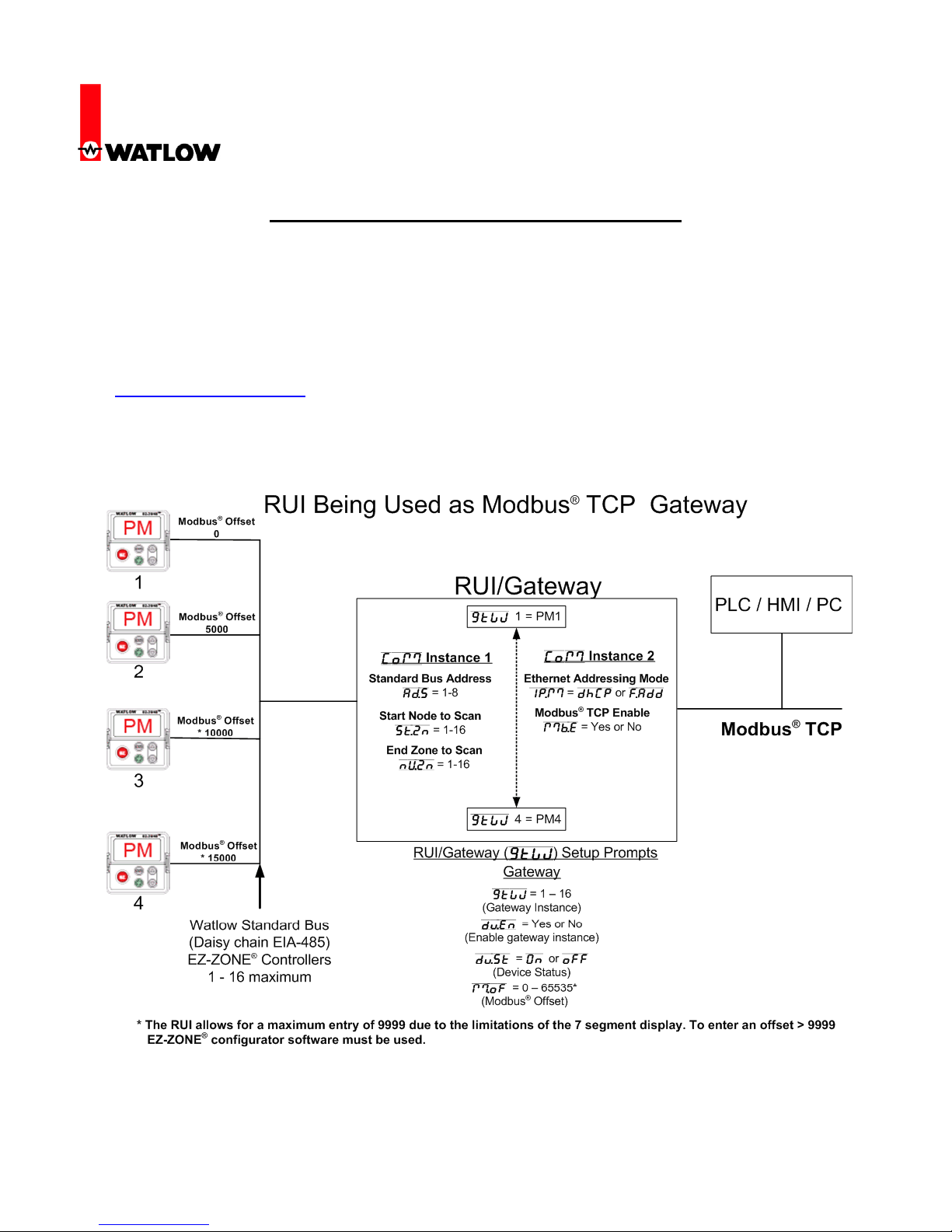
2. Prior to looking closer at the RUI/Gateway configuration prompts let’s first take a look at the
network in use.
RUI/Gateway & Modbus®TCP
Configuration & Programming Example
Using KEPServerEX 4.0
Watlow
1241 Bundy Blvd
Winona, MN 55987
Telephone: 507-494-5656
© 2008 Watlow Electric Mfg Co 2 FM 4/08
3. Some notables regarding the graphic above. In the steps that follow we are going to focus on
four of the prompts shown: a. Modbus®Enable (Mb;E) b. Gateway instance (GTW)
c. Gateway enable (du;En) d. Modbus®offset (M;oF)
4. Notice in the graphic in step 2 that the RUI/Gateway has 2 “Com” instances. Com instance 1
will always be Standard Bus and Com instance 2 will always be the user protocol of choice, in
this case, Modbus®TCP. This protocol when ordered also comes standard with EtherNet/IPTM
(Industrial Protocol) as well. When setting the prompts for Com instance 2 you must first
enable Modbus®TCP, EtherNet/IPTM or both. For the purpose of this paper the prompt
displayed as Mb;E will be set to yes (Modbus®TCP enabled). If a step-by-step example is
needed to fully configure the RUI/Gateway refer to step one and download the appropriate
user manual.
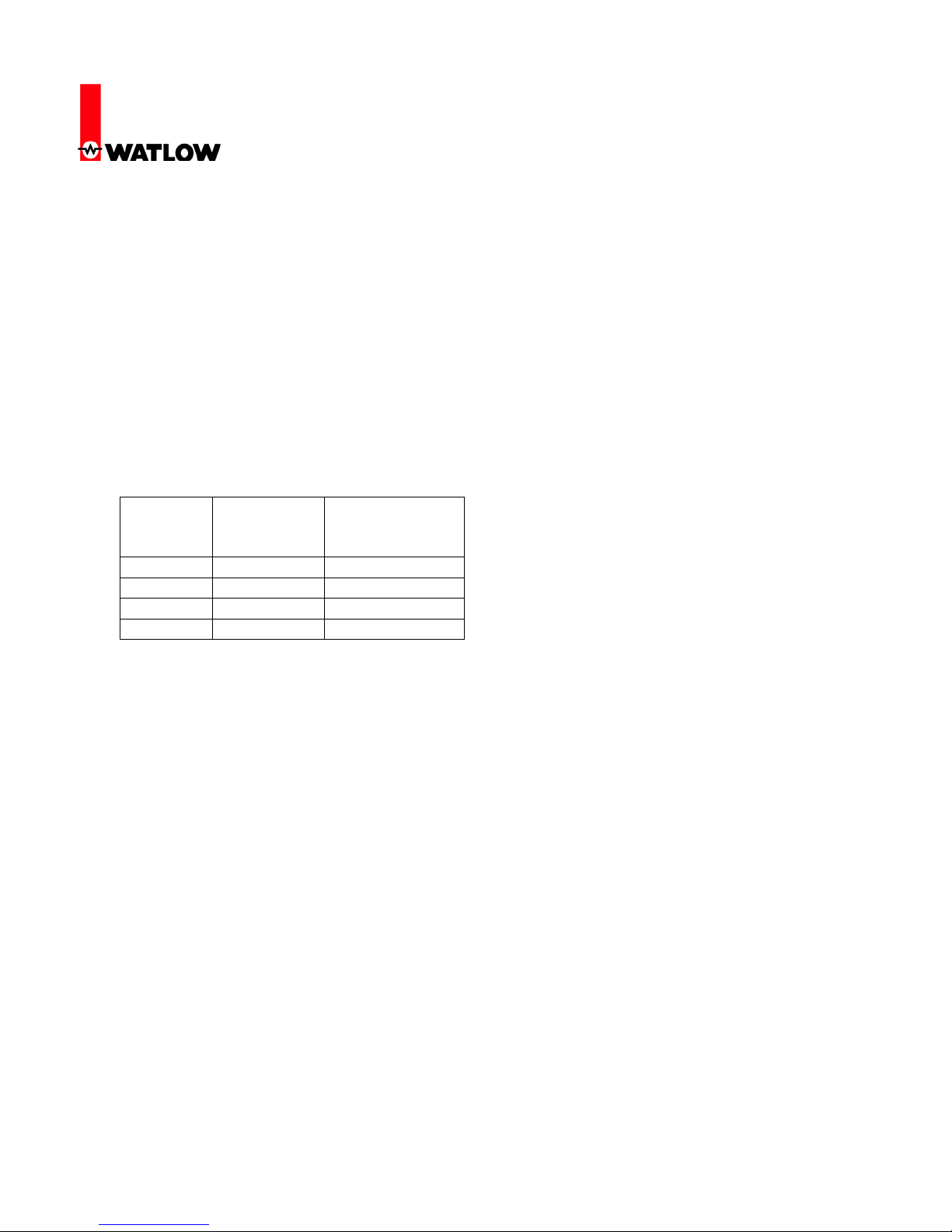
5. To implement the network shown in step two the following settings will need to be entered:
Further explanation of these prompts and their associated enumerated values will follow.
6. After completing the configuration as shown above as well as your Com 1 settings for the
Standard Bus side this will complete the RUI/Gateway configuration.
7. Note that KEPServerEX is one of many software packages on the market today that include
the Modbus®TCP driver; this procedure is for KEPServerEX.
8. The following screen shots capture a step-by-step procedure to successfully establish
Communications between the computer (PC) running KEPServerEX and the EZ-ZONE®
RUI/Gateway (Com instance 2) over Modbus®TCP. Once communications are established
over Com instance 2 we will then look further at the KEPServerEX configuration that will
enable communications through the RUI/Gateway to Com instance 1 and the EZ-ZONE®PM
controls (1 - 4) over Standard Bus; thereby establishing a live and active communications link
between dissimilar networks.
Gateway
Instance
Enable
Gateway
Instance
Modbus®
Offset
GTW = 1 Du;En = Yes M;oF = 0
GTW = 2 Du;En = Yes M;oF = 5000
GTW = 3 Du;En = Yes M;oF = *10000
GTW = 4 Du;En = Yes M;oF = *15000
* The RUI allows for a maximum entry of 9999 due to the limitations of the 7 segment display. To enter
an offset > 9999 EZ-ZONE®configurator software must be used.

RUI/Gateway & Modbus®TCP
Configuration & Programming Example
Using KEPServerEX 4.0
Watlow
1241 Bundy Blvd
Winona, MN 55987
Telephone: 507-494-5656
© 2008 Watlow Electric Mfg Co 3 FM 4/08
9. Provide a name for the channel.
10. In this example the device driver selected will be “Modbus Ethernet”.
RUI/Gateway & Modbus®TCP
Configuration & Programming Example
Using KEPServerEX 4.0
Watlow
1241 Bundy Blvd
Winona, MN 55987
Telephone: 507-494-5656
© 2008 Watlow Electric Mfg Co 4 FM 4/08
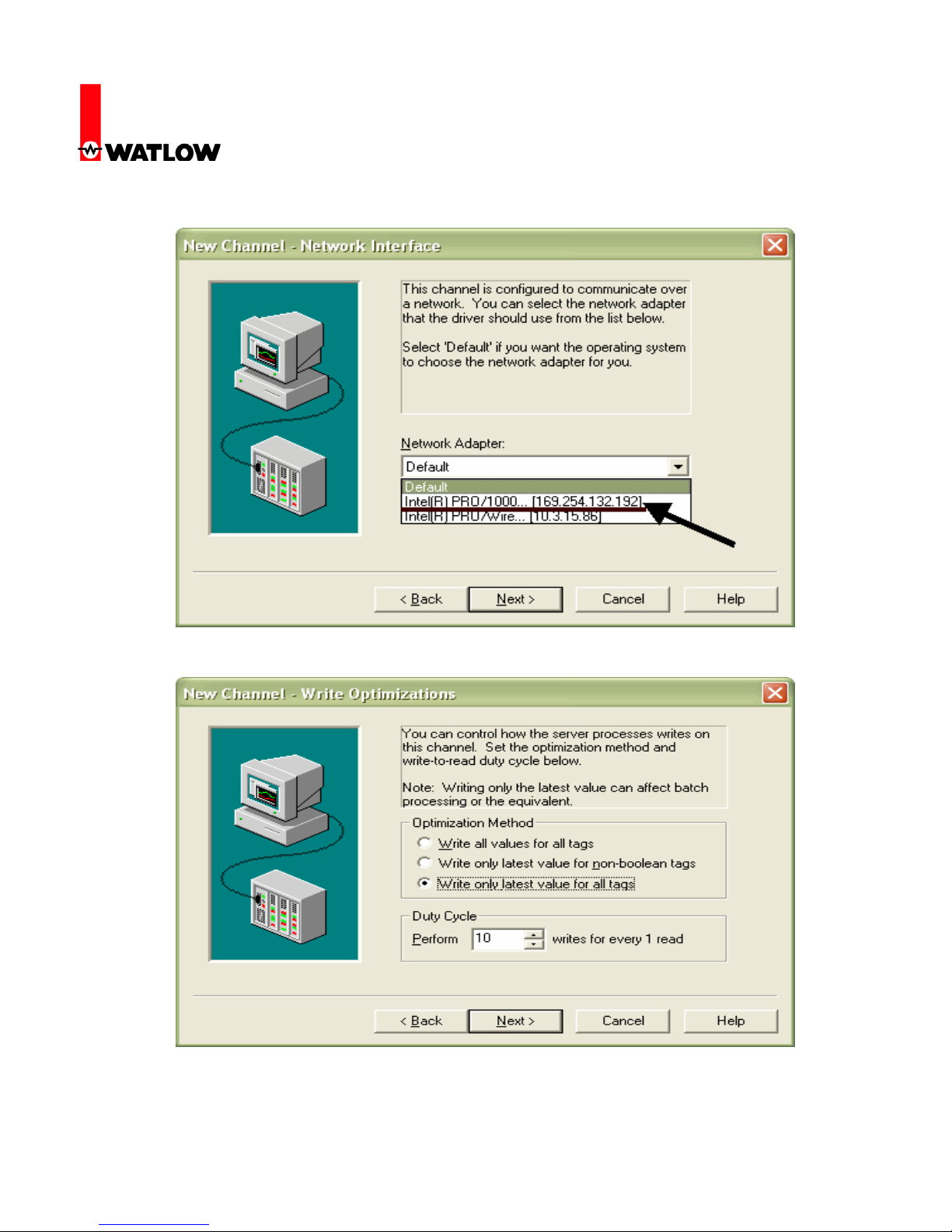
11. Select the appropriate hardware (network adapter) used on the network.
12. Next, select the appropriate write optimization method.
RUI/Gateway & Modbus®TCP
Configuration & Programming Example
Using KEPServerEX 4.0
Watlow
1241 Bundy Blvd
Winona, MN 55987
Telephone: 507-494-5656
© 2008 Watlow Electric Mfg Co 5 FM 4/08
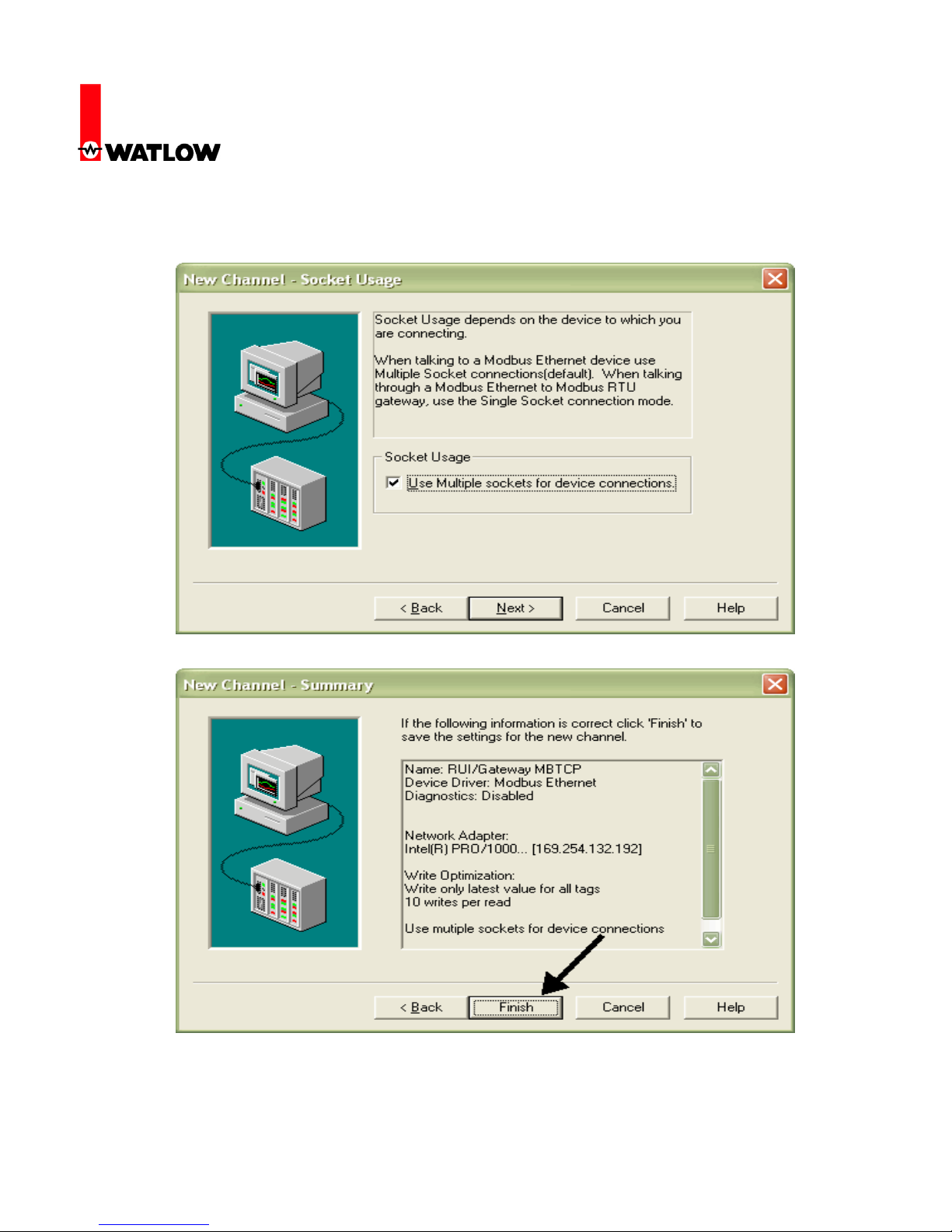
13. The next selection allows for multiple masters on the network. When multiple masters exist on
a network talking (reading & writing) to the same slaves, possible conflicts between masters
can exist when performing a write operation.
14. Click finish to complete this part of the configuration.
RUI/Gateway & Modbus®TCP
Configuration & Programming Example
Using KEPServerEX 4.0
Watlow
1241 Bundy Blvd
Winona, MN 55987
Telephone: 507-494-5656
© 2008 Watlow Electric Mfg Co 6 FM 4/08
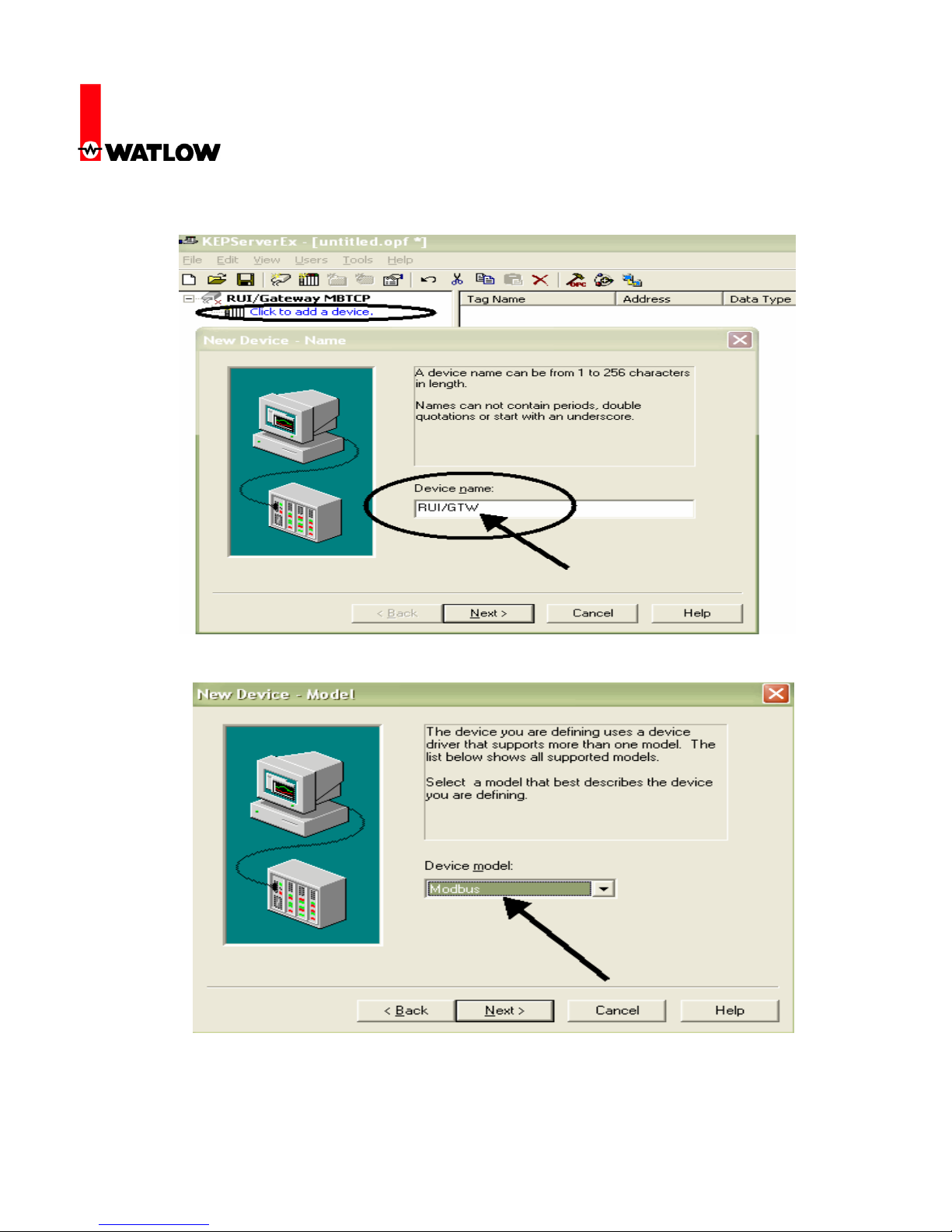
15. Once the channel configuration is complete it is now time to configure a device
(RUI/Gateway).
16. Select the Modbus®driver.
RUI/Gateway & Modbus®TCP
Configuration & Programming Example
Using KEPServerEX 4.0
Watlow
1241 Bundy Blvd
Winona, MN 55987
Telephone: 507-494-5656
© 2008 Watlow Electric Mfg Co 7 FM 4/08
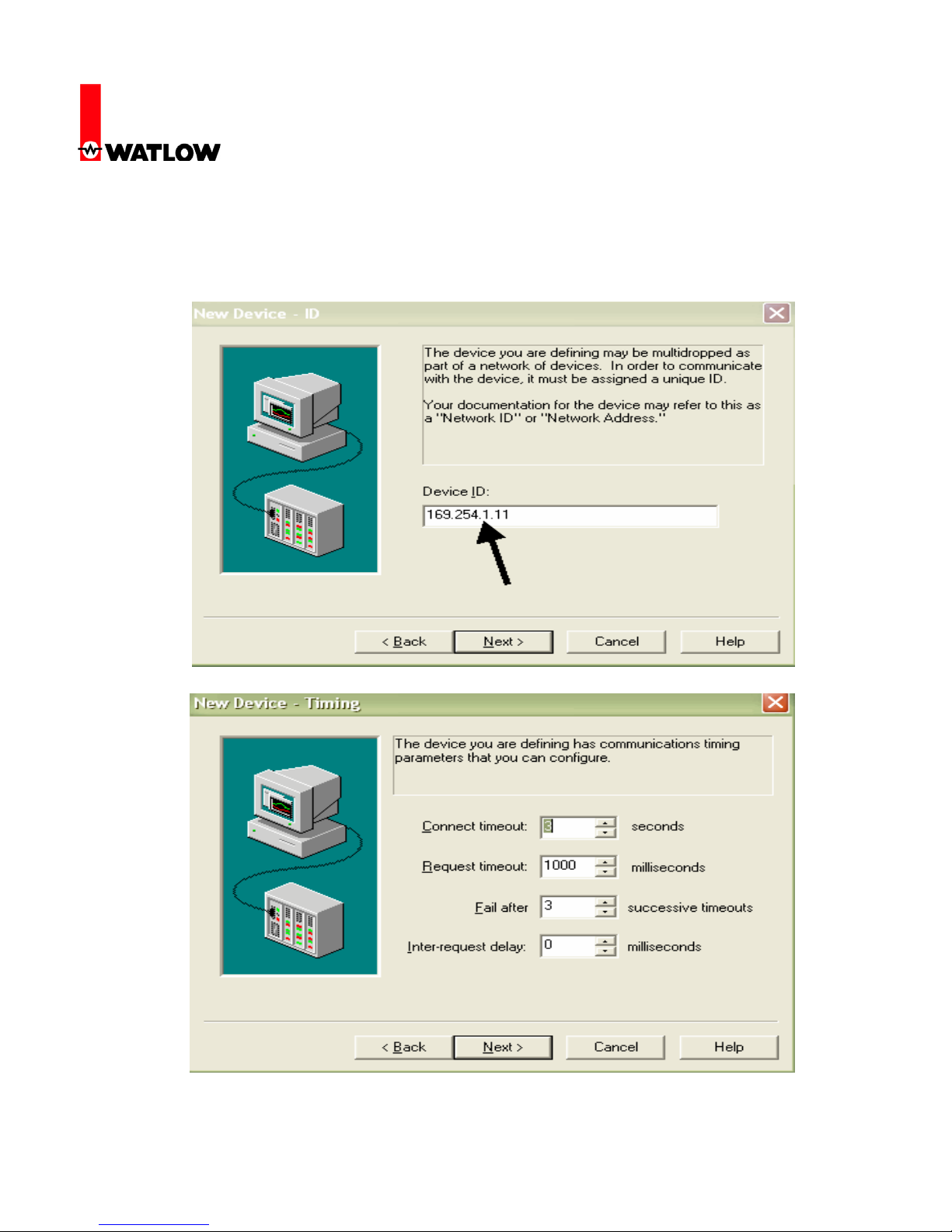
17. Recall that in steps 1-3 it was said that there are other configuration steps that need to be
addressed that are not covered in this paper. As an example of those parameters that need to
be set on the RUI/Gateway we see the IP address coming into focus. Enter the Modbus®
TCP/IP address of the RUI/Gateway.
18. Set timing according to your network requirements.
RUI/Gateway & Modbus®TCP
Configuration & Programming Example
Using KEPServerEX 4.0
Watlow
1241 Bundy Blvd
Winona, MN 55987
Telephone: 507-494-5656
© 2008 Watlow Electric Mfg Co 8 FM 4/08
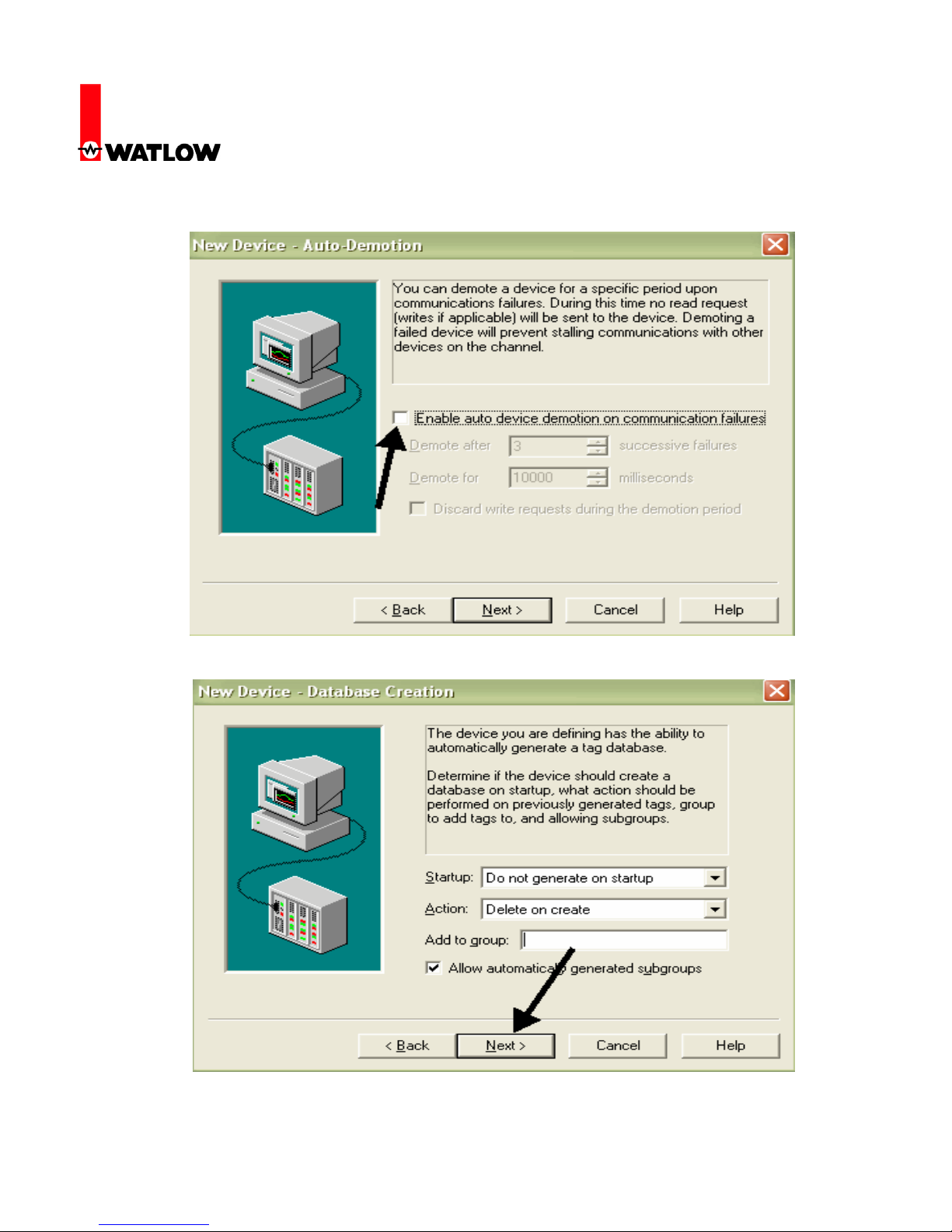
19. If communications fail between KEPServerEX and RUI/Gateway stop polling device.
20. Generate unique input / output (I/O) tags for the RUI/Gateway.
RUI/Gateway & Modbus®TCP
Configuration & Programming Example
Using KEPServerEX 4.0
Watlow
1241 Bundy Blvd
Winona, MN 55987
Telephone: 507-494-5656
© 2008 Watlow Electric Mfg Co 9 FM 4/08
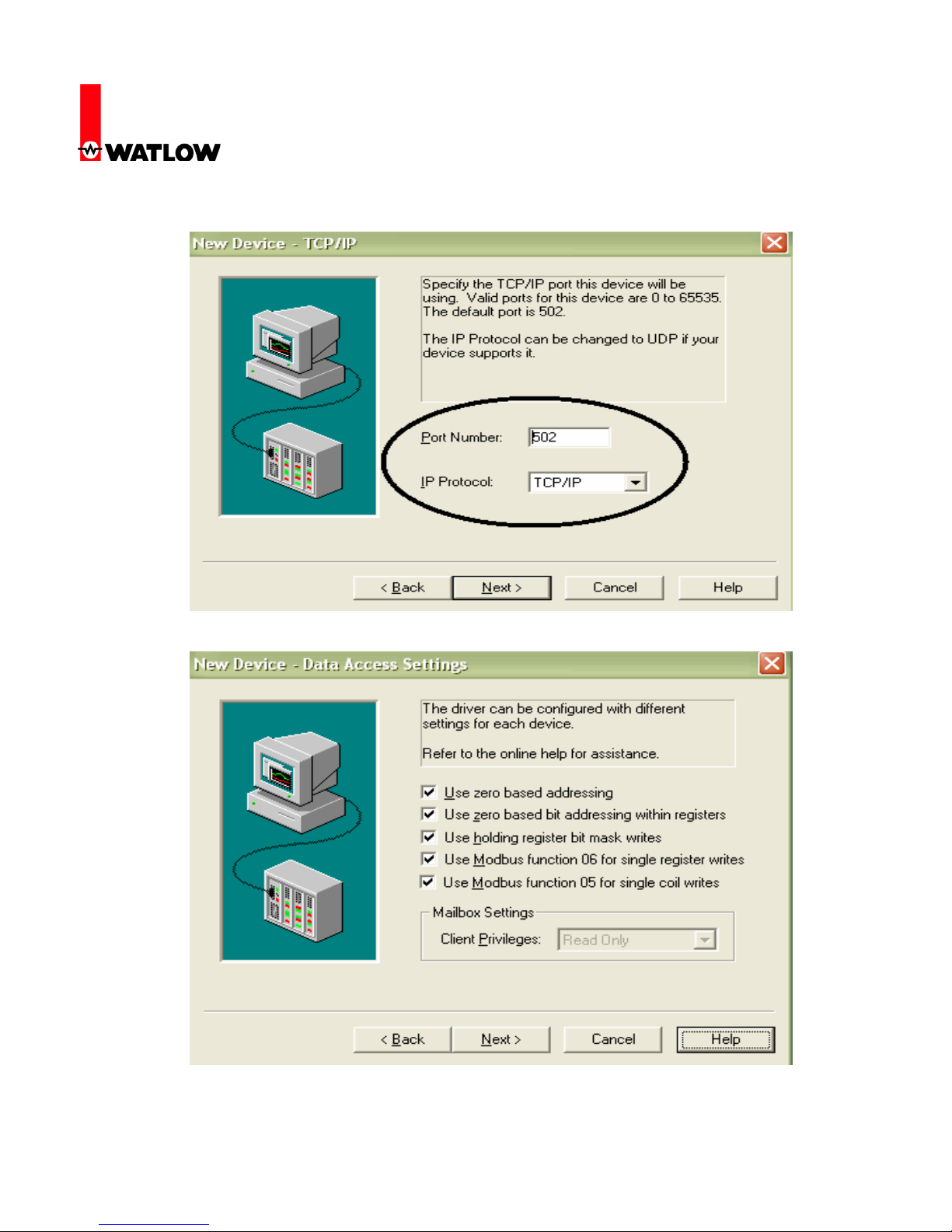
21. Use the defaults for port number and IP protocol.
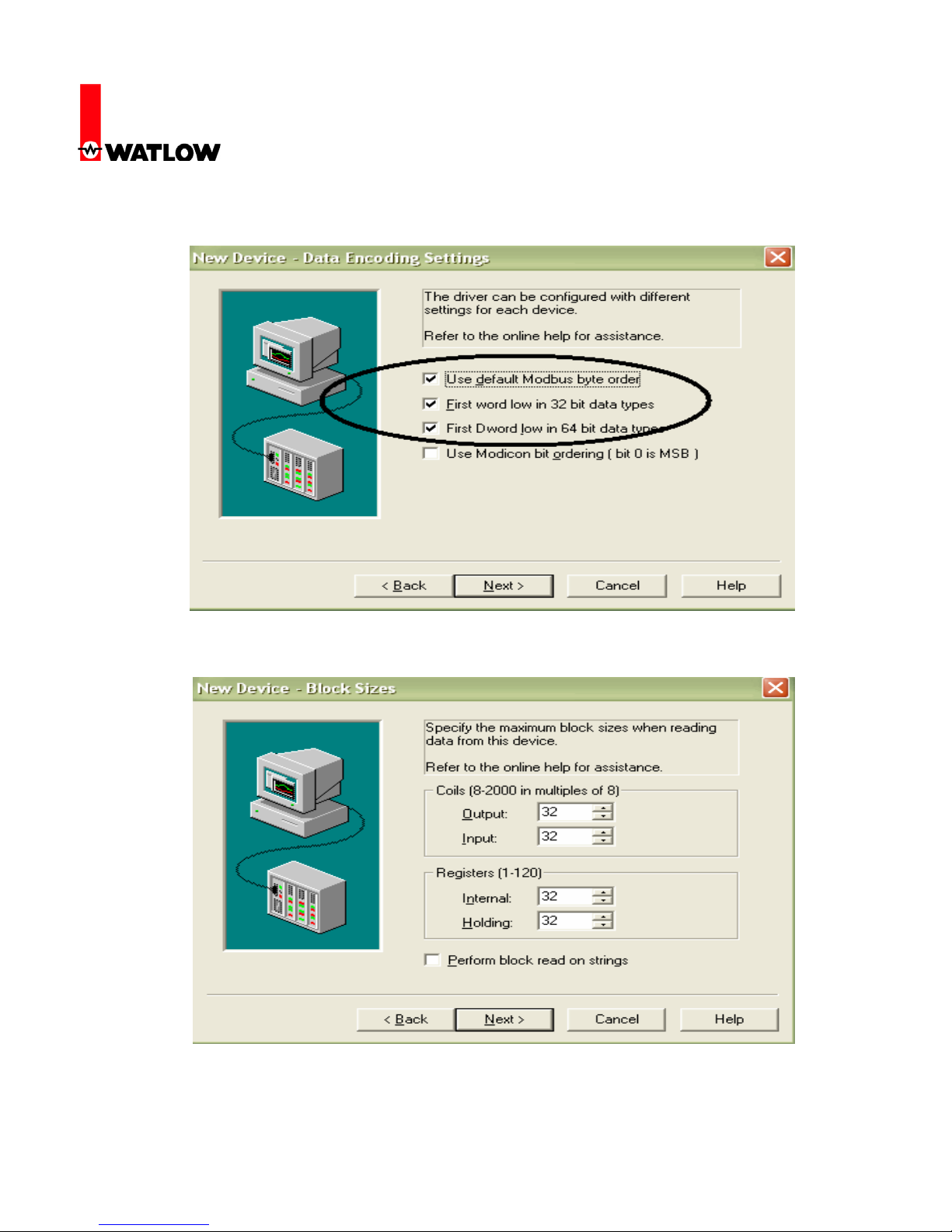
22. Use the defaults as shown.
RUI/Gateway & Modbus®TCP
Configuration & Programming Example
Using KEPServerEX 4.0
Watlow
1241 Bundy Blvd
Winona, MN 55987
Telephone: 507-494-5656
© 2008 Watlow Electric Mfg Co 10 FM 4/08
23. The graphic below shows the default Modbus®word order which also represents the default
Modbus® word order for the RUI/Gateway (Low/High).
24. Coil access is not used with the RUI/Gateway. The number of registers shown limits
KEPServerEX in the maximum number of registers which can be read at a time.
Altri manuali Watlow Electric Scheda di rete

Manuali Scheda di rete popolari di altre marche


Buffalo
Buffalo AirStation WLI-PCM-L11GP Manuale utente

National Instruments
National Instruments NI 9234 Manuale utente

Hama
Hama 49276 Manuale utente

Linksys
Linksys WCF54G - Wireless-G Compact Flash Card Manuale operativo

Compaq
Compaq Wireless LAN 100 Manuale utente

Bose
Bose PowerMatch Dante Manuale utente