Xtool KC501 Manuale utente

KC501 Key & Chip
Programmer
User Manual

I
Please read this user manual carefully before using the KC501
Key & Chip Programmer. When reading the manual, please pay
attention to the words “Note” or “Caution” and read them carefully
for appropriate operation.
TRADEMARKS
is a registered trademark of Shenzhen Xtooltech
Intelligent CO., LTD.
In countries that the trademarks, service marks, domain names,
logos and the name of the company are not registered, Xtool
claims that it still reserves the ownership of the unregistered
trademarks, service marks, domain names, logos and the
company name. All other marks for the other products and the
company’s name mentioned in the manual still belong to the
original registered company.
You may not use the trademarks, service marks, domain names,
logo and company name of Xtool or other companies mentioned
without written permission from the trademark holder.
Xtool reserves the right for the final interpretation of this manual
content.
COPYRIGHT
Without the written consent of Shenzhen Xtooltech Intelligent Co.,
Ltd., any company or individual shall not copy or backup this
operation manual in any form (electronic, mechanical,
photocopying, recording or other forms).

II
DECLARATION
This manual is designed for the usage of KC501 Key & Chip Programmer
and provides operating instructions and product descriptions for users of
the KC501 Key & Chip Programmer.
No part of this manual can be reproduced, stored in a retrieval system or
transmitted, in any form or by any means (electronic, mechanical,
photocopying, recording, or otherwise), without the prior written
permission of Xtool.
Use the device only as described in this manual. Xtool is not responsible
for any consequences of violating the laws and regulations caused by
using the product or its data information
Xtool shall not be liable for any incidental or consequential damages or for
any economic consequential damages arising from the accidents of
individual users and the third parties, misuse or abuse of the device,
unauthorized change or repair of the device, or the failure made by the
user not to use the product according to the manual.
The configuration, function, appearance and UI of this product involved in
the user manual will continue to be optimized, and the manual may not be
updated in time. Please refer to the actual product if there is any
difference. The final interpretation right belongs to Shenzhen Xtooltech
Intelligent Co., Ltd.
OPERATION INSTRUCTIONS
For safe operation, please follow the instructions below:
Keep the device away from heat or fumes when you are using it.
Make sure the diagnostic link connector (DLC) is functioning properly
before starting the test to avoid damage to the key programmer.

III
Do not switch off the power or unplug the connectors during testing,
otherwise you may damage the key programmer.
CAUTIONS!
Avoid shaking or dismantling the unit as it may damage the internal
components.
Do not use hard or sharp objects to touch the LCD screen.
Do not use excessive force.
Do not expose the screen to strong sunlight for a long period.
Please keep it away from water, moisture, high temperature or very
low temperature.
If necessary, calibrate the screen before testing to ensure the
accuracy of LCD performance.
Keep the main unit away from strong magnetic fields.
AFTERSALES-SERVICES
E-Mail: [email protected]
Tel: +86 755 21670995 or +86 755 86267858 (China)
Official Website: www.xtooltech.com

i
CONTENT
TRADEMARKS.........................................................................................I
COPYRIGHT............................................................................................. I
DECLARATION.......................................................................................II
OPERATION INSTRUCTIONS............................................................. II
CAUTIONS!.............................................................................................III
AFTERSALES-SERVICES...................................................................III
1 GENERAL INTRODUCTION............................................................. 1
Exposed View of KC501................................................................................2
Technical Specifications................................................................................ 4
Accessories......................................................................................................5
2 HOW TO USE.......................................................................................8
Program Keys & Emulators...........................................................................8
Read Remote Frequency.............................................................................. 9
Read Transponder ID & Chip Type............................................................. 9
EEPROM Reading & Writing...................................................................... 10
Installing EEPROM Chip...........................................................................................10
Read & Write EEPROM on Tablets........................................................................ 14
Read & Write ECU/BCM Data....................................................................18
Functions on PC/Laptop.............................................................................. 23
Read & Write EEPROM With PC/Laptop............................................................... 24
Read & Write Transponder Chip With PC/Laptop................................................ 25

ii
3 SUPPORT LIST................................................................................. 27
Key Programming Support List.................................................................. 27
EEPROM Support List................................................................................. 30
Ecu Support List............................................................................................35
4 TROUBLESHOOTING......................................................................36

1
1 GENERAL INTRODUCTION
KC501 is a multipurpose key & chip programmer that supports
these functions:
Read & write car keys & key chip
Generate dealer keys
Write data to key emulators
Read remote frequency, chip type & chip ID
Read & write Mercedes-Benz infrared key
Read & write MCU/EEPROM chip
This programmer could be used on all the advanced Xtool
diagnosis/key programming tablets or PC/laptops with KC501
Studio installed.
Some of the Xtool tablets (e.g., P700 series) doesn’t
come up with USB-C or USB-A ports. KC501 is not
compatible with these devices.

2
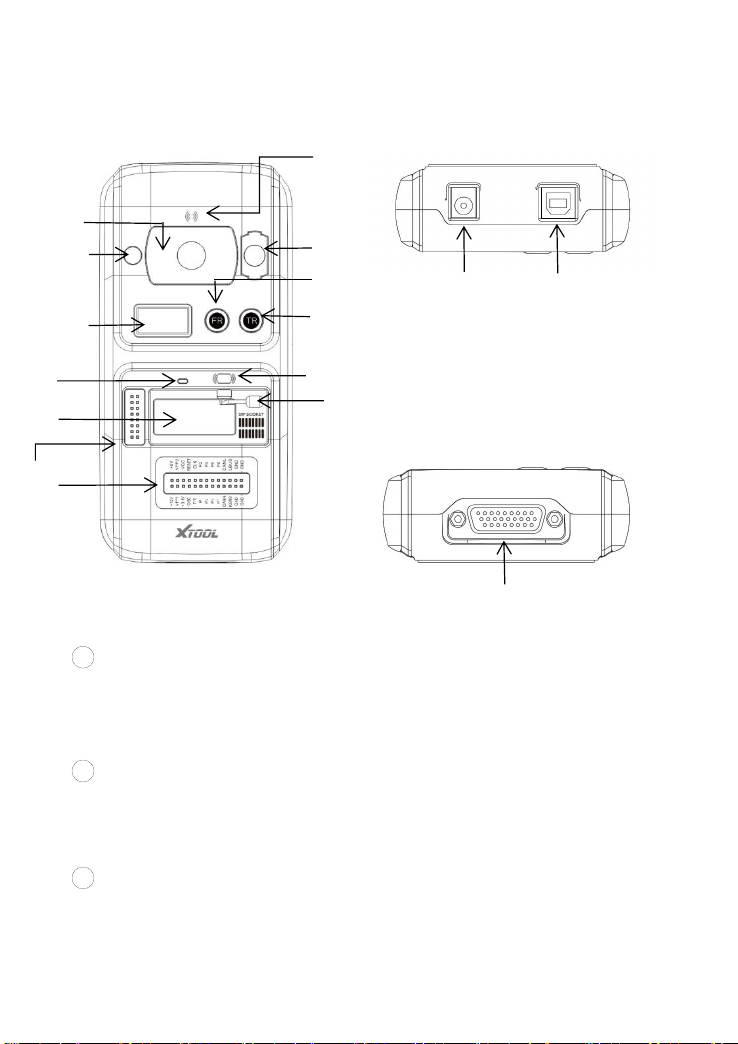
EXPOSED VIEW OF KC501
1DC Port: Provides 12V DC power supply.
Please connect 12V power supply to KC501 when
working on MCU/ECU reading & writing process.
2USB-B Port: Provides data transmission between KC501 and
Xtool devices or PC. Also provides 5V power supply when
connected.
3DB 26-Pin Port: Can be connected with Mercedes-Benz
infrared cable, ECU cable, MCU cable and MC9S12 cable.
①
③
④
⑦
⑥
⑨
⑭
②
⑤
⑧
⑩
⑪
⑬
⑫
⑮

3
4Cross Signal Pins: Holds the MCU board, MCU spare cable
or DIY signal interface.
The Cross-shaped signal pin is used to place MCU
board, MCU spare cable or DIY signal cable to read or
write MCU and ECU chips.
5Locker: Locks the EEPROM component transponder slot to
make sure it is functioning.
6EEPROM Component Transponder Slot: Holds the
EEPROM plug-in transponder or EEPROM socket, used to
read & write EEPROM chip.
The right-bottom corner of the slot is PIN 1. Please
check the DIP SOCKET diagram printed on the right of
the slot.
7Status LED: Indicates current operating status.
8IC Card Induction Area:Used to read and write IC card data.
9Display Screen: Show remote frequency or transponder ID.
10 Remote Frequency Button: Press this button to show remote
frequency in the display screen.
11 Transponder ID Button: Press this button to show
transponder type and ID in the display screen.
12 Transponder Slot: Holds the transponder to read or write
transponder data.
13 Vehicle Key Slot: Used to hold the vehicle key to read or write
vehicle key data.

4
14 Remote Control Transponder Induction Area: Used to read
and write remote control transponder data.
15 Mercedes Infrared Key Slot: Used to read or write Mercedes
vehicle key data.
TECHNICAL SPECIFICATIONS
Item
Description
Display
0.96-in 128x64 Monochrome OLED screen
Input Voltage
5V (USB-B)/12V (DC)
Working
Temperature
-10~50℃(14~122℉)
Storage
Temperature
-20~60℃(-4~140℉)
Related
Humidity
< 90%
Ports
DC charging port
USB-B port
DB26 port
Relative
Humidity
10%~90%
Size
176*85*32 (mm)
Altri manuali per KC501
1
Indice
Altri manuali Xtool Scheda madre
Manuali Scheda madre popolari di altre marche

Telit Wireless Solutions
Telit Wireless Solutions SL869-3DR Manuale utente

Gigabyte
Gigabyte GA-9IVDT Manuale utente

Texas Instruments
Texas Instruments ADS8372EVM Manuale utente

Commell
Commell MS-C73 Manuale utente

IBT Technologies
IBT Technologies MB860 Manuale utente

Nvidia
Nvidia TEGRA DG-04927-001_V01 Manuale utente