Zoom 4353 Manuale utente

iHiFi UNIVERSAL TRANSMITTER
Quick Start
English............................................................ 2
Español........................................................... 6
Français........................................................ 10
Português ..................................................... 14
Türkçe........................................................... 18

2
Using the iHiFi Universal Transmitter
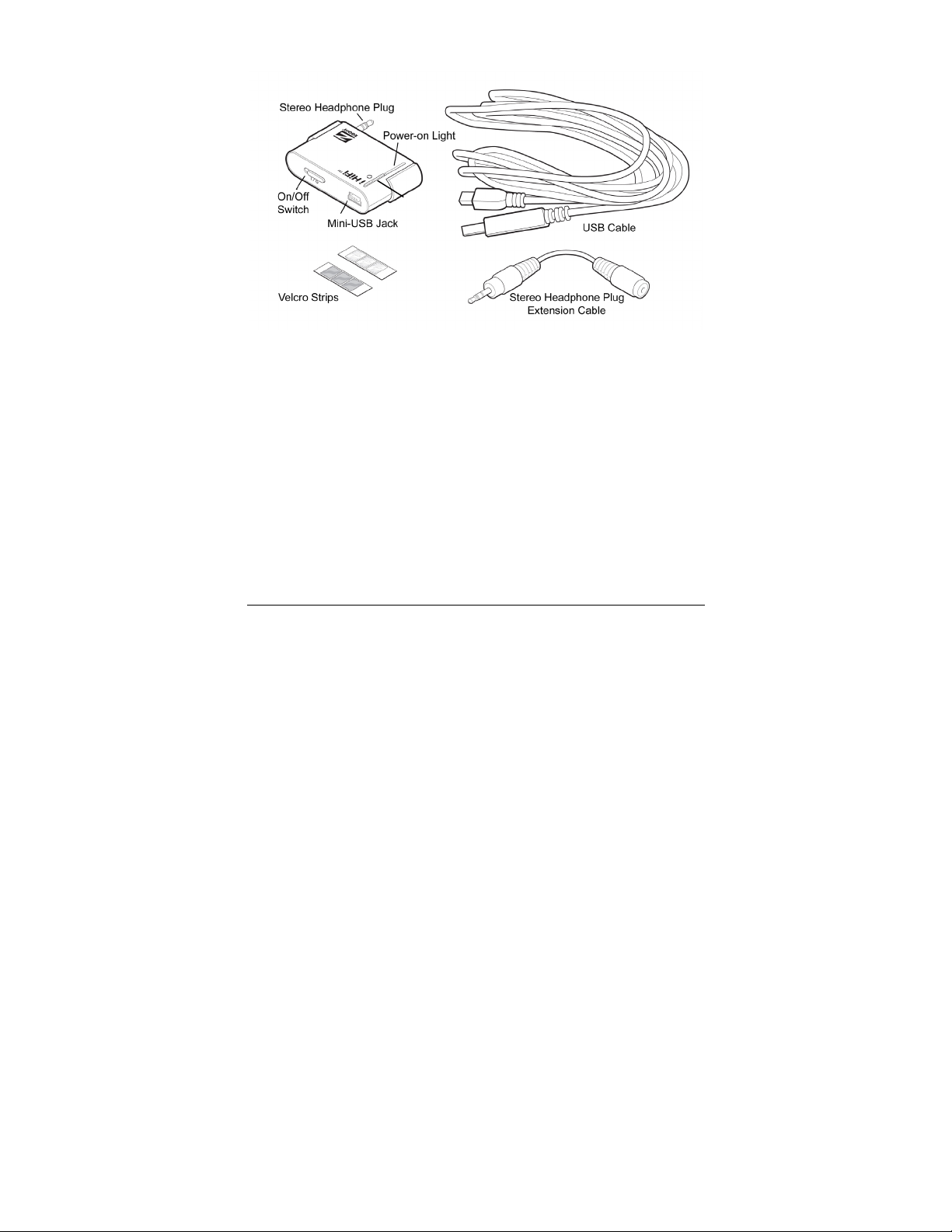
The iHiFi Universal Transmitter plugs into the stereo headphone jack of an
iPod, MP3 player, MP3-enabled phone, CD player, computer sound card, satellite
radio, or other audio device. You plug it into the jack directly or, if necessary,
using the short extension cable included with your unit.
When you’re not using the Transmitter, you should switch it off by using the
On/Off switch marked 1/0 (0 is Off). A light on the Transmitter turns on when the
Transmitter is on.
When the Transmitter is switched on and working, it converts the music or
other audio coming out of the headphone jack to a Bluetooth wireless signal that
can be received by a “paired” iHiFi Receiver or other compatible Bluetooth device,
such as Bluetooth headphones.
The Transmitter automatically “pairs” with an iHiFi Receiver. (The
Transmitter can also pair with another Bluetooth device, such as Bluetooth
headphones, if that device has 0000 or 1234 as its "PIN code" or "Passkey".)
When you switch on the Transmitter the first time, it tries to pair with an
appropriate Bluetooth device that is nearby. The closer the two devices are, the
more likely a pairing occurs. If you’re using the Transmitter with an iHiFi Receiver,
Connect
button

3
for instance, you should switch on the Transmitter while it’s near the Receiver
that’s already switched on. After you switch on the Transmitter, its red and blue
lights should immediately start to flash to show that pairing has begun. If the lights
don’t both flash right after you switch on the Transmitter, press and hold the
Connect button that’s directly above the lights for 4-5 seconds until flashing starts.
Pairing usually takes only about 10 seconds. However, successful pairing can
take up to 3 minutes if the two Bluetooth devices aren’t near each other or if there
are other wireless devices nearby. Each time the Transmitter is switched on, it will
try for 10 seconds to pair with the last paired device. If the last paired device is not
found (because, for instance, it’s off), then the Transmitter will enter pairing mode
and try to pair with another Bluetooth device. If pairing doesn’t occur within 3
minutes, the Transmitter enters Idle mode and stays in Idle mode until it’s
powered on again. If pairing does not occur, first power down the Receiver and
switch the Transmitter off, then power up the Receiver, and then switch the
Transmitter back on near the Receiver.
Disconnection may occur if, for instance, the Transmitter gets too far away from
the Receiver. In that case the Transmitter automatically tries to reconnect for 10
seconds. If it is unable to do so, the Transmitter enters Idle mode and stays in Idle
mode until it’s switched on after being switched off.
When using the Transmitter, you will get your best sound if you play your
iPod or other audio device near maximum volume, and initially adjust your
stereo’s volume accordingly. Then you can vary the volume using your audio
device.
Your Transmitter may have a sliding plastic jacket. If you don’t have an iPod
Mini, you’ll probably want to remove this jacket by pulling it off the Transmitter as
shown below.

4
The iHiFi Universal Transmitter has a built-in rechargeable battery that
typically lets the Transmitter stay on for about six hours. Once the Transmitter
stops working, it takes about two hours to get fully charged. You can charge the
Transmitter in either of these ways:
•Plug one end of the included USB cable into the USB port of a computer, and
plug the other end into the mini-USB jack of the Transmitter.
•If you have the Y cable that comes with some Transmitter/Receiver Combos,
plug the Y cable into the end of your iHiFi Receiver’s power cube cable. One of
the loose ends then plugs into the iHiFi Receiver, and the other loose end can
be plugged into the Transmitter’s power jack.
The LED closest to the bottom of the Transmitter is on when the Transmitter is
charging, and off when the Transmitter is fully charged. You can use the
Transmitter for transmitting audio during charging, if you'd like. Once the
Transmitter is fully charged, you will get best audio performance if you disconnect
the Transmitter from the cable used for charging.
Included with the Transmitter are some Velcro®fasteners that you can use to hold
the Transmitter to your iPod or other audio device. The Velcro works best if it is
as far away from the headphone jack as possible, but no part of the Velcro
can be more than 3.75 cm (1.5 inches) from the jack or it won’t line up with
the Transmitter correctly.
We’ve included two strips of Velcro, one with 3 pieces of light gray Velcro and the
other with 3 pieces of white Velcro. You use one of each color, and the extras will
let you replace the Velcro if it starts to wear out. Make sure you save the extra
Velcro in case you need it.
Velcro pad

5
Peel off one piece of gray Velcro and stick it on a clear,
preferably flat area on the same side of your iPod or
other device as the headphone jack. Remember, the
further from the jack the better, but it can’t be more than
3.75 cm (1.5 inches) from the jack. Now peel off one
piece of white Velcro from the other strip, and carefully
push the Velcro side (NOT the sticky side) against the
gray Velcro that you already installed, so that the two
pieces stay together. Then plug in the Transmitter,
being careful that it's straight. Press it in place so that it
pushes against the sticky side of the white Velcro.
When you first do this, you should leave the Transmitter in place for at least one
hour before pulling the Transmitter and audio device apart. To be safe, we
recommend that you leave them attached overnight.
The top two LEDs on the transmitter show you the mode it’s in.
Both LEDs off Idle
Both LEDs steady on Searching for last paired device
Red and blue LEDs alternating Pairing
Blue LED flashing twice every three seconds Paired and connected
Enjoy!
Remember. . . You can put iHiFi Receivers in different rooms or even different
locations. This lets you use your iHiFi Transmitter as you move from place to
place. And one iHiFi Receiver can be used with different iHiFi Transmitters at
different times, so consider getting iHiFi Transmitters for all your favorite audio
devices.

6
Como usar el Transmisor Universal iHiFi
El Transmisor iHiFi “Universal” se conecta al enchufe de los audífonos
estereofónicos de un iPod, reproductor de MP3, teléfono habilitado para MP3,
reproductor de CD, tarjeta de sonido de computador, radio satelital, u otro
dispositivo de sonido. Lo puedes conectar directamente al enchufe o si es
necesario puedes usar el cable de extensión corto que incluimos con tu unidad.
Cuando no estés usando el Transmisor, debes apagarlo usando para ello el
interruptor de Encendido/Apagado marcado 1/0 (0 es Apagado). Una luz se
enciende en el Transmisor cuando este esta Encendido.
Cuando el Transmisor esta encendido y funcionando, convierte la música u
otro audio que salga del enchufe de los audífonos en una señal inalámbrica
Bluetooth que puede ser recibida por un Receptor iHiFi para “emparejar” o por
otro dispositivo compatible Bluetooth como por ejemplo unos audífonos Bluetooth.
El Transmisor emparejara automáticamente con un Receptor iHiFi. (El
Transmisor también se puede emparejar con otro dispositivo Bluetooth tal como
los audífonos Bluetooth, siempre y cuando este dispositivo tenga como “Código
PIN” o “Clave” 0000 o 1234). Cuando tu conectas el Transmisor por primera vez,
este trata de emparejarse con el dispositivo Bluetooth adecuado que se
encuentre más cerca. Entre más cerca estén los dos dispositivos, será más
probable que ocurra el emparejamiento. Por ejemplo, si estas usando el
Cable USB
Cable de Extensión
Tiras de Velcro
Enchufe para
audífonos estereofónicos
Enchufe
Mini
–
USB
Interruptor para
Encender/
Apagar
Luz de
Encendido
Botón de
Conectar

7
Transmisor con un Receptor iHiFi, debes cambiar el Transmisor a Encendido
mientras este cerca al Receptor que ya está encendido. Si las luces azules y
rojas no titilan correctamente después de encender el Transmisor, presione y
sostenga el botón de conectar, que está directamente encima de las luces, por 4-
5 segundos hasta que el destellar comienza.
Por lo general el emparejamiento solo toma cerca de 10 segundos. Sin embargo,
un emparejamiento exitoso puede tomar hasta 3 minutos si los dos dispositivos
Bluetooth no están cerca el uno del otro o si hay otros dispositivos inalámbricos
cerca. Cada vez que el Transmisor se enciende, tratara de emparejarse con el
último dispositivo emparejado por 10 segundos. Si no encuentra el ultimo
dispositivo emparejado (debido por ejemplo a que se encuentre apagado)
entonces el Transmisor entrará en el modo de emparejamiento e intentará
emparejarse con otro dispositivo Bluetooth. Si el emparejamiento no ocurre
dentro de 3 minutos, el Transmisor entrará en el modo inactivo y permanecerá en
este modo hasta que sea activado nuevamente. Si el emparejamiento no ocurre,
lo primero es apagar el Receptor y enseguida el Transmisor, luego volver a
encender el Receptor y enseguida conectar el Transmisor de nuevo, cerca al
Receptor.
Puede ocurrir una desconexión, si por ejemplo, el Transmisor se encuentra muy
lejos del Receptor. En este caso, el Transmisor intentará reconectarse
automáticamente durante 10 segundos. Si no lo logra, el Transmisor entrará en el
modo inactivo y permanecerá en ese modo hasta que vuelva a activarse.
Cuando estés usando el Transmisor, lograrás el mejor sonido si colocas tu
iPod cerca al máximo volumen, y ajustas inicialmente el volumen de tu estéreo
de acuerdo con esto. Luego puedes cambiar el volumen usando tu iPod.
Tu transmisor viene con una cubierta plástica deslizable. Si no tienes un iPod
Mini, es preferible que remuevas esta cubierta, simplemente desprendiendola del
Transmisor, como se muestra en la gráfica.

8
El Transmisor iHiFi Universal trae una batería recargable incorporada que
por lo general permite que el Transmisor funcione alrededor de 6 horas. Cuando
el Transmisor deje de funcionar, se demora cerca de 2 horas para volver a cargar
completamente. Tu puedes cargar el Transmisor de cualquiera de las siguientes
formas:
•Conecta un extremo del cable USB aquí incluido, en el Puerto USB de un
computador y luego conecta el otro extremo en el enchufe USB mini del
Transmisor.
•Si usted tiene el cable de Y que viene con algunas combinaciones de
Transmisor/Receptor, conecta el cable Y en el extremo del cable del cargador
de tu Receptor iHiFi. Luego, uno de los extremos libres se conecta al Receptor
iHiFi, y el otro extremo puede ser conectado al enchufe del Transmisor.
La luz LED más cercana a la parte de abajo del Transmisor deberá estar
encendida cuando el Transmisor este cargando y apagada cuando el Transmisor
este completamente cargado. Puedes usar el Transmisor para transmitir audio
mientras lo estas cargando si así lo deseas. Una vez que el Transmisor este
completamente cargado, lograrás el mejor desempeño de audio si desconectas el
Transmisor del cable usado para cargarlo.
Incluido con el Transmisor encontrarás algunos sujetadores Velcro®que puedes
usar para sujetar el Transmisor a tu iPod u a otro dispositivo de audio. El Velcro
funciona mejor si esta lo más alejado posible del enchufe de los audífonos, pero
recuerda que ninguna parte del Velcro podrá estar a más de 3.75 cms. (1.5
pulgadas) del enchufe o de lo contrario no se alineara correctamente con el
Transmisor.
Hemos incluido dos tiras de Velcro, una con 3 partes deVelcro gris y la otra con 3
partes de Velcro blanco. Tu debes usar una de cada color y las extras las puedes
usar para reemplazar el Velcro cuando comience a desgastarse. Asegúrate de
guardar el Velcro extra en caso de que lo necesites.
Parte de Velcro

9
gris que ya has instalado, de manera que las dos partes se mantengan unidas.
Luego conecta el Transmisor, teniendo cuidado de que este derecho. Presiónalo
en su lugar, de manera que empuje contra el lado pegajoso del Velcro blanco.La
primera vez que hagas esto, debes dejar el Transmisor en su lugar por lo menos
durante una hora antes de desprender el transmisor y el dispositivo de audio
aparte. Para estar más seguros, recomendamos dejarlos pegados hasta el día
siguiente.
Luego conecta el Transmisor, teniendo cuidado de que este derecho. Presiónalo
en su lugar, de manera que empuje contra el lado pegajoso del Velcro blanco. La
primera vez que hagas esto, debes dejar el Transmisor en su lugar por lo menos
durante una hora antes de desprender el transmisor y el dispositivo de audio
aparte. Para estar más seguros, recomendamos dejarlos pegados hasta el día
siguiente.
Las dos luces LED principales del Transmisor te mostrarán en que modo se
encuentra este.
Ambas luces LEDs apagadas Modo Parado
Ambas luces LEDs fijas encendidas Buscando el ultimo dispositivo emparejado
Las luces LEDs rojas y azules alternas Hacer pareja
La luz azul intermitente cada 3 segundos Emparejado y conectado
Disfrútalo!
Recuerda . . . puedes colocar Receptores iHiFi en cuartos diferentes o aún más
en lugares diferentes. Esto te permite usar tu Transmisor iHiFi cuando te mueves
de sitio a sitio. Y un Receptor iHiFi se puede usar con diferentes Transmisores
iHiFi en momentos diferentes, de manera que considera la posibilidad de
conseguir Transmisores iHiFi para todos tus dispositivos de audio favoritos.
Despega una parte del Velcro gris y pégala en una
superficie limpia, preferiblemente plana, en el mismo
lado que el enchufe de los audífonos de tu iPod o de
otro dispositivo. Recuerda que entre más lejos este
del enchufe mucho mejor, pero tampoco debe estar
a más de 3.75 cm (1.5 pulgadas) del enchufe.
Ahora, despega una parte del Velcro blanco de la
otra tira y con mucho cuidado empuja el lado del
Velcro (NO el lado pegajoso) contra el Velcro

10
Utilisation du transmetteur universel iHiFi
Le transmetteur universel iHiFi se branche sur la prise casque stéréo des
iPod, lecteurs MP3, téléphones compatibles MP3, lecteurs CD, cartes son
d’ordinateur, radios satellite ou tout autre périphérique audio. Branchez-le
directement dans la prise ou, si nécessaire, utilisez le petit câble d’extension
fourni avec l’unité.
Lorsque vous n’utilisez pas le transmetteur, éteignez-le à l’aide de
l’interrupteur marche/arrêt portant la marque 1/0 (0 signifiant arrêt). Un voyant
situé sur le transmetteur s’allume lorsque l’appareil est sous tension.
Lorsque le transmetteur est allumé et en marche, il convertit la musique et tout
autre signal sonore sortant de la prise casque en un signal sans fil Bluetooth
pouvant être reçu par un récepteur iHiFi « apparié » ou tout autre périphérique
Bluetooth compatible, tel qu’un casque Bluetooth.
Le « pairage » du transmetteur avec un récepteur iHiFi s’effectue
automatiquement. (Le transmetteur peut également s’apparier avec un autre
périphérique Bluetooth, tel qu’un casque Bluetooth, si le « code PIN » ou la « clé
de passe » de ce périphérique correspond à 0000 ou 1234.) Lorsque le
transmetteur est allumé pour la première fois, il tente d’établir un pairage avec le
périphérique Bluetooth approprié le plus proche. Plus les deux périphériques sont
Prise casque stéréo
Interrupteur
marche/arrêt
Prise
mini
-
USB
Rubans de velcro
Voyant
d’alimentation
Câble d’extension
Câble USB
Bouton de
relier
Indice
Lingue:
Altri manuali Zoom Trasmettitore