
Abbott Pima ANALYSER Manuale utente

PimaTM ANALYSER
USER GUIDE
EN
Pima™Analyser
2
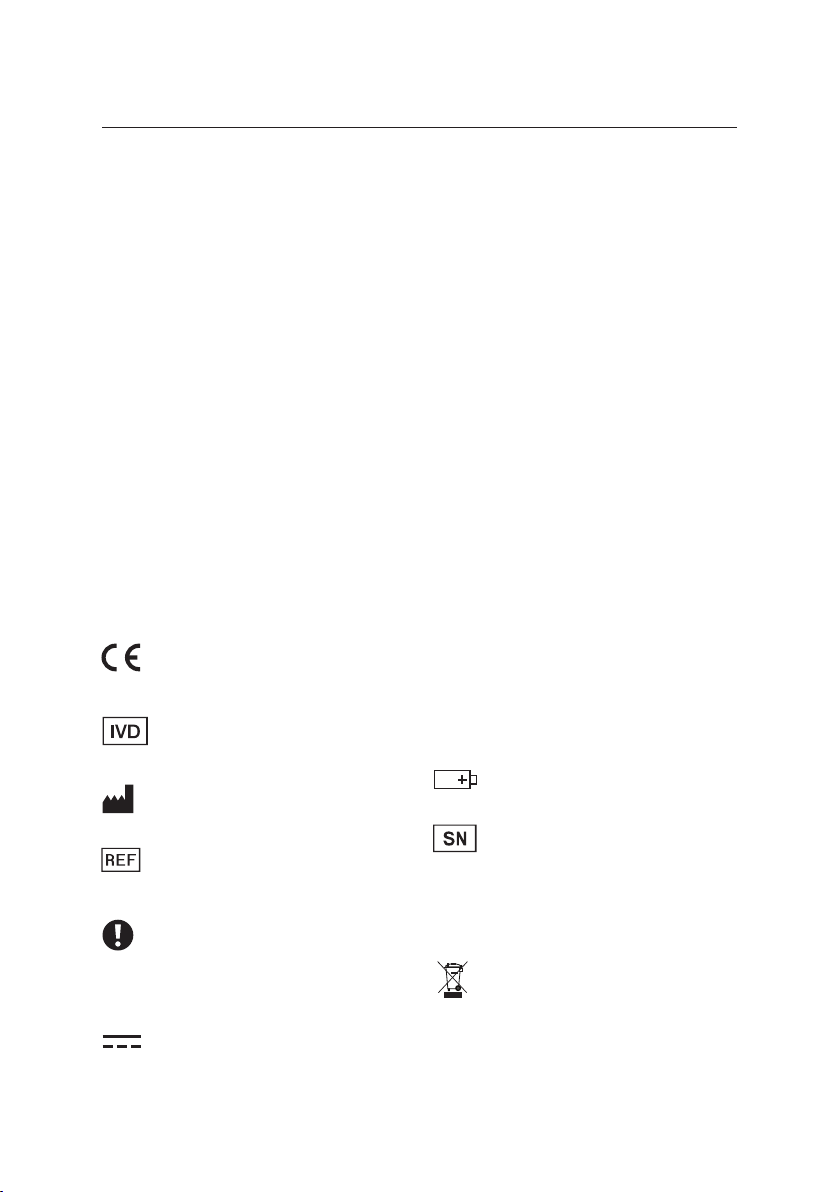
Li-Po Lithium-Polymer
Li-Ion Lithium-Ion
Baery
Serial Number
pTo keep dry
This unit must be recycled
or discarded according to
applicable local and naonal
regulaons.
Index of Symbols
CE Mark
In vitro diagnosc
medical device
Manufacturer
Catalogue Number
Aenon symbol.
Indicates special problems
or important informaon.
Read the accompanying text
carefully.
Direct current (DC)
The Pima Analyser employs the same stac image analysis and counng
principles as exisng cell enumeraon technologies, in a compact, portable
and robust package. Designed equally to suit the needs of the healthcare
professional in the eld or in the laboratory the Pima Analyser is an
aordable, eecve and valuable point-of-care diagnosc tool.
The following cartridges can be used together with the Pima Analyser:
Pima CD4 test cartridges: 25 individually pouched test cartridges
(catalogue no. 260100025) or
100 individually pouched test cartridges
(catalogue no. 260100100)
Pima Bead Standard: box incl. 2 bead cartridges "Low" and "Normal"
(catalogue no. 260400011)
For more informaon about Pima: www.globalpointofcare.abbo

9
1
2
3
4
5
6
7
8
Pima™ ANALYSER USER GUIDE 3
1 INTRODUCTION
2 GETTING STARTED
3 RUNNING A TEST
4 ANALYSIS MENU
5 MAIN MENU: RESULTS
6 MAIN MENU: SETTINGS
7 MAIN MENU: POWER OFF
8 ERROR CODES & TECHNICAL SUPPORT
9 ERROR WARNINGS & MESSAGES

4
6 1 INTRODUCTION
6 Intended Use
6 Test Principle
6 Data Handling
7 Pima Analyser Specicaons
7 Declaraon of Conformity
8 Pima Analyser Recharging Intervals during Storage
8 Unpacking, Installaon & Transport
8 Pima Analyser Calibraon
9 Maintenance & Cleaning
9 Components and Oponal Items
10 Safety Warnings
11 Pima Analyser at a Glance
12 2 GETTING STARTED
12 Pima Analyser Status Lights
12 Pima Analyser Display
13 Charging the Pima Analyser
13 Charging Status Light
14 Switching On the Pima Analyser/Power Status Light
15 User Interface
15 Navigaon
16 3 RUNNING A TEST
16 Iniang a Test
17 Inserng the Pima Test Cartridge
18 Operator ID Entry
18 Sample ID Entry
18 Analysis in Progress
19 Analysis Complete
20 Prinng Results immediately aer Analysis
22 4 ANALYSIS MENU
22 Changing Operator and Sample ID during a Test Run
22 Analysis Menu
22 Change Operator ID
22 Change Sample ID
23 Abort Analysis
TABLE OF CONTENTS

Pima™ ANALYSER USER GUIDE 5
24 5 MAIN MENU: RESULTS
24 View Results from Archive
25 Print Results from Archive
26 Export Results from Archive
28 Export and Delete Results from Archive
29 Delete Results from Archive
31 6 MAIN MENU: SETTINGS
31 Sengs
31 Enter an Operator ID
32 Edit an Operator ID
33 Delete an Operator ID
33 Date
34 Time
34 Service Export
35 Device Info
36 Connecvity
36 Local Network
37 7 MAIN MENU: POWER OFF
37 Turning O the Pima Analyser
38 8 ERROR CODES & TECHNICAL SUPPORT
38 Error Code Window
38 Technical Support
39 Error Codes
40 9 ERROR WARNINGS & MESSAGES
40 Archive Error
40 Barcode Errors
41 Entry Errors
42 Export Error
42 Power Warning
43 Power Error
43 Printer Errors
44 Selecon Error
44 Storage Errors
45 Undened Errors
46 Volume Error

9
1
2
3
4
5
6
7
8
6
Intended Use
The Pima Analyser is a portable bench-top xed volume cytometer used for
the processing and analysis of a Pima CD4 test cartridge.
For in vitro diagnosc use. Designed to perform in a laboratory as well as in
non-laboratory environments, the Pima Analyser can be operated on external
power or by using an on-board rechargeable baery.
The Pima Analyser requires no maintenance.
Test Principle
The Pima test consists of a disposable Pima test cartridge, containing dried
reagents, and the Pima Analyser. A low sample volume of approx.
25 microliters (µL) of capillary or venous whole blood is collected into the test
cartridge, which is then capped.
The Pima test cartridge is inserted into the Pima Analyser and the sample
sealed within the cartridge is processed. During the course of test processing,
data is recorded, analyzed and interpreted using soware embedded in the
Pima Analyser.
Upon compleon of the test the cartridge is removed from the Pima Analyser
and a test result is displayed.
Data Handling
The Pima Analyser provides for data entry (Operator ID, Sample ID),
archiving and connecvity to printers and data storage media.
All results are saved in an on-board archive and may be retrieved and
downloaded by the operator at any me aer the test.
A Pima Test Report may also be printed using an aached external USB Printer.
1 INTRODUCTION
1 INTRODUCTION

9
1
2
3
4
5
6
7
8
Pima™ ANALYSER USER GUIDE 7
Pima Analyser Specicaons
Pima Analyser
Dimensions D 22 cm × W 13 cm × H 16 cm
Weight 2.54 kg
Detecon System LED illuminaon and CCD-based detecon
Controls sample volume control; reagent control;
automac control of cartridge expiry date;
internal process controls; automac test
idencaon
Display graphical display, monochrome, 128 × 64 pixel
User Interface 16 buon keypad
Languages (Display) English
Memory data storage capacity of approx. 1000 tests
Operang Condions
Operang Temperature 10 - 40 °C
Altude 0 - 2000 m
Relave Humidity 10 - 95 % (no condensaon)
Transport/Storage Temperature 2- 40 °C
Environment protect from direct sunlight, humidity and dust
Power
Power Supply DC 18 V/ 3.5 A
Mains Power 100 - 240 V + 10 % (A/C) at 47 - 63 Hz
Declaraon of Conformity
The Pima Analyser complies with the Essenal Requirements of the Direcve
98/79/EC Annex I and was tested according to EN 61010-1, EN 61010-2-101,
EN 61326-1 and EN 61326-2-6.

9
1
2
3
4
5
6
7
8
8
Unpacking, Installaon & Transport
Unpack the Pima Analyser and place safely on a clean, at, level and stable
surface. Do not put the Pima Analyser on surfaces that may vibrate, e.g. the
top of a freezer or refrigerator or next to a laboratory centrifuge.
Inspect for any obvious sign of damage. Report any damage immediately to
your local distributor. Allow temperature equilibraon for at least 30 minutes
to ensure that the Pima Analyser has reached surrounding temperature.
When using the Pima Bag for transportaon, take out the Pima Analyser and
place safely on a clean, at, level and stable surface for tesng.
If the Pima Analyser was transported or moved to areas with dierent climac
condions, allow temperature equilibraon for at least 30 minutes.
Note: Keep the original Pima Analyser box in case the instrument needs to
be shipped for repair or the like.
Pima Analyser Calibraon
The Pima Analyser is factory calibrated and does not require any further
calibraon and vericaon operaons. However, a daily performance check
using Pima Bead Standard is recommended. If the Pima Analyser was
transported or moved, a test with the Pima Bead Standard may be run to ensure
proper funconality. Please refer to the Pima Bead Standard User Guide
(UG-PIMA-03) for more informaon on this product.
Pima Analyser Recharging Intervals during Storage
During long term storage below 30 °C, the Pima Analyser should be connected
to mains A/C power and the baery recharged overnight at least once per
year. During long term storage at 30 - 40 °C the baery needs to be recharged
at least once every 6 months. If long term storage temperatures exceed 40 °C,
the recharge intervals may need to be considerably shorter.
Note: It is not recommended to store the Pima Analyser with an empty
baery. Therefore, always recharge the baery before long term
storage.
1 INTRODUCTION

9
1
2
3
4
5
6
7
8
Pima™ ANALYSER USER GUIDE 9
Maintenance & Cleaning
The Pima Analyser is a maintenance free instrument and has no serviceable
parts. In the case of encountered Pima Analyser failures or damages, contact
your local distributor.
Use cleaning soluons containing alcohol (for example 70 % Ethanol or
Isopropanol). Soak a paper towel or clean cloth with cleaning soluon and wipe
the outside of the instrument. In case of using a liquid reagent, turn o the
Pima Analyser and disconnect it from mains A/C power.
Do not try to open the Pima Analyser for cleaning.
Do not spray directly onto or inside of the instrument.
Do not use cleaning soluons containing chlorine bleach or organic solvents
other than alcohol.
Follow instrucons on clearance cercate included in the Pima Analyser
box before shipping the instrument to a third party.
Components and Oponal Items
The following items are supplied with your Pima Analyser
(catalogue no. 260300003):
• Power transformer (18 V)
• Power cable (EU)
• Pima Analyser User Guide
• Pima Bead Standard (catalogue no. 260400011)
The following oponal items are also available for your Pima Analyser:
• Pima Bag (catalogue no. 260400001)
• USB Printer (catalogue no. 27040R007)
and Printer Paper I (catalogue no. 26040R009)
and Printer Paper II (catalogue no. 26040R010)
• Connecvity Pack IV (catalogue no. 260400059)

9
1
2
3
4
5
6
7
8
10
Safety Warnings
Only use the power transformer and A/C power cable supplied with the
Pima Analyser. Any other power supplies can damage the instrument and
may cause possible hazards.
Plug in power cable only in grounded power sockets.
Use Pima Analyser indoors when connected to A/C power.
When used outdoors disconnect from mains and avoid direct contact with
liquids of any kind.
Do not open the Pima Analyser. Any unauthorized opening of the instrument
can cause potenal hazards and will invalidate warranty claims.
Only use the Pima Analyser as described in this document.
Only insert USB Printers, USB storage devices or other authorized devices
into the USB ports of the Pima Analyser. Do not use USB 3.0 storage devices.
Placement of the Pima Analyser should allow easy disconnecon from mains
A/C power at any me.
To ensure proper venlaon do not cover the instrument while switched on.
Perform scan on USB storage devices for viruses on a regular basis.
Do not plug in bulky USB devices next to each other since this may damage
the USB ports.
When using the Pima Analyser together with the Pima CD4 cartridge follow
proper infecon control guidelines for handling all blood specimens and
related items.
For disposal of the Pima Analyser please contact your local distributor.
1 INTRODUCTION
Indice
Altri manuali Abbott Strumento di misura

Abbott
Abbott SoToxa Oral Fluid Manuale utente

Abbott
Abbott m-PIMA Manuale utente

Abbott
Abbott i-STAT 1 Guida utente

Abbott
Abbott SoToxa Oral Fluid Manuale utente

Abbott
Abbott i-STAT 1 Manuale utente

Abbott
Abbott i-STAT Manuale di servizio

Abbott
Abbott i-STAT 1 Guida utente

Abbott
Abbott CELL-DYN 3200 Manuale utente

Abbott
Abbott FreeStyle Libre 2 Manuale utente

Abbott
Abbott CELL-DYN 3000 Manuale utente


