Ametek Drexelbrook DR2000 Manuale utente

Guided Radar (TDR) Level Meter for 2-wire control
systems
DR2000
DR2000DR2000
DR2000 Quick Start
Quick StartQuick Start
Quick Start
© AMETEK Drexelbrook - DR2000QS-LM, EDO#6-13-112 - Issue #4

CONTENTS
2
www.drexelbrook.comDR2000QS-LM, EDO#6-13-112 - Issue #4
DR2000
1 Safety instructions 4
2 Installation 5
2.1 Intended use ..................................................................................................................... 5
2.2 Scope of delivery............................................................................................................... 6
2.3 Visual check...................................................................................................................... 7
2.4 Storage ............................................................................................................................. 8
2.5 Transport .......................................................................................................................... 8
2.6 Pre-installation requirements ......................................................................................... 9
2.7 How to prepare the tank before you install the device.................................................... 9
2.7.1 Pressure and temperature ranges......................................................................................... 9
2.7.2 General information for nozzles........................................................................................... 12
2.7.3 Installation requirements for concrete roofs....................................................................... 14
2.8 Installation recommendations for liquids...................................................................... 15
2.8.1 General requirements .......................................................................................................... 15
2.8.2 Installation in standpipes (stilling wells and bypass chambers) ......................................... 16
2.9 Installation recommendations for solids....................................................................... 17
2.9.1 Nozzles on conical silos........................................................................................................ 17
2.9.2 Traction loads on the probe.................................................................................................. 18
2.10 How to install the device on the tank ........................................................................... 19
2.10.1 How to assemble the single rod probe (single-piece probe) ............................................. 19
2.10.2 How to assemble the single rod probe (segmented probe)............................................... 23
2.10.3 How to assemble the segmented coaxial probe ................................................................ 26
2.10.4 How to install a device with a flange connection................................................................ 29
2.10.5 How to install a device with a threaded connection ........................................................... 30
2.10.6 How to install a device with a hygienic connection ............................................................ 31
2.10.7 How to install a cable probe in the tank ............................................................................. 32
2.10.8 How to turn or remove the signal converter ...................................................................... 33
2.10.9 Recommendations for pits and tanks made of non-conductive materials........................ 34
2.10.10 Wall support for the remote version ................................................................................ 35
2.10.11 How to attach the weather protection to the device......................................................... 35
2.10.12 How to open the weather protection ................................................................................ 38
2.11 Electromagnetic compatibility ..................................................................................... 39
3 Electrical connections 40
3.1 Electrical installation: 2-wire, loop-powered ................................................................ 40
3.1.1 Compact version ................................................................................................................... 40
3.1.2 Remote version ..................................................................................................................... 42
3.2 Non-Ex devices............................................................................................................... 43
3.3 Devices for hazardous locations .................................................................................... 43
3.4 Minimum power supply voltage ..................................................................................... 44
3.5 Protection category ........................................................................................................45
3.6 Networks ........................................................................................................................ 46
3.6.1 General information.............................................................................................................. 46
3.6.2 Point-to-point networks ....................................................................................................... 46
3.6.3 Multi-drop networks ............................................................................................................. 47
3.6.4 Fieldbus networks................................................................................................................. 48

CONTENTS
3
www.drexelbrook.co DR2000QS-LM, EDO#6-13-112 - Issue #4
DR2000
4 Operation 49
4.1 General notes ................................................................................................................. 49
4.2 Digital display screen .....................................................................................................49
4.2.1 Local display screen layout .................................................................................................. 49
4.2.2 Functions of keypad buttons................................................................................................. 49
4.3 Commissioning............................................................................................................... 50
4.4 Probe length calculation ................................................................................................ 52
4.5 Snapshot ......................................................................................................................... 54

SAFETY INSTRUCTIONS
1
4
DR2000
www.drexelbrook.comDR2000QS-LM, EDO#6-13-112 - Issue #4
Warnings and symbols used
HANDLING
• This symbol designates all instructions for actions to be carried out by the operator in the
specified sequence.
iRESULT
RESULTRESULT
RESULT
This symbol refers to all important consequences of the previous actions.
Safety instructions for the operator
DANGER!
This information refers to the immediate danger when working with electricity.
DANGER!
These warnings must be observed without fail. Even partial disregard of this warning can lead to
serious health problems and even death. There is also the risk of seriously damaging the device
or parts of the operator's plant.
WARNING!
Disregarding this safety warning, even if only in part, poses the risk of serious health problems.
There is also the risk of damaging the device or parts of the operator's plant.
CAUTION!
Disregarding these instructions can result in damage to the device or to parts of the operator's
plant.
INFORMATION!
These instructions contain important information for the handling of the device.
CAUTION!
Installation, assembly, start-up and maintenance may only be performed by appropriately
trained personnel. The regional occupational health and safety directives must always be
observed.
LEGAL NOTICE!
The responsibility as to the suitability and intended use of this device rests solely with the user.
The supplier assumes no responsibility in the event of improper use by the customer. Improper
installation and operation may lead to loss of warranty. In addition, the "Terms and Conditions of
Sale" apply which form the basis of the purchase contract.
INFORMATION!
•
Further information can be found in the handbook and on the data sheet. These documents
can be downloaded from the website.
•
If you need to return the device to the manufacturer or supplier, please fill out the device
return form and send it with the device. Unfortunately, the manufacturer cannot repair or
inspect the device without the completed form. The form can be found in the handbook.

2
INSTALLATION
5
DR2000
www.drexelbrook.com DR2000QS-LM, EDO#6-13-112 - Issue #4
2.1 Intended use
This TDR level transmitter measures distance, level, mass and volume of liquids, pastes,
slurries, granulates and powders.
It can be installed on tanks, silos and open pits.
CAUTION!
Responsibility for the use of the measuring devices with regard to suitability, intended use and
corrosion resistance of the used materials against the measured fluid lies solely with the
operator.
INFORMATION!
The manufacturer is not liable for any damage resulting from improper use or use for other than
the intended purpose.

INSTALLATION
2
6
DR2000
www.drexelbrook.comDR2000QS-LM, EDO#6-13-112 - Issue #4
2.2 Scope of delivery
INFORMATION!
Do a check of the packing list to make sure that you have all the elements given in the order.
Figure 2-1: Scope of delivery
1 Signal converter and probe.
2 Probe segments. For the assembly procedure of the single rod probe, refer to the instructions that are supplied with
the device. If a single rod or coaxial probe is attached and you ordered the "segmented probe" option, only part of the
probe is attached to the device. For the assembly procedure of the segmented single rod probe, refer to the instruc-
tions that are supplied with the device. For the assembly procedure of the segmented coaxial probe, refer to the in-
structions that are supplied with the device.
3 Quick Start
4 Strap wrench
INFORMATION!
No training required!
CAUTION!
Make sure that the length of the probe is correct.

2
INSTALLATION
7
DR2000
www.drexelbrook.com DR2000QS-LM, EDO#6-13-112 - Issue #4
2.3 Visual check
If the device is supplied with an FKM/FPM gasket, there is no symbol on the side of the process
connection.
INFORMATION!
Inspect the packaging carefully for damages or signs of rough handling. Report damage to the
carrier and to the local office of the manufacturer.
Figure 2-2: Visual check
1 Device nameplate (for more data, refer to the handbook)
2 Process connection data (size and pressure rating, material reference and heat number)
3 Gasket material data –refer to the illustration that follows
Figure 2-3: Symbols for the supplied gasket material (on the side of the process connection)
1 EPDM
2 Kalrez®6375
INFORMATION!
Look at the device nameplate to ensure that the device is delivered according to your order.
Check for the correct supply voltage printed on the nameplate.

INSTALLATION
2
8
DR2000
www.drexelbrook.comDR2000QS-LM, EDO#6-13-112 - Issue #4
2.4 Storage
•Store the device in a dry and dust-free location.
•Store the device in its original packing.
2.5 Transport
WARNING!
Do not keep the device in a vertical position. This will damage the probe and the device will not
measure correctly.
Figure 2-4: Storage conditions
1 Do not bend rod and coaxial probes –support here
2 Storage temperature range: -50…+85°C/-60…+185°F (min. -40°C/-40°F for devices with the integrated LCD display
option)
Figure 2-5: How to hold the device
1 Wind cable probes greater than 400 mm / 16¨in diameter.
2 Do not hold the probe when you lift the device.
3 Do not wind the electrical cable less than 330 mm / 13¨in diameter.
WARNING!
If you do not lift the device carefully, you can cause damage to the probe.

2
INSTALLATION
9
DR2000
www.drexelbrook.com DR2000QS-LM, EDO#6-13-112 - Issue #4
2.6 Pre-installation requirements
•Make sure that there is sufficient space on all sides.
•Protect the signal converter from direct sunlight. If necessary, install the weather protection
accessory.
•Do not subject the signal converter to heavy vibrations.
2.7 How to prepare the tank before you install the device
2.7.1 Pressure and temperature ranges
INFORMATION!
Obey the precautions that follow to make sure that the device is correctly installed.
CAUTION!
To avoid measuring errors and device malfunction, obey these precautions.
Figure 2-6: Pressure and temperature ranges
1 Temperature at the process connection
The temperature at the process connection must stay in the temperature range of the gasket material unless the de-
vice is a High-Temperature version. Refer to the table "Permitted temperature ranges for gaskets" that follows and
to "Technical data" in the handbook.
Devices with Hazardous Location approvals: see supplementary instructions
2 Ambient temperature for operation of the display
-20...+60°C / -4...+140°F
If the ambient temperature is not between these limits, the display screen switches off automatically
3 Ambient temperature
Non-Ex devices: min. (Compact) -36°C/-33°F, min. (Remote) -37°C/-34.6°F max. +80°C / +176°F
Devices with Hazardous Location approvals: see supplementary instructions
4 Process pressure
-1...40 barg / -14.5...580 psig
WARNING!
The process connection temperature range must agree with the temperature limits of the
gasket material.

INSTALLATION
2
10
DR2000
www.drexelbrook.comDR2000QS-LM, EDO#6-13-112 - Issue #4
Permitted temperature ranges for gaskets
Gasket material Permitted temperature ranges for gaskets
Standard version High-Temperature version
[°C] [°F] [°C] [°F]
FKM/FPM -40…+150 -40…+302 -40…+300 -40…+572
Kalrez®6375 -20…+150 -4…+302 -20…+300 -4…+572
EPDM -50…+150 -58…+302 -50…+250 -58…+482
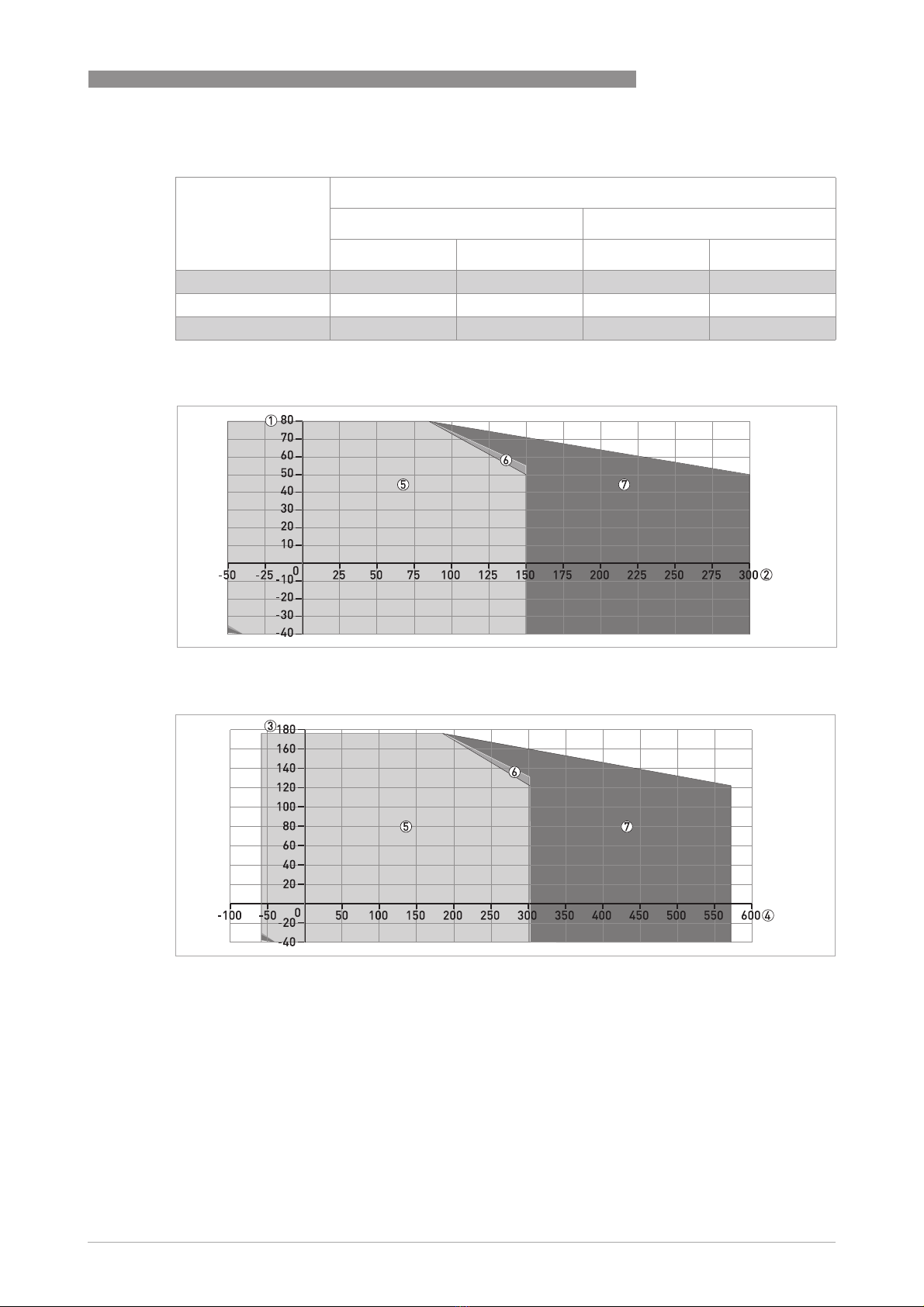
Compact version:
Ambient temperature / flange temperature, flange and threaded connection, in °C
Figure 2-7: Compact version: Ambient temperature / flange temperature, flange and threaded connection, in °C
Ambient temperature / flange temperature, flange and threaded connection, in °F
Figure 2-8: Compact version: Ambient temperature / flange temperature, flange and threaded connection, in °F
1 Maximum ambient temperature, °C
2 Maximum flange temperature, °C
3 Maximum ambient temperature, °F
4 Maximum flange temperature, °F
5 All probes
6 All versions of the 2 mm / 0.08¨single cable probe
7 High-Temperature (HT) version of the Ø2 mm / 0.08¨single cable probe
Indice
Altri manuali Ametek Drexelbrook Strumento di misura

Ametek Drexelbrook
Ametek Drexelbrook VeriGAP 504-1000 Series Istruzioni per l'installazione e il funzionamento

Ametek Drexelbrook
Ametek Drexelbrook DR7000 Series Schema elettrico

Ametek Drexelbrook
Ametek Drexelbrook DR5400 Manuale utente

Ametek Drexelbrook
Ametek Drexelbrook ThePoint Series Manuale utente