
Amperes iPX5101 Manuale utente

INSTRUCTION MANUAL
iPX5101
Ethernet Paging Server
Thank you for choosing another quality product from Amperes Electronics.
iPX5101 has been upgraded further with newer technology in keeping pace with the demands of today's PA complexity.
Among them is the Ultra Low Latency audio and data transmissions.
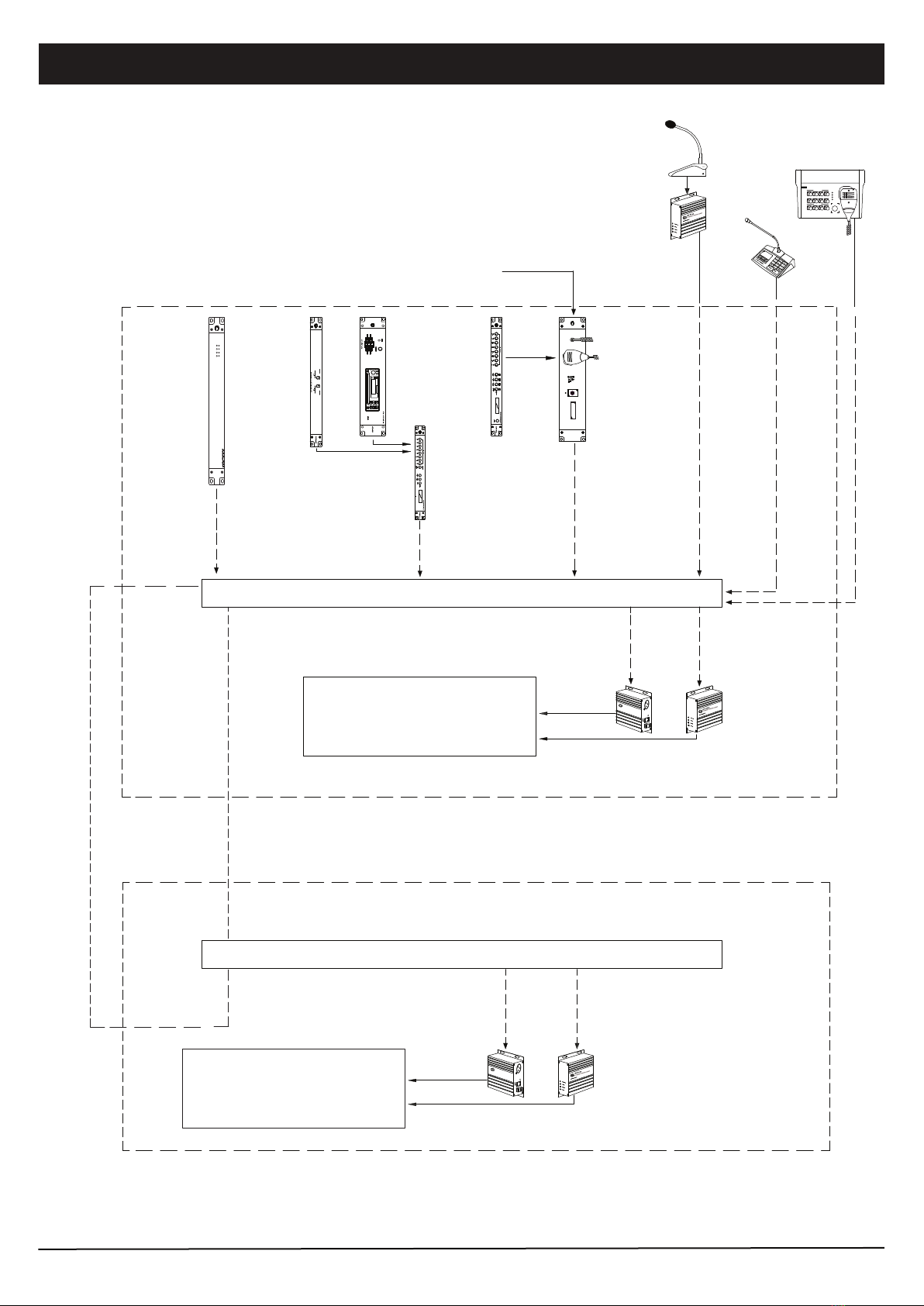
It functions as a traffic controller for all paging clients ( iPX5151 / iPX5155 / iEP1202 ). Every activity from Clients shall be
monitored by iPX5101 and would determine the intended routing to be allowed or otherwise, considering the priority level,
traffic condition and the zone configuration.
With the growing demand of IP Paging System, Amperes IP related products such as iPX5101 shall be the great tool for
coming future. Do read through the manual in order the tap the many advantages that Amperes IP system has to offer.
iPX 5101 amperes
ETHERNET PAGING SERVER
ACT STATUS POWER
REM
VER 4/ 2021Applicable for Version 2.29 and above

Parts Identification
23
4
1
1. INDICATOR LEDS
2. POWER CONNECTOR
3. ETHERNET PORT
4. RESET SWITCH
Front View
Rear View
PAGE 2 iPX5101 | ETHERNET PAGING SERVER
Connect iPX5101 to a network switch via this port.
POWER: This blue LED shall light up when iPX5101 is powered up.
REM: Light up when iPX5101 is ready to communicate with paging clients.
STATUS: Blink whenever there is a network activity ongoing.
ACT: Light up when we reset iPX5101 to default setting
24V DC input for power, use only regulated power supply.
iPX 5101 amperes
ETHERNET PAGING SERVER
ACT STATUS POWER
REM
DC 24V
+
-
ETHERNET
100mA
ETHERNET PAGING SERVER
ETHERNET ADDRESS :
iPX 5101
SERIAL NO :
RESET
Quality Product From
AMPERES ELECTRONICS
Button to allow iPX5101 enters bootloader mode or resets to factory default settings.
Bootloader mode: To enter this mode, hold the reset button untl POWER, REM and STATUS LEDs lit. Enter this mode
to do update firmware if normal mode updating via web browser does not work. All iPX5101 settings remain intact in
this mode.
Reset factory default settings: Hold the reset button until POWER, REM, STATUS and ACT LEDs lit will reset all
iPX5101 settings to factory defaults.
iPX5101 | ETHERNET PAGING SERVER PAGE 3
Schematic Diagram
cat5e
iPX 5101
ampe re s
ACT STATUS POWERREM
FROM FIRE ALARM
INTERFACE
iEP1200 EMER.
PAGING MIC
MR1301 MESS.
PLAYER
MP3 / TUNER / CD
MEDIA PLAYER
iPX5101
IP PAGING CONTROLLER
iPX5200 MUSIC
SERVER
NETWORK SWITCH WITH FIBER LINK
iPX 5300
ETHERNETMUSIC CLIENT
ETHERNETADDRESS
ETHERNET
RESET
BALANCEDLINE
OUTPUT
amperes
iPX5155
iPX5300
LOCAL PA EQUIPMENT INCL. PRE-AM-
PLIFIER MIXER ZONE DECODER
POWER AMPLIFIERS ETC.
Fiber redundant loop ( not available to all switchers )
iPX 5300
ETHERNETMUSIC CLIENT
ETHERNETADDRESS
ETHERNET
RESET
BALANCEDLINE
OUTPUT
amperes
LOCAL PA EQUIPMENT INCL.
PRE-AMPLIFIER MIXER ZONE
DECODER POWER AMPLIFIERS
ETC.
NETWORK SWITCH WITH FIBER LINK
iPX5155
iPX5300
Music Audio
SUB RACK
Music Audio
MAIN RACK
Note:
In a system, only one iPX5101 is required, no matter what the size of the system or the number of clients ( iPX5151 or iPX5155 ) are installed.
iEP 1200
amperes
ETHERNETEMERGENCY PAGING PANEL
MIC
SIRENSWITCH
SIREN
FIRE
EMERGENCY/ SIREN ACTIVE
POWER
STREAMING
NETWORK
ACTIVE
iPD1280
PD SERIES
PAGING MIC
iPX5151 /
iPX5155
(Input Mode)
cat5e
2 3 41
5 6 7 8
1 2
ZONEGROUP KEYS
MESSAGEKEYS
3 4
MIC
POWER
SERVER
STREAMING
SIREN/ MIC
SIREN
1202
iEP
iEP1202
Music / Paging Audio
+
Data
Music / Paging Audio
+
Data
cat5e
(Output Mode)
(Output Mode)
Connecting The Unit
PAGE 4 iPX5101 | ETHERNET PAGING SERVER
DC 24V
+
-
ETHERNET
100mA
ETHERNET PAGING SERVER
ETHERNET ADDRESS :
iPX 5101
SERIAL NO :
RESET
Quality Product From
AMPERES ELECTRONICS
24V DC
iPX5101
cat5e
cat5e
cat5e
Fiber optic
Converter
To PD Series
Paging Mic
iPX5151 / iPX5155
(Input Mode)
iPX5155
(Output Mode)
Audio & Data Out
PC
Network Switch
10/100 Base-T
Single / MM Fiber
Optic cable
To Sub System
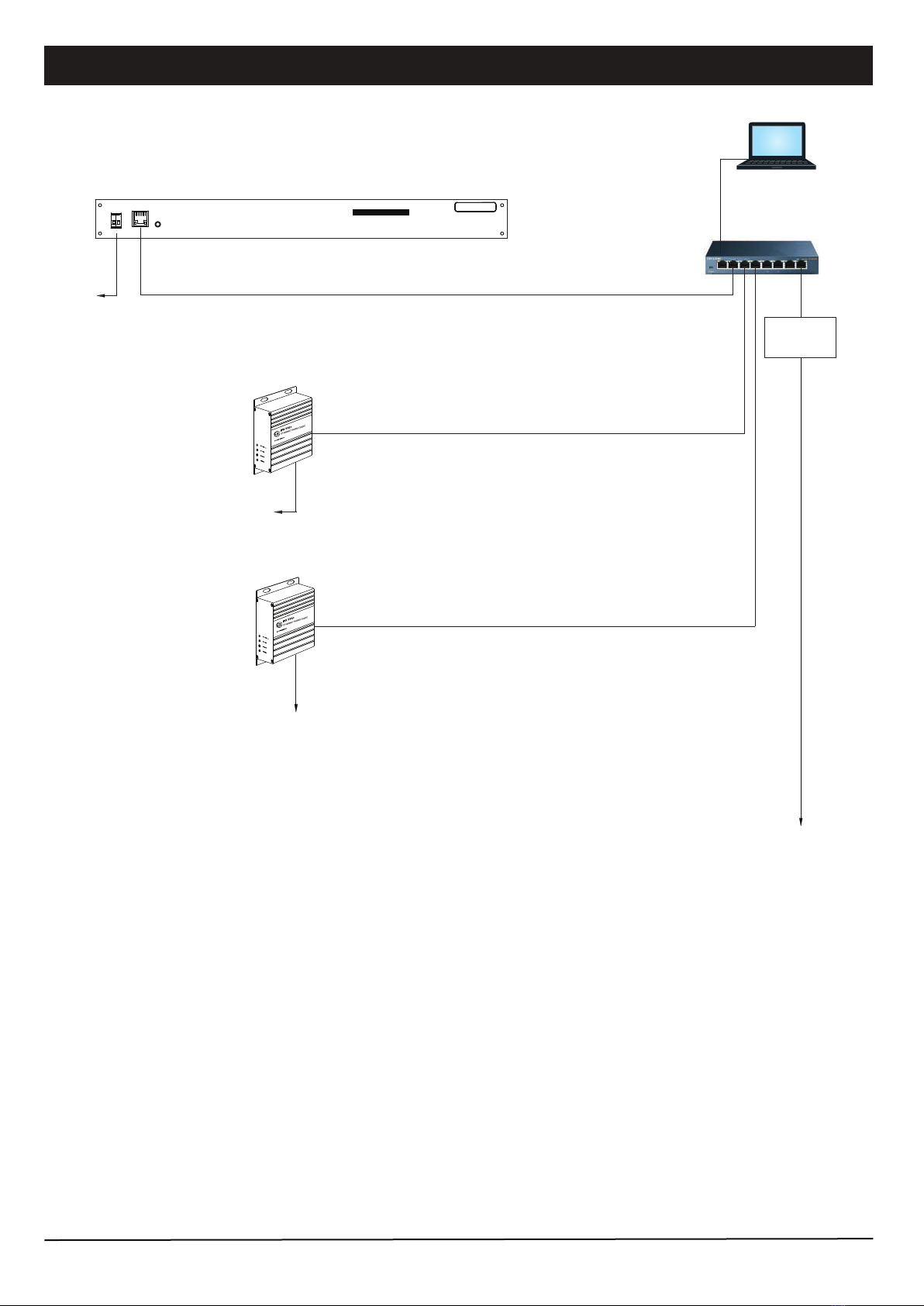
Note: Connection to sub
rack can be done using
existing LAN
To System
( Local Rack )
Audio to pre-amp
Data to zone decoder

Interface with PMX LAN
iPX5101 | ETHERNET PAGING SERVER PAGE 5
iPX 5101
ampe re s
ACT STATUS POWERREM
iPX5101
IP PAGING CONTROLLER
NETWORK SWITCH
iPX5155
LOCAL PA EQUIPMENT INCL. PRE-AM-
PLIFIER MIXER ZONE DECODER
POWER AMPLIFIERS ETC.
Paging / Music / Siren
+
Data
PC with PMX LAN Software ( Paging / Music / Siren )
iPX5101 can work with PMX LAN to allow a user to conduct paging, music playing or initiate a siren from a PC.
(Output Mode)
cat5e cat5e
cat5e

Device Setup Via Browser
PAGE 6 iPX5101 | ETHERNET PAGING SERVER
Network Configuration
Edit iPX5101 IP address, Subnet address and Gateway
address here to suit you networking environment. It is
recommended to leave the Data port number unchanged.
Click the “SAVE” button to save your changes.
IP Address
Subnet Address
Gateway Address
Data Port
Stream Port
Multicast IP
iPX5101 shall require some setups via web browser. Kindly follow instructions listed below.
Open a browser (Chrome / IE) and enter iPX5101 IP address. The default address is 192.168.0.100. Default username
and password are both “admin”.
Device Info
The first page appear upon login shall be Device Info. Infor-
mation such as firmware version, networking addresses and
paging configuration are shown. No configuration is needed
in this page.
BLK A Paging Server
iPX5101 | ETHERNET PAGING SERVER PAGE 7
Device Setup Via Browser
System
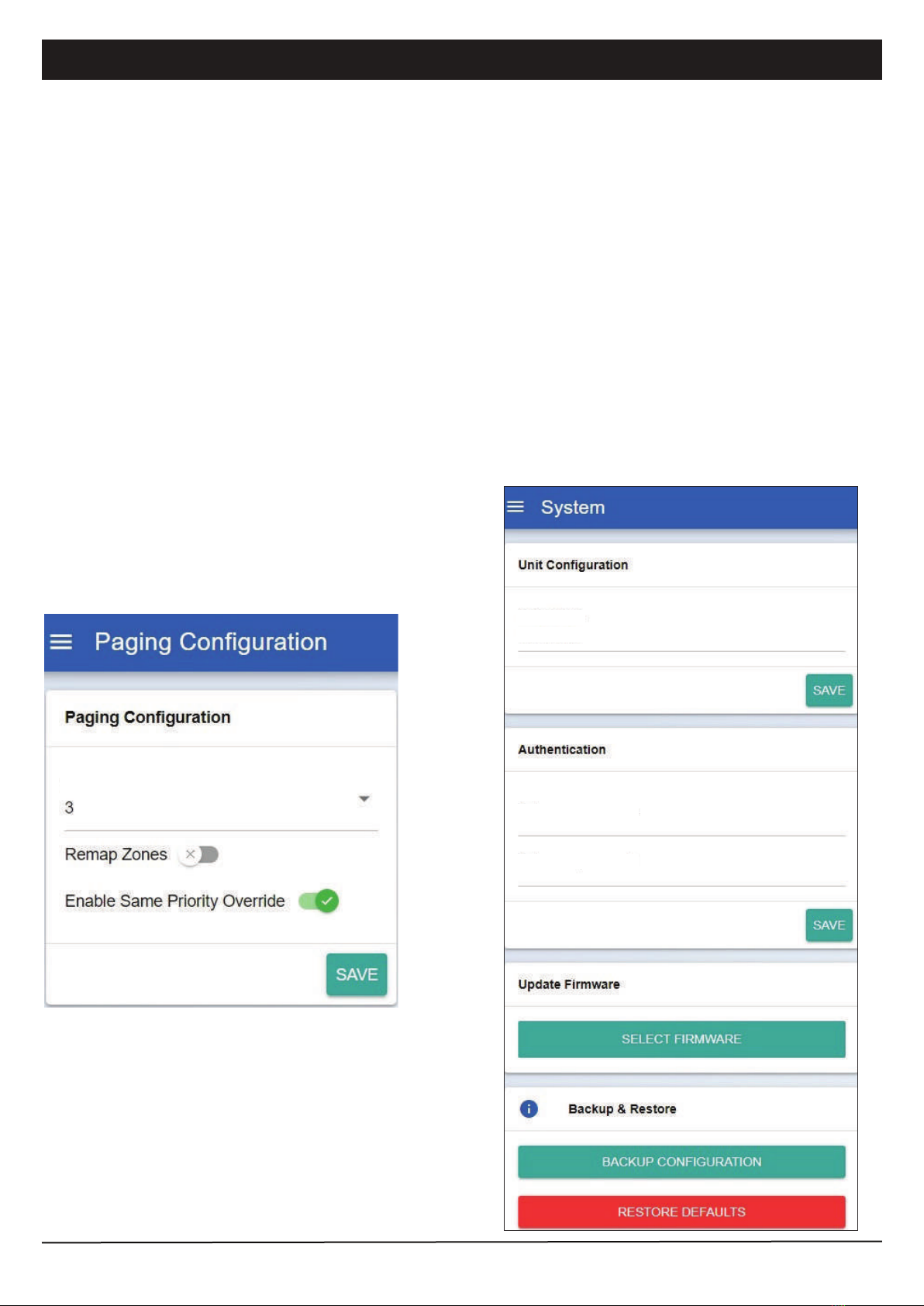
Unit Configuration: We can enter a meaningful
Device Name here, e.g. “BLK A Paging Server”.
The name will be shown in Device Info page.
Authentication: You can alter the user name and pass-
word to avoid unnecessary access to the system.
Update Firmware : Firmware is stored in the unit’s
memory. Should there be any updates available, use this
section to perform system upgrades accordingly.
Backup and Restore: You can backup the configura-
tion and can reset the settings to default settings.
Device Name
BLK A Paging Server
Enter new username
Enter new password
Paging Configuration
Concurrent Paging: Number of paging mic that
allow to page concurrently. Note that in order to allow
the paging mics to talk at the same time, multiple
iPX5155 (operate in Output Mode) serving different
zone ranges are needed to be present in the system.
Also, the zone ranges that the paging mics are
calling do not overlap. Disable this setting if we want
to allow only one paging mic to be active at a time.
Remap Zones: (To be supported)
Enable Same Priority Override: When
multiple paging mics with equal priority attempt to
page the same zone range, enable this setting shall
allow late caller to page first.
Note: Overlapped zone(s) are zone(s) that been
served by two devices. E.g. if Mic 1 is paging zone 1
& 2; Mic 2 is paging zone 2 & 3 then zone 2 is an
overlapped zone.
Concurrent Paging

PAGE 8 iPX5101 | ETHERNET PAGING SERVER
Device Setup Via Browser
Paging Server
CLIENT BROWSER: Show all clients IP address, model, firmware version, connection status and serving zone range.
SERVER LOGS: Logging activities among server and clients.
NO
1
Time LogNo
10:00:05
10:00:03
[Socket:4] Timeout
Connected to SSE Socket: 5
Device Name IP Address Device Model FW Version Connection Status Zone Range
IPX Device
5155 (Sub 5)
5151 (2) Main Build
5155 (Sub 2)
5155 (Sub 4)
192.168.0.220
192.168.0.158
192.168.0.152
192.168.0.156
192.168.0.157
iEP1200
iPX5151
iPX5155
iPX5155
iPX5155
2.10
2.29
2.17
2.29
2.29
Connected
Connected
Connected
Connected
Connected
N/A
10 - 12
N/A
4 - 6
7 - 9

iPX5101 | ETHERNET PAGING SERVER PAGE 9
Firmware Update
System firmware shall be updated once in a while when new features are available or to fix bugs. There are 2 methods of
doing;
1. Open a browser and type in the iPX5101 IP address.
2. Under “System Configuration” page look for “Firmware Update” section as shown in below.
Update firmware in Normal Operation Mode
Click “SELECT FIRMWARE” and choose a binary file with “.acfr” extension.
Click “UPLOAD”.
Once the update is completed, the browser shall enter the login page.
iPX5101.acfr
PAGE 10 iPX5101 | ETHERNET PAGING SERVER
Firmware Update
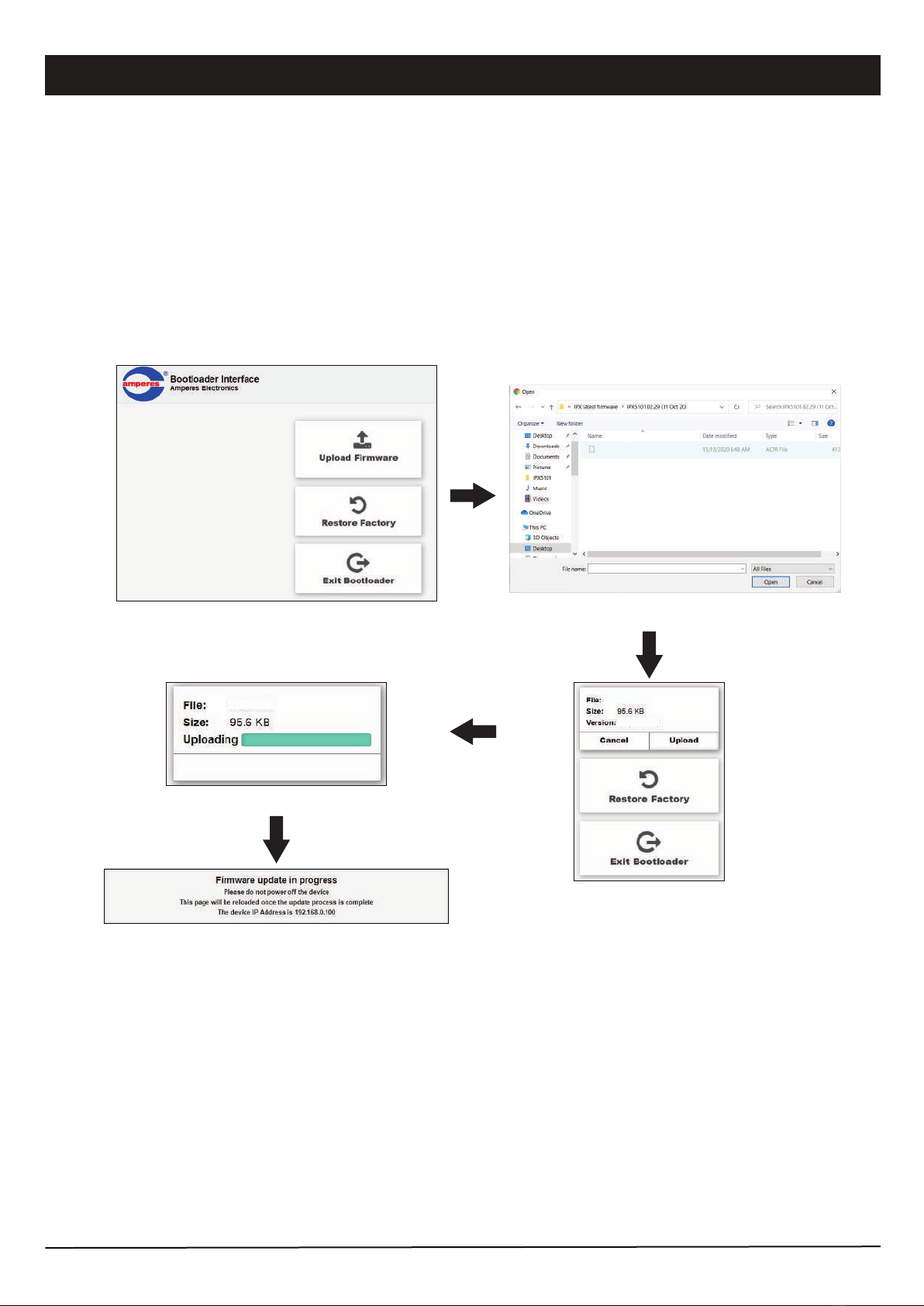
1. Press & hold the reset button until “STATUS” LED is turned ON. This will set the IP address to default address
192.168.0.100.
2. Open a browser and enter the IP address 192.168.0.100. A web page as shown below shall appear.
3. Select “ Upload Firmware ”, choose a binary file with “ .acfr ” extension and click “UPLOAD”
4. Once the uploading is completed, the browser shall enter the login page.
Update firmware in Bootloader Mode
If the iPX5101 “hanged”, it is required to perform system reset by :
Click the Upload Firmware button to find the updat-
ed firmware file.
Find the updated firmware file.
Ready to upload, click Upload
button to upload the firmware.
Updating progress
After finish updating firmware, the browser automatically
restart.
IPX5101 IPX5101
2.06
IPX5101.acfr
IPX5101.acfr
Altri manuali per iPX5101
1
Indice
Altri manuali Amperes Server


