
Analog Devices UG-1221 Manuale utente

User Guide | EVAL-HCRWATCH4Z
UG-1221
Vital Signs Monitoring (VSM) Watch
PLEASE SEE THE LAST PAGE FOR AN IMPORTANT
WARNING AND LEGAL TERMS AND CONDITIONS. Rev. 0 | 1 of 33
FEATURES
►Vital signs monitoring platform
►Wearable battery-powered platform
►Real-time live data view
►Data storage to flash memory for offline analysis
►Easy configuration
DEVICES HOSTED IN THE VSM WATCH
►nRF52840
►ADP5360
►ADXL362
►ADPD4100
►AD8233
►AD5940
►AD7156
EVALUATION KIT CONTENTS
►VSM platform (the watch)
►Charging cradle
►USB Type A to micro USB cable
►Firmware debug board
SOFTWARE NEEDED
►VSM WaveTool
GENERAL DESCRIPTION
The vital signs monitoring (VSM) watch, EVAL-HCRWATCH4Z, is a
modular development, demonstration, and data collection platform
for high performance vital signs monitoring applications based on
Analog Devices, Inc., analog front ends (AFEs) and sensors.
The VSM watch is a wearable, battery-powered device that enables
the continuous monitoring and on-demand spot check measure-
ment of photoplethysmography (PPG), electrodermal activity (EDA,
bioimpedance-based), skin temperature, electrocardiography (ECG,
biopotential based), and motion/activity (based on a 3‑axis acceler-
ometer).
The VSM watch allows synchronized, multiparameter data storage
on internal memory for later data retrieval and offline analysis
and/or live monitoring on a PC (Windows® OS) or Android- or
iOS-based device.
PREPARING THE VSM WATCH
Before using the VSM watch, proper preparations must be made.
Ensure that the battery of the watch is charged and the VSM Wave-
Tool PC program is installed. See the Powering Up the System
for the First Time section for installation instructions. Upgrade the
watch firmware using the VSM WaveTool.
CONDITIONS REGARDING THE USE OF THIS
PRODUCT IN HEALTHCARE APPLICATIONS
This device design is being provided as-is without any express or
implied representations or warranties of any kind and the use of
this device shall impose no legal obligation on Analog Devices, Inc.,
and its subsidiaries, employees, directors, officers, servants, and
agents. In addition, it is understood and agreed to that the device
is not authorized for use in safety critical healthcare applications
(such as life support) in which malfunction or failure of a product
can be expected to result in personal injury or death. This device
must not be used for diagnostic purposes. It must not be used with
a defibrillator or other equipment that produces high voltages more
than the supply rails on the evaluation board.
This device is provided for evaluation and development purposes
only. It is not intended for use as, or as part of, a product. Any
use of the device in such applications is at your own risk and you
shall fully indemnify Analog Devices, its subsidiaries, employees,
directors, officers, servants and agents for all liability and expenses
arising from such unauthorized usage. You are solely responsible
for compliance with all legal and regulatory requirements connected
to such use.

User Guide EVAL-HCRWATCH4Z
TABLE OF CONTENTS
analog.com Rev. 0 | 2 of 33
Features................................................................ 1
Devices Hosted in the VSM Watch........................1
Evaluation Kit Contents......................................... 1
Software Needed...................................................1
General Description...............................................1
Preparing the VSM Watch..................................... 1
Conditions Regarding the Use of This Product
in Healthcare Applications................................... 1
Evaluation Platform Overview............................... 3
Evaluation Platform............................................... 6
Overview............................................................ 6
Powering Up the System for the First Time........6
Water Resistance............................................... 6
Software............................................................. 6
Bluetooth USB PC Dongle (nRF52840)............. 6
Buttons............................................................... 7
Display Indicators...............................................7
Vital Signs Monitored...........................................11
Photoplethysmography—ADPD4100............... 11
Motion and Activity–ADXL362.......................... 11
Electrocardiography–AD8233...........................11
Bioimpedance–AD5940....................................11
Skin and Ambient Temperature........................ 12
Use Cases........................................................... 13
Embedded Algorithms for Evaluation.................. 15
Pedometer........................................................15
Automatic Gain Control.................................... 15
Heart Rate Monitoring...................................... 15
Signal Quality Index......................................... 15
ECG Heart Rate Monitoring............................. 15
Battery Life and Memory Footprint...................... 16
Battery Life....................................................... 16
Memory Footprint ............................................ 16
Schematics and Layouts..................................... 17
FCC Compliance Statement................................28
Ordering Information............................................29
Bill of Materials.................................................29
Device Models..................................................33
REVISION HISTORY
12/2021—Revision 0: Initial Version


User Guide EVAL-HCRWATCH4Z
EVALUATION PLATFORM
analog.com Rev. 0 | 6 of 33
OVERVIEW
The VSM watch is a modular development, demonstration, and
data collection platform for high performance vital signs monitoring
applications based on Analog Devices analog front ends and sen-
sors.
The platform optimized electrical and mechanical design hosts all
the required circuits to sense, condition, digitize, process, store,
and wirelessly transmit real-time, vital sign related data. This plat-
form does the following:
►Minimizes the risks associated with a new electronic design
►Minimizes the time to market for a new final product
►Facilitates the evaluation of a wide range of Analog Devices
solutions in a single battery-powered wearable ecosystem
►Highlights and addresses the challenges associated with a wear-
able device
►Allows the developer to focus on other added value tasks, such
as algorithm development, and the overall firmware for engineer-
ing and scientific research and validation
This platform is not intended to do the following:
►Act as the final product for a specific application.
►Demonstrate an application-specific optimized design. Trade-offs
were made to allow platform flexibility.
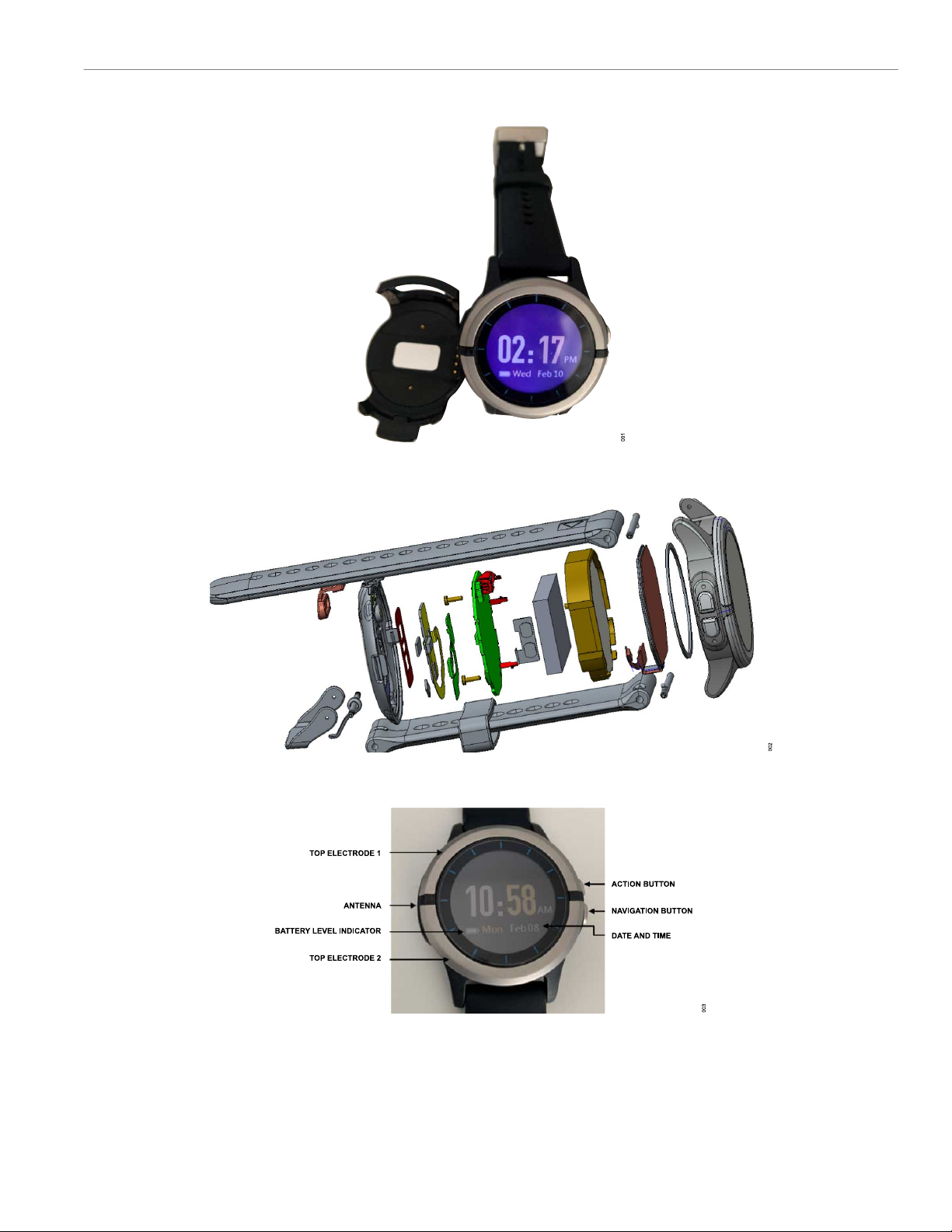
The evaluation platform kit contains the following items (see Figure
9:
►VSM platform (the watch)
►Charging cradle
►USB Type A to micro USB cable
►Firmware debug board
Figure 9. Evaluation Kit Contents
The USB cable is used for the following purposes:
►Recharge the battery via the charging cradle (connecting the
watch to a PC or wall adapter)
►Upgrade the platform firmware (using VSM Wavetool)
►Download data stored in the internal flash memory for offline
data analyses or other purposes
Use the watch only with the USB cable provided.
POWERING UP THE SYSTEM FOR THE FIRST
TIME
The VSM watch is shipped from the factory in an ultra low power
shipment mode. To exit this power mode, place the watch into the
charging cradle and connect the USB cable to provide power.
Before using the watch for the first time, fully charge the battery by
connecting the VSM watch to a PC or wall adapter using the USB
cable provided.
WATER RESISTANCE
The VSM watch is IP68 rated. Despite this rating, exercise caution
if showering, swimming, or doing any other activity with the VSM
watch that exposes it directly to moisture.
SOFTWARE
For information on the VSM watch software, refer to the VSM watch
software user guide included with the VSM WaveTool (available for
download on the Analog Devices website at www.analog.com).
BLUETOOTH USB PC DONGLE (NRF52840)
The VSM watch platform leverages an off-the-shelf Nordic Semi-
conductor Bluetooth® low energy (BLE) dongle for communicating
wirelessly with a PC (see Figure 10). The nRF52840 is available for
purchase separately through multiple online vendors.
Figure 10. BLE USB PC Dongle (nRF52840)

User Guide EVAL-HCRWATCH4Z
EVALUATION PLATFORM
analog.com Rev. 0 | 7 of 33
BUTTONS
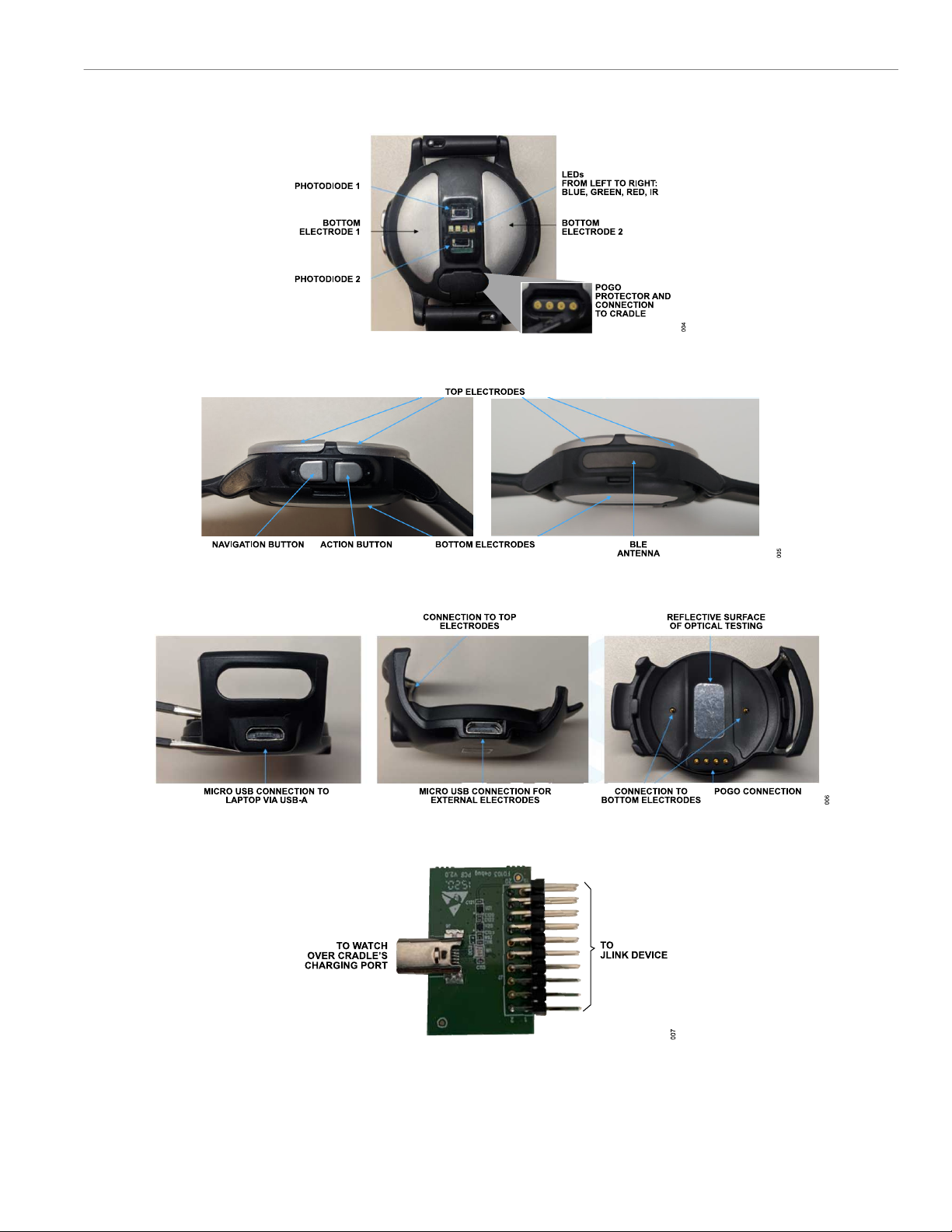
Two buttons are found on the side of the VSM watch. Table 1 to
Table 3 explain the uses of these buttons.
Table 1. Button Descriptions
Button Description
Navigation Short press to proceed to the next screen
Action Short press for OK
Table 2. Button Usage in Watch App
Button Combinations Button Actions Button Press Timings (sec)
Action Button Short Press Selects the current page action 0.05
Navigation Button Short Press Navigates to the next page 0.05
Action Button Long Press Returns to the previous page action 3
Navigation Button Long Press Calls a soft reset of the watch app 3
Action and Navigation Button Long Press Enters the bootloader 3
Navigation Button Long Press When Watch Is Powered Down Wakes up the watch 1
Table 3. Button Usage in Bootloader
Button Combinations Button Actions Button Press Timings (sec)
Action Button Short Press No action Not applicable
Navigation Button Short Press No action Not applicable
Action Button Long Press No action Not applicable
Navigation Button Long Press Enters watch app 7
Action and Navigation Button Long Press Enters watch app 7
Action Button Short Press No action Not applicable
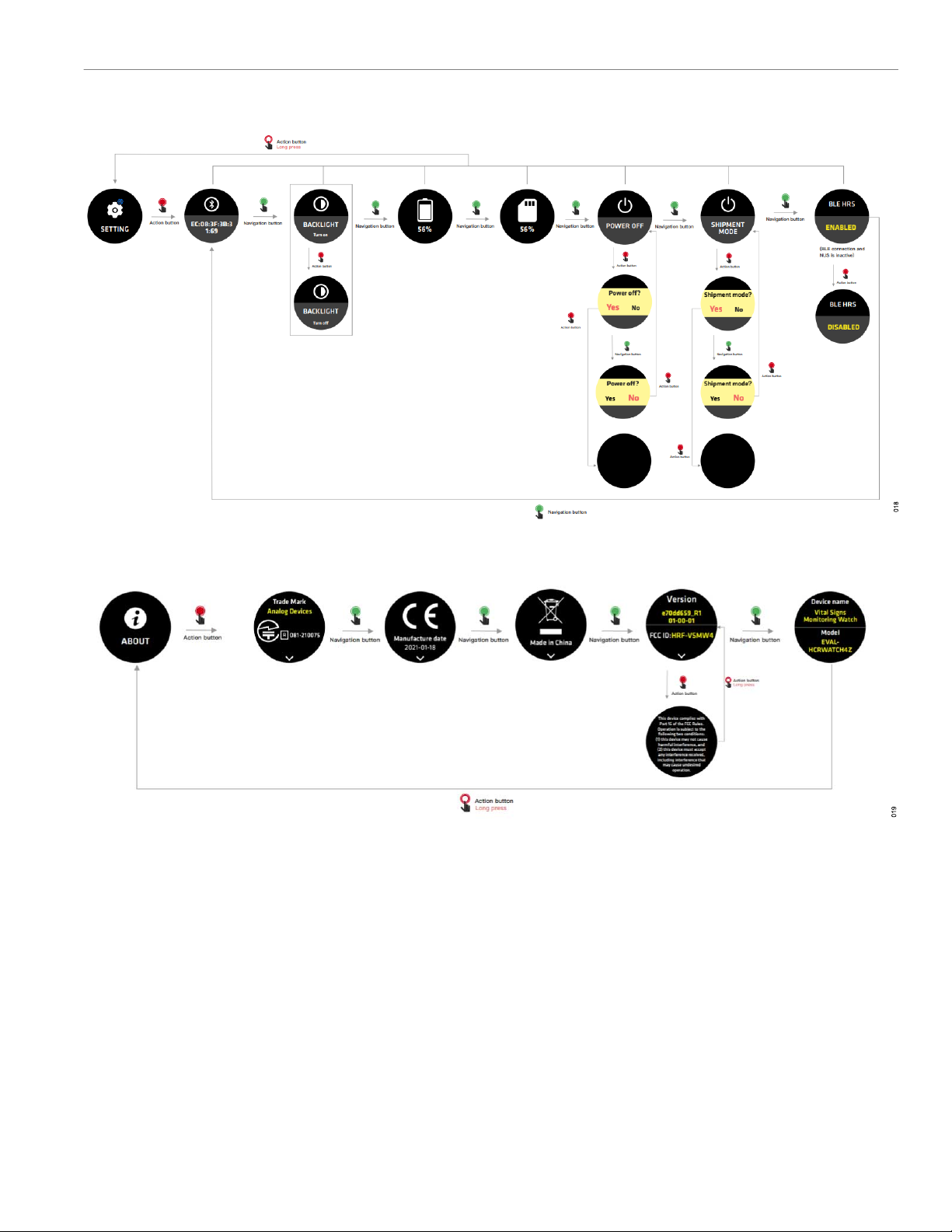
DISPLAY INDICATORS
Figure 11. Starting Up
Figure 12. Restart from Any Page


Indice
Altri manuali Analog Devices Strumento di misura


