AT&T CL82219 Manuale utente

Quick start guide
CL82219/CL82229/CL82319/
CL82419/CL82519
DECT 6.0 cordless telephone/
answering system with
caller ID/call waiting
Scan the QR code for
support information

Congratulations
on your purchase of this AT&T product. Before using this AT&T product, please read
the Important safety information section on pages 1-3 of this manual.
Both the model and serial numbers of your AT&T product can be found on the
bottom of the telephone base. Save your sales receipt and original packaging in
case it is necessary to return your telephone for warranty service.
For customer service, please visit our website at https://telephones.att.com
or call 1 (800) 222-3111. In Canada, dial 1 (866) 288-4268.
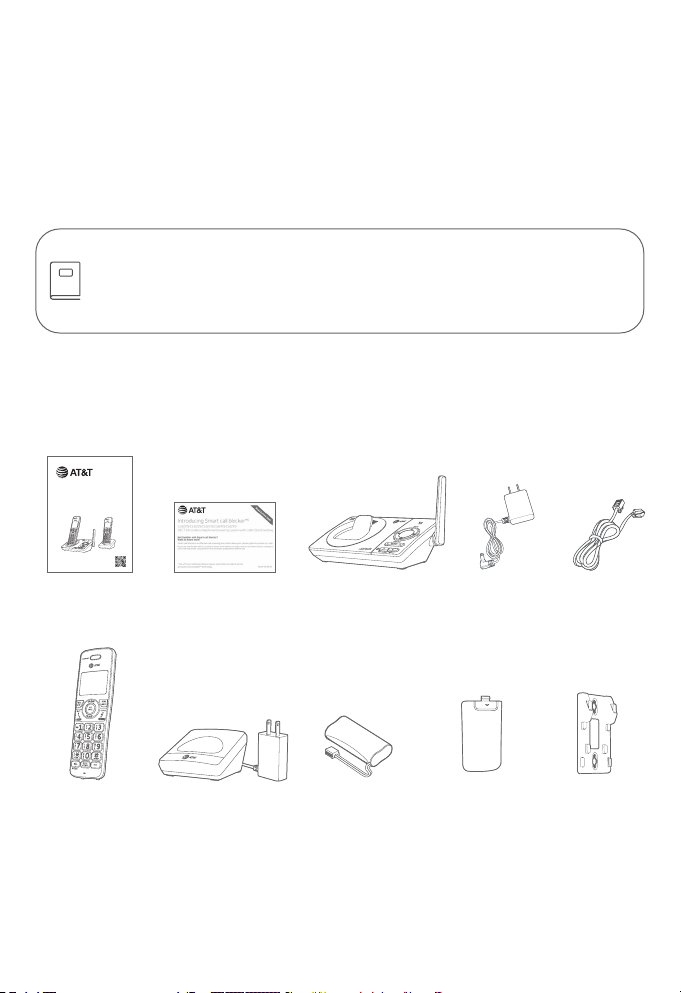
Parts checklist
Your telephone package contains the following items.
Telephone
line cord
Power adapter
for telephone
base
Telephone baseQuick start guide
Cordless handset
(2 for CL82219/
CL82229)
(3 for CL82319)
(4 for CL82419)
(5 for CL82519)
Charger for
cordless handset
with power
adapter installed
(1 for CL82219/
CL82229)
(2 for CL82319)
(3 for CL82419)
(4 for CL82519)
Battery for
cordless handset
(2 for CL82219/
CL82229)
(3 for CL82319)
(4 for CL82419)
(5 for CL82519)
Battery
compartment
cover
(2 for CL82219/
CL82229)
(3 for CL82319)
(4 for CL82419)
(5 for CL82519)
Please refer to the online CL82219/CL82229/CL82319/CL82419/CL82519
DECT 6.0 cordless telephone/answering system with caller ID/call waiting
Complete user’s manual for a full set of installation and operation
instructions at https://telephones.att.com/manuals.
Wall-mount
bracket
Quick start guide
CL82219/CL82229/CL82319/
CL82419/CL82519
DECT 6.0 cordless telephone/
answering system with
caller ID/callwaiting
Scanthe QR code for
support information
Smart call blocker
leaet

1
Important safety information
This symbol is to alert you to important operating or servicing instructions
that may appear in this user’s manual. Always follow basic safety precautions
when using this product to reduce the risk of injury, re, or electric shock.
Safety information
fRead and understand all instructions in the user’s manual. Observe all markings on
the product.
fAvoid using a telephone during a thunderstorm. There may be a slight chance of
electric shock from lightning.
fDo not use a telephone in the vicinity of a gas leak. Under certain circumstances,
a spark may be created when the adapter is plugged into the power outlet, or
when the handset is replaced in its cradle. This is a common event associated with
the closing of any electrical circuit. In an inadequately ventilated environment,
the user should not plug the phone into a power outlet, nor put a charged
handset into the cradle where there are concentrations of ammable or ame-
supporting gases. A spark in such an environment could create a re or explosion.
Such environments might include: medical use of oxygen without adequate
ventilation; industrial gases (cleaning solvents; gasoline vapors; etc.); a leak of natural
gas; etc.
fDo not use this product near water or when you are wet. For example, do not use
it in a wet basement or shower, nor next to a swimming pool, bathtub, kitchen sink
and laundry tub. Do not use liquids or aerosol sprays for cleaning. If the product
comes in contact with any liquid, unplug any line or power cord immediately. Do not
plug the product back in until it has dried thoroughly.
fInstall this product in a protected location where no one can trip over any line or
power cords. Protect cords from damage or abrasion.
fIf this product does not operate normally, see the Troubleshooting section of the
online Complete user’s manual. If you cannot solve the problem, or if the product
is damaged, refer to the Limited warranty section (pages 33 - 35). Do not
open this product except as directed in your user’s manual. Opening the product or
reassembling it incorrectly may expose you to hazardous voltages or other risks.
fReplace batteries, only as described in your user’s manual (Page 6). Do not burn
or puncture batteries — they contain caustic chemicals.
fThis power adapter is intended to be correctly oriented in a vertical or oor mount
position. The prongs are not designed to hold the plug in place if it is plugged into a
ceiling or an under-the-table/cabinet outlet.
fFor pluggable equipment, the socket-outlet shall be installed near the equipment
and shall be easily accessible.
CAUTIONS:
fUse only the power adapter provided with this product. To obtain a replacement,
visit our website at https://telephones.att.com or call
1 (800) 222-3111.In Canada, dial 1 (866) 288-4268.

2
Important safety information
CAUTION: To prevent risk of re or battery explosion, replace with the correct
battery type. Dispose of used batteries according to the instructions.
fDisconnect the telephone line from the equipment before open the battery door.
Do not use the battery in following conditions:
fHigh or low extreme temperature during use, storage or transportation.
fReplacement of a battery with an incorrect type that can defeat a safeguard.
fDisposal of a battery into fire or a hot oven, or mechanically crushing or
cutting of a battery, that can result in an explosion.
fLeaving a battery in an extremely high temperature surrounding
environment that can result in an explosion or the leakage of flammable
liquid or gas.
fA battery subjected toextremely low air pressure that can result in an
explosion or the leakage of flammable liquid or gas.
fU
se only the supplied rechargeable battery or replacement battery (model
BT183342/BT283342).
To order, visit our website at
https://telephones.att.com,or call 1 (800) 222-3111. In
Canada, dial 1 (866) 288-4268.
fThe applied nameplate is located at the bottom or near of the product.
Especially about cordless telephones
fPrivacy: The same features that make a cordless telephone convenient create
some limitations. Telephone calls are transmitted between the telephone base
and the handset by radio waves, so there is a possibility that your cordless
telephone conversations could be intercepted by radio receiving equipment within
range of the cordless handset. For this reason, you should not think of cordless
telephone conversations as being as private as those on corded telephones.
fElectrical power: The telephone base of this cordless telephone must be
connected to a working electrical outlet which is not controlled by a wall switch.
Calls cannot be made from the handset if the telephone base is unplugged,
switched o or if the electrical power is interrupted.
fPotential TV interference: Some cordless telephones operate at frequencies
that may cause interference to TVs and VCRs. To minimize or prevent such
interference, do not place the telephone base of the cordless telephone near
or on top of a TV or VCR. If interference is experienced, moving the cordless
telephone farther away from the TV or VCR will oen reduce or eliminate the
interference.
fRechargeable batteries: This product contains nickel-metal hydride rechargeable
batteries. Exercise care in handling batteries in order not to create a short
circuit with conductive material such as rings, bracelets, and keys. The battery or
conductor may overheat and cause harm. Observe proper polarity between the
battery and the battery charger.
i

3
Important safety information
fNickel-metal hydride rechargeable batteries: Dispose of these batteries in a safe
manner. Do not burn or puncture. Like other batteries of this type, if burned or
punctured, they could release caustic material which could cause injury.
The RBRC Seal means that the manufacturer is voluntarily
participating in an industry program to collect and recycle nickel-
metal hydride rechargeable batteries when taken out of service
within the United States. These batteries may be taken to a
participating local retailer of replacement batteries or recycling
center. You may call 1-800-8-BATTERY® for locations accepting
spent Ni-MH batteries.
The RBRC Seal and 1-800-8-BATTERY® are registered trademarks of
Call2recycle, Inc.
Precautions for users of implanted cardiac pacemakers
Cardiac pacemakers (applies only to digital cordless telephones):
Wireless Technology Research, LLC (WTR), an independent research entity, led
a multidisciplinary evaluation of the interference between portable wireless
telephones and implanted cardiac pacemakers. Supported by the U.S. Food and
Drug Administration, WTR recommends to physicians that:
Pacemaker patients:
fShould keep wireless telephones at least six inches from the pacemaker.
fShould NOT place wireless telephones directly over the pacemaker, such as in a
breast pocket, when it is turned ON.
fShould use the wireless telephone at the ear opposite the pacemaker.
WTR’s evaluation did not identify any risk to bystanders with pacemakers from
other persons using wireless telephones.
ECO mode
This power conserving technology reduces power consumption for optimal battery
performance. The ECO mode activates automatically whenever the handset is
synchronized with the telephone base.
Especially about telephone answering systems
Two-way recording: This unit does not sound warning beeps to inform the other
party that the call is being recorded. To ensure that you are in compliance with any
federal or state regulations regarding recording a telephone call, you should start
the recording process and then inform the other party that you are recording the
conversation.
SAVE THESE INSTRUCTIONS

4
Table of contents
Important safety information....................................................................................................1
Install...........................................................................................................................................................5
Wall-mount installation (optional)......................................................................................... 7
Handset overview..............................................................................................................................8
Telephone base overview............................................................................................................11
Initial basic settings........................................................................................................................12
Date and time ................................................................................................................................12
Smart call blocker setup via voice guide.....................................................................12
Basic answering system setup via voice guide.......................................................13
Record your own announcement.....................................................................................13
Number of rings............................................................................................................................13
Ringer volume................................................................................................................................14
LCD language .................................................................................................................................14
Dial mode..........................................................................................................................................14
Temporary tone dialing...........................................................................................................15
Set speed dial voicemail number .....................................................................................15
Operate...................................................................................................................................................15
Directory ................................................................................................................................................17
Caller ID...................................................................................................................................................18
Caller ID announce......................................................................................................................18
Review and dial a number in the call log......................................................................18
Save a caller ID log entry to the directory..................................................................18
Delete a caller ID log entry....................................................................................................18
Erase missed calls indicator in the call log.................................................................19
Smart call blocker *§.......................................................................................................................19
What is Smart call blocker? ..................................................................................................19
Turn Smart call blocker on or o......................................................................................19
Default scenario of Smart call blocker handling...................................................20
Prerequisite setups....................................................................................................................20
Other popular scenarios.........................................................................................................22
Block the caller while on a call............................................................................................23
Unblock a telephone number .............................................................................................23
Answering system ..........................................................................................................................24
About answering system and voicemail.....................................................................24
Turn answering system on or o......................................................................................25
Message alert tone.....................................................................................................................25
Call screening.................................................................................................................................25
Message playback...................................................................................................................... 26
For C-UL compliance......................................................................................................................27
FCC Part 68 and ACTA...................................................................................................................31
FCC Part 15............................................................................................................................................32
Limited warranty ..............................................................................................................................33
Technical specications.............................................................................................................. 36

5
Telephone base
Notes:
f Plug one end of the telephone line cord into a telephone jack or a DSL lter.
f If you have DSL high-speed Internet service, a DSL lter (not included) is required.
Charger
Caution: Use only the power adapter(s)
provided with this product. To obtain a
replacement, visit our website at
https://telephones.att.com
or call 1 (800) 222-3111. In Canada,
dial 1 (866) 288-4268.
Install

6
Battery
Install the battery, as shown below.
Caution: Use only the supplied rechargeable battery or replacement battery
(model BT183342/BT283342).
Charge your handset(s) before initial use. The battery is fully charged aer 10
hours of continuous charging. The CHARGE light on the top of the handset is on
during charging.
Install
THIS SIDE UP /
CE CÔTÉ VERS LE HAUT
THIS SIDE UP / CE CÔTÉVERS LE HAUT
BatteryPack / Bloc-piles :
BT183342/BT283342(2.4V 400mAh Ni-MH)
WARNING/ AVERTISSEMENT :
DONOT BURN OR PUNCTURE BATTERIES.
NEPAS INCINÉRER OU PERCER LES PILES.
Madein China / Fabriqué en chine CR1349

7
Wall-mount installation (optional)
Plug the telephone line into
the telephone base.
Insert the extended tabs of
the wall-mount bracket into
the slots on the back of the
telephone base. Push the
telephone base down until it is
securely in place.
Plug the power adapter into a
power outlet not controlled by
a wall switch. Plug the other end
of the power adapter into the
telephone base.
1
2
34
Align the holes on the wall-mount
bracket with the standard wall
plate and slide the wall-mount
bracket down until it locks
securely.
B
A

8
Handset
1REDIAL/
PAUSE
fPress repeatedly to view the last 10 numbers dialed.
fWhile entering numbers, press and hold to insert a
dialing pause.
MENU/
SELECT
fWhen the handset is not in use, press to show the menu.
fWhile in the menu, press to select an item or save an
entry or setting.
2
VOL pDIR fPress to scroll up while in menus.
fPress to increase the listening volume when on a call.
fPress to show directory entries when the handset is not
in use.
fWhile entering names or numbers in the directory, press
to move the cursor to the right.
CALL
BLOCK
fPress to block the incoming call when the telephone is
ringing.
fWhen on a call, press to block the call.
fWhen the handset is not in use, press to show the call
block menu.
VOL qCID fPress to scroll down while in menus.
fPress to decrease the listening volume when on a call.
fPress to show the caller ID log when the handset is not
in use.
fWhile entering names or numbers in the directory, press
to move the cursor to the le.
Handset overview
1
3
2
4
5
8
6
7
Questo manuale è adatto per i seguenti modelli
4
Indice
Altri manuali AT&T Cornetta

AT&T
AT&T E560-1 Manuale utente

AT&T
AT&T BE50 Manuale utente

AT&T
AT&T CLP99573 Manuale utente

AT&T
AT&T 5800 Manuale utente

AT&T
AT&T E597-1 Manuale utente

AT&T
AT&T CL80111 Manuale utente

AT&T
AT&T TL90031 Manuale utente

AT&T
AT&T TL90073 Manuale utente

AT&T
AT&T TL90077 Manuale utente

AT&T
AT&T 2300 Manuale utente

AT&T
AT&T E250 Manuale utente

AT&T
AT&T TL76008 Manuale utente

AT&T
AT&T 5865 Manuale utente

AT&T
AT&T TL90071 Manuale utente

AT&T
AT&T SB67108 - AT&T Manuale utente

AT&T
AT&T MS2025 Manuale utente

AT&T
AT&T DL70010 Manuale utente

AT&T
AT&T CL80103 Manuale utente

AT&T
AT&T E598-2 Manuale utente

AT&T
AT&T CRL80112 Manuale utente