AT&T MS2025 Manuale utente

User’s manual
MS2025 4-line
Small Business Cordless Handset
+06 1((
%#0%'.

Congratulations
on your purchase of this AT&T product. Before using this AT&T
product, please read the Important safety information on
pages 54-56 of this manual. Please thoroughly read this user’s
manual for all the feature operations and troubleshooting
information necessary to install and operate your new AT&T
product. You can also visit our website at
www.telephones.att.com or call 1 (800) 222-3111. In
Canada, dial 1 (866) 288-4268.
Model number: MS2025
Type: 4-Line Small Business Cordless Handset
Serial number:
Purchase date:
Place of purchase:
Both the model and serial numbers of your AT&T product can be
found on the bottom of the telephone base.
Save your sales receipt and original packaging in case it is
necessary to return your telephone for warranty service.
© 2012 Advanced American Telephones. All Rights Reserved. AT&T and
the AT&T logo are trademarks of AT&T Intellectual Property licensed to
Advanced American Telephones, San Antonio, TX 78219. Printed in China.
T
Compatible with
Hearing Aid T-Coil
TIA-1083
Telephones identified with this logo have reduced noise and
interference when used with most T-coil equipped hearing aids and
cochlear implants. The TIA-1083 Compliant Logo is a trademark of
the Telecommunications Industry Association. Used under license.

+06 1((
%#0%'.
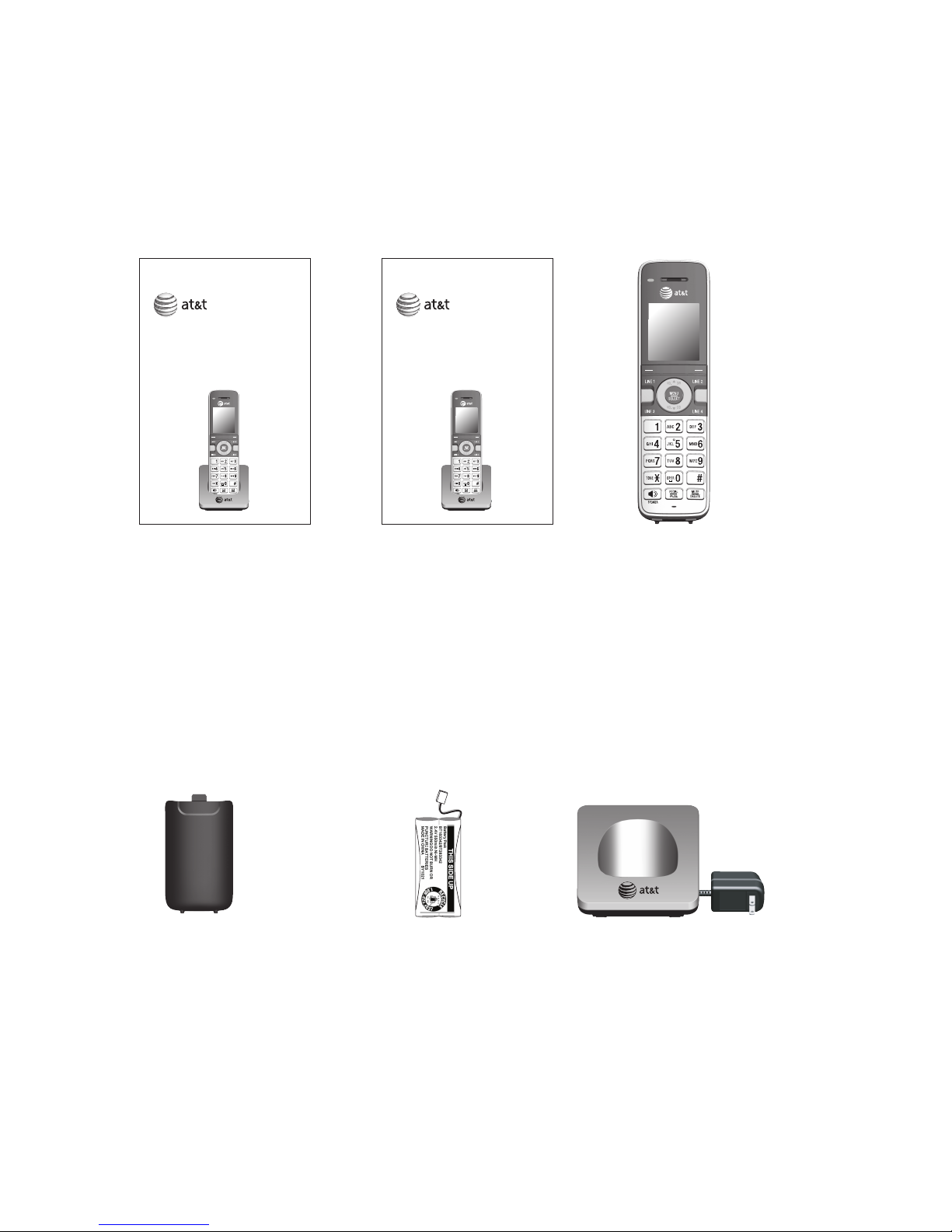
Parts checklist
Your telephone package contains the following items. Save
your sales receipt and original packaging in the event warranty
service is necessary.
Cordless handset
MS2025
User's manual
MS2025
Quick start guide
Charger for cordless
handset with power
adapter installed
Battery for cordless
handset
Battery compartment
cover
+06 1((
%#0%'.
User’s manual
MS2025 4-line
Small Business Cordless Handset
+06 1((
%#0%'.
Quick start guide
MS2025 4-line
Small Business Cordless Handset

Table of contents
User’s manual
MS2025 4-Line
Small Business Cordless Handset
Getting started
Installation....................................... 1
Quick reference guide ............... 2
Charger installation..................... 5
Battery installation and
charging........................................ 6
Adding and registering a
handset.......................................... 8
To register a handset to
your MS2015 deskset............. 9
Deregistering a handset..........10
To deregister the cordless
handset from the MS2015
deskset ........................................10
Adding a corded headset.......11
Telephone settings
Telephone setup .........................12
Menu settings...........................12
Ringer volume..........................13
Ringer melodies ......................14
Language....................................15
Home area code......................16
Key tone......................................17
LCD contrast .............................17
Extension number ..................18
Phone rename..........................19
Reset handset ..........................19
Telephone operation
Telephone operation.................20
Line indicators..........................20
Making and ending a call...20
On hook dialing
(predialing).................................20
Using the speakerphone.....21
Answering a call .....................21
Temporary ringer
silencing......................................21
Redial............................................21
Options while on calls.............23
Call waiting................................23
Volume control ........................23
Mute ..............................................23
Hold...............................................24
+06 1((
%#0%'.

Chain dialing.............................25
Conference call ...........................26
Conference calls .....................26
A. Join a call by answering
an intercom call......................26
B. Inviting parties using
Intercom......................................27
Intercom..........................................28
Make an intercom call to
an extension .............................28
Answer an intercom call.....28
End an intercom call.............28
Answer an incoming call
during an intercom call.......28
Directory
About the directory...................29
Capacity ......................................29
Exit the directory ....................29
Create directory entries..........30
Create a new directory
entry .............................................30
Review directory entries .....30
Search directory..........................31
Search by name ......................31
Dial, delete or edit entries.....32
Display dial ................................32
Delete an entry........................32
Edit an entry .............................32
Caller ID
About the caller ID....................33
Information about caller ID
with call waiting .....................33
Caller ID information................35
How the caller ID
information (call log)
works............................................35
Review the caller ID
information................................36
View dialing options..............36
Dial a call history entry.......37
Save a caller ID entry to
the directory .............................37
Delete all caller ID
entries..........................................37
Reasons for missing caller ID
information................................38
Answering system
Private mailbox setup ..............39
Announcement ........................39
Answering system
operation....................................40
Visual message waiting
indicator......................................40
Message playback..................40
Appendix
Handset screen icons...............41
Alert tones and lights ..............42
Handset alert tones...............42
Handset indicator lights......42
Handset display screen
messages....................................43
Troubleshooting ..........................44
Maintenance..................................53

Important safety
information................................54
FCC part 15...................................57
FCC part 68 and ACTA.............59
Limited warranty.........................60
Technical specifications ..........63
DECT 6.0 digital
technology.................................63
Telephone operating
range ............................................63
Index
Index ................................................64

1
Your product may be shipped with a protective sticker covering
the handset display - remove it before use.
For customer service or product information, visit our website at
www.telephones.att.com or call 1 (800) 222-3111. In
Canada, dial 1 (866) 288-4268.
Avoid placing the telephone base too close to:
Communication devices such as television sets, VCRs, or other
cordless telephones.
Excessive heat sources.
Noise sources such as a window with traffic outside, motors,
microwave ovens, refrigerators, or fluorescent lighting.
Excessive dust sources such as a workshop or garage.
Excessive moisture.
Extremely low temperature.
Mechanical vibration or shock such as on top of a washing
machine or work bench.
•
•
•
•
•
•
•
You must install and
charge the handset
battery before using the
cordless handset.
See pages 5- 7 for easy
instructions.
Getting started
Installation

2
Charge light
On when the handset is charging in the
charger (page 7).
Softkeys (2)
Press to select a menu item displayed above
the key.
LINE 1/LINE 2/LINE 3/LINE 4
Press to make a call on the desired line
(pages 20).
Press to answer a call (page 21).
INT
Press to make an intercom call when in idle
(page 28).
REDIAL/PAUSE
Press to view the last 10 numbers dialed
(page 21).
/SPEAKER
Press to turn on the handset speakerphone.
Press again to resume normal handset use
(page 21).
•
•
•
•
•
•
•
+06 1((
%#0%'.
Getting started
Quick reference guide

3
Getting started
Quick reference guide
VOL/ DIR
Press to scroll up while in menus.
During a call, press to increase the listening volume
(page 23).
Press to show directory entries when the telephone
is not in use (page 30).
MENU/SELECT
Press to enter the menu.
While in a menu, press to select an item or save an
entry or setting.
OFF/CANCEL
While using menus, press to return to idle mode.
During a call, press to hang up.
VOL/ CID
Press to scroll down while in menus.
During a call, press to decrease the listening
volume (page 23).
Press to show the caller ID history when the
telephone is not in use (page 36).
MUTE/DELETE
During a call, press to mute the microphone
(page 23).
While predialing, press to delete digits (page 20).
While reviewing the directory entry, press to delete
an individual entry (page 32).
While entering or editing a directory entry, press to
erase a digit or character (pages 30 and 32).
•
•
•
•
•
•
•
•
•
•
•
•
•
•
+06 1((
%#0%'.

4
Getting started
Quick reference guide
Main menu
Main menu
Ringers (pages 13-14)
Phone Settings (pages 15-19)
Using menus
Press MENU/SELECT or MENU to
show the first menu item, Ringers.
Press or to scroll through
menu items.
Press MENU/SELECT or SELECT
to select or save changes to a
highlighted menu item.
Press OFF/CANCEL or BACK
to cancel an operation, exit the
menu display or return to the
idle screen.
•
•
•
•
•
•
Belt clip
+06 1((
%#0%'.
Phone
BACK SELECT
Ringers
Phone settings
Altri manuali per MS2025
2
Indice
Altri manuali AT&T Cornetta

AT&T
AT&T CL81201 Manuale utente

AT&T
AT&T CL80100 Manuale utente

AT&T
AT&T SB67108 - AT&T Manuale utente

AT&T
AT&T E5640 Manuale utente

AT&T
AT&T CRL30102 Manuale utente

AT&T
AT&T BE50 Manuale utente

AT&T
AT&T STX-2 Manuale utente

AT&T
AT&T E560-1 Manuale utente

AT&T
AT&T MS2025 Manuale utente

AT&T
AT&T CL80121 Manuale utente

AT&T
AT&T CL80109 Manuale utente

AT&T
AT&T Synapse SB67040 Manuale utente

AT&T
AT&T TL71108 Manuale utente

AT&T
AT&T TL90073 Manuale utente

AT&T
AT&T EL50003 Manuale utente

AT&T
AT&T TL77008 Manuale utente

AT&T
AT&T TL90071 Manuale utente

AT&T
AT&T 5800 Manuale utente

AT&T
AT&T E5902B Manuale utente

AT&T
AT&T DLP70110 Manuale utente