ATCOM IPPBX IP-2G4A Manuale utente

IPPBX IP2G4A User Manual
For Firmware Version: V3.0
2013-12-11

IPPBX IP2G4A User Manual
~ 1 ~ ATCOM TECHNOLOGY CO., LIMITED
Contents
Contents........................................................................................................................................................................... 1
1. Introduction.............................................................................................................................................................. 5
2. Connection and Change IP Address of IPPBX.................................................................................................. 6
2.1 Connection................................................................................................................................................... 6
2.2 WAN Settings............................................................................................................................................... 8
2.3 LAN Settings................................................................................................................................................ 8
2.4 DHCP Server............................................................................................................................................... 9
2.5 System Status............................................................................................................................................ 10
3. Create local extensions and make interior calls .............................................................................................. 11
3.1 FXS extensions.......................................................................................................................................... 11
3.2 VOIP extensions........................................................................................................................................ 14
3.2.1 Add new extensions........................................................................................................................ 14
3.2.2 Modify extensions.......................................................................................................................... 18
3.3 Register onto IPPBX with your IP phone............................................................................................... 19
3.4 Extensions Status...................................................................................................................................... 19
3.5 Feature Codes........................................................................................................................................... 20
3.6 SMTP Settings........................................................................................................................................... 22
3.7 Conference................................................................................................................................................. 24
3.8 Paging / Intercom...................................................................................................................................... 24
3.9 Options........................................................................................................................................................ 25
4. Create VoIP trunk to communicate with VoIP provider .................................................................................. 26
4.1 Create VoIP trunks.................................................................................................................................... 26
4.2 Check VoIP Trunk Status......................................................................................................................... 28
4.3 Make outbound calls................................................................................................................................. 28

IPPBX IP2G4A User Manual
~ 2 ~ ATCOM TECHNOLOGY CO., LIMITED
4.4 Make inbound calls................................................................................................................................... 30
5. Create Service Provider to connect two IP PBXes.......................................................................................... 32
5.1 Create Service Provider........................................................................................................................... 32
5.2 Check Service Provider Status ............................................................................................................... 33
5.3 Make outbound calls................................................................................................................................. 33
5.4 Make inbound calls................................................................................................................................... 34
6. Make outbound/inbound calls to/from PSTN network..................................................................................... 35
6.1 Make sure FXO modules are installed................................................................................................... 35
6.2 Make outbound calls................................................................................................................................. 36
6.3 Make inbound calls................................................................................................................................... 37
7. Make outbound/inbound calls to/from GSM network...................................................................................... 39
7.1 Make sure GSM modules are installed ................................................................................................... 39
7.2 Make outbound calls .................................................................................................................................. 40
7.3 Make inbound calls..................................................................................................................................... 41
8. Inbound Call Control............................................................................................................................................. 43
8.1 Time Interval................................................................................................................................................ 43
8.2 Hunt / Ring Group....................................................................................................................................... 44
8.3 Queue........................................................................................................................................................... 45
8.4 IVR................................................................................................................................................................ 47
8.5 DISA.............................................................................................................................................................. 49
8.6 Call Back...................................................................................................................................................... 50
8.7 Inbound to Outbound.................................................................................................................................. 52
8.7.1 GSM/FXO trunk to SIP trunk......................................................................................................... 52
8.7.2 SIP trunk to GSM/FXO trunk ......................................................................................................... 53
8.8 Custom Dialplan............................................................................................................................................. 54

IPPBX IP2G4A User Manual
~ 3 ~ ATCOM TECHNOLOGY CO., LIMITED
8.9 Blacklist ........................................................................................................................................................ 55
8.10 SIP Settings.................................................................................................................................................. 55
8.11 IAX Settings.................................................................................................................................................. 57
9. Audios..................................................................................................................................................................... 57
9.1 Music On Hold............................................................................................................................................. 57
9.2 Custom Prompts......................................................................................................................................... 58
9.3 Language Setting........................................................................................................................................ 58
10. Network Settings........................................................................................................................................... 58
10.1 Web Access............................................................................................................................................... 58
10.2 Firewall....................................................................................................................................................... 59
10.3 Port Forwarding ........................................................................................................................................ 62
10.4 DDNS ......................................................................................................................................................... 62
10.5 VLAN.......................................................................................................................................................... 62
10.6 VPN............................................................................................................................................................. 63
11. System Settings ............................................................................................................................................ 63
11.1 Change Password.................................................................................................................................... 63
11.2 Auto Provisioning................................................................................................................................... 64
11.2.1 Auto Provisioning............................................................................................................................. 64
11.2.2 Configured Phones.......................................................................................................................... 65
11.2.3 Unconfigured Phones...................................................................................................................... 66
11.2.4 Upload Phone Configure................................................................................................................. 67
11.3 Date && Time............................................................................................................................................ 67
11.4 External Storage....................................................................................................................................... 68
11.5 Firmware Upgrade.................................................................................................................................... 70
11.6 Backup and Restore................................................................................................................................. 70

IPPBX IP2G4A User Manual
~ 4 ~ ATCOM TECHNOLOGY CO., LIMITED
11.7 Reboot && Reset...................................................................................................................................... 71
12. Reports........................................................................................................................................................... 72
12.1 Call Detail Records................................................................................................................................... 72
12.2 Syslog...................................................................................................................................................... 73
13. Web Interface for extension......................................................................................................................... 73

IPPBX IP2G4A User Manual
~ 5 ~ ATCOM TECHNOLOGY CO., LIMITED
1. Introduction
Overview of the IPPBX
ATCOM IPPBX is a SIP-based IP voice switch with a small embedded OS and rich GUI (Graphical User
Interface), providing a powerful networking and corporate communication function. With it, users can quickly
deploy an internal communication system for enterprise, as well as configure conveniently applications and
value-added services on IP PBX via its GUI, to fit enterprise's own various demands.
Targeting for SOHO user and SMB market with an easy to use graphical interface, IP2G4A provides a
cost-saving solution on their telecommunication/data needs. With IP2G4A, company with branch offices in
different countries can be easily combined together to work like a virtual single office through internet.
Hardware Specifications
CPU
400MHz Blackfin 533 Chip
NAND Flash
256 M
SDRAM
128 M
GSM Port
2
Analog Port
4
Network Interface
WAN,LAN
Measurement and Weight
Inner box
225 * 120 * 30mm

G.W./unit
0.79KG
Carton MEAS
456 * 442 * 362 mm
Units per Carton
21 units/ CTN
G.W./CTN
18 KG/CTN
Function Features
Voicemail
Authentication before call outbound
Voicemail to Email
User WEB portal
Blind/Attended Transfer
Blacklist
Call Forward
Call Detail Records(CDR)
Call Parking
Conference
Do not Disturb (DND)
Ring Group
Group / Directed Pickup
Call Queue
Call Recording
Call Back
Call Waiting
IVR
Call Routing
Intercom/Paging
Caller ID
IP Restriction
BLF Support
Firewalls
Music on Hold
DDNS
Video Call
DHCP Server

IPPBX IP2G4A User Manual
~ 6 ~ ATCOM TECHNOLOGY CO., LIMITED
PPPoE
VLAN
Port Forward
VPN client
External Storage
Auto Provisioning
Storage Quota Privilege
Fax to Email
Custom Dialplan
Auto call recording
Integrated built-in packet capture tools
2. Connection and Change IP Address of IPPBX
2.1 Connection
The default IP address of IPPBX is:
WAN: 192.168.1.100/255.255.255.0
LAN: 192.168.10.1/255.255.255.0
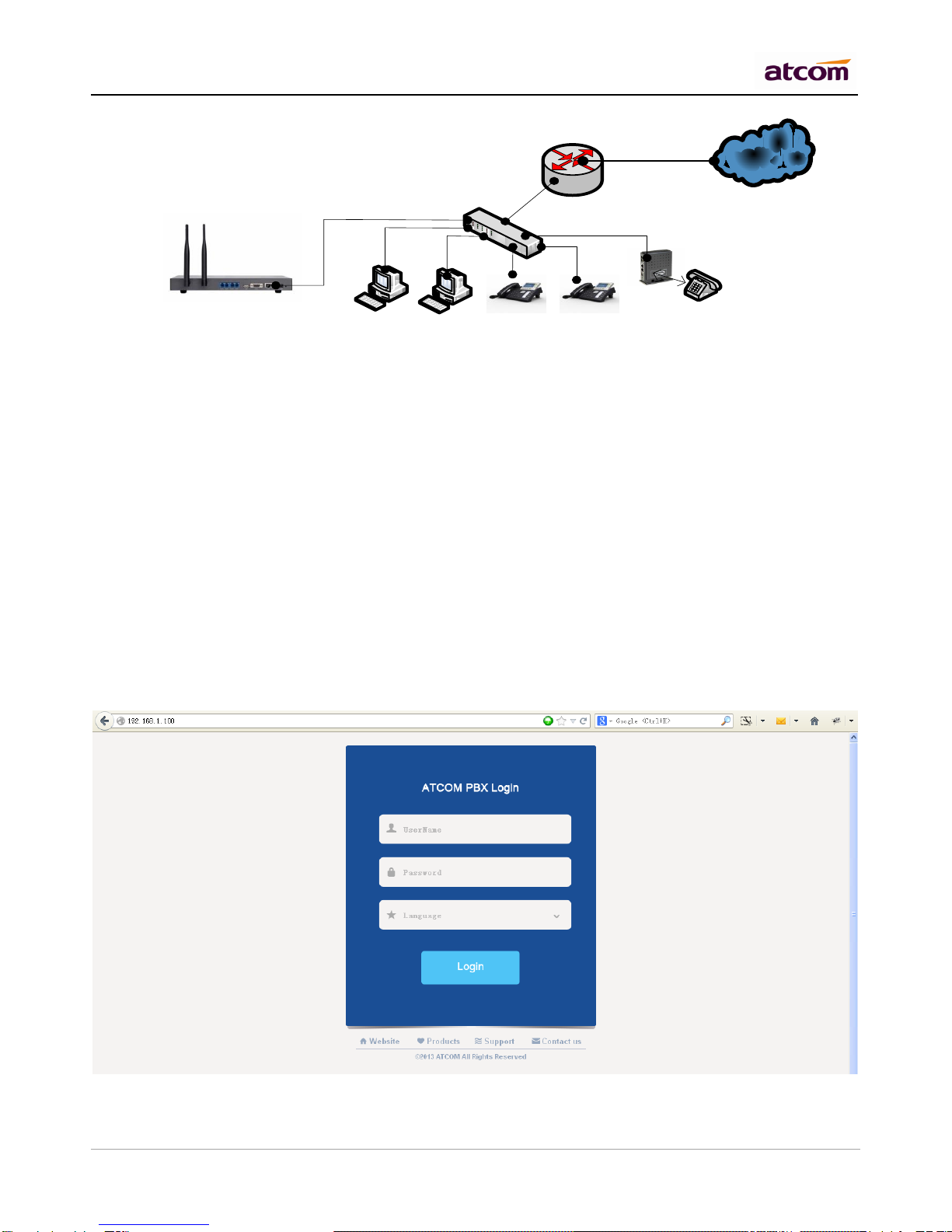
There are two network interfaces (WAM and LAN) in IP2G4A, it can be used as a router (WAN port connects
Internet and LAN port connects local network):
Internet
WAN
Ext:6001
192.168.10.3 Ext:6002
192.168.10.4
Ext:6003
192.168.10.5 Ext:6004
192.168.10.6
Ext:6005
192.168.10.7
Ext:6006
IVSP
LAN
192.168.10.1
WAN
tpcard.vicp.cc
If you do not want IPPBX to act as a router and put it behind a router, please connect WAN port to your local
network:

IPPBX IP2G4A User Manual
~ 7 ~ ATCOM TECHNOLOGY CO., LIMITED
Internet
Ext:6001
192.168.1.3 Ext:6002
192.168.1.4
Ext:6003
192.168.1.5 Ext:6004
192.168.1.6
Ext:6005
192.168.1.7
WAN
192.168.1.100
NOTE: It’s recommended to re-set IP address of IPPBX via WAN at the first time, Since DHCP server on LAN
port is enabled by default, Other DHCP client enabled devices in the network may obtain IP from IPPBX rather
than real DHCP server. And then access IPPBX via LAN after configuring LAN settings.
1) Connect IPPBX to your PC directly or through switch.
Make sure IP address of your PC is in network 192.168.1.0/255.255.255.0, if not, you need to appoint an IP
address for your PC, for example, 192.168.1.3
2) Login IPPBX as administrator via WEB GUI
User: admin
Password: atcom
NOTE: Language option will be accomplished in future versions, currently, only English is supported. So it’s not
selectable now.
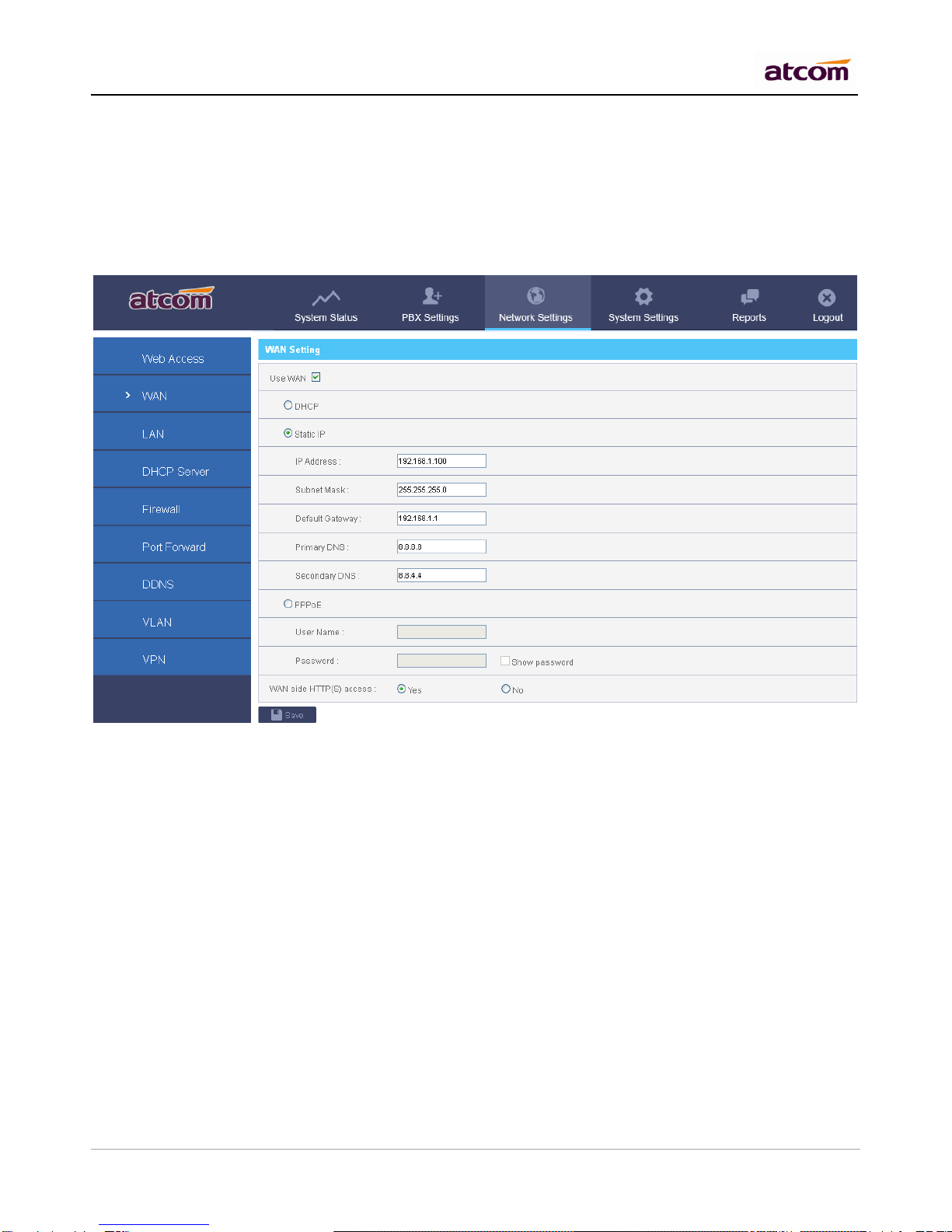
3) Go to Network Settings ->WAN.
Re-set IP of WAN port.

IPPBX IP2G4A User Manual
~ 8 ~ ATCOM TECHNOLOGY CO., LIMITED
4) Go to Network Settings -> LAN.
Re-set IP of LAN port.
2.2 WAN Settings
There are three ways to set an IP address to WAN port: DHCP, Static IP, PPPoE.
DHCP
IPPBX will obtain an IP address automatically from DHCP server when rebooting. It’s not recommended to
choose this option unless there is a reserved IP for IPPBX in DHCP server so that IPPBX can keep the same IP
all the time.
Static IP
Set an IP address manually according to the real network environment. If IPPBX is behind a router, the gateway
is usually set to the IP of the router.
PPPoE
IPPBX will obtain an IP address automatically after establishing a connection to PPPoE server with username
and password.
2.3 LAN Settings
DHCP

IPPBX IP2G4A User Manual
~ 9 ~ ATCOM TECHNOLOGY CO., LIMITED
Yes: IPPBX will get an IP address from DHCP server, Not recommended.
No: Configure IP address manually for LAN. Default is NO.
NAT
Yes: IPPBX will act as a router, all the devices connected to LAN can access the network connected to WAN.
Default is Yes.
No: Networks connected to LAN and WAN are independent.
NOTE: IP addresses of LAN and WAN can’t be in the same network.
For example: IP of WAN is 192.168.1.100/255.255.255.0, IP of LAN can’t be 192.168.1.xx/255.255.255.0
Hostname
Set the host name for IPPBX.
IP Address / Subnet Mask
Set the IP address / subnet mask for LAN network interface.
Gateway
Set the Gateway for LAN network interface.
Primary DNS / Secondary DNS
Set the DNS server for LAN network interface.
IP Address 2 / Subnet Mask 2
Set the failover IP address for LAN network interface.
2.4 DHCP Server
The Dynamic Host Configuration Protocol (DHCP) is a network protocol used to configure devices that are
connected to a network (known as hosts) so they can communicate on that network using the Internet Protocol
(IP). It involves clients and a server operating in a client-server model.
Enable DHCP server
Altri manuali per IPPBX IP-2G4A
1
Indice
Altri manuali ATCOM Centralino

ATCOM
ATCOM APBX IP4G Manuale utente

ATCOM
ATCOM IPPBX IP04 Manuale utente

ATCOM
ATCOM IPPBX IP01 Manuale utente

ATCOM
ATCOM IPPBX Manuale utente

ATCOM
ATCOM IPPBX IP08 Manuale utente

ATCOM
ATCOM IPPBX IP08 Manuale utente

ATCOM
ATCOM IPPBX IP04 Manuale utente

ATCOM
ATCOM IPPBX IP01 Manuale utente

ATCOM
ATCOM IPPBX IP02 Manuale utente

ATCOM
ATCOM IP-01P Manuale utente
Manuali Centralino popolari di altre marche

Rauland-Borg
Rauland-Borg Telecenter IV Manuale utente

Grandstream Networks
Grandstream Networks UCM6208 Manuale utente

Panasonic
Panasonic KX-TVS50 - 2 Port Voicemail System Manuale utente

bintec elmeg
bintec elmeg elmeg hybird 600 Manuale utente

Panasonic
Panasonic KX-NS300 Manuale utente

MCK
MCK EXTender PBXgateway Manuale utente