Aurora JPX-TX1 Manuale utente

i
Manual Number: 140731
USERS GUIDE
JPX Series
JPX-TX1 / JPX-RX1
JPEG2000 IP Distribution
JPX-RX1
JPX-TX1

i
User Guide
SAFETY INSTRUCTIONS
Please review the following safety precautions. If this is the first time using this model, then read this manual
before installing or using the product. If the product is not functioning properly, please contact your local
dealer or Aurora for further instructions.
The lightning symbol in the triangle is used to alert you to the presence of dangerous voltage
inside the product that may be sufficient to constitute a risk of electric shock to anyone opening
the case. It is also used to indicate improper installation or handling of the product that could
damage the electrical system in the product or in other equipment attached to the product.
The exclamation point in the triangle is used to alert you to important operating and maintenance
instructions. Failure to follow these instructions could result in injury to you or damage to the
product.
Be careful with electricity:
Power outlet: To prevent electric shock, be sure the electrical plug used on the product power cord
matches the electrical outlet used to supply power to the Aurora product. Use only the power adapter
and power connection cables designed for this unit.
Power cord: Be sure the power cord is routed so that it will not be stepped on or pinched by heavy
items.
Lightning: For protection from lightning or when the product is left unattended for a long period,
disconnect it from the power source.
.
Also follow these precautions:
Ventilation: Do not block the ventilation slots if applicable on the product or place any heavy object on
top of it.
Blocking the air flow could cause damage. Arrange components so that air can flow freely. Ensure that
there is adequate ventilation if the product is placed in a stand or cabinet. Put the product in a properly
ventilated area, away from direct sunlight or any source of heat.
Overheating: Avoid stacking the Aurora product on top of a hot component such as a power amplifier.
Risk of Fire: Do not place unit on top of any easily combustible material, such as carpet or fabric.
Proper Connections: Be sure all cables and equipment are connected to the unit as described in this
manual.
Object Entry: To avoid electric shock, never stick anything in the slots on the case or remove the cover.
Water Exposure: To reduce the risk of fire or electric shock, do not expose to rain or moisture.
Cleaning: Do not use liquid or aerosol cleaners to clean this unit. Always unplug the power to the
device before cleaning.
ESD: Handle this unit with proper ESD care. Failure to do so can result in failure.
FCC
This device complies with Part 15 of the FCC Rules. Operation is subject to the following two conditions:
(1) This device may not cause harmful interference.
(2) This device must accept any interference received, including interference that may cause undesired
operation.
Trademarks
All trademarks in this document are the properties of their respective owners.

ii
User Guide
TABLE OF CONTENTS
PACKAGE CONTENTS.............................................................................................................1
INTRODUCTION........................................................................................................................2
About..................................................................................................................................................... 2
Features................................................................................................................................................ 2
JPX-TX1 Front & Rear.......................................................................................................................... 3
JPX-RX1 Front & Rear ......................................................................................................................... 4
APPLICATIONS.........................................................................................................................5
Example 1 JPX-TX1 Transmitter to JPX-RX1 Receiver....................................................................... 5
Example 2 JPX-TX1 Transmitter to Multiple JPX-RX1 Receivers........................................................ 6
Example 3 Multiple JPX-TX1 to Multiple JPX-RX1............................................................................... 7
Example 4 Video Wall........................................................................................................................... 8
HARDWARE INSTALLATION....................................................................................................9
OPERATION............................................................................................................................10
Installation........................................................................................................................................... 10
Searching Devices.............................................................................................................................. 12
Setting Device Parameters................................................................................................................. 13
Device Settings................................................................................................................................... 14
Scene Setting...................................................................................................................................... 15
Videowall Setting ................................................................................................................................ 18
Manage Configuration Files................................................................................................................ 25
Log...................................................................................................................................................... 26
CONNECTOR PIN DEFINITION..............................................................................................27
HDMI................................................................................................................................................... 27
CAT5e/6/6A......................................................................................................................................... 28
APPENDIX 1 Troubleshooting...........................................................................................29
APPENDIX 2 Firmware Update..........................................................................................31
APPENDIX 3 RS-232 Debug ..............................................................................................31
APPENDIX 4 Technical Specifications..............................................................................32
APPENDIX 5 Warranty .......................................................................................................33

1
User Guide
PACKAGE CONTENTS
Please make sure the following items are included within your package. Contact your dealer if any items
are missing or damaged.
JPX-RX1
1 qty JPX-RX1 Receiver Decoder Unit
1 qty 12v DC Power Supply
2 qty 3 pos Phoenix Male Connectors
2 qty Mounting Ears
JPX-TX1
1 qty JPX-TX1 Transmitter Encoder Unit
1 qty 12v DC Power Supply
1 qty 3 pos Phoenix Male Connectors
2 qty Mounting Ears
Optional Accessories
JPX-RK4 4RU Rack Mount
Note: Go to www.auroramm.com for latest manual and firmware

2
User Guide
INTRODUCTION
About
The JPX Series is a JPEG2000 visually lossless HDMI over IP which allows you to simultaneously
send out an HDMI Signal (1080p video with 2.1 audio, USB & RS-232) to one or more HDMI
video display devices using CAT5e/6/7 Cable over a standard Ethernet infrastructure. The JPX
Series can be used to distribute HD digital content from multiple sources to many destinations on
a LAN. AV signals are transmitted digitally over a CAT5e/6/7 cable with visual lossless quality with
low latency. Internal video compression adapts to available network bandwidth if needed. The
series also has a Videowall mode capabilities making it perfect for low cost digital signage
applications.The RS-232 can be used to remotely control devices from any receiver or transmitter
location. A USB signal can also be passed through with the RS-232 and HDMI signal making the
JPX Series a single cable solution.
Computer software is available for full control and management or the optional HJ-PXC can be
used to interface with control systems or other devices via LAN.
Features
HDMI Encoding and Decoding using JPEG2000
Switching Matrix when multiple units are used
Low Latency
Videowall modes
Extend the transmission distance to at least 100 meters from a source at 1080p
USB signal transmission, Supports USB 2.0
RS232 control signal transmission
Supports all high definition resolutions: 1080p, 1080i and 720p
HDCP compliant
PoE (Power over Ethernet)
Optional IP control box (HJ-PXC) to allow matrix control and management via LAN for
control systems.

3
User Guide
JPX-TX1 Front & Rear
Front
Operation Mode Switch –Normal mode: Transmit RS-232 Signal between TX & RX, Debug
mode: Debug the unit.
Power LED –LED will light RED when power is applied.
Link LED - The LED will light solid blue when a TX and RX are linked to each other.
Rear
GND Symbol –Ground connection
DC 12V –Connection to 12v / 2A power supply
USB –USB Type B connection to HOST PC
Ethernet –10/100/1000Mbps LAN
HDMI In –HDMI input signal to be encoded and transmitted.
HDMI Out –HDMI Local Loop Out
RS-232 –Serial port control

4
User Guide
JPX-RX1 Front & Rear
Front
Operation Mode Switch –Normal mode: Transmit RS-232 Signal between TX & RX, Debug
mode: Debug the unit.
Power LED –LED will light RED when power is applied.
Link LED - The LED will light solid blue when a TX and RX are linked to each other.
USB3 –USB 2.0 Type A to be connected to a device (ex. Mouse, keyboard, etc)
USB4 –USB 2.0 Type A to be connected to a device (ex. Mouse, keyboard, etc)
Rear
GND Symbol –Ground connection
DC 12V –Connection to 12v / 2A power supply
USB1 –USB 2.0 Type A to be connected to a device (ex. Mouse, keyboard, etc)
USB2 –USB 2.0 Type A to be connected to a device (ex. Mouse, keyboard, etc)
Ethernet –10/100/1000Mbps LAN
Audio Out –Audio de-embedded output
HDMI Out –HDMI Output to Display
RS-232 –Serial port control

5
User Guide
APPLICATIONS
Example 1 JPX-TX1 Transmitter to JPX-RX1 Receiver

6
User Guide
Example 2 JPX-TX1 Transmitter to Multiple JPX-RX1 Receivers
TV
HD Media Center
TX
RX RX RX RX RX RX RX
Switch
TV TV TV TV TV TV

7
User Guide
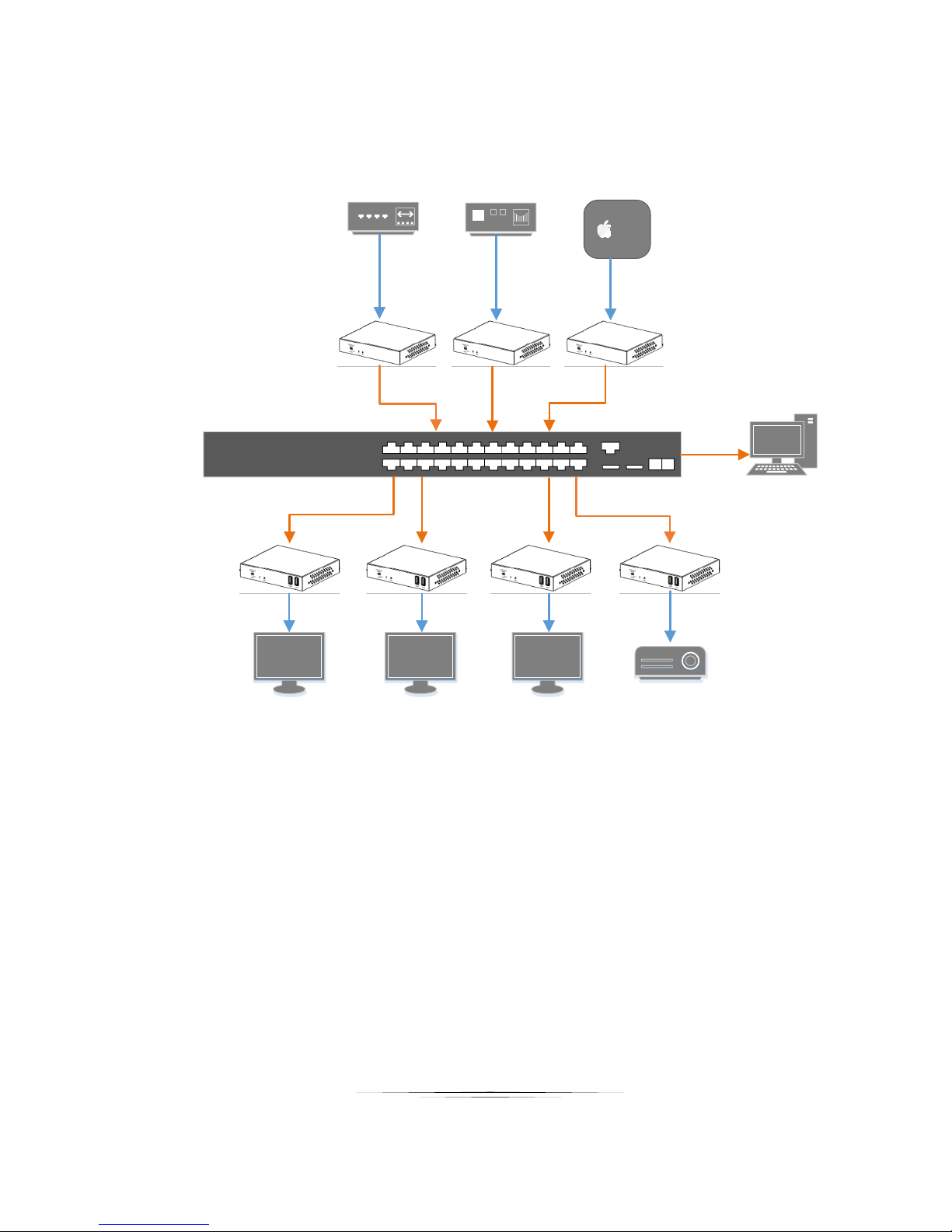
Example 3 Multiple JPX-TX1 to Multiple JPX-RX1
tv
Apple TVBlue-ray DVD Xbox
TX TX TX
Projector
TVTVTV
RX RX RX RX
PC
Switch
HDMI
Ethernet
Questo manuale è adatto per i seguenti modelli
1
Indice
Altri manuali Aurora Server