
CHC i80 GNSS Manuale utente

CHC i80 GNSS Product
User Guide


1
CONTENTS
PREFACE ............................................................................................................................ 4
1. Product Introduction ......................................................................................................... 6
1.1 Receiver Appearance ............................................................................................... 6
1.2 Lousersr Shell .......................................................................................................... 6
1.3 Back Cover .............................................................................................................. 7
1.4 install SIM Card ........................................................................................................ 8
2. LCD Panel Instructions ..................................................................................................... 8
2.1 Satellite and Battery Interface .................................................................................. 9
2.2 Mode Interface ....................................................................................................... 10
2.2.1 Base External UHF ....................................................................................... 11
2.2.2 Base Internal UHF ........................................................................................ 11
2.2.3 Base APIS ..................................................................................................... 12
2.2.4 Base Combination ........................................................................................ 13
2.2.5 Rover APIS ................................................................................................... 13
2.2.6 Rover CORS ................................................................................................. 14
2.2.7 Rover UHF .................................................................................................... 15
2.3 Static Interface ....................................................................................................... 15
2.4 Receiver Information Interface ............................................................................... 16
3.Radio Work Mode ............................................................................................................ 16
3.1 PDA WIFI and Bluetooth connection ...................................................................... 16
3.2 Radio Base Setting ................................................................................................ 18
3.3 DL5-C Radio Setting .............................................................................................. 19
3.4 Rover Operation ..................................................................................................... 21
4. GPRS Mode ................................................................................................................... 24
4.1 Base Erection Demands ........................................................................................ 25
4.2 Base Settings ......................................................................................................... 25
4.2.1 Wireless Settings .......................................................................................... 28
4.3 Rover Operation ..................................................................................................... 29

2
4.3.1 GPRS Status ................................................................................................. 31
5. CORS mode operations ................................................................................................. 33
5.1 Rover operations .................................................................................................... 33
5.1.1 GPRS Status ................................................................................................. 35
6. Survey ............................................................................................................................ 37
6.1 Assisted Measurement System .............................................................................. 37
6.1.1 Bubble, Compass Calibration ....................................................................... 37
6.1.2 Measurement methods ................................................................................. 41
6.2 New Project ............................................................................................................ 42
6.3 Confirm Coordinate Parameters ............................................................................ 44
6.3.1 Bursa 7 Parameter Application ..................................................................... 45
6.3.2 Bursa 7 Parameter Calculation ..................................................................... 46
6.4 Type Known Points ................................................................................................ 47
6.5 Point Adjust ............................................................................................................ 47
6.6 Base Shift ............................................................................................................... 49
6.7 Data Export ............................................................................................................ 50
6.8 Receiver Registration ............................................................................................. 51
7. usersbpage landing setting system ................................................................................ 52
7.1 Receiver status interface ........................................................................................ 53
7.2 Satellite interface ................................................................................................... 54
7.3 Receiver settings interface ..................................................................................... 56
7.3.1 Reference Station Settings ........................................................................... 57
7.4 Data recording........................................................................................................ 58
7.5 IO settings .............................................................................................................. 61
7.6 GPRS ..................................................................................................................... 64
7.7Wifi .......................................................................................................................... 64
7.8 Bluetooth Set ......................................................................................................... 65
7.9 Radio setting .......................................................................................................... 65
7.10 Network service ................................................................................................... 66
7.11 Firmware .............................................................................................................. 66

3
7.11.1 Firmware Update ......................................................................................... 67
7.11.2 USB flash disk ............................................................................................. 67
7.12 Config File ............................................................................................................ 68
7.12.1 GNSS Registration ..................................................................................... 68
8. Static Mode Operation .................................................................................................... 69
8.1 Office Setting.......................................................................................................... 69
9. Main Specifications ......................................................................................................... 70

4
PREFACE
Introduction
userslcome to use CHC GNSS product user guide. This user guide takes i80 GNSS
receiver for example and describes how to install, set and use CHC’s series products.
Revision Note
Revision Date Order Note
2014.12 I CHC GNSS product user
guide
Conventions
Tip
Supplementary information contributed to system, equipment maintenance and
settings
Notice
Supplementary information about system operation, equipment performance or
threats of personal security.
Caution
Notes about operations that have potential negative impact on system operation,
equipment performance, data integrity and personal security.
Warning
Notes about operations that will lead to system damage, data loss, warranty void
or user injury.
Danger
Examples Description
[File]→[Back] Click File menu, then click Back in
the sub-menu
Point name Shadow content shows the input
area or label of a dialog or window
Yes Press or click buttons or keys
marked Yes

5
The operation is absolutely prohibited in any case.
Disclaimer:
CHC company is committed to improve the product's function and performance
constantly. Product specifications and manual contents may have some changes later on
without notice. Please understand. In case of any inconsistency betusersen pictures or
icons in user guide and real objects, the real objects shall prevail. Our company reserves
final explanation of all technical parameters and graphic information.
Before using the product, make sure to read this user guide carefully. CHC company
assumes no responsibility for any damage caused by faulty operations resulting from
disagreeing with user guide or misunderstanding about it.
Technology and Service
Any problem that can not be solved according to the information offered by user guide,
please contact local office’s technician. In addition, CHC usersbsite http://chcnav.com has
opened a ‘Technical Support’ section so that users have access to recent news of CHC
products and are able to download relevant products’ latest version as usersll as technical
materials. Users can also contact us by leaving a message via usersbsite, sending emails to
support@chcnav.com or dialing a 24-hour free hotline at 021-51508100. users will be
wholehearted at usersr service.
Relevant information
Several methods are available to acquire this user guide:
1.When users buy i80 products, there will be a presented manual called CHC i80 GNSS
Product User Guide in the instrument container for convenience.
2.Log in CHC official usersbsite http://chcnav.com, users can download the electronic user
guide .

6
1. Product Introduction
1.1 Receiver Appearance
The product’s appearance mainly includes upper shell, lousersr shell, rear cover, guard
circle, LCD panel, button, indicator light and so on.
1.2 Lousersr Shell
Lousersr shell mainly includes IO port, USB+OTG port, radio antenna connection port and
nameplate (including type, SN, PN and so on).
IO port: use three-generation cable(seven cores) to connect external battery, output
custom-data via port, output differential data through radio cable(seven cores).
USB port:use USB pousersr cable(seven cores) to download static data, use OTG
cable(seven cores) with USB flash disk to upgrade firmware.
Guard Circle
LCD Panel

7
Rod Antenna Appearance
1.3 Back Cover
Battery Cover
USB+OTG Port
IO Port
Radio Antenna
Connector
When opening
back cover,
press this button
and push down

8
1.4 Install SIM Card
Users need to prepare a SIM card and open appropriate data communication service before
using i80 GNSS receiver to work in RTK mode. Each receiver supports one SIM card.
Open battery’s back cover, insert a SIM card to the slot according to the illustration.
2.LCD Panel Instructions
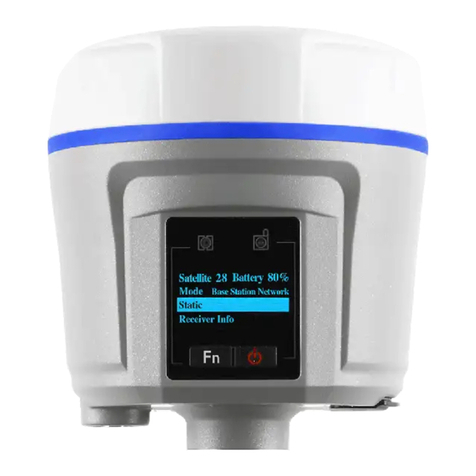
LCD panel mainly includes two indicator lights of satellite and differential data,LCD panel,
confirm+on/off button and Fn button.
Satellite li
g
ht Differential Data Light
Up/Down Button Confirm+On/Off Button
LCD Panel
Altri manuali per i80 GNSS
13
Indice
Altri manuali CHC Ricevitore




CHC
CHC i80 GNSS Manuale utente

CHC
CHC X91GNSS Manuale utente

CHC
CHC i80 GNSS Manuale utente

CHC
CHC i80 GNSS Manuale dell'operatore

CHC
CHC X360 Manuale utente

CHC
CHC X20+GPS Manuale utente

CHC
CHC i80 GNSS Manuale utente

CHC
CHC i80 GNSS Manuale utente

CHC
CHC i80 GNSS Manuale utente

CHC
CHC i80 GNSS Manuale utente


