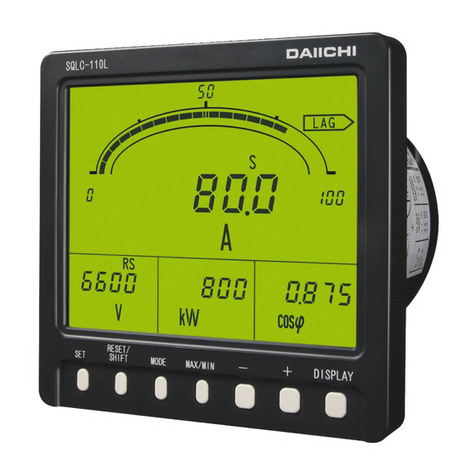
Daiichi Electronics SQLC-72L Manuale utente

SQLC-216-212
INSTRUCTION MANUAL
(DETAILED VERSION)
POWER LINE SUPER MULTI-METER
SQLC-72L

SQLC-216-212
1
Contents
Introduction ・・・・・・・・・・・・・・・・・・・・・・・・・・・・・・・・・・・・・・・・・・・・・・・・・・・・・・・・・・・・・・・・・・・・・・・ 2
Safety Precaution ・・・・・・・・・・・・・・・・・・・・・・・・・・・・・・・・・・・・・・・・・・・・・・・・・・・・・・・・・・・・・・・・・・ 2
Composition of type ・・・・・・・・・・・・・・・・・・・・・・・・・・・・・・・・・・・・・・・・・・・・・・・・・・・・・・・・・・・・・・・ 3
1. Product outline ・・・・・・・・・・・・・・・・・・・・・・・・・・・・・・・・・・・・・・・・・・・・・・・・・・・・・・・・・・・・・・・・・・ 4
1.1 Features of product ・・・・・・・・・・・・・・・・・・・・・・・・・・・・・・・・・・・・・・・・・・・・・・・・・・・・・・・・・・ 4
1.2 Part names ・・・・・・・・・・・・・・・・・・・・・・・・・・・・・・・・・・・・・・・・・・・・・・・・・・・・・・・・・・・・・・・・・・・ 4
1.3 Bundled items ・・・・・・・・・・・・・・・・・・・・・・・・・・・・・・・・・・・・・・・・・・・・・・・・・・・・・・・・・・・・・・・・ 4
2. Dimensions ・・・・・・・・・・・・・・・・・・・・・・・・・・・・・・・・・・・・・・・・・・・・・・・・・・・・・・・・・・・・・・・・・・・・・・・ 4
2.1 SQLC-72L ・・・・・・・・・・・・・・・・・・・・・・・・・・・・・・・・・・・・・・・・・・・・・・・・・・・・・・・・・・・・・・・・・・・・・ 4
2.2 Current sensor (Option) ・・・・・・・・・・・・・・・・・・・・・・・・・・・・・・・・・・・・・・・・・・・・・・・・・・・・・・ 5
2.3 Zero-phase current transformer ZCT (Option) ・・・・・・・・・・・・・・・・・・・・・・・・・・・・・・・・・・ 6
3. Installation instructions ・・・・・・・・・・・・・・・・・・・・・・・・・・・・・・・・・・・・・・・・・・・・・・・・・・・・・・・ 7
4. Connection ・・・・・・・・・・・・・・・・・・・・・・・・・・・・・・・・・・・・・・・・・・・・・・・・・・・・・・・・・・・・・・・・・・・・・・・ 10
4.1 Low-voltage circuit ・・・・・・・・・・・・・・・・・・・・・・・・・・・・・・・・・・・・・・・・・・・・・・・・・・・・・・・・・・ 10
4.2 High-voltage circuit ・・・・・・・・・・・・・・・・・・・・・・・・・・・・・・・・・・・・・・・・・・・・・・・・・・・・・・・・・ 11
5. Operation and Screen ・・・・・・・・・・・・・・・・・・・・・・・・・・・・・・・・・・・・・・・・・・・・・・・・・・・・・・・・・・・・ 11
6. Display mode ・・・・・・・・・・・・・・・・・・・・・・・・・・・・・・・・・・・・・・・・・・・・・・・・・・・・・・・・・・・・・・・・・・・・・・ 12
6.1 Measurement display ・・・・・・・・・・・・・・・・・・・・・・・・・・・・・・・・・・・・・・・・・・・・・・・・・・・・・・・・・・ 12
6.2 Instant measurement display mode ・・・・・・・・・・・・・・・・・・・・・・・・・・・・・・・・・・・・・・・・・・・・・ 13
6.3 Maximum value / Minimum value display mode ・・・・・・・・・・・・・・・・・・・・・・・・・・・・・・・・・・・ 14
6.4 Reset ・・・・・・・・・・・・・・・・・・・・・・・・・・・・・・・・・・・・・・・・・・・・・・・・・・・・・・・・・・・・・・・・・・・・・・・・ 14
6.5 Setting value display mode ・・・・・・・・・・・・・・・・・・・・・・・・・・・・・・・・・・・・・・・・・・・・・・・・・・・ 15
7. Setting ・・・・・・・・・・・・・・・・・・・・・・・・・・・・・・・・・・・・・・・・・・・・・・・・・・・・・・・・・・・・・・・・・・・・・・・・・・ 16
7.1 Setting mode 1 ・・・・・・・・・・・・・・・・・・・・・・・・・・・・・・・・・・・・・・・・・・・・・・・・・・・・・・・・・・・・・・・ 16
7.2 Setting mode 2 ・・・・・・・・・・・・・・・・・・・・・・・・・・・・・・・・・・・・・・・・・・・・・・・・・・・・・・・・・・・・・・・ 20
8. Test mode ・・・・・・・・・・・・・・・・・・・・・・・・・・・・・・・・・・・・・・・・・・・・・・・・・・・・・・・・・・・・・・・・・・・・・・・ 26
9. Specifications ・・・・・・・・・・・・・・・・・・・・・・・・・・・・・・・・・・・・・・・・・・・・・・・・・・・・・・・・・・・・・・・・・・ 28
10. Description of functions ・・・・・・・・・・・・・・・・・・・・・・・・・・・・・・・・・・・・・・・・・・・・・・・・・・・・・・・・ 35
10.1 Contact output ・・・・・・・・・・・・・・・・・・・・・・・・・・・・・・・・・・・・・・・・・・・・・・・・・・・・・・・・・・・・・・ 35
10.2 Inrush current mask function ・・・・・・・・・・・・・・・・・・・・・・・・・・・・・・・・・・・・・・・・・・・・・・・・・・ 35
10.3 Power flow measurement ・・・・・・・・・・・・・・・・・・・・・・・・・・・・・・・・・・・・・・・・・・・・・・・・・・・・・・ 35
11. Multi-Meter Configuration Software(SQLC-CS-01)・・・・・・・・・・・・・・・・・・・・・・・・・・・・・・・・・ 36
11.1 Outline ・・・・・・・・・・・・・・・・・・・・・・・・・・・・・・・・・・・・・・・・・・・・・・・・・・・・・・・・・・・・・・・・・・・・・ 36
11.2 Hardware requirements ・・・・・・・・・・・・・・・・・・・・・・・・・・・・・・・・・・・・・・・・・・・・・・・・・・・・・・・ 36
11.3 System configuration ・・・・・・・・・・・・・・・・・・・・・・・・・・・・・・・・・・・・・・・・・・・・・・・・・・・・・・・・ 36
12. Troubleshooting ・・・・・・・・・・・・・・・・・・・・・・・・・・・・・・・・・・・・・・・・・・・・・・・・・・・・・・・・・・・・・・・・ 37
Appendix table 1...3

SQLC-216-212
2
Introduction
Thank you for purchase of DAIICHI product.
Please read this instruction manual carefully before use.
Keep this manual for future reference.
Please contact with us in case this manual is lost or damaged.
Safety Precaution
■ Usage environment and conditions
Don't use this product in the following conditions.
① Locations beyond the ambient temperature range (-10...+55 ℃) and humidity range (5...90 % RH).
② Locations with excessive corrosive gas (SO2 / H2S / etc.)
③ Locations with excessive dust.
④ Locations with excessive vibration or shocks.
⑤ Locations with excessive exogenous noise.
⑥ Altitude over 2000 m.
⑦ When measure the following inverter output directly, error will becomes large.
Cycle control, SCR phase angle control, PWM inverter.
■ Outdoor use conditions.
① These products are not a dustproof, waterproof, and splash proof construction.
Please avoid the place with much dust. Please do not install in the place directly exposed to the rain
and water droplets. (IP code:IP40)
② Please do not install in the place directly exposed to the sun even through the glass. Discoloration and
degradation of a name plate, and deformation of the box by the surface temperature rise may caused.
③ Product life may shorten when the daily average temperature exceeds 40 ℃.
■ Mounting and wiring
Please refer to this instruction manual for installation and the wiring.
Please refer to connection diagram for the wiring. An improper connection may cause troubles.
Hot line work is prohibited. There is a risk of explosion by electric shock, device malfunction, burning,
fire, or gas.
Please use an electrical wire size suitable with the rated current.
Use unsuitable size electric wire, which may lead to a fire.
Please carry out coating removal of a covering electric wire by reasonable length. If covering removal
is too long, there is a possibility of short-circuiting with the next electric wire. Moreover, if covering
removal of an electric wire is too short, a mating defect and poor contact may be caused.
Be careful of the short circuit by the exposure of conductor.
Please use it combining the current sensor of this product and exclusive use.
Please use a current sensor within input rated range.
Since a current sensor (exclusive use) is only for low-voltage circuits, it cannot be used for a high-voltage
circuit. Connecting with a high-voltage circuit is dangerous.
When using with a circuit of 600 A or more, please connect the current sensor of the 5 A rated the (CTF-5A)
on the secondary side of the instrument for the current transformer (secondary 5 A).
Primary cable to connect to the current sensor, please use the penetrable insulated wire.
Please do not use non-insulated wire and conductor (bus bar, etc.).
As for the core division surface of a current sensor, characteristics worsen by adhesion of dust or accrual
of rust. Be careful not to attach dirt to a core division surface. When dirty, please clean with a dry cloth.
As for the core division surface of a current sensor, characteristics worsen by adhesion of dust or accrual
of rust. Be careful not to attach dirt to a core division surface.
When dirty, please clean with a dry cloth.
Please do not continuously energized the secondary side of the current sensor in an open state.
However, this product has a built-in protection circuit of the secondary terminal open.
There is no problem in the open in the wiring construction period.
The current sensor has polarity. Please note the time of installation.

SQLC-216-212
3
■ Preparation
This product must be set before use. Please read this manual and make the setting correctly.
If you make a mistake on the setting it does not operate correctly.
■ Maintenance and inspection
① Inspection during energization is dangerous.
② No replacement in periodic inspection.
③ Please wipe off lightly with the dry soft cloth.
Please do not use the organic solvent, chemicals, cleaners, etc., such as an alcohol, for cleaning.
■ Storage
If you want to long-term storage, please avoid the following environment.
Locations beyond the ambient temperature range and humidity range. -25...+70 ℃, 5...90 % RH
Daily average temperature more than 40 ℃.
Location corresponding to the usage environment and use conditions (②...④).
■ Countermeasures against troubles
If this product breaks down within the warranty period, it will be repairs by DAIICHI Electronics.
■ Disposal
Please dispose of this product as industrial waste (noncombustible).
Mercury parts and a nickel-cadmium battery are not used for this product.
■ Warranty period
The warranty period of the product is one year after the date of delivery.
■ Warranty scope
In the state of the normal use of product-specification within the range according to this instruction manual,
the trouble within the warranty period performs exchange or repair gratuitously.
However, if it corresponds to the next, it does not warrant.
① If it breaks down when converted or repaired except our company.
② If it breaks down by use out of specification range.
③ If the cause of trouble is based on cause other than this product.
④ Transportation, movement, damage by falling, and trouble.
⑤ Other, natural disasters, disasters, etc. In the case where the supplier side (Company and agent) is
not responsible.
This warranty is a guarantee for the delivered product. Cannot warrant the damage induced by trouble of
this product.
■ Replacement cycle of the product
We recommend updating the product for 10 years as a rough standard.
■ Change of instruction manual written contents.
This instruction manual changes written contents without a notice by product improvement etc.
Composition of type
Type Specification code
SQLC-72L-
① Hardware model ② Auxiliary supply ③ Control input, Communication output,
Contact output
A Hardware model A 1 85...264 V AC
80...143 V DC 1
Control input:DI ×1
Communication output:MODBUS RTU
Contact output:DO ×2
2 20...56 V DC

SQLC-216-212
4
1 Product outline
1.1 Features of product
Small Multi-meter, DIN 72 mm square size
Input circuit is a 3 phase 3 wire, 1 phase 3 wire, 1 phase 2 wire, 3 phase 4 wire shared.
400 V direct connection is possible (110 V / 220 V / 440 V shared)
Compliant for international standards [IEC 60688:2012 (Transducer), IEC 62053:2003 (Electricity
metering equipment), CE marking]
Equipped with a liquid crystal panel with a wide viewing angle.
Equipped with a high visibility high-intensity white backlight.
Wiring can be confirmed by the test function.
Screw-less spring-type terminal block the adoption. Wiring man-hours can be reduced.
RS485 Communication output(MODBUS RTU), Alarm output, Pulse output can be output simultaneously.
1.2 Part names
1.3 Bundled items
① Instruction Manual (Instruction・Operation) ・・・・・・・・・ 1
② Attachment tool ・・・・・・・・・・・・・・・・・・・・・・・・・・・・・・・・・・・・・ 2
③ Termination resister for communication (100 Ω) ・・・・・ 1
2 Dimensions
2.1 SQLC-72L
■ Operation switch
LCD
Digital display
Unit
display
Auxiliary supply, Ground terminal
Voltage input terminal
Current sensor input, ZCT input, Communication output,
Control input, Contact output terminal
Attachment tool
Attachment tool
-/+
Switch
SET
Switch
RESET
Switch
DISPLAY
Switch

SQLC-216-212
5
2.2 Current sensor (option):Made by MULTI MEASURING INSTRUMENTS Co., Ltd.
5A(CTF-5A)
7.9
25.3
42
41.3
10
38.5
33
50A(CTF-50A)
25.5
42
9.5
10
28.6
23
48
100A(CTF-100A)
14.5
46
30.5
55
16
37.5
29.5
200A(CTF-200A)
24
52.5
35.5
76
24
55.5
45
400A(CTF-400A)
35.5
18.5
35.5
53
94
37
73
62.5
600A(CTF-600A)
35.5
18.5
35.5
53
37
94
73
62.5

SQLC-216-212
6
2.3 Zero-phase current transformer ZCT (option) : Made by OMRON Corporation
50A(OTG-LA21)
(Mounting pitch)
11
13.5
27 28
68.5
6
74
8.5
50
4.1 64
9.3
1.8
Terminal cover
20
17
φ21
5.9
1.7
4.7
5.2
100A(OTG-LA30)
φ30
63
6
57
86
34.5
81.5
33.5 13.5
8.5
50
54
4.1
1.8
9.3
(Mounting pitch)
76
1.7
20
Terminal cover
17
5.9
5.2
2.2
200A(OTG-LA42)
Terminal cover
25
17
107
φ42
(Mounting pitch)
97
109
88
9.3
11
5.2
400A(OTG-LA68)
(Mounting pitch)
143
118
φ68
136
131 31
Terminal cover
17
11
9.3
6.1
600A(OTG-LA82)
Terminal cover
φ82
158
160 (Mounting pitch)
172
138
11
9.3
33
28
17
6.2
100A for outdoor(OTG-LA30W)
62
Lead wire color
No polarity
:White, Black
φ30
5.5
24 73.5
3.5
20
φ5.5
(Mounting pitch)
84
68
2
10.5
500
42.5
5
(JIS C 3306)
1.25mm VCTFK
2

SQLC-216-212
7
● CT inside diameter and wiring length of current sensor
Primary
current Type CT inside
diameter
Wiring length
(Max.)
5 A CTF-5A 10 mm 10 m
50 A CTF-50A 10 mm
50 m
100 A CTF-100A 16 mm
200 A CTF-200A 24 mm
400 A CTF-400A 37 mm
600 A CTF-600A 37 mm
(M3 screw)
Attaching portion
(to right and left)
Attachment tool
phillips screwdriver.
Tightened with a
Tightening torque:0.1N・m
3 Installation instructions
■ Panel cutout dimensions
98 or more
68+0.7
-0
98 or more
Panel cutout
+0.7
-0
68
■ Mounting position
Since the LCD contrast is changed in accordance
with the monitoring angle, please be installed at
the optimal angle.
75°
75°
(Side view) (Top view)
75° 75°
■ Installation
Insert from the front panel cut hole.
Install as shown in the figure below.
■ Connection of current sensor
① Remove the fixing hooks, and open the movable core.
Please check the mounting direction of the current sensor. (Symbol:Power supply side K, Load side L)
Pass the wirees in the center of the current sensor.
② Make sure that there is no dust on the core division surface.
Until the sound of the fixing hook is, please close the movable core.
③ To secure the current sensor to the wire in the cable ties.
①
Movable core Terminal cover
Core division
conductor
(cable)
Primary
surface
Fixing hook
②
Close the
fixing hook
③
Aux.supply
Fixing hole
(4mm×2mm)
Cable ties
(K)
side
Primary
(cable)
Load side
conductor
Fixing hole
(4mm×2mm)
Cable ties
(L)
● Solderless terminal to be used in the
secondary terminal of the current sensor,
please use the Solderless terminal of the
specified.
Solderless terminal for M3 screw (Without
insulation sleeve)
Tightening torque:0.5...0.6 N・m

SQLC-216-212
8
■ Connection method
(1) Applicable wire
Terminal is a screw-less spring-type terminal. Fit wire size, please refer to the table below.
Terminal Wire
Applicable wire
Single
wire
Flexible
stranded
wire
Stranded wire,
rod terminal
(Ferrule with
insulating
collar)
Stranded wire,
rod terminal
(Ferrule without
insulating
collar)
Two stranded wire,
rod terminal
(Twin ferrule with
insulating collar)
Delamination
of wire
Voltage input,
Auxiliary supply,
Ground
Cross-sectional
area 0.08 ... 2.5 mm2 0.25 ... 1.5 mm2 0.5 mm2×2
5 ... 6 mm
AWG 28 ... 12 24 ... 16 22
Current sensor, ZCT,
Communication output,
Control input,
Contact output
Cross-sectional
area 0.08 ... 2.5 mm2 0.25 ... 1.5 mm2 0.5 mm2×2
AWG 28 ... 12 24 ... 16 22
Flexible stranded wire Single wire
Stranded wire, rod terminal Stranded wire, rod terminal Two stranded wire, rod terminal
(Ferrule with insulating collar) (Ferrule without insulating collar) (Twin ferrule with insulating collar)
In case of flexible stranded wire, please be careful not to loosen
the wire. There is a rod terminal as a preventive measure.
Rod terminal of recommendation, please refer to the following.
Also, please use a dedicated crimping tool to rod terminal.
Rod terminal:WAGO, Ferrule with insulating collar /
Ferrule without insulating collar, 216 series
Crimping tool:WAGO, Ferrule crimping tool 206-204 (Applicable wire:0.25 mm
2
to 4 mm
2
)
Please use a rod terminal that matches the wire size.
The tip of the wire, please cut the length of the rod terminal (or about 0.5 mm long).
After the rod terminal crimping, please check the appearance.
◯ × Exposure of conductor × Damage to the side × Wire peeling shortage
Twin ferrule with insulating collar
can crimp more two standard wires at
the same time.
Please use in the case of two wires to
daisy chain, such as one terminal.
0 ... 0.5 mm
Pressure bonding
Exposure of conductor
Damage
Insufficient length of
the wire

SQLC-216-212
9
Screwdriver
insertion slot Wire insertion slot
Wire insertion slot
Current sensor, ZCT, Communication output,
Control input, Contact output
(2) Connection method
① Stripping 5-6 mm a coating of the tip of the wire. Or, crimping the rod terminal.
The screwdriver of the flat-blade screwdriver cutting edge (3.5 mm × 0.5 mm)
② Insert the screwdriver to screwdriver insertion slot, open the spring.
③ To insert the wire to the wire insertion slot.
④ Pull out the screwdriver, close the spring.
【Recommended screwdriver】Cutting edge 3.5 mm×0.5 mm
WAGO made screwdriver:210-720, 210-657, 210-658, 210-120J, 210-350/01, 210-258J
① 5 ... 6 mm Without of loosened and twisting and bending
②
③
④
【Screwdriver and wire insertion slot】
【Upper position terminal】 【Lower position terminal】
Insert the
screwdriver to
open the spring
Screw driver
Auxiliary supply, Ground Voltage input
Indice
Altri manuali Daiichi Electronics Strumento di misura