
Deif GPC-3 Hydro Manuale utente

DEIF A/S · Frisenborgvej 33 · DK-7800 Skive · Tel.: +45 9614 9614 · Fax: +45 9614 9615 · info@deif.com · www.deif.com
DEIF A/S · Frisenborgvej 33 · DK-7800 Skive · Tel.: +45 9614 9614 · Fax: +45 9614 9615 · info@deif.com · www.deif.com
DEIF A/S · Frisenborgvej 33 · DK-7800 Skive · Tel.: +45 9614 9614 · Fax: +45 9614 9615 · info@deif.com · www.deif.com
QUICK START GUIDE
Generator Paralleling Controller, GPC-3
Generator Protection Unit, GPU-3/GPU-3 Hydro
Paralleling and Protection Unit, PPU-3
● What's in the delivery?
● Getting started
● The first steps
● PC utility software
Document no.: 4189340603B
SW version: 3.0X.X or later

1. General information
1.1. Warnings, legal information and safety..................................................................................................3
1.1.1. Warnings and notes ......................................................................................................................3
1.1.2. Legal information and disclaimer ..................................................................................................3
1.1.3. Safety issues ................................................................................................................................3
1.1.4. Electrostatic discharge awareness ...............................................................................................3
1.1.5. Factory settings ............................................................................................................................3
1.2. About the Quick Start Guide...................................................................................................................4
1.2.1. General purpose............................................................................................................................4
1.2.2. Intended users...............................................................................................................................4
1.2.3. Contents and overall structure ......................................................................................................4
2. What's in the delivery?
2.1. Standard delivery...................................................................................................................................5
2.2. Optional delivery.....................................................................................................................................6
3. Getting started
3.1. Connecting the devices..........................................................................................................................8
3.1.1. Connecting the display with the main unit.....................................................................................8
3.1.2. Connecting the power supply to the main unit...............................................................................9
3.1.3. Connecting the additional operator panel, AOP-1 (optional).........................................................9
3.1.4. Connecting the additional operator panel, AOP-2 (optional).......................................................10
3.2. Wiring...................................................................................................................................................11
3.2.1. Basic wiring for GPU-3 and GPU-3 Hydro...................................................................................11
3.2.2. Basic wiring for GPC-3 and PPU-3..............................................................................................13
4. The first steps
4.1. Basic AC values...................................................................................................................................15
4.2. Getting started with the DEIF utility software (USW)............................................................................17
4.2.1. Downloading the software...........................................................................................................17
4.2.2. Installation of USB drivers...........................................................................................................17
4.2.3. Getting connected........................................................................................................................18
4.2.4. Read parameters from the device...............................................................................................20
4.2.5. Basic configuration of a device using the utility software.............................................................20
5. Configuring the speed governor and AVR outputs
5.1. Settings for speed governor and AVR control......................................................................................22
ML-2 quick start guide 4189340603 UK
DEIF A/S Page 2 of 23

1. General information
1.1 Warnings, legal information and safety
1.1.1 Warnings and notes
Throughout this document, a number of warnings and notes with helpful user information will be presented.
To ensure that these are noticed, they will be highlighted as follows in order to separate them from the gener-
al text.
Warnings
Warnings indicate a potentially dangerous situation, which could result in death, personal in-
jury or damaged equipment, if certain guidelines are not followed.
Notes
Notes provide general information, which will be helpful for the reader to bear in mind.
1.1.2 Legal information and disclaimer
DEIF takes no responsibility for installation or operation of the generator set. If there is any doubt about how
to install or operate the engine/generator controlled by the Multi-line 2 unit, the company responsible for the
installation or the operation of the set must be contacted.
The Multi-line 2 unit is not to be opened by unauthorised personnel. If opened anyway, the war-
ranty will be lost.
Disclaimer
DEIF A/S reserves the right to change any of the contents of this document without prior notice.
1.1.3 Safety issues
Installing and operating the Multi-line 2 unit may imply work with dangerous currents and voltages. Therefore,
the installation should only be carried out by authorised personnel who understand the risks involved in work-
ing with live electrical equipment.
Be aware of the hazardous live currents and voltages. Do not touch any AC measurement in-
puts as this could lead to injury or death.
1.1.4 Electrostatic discharge awareness
Sufficient care must be taken to protect the terminal against static discharges during the installation. Once the
unit is installed and connected, these precautions are no longer necessary.
1.1.5 Factory settings
The Multi-line 2 unit is delivered from factory with certain factory settings. These are based on average values
and are not necessarily the correct settings for matching the engine/generator set in question. Precautions
must be taken to check the settings before running the engine/generator set.
ML-2 quick start guide 4189340603 UK General information
DEIF A/S Page 3 of 23

1.2 About the Quick Start Guide
1.2.1 General purpose
This Quick Start Guide mainly includes general product information, mounting instructions and wiring descrip-
tions.
The general purpose of this document is to help the user with the first steps of installing and using the Multi-
line 2 system.
Please make sure that you also read the Installation Instructions before starting to work with
the Multi-line 2 unit and the genset to be controlled. Failure to do this could result in human
injury or damage to the equipment.
1.2.2 Intended users
This Quick Start Guide is mainly intended for the panel builder in charge. On the basis of this document, the
panel builder designer will give the electrician the information he needs in order to get started with the instal-
lation. For detailed electrical drawings, please see the Installation Instructions.
1.2.3 Contents and overall structure
This document is divided into chapters, and in order to make the structure simple and easy to use, each
chapter will begin from the top of a new page.
ML-2 quick start guide 4189340603 UK General information
DEIF A/S Page 4 of 23
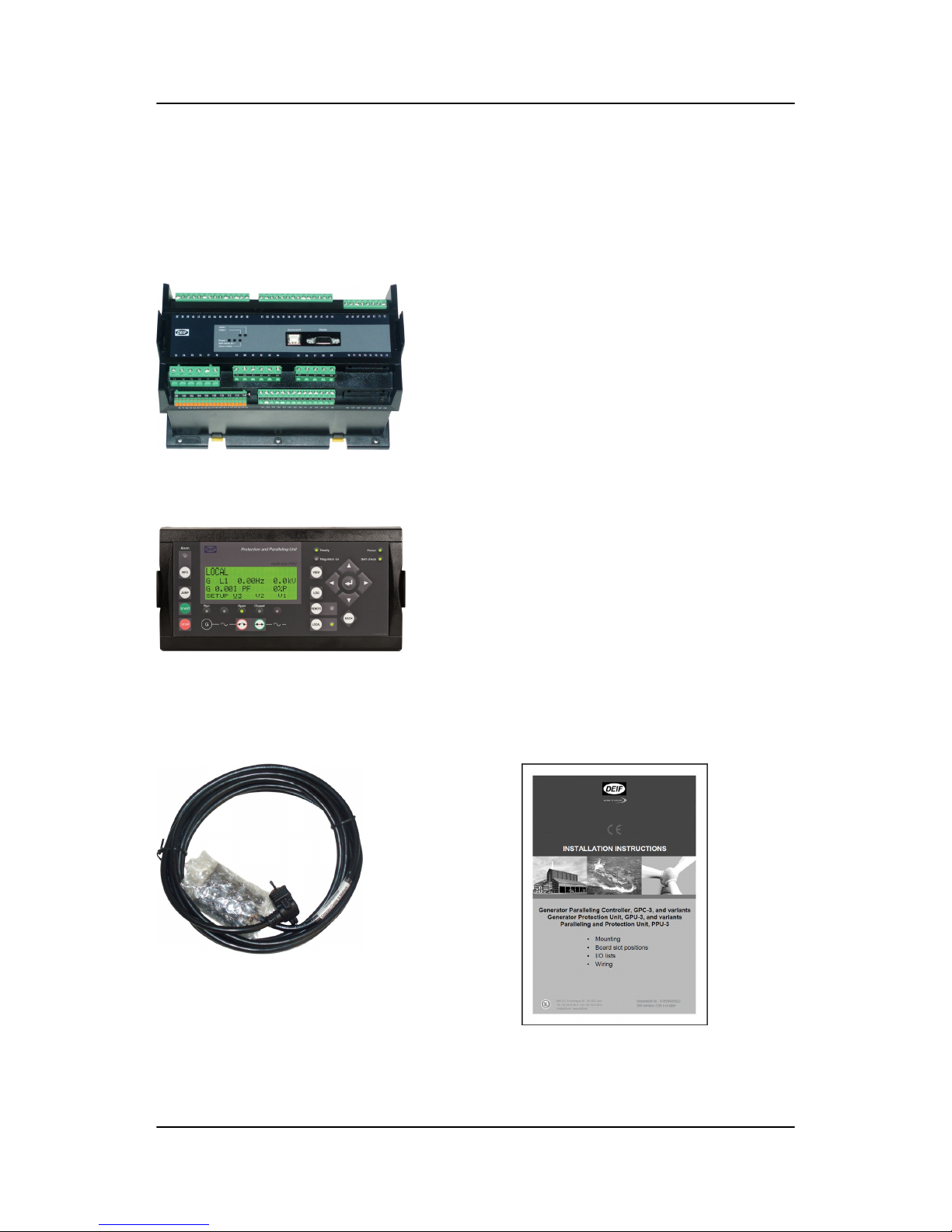
2. What's in the delivery?
2.1 Standard delivery
The main unit
Standard display unit, DU-2
Layout is option-dependent
Display cable, 3 m Installation instructions
ML-2 quick start guide 4189340603 UK What's in the delivery?
DEIF A/S Page 5 of 23

2.2 Optional delivery
Display cable with plugs, 6 m (option J2) PC cable for option N programming -
Ethernet cable crossed (option J4)
Display cable with plugs, 1 m (option J6) PC cable for utility software (option J7)
ML-2 quick start guide 4189340603 UK What's in the delivery?
DEIF A/S Page 6 of 23
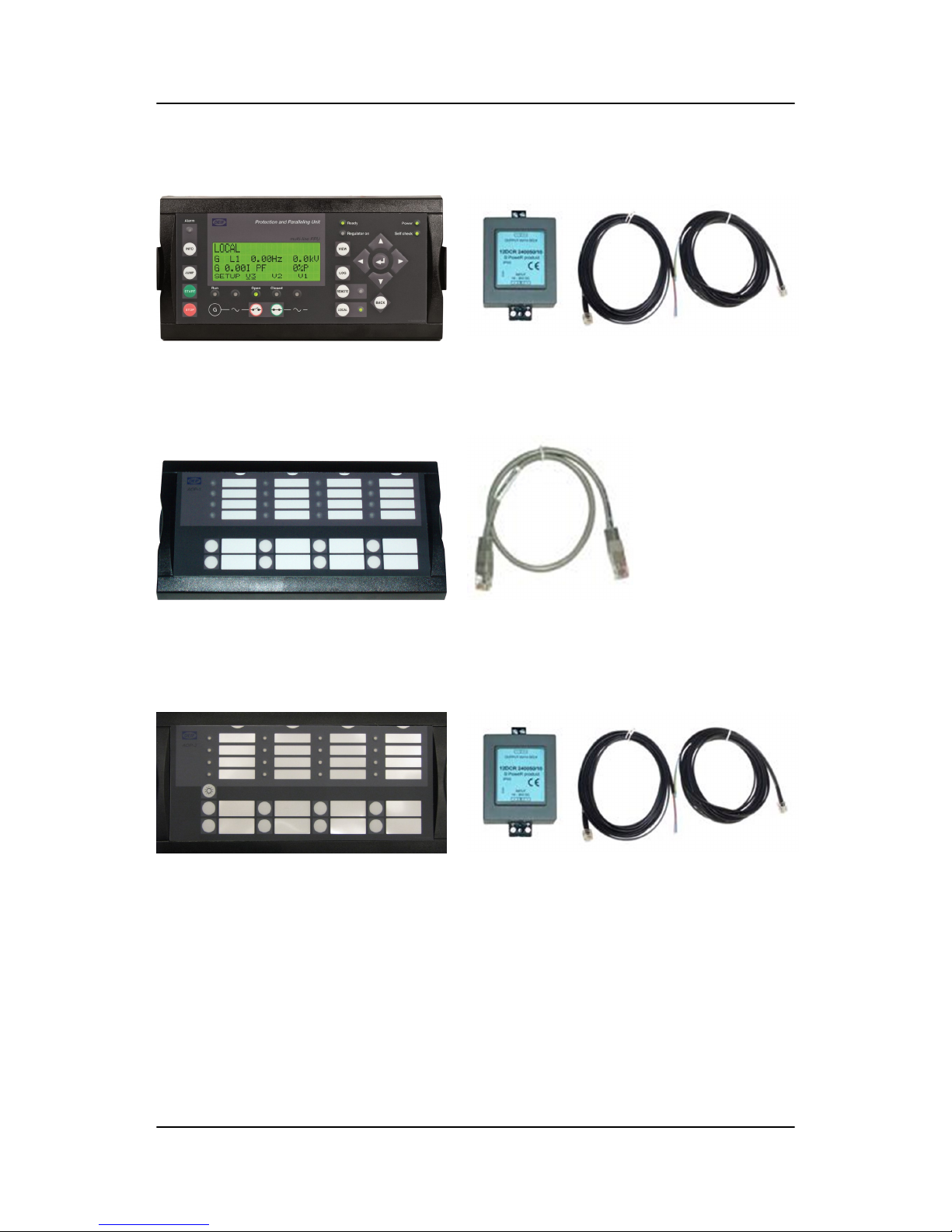
Additional standard display, DU-2 (option X2)
Display unit, DU-2 DC/DC converter and 2 × CAN bus cable 3 m
Additional operator panel, AOP-1 (option X3)
AOP-1 0.5 m cable
Additional operator panel, AOP-2 (option X4)
AOP-2 DC/DC converter and 2 × CAN bus cable 3 m
ML-2 quick start guide 4189340603 UK What's in the delivery?
DEIF A/S Page 7 of 23

3. Getting started
3.1 Connecting the devices
3.1.1 Connecting the display with the main unit
Connect the SUB-D display cable to the main unit and the display unit as shown in the picture below.
No use of tools or brute force when tightening finger-screws on display cable.
ML-2 quick start guide 4189340603 UK Getting started
DEIF A/S Page 8 of 23

3.1.2 Connecting the power supply to the main unit
3
1
4
2
787776757473 96 979594929190 93
89888785 8683 8482818079
727169 70686765 66
62 6359 60 615856 575553 54 645251504947464443 45 4841403837 39 42
Service port Display
CAN B
CAN A
Power
Self check ok
Alarm inhibit
1. Terminal 1: +24 Vdc
2. Terminal 2: 0 Vdc
3. Option M4 - terminal 98: +24 Vdc
4. Option M4 - terminal 99: 0 Vdc
3.1.3 Connecting the additional operator panel, AOP-1 (optional)
Display unit
DU-2
AOP-1
AOP-1 cable
0.5 m
ML-2 quick start guide 4189340603 UK Getting started
DEIF A/S Page 9 of 23

3.1.4 Connecting the additional operator panel, AOP-2 (optional)
The CAN cable for the CAN bus communication between the display unit of main unit no. 1 and the AOP-2
has to be connected to the CAN port (CAN 2) of the display unit (DU-2) and the CAN port (CAN 1) of the
AOP-2 as shown in the drawing below.
Standard display DU-2
OFF
ON
App./Bootl.
End Res.
CAN 1
AOP-1
CAN 2
ML - 2
Green
Blue
DIN Rail
Additional Operator Panel AOP-2
OFF
ON
App./Bootl.
End Res.
CAN 1 CAN 2
Green
Blue
DIN Rail
5V DC
24V DC
+
-
+
-
White
Black
1212
Twisted pair max. 200m
Cable shield
The AOP-2 can be placed up to 200 m from the main display. The AOP-2 requires a separate power supply
unit, while the display receives the power supply through the display cable from the main unit.
For further information about the installation of multiple displays and AOP-2s, please refer to
the document "Description of Option X".
ML-2 quick start guide 4189340603 UK Getting started
DEIF A/S Page 10 of 23
Altri manuali per GPC-3 Hydro
3
Questo manuale è adatto per i seguenti modelli
3
Indice
Altri manuali Deif Unità di controllo

Deif
Deif Delomatic 4 AOP-2 Guida

Deif
Deif GCU 100 Manuale utente

Deif
Deif PCM 4 Series Guida

Deif
Deif Multi-line 2 Manuale di istruzioni

Deif
Deif CIO 308 Manuale utente

Deif
Deif PPU 300 Manuale utente

Deif
Deif GCU 100 Manuale utente

Deif
Deif Multi-line 2 Manuale utente

Deif
Deif DELOMATIC 4 Series Supplemento
Manuali Unità di controllo popolari di altre marche

Festo
Festo Compact Performance CP-FB6-E Manuale elenco delle parti

Elo TouchSystems
Elo TouchSystems DMS-SA19P-EXTME Manuale utente

JS Automation
JS Automation MPC3034A Manuale utente

JAUDT
JAUDT SW GII 6406 Series Guida rapida

Spektrum
Spektrum Air Module System Manuale utente

BOC Edwards
BOC Edwards Q Series Manuale utente


