
ECEFAST TDS-110 Manuale utente

TDS-110 Ultrasonic Thickness Gauge
Instruction Manual

TDS-110 Ultrasonic Thickness Gauge
1
Content
1 INTRODUCTION............................................................................................3
1.1 SCOPE OF APPLICATIONS................................................................................3
1.2 PRIMARY THEORY .........................................................................................3
1.3 MEASURING PRINCIPLE .................................................................................3
1.4 APPEARANCE.................................................................................................4
1.5 KEYBOARD ....................................................................................................4
1.6 DISPLAY SYMBOLS.........................................................................................5
2 PRODUCT SPECIFICATIONS.....................................................................5
2.1 TECHNOLOGY PARAMETER ............................................................................5
2.2 MAIN FUNCTIONS ..........................................................................................6
3 OPERATION....................................................................................................6
3.1 PREPARATION FOR MEASUREMENT ................................................................6
3.2 ADJUSTING SOUND VELOCITY ........................................................................6
3.3 SETTING PROBE FREQUENCY..........................................................................7
3.4 MEASUREMENT OF THICKNESS ......................................................................7
3.5 MEASUREMENT OF SOUND VELOCITY ............................................................7
3.6 SETTING ALARM THICKNESS LIMITS...............................................................8
3.7 MENU OPTION................................................................................................8
3.7.1 SYSTEM SETUP ...........................................................................................9
3.7.2 PRINT FUNCTION.......................................................................................11
3.7.3 MEMORY MANAGE...................................................................................11
4 DATA LOGGER OPERATION...................................................................12
4.1 LOGGING READINGS INTO MEMORY .............................................................12
4.2 REVIEWING STORED THICKNESS READINGS..................................................12
4.3 CLEARING CURRENT THICKNESS VALUE......................................................12
5. MEASURING TECHNOLOGY..................................................................13
5.1 CLEANING SURFACE.....................................................................................13
5.2 IMPROVING REQUIREMENT ON ROUGHNESS..................................................13
5.3 ROUGH MACHINED SURFACE........................................................................13
5.4 MEASURING CYLINDRICAL SURFACE............................................................13
5.5 COMPOUND PROFILE....................................................................................13
5.6 UN-PARALLEL SURFACE...............................................................................14
5.7 INFLUENCE OF MATERIAL’S TEMPERATURE..................................................14
5.8 MATERIAL WITH LARGE ATTENUATION........................................................14
5.9 REFERENCE TEST PIECE................................................................................14
5.10 SEVERAL MEASURING METHODS................................................................15

TDS-110 Ultrasonic Thickness Gauge
2
5.12 CHANGING PROBE......................................................................................15
5.13 MEASURING CASTING ................................................................................16
6 PREVENTING ERRORS IN MEASUREMENT.......................................16
6.1 ULTRA-THIN MATERIAL ..............................................................................16
6.2 RUST,CORROSION AND PIT .........................................................................17
6.3 ERROR IN IDENTIFYING MATERIAL..............................................................17
6.4 WEARNESS OF PROBE ..................................................................................17
6.5 OVERLAPPED MATERIAL AND COMPOUND MATERIAL ................................17
6.6 INFLUENCE OF OXIDATION LAYER AT METAL’S SURFACE...........................17
6.7 ABNORMAL READOUT OF THICKNESS..........................................................17
6.8 UTILIZATION AND SELECTION OF COUPLING AGENT ...................................17
7. ATTENTION.................................................................................................18
7.1 CLEANING THE TEST PIECE..........................................................................18
7.2 CLEANING THE INSTRUMENT’S CASE...........................................................18
7.3 PROTECTING THE PROBE..............................................................................18
7.4 REPLACING BATTERIES................................................................................18
7.5 ABSOLUTELY AVOID COLLISION AND MOISTURE..........................................19
8. MAINTENANCE ..........................................................................................19
9.CONFIGURATION.......................................................................................20
APPENDIX Ⅰ..................................................................................................21
SOUND VELOCITY FOR DIFFERENT MATERIALS ...............................................21

TDS-110 Ultrasonic Thickness Gauge
3
1 Introduction
1.1 Scope of applications
Ultrasonic Thickness Gauge measuring with ultrasonic wave, is applicable
for measuring the thickness of any material in which ultrasonic wave can be
transmitted and reflected back from the other face.
The gauge can provide quick and accurate measurement to various work
pieces such as sheets of board and processing parts. Another important
application of the gauge is to monitor various pipes and pressure vessels in
production equipment, and monitor the thinning degree during using. It can be
widely used in petroleum, chemical, metallurgy, shipping, aerospace, aviation
and other fields.
1.2 Primary Theory
The primary theory of measuring thickness with ultrasonic wave is similar
to that of measuring thickness with optical wave. The ultrasonic wave emitted
from the probe reaches the object and transmits in it. When the ultrasonic wave
reaches the bounding surface of the material, it is reflected back to the probe.
The thickness of the material can be determined by accurately measuring the
time of the ultrasonic wave transmitting in it
1.3 Measuring Principle
The digital ultrasonic thickness gauge determines the thickness of a part or
structure by accurately measuring the time required for a short ultrasonic pulse
generated by a transducer to travel through the thickness of the material,reflect
form the back or inside surface, and be returmed to the transducer.The measured
two-way transit time is divided by two to account for the down-and-back travel
path,and then multiplied by the velocity of sound in the material.
The result is expressed in the well-known relationship:
Where: H—Thickness of the test piece.
v----Sound Velocity in the material.
t----The measured round trip transit time.
v ×t
H =
2

TDS-110 Ultrasonic Thickness Gauge
4
1.4 Appearance
1.5 Keyboard
PowerON/OFF ☼LCD backlight on/off
VEL sound velocity Save data / Browse data
CAL Calibration standard block of 4.00mm
MENU Function selector
Adjusting sound velocity and thickness; key for moving menu cursor
Adjusting sound velocity and thickness; key for moving menu cursor
2-point calibration; To be used together with function keys.

TDS-110 Ultrasonic Thickness Gauge
5
1.6 Display symbols
2 Product Specifications
2.1 Technology parameter
Display: 128×64 LCD with LED backlight.
Measuring range: 0.75mm~300.0mm (0.03inch~11.8 inch)
Sound Velocity Range: 1000m/s~9999m/s (0.039~0.394in/µs
Display resolution: 0.01mm or 0.1mm (lower than 100.0mm)
0.1mm (more than 99.99mm)
Accuracy: ±(0.5%Thickness +0.02)mm, depends on Materials
and conditions
Units: Metric/Imperial unit seletable.
Lower limit for steel pipes:
5MHz probe: 20mm3.0mm (0.80.12 inch)
10MHz probe: 20mm3.0mm (0.60.08 inch)
Power Source: 2pcs 1.5V AA size, batteries.100 hours typical operating
time(LED backlight off).
Communication: RS232 serial port
Outline Dimensions: 150mm×74mm×32mm
Weight: 238 g
Four measurements readings per second for single point measurement,
Memory for up to 5 files(up to 100 values for each file) of stored values

TDS-110 Ultrasonic Thickness Gauge
6
2.2 Main Functions
1) Capable of performing measurements on a wide range of material, including
metals,plastic,ceramics,composites,epoxies,glass and other ultrasonic wave
well-conductive materials.
2) Transducer models are available for special application,including for coarse
grain material and high temperature applications.
3) Probe-Zero function,Sound-Veloctiy-Calibration function.
4) Two-Point Calibration function.
5) Coupling status Indicator showing the coupling status.
6) Battery information indicates the rest capacity of the battery.
7) Auto sleep and auto power off function to conserve battery life.
8) Optional software to process the memory data on the PC.
9) Optional thermal mini-printer to print the measured data via RS232 port.
3 Operation
3.1 Preparation for measurement
3.1.1 Insert the probe plug into the socket for the probe on the main unit,
3.1.2 Press to turn on the instrument。
3.1.3 Lcd will Display soft editions information about the instrument. And
then display Latest sound velocity.
3.2 Adjusting sound velocity
If the current display is thickness, by pressing VEL, you can come into
speed-of-sound state, and it will display content in current sound velocity
memory unit. The sound velocity memory unit will change once every time
when you press the VEL key, it can display 5 sound velocity alternatively. If
you hope to change the contents in the current sound velocity unit, you can
adjust that with or till reach the desired value, and then the value be
saved to memory.

TDS-110 Ultrasonic Thickness Gauge
7
3.3 Setting probe frequency
Press MENU key to move the cursor to the position as that shown in the
following figure. Press to change the frequency setting. LCD will display
in sequence the probe frequency to be set 5M, 7M or ZW.
3.4 Measurement of thickness
First, set the sound velocity, then coat the coupling agent at the place to be
measured, couple the probe with the material to be measured, now you can
begin the measurement. The screen will display the thickness of material to be
measured. After you remove the probe, the thickness value will be maintained,
while the coupling indicator will disappear.
Note: when the probe is coupled with the material to be measured, the
instrument will display the coupling indicator; if the indicator flashes or doesn't
appear, it means that the coupling is not so good.
3.5 Measurement of sound velocity
The sound velocity of a material can be measured using a test piece with given
thickness. First, measure the test piece with caliper or micron micrometer and
read the thickness accurately. Couple the probe with the test piece with given
thickness till it displays a value, remove the probe, then adjust the display to the

TDS-110 Ultrasonic Thickness Gauge
8
actual thickness with or , press VEL, now it will display the sound
velocity to be measured. Save the value into current sound velocity memory unit.
For measuring sound velocity, one must select a test piece with adequate
thickness, and the recommended min. wall thickness is 20.0mm. When
measuring the sound velocity, please turn off the min. capturing function.
For example: To measure the sound velocity of a material with a thickness of
25.0mm, the procedure is:
3.6 Setting alarm thickness limits
The instrument will alarm if the measurement is out of limits. When the
measurement is lower than the low limit or higher than the high limit, the buzzer
will alarm. The alarming limit is set as follows:
1) Press MENU, move cursor to ALARM.
2) Press display the low and high limit of previous setting, useor to set
the new low or high limit.
3) To exit the Limit Setting, press VEL, MENU, or start to measure.
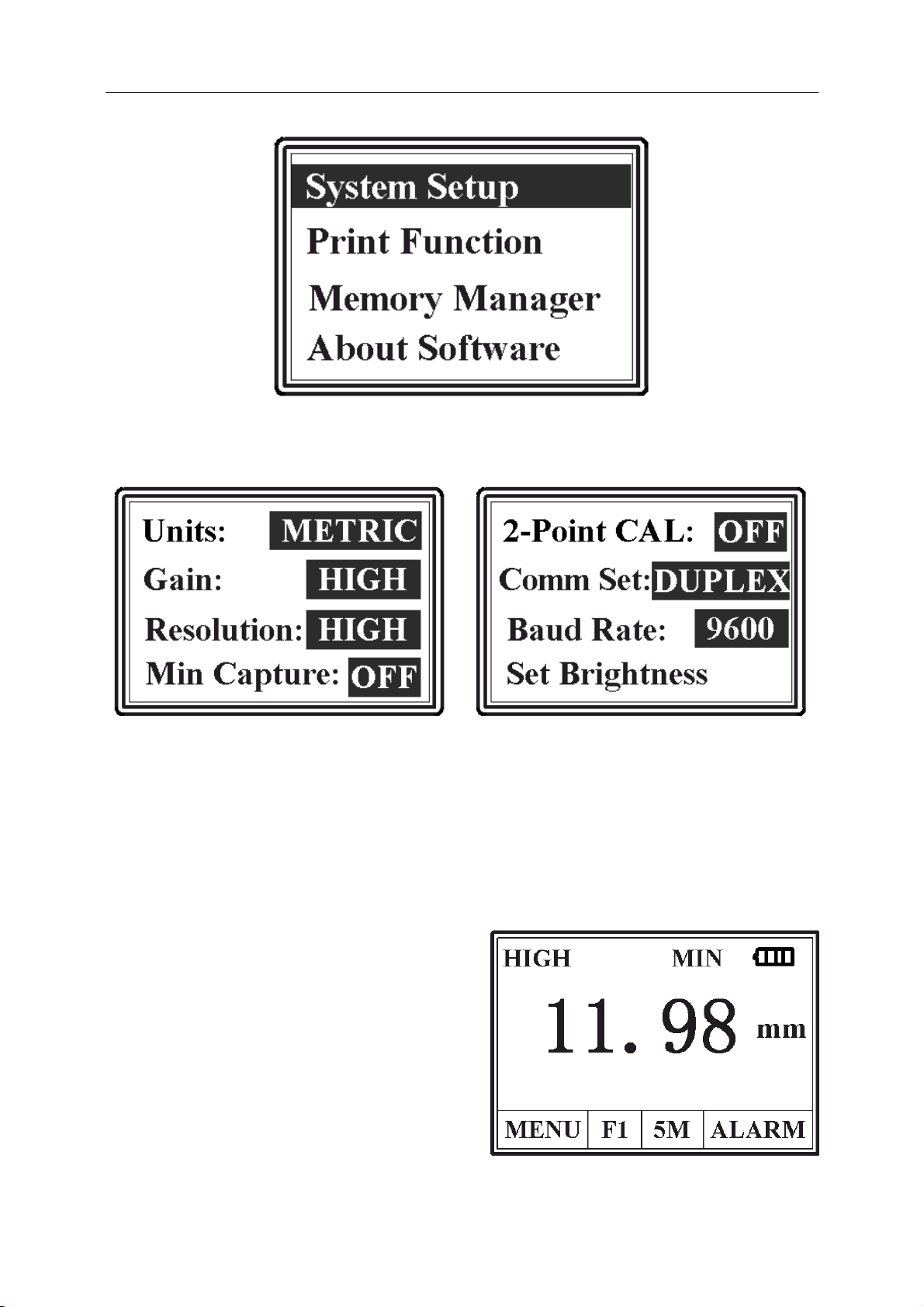
3.7 Menu option
The setting and function of the instrument be handle in Menu option.
Press MENU, move cursor to MENU then Press display main menu.
TDS-110 Ultrasonic Thickness Gauge
9
3.7.1 System Setup
Measurement units: metricandImperial
1) Receiving gain: LOW and HIGH
1. The LOW is mainly used for measuring coarse material with high
scatter and small sound absorption, such as cast aluminum, cast
copper and other metallic parts.
2) Display resolution: 0.1mm(LOW) and 0.01mm(HIGH)
3) Minimum capture measurement OFF and ON
1. To capture min.
measurement is to trap the
minimum value in a group
of measured values. When
the probe couples with the
work piece, it will display
actual measurement, when
the probe is taken away, it
will display the min. value
of measurement carried
Questo manuale è adatto per i seguenti modelli
1
Indice
Altri manuali ECEFAST Strumento di misura


