
Element TITAN 3K Manuale utente
!"#$%&
!"#$%&
TITAN 3K
Ballistic Laser Rangefinder
1) INTRODUCTION & OVERVIEW 1
2) BATTERY & CHARGING 2
3) OBTAINING A CLEAR IMAGE 3
4) DISPLAY ORIENTATION 4
5) RANGING & TARGETING MODES 6
6) PAIRING WITH BLUETOOTH DEVICES 8
7) WARRANTY INFORMATION 11
8) SPEC SHEET 12
INDEX
ELEMENT
BALLISTICS
CHIP
USB-C
CHARGING
3000m
RANGE
7x26
OPTICAL
SYSTEM
TRIPOD
MOUNT
BLUETOOTH
CONNECTIVITY
18650
BATTERY
DUAL-COLOR
T-OLED
DISPLAY
BAG
INCLUDED
WEATHER
RESISTANT
RUGGED
CONSTRUCTION
PLATINUM
WARRANTY
The TITAN 3K is not just any rangefinder. At the push of a button, this
unit will present you with an accurate firing solution out to 3
Kilometers, harnessing the full power of the integrated Ballistics Chip
to factor in weather conditions, incline, spin drift and more. The high-
capacity 18650 battery ensures many hours of continuous use, and
can be USB Charged on your way to the range. This manual contains
everything you need to know when operating this unit.!
1
INTRODUCTION & OVERVIEW
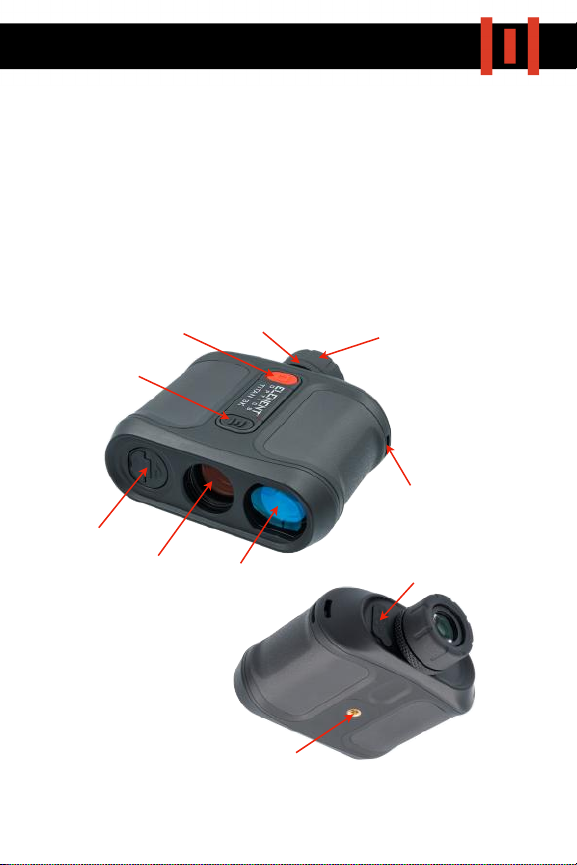
Twist-Out Eyecup
Diopter
Range Button
Mode Button
Battery Cap
Objective Lens Laser Lens
Lanyard Mount
Tripod Mount
USB-C Charging Point
The TITAN 3K uses an 18650 Battery. This comes installed from the
factory and does not need to be removed. Before setting up and
operating the unit, it is advised to fully charge the battery first.
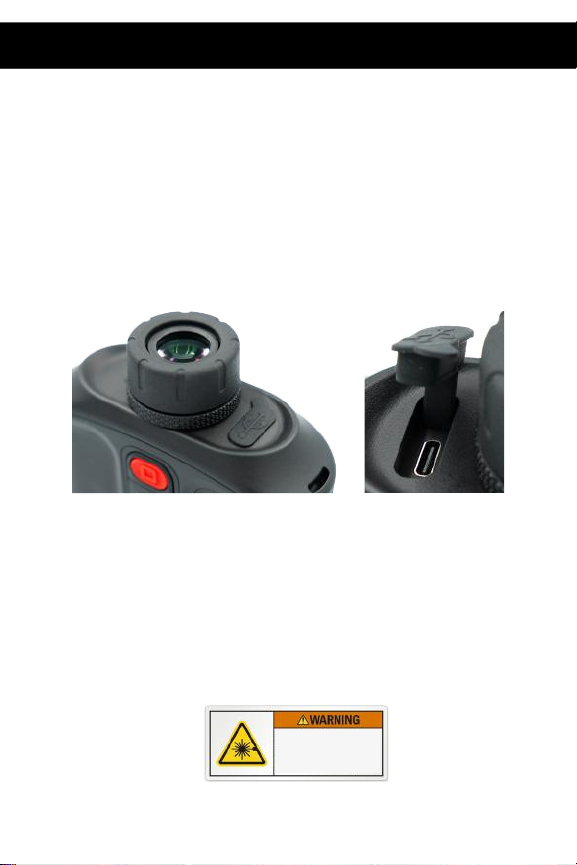
To charge, expose the USB-C port located next to the eyepiece by
lifting the rubber cap and insert the included charging cable. When
charging, the indicator light below the port will illuminate RED.
When fully charged, the indicator light will turn GREEN.
Replace the rubber cap to ensure weather-sealing after charging.
*NOTE: If you intend to purchase a spare battery, you will need a flat-
top 18650. Some 18650 batteries have PCB’s built in, which increases
their length.
BATTERY & CHARGING
2
CLASS 3R LASER PRODUCT
Avoid direct exposure to eyes
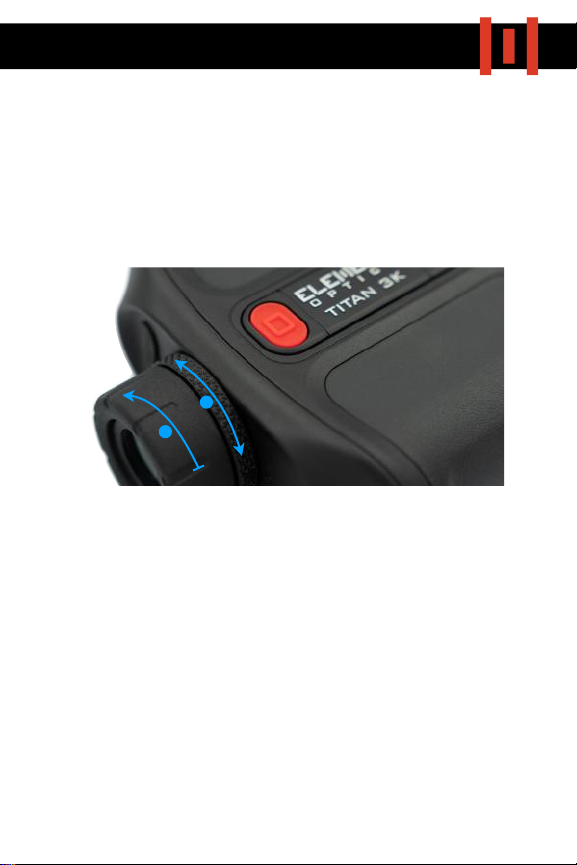
As with all optical devices, the TITAN 3K will need to be adjusted to
your eye.
1) To start, hold the unit up to your eye and look through the eyepiece
towards a featureless background. Twist the eyecup anticlockwise to
lift until a comfortable eye relief is obtained.
2) Then, switch on the display by pressing the red RANGE
button and
turn the diopter ring until the display appears sharply in focus.
3) Display Brightness can be adjusted by holding in the RANGE
button
and then pressing the black MODE button to cycle through the 6
brightness settings.
3
OBTAINING A CLEAR IMAGE
1
2
3
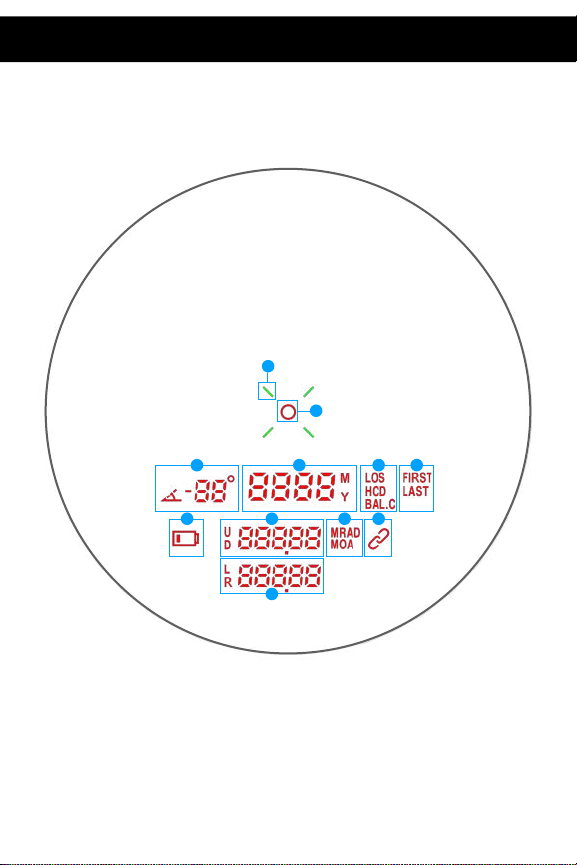
The TITAN 3K has a Dual-Colour Transparent OLED (T-OLED) Display. It
is important to understand what each icon means before continuing.
1) LASER RETICLE: Hold this on the object you want to range.
2) LASER ACTIVITY INDICATORS: These 4 Green lines illuminate when a
laser beam is being emitted.
3) INCLINOMETER:
Indicates the angle (degrees) of the target being
ranged.
4
DISPLAY ORIENTATION
3
2
1
3
4 5 6
7 8 910
11

4. DISTANCE TO TARGET: Displayed in METERS (M) or YARDS (Y). To switch
between M and Y, Double-Tap the black MODE button.
5. RANGING MODE:
"LOS (LINE OF SIGHT): Direct distance to target
"HCD (HORIZONTAL COMPONENT DISTANCE): The angle-compensated
distance to your target, useful when referencing a bullet drop chart
for given distances.
"BAL.C (BALLISTIC CALCULATOR): Direct Target Distance shown, but
additionally, Elevation & Windage data also displayed.
6. TARGET PRIORITY MODE:
"FIRST: The processor prioritises the signal from the closest target
detected. Useful when ranging an object in an open field.
"LAST: The processor prioritises the signal from the closest target
detected. Useful when ranging through vegetation.
"NONE (BEST): The processor prioritises the strongest signal returned.
"SCAN MODE can be activated by holding in the RANGE button. This
gives a continuous distance readout.
7. LOW BATTERY INDICATOR: It’s time to plug me in.
8. ELEVATION: Shown as a numerical value and U (up) or D (down).
9. BALLISTIC SOLUTION UNIT: Shown as MRAD or MOA (more on Page 9)
10. DEVICE CONNECTED: Displayed when the TITAN 3K is paired to the
Element Ballistics App or a HYPR Riflescope.
11. WINDAGE: Shown as a numerical value and L (left) or R (Right). More
information on Page 9.
5
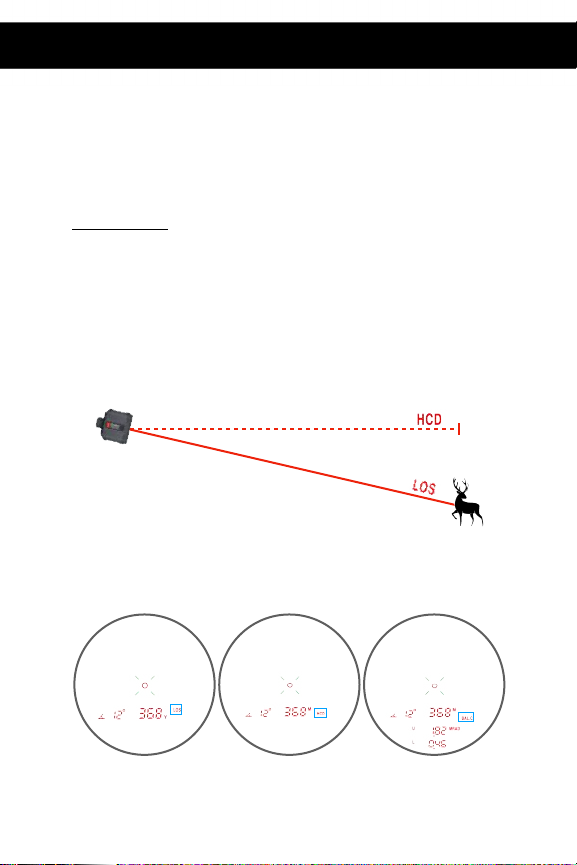
The TITAN 3K features a number of different ranging and targeting
modes, making it easier to obtain an accurate reading in challenging
conditions.
RANGING MODES:
By changing Ranging Modes, you allow the processor to change the way it
reads out the data it has measured. As demonstrated in the below graphic,
LOS
mode gives you the direct distance to the target you have ranged, while
HCD mode gives you the horizontal component of that distance, i.e. the actual
distance multiplied by the cosine of the angle. Since gravity only acts
vertically, the HCD more accurately predict how much bullet drop you need to
account for.
To cycle between LOS, HCD and BAL.C
, use short presses of the black MODE
button.
RANGING & TARGETING MODES
6
LOS HCD BAL.C
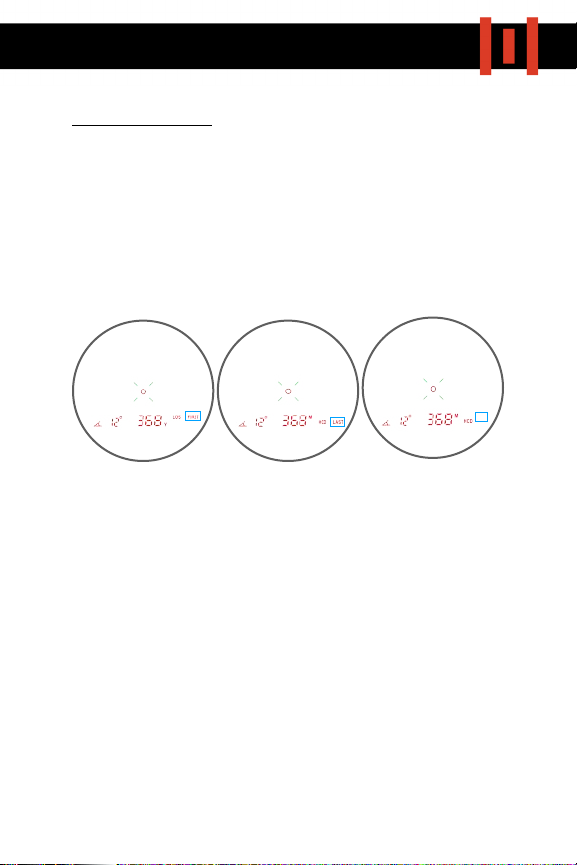
TARGET PRIORITY MODES:
No matter how powerful the laser system in a rangefinder is, a returning
laser signal still has to be read and processed. The processor may receive
multiple return signals from different objects downrange, and needs to
predict which one is the one you want a reading for. By changing modes, you
can instruct the processor to focus on specific data, giving you a better
chance of obtaining the reading you want. These modes are summarised in
PAGE 5.
To switch between Target Priority Modes, hold in the black MODE button for 3
Seconds.
The TITAN 3K also has a SCAN
function which can be used in any mode. To
activate, simply hold in the red RANGE
button. This will give a continuous
reading for a few seconds. This feature is useful when trying to obtain a
reading off a small target - By scanning past the target and watching the
readout, you may be able to detect a sudden change in the range value,
possibly indicating a return signal from the small target as the beam passes
by.
7
FIRST LAST BEST
(no icon)

The TITAN 3K is compatible with a number of
external Bluetooth devices, including the
Element HYPR-7 and, most importantly, the
Element Ballistics mobile app, from which you
can create & send ballistic profiles and change
preferences.
HYPR-7
The TITAN 3K will automatically pair with the HYPR-7 when in range,
displaying the “device connected” icon:
When paired, the rangefinder transmits range & incline data to the riflescope,
providing an instant firing solution with no need for manual input. Note that
when in BAL.C
mode, the TITAN 3K will display ballistic data from the HYPR-7,
bypassing its own ballistic chip. This means that a spotter/shooter pair will
always be working with the same data.
ELEMENT BALLISTICS APP
The Element Ballistics App is available for free on the Apple and Android app
stores. Before using the Ballistic Calculator function on the TITAN 3K, you will
need to install the app and create a profile for your rifle.
PAIRING WITH EXTERNAL DEVICES
8
Indice
Altri manuali Element Strumento di misura


