
Essentim scouter Manuale utente

User Guide

© essentim GmbH | Schragenhofstrasse 35 | D-80992 München
www.essentim.com inf[email protected]om
2
User Guide scouter - Version 1.2

Table of Content
Notes 4
Safety Instructions 5
Intended Use and User 6
Device Description 7
General Information 7
scouter 7
Technical Data 8
Transport and Storage 9
Commissioning 10
Mounting the System 10
scouter Positioning Guide 10
General Notes on Positioning 11
essentim Recommends the Following Positioning Procedure 11
Cleaning, Maintenance and Repair 13
Cleaning 13
Maintenance and Repair 13
Defect 13
Disposal 14
FAQs 15
Troubleshooting 16
Changelog 17
3
User Guide scouter - Version 1.2
Notes
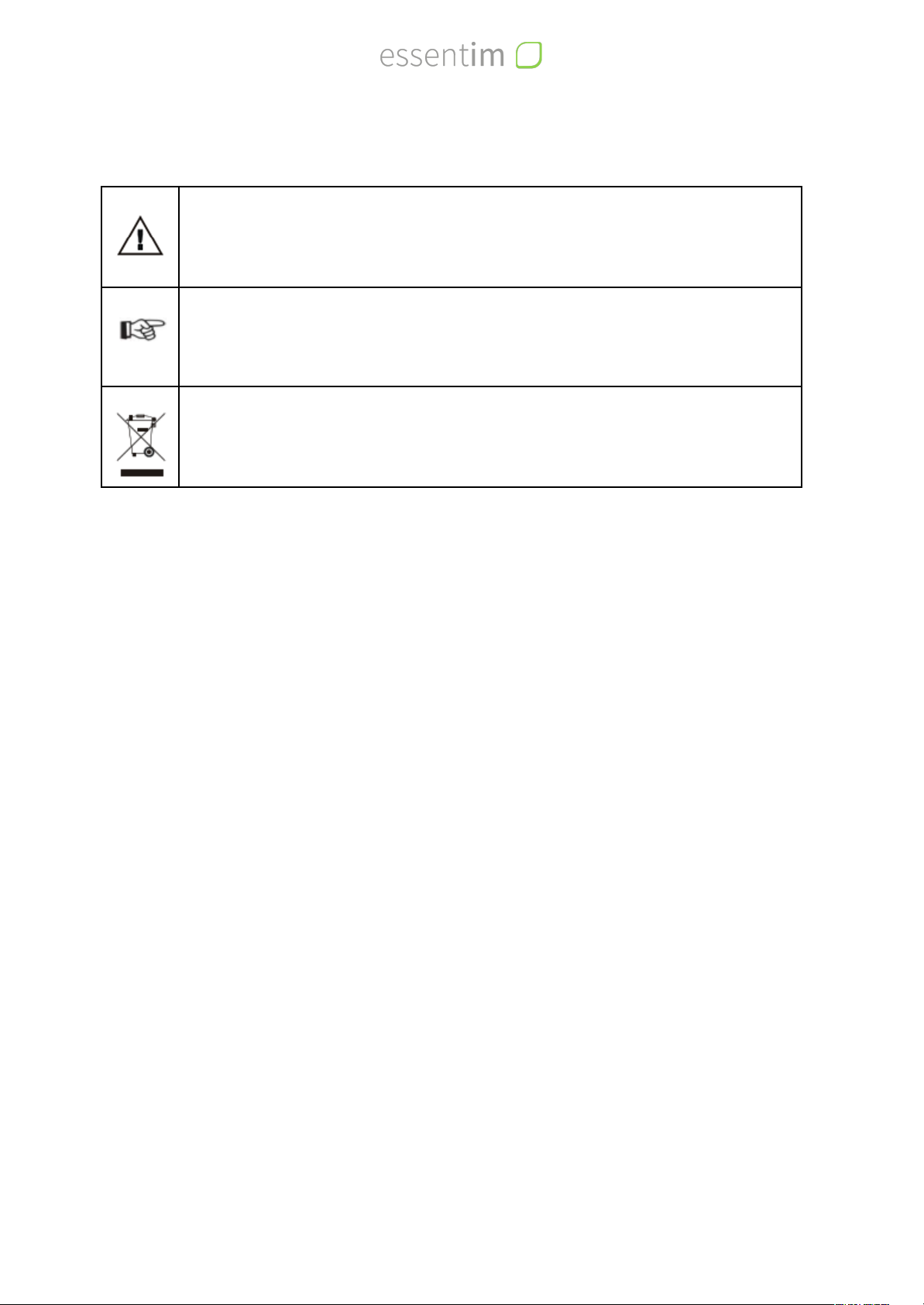
Warning: This symbol represents a warning. It describes a dangerous situation or
indicates safety risks.
Note: This symbol indicates important information.
The symbol of a crossed-out dustbin indicates that this device contains electronic
components and must not be disposed of with household waste in accordance with
Directive 2002/96/EC (WEEE).
Legal notice
No part of this document may be reproduced, electronically duplicated or distributed in any
form without written permission from essentim GmbH.
essentim GmbH assumes no liability for any errors or omissions. The determination of valid
measurement results, conclusions and measures derived therefrom are the sole responsibility
of the user. essentim GmbH does not guarantee the correctness of the determined
measurement values or measurement results. Furthermore, essentim GmbH assumes no
liability for errors or damages resulting from the use of the determined measurement values.
Subject to technical changes. All rights reserved. © essentim GmbH
Warranty and liability
The device complies with the basic safety and health requirements of the relevant EU
regulations and has been tested for proper functioning at the factory. When claiming warranty,
the device number must be stated (see product label on the device). Failure to comply with
the manufacturer's specifications or legal requirements or unauthorized modifications to the
equipment or unauthorized replacement of individual parts or accessories may significantly
impair the electrical safety of this product and void the warranty. Any liability, property
damage or personal injury resulting from the device being used contrary to the instructions in
this manual is excluded. We reserve the right to make technical design and execution changes
at any time without prior notice as a result of continuous further development and product
improvement. No liability is accepted for damage resulting from improper use. Warranty
claims are then also void. Liability for any damage to property or personal injury that occurs is
then transferred to the operator.
4
User Guide scouter - Version 1.2

Safety Instructions
Read these instructions carefully before commissioning and using the device and always keep
the instructions within easy reach!
Warning
Always observe all safety instructions in this document! Non-observance may
result in personal injury or damage to property! Always keep the safety
instructions and the user manual permanently always keep the safety instructions
and the user manual in an accessible and permanent place.
●Observe all technical limits as well as storage conditions for the device.
●If there is obvious damage to the device, it must be taken out of service and stored safely.
●Do not attempt to repair or modify the device. For maintenance and repair, the device
must be sent to the manufacturer or to an agency designated by the manufacturer.
●Before operation, the safety instructions and the user manual must have been read and
understood by the user. The device may only be operated by persons to whom this
applies.
●In addition to the instructions and safety notes in this manual, the basic regulations for
occupational safety must be observed.
●The system is safe and reliable and complies with the relevant EU directives. Improper use
may result in damage to the user, third parties or material objects.
●Maintenance or repairs may only be performed by the manufacturer or by persons or
companies authorized by the manufacturer.
●Clean the device only according to the cleaning instructions in this operating manual.
●Do not operate the device in potentially explosive atmospheres, aggressive atmospheres
or explosion protection zones.
●The device is not a toy. Keep the device away from children and animals.
●Avoid contact with liquids or high humidity.
●Avoid the penetration of liquids into the device.
●Protect the device from permanent direct sunlight.
●Do not remove any safety signs, stickers or labels from the device. Keep all safety signs,
stickers and labels in a legible condition.
●Do not open the device!
●The product should not be sterilized!
5
User Guide scouter - Version 1.2

Intended Use and User
The essentim scouter is the base station for the essentim wireless sensor network. With the
scouter, essentim sensors can be connected to the essentim cloud. In the cloud, sensors can
be managed, measurement data can be stored and processed, visualized and analyzed. The
scouter is installed stationary in a normal room climate.
Warning
Always observe the safe operating conditions specified here! Failure to do so may
result in personal injury and/or damage to property.
●0°C to +40°C, non-condensing humidity up to 70%, ambient pressure.
●The scouter is a stationary unit, select a safe and central location. Observe the scouter
positioning guide in this operating manual!
●Only cables and extensions approved by essentim may be used with the scouter.
●Avoid mechanical stress on the device; damage to the housing may result in damage to
the electronics. This can lead to defects, short circuits and temperature development.
The user is for example a trained laboratory employee / assistant / technician / IT employee /
student. Each user must have read and understood the safety instructions and the operating
instructions.
6
User Guide scouter - Version 1.2
Device Description
General Information
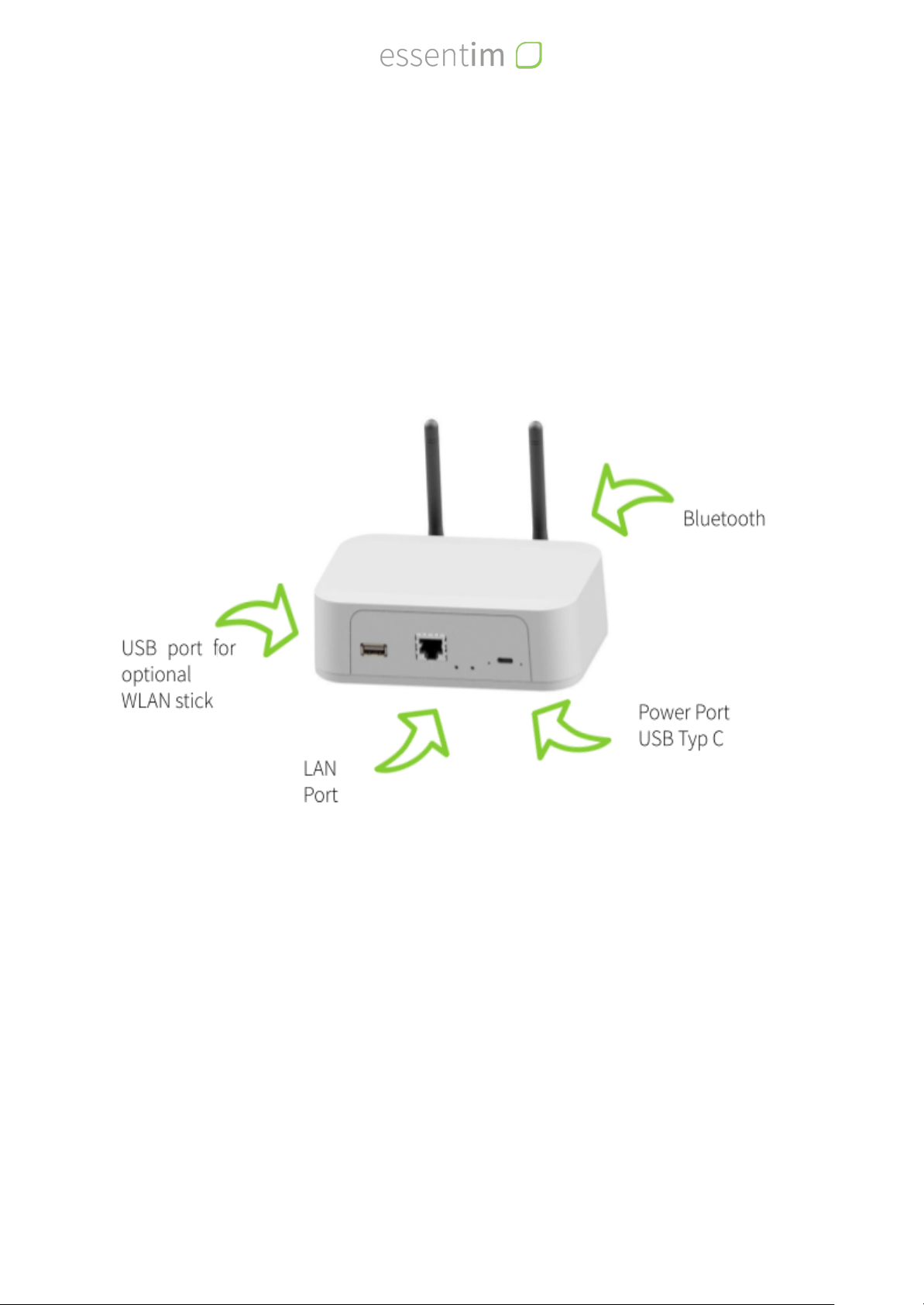
The essentim scouter is the central point of the essentim wireless sensor network. It collects
the data from the essentim sensors and forwards them to the essentim cloud. The user can
connect to the scouter via the LAN interface to perform the necessary configuration steps.
scouter
7
User Guide scouter - Version 1.2

Technical Data
Manufacturer
essentim GmbH
Model
scouter Version 1
Type
Wireless Sensor Network Server / Gateway
Power supply for charging
5V DC (max. 3A)
Battery Type
Battery: CR1225
Betriebsbedingungen
(EN / IEC 61010-1)
●Operating location
●Ambient temperature
●Humidity
●Altitude
●Other
Storage and loading conditions
●Temperature
●Humidity
●Other
Indoor, no use or storage in explosive atmospheres.
0 °C to +40 °C
Maximum 70 % relative humidity, non-condensing
5000 m
Do not expose to chemicals or mechanical stress.
The product should not be sterilized!
Observe the cleaning instructions in the user manual to prevent
damage.
0 to 40°C
10 to 50%
Protected from frost and heat, not in contact with hazardous
substances in a place protected from dust and sunlight.
EMC/radio
EN 61000-6-2:2005, EN 61326-1:2013
ETSI EN 301 489-1 V2.2.3:2019-11
ETSI EN 301 489-17 V3.1.1:2017-02
ETSI EN 300 328 V2.2.2:2019-07
Other conformities
RoHS, FCC, IC, CE
IP protection class (EN 60529)
IP20
Further Information
Operating system
Embedded Linux (Raspbian)
Interfaces
Bluetooth Low Energy, USB, LAN
Dimensions
150 x 105 x 45 (mm) without Antennas
Weight
Ca. 260 g
8
User Guide scouter - Version 1.2

Transport and Storage
Warning
Improper transport may result in personal injury and/or damage to property.
Always observe all instructions for safe transport
The essentim scouter must be secured during transport to prevent possible mechanical
impacts. The scouter must not be transported during operation. Before each transport, the
antennas must be dismantled.
Unused scouters should be stored away from dust, sunlight and moisture.
Storage and loading conditions
- Temperature
- Humidity
- Others
0 to 40°C
10 to 50%
Protected from frost and heat, not in contact with hazardous
substances in a place protected from dust and sunlight.
9
User Guide scouter - Version 1.2
Commissioning
When using the essentim scouter for the first time, the following steps must be performed:
1. Set up system
2. Establish connection to the essentim Cloud
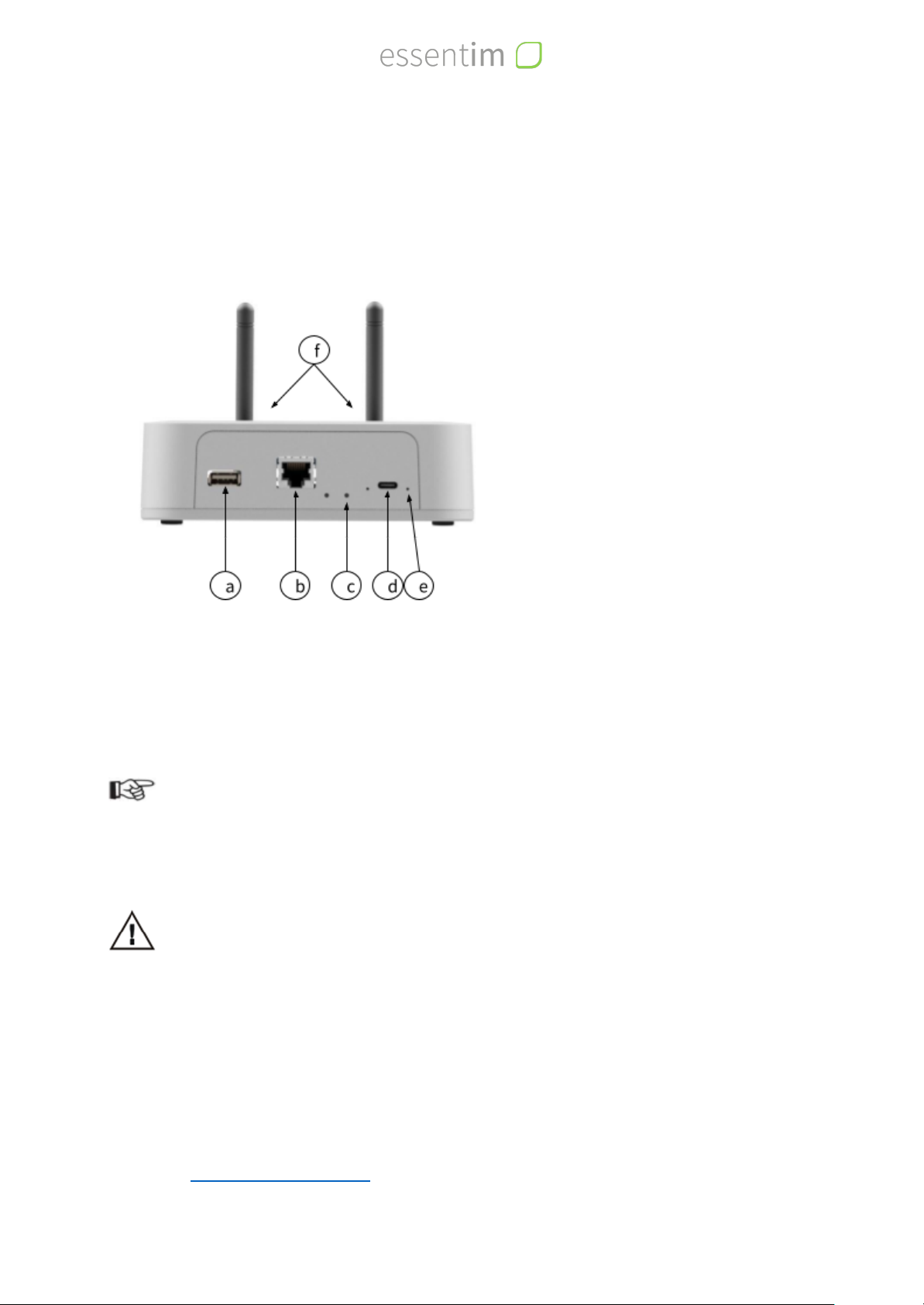
a
b
c
d
e
f
USB A port (WLAN stick)
LAN port
Reset Button
Power Supply connector
Power LED
2 x antenna connector
Mounting the System
●Screw the enclosed antennas to the scouter.
●Position the scouter in a place protected from dust, sunlight and moisture.
Note
Observe the scouter positioning aid in this user manual.
●Connect the scouter to a 230 V power supply using the enclosed power supply unit.
Warning
Lay all cables so that no person can trip over them. Position the scouter so that
no person can trip over it. Do not use any accessories that show external damage
or strange behavior. Only use accessories approved by essentim.
●If the scouter is properly connected to the mains, the power LED lights up green.
scouter Positioning Guide
When positioning the scouter, some aspects should be taken into account to achieve optimal
network coverage. For large rooms, several scouters are required for the wireless sensor
network. If you have problems with the connection of the scouter, please contact essentim
support at support@essentim.com.
10
User Guide scouter - Version 1.2
Indice


