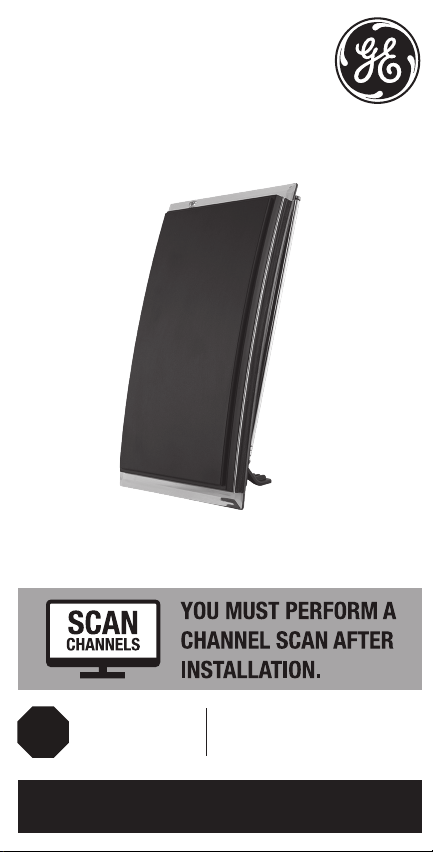
GE Crystal HD Manuale utente

Crystal HD
User Manual Maximize the number of channels by testing
the antenna in several locations. Be sure
to run a TV channel scan in each position.
Refer to your TV’s instruction manual if
necessary.
Position the antenna as high as possible or
near a window for best performance.
Visit www.antennaweb.org to determine the
available television stations and broadcast
tower locations in your area.
Perform a TV channel scan.
1. Connect 2. Place Helpful Antenna Tips
QUESTIONS? ISSUES?
CALL OUR U.S.-BASED EXPERTS AT
1-800-654-8483
3. Scan
See reverse for easy-to-follow
instructions and exclusive deals.
MADE IN TAIWAN
GE is a trademark of General Electric Company and is
under license by Jasco Products Company LLC,
10 E. Memorial Rd., Oklahoma City, OK 73114.
This Jasco product comes with a limited-lifetime
warranty. Visit www.byjasco.com for warranty details.
Questions? Contact our U.S.-based Consumer Care at
1-800-654-8483 between 7AM-8PM, M-F, Central Time.
12534/34134/35848/48732 V2 01/22
Questions? Contact our U.S.-based
Consumer Care at 1-800-654-8483
between 7AM–8PM, M–F, Central Time.
Please call before
returning to store
CALL
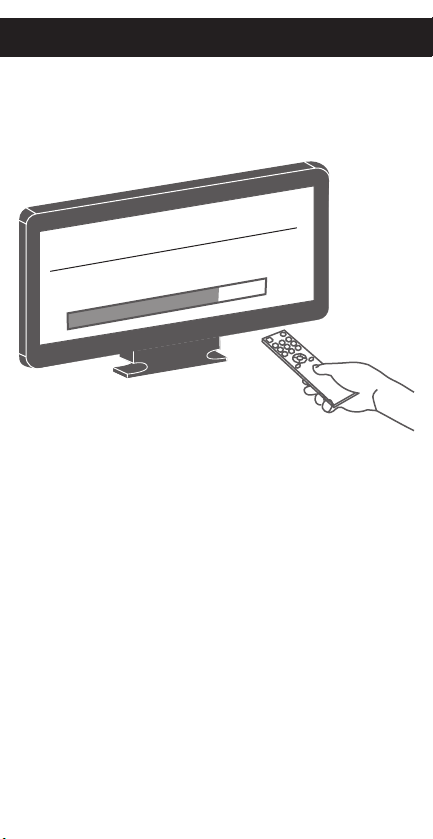
CHANNEL SEARCH
Scanning for channels
73% .
1. Open the TV’s setup or settings menu.
2. Select scan, autotune, channel search or
channel scan, making sure it’s set to scan
for over-the-air channels rather than cable.
3. Wait for the TV to complete the
channel scan.
Tip 1: Consult the TV manual or contact the TV’s
manufacturer for detailed instructions.
Tip 2: Rescan for over-the-air channels anytime you
move the antenna.
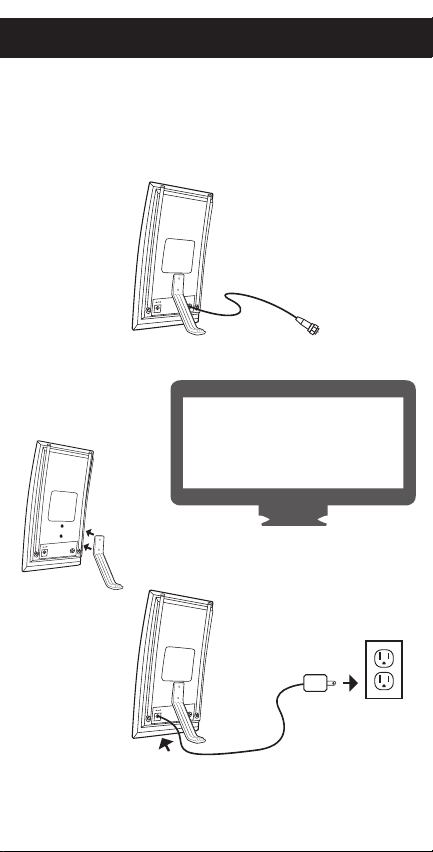
Connect the antenna to the TV.
Connect the power supply to the
antenna and a wall outlet.
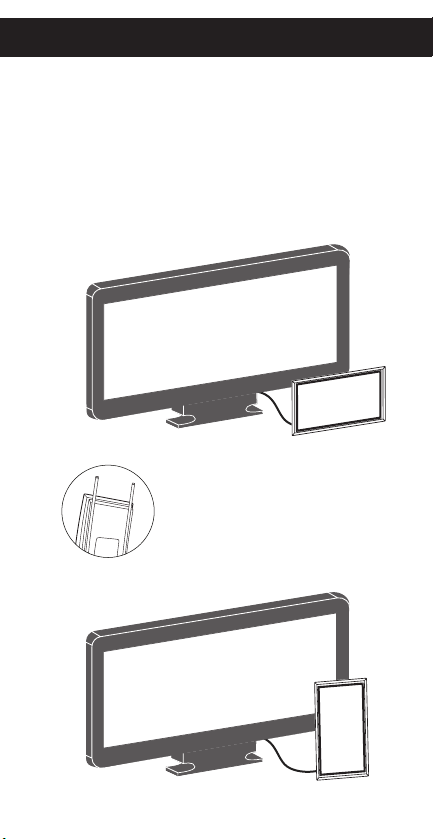
Place the antenna on a at surface
in your desired location.
Extend the dipoles, as needed,
for best reception.
Antenna
Antenna
Attach the antenna
stand for tabletop
placement.
Power supply
HDTV
HDTV
Tabletop
Tabletop
Adjustable dipoles
OR
PLEASE NOTE: Use only the supplied AC adapter.
Connect to
TV’s coax

Crystal HD
User Manual Maximize the number of channels by testing
the antenna in several locations. Be sure
to run a TV channel scan in each position.
Refer to your TV’s instruction manual if
necessary.
Position the antenna as high as possible or
near a window for best performance.
Visit www.antennaweb.org to determine the
available television stations and broadcast
tower locations in your area.
Perform a TV channel scan.
1. Connect 2. Place Helpful Antenna Tips
QUESTIONS? ISSUES?
CALL OUR U.S.-BASED EXPERTS AT
1-800-654-8483
3. Scan
See reverse for easy-to-follow
instructions and exclusive deals.
MADE IN TAIWAN
GE is a trademark of General Electric Company and is
under license by Jasco Products Company LLC,
10 E. Memorial Rd., Oklahoma City, OK 73114.
This Jasco product comes with a limited-lifetime
warranty. Visit www.byjasco.com for warranty details.
Questions? Contact our U.S.-based Consumer Care at
1-800-654-8483 between 7AM-8PM, M-F, Central Time.
12534/34134/35848/48732 V2 01/22
Questions? Contact our U.S.-based
Consumer Care at 1-800-654-8483
between 7AM–8PM, M–F, Central Time.
Please call before
returning to store
CALL
CHANNEL SEARCH
Scanning for channels
73% .
1. Open the TV’s setup or settings menu.
2. Select scan, autotune, channel search or
channel scan, making sure it’s set to scan
for over-the-air channels rather than cable.
3. Wait for the TV to complete the
channel scan.
Tip 1: Consult the TV manual or contact the TV’s
manufacturer for detailed instructions.
Tip 2: Rescan for over-the-air channels anytime you
move the antenna.
Connect the antenna to the TV.
Connect the power supply to the
antenna and a wall outlet.
Place the antenna on a at surface
in your desired location.
Extend the dipoles, as needed,
for best reception.
Antenna
Antenna
Attach the antenna
stand for tabletop
placement.
Power supply
HDTV
HDTV
Tabletop
Tabletop
Adjustable dipoles
OR
PLEASE NOTE: Use only the supplied AC adapter.
Connect to
TV’s coax

Crystal HD
User Manual Maximize the number of channels by testing
the antenna in several locations. Be sure
to run a TV channel scan in each position.
Refer to your TV’s instruction manual if
necessary.
Position the antenna as high as possible or
near a window for best performance.
Visit www.antennaweb.org to determine the
available television stations and broadcast
tower locations in your area.
Perform a TV channel scan.
1. Connect 2. Place Helpful Antenna Tips
QUESTIONS? ISSUES?
CALL OUR U.S.-BASED EXPERTS AT
1-800-654-8483
3. Scan
See reverse for easy-to-follow
instructions and exclusive deals.
MADE IN TAIWAN
GE is a trademark of General Electric Company and is
under license by Jasco Products Company LLC,
10 E. Memorial Rd., Oklahoma City, OK 73114.
This Jasco product comes with a limited-lifetime
warranty. Visit www.byjasco.com for warranty details.
Questions? Contact our U.S.-based Consumer Care at
1-800-654-8483 between 7AM-8PM, M-F, Central Time.
12534/34134/35848/48732 V2 01/22
Questions? Contact our U.S.-based
Consumer Care at 1-800-654-8483
between 7AM–8PM, M–F, Central Time.
Please call before
returning to store
CALL
CHANNEL SEARCH
Scanning for channels
73% .
1. Open the TV’s setup or settings menu.
2. Select scan, autotune, channel search or
channel scan, making sure it’s set to scan
for over-the-air channels rather than cable.
3. Wait for the TV to complete the
channel scan.
Tip 1: Consult the TV manual or contact the TV’s
manufacturer for detailed instructions.
Tip 2: Rescan for over-the-air channels anytime you
move the antenna.
Connect the antenna to the TV.
Connect the power supply to the
antenna and a wall outlet.
Place the antenna on a at surface
in your desired location.
Extend the dipoles, as needed,
for best reception.
Antenna
Antenna
Attach the antenna
stand for tabletop
placement.
Power supply
HDTV
HDTV
Tabletop
Tabletop
Adjustable dipoles
OR
PLEASE NOTE: Use only the supplied AC adapter.
Connect to
TV’s coax

Crystal HD
User Manual Maximize the number of channels by testing
the antenna in several locations. Be sure
to run a TV channel scan in each position.
Refer to your TV’s instruction manual if
necessary.
Position the antenna as high as possible or
near a window for best performance.
Visit www.antennaweb.org to determine the
available television stations and broadcast
tower locations in your area.
Perform a TV channel scan.
1. Connect 2. Place Helpful Antenna Tips
QUESTIONS? ISSUES?
CALL OUR U.S.-BASED EXPERTS AT
1-800-654-8483
3. Scan
See reverse for easy-to-follow
instructions and exclusive deals.
MADE IN TAIWAN
GE is a trademark of General Electric Company and is
under license by Jasco Products Company LLC,
10 E. Memorial Rd., Oklahoma City, OK 73114.
This Jasco product comes with a limited-lifetime
warranty. Visit www.byjasco.com for warranty details.
Questions? Contact our U.S.-based Consumer Care at
1-800-654-8483 between 7AM-8PM, M-F, Central Time.
12534/34134/35848/48732 V2 01/22
Questions? Contact our U.S.-based
Consumer Care at 1-800-654-8483
between 7AM–8PM, M–F, Central Time.
Please call before
returning to store
CALL
CHANNEL SEARCH
Scanning for channels
73% .
1. Open the TV’s setup or settings menu.
2. Select scan, autotune, channel search or
channel scan, making sure it’s set to scan
for over-the-air channels rather than cable.
3. Wait for the TV to complete the
channel scan.
Tip 1: Consult the TV manual or contact the TV’s
manufacturer for detailed instructions.
Tip 2: Rescan for over-the-air channels anytime you
move the antenna.
Connect the antenna to the TV.
Connect the power supply to the
antenna and a wall outlet.
Place the antenna on a at surface
in your desired location.
Extend the dipoles, as needed,
for best reception.
Antenna
Antenna
Attach the antenna
stand for tabletop
placement.
Power supply
HDTV
HDTV
Tabletop
Tabletop
Adjustable dipoles
OR
PLEASE NOTE: Use only the supplied AC adapter.
Connect to
TV’s coax

Crystal HD
User Manual Maximize the number of channels by testing
the antenna in several locations. Be sure
to run a TV channel scan in each position.
Refer to your TV’s instruction manual if
necessary.
Position the antenna as high as possible or
near a window for best performance.
Visit www.antennaweb.org to determine the
available television stations and broadcast
tower locations in your area.
Perform a TV channel scan.
1. Connect 2. Place Helpful Antenna Tips
QUESTIONS? ISSUES?
CALL OUR U.S.-BASED EXPERTS AT
1-800-654-8483
3. Scan
See reverse for easy-to-follow
instructions and exclusive deals.
MADE IN TAIWAN
GE is a trademark of General Electric Company and is
under license by Jasco Products Company LLC,
10 E. Memorial Rd., Oklahoma City, OK 73114.
This Jasco product comes with a limited-lifetime
warranty. Visit www.byjasco.com for warranty details.
Questions? Contact our U.S.-based Consumer Care at
1-800-654-8483 between 7AM-8PM, M-F, Central Time.
12534/34134/35848/48732 V2 01/22
Questions? Contact our U.S.-based
Consumer Care at 1-800-654-8483
between 7AM–8PM, M–F, Central Time.
Please call before
returning to store
CALL
CHANNEL SEARCH
Scanning for channels
73% .
1. Open the TV’s setup or settings menu.
2. Select scan, autotune, channel search or
channel scan, making sure it’s set to scan
for over-the-air channels rather than cable.
3. Wait for the TV to complete the
channel scan.
Tip 1: Consult the TV manual or contact the TV’s
manufacturer for detailed instructions.
Tip 2: Rescan for over-the-air channels anytime you
move the antenna.
Connect the antenna to the TV.
Connect the power supply to the
antenna and a wall outlet.
Place the antenna on a at surface
in your desired location.
Extend the dipoles, as needed,
for best reception.
Antenna
Antenna
Attach the antenna
stand for tabletop
placement.
Power supply
HDTV
HDTV
Tabletop
Tabletop
Adjustable dipoles
OR
PLEASE NOTE: Use only the supplied AC adapter.
Connect to
TV’s coax

Crystal HD
User Manual Maximize the number of channels by testing
the antenna in several locations. Be sure
to run a TV channel scan in each position.
Refer to your TV’s instruction manual if
necessary.
Position the antenna as high as possible or
near a window for best performance.
Visit www.antennaweb.org to determine the
available television stations and broadcast
tower locations in your area.
Perform a TV channel scan.
1. Connect 2. Place Helpful Antenna Tips
QUESTIONS? ISSUES?
CALL OUR U.S.-BASED EXPERTS AT
1-800-654-8483
3. Scan
See reverse for easy-to-follow
instructions and exclusive deals.
MADE IN TAIWAN
GE is a trademark of General Electric Company and is
under license by Jasco Products Company LLC,
10 E. Memorial Rd., Oklahoma City, OK 73114.
This Jasco product comes with a limited-lifetime
warranty. Visit www.byjasco.com for warranty details.
Questions? Contact our U.S.-based Consumer Care at
1-800-654-8483 between 7AM-8PM, M-F, Central Time.
12534/34134/35848/48732 V2 01/22
Questions? Contact our U.S.-based
Consumer Care at 1-800-654-8483
between 7AM–8PM, M–F, Central Time.
Please call before
returning to store
CALL
CHANNEL SEARCH
Scanning for channels
73% .
1. Open the TV’s setup or settings menu.
2. Select scan, autotune, channel search or
channel scan, making sure it’s set to scan
for over-the-air channels rather than cable.
3. Wait for the TV to complete the
channel scan.
Tip 1: Consult the TV manual or contact the TV’s
manufacturer for detailed instructions.
Tip 2: Rescan for over-the-air channels anytime you
move the antenna.
Connect the antenna to the TV.
Connect the power supply to the
antenna and a wall outlet.
Place the antenna on a at surface
in your desired location.
Extend the dipoles, as needed,
for best reception.
Antenna
Antenna
Attach the antenna
stand for tabletop
placement.
Power supply
HDTV
HDTV
Tabletop
Tabletop
Adjustable dipoles
OR
PLEASE NOTE: Use only the supplied AC adapter.
Connect to
TV’s coax
Indice
Altri manuali GE Antenna

GE
GE 33691 ultra-flat digital amplified antenna Manuale utente

GE
GE Quantum Amplified Quantum Antenna Manuale utente

GE
GE Ultra Edge HD Manuale utente

GE
GE Ultra Pro Hover HD 250 Manuale utente

GE
GE 24700-2 Manuale utente

GE
GE Quadcore HD Manuale utente

GE
GE 25993 Manuale utente

GE
GE 34134 Manuale utente

GE
GE 34137 Manuale utente

GE
GE 34140 Manuale utente
Manuali Antenna popolari di altre marche

Alfa Network
Alfa Network APA-L01 Manuale utente

Naval
Naval PR-422CA Manuale utente

Feig Electronic
Feig Electronic ID ISC.ANTH200/200 Series Manuale utente

TERK Technologies
TERK Technologies TV44 Manuale utente

Directive Systems & Engineering
Directive Systems & Engineering DSE2324LYRMK Manuale utente

HP
HP J8999A Manuale utente