Giropes GI650 Manuale utente

V.1.4_03/05/2022
EN
USER MANUAL
GI650
WEIGHBRIDGE
El fabricante se reserva el derecho de modificar sin previo aviso las características de sus productos para introducir mejoras técnicas o cumplir con nuevas
regulaciones oficiales./Le constructeur se réserve le droit de modifier les caractéristiques de ses produits en vue d’y apporter des améliorations techniques
ou de respecter de nouvelles réglamentations./The manufacturer reserves the right to modify the specifications of its products in order to make technical
improvements or comply with new regulations.
Pol. Empordà Internacional C/Molló 3
17469 VILAMALLA - (Girona) SPAIN
T. (34) 972 527 212

2
USER MANUAL GI650 ENEN

3
1. INTRODUCTION 4
1.1 CHARACTERISTICS 4
CONNECTION OF THE LOAD CELL 4
OPERATION INTERFACE 4
SERIAL COMMUNICATION 4
POWER SUPPLY 4
OPERATING CONDITIONS AND MECHANICAL DATA 5
1.2 GENERAL FUNCTIONAL CHARACTERISTICS 5
1.3 DIMENSIONS 6
1.4 DISPLAY 7
1.5 KEYS AND FUNCTIONS 8
MAIN-DISPLAY 8
KEYBOARD-DISPLAY 9
NUMERIC-DISPLAY 9
1.6 FUNCTIONS WHEN STARTING THE INDICATOR 10
2. WEIGHING INSTRUCTIONS 10
ZERO 10
TARE 10
TARE MANUAL 11
DEACTIVATE TARE 11
MEMORIZED TARE 11
CHECKWEIGHER 11
NET WEIGHT USING 2 WEIGHINGS 12
NET WEIGHT USING 1 WEIGHING 13
3. MENU STRUCTURE 15
3.1 MENU 16
COMMUNICATIONS 16
SECURITY 17
DATA BASE 17
GENERAL 17
FUNCTIONALITY 18
PRINTERS 18
ADDITIONAL 19
WEIGHING 19
CALIBRATION AND METROLOGY 21
DIAGNOSTIC 23
ABOUT THE DEVICE 23
3.2 DATA BASE 23
4. ERROR MESSAGES 28
5. CONFIGURATION OF PERSONALIZED TICKETS 28
6. CONNECTIONS 34
7. DSD-MEMORY 35
8. REMOVAL OF ELECTRONIC EQUIPMENT 35
9. WARRANTY 35
10. ANNEX 36
EN USER MANUAL GI650 ENEN

ENENUSER MANUAL GI650
4
1. INTRODUCTION
Dear User,
the performance that the equipment you have acquired will offer you, will be all the greater the more attention you devote to the instructions
for use included in this manual. Please break our traditional apathy towards the manuals and do not wait for “everything goes wrong” for a
consultant, so you can enjoy optimal benefits from the execution of the first weight.
This equipment is designed to work on one hand as basic equipment to carry out weighing with or without tare, assigning these weights to their
corresponding code. Up to a maximum of 9200 weighings can be memorized.
1.1 CHARACTERISTICS
FEATURES OF THE LOAD CELL
Precision Class III or IIII
Fraction factor p’I = 0,5
Minimum input voltage per VSI > 0.3 uV
Excitation voltage 5 V DC
Min. transducer resistance 29 Ω
Max. transducer resistance 1200 kΩ
Maximum length of cable 5714 m/mm2
Temperature range -10°C à +40°C
Type of Range Mono-range; Multi-range; Multi-intervall
OPERATION INTERFACE
Display LCD tactil 800x600
COMMUNICATION
Port Tx/Rx: (Channel 1) RS-232 bi-directional
Port Tx/Rx: (Channel 2) RS-232 bi-directional
Port Tx/Rx: (Optional) RS-485 bi-directional
Port Ethernet
Port USB Compatible with USB 2.0
Transmission Speed 300 - 115200
Bits 7 and 8 bits
Parity No; Even and Odd
POWER SUPPLY
Power Source 110 - 230VAC, 50-60 Hz

5
ENENUSER MANUAL GI650
OPERATING CONDITIONS AND MECHANICAL DATA
Operation Temperature Range from -10ºC till 40ºC
Max. Temperature Range from -25ºC till 70ºC
Size without Support (mm) 242 x 212 x 84
Weight without Support ~ 2.8Kg
Support Desktop and Wall
1.2 GENERAL FUNCTIONAL CHARACTERISTICS
Display
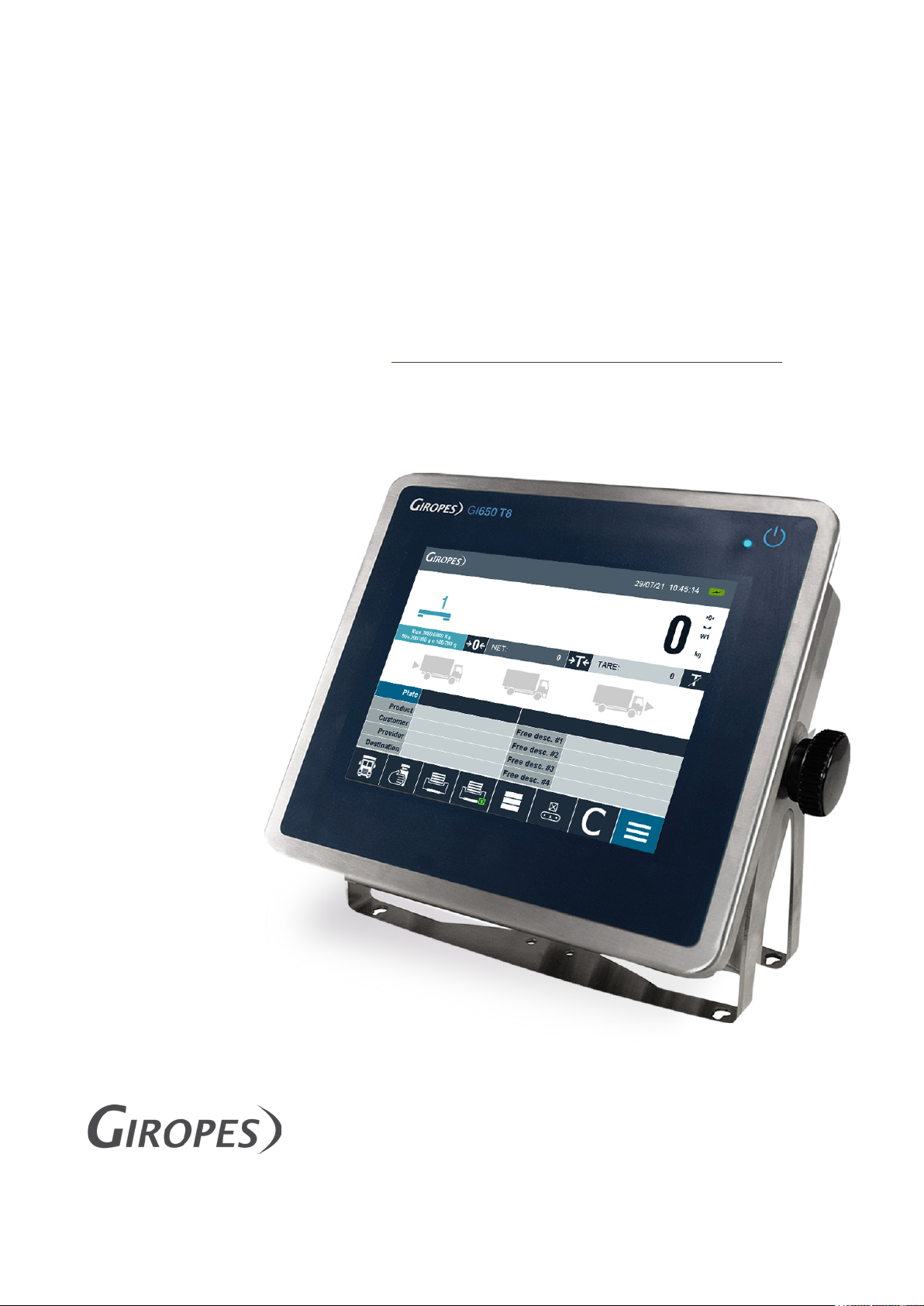
The GI650 has a Touchscreen Display with integrated back-light.
Password
Password protection for metrological and security Parameters
Theoric Calibration
If the reference weight is not available, you can perform a theoretical
calibration by using the capacity and sensitivity values (mV/V) of the load
cells used.
Import / Export Data
It is possible to export the Code-files and weighings via USB to a PC to
manage / modify the Categories.
Manage Files
It is possible to store and manage up to 1900 code-files. These files are
used in 5 different types: Product (1000), Customer (400), Provider
(100), Target (100) and Plates (300). It is also possible to program a
specific name for each code.
Manage Weighings
It is possible to store and manage up to 9200 weighings in 2 different
types: open weights and Weights (4600 each).
Manage memorized Tares
It is possible to store and manage Tara-values in the Plates-register.
Manage the Printer
It is possible to work with 2 printer/labeler on the GI650. You can also free
configure the printouts and on which printer, which information is printed.
Software
GI Manager
Repeater available
It is possible to work with a Repeater through the serial RS-232 Port or the
optional RS-485 Port
Alibi-Memory
Alibi-Memory (DSD) is an available Optional.
External Keyboard
It is possible to plug an external Keyboard through the serial USB-Port

ENENUSER MANUAL GI650
6
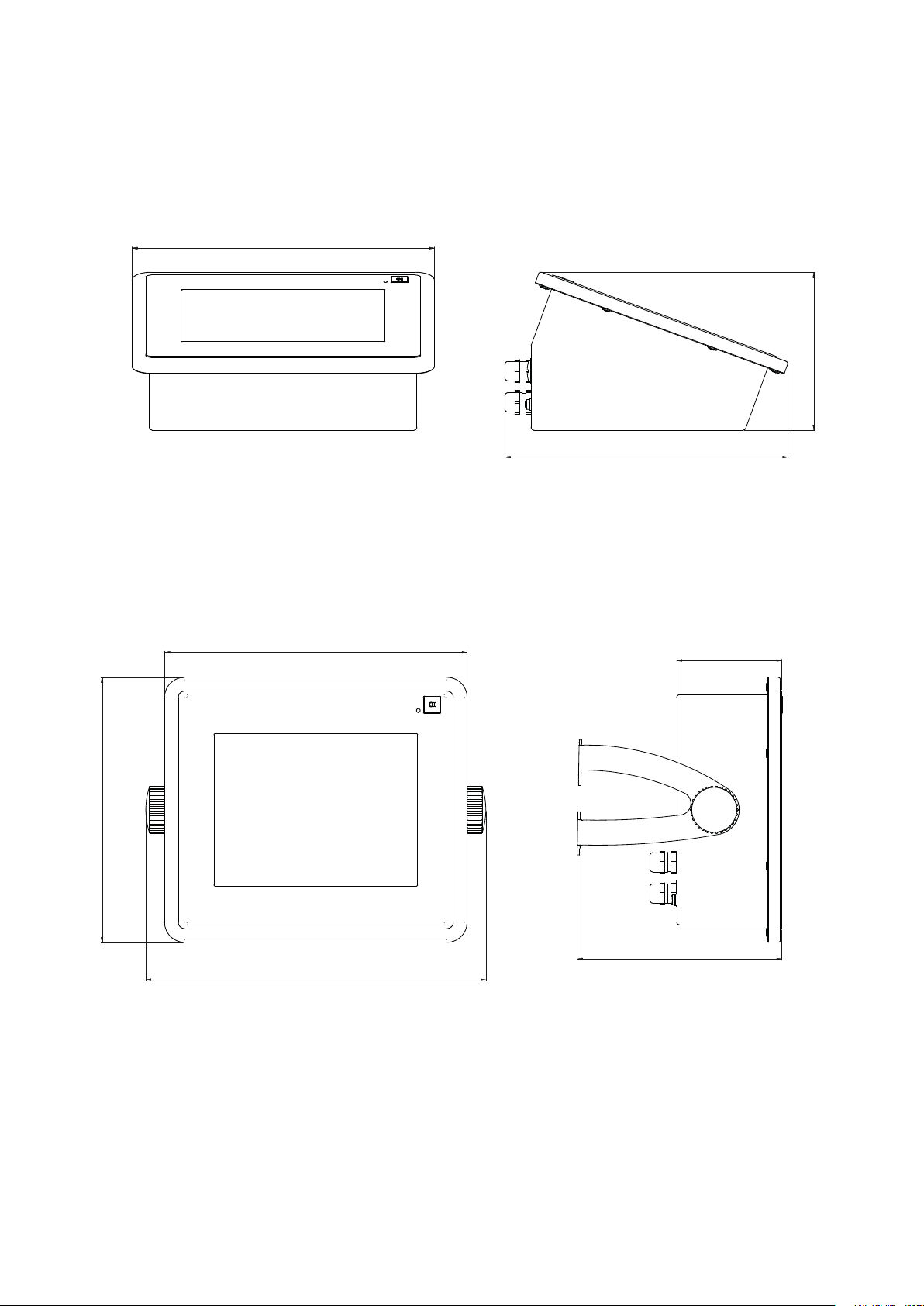
1.3 DIMENSIONS
BENCH TOP
1
1
2
2
3
3
4
4
5
5
6
6
A A
B B
C C
D D
Diseñado: Revisado: Fecha: Unidades del plano: Número SAP:
Tamaño del papel:
Escala:
Página:
Propiedad:
Giropès S.L.
Pol. Empordà Internacional.
Calle Molló. Parcela 15-16.
17469 Vilamalla (Girona).
AMS NT 13/05/2019 mm
A3
GI450T8
Vista general Pedido nº:
Validado:
Nº plano: IDD-VIGI-GI650-C2DD-0003-00
126
242
226
84
164
212
242
272
ON WALL
1
1
2
2
3
3
4
4
5
5
6
6
A A
B B
C C
D D
Diseñado: Revisado: Fecha: Unidades del plano: Número SAP:
Tamaño del papel:
Escala:
Página:
Propiedad:
Giropès S.L.
Pol. Empordà Internacional.
Calle Molló. Parcela 15-16.
17469 Vilamalla (Girona).
AMS NT 13/05/2019 mm
A3
GI450T8
Vista general Pedido nº:
Validado:
Nº plano: IDD-VIGI-GI650-C2DD-0003-00
126
242
226
84
164
212
242
272

7
ENENUSER MANUAL GI650
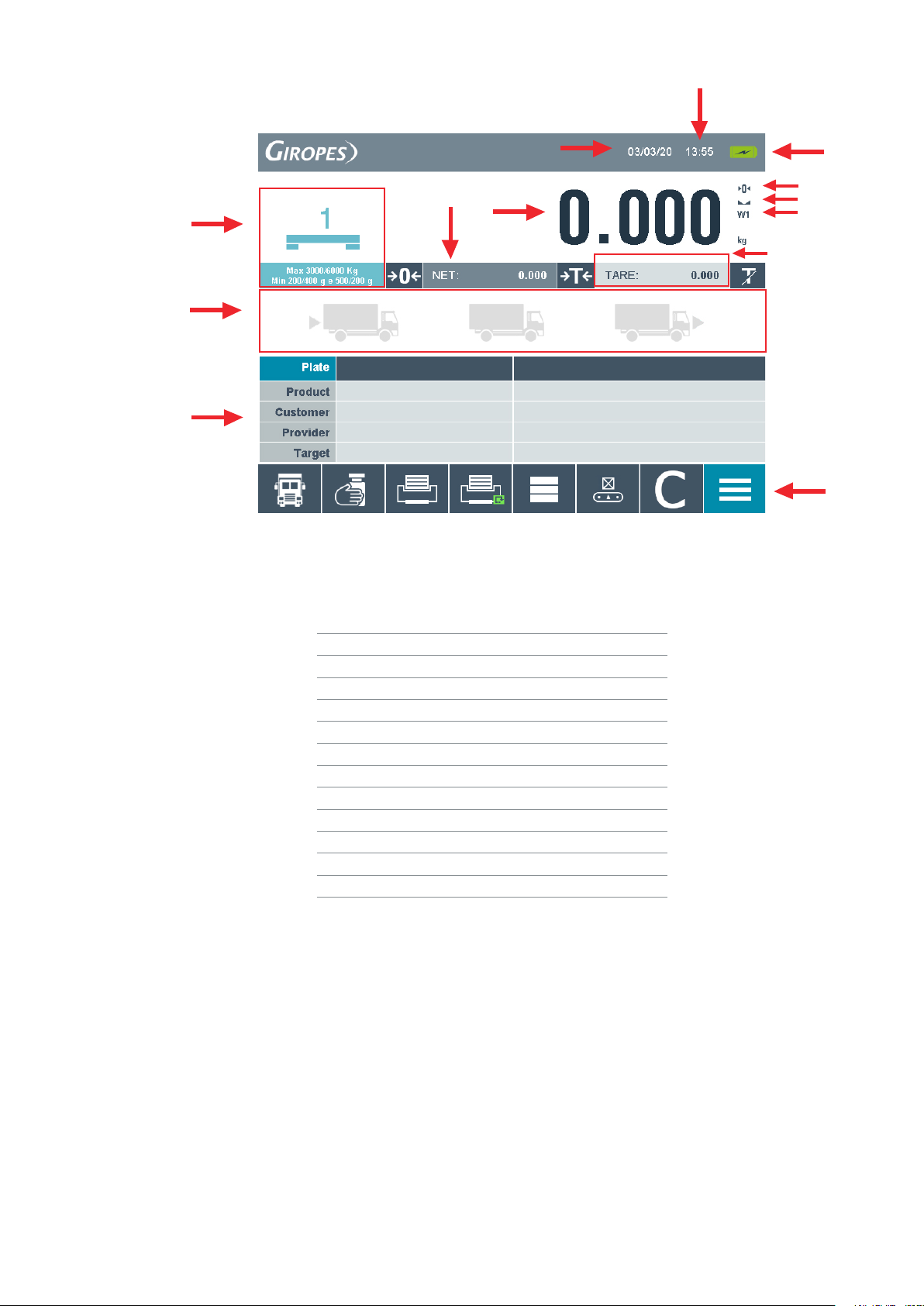
1.4 DISPLAY
1
11
12
2
8
9
4
5
6
7
10
3
13
Number Function
1Platform-number and Configuration
2Date
3Time
4Charging-indicator
5Zero-indicator
6Stable-indicator
7Weight-range
8Gross-weight
9Net-weight
10 Tare-weight
11 Truck - status
12 Categories
13 Command-Keys

ENENUSER MANUAL GI650
8
1.5 KEYS AND FUNCTIONS
It is possible to choose between 3 different Keyboards:
QWERTZ, QWERTY and AZERTY
To change the Keyboard you have to access to the Main-menu by press
Choose the Menu point “General” and change the settings.
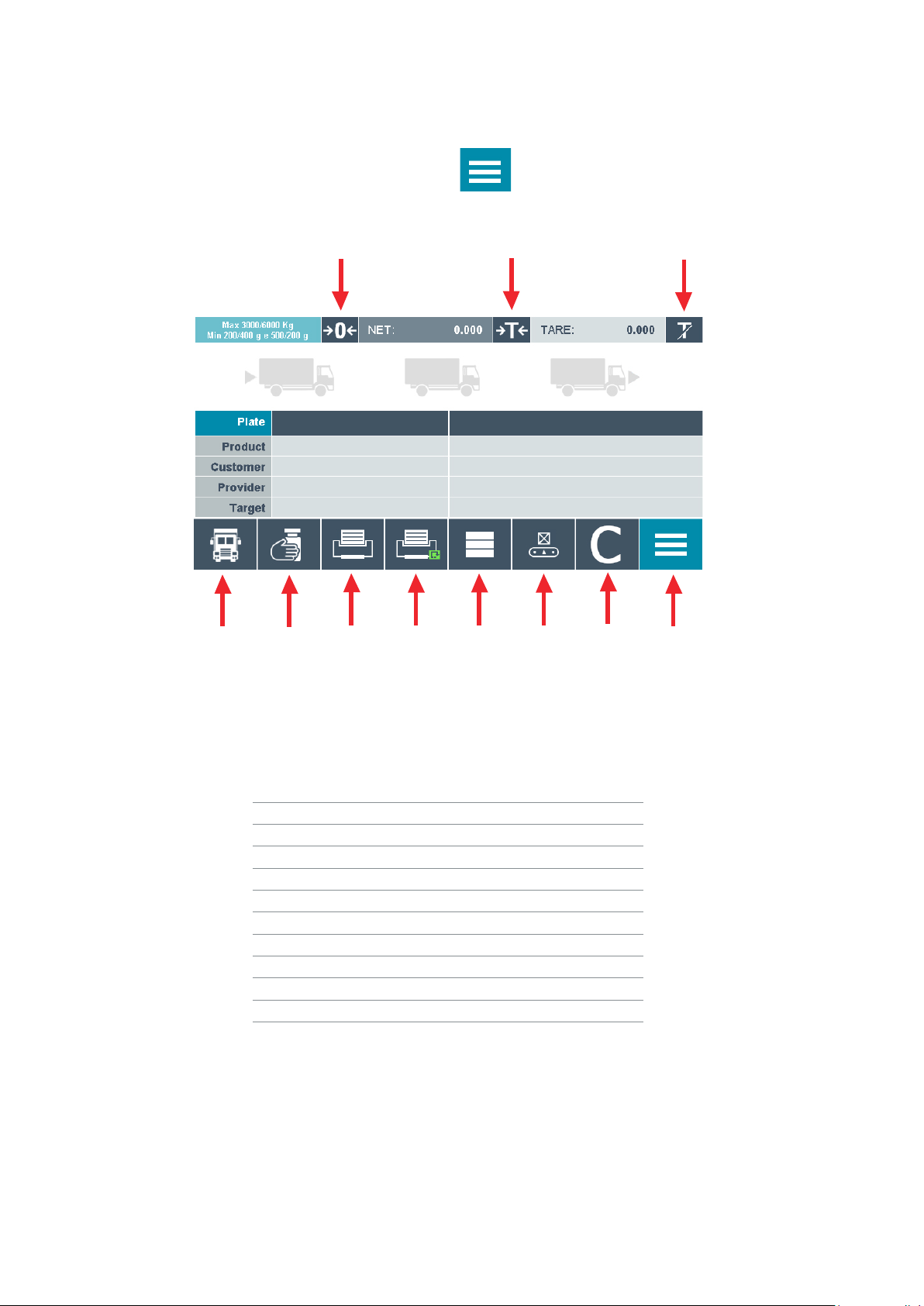
MAIN-DISPLAY:
Number Function
1Zero
2Tare (blocked by default)
3Deactivate Tare
4Store the weight
5Manual Tare
6Open PIT - List
7Reprint last Ticket
8Fastkey to access Database
9Activate / Deactivate the Checkweigher
10 Start a new Weight without Zero-Step
11 Access to Main-menu
123
4567 8 9 10 11

9
ENENUSER MANUAL GI650
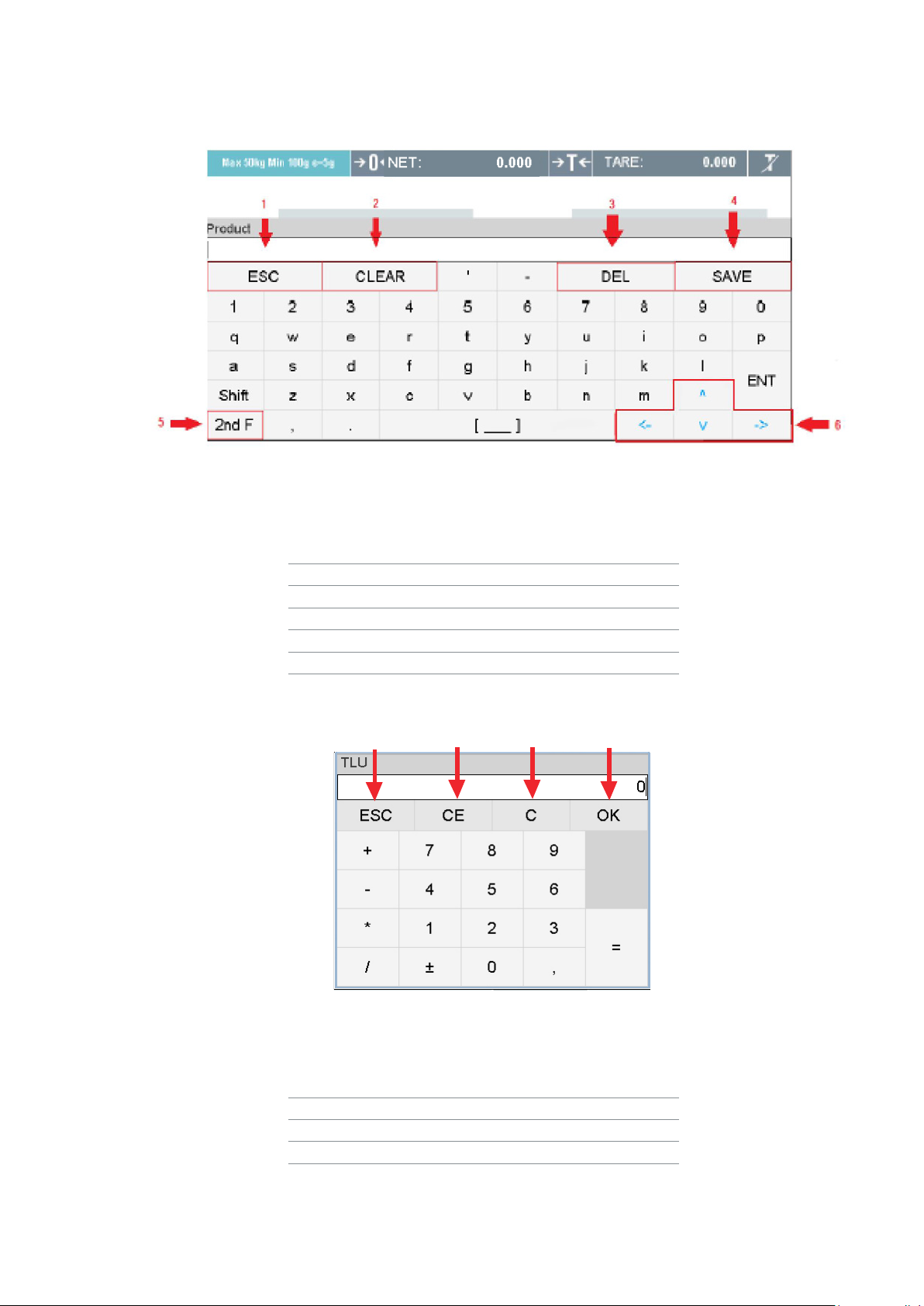
KEYBOARD-DISPLAY:
Key Function
1Exit the Keyboard
2Clear all letters
3Delete the last letter
4Save the changes
5Change to the special characters
6Arrow Keys
NUMERIC-KEYBOARD:
Key Function
1Exit the Keyboard
2Clear all numbers
3Delete the last number
4Save the change
1 2 34

ENENUSER MANUAL GI650
10
1.6 FUNCTIONS WHEN STARTING THE INDICATOR
To turn on the indicator press the key
The Display turns on, showing the Firmware-, Bootloader- and Weight model-version, also the CRC-value and the number
of Calibrations during the initialization.
After finishing the initialization, the indicator is performing the initial zero.
To do this, the indicator must be connected to the Load cell and following conditions must be made:
•The weight must be stable (indicator for stability is on )
•The weight must be inside the range of initial Zero (15% in positive and 5% in negative)
During this operation, the Display will show “0 init” till the weight is in range.
2. WEIGHING INSTRUCTIONS
PLEASE NOTE:
This equipment comes with a standard factory configuration. It is strongly recommended to program the databases and the
different codes as required.
Before do any weighing you have to insert the Plate.
Without doing this, it is not possible to store any weight.
You can put the Data directly into the respective Field or select from Database (see point 3.2)
ZERO
When you press the key ,this assumes the metrological function of weight zeroing.
To do this, the following conditions must be made:
•The weight must be stable (indicator for stability is on )
•Weight value not less than -2% of the Max. in relation to the zero of the calibration
•Weight value not higher than 2% of the Max. in relation to the zero of the calibration
The sign indicates that the function has been done.
Altri manuali per GI650
1
Indice
Altri manuali Giropes Strumento di misura