
Haier 42T51 Manuale utente

Table of Contents
Characteristic Functions 1
Important Safety Instructions 2
Technical Specifications 5
The Technical Specifications for Final Product 5
Technical Specifications for TV 6
VGA Display Mode 6
Power Management 6
Packing Listing 6
Installation & Connection 7
Antenna Connection 7
Power Connection 8
Computer Connection 8
AV1 Video Signal Connection 9
AV2 Video Signal Connection 10
YPbPr/YCbCr Input Connection 11
Position of Control Keys 12
Remote Control 13
Basic Operation Instruction 15
Power On 15
Standby 15
Signal Source Selection 15
Menu Operation Instruction 15
PICTURE 16
SOUND 17
OSD 18
ADVANCE 18
TV 19
Simple Troubleshooting 22
HDMI digital port Connection 8

Characteristic Functions
1. LCD panel with no glint and low radiation can ease eyes' fatigue and protect
eyes.
2. High-quality LCD panel is adopted with high brightness, high contrast, wide
viewing angle, and super fast response time. Super fast response time can
greatly eliminate the shadow of moving images.
3. TV/Monitor with two in one and multiple input ports can easily switch among the
Modes.
4. De-interlacing image disposal is adopted. Today's most advanced technique for
movement compensation, can completely improve the saw tooth and vague
edges of the athletic picture.
5. There are four smart sound modes and four smart image modes.
6. Dynamic contrast technology can obviously improve the definition and contrast
of the picture
7. Tuner for frequency synthesis can support full auto search and manual search.
8. With perfect timing function, you can set time to turn off. It will be turned off in
state of no signals, too.
9. Auto Adjustment can help you to setup the image into the best performance in a
few seconds instead of complicated adjustment in PC mode.
10. Auto color balance adjustment technology can make the machine to reach the
best color setting in PC mode.
11. Support hi-definitionYPbPr and double HDMI.
12. All functions can be realized with remote control, which is really a convenient
operation.
13. Power is designed to save energy. The standby power consumption is less
than1.5W.
14. Input ports include VGA, YPbPr, HDMI, S-Video, CVBS, USB and TV.
15. Output ports include AV and Earphone.
16. Support USB interface, you can look through picture of JPG format and play
music files of Mp3 format.
1
Important Safety Instructions
2
Thank you to choose the LCD TV made by our company, a valuable product with
excellent quality and multiple functions. This machine will bring you more
audiovisual enjoyment. Its design can insure user s safety. All machine are strictly
tested before leaving factory. But incorrect use can lead to electric shock or fire. In
order to insure safety and extend its life, please read below regulations carefully
before using it and comply with the following safety instructions.
When the following troubles occur, please pull out the plug and call the
professional engineers to repair.
A. The cable or plug is damaged.
B. The product was fallen down or the case is
damaged.
C. Obvious abnormal situation occurs. In spite
of correct operation according to the user
manual but it still can't work normally.
D. Some abnormal substances or liquid fall into it.
E. Unusual sound or smell sends out.
There is high voltage inside the machine but no parts which can be repaired by
users themselves. In order to assure the people's safety, please do not open
the case to repair it by yourself. If it is needed to repair, please contact qualified
engineer to repair.
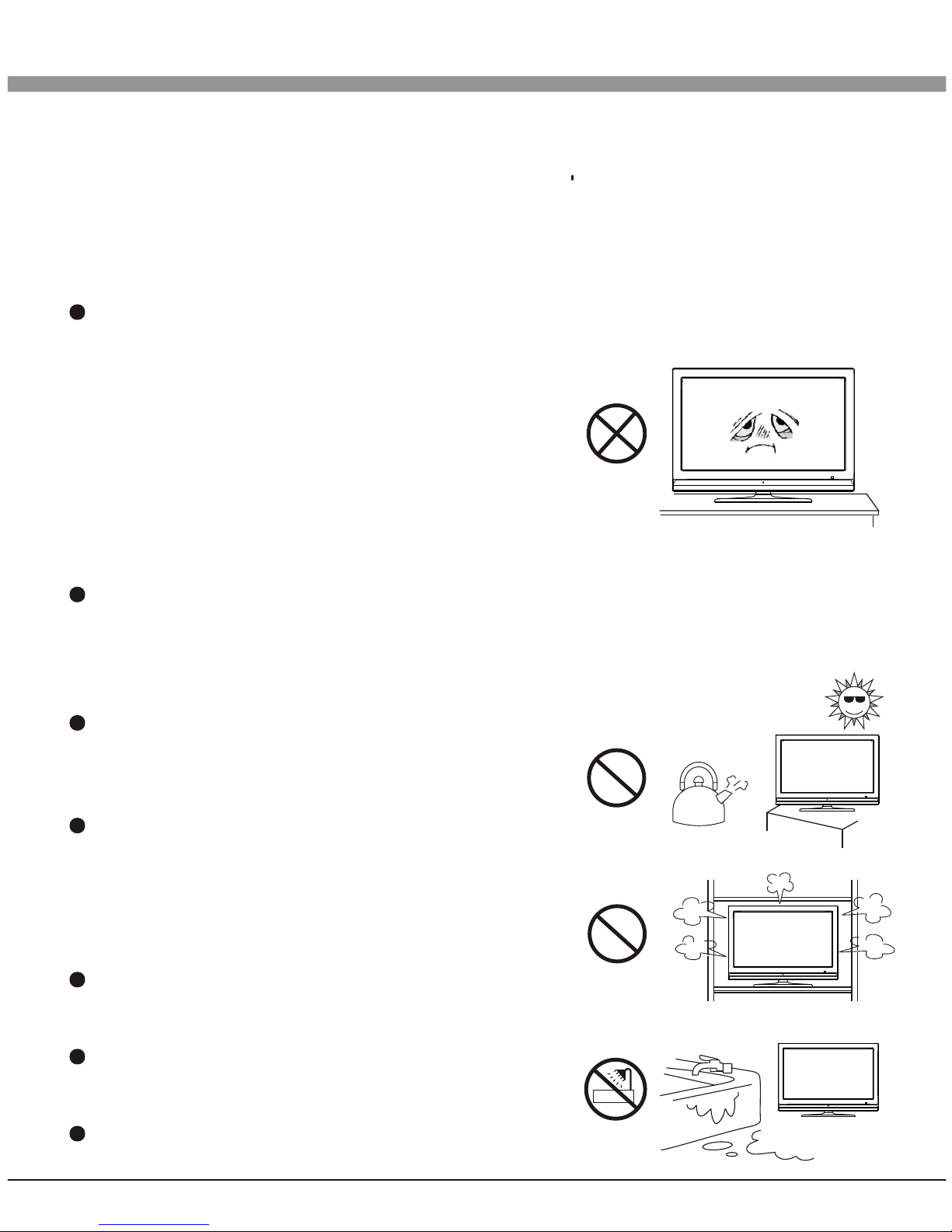
Please put this machine in the place of well
ventilation, instead of extremely hot, cool or
moist, and direct sunlight.
The slots on the case is designed to release
heat so as to assure that all inside components
will not reach an extra high temperature and
can work normally for a long time. Please do
not cover the holes while place it.
Unless there is good ventilation installation,
please do not put this machine in inlaid device.
Please do not place it on an unstable position
so as to avoid falling off.
Do not place the LCD TV near water source,
like a bathtub, pool, washing machine, or moist

Important Safety Instructions
3
cellar and similar environment.
During a thunder rain weather, do not touch
the power cord and antenna cable. Please
pull out the power line and aerial plugs for
preventing thunder and lightning damage to
this machine.
All cables can be connected or pull out only after power supply is turned off.
The power cord must be taken off before you
clean the machine. Do not use the liquid
cleanser or aerosol cleanser. It is
recommended to use a wet soft cloth to clean
the machine. Do not use the alcohol,
impregnant or ammoniac liquid to wipe the
screen.
If you will not use the machine for a long time, please pull out the power cord.
Do not keep the sleeping mode for too long time.
Read the manual and marking label before using the machine, and keep the
user manual for later use.
Don't use the attachments which are not recommended by the machine
manufacturer as they may cause hazards.
The power cord must be placed correctly so as to avoid be trample or crush.
Please do not make the power socket overloaded or the power cord extended.
Otherwise it will cause fire or electrical shock.
The LCD panel is fragile and expensive. The surface of the panel is easy to be
scratched. Please do not use the hard thing to knock, press, score the panel.
Otherwise it will be harmful for the panel. The exchange cost is very high.
All technical specification on this instruction book and outer package are
subject to change without notice. If the instruction book has slight difference
with actual operation, please take the actual operation as standard.

4
Important Safety Instructions
When the MAINS plug or an appliance coupler is used as the disconnect device,
the disconnect device shall remain readily operable.
The machine should not suffer from waterdrop
or watersplash, do not place the vessel with
water (or other liquids) on it, for like this it is
possibly to cause fire or electric shock.
The attaching plug should be inserted into the
power point completely, otherwise it may cause
spark to bring fire.
Please do not put candle, ash-tray, incense, inflammables or explosive nearby
this machine.
Please do not stretch into any sharp object, metal or liquid, or touch the signal
attachment or the inner of radiation hole, in order to avoid short circuit and
product damage, or possibly causing electric shock. Especially pay attention
when there are children on the spot.
Please do not use the machine immediately when moving the machine from low
temperature place to high temperature one, or install and use at the place of
facing air conditioning, otherwise it may cause the condensation in the
machine, to cause fault.
Must be careful when moving this machine, avoiding being struck, especially
pay attention to protect the screen part. In addition, if using handcart, must
note the injury as the product is overturned from the handcart because of hard
braking, overexerting and uneven ground.
Technical Specifications
The Technical Specifications for Final Product
5
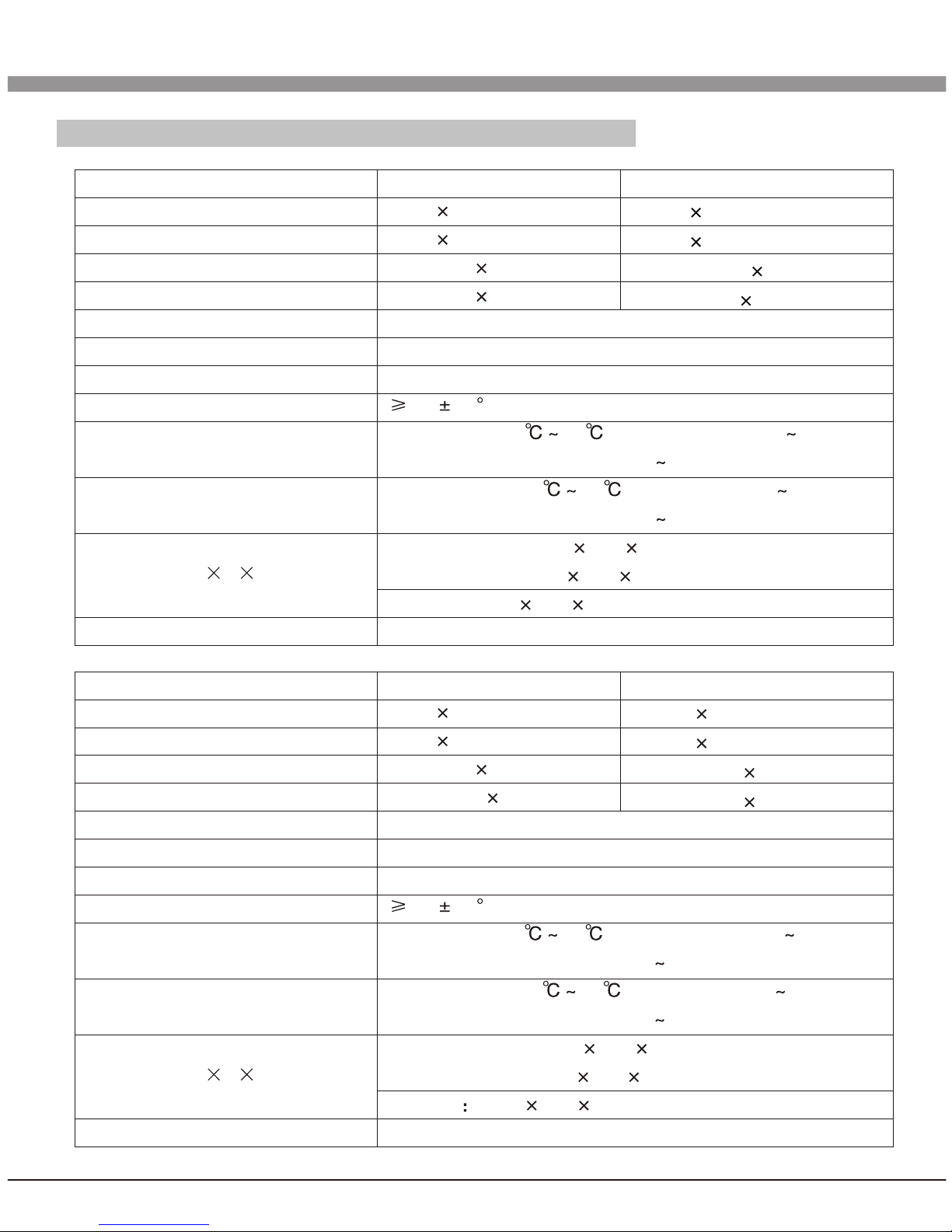
37" (HD)
1366 768
1360 768@60Hz
0.600mm 0.600mm
819.6mm 460.8mm
16.7M
100V-240VAC 60/50Hz
10W+10W
8m 30
Temperature: 5 40 Humidity: 10% 85%
Atmosphere Pressure: 86kPa 104kPa
Temperature: -20 55 Humidity: 5% 95%
Atmosphere Pressure: 86kPa 104kPa
Excluding base: 908 598 112 mm
Including base: 908 646 112mm
Packing: 1030 735 230mm
Net Weight: 13.5Kg Gross Weight: 17.5Kg
42" (HD)
1366 768
1360 768@60Hz
0.681mm 0.681mm
930.25mm 523.01mm
16.7M
100V-240VAC 60/50Hz
10W+10W
8m 30
Temperature: 5 40 Humidity: 10% 85%
Atmosphere Pressure: 86kPa 104kPa
Temperature: -20 55 Humidity: 5% 95%
Atmosphere Pressure: 86kPa 104kPa
Excluding base: 1006 657 115 mm
Including base: 1006 711 115 mm
Packing 1135 795 230 mm
Net Weight: 19.5Kg Gross Weight: 23.5Kg
42" (FHD)
1920 1080
1920 1080@60Hz
0.4845mm 0.4845mm
930.24mm 523.26mm
37" (FHD)
1920 1080
1920 1080@60Hz
0.42675mm 0.42675mm
819.36mm 460.89mm
Panel size
Max. Resolution
Best Resolution
Pixel Pitch
Active Area
Color
Power Supply
Power Consumption of Speaker
Control Area of Remote Control
Operating Environment
Storage Environment:
Dimension (L H W)
Weight
Panel size
Max. Resolution
Best Resolution
Pixel Pitch
Active Area
Color
Power Supply
Power Consumption of Speaker
Control Area of Remote Control
Operating Environment
Storage Environment:
Dimension (L H W)
Weight

Technical Specifications
6
Technical Specifications for TV
1.Supported Systems PAL+SECAM or PAL+NTSC
2.Storage channels: 199
3.TV(RF): 75 Imbalance
4.AV Video-Input: 75 ,1VP-P, RCA
5.AV Audio-Input: 20K , 500mV RMS
6.YPbPr/HDMI Video Input: 480i, 480p, 576i, 576p, 720p, 1080i, 1080p
VGA Display Mode
Power Management
This product is complied with EPA Energy Star Standard and compatible with VESA
DPMS Standard.
Note: All the specifications in the user manual or on the packing carton may be
changed without additional notice.
Packing Listing
1. LCD TV
2. User Manual
3. Power Cable (or the machine itself has power cable)
4. Remote Control
Details are listed as follows:
(Excluding base subassembly)
Note: Recommended mode: HD panel: 1360X768@60Hz
FHD panel: 1920X1080@60Hz
VGA
SVGA
70Hz
60Hz
60Hz
60Hz
60Hz
60Hz
60Hz
60Hz
720 400
640 480
800 600
1024 768
1280 720
1360 768
1600 900
1920 1080
WXGA
XGA
1
2
3
4
5
6
7
8
NO.
WUXGA
FHD/HD panel
Mode Resolution Refresh
Panel
FHD panel
Mode
On
Standby
LED Indicator
Off
Lighting
Power Consumption
42"
240W
1.5W
37"
180W
1.5W

Antenna Connection
It is better to use outdoor antenna or CATV cable if you want to watch the colorful and
hi-definition pictures.
Attention:
Please turn off TV power before the outdoor antenna is connected to the TV signal
input port. Outdoor antenna can't be located near the high voltage cables. Please pull
out the plug of outdoor antenna to avoid thunder shock in thunder weather.
Installation & Connection
7
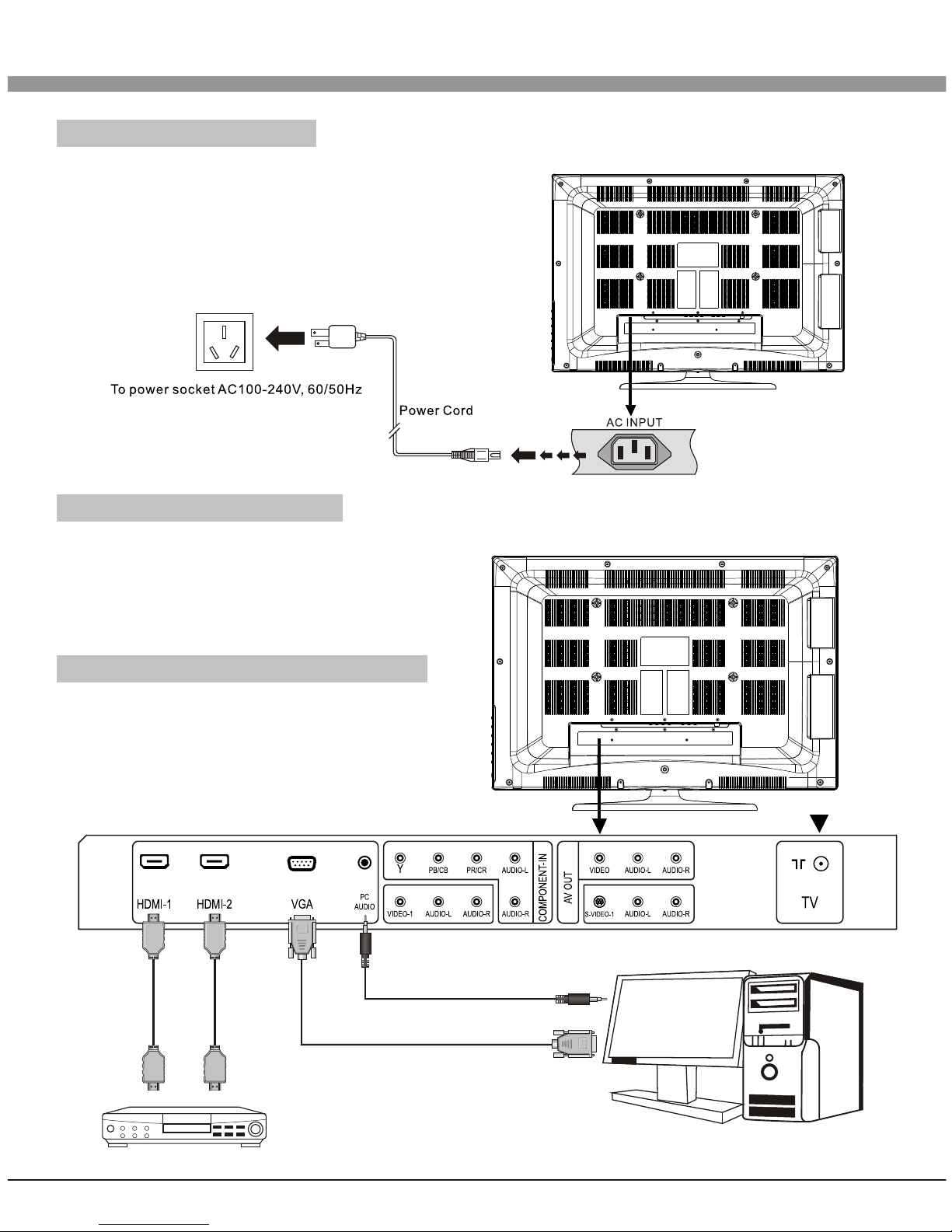
Power Connection
Notes:
1.This machine uses AC 100-240V, 60/50Hz.
2.If a long time at leisure, please disconnect
it from power supply.
Computer Connection
Please connect one end of VGA cord with the output port of the computer (available
for both desktop or laptop computer),
and another end of VGA cord with the
input port of the VGA on its rear cover.
HDMI digital port Connection
Connect external HDMI high signal
source to HDMI digital input port of this
machine through HDMI digital connector
cable; push"SOURCE" button to select
"HDMI" signal source.
8
Installation & Connection
Audio/Video machine with HDMIinterfaces

AV1 Video Signal Connection
Through composite cable, connect AV equipment VIDEO output termination to this
machine VIDEO input, and AV equipment AUDIO output termination to this machine
AUDIO input, respectively.
9
Installation & Connection
WWRR
YYWWRR
Y Yellow (VIDEO)
W White (AUDIO-L)
R Red (AUDIO-R)
CVBS, DVD Playeror other machine
with CVBS/S-Video.
Indice
Altri manuali Haier TV LCD

Haier
Haier L37A11-AK Manuale utente

Haier
Haier LE19P620 Manuale utente

Haier
Haier LE19Z6 Manuale utente

Haier
Haier L39B2180a Manuale utente

Haier
Haier LET40T3 Manuale utente

Haier
Haier L55B2181 Manuale utente

Haier
Haier L26A8A-A1 Manuale utente

Haier
Haier L20AV6-A0 Manuale utente

Haier
Haier HBLC20AB11 Manuale utente

Haier
Haier L17L6A-G1 Manuale utente

Haier
Haier LE32A300 Manuale utente

Haier
Haier LE32K6600GA Manuale utente

Haier
Haier LE19B13200 Manuale utente

Haier
Haier 48DR3505 Manuale utente

Haier
Haier LE32D2320 Manuale utente

Haier
Haier P60A11-AK Manuale utente

Haier
Haier L32A9A-A1 Manuale utente

Haier
Haier A626 Manuale utente

Haier
Haier LTF47K1a Manuale utente

Haier
Haier HLC32K2 Manuale utente


