Hilti NURON SI-AT-22 Manuale utente

1

2
3

SI-AT-22
en Original operating instructions . . . . . . . . . . . . . . . . . . . . . . . . . . 1
fr Moded'emploioriginal ............................... 15
es Manual de instrucciones original . . . . . . . . . . . . . . . . . . . . . . . 29
pt Manual de instruções original . . . . . . . . . . . . . . . . . . . . . . . . . . 44

*2343813* 2343813 English 1
Original operating instructions
1 Information about the operating instructions
1.1 About these operating instructions
• Read these operating instructions before the product is used or operated
for the first time. This is a prerequisite for safe, trouble-free handling and
use of the product.
• Observe the safety instructions and warnings in these operating instruc-
tions and on the product.
• Always keep the operating instructions with the product and make sure
that the product is accompanied by these operating instructions only,
when the product is given to other persons.
1.2 Explanation of symbols
1.2.1 Warnings
Warnings alert persons to hazards that occur when handling or using the
product. The following signal words are used:
DANGER
DANGER !
▶Draws attention to imminent danger that will lead to serious personal
injury or fatality.
WARNING
WARNING !
▶Draws attention to a potential threat of danger that can lead to serious
injury or fatality.
CAUTION
CAUTION !
▶Draws attention to a potentially dangerous situation that could lead to
personal injury or damage to the equipment or other property.
1.2.2 Symbols in the operating instructions
The following symbols are used in these operating instructions:
Comply with the operating instructions
Instructions for use and other useful information
Dealing with recyclable materials
Do not dispose of electric equipment and batteries as household
waste
Hilti Liion battery

2 English 2343813 *2343813*
Hilti charger
1.2.3 Symbols in illustrations
The following symbols are used in illustrations:
These numbers refer to the illustrations at the beginning of these
operating instructions.
The numbers in illustrations refer to important work steps or to com-
ponents important for the work steps. In the text, the corresponding
numbers draw attention to these work steps or components, e.g. (3).
Item reference numbers are used in the overview illustration and
refer to the numbers used in the key in the product overview sec-
tion.
This symbol is intended to draw your special attention to certain
points for handling the product.
1.3 Product-dependent symbols
1.3.1 Symbols on the product
The following symbols can be used on the product:
The product supports near-field communication (NFC) technology
compatible with iOS and Android platforms.
Direct current (DC)
If applied on the product, the product has been certified by this cer-
tification body for the US and Canadian markets according to the
applicable standards.
1.4 Product information
products are designed for professional users and only trained,
authorized personnel are permitted to operate, service and maintain the
products. This personnel must be specifically informed about the possible
hazards. The product and its ancillary equipment can present hazards if
used incorrectly by untrained personnel or if used not in accordance with
the intended use.
The type designation and serial number are printed on the rating plate.
▶Write down the serial number in the table below. You will be required to
state the product details when contacting Hilti Service or your local Hilti
organization to inquire about the product.
Product information
Adaptive torque module SIAT22
Generation 02
Serial no.

*2343813* 2343813 English 3
2 Safety
2.1 Safety precautions
▶Observe the safety precautions in the operating instructions for the
impact wrench.
3 Description
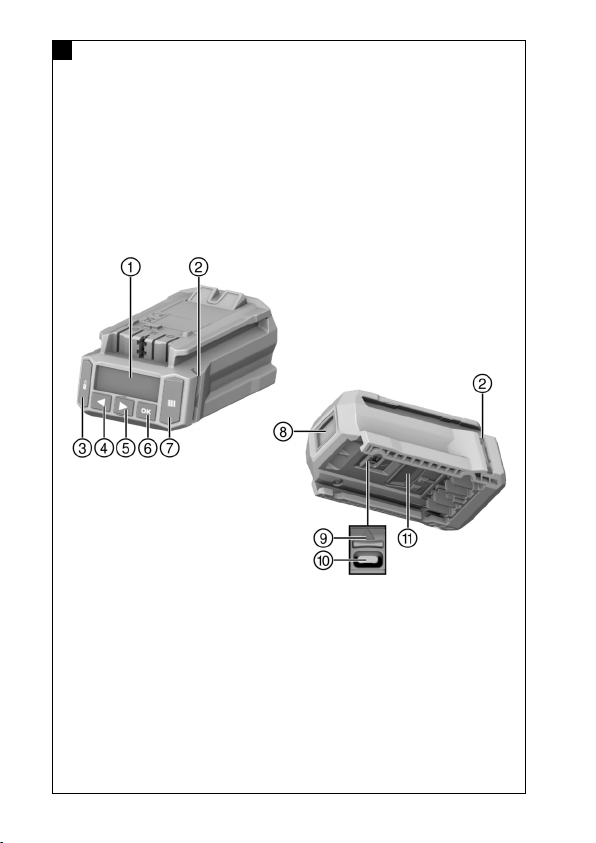
3.1 Product overview 1
@Display
;Indicator LEDs
=Lock button
%Left arrow button
&Right arrow button
(OK button
)Scan button
+Scanner
§USB interface cover (shown
open in the illustration)
/USB interface type C
:Release button
3.2 Intended use
The product described in an electronic module for controlled tightening
of fasteners so as to ensure the quality of the connection. It can be
used only with Hilti impact wrenches that have the AT22 suffix in the
model designation. A record of the work carried out is saved in the
module and can be read out, for documentation purposes, using the
AT Documentation Software PC application.
It is not possible to set a particular torque manually on this module!
Use only the impact-wrench sockets described in the operating instructions
of the relevant product to tighten Hilti fasteners.
For this product, use only the Hilti Nuron lithium-ion batteries of the B 22
series recommended in the operating instructions of the impact wrench.
3.3 Possible misuse
Do not work with this product on electrically live lines.
This product is not suitable for Hilti fasteners in nuclear power plants! For
more information contact Hilti Service.
3.4 Laser information
Laser class 1 based on standard IEC / EN 60825-1:2014
and corresponding to CFR 21 § 1040 (Laser Notice 56).
3.5 Indicator LEDs
The torque module can indicate various messages or states by means of the
indicator LEDs.

4 English 2343813 *2343813*
Status Meaning
The LEDs show green. • When scanning: the barcode, QR
code or data matrix code has
been recognized.
• When tightening, after the impact
wrench has switched off auto-
matically: the tightening operation
was completed successfully.
The LEDs flash red. • When scanning: the barcode, QR
code or data matrix code has not
been recognized.
• When tightening, after the im-
pact wrench switches off: The
threaded fastener could not be
tightened in accordance with the
selected settings. The reason for
this could be, for example, that
the impact wrench was switched
off manually before the correct
torque was achieved.

*2343813* 2343813 English 5
Status Meaning
The LEDs flash yellow. Depending on the fastener, the
module has detected the follow-
ing:
• A) The threaded fastener of
the stud anchor had already
been tightened and subsequently
slackened. Consequently, the
threaded fastener has been
retightened in accordance with
the defined parameters for
retightening, and the tightening
operation has been completed
successfully.
• B) The threaded fastener for
installation systems and cast-in
anchor channels had already
been tightened, but the module is
unable to tell whether the correct
tightening torque was applied.
If the threaded fastener was
not tightened with a calibrated
torque wrench or if the indicator
LEDs of the module do not show
green, the threaded fastener
has to be checked with a
calibrated torque wrench and
- if necessary - tightened to the
correct installation torque.
3.6 Buzzer
The torque module's buzzer can emit the following signal tones as audible
feedback:
Status Meaning
Long tone Confirmation tone
• OK
• Operation completed successfully
• The LEDs show green.

6 English 2343813 *2343813*
Status Meaning
2 short tones Warning tone 1
• OK or not OK, as applicable,
depending on the fastener and
the application (e.g. repeat
torquing of a fastener, tightening
torque not detected. See the
section headed Tightening the
threaded fastener in "Adaptive"
operating mode)
• The LEDs flash yellow.
4 short tones Warning tone 2
• Not OK
• Operation canceled
• The LEDs flash red.
3.7 USB interface
The USB interface (type C, USB 2.0) can be used to connect
the torque module to a PC. When this connection is made, the
AT Documentation Software offers a range of functions, including:
• Adding new data records for new fasteners
• Changing / updating existing data records
• Deactivating / activating the documentation function
• Loading the log from the documentation function
• Setting the clock in the torque module
Further information can be found in the documentation for the
AT Documentation Software.
The software can be downloaded from here:
http://www.hilti.com/adaptive_torque_documentation_software
3.8 Items supplied
Adaptive torque module, operating instructions, quick-start guide, USB
cable
Other system products approved for use with this product can be found at
your local Hilti Store or at: www.hilti.group
4 Technical data
Weight 0.24 kg
(0.53 lb)
Laser class 1
Altri manuali per NURON SI-AT-22
2
Indice
Lingue:
Altri manuali Hilti Unità di controllo
Manuali Unità di controllo popolari di altre marche

Festo
Festo Compact Performance CP-FB6-E Manuale elenco delle parti

Elo TouchSystems
Elo TouchSystems DMS-SA19P-EXTME Manuale utente

JS Automation
JS Automation MPC3034A Manuale utente

JAUDT
JAUDT SW GII 6406 Series Guida rapida

Spektrum
Spektrum Air Module System Manuale utente

BOC Edwards
BOC Edwards Q Series Manuale utente