Hotpoint SI E40 BA1 UK Manuale utente

EN Operating Instructions

SI DC30 BA1 UK
SI E40 BA1 UK
LCD
4a
5
5
6
6
9
9
8
8
7
7
11
11
2
3
1
14
13
12
4b
4c
2
3
1
13
12
10
10

C1
LCD
C2
COTTON
B1
LCD
A
LCD
E1E2
LCD
D1D2
LCD
B2

F
LCD
G
LCD
H1
LCD
H2
LINEN
K1
LCD
K2
I
LCD
J
LCD

55
en
GENERAL SAFETY RULES
• Do not operate the iron in case of damaged plug,
power cord or appliance, or in the presence of visible
damage or water leaks from the appliance. In such a
case the appliance must be inspected by the Hotpoint
authorized technical staff in order to avoid dangerous
situations.
• If the appliance was dropped, do not operate it.
• The appliance is not intended to be used by individuals
(children included up to 8 years of age) with impaired
physical, sensory or mental capabilities, inexpert
individuals or individuals who are not familiar with
the product, unless they are supervised by a person
responsible for their safety, or by individuals who have
not received preliminary instructions on the use of the
appliance.
• Supervise children to prevent them from playing with
the appliance.
• Never leave the appliance unattended when the plug
is connected into the electrical socket.
• After each use of the appliance, when lling and
emptying the water reservoir, as well as when
cleaning the appliance, set the steam regulator to Off.
Then place the appliance in a stable position, using
the stand, and disconnect the plug from the electrical
socket.
• The appliance must be used and placed on a stable,
athorizontalsurface.Theuseonanironingboardis
recommended.

66
en
• For your safety, all repairs or maintenance operations
must be carried out exclusively the the Hotpoint
authorised technical staff.
• Keep the iron and its cord out of reach of children less
than 8 years of age when it is energized or cooling
down.
• Cleaning and user maintenance shall not be made by
children without supervision.
• When placing the iron on its stand, ensure that the
surface on which the stand is placed is stable.
• The plug must be removed from the socket-outlet
beforethewaterreservoirislledwithwater.
• This steam iron is equipped with the safety device
Power off system. When the plug has been connected,
move the iron to switch it on.

77
en
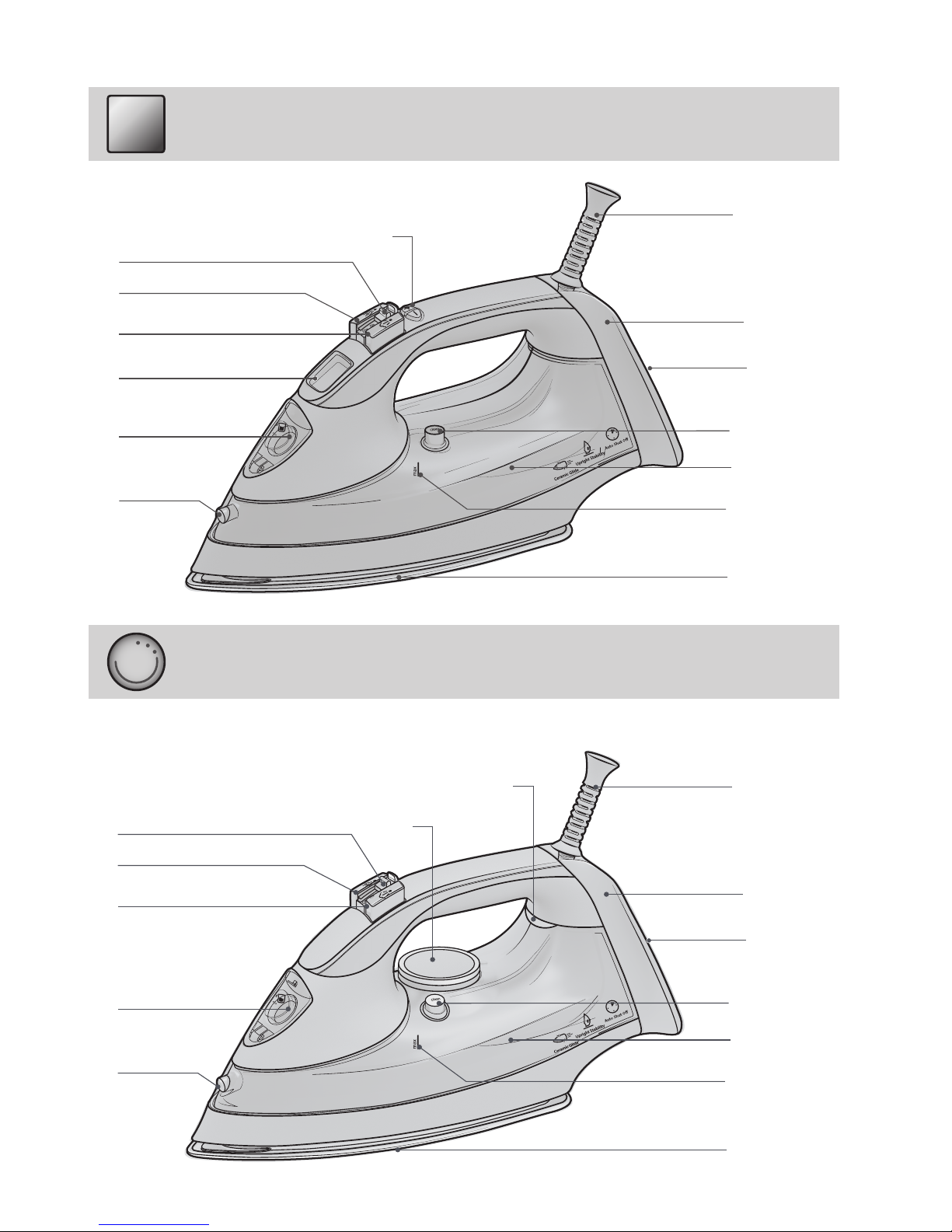
DESCRIPTION
OF YOUR IRON
1. Shot of steam button
2. Spray button
3. Steam regulator
4a. Temperature buttons +/-
4b. Temperature control
4c. Temperature indicator light
5. Power cable holder
6. Cable winder
7. Stand
8. Auto-Clean button
9. Water reservoir
10. Maximum water level
11. Soleplate
12. Spray nozzle
13. Filler hole Lid
14. LCD
Not shown: water measurer
INTRODUCTION
Thank you for purchasing our Quick Perfec-
tion steam iron. In doing so, you have opted
for an effective high-performance appliance.
We advise you to register this product online
at www.hotpoint.co.uk to make sure you are
entitled to all benets made available by Hot-
point’s Customer Service.
This appliance has been exclusively designed for do-
mestic use and is not intended for industrial use.
Before using the appliance, carefully read
the instructions and keep them with care for
future use.
GENERAL SAFETY RULES
The safety of your steam iron complies with the tech-
nicalspecicationsandstandardsinforce.
The voltage of your electrical mains must
correspond to the voltage of the steam iron
(220-240 V). Improper connection may result in
irreversible damage for the appliance, voiding its
warranty.
• Use the appliance only for its intended use as
described in this manual.
• This product is intended only for ironing of
clothing and household laundry.
• This appliance must be exclusively connected
to a grounded socket. When using an extension
cord, make sure that a grounded socket is
available.
• Inspect the conditions of the power cord on a
regular basis.
• Do not ll the water reservoir by holding the
appliance directly under the tap. Always use the
water measurer supplied with the appliance.
• Make sure you have disconnected the plug from
theelectricalsocketbeforellingandemptying
the water reservoir and in any case after each
use.
• Disconnect the plug from the socket by holding
the plug, and not by pulling the cable.
• Avoid contact between the power cord and the
iron plate when hot.
• Do not wind the power cord around the plate
when hot. Use the cord, instead.
The iron, water and steam coming out of the
plate are extremely hot and can burn the
skin.
• Before storing the appliance, wait until it has
cooled down completely (a steam iron takes
about one hour to cool down). Use the handle to
store the appliance after use.
• Do not direct the steam towards people or
animals and do not iron garments while worn.
• After use, store the appliance in a stable position,
using the stand on the back of the iron.
• Never add any perfume, vinegar, starch,
scale-removing agents, ironing products
or other chemicals in the water reservoir -
unless recommended by Hotpoint. Never use
contaminated water.
• Never immerse the appliance in water or in any
other liquid.
• The appliance must not be left outdoor and
exposed to weather agents.
• Never leave or use the appliance in the proximity
of ames, ovens, ammable materials or other
heat sources.
• Never use the appliance for any purposes other
than the ones for which it has been designed.
• In case of suspected damage, immediately
disconnect the plug from the electrical socket.
• The manufacturer assumes no responsibility in
case of damage resulting from the improper use
of the appliance.
This appliance must be earthed. The fol-
lowing operations should be carried out by a
qualied electrician.

88
en
Ifa13ampplug(BS1363)isuseditmustbetted
with a 13 amp fuse, either in the plug or adaptor or at
the distribution board.
If you are in any doubt regarding the electrical supply
toyourmachine,consultaqualiedelectricianbefore
use.
How to connect an alternative plug
The wires in this mains lead are coloured in accordan-
ce with the following code:
BLUE NEUTRAL (N)
BROWN LIVE (L)
GREEN & YELLOW EARTH (E)
Fuse
Blue
Brown
Cord
The power supply cable must never be bent
or dangerously compressed.
The power supply cable must only be repla-
ced by an authorised serviceman.
BEFORE USE
Beforeusingtheapplianceforthersttime,remove
all stickers, protective plastic or cardboard case from
the soleplate of the iron.
Make sure that all adhesive parts have been
removed from the soleplate with a dampened soft
cloth and eliminate any residues or particles from
the manufacturing process, by repeatedly lling and
emptying the water reservoir.
When switching on the iron for the rst
time, you may notice an unpleasant odour, a
little smoke and some impurities that will
disappear in a few minutes. When using the steam
function for the rst time, do not direct the steam
jet on the garments because of the possible
presence of manufacturing residues in the steam
dispenser.
Filling the water reservoir (A)
We recommend using demineralised water.
Replacing the fuse
When replacing a faulty fuse, a 13 amp ASTA appro-
ved fuse to BS 1362 should always be used, and the
fusecoverre-tted.Ifthefusecoverislost,theplug
must not be used until a replacement is obtained.
Replacement fuse covers
Ifareplacementfusecoveristted,itmustbeofthe
correct colour as indicated by the coloured marking or
the colour that is embossed in words on the base of
the plug. Replacements can be obtained directly from
your nearest Service Depot.
Removing the plug
If your appliance has a non-rewireable moulded plug
and you should wish to re-route the mains cable throu-
gh partitions, units etc., please ensure that either:
• the plug is replaced by a fused 13 ampere rewi-
reable plug bearing the BSI mark of approval.
or:
• the mains cable is wired directly into a 13 amp
cable outlet, controlled by a switch, (in complian-
ce with BS 5733) which is accessible without
moving the appliance.
Disposing of the plug
Ensure that before disposing of the plug itself, you
make the pins unusable so that it cannot be acciden-
tally inserted into a socket.
Instructions for connecting cable to an
alternative plug
The wires in the mains lead are coloured in
accordance with the following code:
GREEN & YELLOW EARTH
BLUE NEUTRAL
BROWN LIVE
As the colours of the wires in the lead may not corre-
spond with the coloured markings identifying the ter-
minals in your plug, proceed as follows:
• Connect Green & Yellow wire to terminal marked
Eor
or coloured Green or Green & Yellow.
• Connect Brown wire to terminal marked Lor co-
loured Red.
• Connect Blue wire to terminal marked Nor co-
loured Black.

99
en
Before lling the iron with water, make sure that
the iron is switched-off and disconnected from the
electrical socket.
1. Set the steam regulator (3) to Off.
2. Tilt the iron in such a position to make water
entrance easier.
3. Openthelidofthellerhole(13)andllthewater
reservoir using the water measurer supplied with
theiron.Neverllthewaterreservoirabovethe
maximum water level (10).
4. Closethelidofthellinghole.
Never add any perfume, vinegar, starch,
scale-removing agents, ironing products or
other chemicals in the water reservoir - unless
recommended by Hotpoint. Never use
contaminated water.
USING THE IRON
In order to make reading this instructions manual
easier and identify the model of your Quick Perfect
iron, refer to the graphics on page II.
Your iron is supplied with Power Off System
safety device which automatically switches
the iron off when it is left unattended or tips over
and ensures maximum safety.
Selecting the temperature
and adjusting the steam (B1) LCD
1. Connect the plug of the appliance into a
grounded socket (220/240V).
2. TheLCD(14)lightsupinredandstartsashing
to indicate that the iron is reaching the set
temperature.
3. Use the temperature buttons +/- (4a) to select
the desired temperature. Every time you press
one of the two buttons, the display lights up and
startsashingtoindicatethatthesteamironis
reaching the selected temperature.
4. When the iron reaches the set temperature, the
LCD lights up in green and the set temperature
isshowninxedmodetoindicatethattheiron
is ready for use.
5. Make sure to check the garment label in order
to identify the fabric type. In case of doubts, it
is recommended not to the use spray function
and iron a hidden corner in order to determine
the most appropriate temperature and avoid
damaging the fabric. In case of very delicate
fabrics, such as silk, wool, and synthetic
materials, iron the garment inside out to prevent
shiny marks. Start ironing the garments that
require a lower temperature, such as synthetic
fabrics.
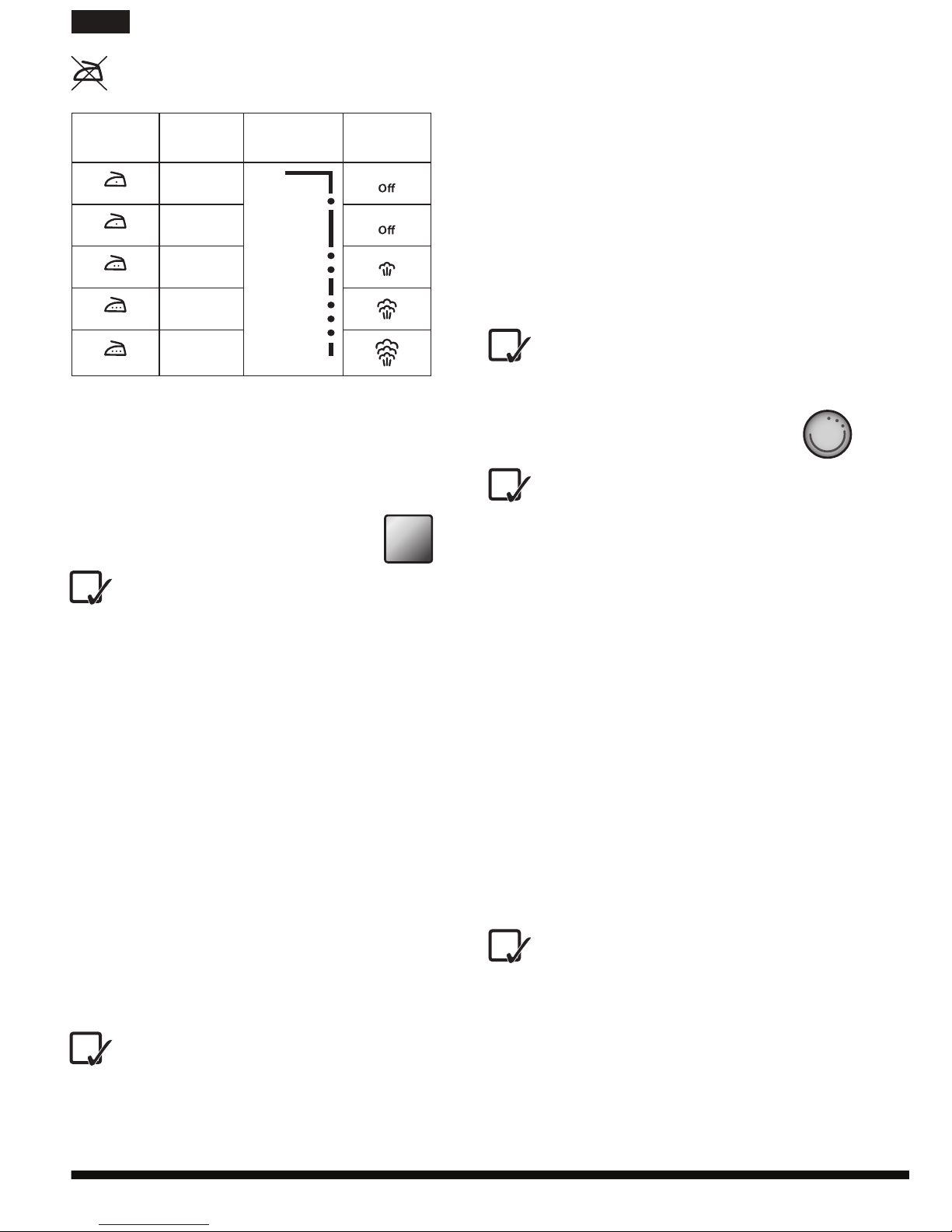
Fabrics with this symbol on the label must
not be ironed.
GARMENT
LABEL FABRIC TYPE TEMPERATURE
INDICATION
STEAM
INDICATION
synthetic
silk
mixed cotton
wool
mixed wool
cotton
linen
jeans
6. Select the steam level with the steam regulator
(3) or move it to Off to iron without steam. When
steam ironing, make sure that the water level in
the reservoir is at least ¼.
Selecting the temperature
and adjusting the steam (B2)
1. Connect the plug of the appliance into a
grounded socket (220/240V).
2. Use the temperature control (4b) to select the
desired temperature. If you go from a lower
temperature to a higher temperature, the
temperature indicator light (4c) light up until the
selected temperature is reached.
3. When the iron reaches the set temperature, an
acoustic signal is emitted and the temperature
indicator light goes off.
4. We recommend to check the garment label
in order to identify the fabric type. In case of
doubts, it is recommended not to use the spray
function and iron a hidden corner in order to
determine the most appropriate temperature
and avoid damaging the fabric. In case of very
delicate fabrics, such as silk, wool, and synthetic
materials, iron the garment inside out to prevent
shiny marks. Start ironing the garments that
require a lower temperature, such as synthetic
fabrics.

1010
en
no-steam and steam ironing mode.
1. Check that the water level in the reservoir is
higher than ¼.
2. Select the recommended ironing temperature
with the temperature buttons +/- (4a) (see step B1
and chapter “Using the iron”, section “Selecting
the temperature and adjusting the steam”).
3. Press the shot of steam button (1) to obtain
an extra steam ow when ironing. If the shot
of steam function has not been used for some
time, it may be necessary to press the button
repeatedly to activate the pump.
If the water in the reservoir is nished, it
may be necessary to press the shot of
steam button several times to (re)activate the
pump, after lling the water reservoir again.
USE
When switching on the iron for the rst
time, you may notice an unpleasant odour, a
little smoke and some impurities from the
manufacturing process that will disappear in a
few minutes.
Ironing without steam (C2)
1. Set the steam regulator (3) to Off (=no steam).
2. Select the recommended ironing temperature
with the temperature control (4b) (see step B2
and chapter “Using the iron”, section “Selecting
the temperature and adjusting the steam”).
Steam ironing (D2)
1. Check that the water level in the reservoir is
higher than ¼.
2. Select the appropriate steam with the steam
regulator (3) and the recommended ironing
temperature with the temperature selector
(4b) (see step B2and chapter “Using the iron”,
section “Selecting the temperature and adjusting
the steam”).
The iron starts producing steam as soon as
it reaches the set temperature.
Ironing with shot of steam (E2)
The shot of steam function allows you to eliminate
persistent wrinkles. You can use this function both in
no-steam and steam ironing mode.
1. Check that the water level in the reservoir is
higher than ¼.
2. Select the recommended ironing temperature
with the temperature control (4b) (see step B2
Fabrics with this symbol on the label must
not be ironed.
GARMENT
LABEL FABRIC TYPE TEMPERATURE
INDICATION
STEAM
INDICATION
synthetic
silk
mixed cotton
wool
mixed wool
cotton
linen
jeans
MIN
LINEN
5. Select the steam level with the steam regulator
(3) or move it to Off to iron without steam. When
steam ironing, make sure that the water level in
the reservoir is at least ¼.
USE LCD
When switching on the iron for the rst
time, you may notice an unpleasant odour, a
little smoke and some impurities from the
manufacturing process that will disappear in a
few minutes.
Ironing without steam (C1)
1. Set the steam regulator (3) to Off (=no steam).
2. Select the recommended ironing temperature
with the temperature buttons +/- (4a) (see step B1
and chapter “Using the iron”, section “Selecting
the temperature and adjusting the steam”).
Steam ironing (D1)
1. Check that the water level in the reservoir is
higher than ¼.
2. Select the appropriate steam with the steam
regulator (3) and the recommended ironing
temperature with the temperature buttons +/-
(4a) (see step B1and chapter “Using the iron”,
section “Selecting the temperature and adjusting
the steam”).
The iron starts producing steam as soon as
it reaches the set temperature.
Ironing with shot of steam (E1)
The shot of steam function allows you to eliminate
persistent wrinkles. You can use this function both in
Indice
Altri manuali Hotpoint Ferro

Hotpoint
Hotpoint SI E40 BA0 UK Manuale utente

Hotpoint
Hotpoint ARISTON SG C11 CKG Manuale utente

Hotpoint
Hotpoint SG C11 CKG UK Manuale utente

Hotpoint
Hotpoint SG E12 AA0 UK Manuale utente

Hotpoint
Hotpoint II E75 AA0 Manuale utente

Hotpoint
Hotpoint SI C35 CKG Manuale utente

Hotpoint
Hotpoint II E75 AA0 Manuale utente

Hotpoint
Hotpoint SG E12 AA0 UK Manuale utente

Hotpoint
Hotpoint SI E40 BA0 Manuale utente