IBM 05L1596 Manuale utente

Business Audio Speaker
User's Guide
OPTIONS
by IBM

Note: If you are using this product in the United States, Canada, or Puerto Rico, be sure to read the information under Appendix B,
“Product Warranty” on page 2-3 before using this information and the product it supports.
For all other countries, the warranty terms and conditions applicable in the country of purchase are available from IBM or your reseller.
First Edition (May 1998)
The following paragraph does not apply to the United Kingdom or any country where such provisions are inconsistent with local law: INTERNATIONAL
BUSINESS MACHINES CORPORATION PROVIDES THIS PUBLICATION “AS IS” WITHOUT WARRANTY OF ANY KIND, EITHER EXPRESS OR
IMPLIED, INCLUDING, BUT NOT LIMITED TO, THE IMPLIED WARRANTIES OF MERCHANTABILITY OR FITNESS FOR A PARTICULAR
PURPOSE. Some states do not allow disclaimer of express or implied warranties in certain transactions, therefore, this statement may not apply to you.
This publication could include technical inaccuracies or typographical errors. Changes are periodically made to the information herein; these changes will be
incorporated in new editions of the publication. IBM may make improvements and/or changes in the product(s) and/or the program(s) described in this publication
at any time.
This publication was developed for products and services offered in the United States of America. IBM may not offer the products, services, or features discussed
in this document in other countries, and the information is subject to change without notice. Consult your local IBM representative for information on the
products, services, and features available in your area.
Requests for technical information about IBM products should be made to your IBM reseller or IBM marketing representative.
Copyright International Business Machines Corporation 1998. All rights reserved.
Note to U.S. Government Users — Documentation related to restricted rights — Use, duplication or disclosure is subject to restrictions set forth in GSA ADP
Schedule Contract with IBM Corp.

Contents
Product Registration . . . . . . . . . . . . . . . . . . . . . . iv
About This Book ........................ v
Part 1: Quick Installation Guide ................................................ 1-1
Part 2: Appendixes . . . . . . . . . . . . . . . . . . . . . . . . . . . . . . . . . . . . . . . . . . . . . . . . . . . . . . . . . 2-1
Appendix A. Help and Service Information ......... 2-2
Step 1: Problem Solving . . . . . . . . . . . . . . . . . . . 2-2
Step 2: Preparing for the Call ................. 2-2
Step 3: Placing the Call to IBM ................ 2-2
Appendix B. Product Warranty . . . . . . . . . . . . . . . 2-3
Appendix C. Notices . . . . . . . . . . . . . . . . . . . . . 2-6
Appendix D. Trademarks . . . . . . . . . . . . . . . . . . 2-6
Copyright IBM Corp. 1998 iii

Product Registration
Thank you for purchasing OPTIONS by IBM. Please take a few
moments to register your product and provide us with information that
will help IBM to better serve you in the future. Your feedback is
valuable to us in developing products and services that are important
to you, as well as in developing better ways to communicate with you.
Register your option on the IBM Web site at:
http://www.pc.ibm.com/register
IBM will send you information and updates on your registered product
unless you indicate on the Web site questionnaire that you do not want
to receive further information.
iv Business Audio Speaker

About This Book
This book contains installation and usage instructions for the Business
Audio Speaker, and includes the following parts:
Part one contains installation instructions in the following
languages:
English
German
French
Spanish
Japanese
Italian
Brazilian Portuguese
Part two contains help and service information, the product
warranty, notices, and trademarks.
Note: The illustrations in this manual might be slightly different
from your hardware.
v

vi Business Audio Speaker

Part 1: Quick Installation Guide
Product Description
The Business Audio Speaker is a monaural (non-stereo) accessory
speaker that you can attach to the side of some IBM monitors with the
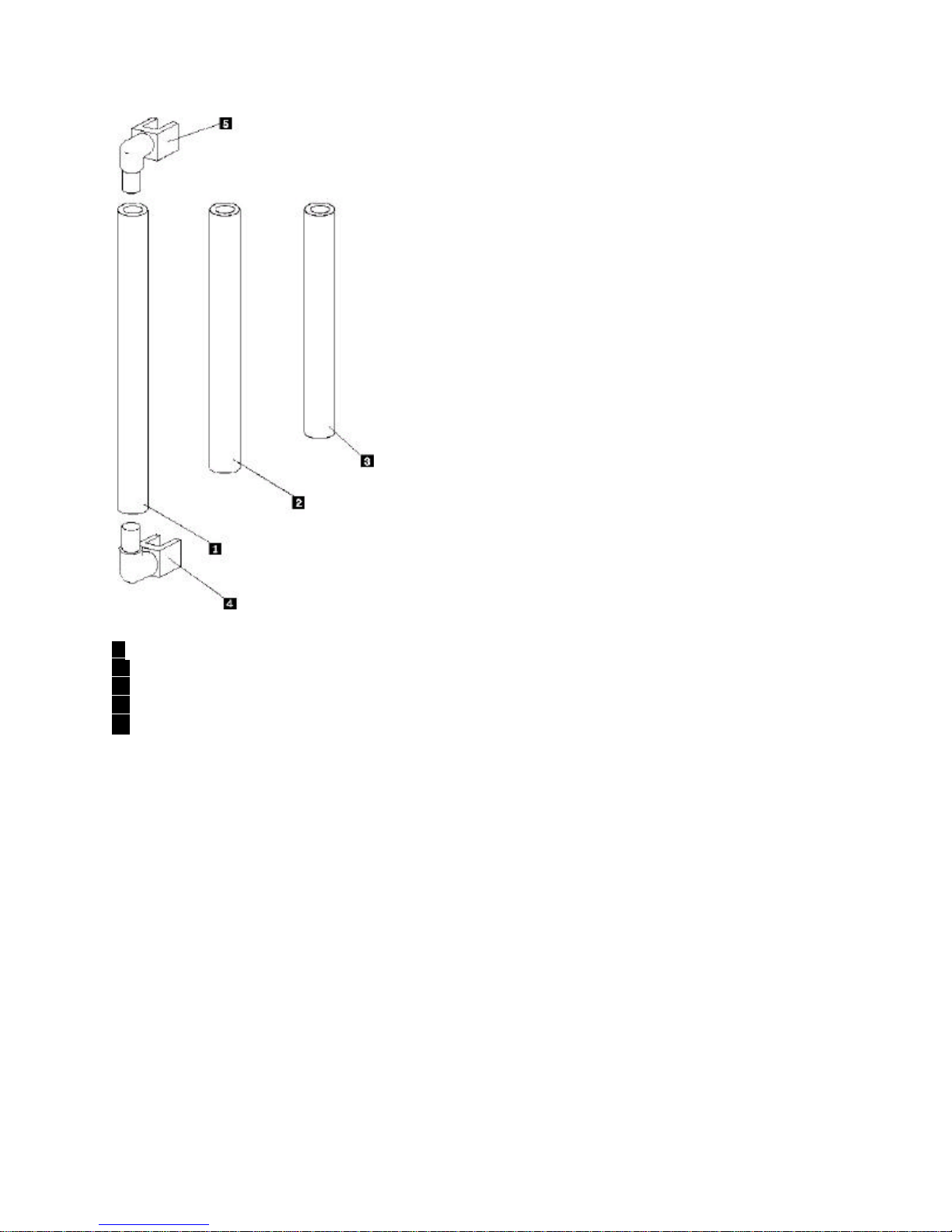
included accessory mounting bar. The accessory bar comes in three
parts and is adjustable to fit a wide range of monitor sizes. The
speaker also has two headphone jacks and a pass-through microphone
input jack.
The Business Audio Speaker, when used with the included accessory
bar, is supported for use with the following IBM monitors:
The Business Audio Speaker is supported for use with the following
IBM systems (if those systems use the above listed monitors):
In addition to this manual, your option package includes:
a speaker with attached connecting cable and mounting clips
an accessory bar for mounting on monitor, in three parts
two endpieces for the accessory bar
a headphone hanger
a hanger mount cover
Contact your place of purchase if an item is missing or damaged. Be
sure to retain your proof of purchase. It might be required to receive
warranty service.
IBM G42 IBM G72 IBM P92
IBM G51 IBM G94 IBM P202
IBM G52 IBM P72 IBM 300XL, 300GL
IBM 300PL IBM Aptiva C-77
IBM Aptiva E-Series IBM Aptiva S-Series
Copyright IBM Corp. 1998 1-1

Installation Instructions
Refer to the following illustration as you read the instructions for installing and using the speaker.
.1/ Volume control knob
.2/ Microphone jack
.3/ Headphone jack 1
.4/ Headphone jack 2
.5/ Headphone hanger
1-2 Business Audio Speaker

Installing the Business Audio Speaker
Assembling the Mounting Bar
Before installing the speaker, assemble the accessory mounting bar which will fit onto your monitor. Refer to the following illustration in order
to locate the accessory bar and determine which pieces to put together in order to fit your monitor. When you have located the piece which fits
your monitor size, assemble the bar by firmly pushing the endpieces into the ends of the bar.
Part 1: Quick Installation Guide 1-3

1 Piece used with 17 inch monitors
2 Piece used with G52S monitors
3 Piece used with 14 and 15 inch monitors
4 End piece
5 End piece
Altri manuali IBM Altoparlanti