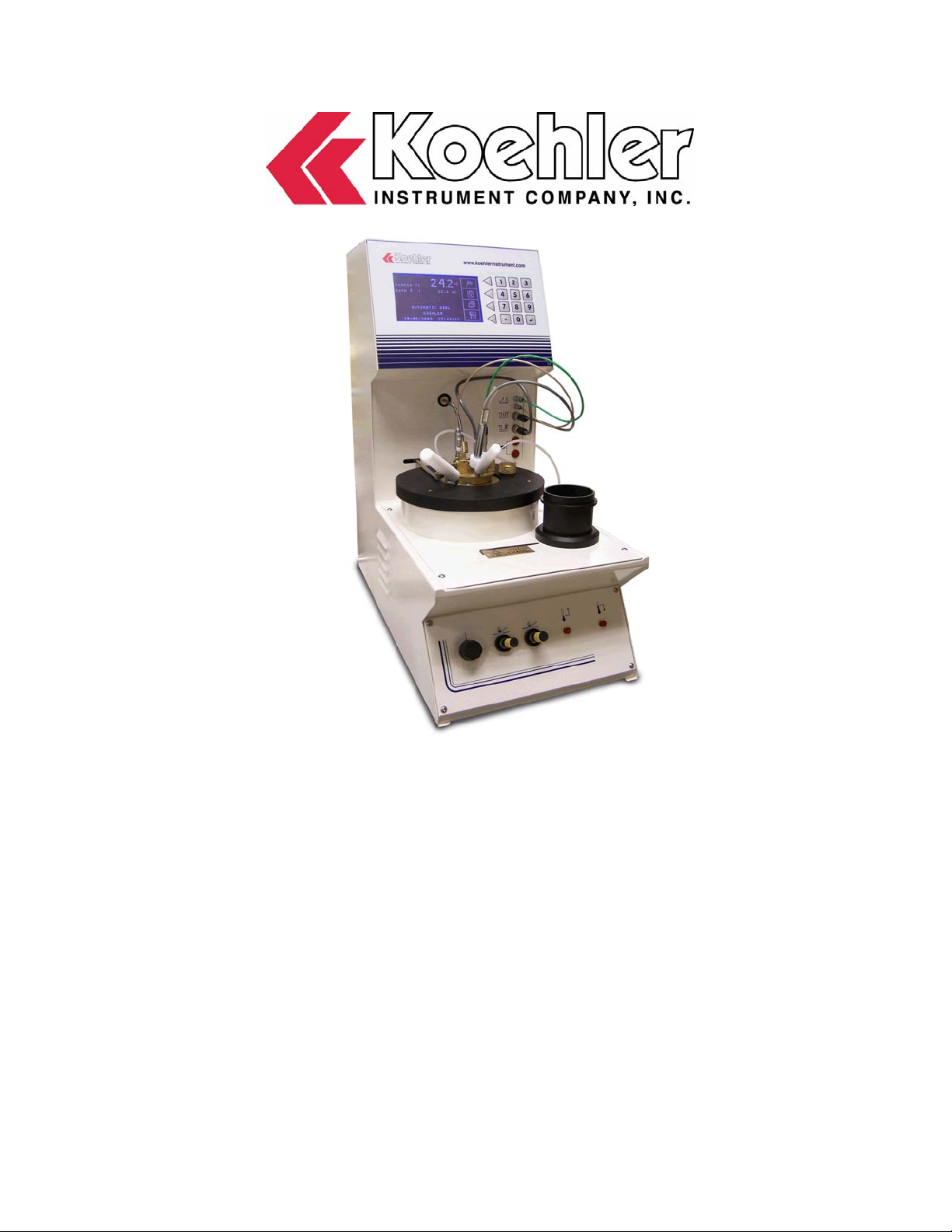
Koehler K877 Series Guida

Operation and Instruction Manual
Koehler Instrument Company, Inc.
1595 Sycamore Avenue • Bohemia, New York 11716-1796 • USA
Toll Free: 1-800-878-9070 (US only) • Tel: +1 631 589 3800 • Fax: +1 631 589 3815
Petroleum Testing & Analysis Instrumentation • Custom Design & Manufacturing
K877XX
Automatic Tag Closed Cup Flash Point
Tester

CONTENTS
CONTENTS................................................................................................................................... 2
I - GENERAL................................................................................................................................. 4
- 1.1 – VERIFICATION AFTER TRANSPORT............................................................................ 4
- 1.2 – SAFETY INSTRUCTIONS .............................................................................................. 4
- 1.3 – IDENTIFICATION OF THE EQUIPMENT........................................................................ 4
- 1.4 – INSTRUCTIONS FOR USE............................................................................................. 5
- 1.5 – INSTALLATION INSTRUCTIONS .................................................................................. 5
II – TECHNICAL CHARACTERISTICS........................................................................................ 7
III - DESCRIPTION OF THE EQUIPMENT .................................................................................. 9
- 3.1 - PRESENTATION (SEE PRESENTATION DIAGRAM)............................................................... 9
3.1.1 – Control Panel ............................................................................................................ 9
3.1.2 – Middle front panel...................................................................................................... 9
3.1.3 – Lower front panel....................................................................................................... 9
3.1.4 – Rear panel ................................................................................................................ 9
3.1.5 – Working zone.......................................................................................................... 10
3.1.6 – Right side ............................................................................................................... 10
IV – ACCESSORIES SUPPLIED WITH THE EQUIPMENT ...................................................... 13
IV – ACCESSORIES SUPPLIED WITH THE EQUIPMENT ...................................................... 14
- 4.1 – ACCESSORIES SUPPLIED AS STANDARD............................................................... 14
- 4.2 – OPTIONS ..................................................................................................................... 14
- 4.3 – ACCESSORY MODELS .............................................................................................. 15
V – METHODS AND BRINING INTO SERVICE ....................................................................... 18
- 5.1 - STANDARDS................................................................................................................ 18
- 5.2 - METHODS.................................................................................................................... 18
- 5.3 - STARTUP..................................................................................................................... 18
5.3.1 – Connections on the back of the equipment........................................................... 18
5.3.2 – Connections to the front of the equipment ........................................................... 19
5.3.3 – Powering on the equipment.................................................................................. 20
VI – GENERAL DESCRIPTION OF THE SOFTWARE ........................................................... 21
- 6.1 – MAIN STANDBY SCREEN......................................................................................... 21
- 6.2 - MENUS FLOW CHART .............................................................................................. 21
VII – STARTING A TEST.......................................................................................................... 23
- 7.1 – CONDUCT OF A TEST............................................................................................... 23
VIII - PRINTING......................................................................................................................... 26
- 8.1 - TYPES OF PRINTER................................................................................................... 26
- 8.2 – PRINTING RESULTS OF TESTS IN PROGRESS...................................................... 26
- 8.3 - PRINTING RESULTS OF ARCHIVED TESTS ............................................................ 26
- 8.4 – PRINTING THE TEMPERATURE GRADIENT............................................................ 26
- 8.5 – MODEL PRINTOUT..................................................................................................... 26

- 8.6 – PRINTING OUT OF LOG........................................................................................... 27
IX – SAFETY DEVICES........................................................................................................... 28
- 9.1 – SAFETY DEVICE - ABSENCE OF SAMPLE PROBE ............................................... 28
- 9.2 – NO INCREASE IN SAMPLE PROBE TEMPERATURE............................................. 28
- 9.3 – ELECTRICAL SAFETY DEVICE ............................................................................... 28
- 9.4 - SAMPLE TEMPERATURE SAFETY DEVICE............................................................ 28
- 9.5 – GAS SAFETY DEVICE............................................................................................... 29
X – UPDATING OF SOFTWARE............................................................................................. 30
XI - CONFIGURATION............................................................................................................. 31
- 11.1 –
PASSWORD.......................................................................................................................... 31
- 11.1.1 – Creation of a password.................................................................................... 31
- 11.2 – SOFTWARE CONFIGURATION.............................................................................. 31
- 11.2.1 – Correction of the result..................................................................................... 31
- 11.2.2 – Stop cooling ..................................................................................................... 31
- 11.2.3 – Safety shutdown .............................................................................................. 32
- 11.2.4 – Enter presumed temperature............................................................................ 32
- 11.2.5 – Barometric pressure ......................................................................................... 32
- 11.2.6 - Buzzer ............................................................................................................... 32
- 11.2.7 – New version of software.................................................................................... 32
- 11.2.8 - New password.................................................................................................... 32
- 11.2.9 – Print out temperature gradient).......................................................................... 33
- 11.2.10 - ''Escaping'' from the software configuration item.............................................. 33
- 11.3 – HARDWARE CONFIGURATION ............................................................................... 33
- 11.3.1 - Language............................................................................................................ 33
- 11.3.2 - Units ................................................................................................................... 33
- 11.3.3 - Calibration .......................................................................................................... 33
- 11.3.3.A – Sample probe and bath .............................................................................................34
- 11.3.3.B – Barometric pressure ..................................................................................................35
- 11.3.3.C – Electrical network image ...........................................................................................36
- 11.3.4 - Checks ............................................................................................................... 37
- 11.3.4.A – Analogue readings ....................................................................................................37
- 11.3.4.B – Logical inputs/outputs ...............................................................................................37
- 11.3.4.C – Self diagnostic ..........................................................................................................37
- 11.3.4.D – Printing the log...........................................................................................................37
XII - INCIDENTS......................................................................................................................... 39
XIII – GENERAL MAINTENANCE............................................................................................. 40
- 13.1 - CALIBRATION ........................................................................................................... 40
- 13.2 – MISCELLANEOUS CHECKS .................................................................................... 40
XIV – ACCESSORIES AND PART NUMBERS......................................................................... 41
- 14.1 – ACCESSORY PART NUMBERS ............................................................................... 41
- 14.2 – ADDITIONAL ACCESSORIES (OPTIONS) .................................................................. 41
- 14.3 – ERROR CODES......................................................................................................... 41
XVI - YOUR CONTACT.............................................................................................................. 42
XVII – ELECTRICAL/ELECTRONIC DIAGRAMS...................................................................... 43

I – GENERAL
- 1.1 – VERIFICATION AFTER TRANSPORT
Check the condition of the packaging and make any reservations to the
transport operator in the event of any damage.
Compare the contents (accessories) with the list supplied.
Check the condition of the accessories.
- 1.2 – SAFETY INSTRUCTIONS
Before using the equipment, the operator must have:
Knowledge of manual methods and experience of the types of tests to be
performed.
Knowledge of the hazards associated with handling products and
samples.
Handling by the user of a hot cover/receptacle containing a sample should be
avoided. Otherwise, this operation must be performed with extreme caution.
In all cases the operator must wear the necessary personal protection:
gloves, goggles, protective clothing.
- 1.3 – IDENTIFICATION OF THE EQUIPMENT
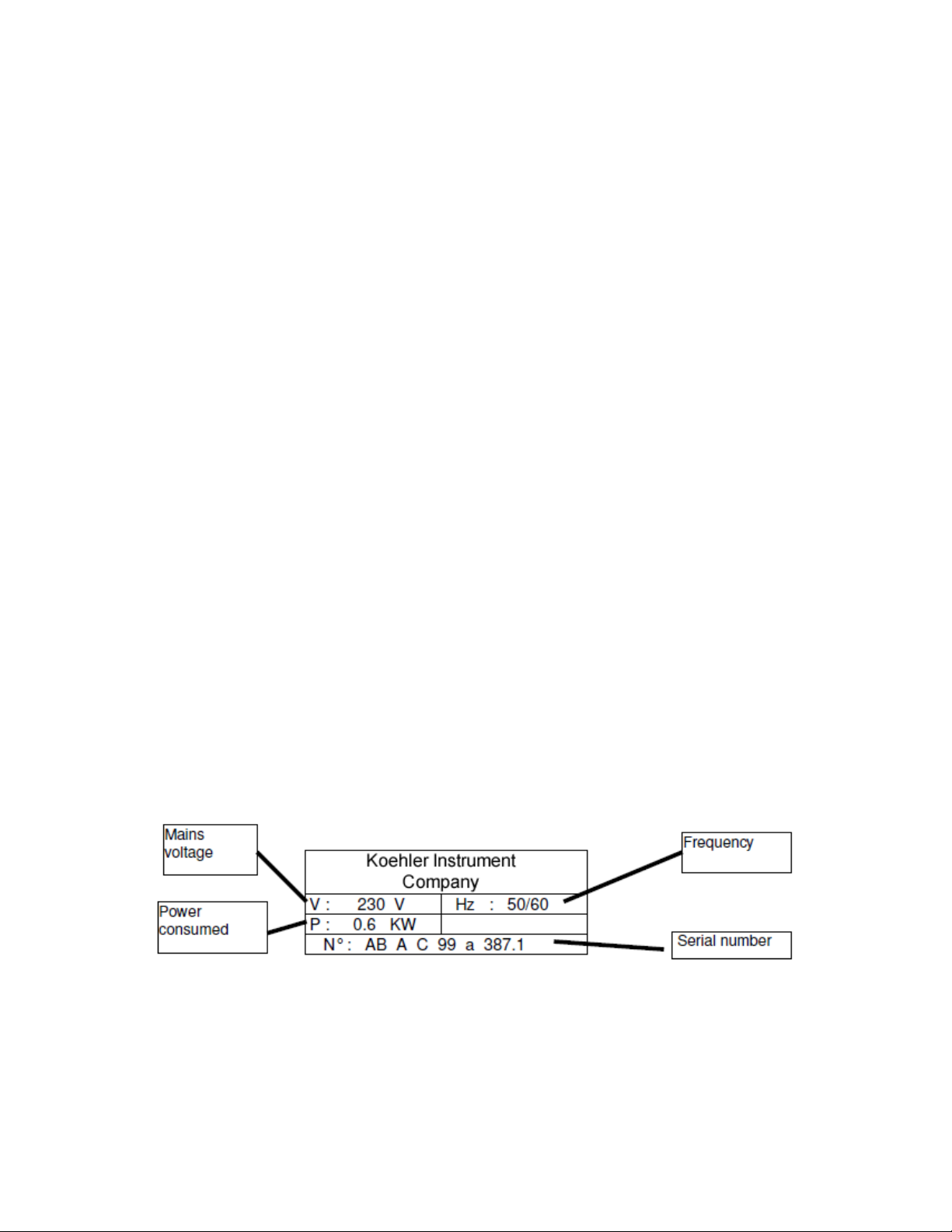
The equipment has a manufacturer’s plate on its left hand side:

- 1.4 – INSTRUCTIONS FOR USE
The equipment must be used solely:
Using the methods indicated in the instructions.
Using the accessories supplied and indicated in the instructions.
In accordance with the test and start up procedures described in the
instructions.
When a test is in progress, the equipment should under no circumstances
be left unsupervised.
It is mandatory to place the equipment under a smoke extractor hood; the work
room must be adequately ventilated.
At least once a month the connections to the cryostat and to the gas must be
checked to ensure the pipes and their fastenings are in satisfactory condition.
The gas pipe must be changed before the expiry date indicated on it.
If an incident occurs (excess pressure of gas, abnormal overheating of the
equipment, leaking or tipping up of the product) which may have caused
damage, an internal and external inspection of the equipment by a qualified
person is mandatory.
All maintenance work must be performed only by a qualified technician on an
equipment restored to room temperature, switched off (except where necessary
for calibration) and disconnected from the electricity, refrigerant and gas supply
systems.
The maintenance functions described and detailed in the instructions shall only
be performed by a qualified technician.
The functions and commands attached to the keyboard are clearly explained in
the instructions; the operator must read these carefully before using the
equipment.
- 1.5 – INSTALLATION INSTRUCTIONS
The cooling circuit for the equipment must be connected to a cryostat
regulated to a temperature at least 15 °C lower than the desired bath
temperature (that is 32 °C below the expected temperature).
The connection to the cryostat must be made using the insulated pipes
and collars supplied as accessories.

The gas circuit of the equipment can be connected to mains gas of 50
mbar maximum with the pipes and collars supplied as accessories, or to a
removable gas bottle, supplied as an option with its connection
accessories.
The equipment should be placed on a stable, strong table or laboratory
bench.
The electrical supply must comply with that described on the rating plate
and the apparatus must be connected to the ground.
It is mandatory to place the equipment under a smoke extractor hood; the
workroom must be adequately ventilated.
Check the condition of the accessories.

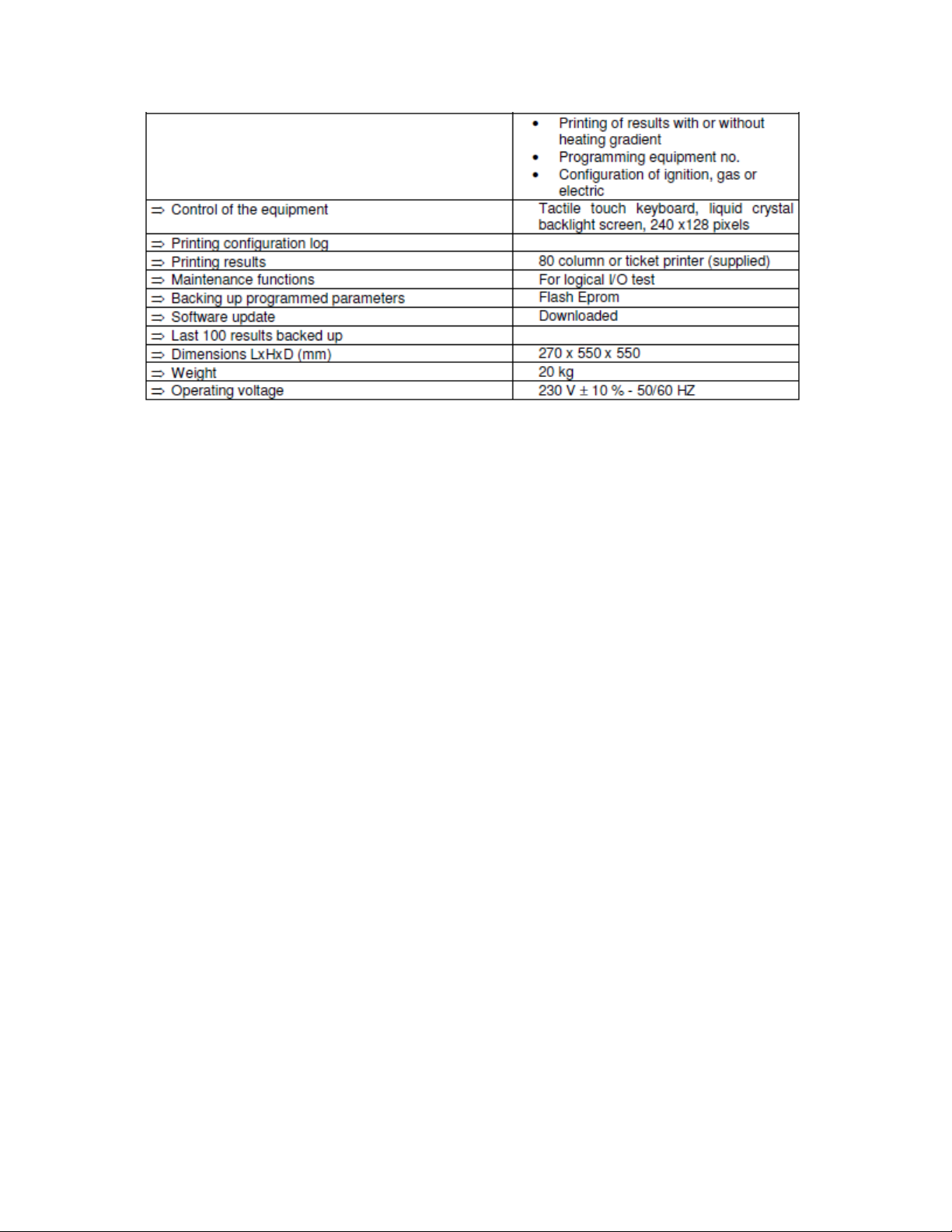
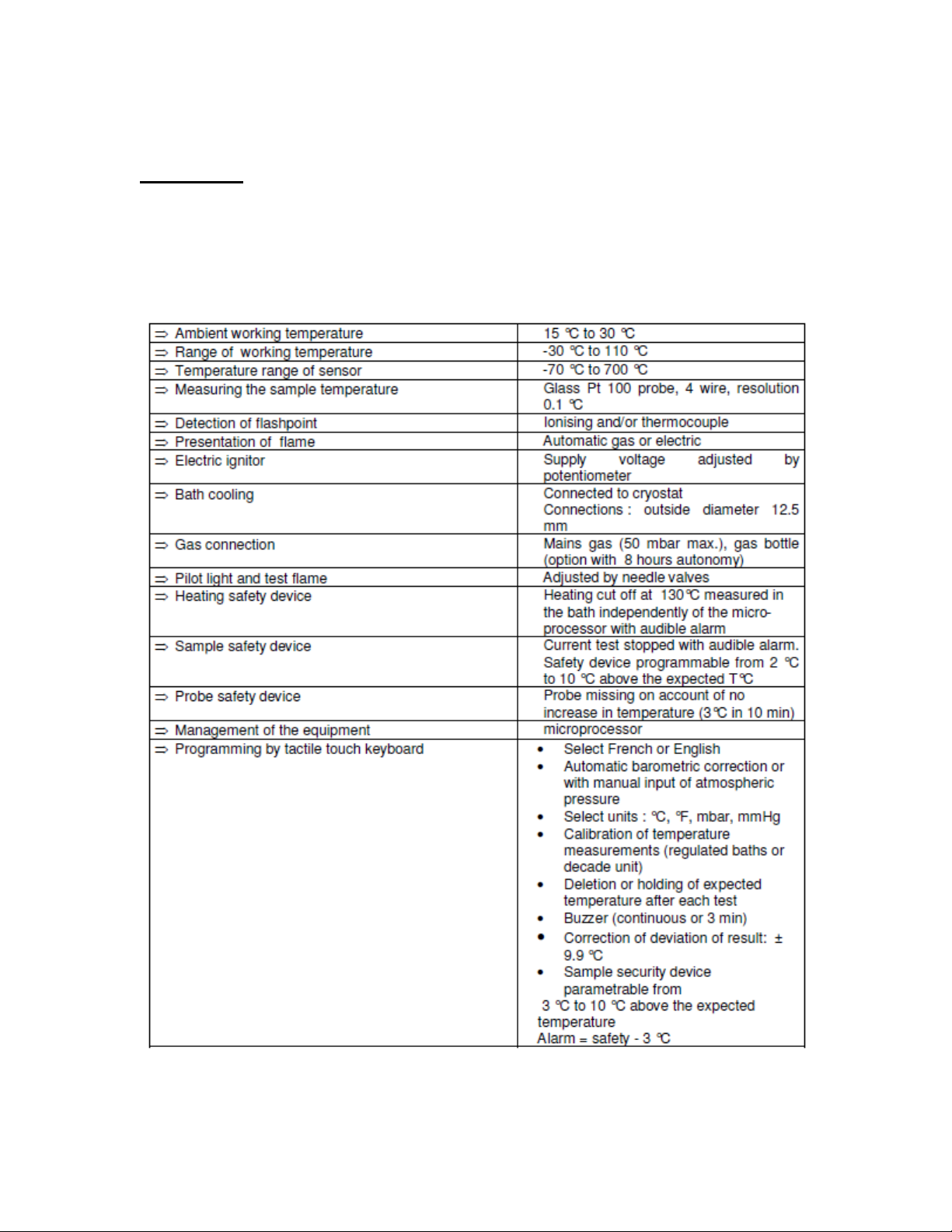
II – TECHNICAL CHARACTERISTICS
Field of use
Determination of a flash point in a closed receptacle in accordance with the
standards:
ASTM D 56
IP 304


III - DESCRIPTION OF THE EQUIPMENT
- 3.1 - PRESENTATION (see presentation diagram)
3.1.1 – Control Panel
1 tactile touch keyboard (1)
1 liquid crystal backlight graphics display (2)
3.1.2 – Middle front panel
The flashpoint detection thermocouple connector (3)
The ionising detection cable connector (4)
The Pt 100 sample probe connector (5)
The bath probe connector (7)
The gas connections for the pilot light and test flame (6)
The plug power supply connectors (24)
3.1.3 – Lower front panel
The gas regulation valves for the pilot light (8), test flame (9)
The heating (10) and refrigeration (11) indicator lights for the bath
Potentiometer for adjusting electrical voltage supplying the electric
ignitor (35)
3.1.4 – Rear panel
The mains switch with protective fuse (12)
The RS232 connector for link with the PC (13)
The printer connection (14)
The gas connection (15)
The inlet (16) and outlet (17) to the cooling circuit.
Gas bottle fastenings (18) (option)
Output of barometric pressure sensor for calibration by pressure
simulation (19)
Barometric pressure sensor connector for calibration with a voltage
generator (20)
Bath over flow (21)
Bath bleed (22)
Drain for recovery of internal condensation (23)

3.1.5 – Working zone
Electrical plug connections (24)
Rest receptacle (25)
Bath (26)
Flame presentation (27) or electric ignitor
Pilot light (28)
Flame presentation door control arm (29)
Agitator connection rod (30)
Temperature measuring probe rest (32)
Bath filling intake (33)
3.1.6 – Right side
Rating plate (31)
Questo manuale è adatto per i seguenti modelli
2
Indice
Altri manuali Koehler Apparecchiature di prova
Manuali Apparecchiature di prova popolari di altre marche

SMART
SMART KANAAD SBT XTREME 3G Series Manuale utente

Agilent Technologies
Agilent Technologies BERT Serial Manuale utente

Agilent Technologies
Agilent Technologies N3280A Manuale utente

Vernier
Vernier Go Direct Voltage Manuale utente

Lifeloc
Lifeloc R.A.D.A.R. Manuale utente

Fluke
Fluke T5-600 Istruzioni per l'uso e l'installazione