Ltech UB1 Manuale utente

Manual
UB1
www.ltech-led.com
UB2 UB4 UB5
Intelligent Touch Panel
(Bluetooth + DMX / Programmable)
FCC ID:2AYCY-UB5
(LED controllers)
E517856

Product Introduction
Package Contents
Manual × 1
Intelligent Touch Panel × 1
Technical Specs
1
Intelligent Touch Panel is an American base wall switch, integrating Bluetoot h 5.0 SIG Mesh
and DMX signals. It is a simple but elegant design with CNC a viation aluminum frame and
2.5D tempered glass. The panel is suitable for multi-scene and multi-zone
lighting control
applications. Working with Bluetooth systems makes i
t
m ore convenient and intelligent.
Input voltage
Working temperature
Dimensions(L×W×H)
Package size(L×W×H)
Weight(G.W.)
Model
Output signal
Zones
Wireless protocol type
DIM
UB1 UB5UB4
UB2
CT RGBW RGBWY
12-24VDC, Powered by Class 2
-20°C~55°C
120×75×30(mm)
158×113×62(mm)
225g
DMX 512
4
Bluetooth 5.0 SIG Mesh
Control mode

75
Product Size
Unit: mm
84
20
29.5
120
(Top View) (Bottom View)
120
43.5
2

Key Functions
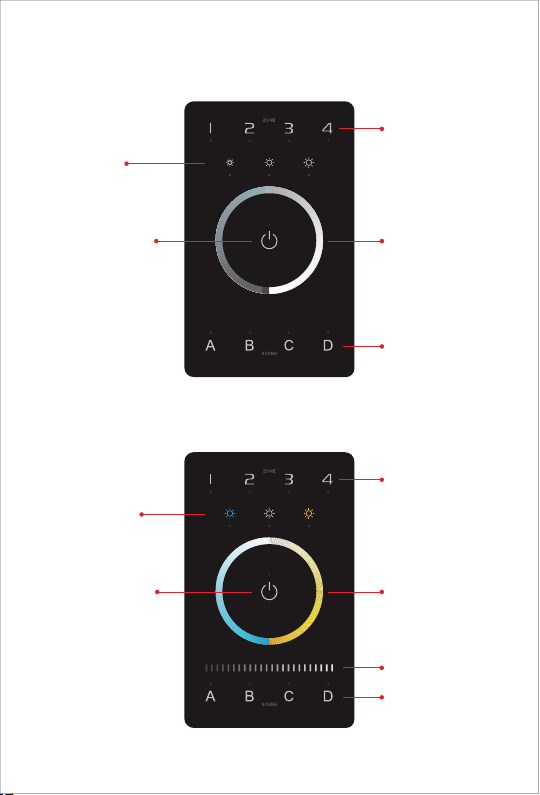
UB1
1- 4 Zone keys
Short press: Turn ON
Select/Deselect the zone
Long press: Turn OFF
Brightness shortcuts
25 ,50 ,100 % % %
Touch color circle (DIM)
4 Scene keys
Short press: Execute scene
UB2
Color tone shortcuts
Cool white
Neutral white
Warm white
Touch slider bar (BRT)
3
Short press: All ON/OFF
1- 4 Zone keys
Short press: Turn ON
Select/Deselect the zone
Long press: Turn OFF
Touch color circle (CT)
Short press: All ON/OFF
4 Scene keys
Short press: Execute scene
DMX address settings for CT:
Standard: Both channels are output CT values
Default: Set in the App
Please refer to P8 for more instructions
Please refer to P12 for
more detailed instructions
Please refer to P12 to
save scenes
Please refer to P12 for
more detailed instructions
Please refer to P12 to
save scenes

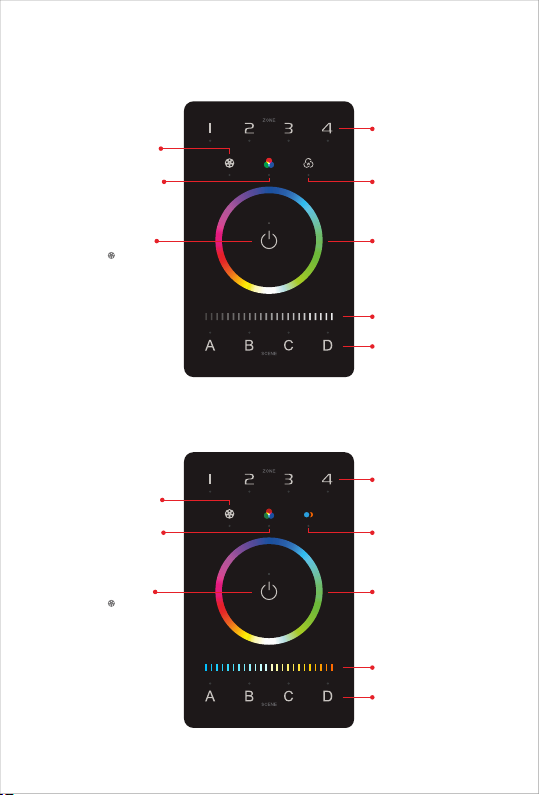
UB4
UB5
16 modes
Short press: Play mode
Long press: Adjust speed
Touch color circle (RGB)Short press: All ON/OFF
4 Scene keys
Short press: Execute scene
Touch slider bar (BRT)
Short press: Turn ON/OFF
white color
Long press: Adjust brightness
of white color
Touch silder bar (WY)
Short press: ON/OFF RGB
Long press: Adjust
RGB brightness
Short press: Turn ON/OFF WY
Long press: Adjust
brightness of WY
Key Functions
16 modes (Press“ ”to switch)
1. 3 color jumping
2. 7 color jumping
3. White strobe
4. 7 color strobe
5. Red green gradient
6. Red blue gradient
7. Green blue gradient
8. Red yellow gradient
9. Blue purple gradient
10. Green yellow gradient
11. Blue cyan gradient
12. Red purple gradient
13. Blue white gradient
14. Yellow purple cyan gradient
15. 3 color gradient
16. Full color gradient
4
Short press: ON/OFF RGB
1- 4 Zone keys
Short press: Turn ON
Select/Deselect the zone
Long press: Turn OFF
16 modes
Short press: Play mode
Long press: Adjust speed
1- 4 Zone keys
Short press: Turn ON
Select/Deselect the zone
Long press: Turn OFF
Short press: All ON/OFF Touch color circle (RGB)
4 Scene keys
Short press: Execute scene
16 modes (Press“ ”to switch)
1. 3 color jumping
2. 7 color jumping
3. White strobe
4. 7 color strobe
5. Red green gradient
6. Red blue gradient
7. Green blue gradient
8. Red yellow gradient
9. Blue purple gradient
10. Green yellow gradient
11. Blue cyan gradient
12. Red purple gradient
13. Blue white gradient
14. Yellow purple cyan gradient
15. 3 color gradient
16. Full color gradient
Please refer to P12 for
more detailed instructions
Please refer to P12 to
save scenes
Please refer to P12 for
more detailed instructions
Please refer to P12 to
save scenes

5
Recommended Applications
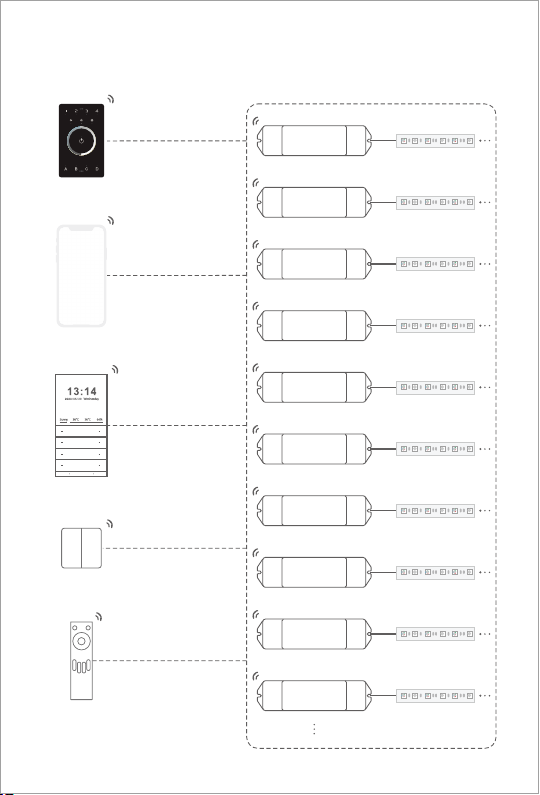
App
1.Wireless Control.
2.Wireless + Wired control ( With reliable and stable signals).
3. Wireless + Wired control (Enriching different lighting applications).
4. Visual control + Remote control of traditional panels.
5.More applications of intelligent control are waiting for you to set up.
App Remote Wireless
switch
Home appliance
module
Super Panel Bluetooth driver Lamp
App Signal converter
Bluetooth to DMX
DMX driver
(DIM/CT/RGB/RGBW/RGBWY)
App DMX driver
(DIM/CT/RGB/RGBW/RGBWY)
Intelligent
touch panel
Bluetooth driver Lamp
Lamp
Lamp
Intelligent
touch panel
Intelligent
touch panel
Intelligent
touch panel

Bluetooth Application Diagram
Super Panel
APP
Lamp/LED strip
Bluetooth driver
Lamp/LED strip
Lamp/LED strip
Lamp/LED strip
Lamp/LED strip
Lamp/LED strip
Lamp/LED strip
Lamp/LED strip
Lamp/LED strip
Lamp/LED strip
RC4 remote
Bluetooth 5.0 SIG Mesh
6
Bluetooth 5.0 SIG Mesh
Bluetooth driver
Bluetooth driver
Bluetooth driver
Bluetooth driver
Bluetooth driver
Bluetooth driver
Bluetooth driver
Bluetooth driver
Bluetooth driver
Intelligent
touch panel
Intelligent
wireless switch

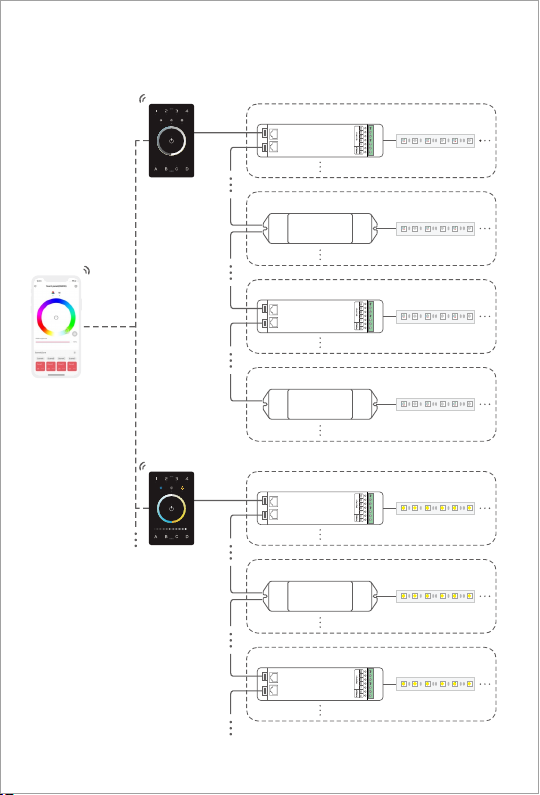
DMX Application Diagram
Each zone can be installed with multiple decoders. When the total number of decoders in 4 zones
exceeds 32, please add DMX signal amplifiers.
UB1
DMX
Bluetooth
APP
UB2
DMX
DMX decoder
Zone 1
7
DMX driver
Dimming lamp
/LED strip
Dimming lamp
/LED strip
Dimming lamp
/LED strip
Dimming lamp
/LED strip
Color temperature lamp
/LED strip
Color temperature lamp
/LED strip
Color temperature lamp
/LED strip
Zone 2
Zone 3
Zone 4
Zone 1
Zone 2
Zone 3
DMX decoder
DMX decoder
DMX decoder
DMX driver
DMX driver

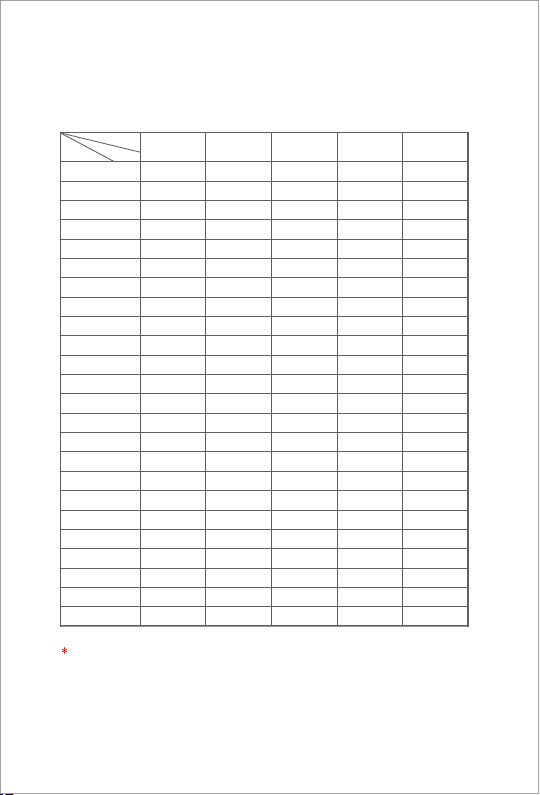
DMX Channel Output Sheet
8
DIM1
1
Zone
Address CT2CTDIM RGBW RGBWY
DIM2
DIM3
DIM4
DIM1
DIM2
DIM3
DIM4
DIM1
DIM2
DIM3
DIM4
DIM1
DIM2
DIM3
DIM4
DIM1
DIM2
DIM3
DIM4
DIM4
C1
W1
C2
W2
C3
W3
C4
W4
C1
W1
C2
W2
C3
W3
C4
W4
C1
W1
C2
W2
BRT1
CT1
BRT2
CT2
BRT3
CT3
BRT4
CT4
BRT1
CT1
BRT2
CT2
BRT3
CT3
BRT4
CT4
BRT1
CT1
BRT2
CT2
R1
G1
B1
W1
R2
G2
B2
W2
R3
G3
B3
W3
R4
G4
B4
W4
R1
G1
B1
W1
R1
G1
B1
W1
Y1
R2
G2
B2
W2
Y2
R3
G3
B3
W3
Y3
R4
G4
B4
W4
Y4
4
3
2
8
7
6
5
12
11
10
9
16
15
14
13
20
19
18
17
500
...
512
...
DIM4
Y4
W2 CT2 W1
W4 CT4 W4
...
...
...
...
... ...
...
...
...
Type
As shown in the sheet above, every 4 DIM addresses are circulated in 4 zones, every 8
addresses of CT1 and CT2 are circulated in 4 zones, every 16 RGBW addresses are circulated
in 4 zones, every 20 RGBWY addresses are circulated in 4 zones.
/
/

Step 1: Remove the panel plate with a flathead screwdriver, as shown below.
Installation Instructions
Step 2: Attach the wires to the panel, as shown in the diagram below . Please be sure
to turn off the power to the circuit at the circuit breaker or fuse box before attaching
the wires.
DC-
DC+
DMX+
DMX-
B
A
GND
9
IN(12-24VDC)
GND
DMX OUT L-BUS
Altri manuali per UB1
1
Questo manuale è adatto per i seguenti modelli
3
Indice
Altri manuali Ltech Sistema di controllo