luxvision PM 200 Manuale utente

USER’S MANUAL
PM 200
PUPILOMETER

Notication
Dear Users,
Thank you for your purchase of PM 200 Pupilometer. Please take time to read our
user’s manual carefully before use.
This guarantees you to make full use of this unit and prolongs the operation life of
this unit.

Content
1. Function Introduction .....................................................................................4
2. Name of Parts ...............................................................................................5
3. Operation ....................................................................................................11
4. Maintenance ................................................................................................16
5. Specications ..............................................................................................17

1. Function Introduction
1. Uses
PM 200 is a digital precision optical instrument used to measure stance between
human pupils in the process of optometry for tting ectacles.
2. Characteristics
This device is designed in a scientic and reasonable way, integrating technologies
on optics, mechanism, electricity and microcomputer into whole.
• Using an optical method to realize hairspring orientation which places the
mechanical orientation
• Adopting a full-digital design to effectively eliminate error optometrist’s articial
measurement, thus allowing objective and precise measurement of patient’s
pupuillary distance
• Save energy for low power design
• A exible bafe design convenient for storage which avoids possible
embarrassment in operation.
4

2. Name of Parts
2.1 Description of the Front Panel (as shown in Fig.1)
8. Nose Bearer
10. Observation
Window
2. Right Pupil
Measuring Key
6. Pupillary distance
Conversion Key
5. Memory key
Fig. 1
4. Display
Window
3. Lens Pupil
Measuring Key
1. Reset
7. Measuring State
Transition Key
9. Measuring
Window
5
1. Reset
Press this key to actuate the device. In the process of measurement, pressing
the key will enable measured data of the device to be reset to the initial status.
2. Right Pupil Measuring Key
It is used to measure right pupillary distance. Pressing outer side of the key
will make pupillary distance pointer move towards nose bearer. At this time,
the right eye pupillary distance and binocular pupillary distance reduce in
numerical value, and then every pressing of the key allows pointer of the
pupillary distance to move 0.5mm and Right data reduce by 0.5mm.
Pressing inner side of the key will make the pupillary distance pointer move

in opposite direction of the nose bearer. Now numerical value of the pupillary
distance increases, and every pressing of the key will enable the pupillary
distance pointer to move 0.5mm, with Right data being increased by 0.5mm.
3. Left Pupil Measuring Key
It is used to measure left pupillary distance. Pressing outer side of the key
will make pupillary distance pointer move in opposite direction of the nose
bearer. At this time, the left eye pupillary distance and binocular pupillary
distance rise in numerical value, and then every pressing of the key allows
pointer of the pupillary distance to move 0.5mm and Left data increase by
0.5mm. Pressing inner side of the key will make the pupillary distance pointer
move towards the direction of the nose bearer. Now numerical value of the
pupillary distance decreases, and every pressing of the key will enable the
pupillary distance pointer to move 0.5mm, with Left data being reduced by
0.5mm.
4. Display Window (as shown in Fig. 2)
It displays the measured numerical value of pupillary distance and some other
relevant information.
1. Binocular Pupillary Distance
2. Right Eye
Pupillary Distance
5. Reading of
Right Eye
Pupillary Distance
7. Display Value of
Optic Distance
4. Reading of Binocular Pupillary Distance
3. Left Eye
Pupillary Distance
6. Reading of Left Eye
Pupillary Distance
11. Left Eye
Measuring State
9. Binocular Measuring State
10. Right Eye Measuring State
8. Memory State
Fig. 2
6
Note
When reading information on the display window, the Right value denotes the distance
between center of nose bridge and right eye pupillary distance, and the Left value
denotes the distance between center of nose bridge and left eye pupillary distance.
PD value stands for the distance between left eye pupil and right eye pupil. The unit
is mm.

Important Matters
Information on the reading display window do not appear simultaneously, instead,
they will appear only when you need to measure a given state.
5. Memory Key
It is used to store the current data. Press the key once to save the data and
press again to cancel the saving. During the saving, the device’s function
of measuring pupillary distance is deactivated, lighting source inside the
device switches out and the device does not shut off automatically.
6. Pupillary Distance Conversion Key (TDIS)
It is used to conduct conversion of measured value of pupillary distance at
different optic distances of 30cm ~ ∞.
7. Measuring State Transition Key (BIN)
Monocular pupil measurement of left or right pupil is realized by pressing
this key, there by making conversion of left or right pupil measurement and
simultaneous binocular pupils measurement available.
8. Nose Bearer
A testee’s bridge rests on the nose bearer so that the device and position
of the testee’s pupil is xed.
9. Measuring Window
The working window of the testing personnel.
10.Observation Window
Two windows provided for a testee to stare at the target with His (her) eyes.
7

2.2 Description of Rear Panel (as shown in Fig.3)
5. Forehead
Bearer
3. Battery Box
Fig. 3
2. Bafe Switch
1. Bafe
4. Preset Screw
1. Bafe
It is located at bottom of the instrument. For operation, turn on the switch
and then lay down the bafe to separate observer and testee.
2. Bafe switch
It may move up and down to draw in and lay down the bafe.
3. Battery box
Two battery boxes are available at the bottom of the device, one on the left
side and the other on right side, each with 2 pieces of 5# AA batteries.
4. Preset screw
It is located under the bafe, which is visible only after the bafe is laid down.
The specication is English standard 1/4”, a camera tripod can be xed for
the convenience of user.
8

5. Forehead bearer
The testee’s forehead reasts on the forehead bearer so that the position of
his pupils is xed.
2.3 Viewed from the Measuring Window (as shown in Fig.4)
Pupillary Distance Pointer
The widths in the observation windows of the device are 0.45mm vertical black
lines, one in the left window and the other in the right window. Pressing measuring
keys of the left and right pupils will make the pointer move on the reecting light
dot of the human pupil, thus permitting measurement of the pupillary distance.
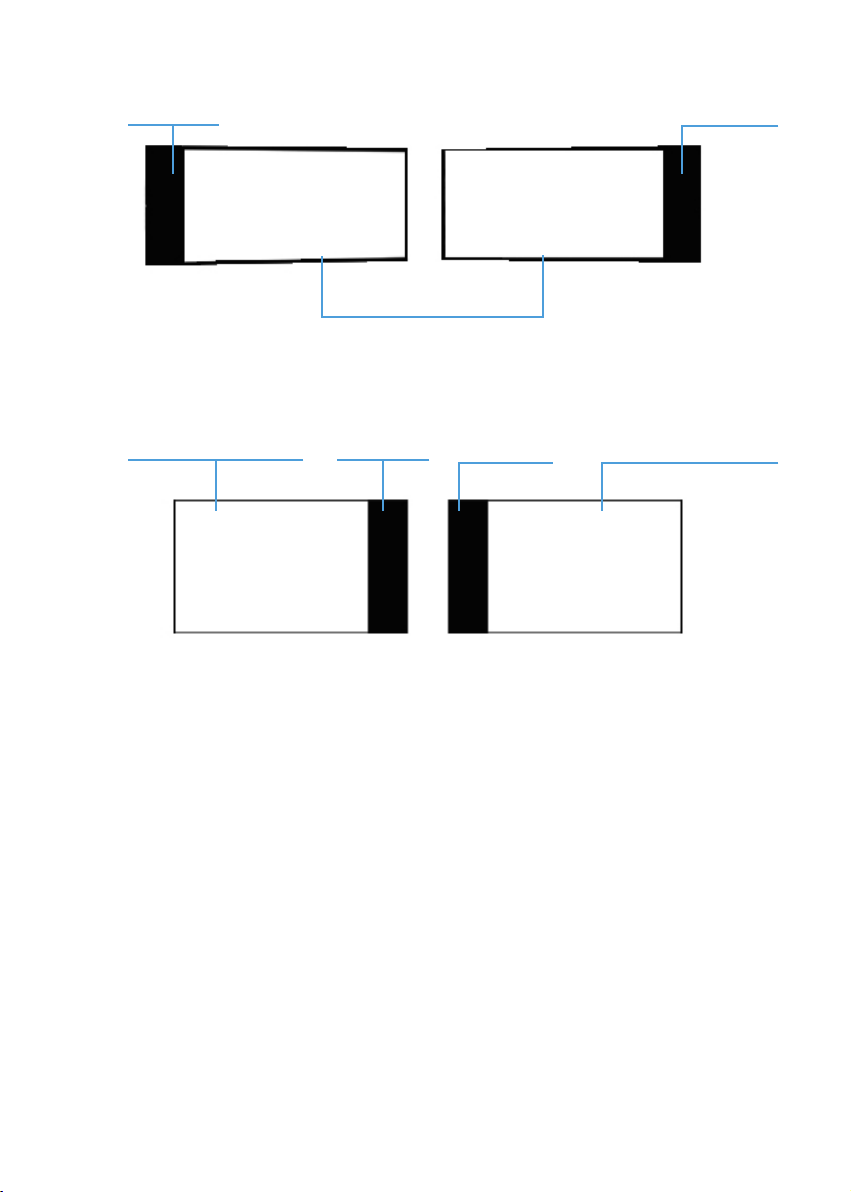
Important Matters
When the single-face pupillary distance pointer reaches the maximum or minimum
range of measurement (maximum value 41.5mm as shown in Fig.5 a or 22mm
as shown in Fig.5b) after pressing left or right pupillary distance measuring key
to move the pupillary distance pointer, the area of measuring window outside the
range of measurement becomes black. At this time, the pupillary distance pointer
is invisible in the measuring window and can be observed only after adjusting the
left or right measuring key of pupillar distance in reverse.
Pupillary distance pointer
Observation window
Fig. 4
9

Black area Black area
Observation window
Fig.5a (It is the state of the observation window
when pupillary distance pointer reaches 41.5mm)
Observation window Black area Black area Observation window
Fig.5b (It is the state of the observation window
when Pupillary distance pointer reaches 22mm)
2.4 Viewed from the Observation Window (as shown in Fig.6)
Target to be stared at
In the middle of an eyeball-shape circle in the center of the device’s inner visual
eld, there is a green target image surrounded with a bright ring. A testee should
stare at the target with both eyes.
10
Indice
Altri manuali luxvision Strumento di misura