Mecmesin BFG 10 Manuale utente

1
2
3
4
4.1
4.1.1
4.1.2
4.1.3
4.1.4
4.1.5
4.1.6
4.2
4.2.1
4.2.2
4.2.3
4.2.4
4.2.5
4.2.6
4.2.7
4.2.8
4.2.9
4.2.10
4.2.11
4.2.12
4.2.13
4.3
4.3.1
4.3.2
4.3.3
4.3.4
4.3.5
4.4
4.5
4.5.1
4.5.2
4.5.3
Introduction
Before Use
Operation
Maintenance
Powering the Gauge
Fitting the rechargeable batteries
Charging the rechargeable batteries
Low battery symbol
Mains operation
Fitting of alkaline batteries
Battery safety information
Using the Gauge
Fitting accessories
Mounting to a test stand
Powering up
Display of Tension/Compression
Zeroing the Gauge
Changing the unit of measurement
Max (Peak) Readings
Max Tension
Max Compression
“Normal” mode
Data Output
Remote key press from PC
Factory Defaults
Optional Settings through Dual Function keys
Auto-off
Loadcell Diagnostic test
Removing the minus sign during data transmission
Overload counters
Display messages
Dimensions (in Millimetres)
BFG Specification Table
Range & Resolution
Accuracy
Output
2

1Introduction
Thank you for choosing the Mecmesin Basic Force Gauge (BFG) instrument. With correct use and regular re-
calibration it will give many years of accurate and reliable service.
The Mecmesin BFG is a member of a series of highly versatile display units. By using the latest integrated circuit
technology it has been possible to produce an instrument which can be used to measure tensile and compressive
forces accurately, whilst being simple to use by the operator.
3

2Before Use
Upon receiving the unit please check that no physical damage has occurred to the packaging material, plastic case
or the instrument itself. If any damage is evident please notify Mecmesin immediately.
4

3Operation
The most commonly used features such as displaying force, peak hold, zero and changing of displayed units can
all be done by pressing a single dedicated key on the front panel.
For less frequently used features a number of “hot keys” are provided, whereby the operator simply presses and
holds 2 keys to enable a gauge option.
5

4
4.1
4.1.1
4.1.2
4.1.3
4.1.4
4.1.5
4.1.6
4.2
4.2.1
Maintenance
When cleaning the keypad care must be taken to avoid liquids, especially alcohols, seeping around the edge of
the membrane. Therefore, we recommend the use of a lightly dampened cloth to avoid liquid spillage onto the
membrane.
Powering the Gauge
The BFG is supplied with a set of 4 Nickel Metal Hydride rechargeable AAA batteries, which are supplied fully
charged to allow use straight from the box. Do not use any other battery charger other than that supplied with
the force gauge.
Fitting the rechargeable batteries
To replace the batteries you must first remove the battery cover on the upper part of the rear of the gauge by
removing the 2 retaining screws. Remove the fitted batteries and fit the 4 new batteries in the battery holder
ensuring that you observe polarity.
Refit the battery cover and tighten the 2 retaining screws.
Charging the rechargeable batteries
Connect the mains adaptor/charger into the charger socket on the top-right hand-side of the gauge, charge the
batteries for 14-16 hours. Only use the adaptor/charger supplied. A fully charged battery pack will provide in
excess of 50 hours constant use between charges.
Low battery symbol
If the low battery symbol appears on the display the accuracy of the loadcell reading may be compromised and
the gauge will power down after a short period of time.
Mains operation
The BFG can also be powered directly from the mains. This can be achieved with or without the batteries being
fitted. Connect the mains adaptor to your mains supply. Only use the adaptor supplied.
Fitting of alkaline batteries
The BFG can also be powered by AAA 1.5V alkaline batteries (not supplied). For fitting of alkaline batteries, follow
fitting instructions as per rechargeable batteries above.
Warning: Warning: When alkaline batteries are fitted, the mains adaptor/charger must NEVER NEVER be connected to the BFG
due to risk of acid leakage which could damage the instrument.
Battery safety information
NEVER:
Short circuit
Heat or incinerate
Disassemble or deform cells
Use alternative chargers other than those supplied by Mecmesin
Use replacement parts other than those supplied by Mecmesin
Immerse in water Solder anything to the battery terminals Reverse individual cell polarity
Using the Gauge
Fitting accessories
6

4.2.2
4.2.3
Affix the short extension rod (30mm long) to the loadcell probe in the hole at the bottom of the gauge by
tightening it gently with the fingers.
Your chosen grip or accessory may now be connected to the extension rod.
Note: Note: When fitting a grip ensure that it is screwed finger-tight only. Excessive torque or overtightening can
damage the loadcell. Never fit any accessory without first sitting an extension rod.
Mounting to a test stand
On the rear of the gauge there are two M5 threaded holes, which can be used for mounting the gauge to a
Mecmesin test stand.
Each Mecmesin test stand is supplied with a dedicated ‘dovetailed mounting bracket’ and screws for this purpose.
If you wish to mount the gauge to another type of stand, ensure that the screws used are threaded into the gauge
to a maximum depth of 10mmmaximum depth of 10mm. If screws are fitted beyond this depth, damage to the loadcell will occur.
Powering up
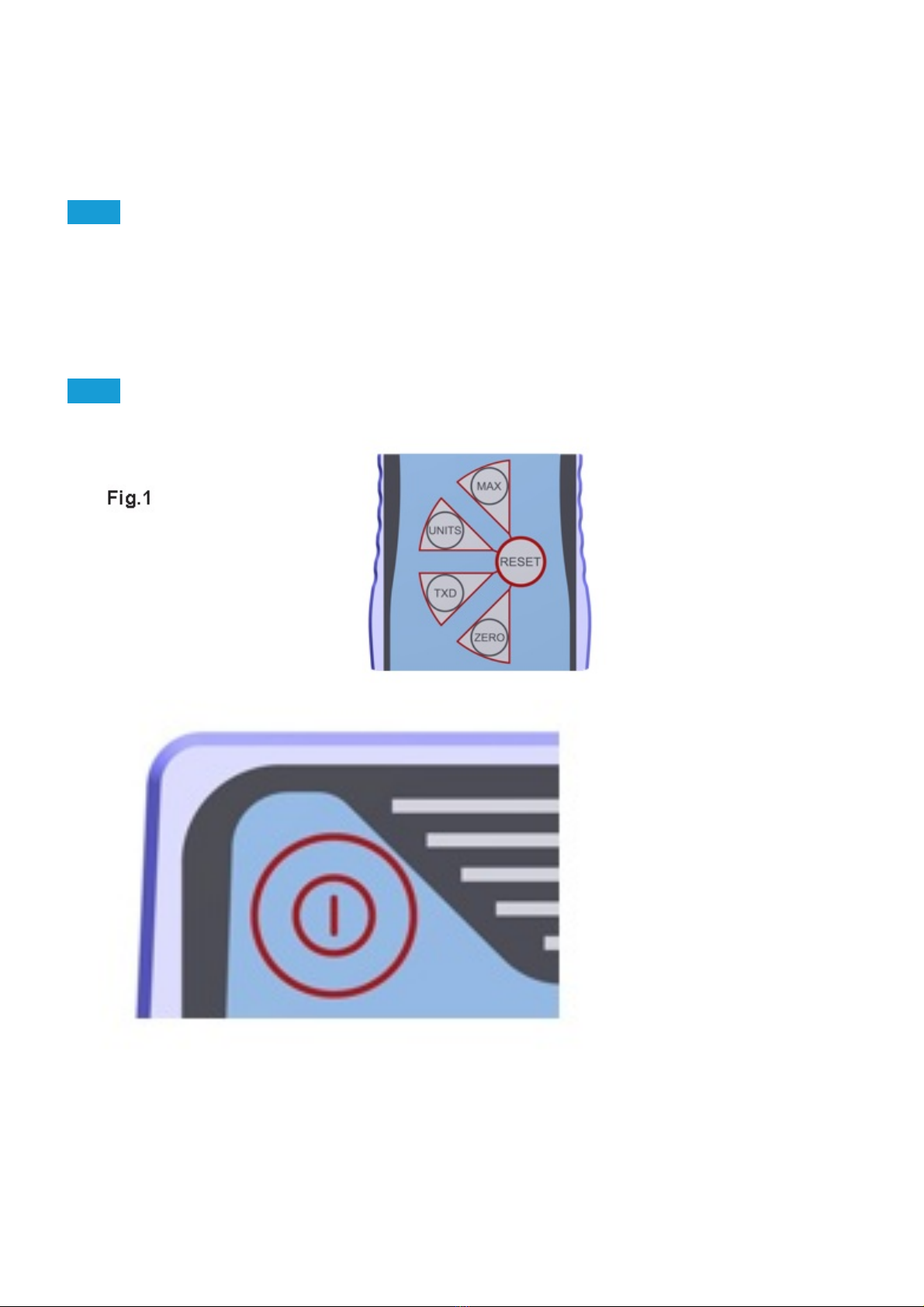
As shown in Figure 1 the control panel has 5 Function keys plus an On/Off key:
To power up the gauge press the red
7

key. A short self test runs during which the display will show the model and capacity in newtons.
After the self test, providing no load has been applied to the instrument, the display will show all zero’s. This is
because the gauge re-zero’s itself during the self test routine.
Please note that a BFG measuring very low forces may not show zero if it is moved during the self testPlease note that a BFG measuring very low forces may not show zero if it is moved during the self test
routine. Once it is properly mounted and zeroed the reading will be stable.routine. Once it is properly mounted and zeroed the reading will be stable.
If a force is applied perpendicularly via the extension rod to the loadcell, the reading on the display will register
the applied force.
Should the instrument have sustained a catastrophic overload, the symbol ‘OL’ will be permanently displayed and
the instrument must be returned to Mecmesin or an approved Mecmesin distributor for repair.
Forces greater than 120% of full-scale will produce an OL symbol which will remain on the display all the time the
overload is present.
To power down the gauge press the red
8

4.2.4
key.
Display of Tension/Compression
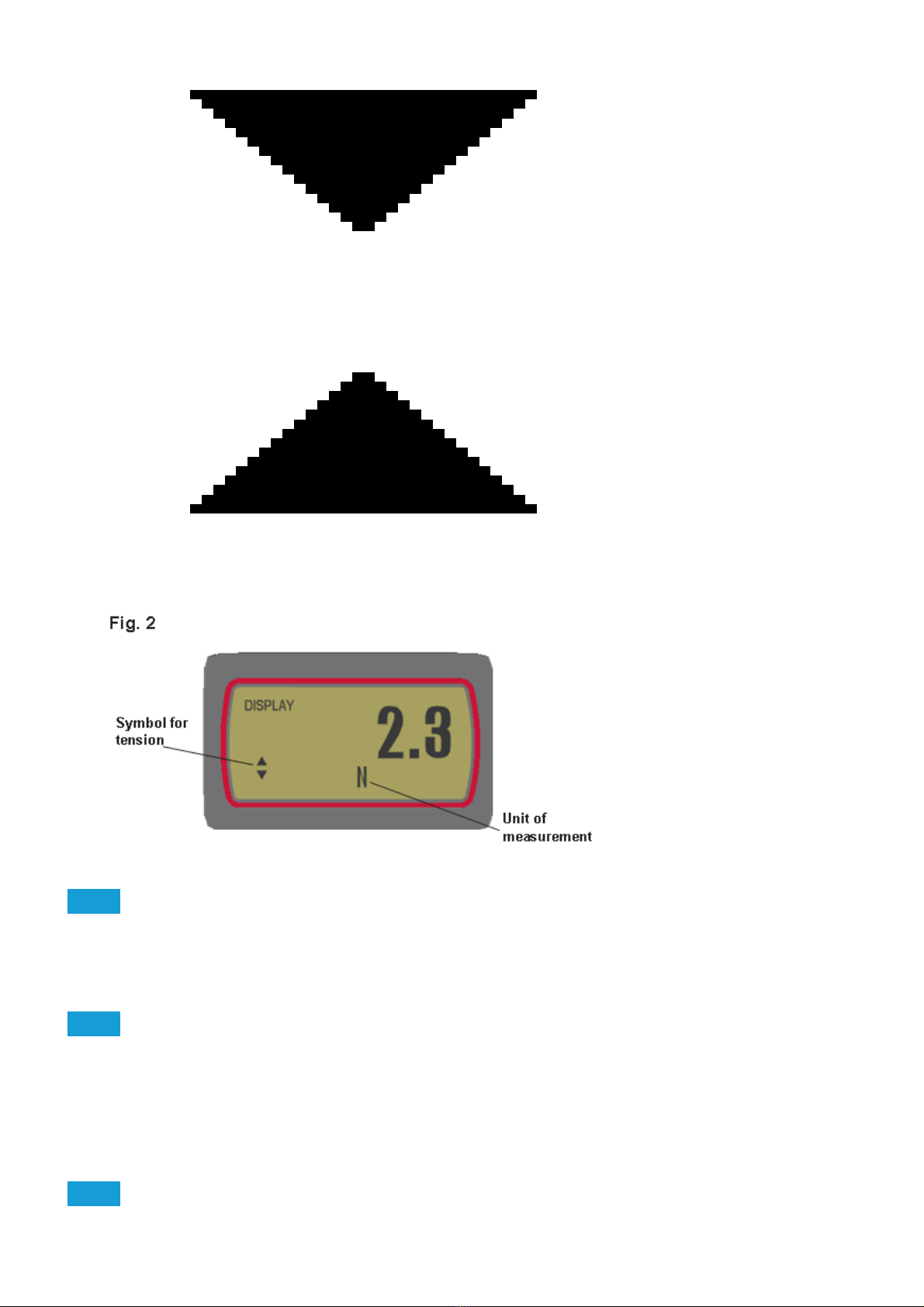
Tensile forces are displayed on the BFG and recognised by the symbol
See Fig 2.
Compressive forces are displayed on the BFG and recognised by the symbol
9

4.2.5
4.2.6
4.2.7
See Fig 3b.
Zeroing the Gauge
During the operation of the gauge it is often necessary to zero the display - e.g. when you wish to tare out the
weight of a grip, so it does not become part of the measured reading. Press and release the ZERO ZERO key. The
display will blink momentarily as the zero operation is carried out.
Changing the unit of measurement
You can choose from the following units of measurement depending on the capacity of your gauge: millinewtons,
kilonewtons, newtons, gram-force, kilogram-force, ounce-force or pound-force.
To change the display units press and release the UNITS UNITS key. Each successive key press will select the next
available units until the gauge returns to its original setting. The BFG automatically converts readings as new units
of measure are selected.
Max (Peak) Readings
The gauge detects and stores maximum (peak) force in both compressive and tensile directions.
10
Questo manuale è adatto per i seguenti modelli
6
Indice
Altri manuali Mecmesin Strumento di misura

Mecmesin
Mecmesin SL Series Manuale utente
Mecmesin
Mecmesin CAPTEST Manuale di istruzioni

Mecmesin
Mecmesin 172100 Manuale utente

Mecmesin
Mecmesin AFTI Manuale di installazione e funzionamento

Mecmesin
Mecmesin AFG Series Manuale utente

Mecmesin
Mecmesin AFG Series Manuale utente

Mecmesin
Mecmesin AFG 2.5 Manuale utente

Mecmesin
Mecmesin Compact Force Gauge Manuale utente

Mecmesin
Mecmesin afg 1000n Manuale utente

Mecmesin
Mecmesin Mecmesin AFI Manuale utente