
MOB MO9218 Manuale utente
USER MANUAL
(2014/53/EU art. 10-8)
(a) Frequency Range; 2402-2480 MHz
(b) Maximum radio-frequency power; 20mW (EIRP)
(2014/53/EU art. 10-9 Simplified Declaration of Conformity)
Hereby, MOB, declares that item MO9218 complies with the essential requirements and
other relevant conditions of Directive 2014/53/EU. The full text of the EU declaration of
conformity is available at the following internet address: www.momanual.com
MOB, PO BOX 644, 6710 BP (NL).
PO: 41-XXXXXX
Made in China

MO9218
EN
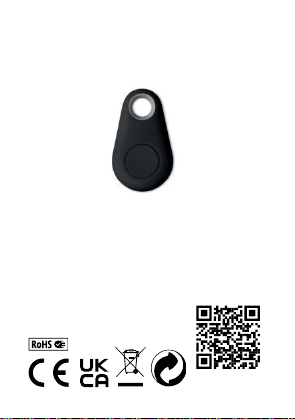
5.2 Wireless anti-loss/ key finder (i-Tag)
Thank you for choosing the smart Wireless anti loss product. i-Tag
is a Wireless Low-energy product which utilises the newest
Wireless 5.2 version. It can help to find lost & valuable belongings
(such as keys, handbag, smartphones etc.), kids or pets together
via an App software within a specified connection distance. Within
the effective connection distance, it can realize the functions of
anti-loss, looking for smart phones, self-portrait selfie button and
voice recording. The effective distance of i-Tag is approx. 25m/75ft
in open range without barriers. i-Tag works on one CR2032
Lithium Coin Battery which is easy to buy in stores and it should
work for almost half a year.
Android
Download and install "isearching" APP from Google Play.
iOS
Download and install "isearching" APP from Apple Store.
Switch on/off:
Switch on: Press and hold the button on i-Tag for 3 seconds until
you hear the Beep twice.

Switch off: Press and hold the button on i-Tag for 3 seconds until
the long "Beep" sound.
Connection:
1. Open the ‘I searching’APP. Tap the ‘+’ icon at the upper right
corner of the screen to add the device, please click the
‘Unconnected’ to connect the device.
2. Tap the ‘+’ icon in the upper left corner of the APP to find
additional connectable I-Tag devices.
Note:
Click the ‘Setting’icon and go to submenu, such as add a photo for
i-Tag, rename, set Alarm when the i-Tag is disconnected and
select the ringtone.
Sliding to the left will show delete icon. Click to delete the device.

Setting for Alert:
1. Double click the button on i-Tag to trigger the alert to search for
the smart phone.
2. Click the ‘ok’on the popup notification to stop the phone alert.
3. Tap ‘Click alarm’icon to search for i-Tag. i-Tag will alarm. Click
the ‘Stop alarm’will stop the alarm from i-Tag.
Taking photograph:
Press "Camera" button, it will turn to camera mode.
Press the switch icon to switch the front and rear camera.
Press the button on i-Tag once; it works as a remote shutter to
take a photo.
Lost history:
lf you lose your i-Tag, you can find it in “Loss History”. A pin-drop
will be marked automatically on Map and it will tell you the i-Tag
location. Just press "loss history" to find the record.

Setting:
In order to experience the functions of i-Tag optimally, enter into
the setting menu to set your i-Tag.
As shown in the image:
WIFI Do Not Disturb: WIFI status no disturb setting.
Silent Period: Silent period setting.
Double click recording: the recorded messages will be here,
double click the i-Tag button to stop the recording and scroll left to
delete it.
Version: Version of current APP.

Battery replacement:
Battery is in the back of the tag. Use a coin as a key and twist it
anti-clockwise to open the battery compartment cover and replace
the battery.
The CR2032 cell is a standard sized battery and easy to purchase
for a replacement.
After replacement put the cover back and turn it clockwise with the
coin to lock the cover.
Specifications:
Application: pets, luggage, bag, key ring. etc.
Wireless version: 5.2
Speaker: yes
Support: IOS/Android/MIUI
Battery: 1 x CR2032, 210mah
Effective range: 25M if without obstacle
Functions: Anti-loss alarm, lost article finder, self-timer,
locate function, voice recorder etc.
DE
5.2 Wireless Keyfinder/Smartfinder (i-Tag)
Vielen Dank, dass Sie sich für dieses intelligente kabellose Anti-
Loss-Produkt entschieden haben. I-Tag ist ein Wireless-Low-
Energy-Produkt, das die neueste Wireless 5.2-Version nutzt. Es
kann helfen, wichtige verlorene Gegenstände (wie z.B. Schlüssel,
Handtaschen, Gepäck usw.) oder Haustiere in Kombination mit
einer App-Software innerhalb einer bestimmten
Verbindungsdistanz zu finden. Innerhalb der effektiven
Verbindungsdistanz kann er die Funktionen Anti-Loss,
Smartphone-Suche, Selbstporträt-Selfie-Button und
Sprachaufzeichnung realisieren. Die effektive Reichweite von i-Tag
beträgt ca. 25m/75ft im offenen Bereich ohne Barrieren. i-Tag
funktioniert mit einer CR2032 Lithium-Knopfzellbatterie, die im
Handel erhältlich ist. Die Batterie hält bei normaler Nutzung ca.
0,5 Jahre.
Android
Laden Sie die App "isearching" von Google Play herunter und

installieren Sie sie.
iOS
Laden Sie die "isearching" APP aus dem Apple Store herunter und
installieren Sie sie.
Einschalten/Ausschalten:
Einschalten: Halten Sie die Taste des i-Tag 3 Sekunden lang
gedrückt, bis zweimal ein Signalton ertönt.
Einschalten: Halten Sie die Taste des i-Tag 3 Sekunden lang
gedrückt, bis ein langer Signalton ertönt.
Verbindung:
1. Öffnen Sie die APP " isearching". Tippen Sie auf das "+"-Symbol
in der oberen rechten Ecke des Bildschirms, um das Gerät
hinzuzufügen, klicken Sie bitte auf „Unconnected”, um das Gerät
zu verbinden.
2. Tippen Sie auf das "+"-Symbol in der oberen linken Ecke der
APP, um weitere verbindungsfähige i-Tag-Geräte zu finden.
Hinweis:
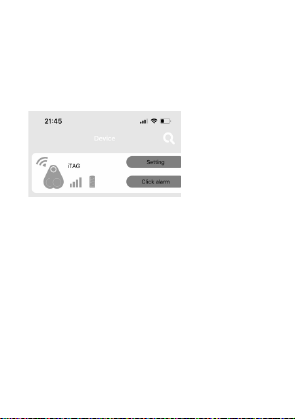
Klicken Sie auf das Symbol "Setting" und gehen Sie zu den
Untermenüs, z. B. Foto für i-Tag hinzufügen, benennen Sie es um,
stellen Sie einen Alarm ein, wenn der i-Tag sich entkoppelt und
wählen Sie den Klingelton aus.
Schieben Sie das Symbol nach links, um das Löschen-Symbol
anzuzeigen. Klicken Sie darauf, um das Gerät zu löschen.
Alarmeinstellungen:
1. Per Doppelklick auf die Schaltfläche des i-Tags, schalten Sie die
Alarmfunktion für die Suche nach dem Smartphone ein.
2. Klicken Sie auf "ok" in der Popup-Benachrichtigung, um den
Smartphone Alarm zu stoppen.
3.Tippen Sie auf das Symbol "Click alarm", um nach dem i-Tag zu
suchen. i-Tag löst einen Alarm aus. Klicken Sie auf "Stop alarm",
um den Alarm des i-Tags zu stoppen.
Fotografieren:
Drücken Sie die Taste "Camera", um in den Kameramodus zu
wechseln.
Drücken Sie das Umschaltsymbol, um zwischen Front- und
Rückkamera zu wechseln.
Drücken Sie die Taste des i-Tags einmal, um ein Foto
auszunehmen; sie funktioniert wie ein Fernauslöser.
Lost History:
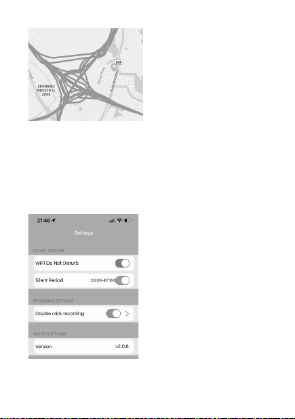
Wenn Sie Ihr i-Tag verlieren, können Sie es über die “Lost History”
wiederfinden. Ein Pin wird automatisch auf der Karte markiert und
zeigt Ihnen den Standort des i-Tags an.
Einstellungen:
Um alle i-Tag Funktionen optimal zu nutzen, gehen Sie in das
Einstellungsmenü, um Ihr i-Tag einzurichten. Wie in der Abbildung
gezeigt:
WIFI Do Not Disturb: WIFI-Status nicht stören-Einstellung.
Pause: Einstellung der Stummschaltzeit.

Dopelklick für Aufnahme: Die aufgezeichneten Nachrichten
werden hier angezeigt. Per Doppelklick auf die i-Tag-Schaltfläche,
können Sie die Aufnahme stoppen. Scrollen Sie nach links, um sie
zu löschen.
Version: Version der aktuellen APP.
Austausch der Batterie:
Die Batterie befindet sich auf der Rückseite des Anhängers.
Verwenden Sie eine Münze als Werkzeug und drehen Sie sie
gegen den Uhrzeigersinn, um die Abdeckung des Batteriefachs zu
öffnen und die Batterie auszutauschen.
Die CR2032-Zelle ist eine Standardbatterie und leicht zu erwerben.
Nach dem Auswechseln setzen Sie den Deckel wieder auf und
verschließen den Deckel durch Drehen im Uhrzeigersinn.
Technische Daten:
Anwendung : Gepäck, Taschen, Schlüsselringe,
Haustiere
Wireless-Version: 5.2
Lautsprecher: ja
Unterstützt: IOS/Android/MIUI
Batterie: 1 x CR2032, 210mah
Effektive Reichweite: 25m, ohne Barrieren
Funktionen: Anti-Loss Funktion, Finder für verlorene
Gegenstände, Selbstauslöser,
Altri manuali per MO9218
1
Indice
Lingue:
Altri manuali MOB Strumento di misura


