
MSG MS012 COM Manuale utente

QUALITY
USER MANUAL
UNIQUENESS
INNOVATION TRAININGSERVICE
MSG MS012 COM
TESTER FOR DIAGNOSTICS
OF VOLTAGE REGULATORS
WARRANTY
2017.05.16

2
User Manual - Tester MSG MS012 COM
1. DESCRIPTION .......................................................................................................................................................3
2. TECHNICAL CHARACTERISTICS........................................................................................................................4
3. CONTROL UNITS..................................................................................................................................................6
3.1 Display...........................................................................................................................................................6
3.2 Buttons and Adjustment Knobs ...........................................................................................................9
3.3 Terminals......................................................................................................................................................10
4. TESTING MODES DISPLAY DATA OUTPUT OF VOLTAGE REGULATORS...................................................10
4.1 Display Data Output when Testing a Voltage Regulator with COM Terminal...........................10
4.2 Display Data Output when Testing a Voltage Regulator with RLO Terminal............................12
4.3 Display Data Output when Testing a Voltage Regulator with SIG Terminal ............................. 12
4.4 Display Data Output when Testing a Voltage Regulator with P-D Terminal ............................13
4.5 Display Data Output when Testing a Voltage Regulator with C Terminal.................................14
4.6 Display Data Output when Testing a Voltage Regulator with D+, 61, L, IL Terminals ............14
5. STEP-BY-STEP INSTRUCTION..........................................................................................................................15
6. TEST CERTIFICATE...............................................................................................................................................16
APPENDIX 1.................................................................................................................................................................17
APPENDIX 2.................................................................................................................................................................19
CONTENTS

3
User Manual - Tester MSG MS012 COM
1. DESCRIPTION
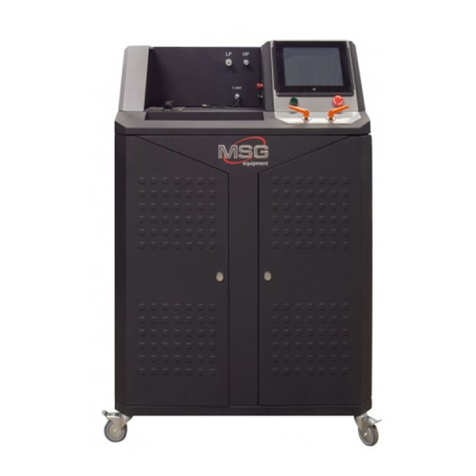
Tester MSG MS012 COM is used for diagnostics of voltage regulators. It simulates installation of
voltage regulator on faultless alternator in order to test its operation under different loads and
modes, under various rotor resistance parameters.
The tester demonstrates how a voltage regulator will operate on the alternator with a certain rotor
resistance. The tester detects if it is possible to install a voltage regulator on the alternator.
A voltage regulator is tested under load, as on the real alternator.
MS012 COM Tester contains the possibility to test all existing types/models of voltage regulators.
New types/models of voltage regulators can easily be added by updating software through USB-
port.
Operation of the tester is conducted by three encoders and a sensor on colored 4.3” TFT display.
MS012 COM Tester is easy and user-friendly in operation. Total testing of a voltage regulator lasts
no longer than 1-2 minutes.

4
2. TECHNICAL CHARACTERISTICS
Fig. 1. MS012 COM Voltage regulator tester - front view
Fig. 2. MS012 COM Voltage regulator tester - back view
User Manual - Tester MSG MS012 COM

5
Supply voltage, V 180-264
90-132
Supply frequency, Hz 50/60
Supply type Single-phase
Maximum consuming power, W 500
Dimensions, mm 260*250*90
Weight, kg 4
Software update Yes
Testing of voltage regulators
Voltage, V 12/24
Resistance of simulated rotor winding, Ohm 1,8-22
Frequency of stator winding (simulation of engine
rotations), rpm 0-6000
Load simulation, % 0-100
Generation voltage adjustment (voltage
regulators with external control) Yes
Tested parameters
- Stabilising voltage
- Current through rotor winding
- COM voltage regulators:
protocol, speed of exchange,
regulator type, errors
- Control lamp
- FR (load on voltage regulator)
Voltage meter accuracy, V 0,1
Ampere meter accuracy, A 0,1
Short circuit protection Yes
Short circuit sound alert Yes
Connection terminals COM, P-D, DFM, D+, RLO, C, SIG
User Manual - Tester MSG MS012 COM

6
MS012 COM Voltage regulator tester is performed in black metallic case with front panel of stainless
steel.
Slot to connect the tester to 220V socket (optional 110V) and safety fuse (2A) are located on the back
panel (Fig. 2).
LCD display, adjustment knobs, power switch and terminals for voltage regulators on the front
panel.
USB B type port used for software update of MS012 COM Tester is located on the left side panel
(Fig. 4).
3. CONTROL UNITS
3.1 C P
Fig. 3. MS012 COM Voltage regulator tester – front panel
Fig. 4. Left side panel - USB port location
User Manual - Tester MSG MS012 COM

7
The tester has short circuit protection. Sound alert turns on in case of short circuit.
In the testing mode parameters of the tester can be set to detect failures in a voltage regulator.
Fig. 5. MS012 COM Voltage regulator tester – Main menu
Button used to activate the testing mode of 12V voltage regulators, which is located
on the sensor display. Menu of terminals for a voltage regulator appears on pressing
the button (Fig. 6).
Button used to activate the testing mode for 24V voltage regulators, which is located
on the sensor display. Pressing the button leads to the testing mode of 24V voltage
regulators.
Button used to enter HELP menu (Fig. 7).
Button of selection of rotor resistance to test a voltage regulator. In order to change
resistance, use the adjustment knob EL LOAD.
Fig. 6. MS012 COM Voltage regulator tester – voltage regulator terminals menu
User Manual - Tester MSG MS012 COM

8
Button to activate voltage regulator testing mode with COM (LIN, BSS) terminal
(Fig. 10).
Button to activate voltage regulator testing mode with RLO terminal (Fig. 12).
Button to activate voltage regulator testing mode with SIG terminal (Fig. 13).
Fig. 7. MS012 COM Voltage regulator tester - Help menu
Button to activate voltage regulator testing mode with P-D terminals (Fig. 14).
Button to activate voltage regulator testing mode with C terminal C (Fig. 15).
Button to activate voltage regulator testing mode with D+, L, IL, 61 terminals (Fig. 16).
Button to return to the previous menu (Fig. 5).
Button to return to the main menu (Fig. 5).
• Tech support: manufacturer contact details menu.
• Service data: service data of the tester.
• Search relay: button is inactive (prospective development).
• EXIT: return to the main men (Fig. 5).
User Manual - Tester MSG MS012 COM

9
3.2 B A K
Fig. 8. MS012 COM Voltage regulator tester – adjustment knobs and on/off switch
MS012 СОМ Voltage regulator tester on/off switch.
• EL LOAD: the adjustment knob with two functions: required resistance of simulated rotor can
be set in the main menu, in voltage regulator testing mode (12V/24V), the load on the simulated
alternator and on a tested voltage regulator, respectively, can be changed from 0% to 100%.
• STATOR: the adjustment knob to change frequency of stator winding from 0 to 6000 in voltage
regulator testing mode (12V/24V). The frequency appear on the display as car engine rotation
frequency.
• VOLTAGE: the adjustment knob to set required current voltage generated by a voltage
regulator in voltage regulator testing mode (12V/24V). Used with terminal modes: COM (LIN,
BSS); RLO; C; SIG; P-D.
User Manual - Tester MSG MS012 COM

10
• В+: voltage regulator plus (30 or 15 terminal).
• В-: voltage regulator minus (earth).
• D+: voltage regulator control lamp terminal, used to connect voltage regulator outputs:
D+; L; IL; 61.
• ST1; ST2: terminals for stator windings of the simulated alternator to connect voltage regulators
stator outputs.
• GC: terminal to connect voltage regulator terminals: COM (LIN, BSS); SIG; RLO; P-D; C.
• F1; F2: terminals for rotor of the simulated alternator, used to connect voltage regulator brushes
or the corresponding voltage regulator outputs.
4.1 D D O W T V
R W COM T
4. TESTING MODES DISPLAY DATA OUTPUT
OF VOLTAGE REGULATORS
Fig. 10. Graphical symbol of COM terminal location in most
common terminals of voltage regulators
3.3 T
Fig. 9. Voltage regulator tester MS012 COM – terminals
User Manual - Tester MSG MS012 COM
Altri manuali per MS012 COM
2
Indice
Altri manuali MSG Apparecchiature di prova




Manuali Apparecchiature di prova popolari di altre marche

SMART
SMART KANAAD SBT XTREME 3G Series Manuale utente

Agilent Technologies
Agilent Technologies BERT Serial Manuale utente

Agilent Technologies
Agilent Technologies N3280A Manuale utente

Vernier
Vernier Go Direct Voltage Manuale utente

Lifeloc
Lifeloc R.A.D.A.R. Manuale utente

Fluke
Fluke T5-600 Istruzioni per l'uso e l'installazione


