Nippon WA-5A Manuale utente

Mercury Analyzer
WA-5A
Instruction Manual
NIC-600-2236-10
Nippon Instruments Corporation

NIC-600-2236-10
Mercury Analyzer WA-5A
Instruction Manual
Table of Contents
1. Introduction ..................................................................................................................... 1
1.1. Safety precautions................................................................................................... 1
1.1.1. Meaning of safety alert symbols....................................................................... 1
1.1.2. Installation precautions..................................................................................... 1
1.1.3. Maintenance precautions ................................................................................. 1
1.2. System Outline......................................................................................................... 2
2. Operating Principle......................................................................................................... 3
2.1. Atmospheric mercury measurement by double amalgam method.......................... 3
2.2. Part names and functions........................................................................................ 4
2.2.1. Front.................................................................................................................. 4
2.2.2. Rear.................................................................................................................. 5
2.2.3. Internal components viewed from the top........................................................ 6
2.2.4. Internal components viewed from the right...................................................... 7
2.2.5. Internal components viewed from the left ........................................................ 8
3. Specifications.................................................................................................................. 9
3.1. Standard configuration............................................................................................. 9
3.2. Component specifications........................................................................................ 9
4. System installation ....................................................................................................... 10
4.1. Conditions for installation....................................................................................... 10
4.1.1. Environment for installation............................................................................ 10
4.1.2. Power supply.................................................................................................. 10
4.2. Installation and connections .................................................................................. 11
4.2.1. WA-5A............................................................................................................. 11
4.3. Software setup....................................................................................................... 12
4.3.1. Installation of WA5Win ................................................................................... 12
4.3.2. Network setting............................................................................................... 13
4.3.3. Configuration setup ........................................................................................ 15
4.4. How to uninstall...................................................................................................... 16
5. Measurement................................................................................................................. 17

NIC-600-2236-10
5.1. Measurement Operation Flowchart....................................................................... 17
5.2. Items essentially required for measurement.......................................................... 18
5.3. System startup....................................................................................................... 19
5.3.1. WA-5A startup ................................................................................................ 19
5.3.2. Startup of control software.............................................................................. 19
5.3.3. System check ................................................................................................. 20
5.4. Condition setting.................................................................................................... 22
5.4.1. Setup of measurement method...................................................................... 22
5.4.2. Blank check condition..................................................................................... 23
5.4.3. Setup of table conditions................................................................................ 24
5.5. Creation of calibration curve.................................................................................. 25
5.6. Measurement of unknown sample (Collector)....................................................... 30
5.7. Measurement of unknown sample (Liquid) ........................................................... 32
5.8. Measurement of unknown sample (Direct Sampling) ........................................... 34
5.9. Printing a report ..................................................................................................... 35
5.10. Suspension of measurement................................................................................. 35
5.11. Finish measurement .............................................................................................. 35
6. WA5AWin ....................................................................................................................... 36
6.1. Basic screen........................................................................................................... 36
6.1.1. SEQUENCE screen........................................................................................ 36
6.1.2. PROFILE screen............................................................................................. 36
6.1.3. CALIBRATION screen.................................................................................... 37
6.1.4. TABLE screen................................................................................................. 37
6.1.5. Common parts................................................................................................ 37
6.1.6. Status bar ....................................................................................................... 38
6.1.7. Table window.................................................................................................. 38
6.1.7.1. Common items.............................................................................................38
6.1.7.2. STD...............................................................................................................39
6.1.7.3. SMP..............................................................................................................41
6.2. List of menu commands......................................................................................... 44
6.2.1. File menu........................................................................................................ 44
6.2.1.1. New...............................................................................................................44
6.2.1.2. Open.............................................................................................................45
6.2.1.3. Save as.........................................................................................................45
6.2.1.4. Page setup..................................................................................................46
6.2.1.5. Print Preview................................................................................................47
6.2.1.6. Print ..............................................................................................................48
6.2.2. Edit menu........................................................................................................ 49
6.2.2.1. Copy.............................................................................................................49
6.2.2.2. Cut................................................................................................................49

NIC-600-2236-10
6.2.2.3. Paste.............................................................................................................49
6.2.2.4. Remove........................................................................................................49
6.2.2.5. Insert.............................................................................................................49
6.2.2.6. Move.............................................................................................................50
6.2.2.7. Save as csv file............................................................................................50
6.2.2.8. Save as jpg File...........................................................................................50
6.2.2.9. Add data.......................................................................................................50
6.2.3. Run menu....................................................................................................... 51
6.2.3.1. Start ..............................................................................................................51
6.2.3.2. Stop...............................................................................................................52
6.2.3.3. Emergency...................................................................................................52
6.2.3.4. Reset............................................................................................................52
6.2.3.5. Equipment-Check........................................................................................52
6.2.3.6. Measurement Condition..............................................................................53
6.2.3.7. Standard gas preparation............................................................................56
6.2.3.8. Flow adjust/Leak check...............................................................................57
6.2.3.9. START & Heater OFF .................................................................................58
6.2.3.10. Heater OFF..................................................................................................59
6.2.3.11. Maintenance ................................................................................................60
6.2.4. Table menu..................................................................................................... 67
6.2.4.1. Memo Setup.................................................................................................67
6.2.4.2. Table Conditions..........................................................................................68
6.2.4.3. Statistical calculation result.........................................................................70
6.2.4.4. Sample name registration...........................................................................70
6.2.4.5. Equipment check result display..................................................................71
6.2.5. System menu.................................................................................................. 72
6.2.5.1. Setup of IPAddress (WA5/WA5Win).........................................................72
6.2.5.2. Setup............................................................................................................74
6.2.5.3. Color Set ......................................................................................................77
6.2.5.4. Firmware update..........................................................................................78
6.2.5.5. If the firmware failed to be updated............................................................79
6.2.6. Window menu................................................................................................. 80
6.2.6.1. Screen Change (Sequence Screen)..........................................................80
6.2.6.2. Screen Change (Profile Screen) ................................................................80
6.2.6.3. Screen Arrangement Initialization ..............................................................80
6.2.6.4. Sequence Log and Error History Labeling ................................................80
6.2.7. Help................................................................................................................. 81
6.2.7.1. About............................................................................................................81
6.3. How to determine a calibration curve.................................................................... 82
6.3.1. 1 Linear formula.............................................................................................. 82
6.3.2. 3 Cubic formula............................................................................................... 82

NIC-600-2236-10
6.4. Calculation formula for mercury amount and concentration.................................. 84
6.5. Mercury content of standard gas........................................................................... 85
7. Maintenance................................................................................................................... 86
7.1. Check items ........................................................................................................... 86
7.1.1. Daily check ..................................................................................................... 86
7.1.2. Annual check.................................................................................................. 87
7.2. Error and warning .................................................................................................. 88
7.3. Troubleshooting..................................................................................................... 91
7.3.1. Reduction in sensitivity................................................................................... 91
7.3.2. Abnormal blank (Increase) ............................................................................. 92
7.3.3. Abnormal sensitivity (Increase)...................................................................... 92
7.4. Maintenance........................................................................................................... 93
7.4.1. Leak check...................................................................................................... 93
7.4.2. Replacement of septum.................................................................................. 94
7.4.3. Dismounting of gas washing bottle/dehumidifying bottle............................... 94
7.4.4. Detachment/Attachment of the cover............................................................. 95
7.4.5. Mounting/Dismounting of collector tube (H2)................................................. 95
7.4.6. Dismounting of absorption cell....................................................................... 96
7.4.7. Cleaning the absorption joints........................................................................ 97
7.4.8. Procedure for decreasing blank level of collector tube.................................. 98
7.4.9. Adjustment of optical system.......................................................................... 99
8. Contact......................................................................................................................... 100

NIC-600-2236-10 1. Introduction
1
1. Introduction
1.1. Safety precautions
1.1.1. Meaning of safety alert symbols
Warning
Indicates that incorrect handling could result in the death or severe injury
to the operator.
Caution
Indicates that incorrect handling could result in moderate or minor injury
to the operator, or damage to property.
1.1.2. Installation precautions
Warning
· Be sure to connect the protective grounding to prevent electric shock.
1.1.3. Maintenance precautions
Caution
· Shut OFF the power supply before staring the maintenance work. Otherwise
electric shock may occur.
Caution
· Maintenance of the heater must be carried out after the power has been turned OFF
and the heater has cooled down close to normal room temperature or it could
result in burns.
· Be careful when touching or handling any of the glass components or they could
be broken.
· Be sure to discharge any liquid from the drain tank once the work has been
completed. It is very important to confirm that the power has been turned OFF
before starting the discharge.

1. Introduction NIC-600-2236-10
2
1.2. System Outline
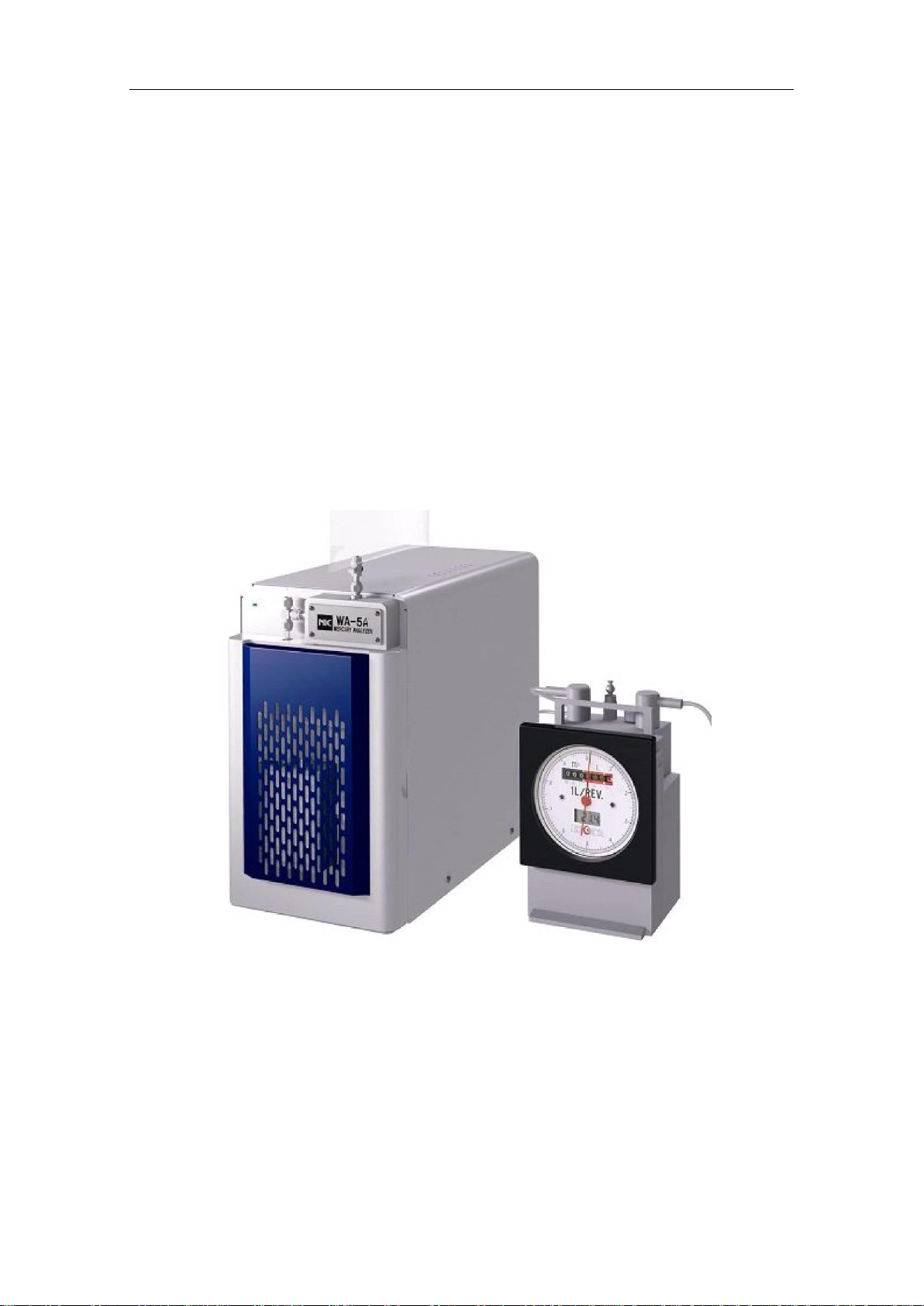
Mercury/WA-5A is a mercury measuring system that features quick, simple operation,
high sensitivity and high accuracy measurement of the amount of mercury collected in a
mercury collector tube dedicated for the system.
The system can be operated and used for processing measurement results through a
PC, allowing for various analysis including statistic calculation.
Furthermore, it is possible to measure automatically more than one collector tubes
continuously by connecting an optional sample changer.
Automatic measurement of a sample in a Tedlar® bag is also possible by connecting a
dry gas meter dedicated for the system.
Please be sure to read this manual before using the system to ensure correct
measurement of mercury.
* The system and the dry gas meter option kit
WA-5A

NIC-600-2236-10 2. Operating Principle
3
2. Operating Principle
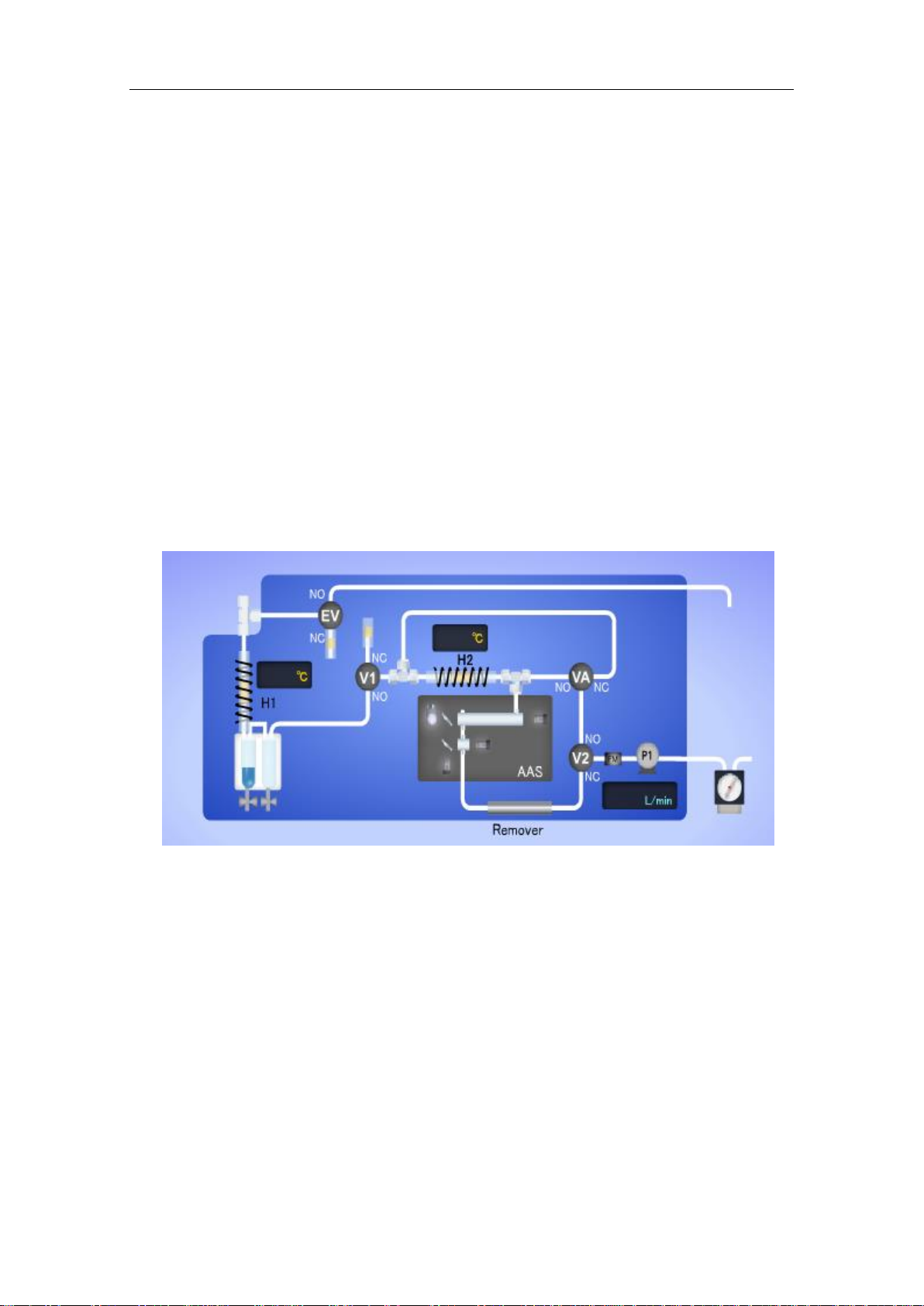
2.1. Atmospheric mercury measurement by double amalgam method
he system heats mercury collector tubes, which ambient air/fuel gas has passed through, in
the heating furnace (H1) by passing air containing no mercury. The mercury trapped in gold
amalgam is released as gaseous mercury during being heated. Any acidic contents that
disturb the detection of mercury are removed in a gas washing unit, and then the gas is
cooled down to remove moisture from it. By passing the gas through the re-collecting
furnace (H2) heated at approximately 165°C, only mercury is re-collected as gold amalgam
and the interference from coexisting components is prevented.
At this time, a carrier gas is introduced through the V1 valve, not through the collector tube
of the heating furnace (H1), and thus variation of measurement flow rates due to difference
in pressure loss between measured collector tubes is prevented. For the detection purpose,
the mercury amount is measured by simultaneously using a high sensitivity cell (1pg - 20ng)
and a wide range cell (1ng -1000ng).
* Flow diagram of dry gas meter connection.
Flow Diagram

2. Operating Principle
NIC-600-2236-10
4
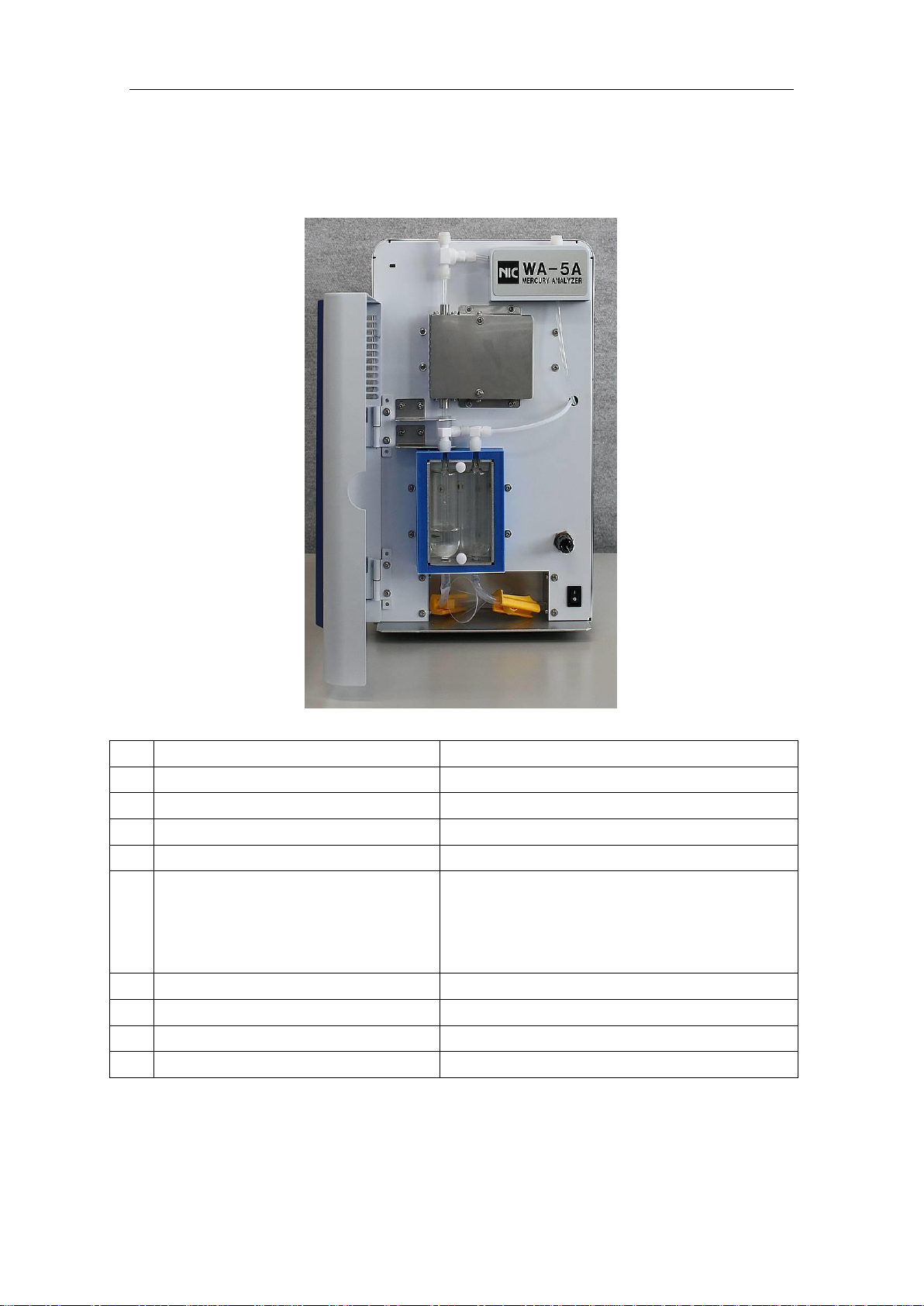
2.2. Part names and functions
2.2.1. Front
No.
Name
Remarks
STD injection port
A built-in septum provided
Collector tube heating furnace (H1)
A built-in cooling fan provided
Collector tube mount port
Made of fluoroplastic
Electronic cooler unit
Gas washing bottle
Removes any acidic gas by washing.
The standard buffer solution (1+1) is used for
measuring ambient air.
NaOH 0.1M is used for reducing vaporization.
Dehumidifying bottle
Removes moisture
To detector
Valve for connecting options
Flow control needle
Adjusted to 0.5L/min

NIC-600-2236-10 2. Operating Principle
5
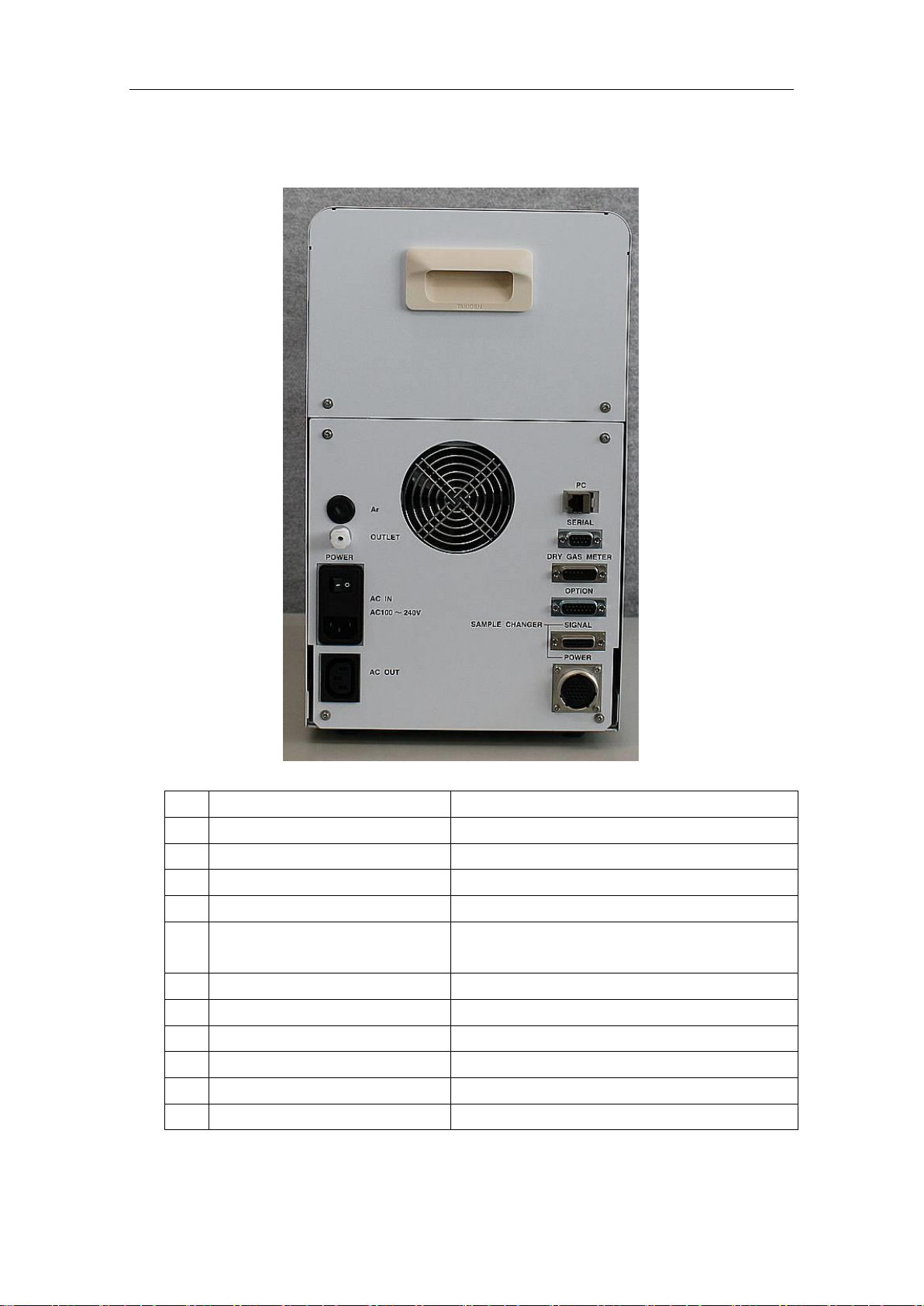
2.2.2. Rear
No.
Name
Remarks
OUTLET
Connected to the exhaust tube (O.D. 6mm)
Power
Power cable connection port
AC100~240V
Fuse
100V10A or 250V5A
AC OUT
Power supply port for the sample changer
* Interlocked with the main switch
PC connection port
Connected through a LAN cable
Serial connection port
(not used)
Dry gas meter connection port
Option
(not used)
Sample changer (signal)
Connected to the cable for control
11
Sample changer (Power)
Connected to the cable for drive
11
Altri manuali per WA-5A
1
Indice
Altri manuali Nippon Strumento di misura

Nippon
Nippon MA-3 Solo Manuale utente

Nippon
Nippon MA-3000 Manuale utente

Nippon
Nippon Mercury/PE-1 Manuale utente

Nippon
Nippon MA-3 Solo Manuale utente

Nippon
Nippon EMP-3 Manuale utente

Nippon
Nippon MA-3000 Manuale utente

Nippon
Nippon Hi-Lutor Manuale utente

Nippon
Nippon RA-4500 Manuale utente

Nippon
Nippon MA-3000 RD-5+SC-5 Manuale utente

Nippon
Nippon EMP-3 Manuale utente