
Packeteer PacketShaper 6500 Manuale utente

00
GIGABIT
LAN EXPANSION MODULE
P/N 20-0162-03 Rev B

DISCLAIMER
THIS MANUAL IS PROVIDED "AS IS" WITHOUT ANY EXPRESS OR
IMPLIED WARRANTY OF ANY KIND INCLUDING WARRANTIES OF
MERCHANTABILITY, NONINFRINGEMENT OF INTELLECTUAL
PROPERTY, OR FITNESS FOR ANY PARTICULAR PURPOSE. IN NO EVENT
SHALL PACKETEER, INC. OR ITS SUPPLIERS BE LIABLE FOR ANY
DAMAGES WHATSOEVER (INCLUDING, WITHOUT LIMITATION,
DAMAGES FOR LOSS OF PROFITS, BUSINESS INTERRUPTION, LOSS OF
INFORMATION) ARISING OUT OF THE USE OF OR INABILITY TO USE THIS
MANUAL, EVEN IF PACKETEER, INC. HAS BEEN ADVISED OF THE
POSSIBILITY OF SUCH DAMAGES. BECAUSE SOME JURISDICTIONS
PROHIBIT THE EXCLUSION OR LIMITATION OF LIABILITY FOR
CONSEQUENTIAL OR INCIDENTAL DAMAGES, THE ABOVE LIMITATION
MAY NOT APPLY TO YOU. Packeteer, Inc. and its suppliers further do not warrant
the accuracy or completeness of the information, text, graphics, links or other items
contained within this manual or for incidental, indirect, special or consequential
damages in connection with the furnishing, and performance of this manual.
Packeteer, Inc. may make changes to this manual, or to the products described herein,
at any time without notice. Packeteer, Inc. makes no commitment to update this
manual. You may not use or export this document in violation of U.S. export laws and
regulations.
COPYRIGHT/TRADEMARKS
Packeteer, the Packeteer logo, combinations of Packeteer and the Packeteer logo as
well as PacketShaper and PacketSeeker are trademarks or registered trademarks of
Packeteer, Inc. in the United States and other countries. Other product and company
names used in this document are used for identification purposes only and may be
trademarks of other companies and are the property of their respective owners.
Copyright © 1996 - 2006 Packeteer, Inc. All rights reserved. No part of this document
may be reproduced, photocopied, stored on a retrieval system, transmitted, or
translated into another language without the express written consent of Packeteer, Inc.
U.S. GOVERNMENT RESTRICTED RIGHTS
The Packeteer Software is comprised of "commercial computer software" and
"commercial computer software documentation" as such terms are used in 48 C.F.R.
12.212 (SEPT 1995) and is provided to the Government (i) for acquisition by or on
behalf of civilian agencies, consistent with the policy set forth in 48 C.F.R. 12.212; or
(ii) for acquisition by or on behalf of units of the Department of Defense, consistent
with the policies set forth in 48 C.F.R. 227-7202-1 (JUN 1995) and 227.7202-3 (JUN
1995). Packeteer, Inc. software is provided with "RESTRICTED RIGHTS." Use,
duplication, or disclosure by the Government is subject to restrictions as set forth in
FAR 52.227-14 and DFAR 252.227-7013 et seq. or its successor. Use of Packeteer,
Inc. products or software by the Government constitutes acknowledgment of
Packeteer Inc.'s proprietary rights in them and to the maximum extent possible under
federal law, the Government shall be bound by the terms and conditions set forth in
Packeteer, Inc.'s end user agreement.
Packeteer®, Inc.
10201 North De Anza Drive, Cupertino, CA 95014
http://www.packeteer.com
PRINTING HISTORY
October, 2006 20-0162-03 Revision B
SAFETY AND REGULATORY COMPLIANCE
For information on safety and regulatory compliance, see "Safety and Regulatory
Information" in Appendix A.

TABLE OF CONTENTS
Chapter 1: When to Use a LAN Expansion Module
Gigabit LAN Expansion Module Requirements ................................ 1-2
Installing a Gigabit LAN Expansion Module .....................................1-3
Chapter 2: Install into a 6500 Model
Installing the LEM ..............................................................................2-2
Verify the Installation..........................................................................2-7
Configure the LEM module ................................................................2-8
Connect the Unit to a Router.............................................................2-9
Managing Traffic with Three LANs ............................................... 2-12
Problems?..........................................................................................2-13
Chapter 3: Install into a 8500/9500/10000 Model
Installing the LEM ..............................................................................3-2
Verify the Installation..........................................................................3-6
Configure the LEM module ................................................................3-7
Connect the Unit to a Router...............................................................3-8
Managing Traffic with Three LANs .................................................3-11
Problems?..........................................................................................3-12
Appendix A: Safety and Regulatory Information


1-1
CHAPTER 1: WHEN TO USE ALAN EXPANSION MODULE
Packeteer’s PacketShaper, PacketSeeker and AppVantage
offer visibility into network application performance and the
ability to control it when needed. They monitor and manage
traffic at WAN access links, ensuring a smooth flow that
maximizes throughput and speeds critical traffic. A
LEM2-1000M-T and LEM2G-1000M-T LAN Expansion
Module extends these benefits to topologies that incorporate
multiple LANs.
The following scenarios are examples of situations that
require a Lan Expansion Module:
• You want to manage a single WAN link and your
network includes a firewall/router that splits your
network into two separate LANs: a protected segment
and a DMZ segment.
• You want to manage a single WAN link and your
network includes a router with multiple LAN
segments.
• You have a single WAN link and your network
includes a router with two LANs; one segment may
connect to the LAN through a firewall and the other to
a VPN tunnel management device.
• Your network includes branch offices with two or
three separate LANs that you manage, and only one
WAN link.

Chapter 1: Introduction
1-2
Gigabit LAN Expansion Module Requirements
The software for the LEM2-1000M-T Gigabit LAN Expansion
Module is included in PacketWise version 6.1.0 and all later
versions. The RoHs-compliant LEM2G-1000M-T requires
PacketWise 7.x or later.
✍Note: The PacketShaper 10000, PacketSeeker 10000 and
PacketShaper/ISP 10000 are only compatible with LEM2G-
1000M-T and later-generation LEM2-1000M-T LAN
Expansion Modules. These newer LEM2-1000M-T LEMs
can be identified by their serial numbers, which have values
of 006-10010001 or higher. For details, see “Problems?” on
page 3-12.
LANs connected to this copper-connector LEM module must use
10BaseT, 100BaseT, or 1000BaseT RJ-45 Ethernet ports or use
fiber optic conversion units for fiber optic networks.
LED
Indicators
The front panel of the LEM has the following LED indicators
beside each port.
LED
Indicator Description
Link Illuminated when the network cable is
properly connected
Tx/Rx Illuminated when network cable is properly
connected; flickers when the unit is
transmitting and receiving data
Speed When properly installed, the speed LED
color on the LEM module indicates that the
LEM is operating at the following speeds:
• amber = 1GB
• green = 100MB
•off=10MB
Chapter 1: Introduction
1-3
Installing a Gigabit LAN Expansion Module
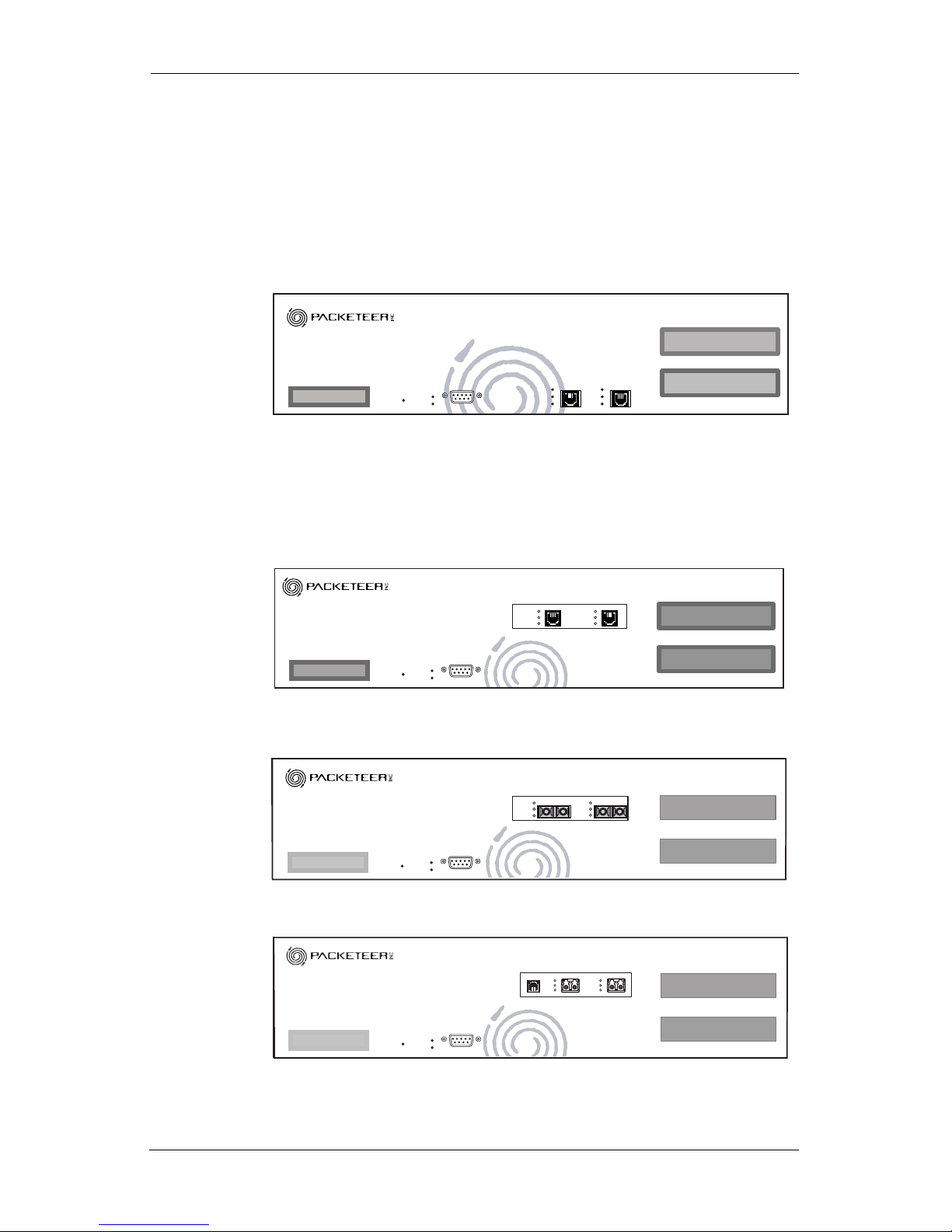
The connectors on your Packeteer unit look like one of the four
illustrations below. Follow the instructions that match your unit.
If your unit looks like this, follow the installation directions in
Chapter 2, "Install into a 6500 Model."
If your unit looks either one of these, follow the installation
directions in Chapter 3, "Install into a 8500/9500/10000 Model."
FAULT
POWER
STATUS Tx/Rx
100
LINK
Tx/Rx
100
OUTSIDEINSIDE LINK
CONSOLE
FAULT
POWER
STATUS
CONSOLE
INSIDE OUTSIDE
LINK
Tx/Rx
SPEED
LINK
Tx/Rx
SPEED
FAULT
POWER
STATUS
CONSOLE
OUTSIDE
INSIDE OUTSIDE
LINK
Tx
Rx
LINK
Tx
Rx
FAULT
POWER
STATUS
CONSOLE
OUTSIDE
INSIDE OUTSIDE
LINK
Tx
Rx
LINK
Tx
Rx
BYPASS CTRL
INSIDE OUTSIDE
SX/LX
Tx/Rx
Link
SX/LX
Tx/Rx
Link

Chapter 1: Introduction
1-4
Chapter 2: Install into a 6500 Model
2-1
CHAPTER 2: INSTALL INTO A6500 MODEL
This chapter describes how to install a LEM2G-1000M-T or LEM2-
1000M-T Gigabit LAN Expansion Module (LEM) into
PacketShaper 6500, PacketShaper 6500/ISP, or
PacketSeeker 6500. The directions in this chapter apply only to
these models, which are hereafter collectively referred to as a
“6500 model.”
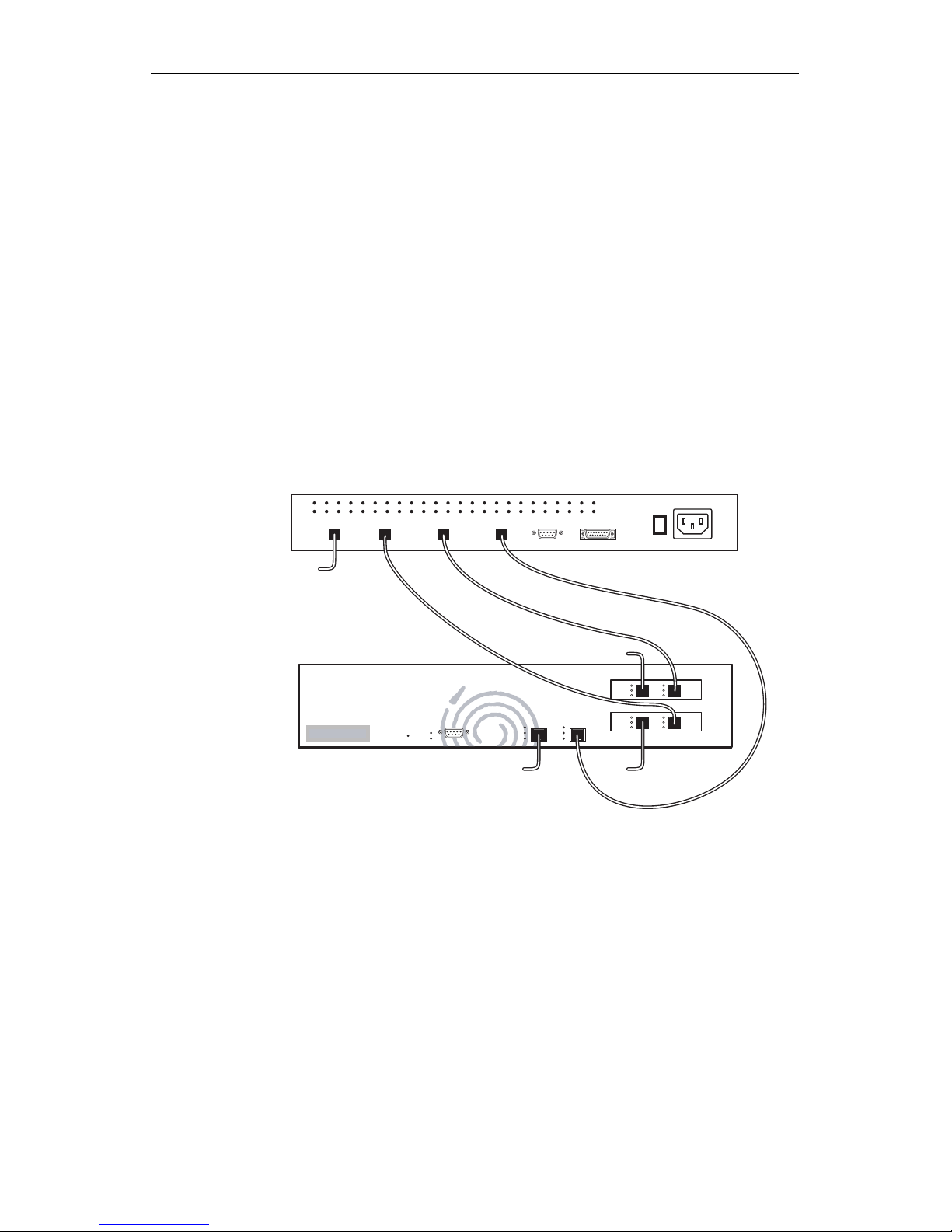
The following illustration shows a unit with two LEMs installed,
for a total of three LANs using one 6500 model. This is a maximum
configuration; you can install only one module if you wish.
Directions begin on the next page.
FAULT
POWER
STATUS Tx/Rx
100
LINK
Tx/Rx
100
OUTSIDE
INSIDE LINK
CONSOLE
WAN Router
INPUT
100-240 MAX
50-60Hz
INSIDE OUTSIDE
INSIDE OUTSIDE
LAN B
LAN C
LAN A
WAN
LINK
Tx/Rx
SPEED
LINK
Tx/Rx
SPEED
LINK
Tx/Rx
SPEED
LINK
Tx/Rx
SPEED
Chapter 2: Install into a 6500 Model
2-2
Installing
the LEM
To install the LEM into a 6500 model:
1. Disconnect the system from any telecommunication links,
networks, or modems, and then turn off the system power
source. WARNING: Failure to do so before you open the
system or do any procedures can result in personal injury or
equipment damage.
2. Ground yourself. WARNING: Electrostatic discharge
(ESD) can damage system components. If an ESD station is
not available, wear a wrist strap attached to a metal part of
the system. If you don’t have a strap, touch some metal part
of the box to ground yourself.
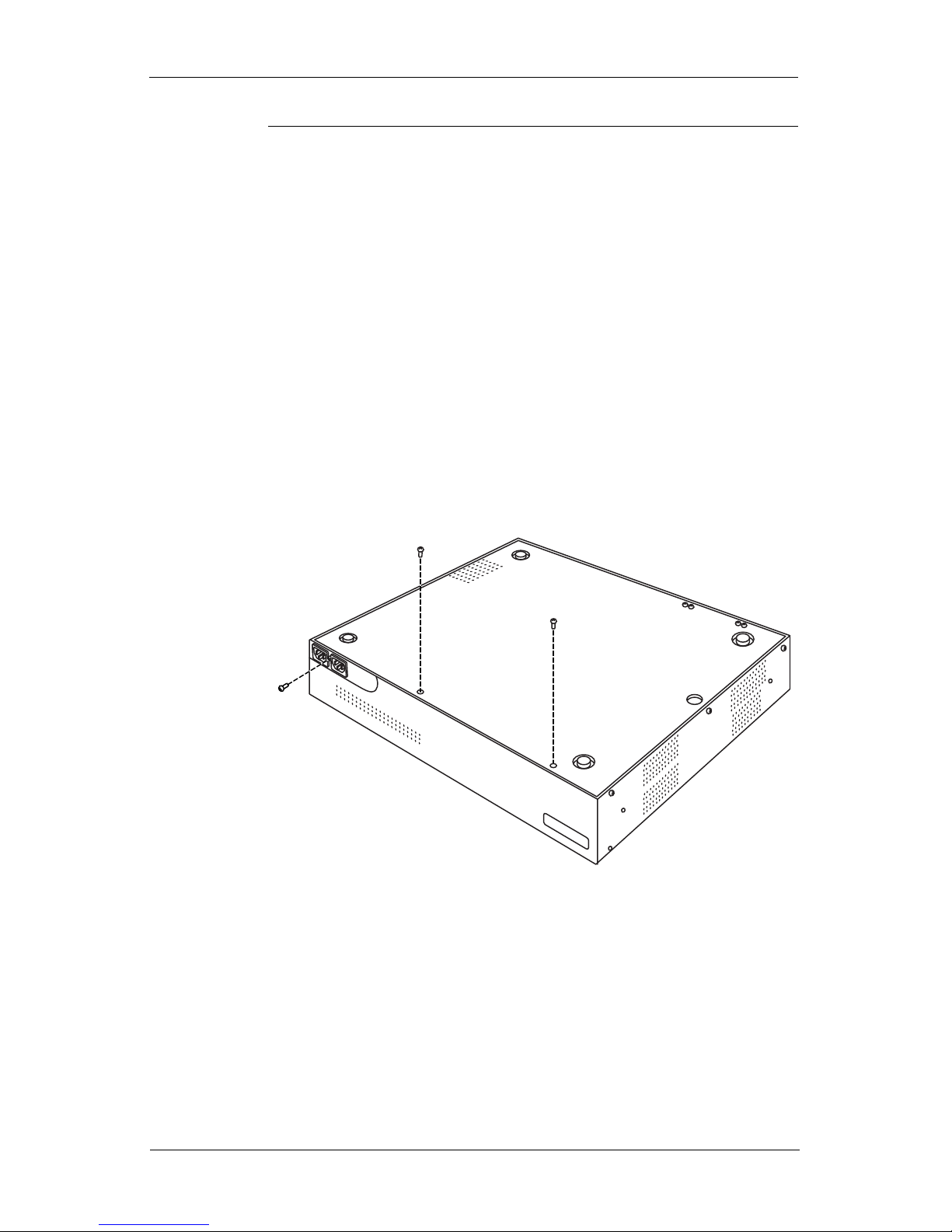
3. Remove the rackmount ears (if present) from the 6500
model, then remove the screws from the back of the unit.
Questo manuale è adatto per i seguenti modelli
9
Indice


