
Pocket Wizard MiniTT1 Manuale utente

PDF generated using the open source mwlib toolkit. See http://code.pediapress.com/ for more information.
PDF generated at: Tue, 05 Aug 2014 18:09:32 PST
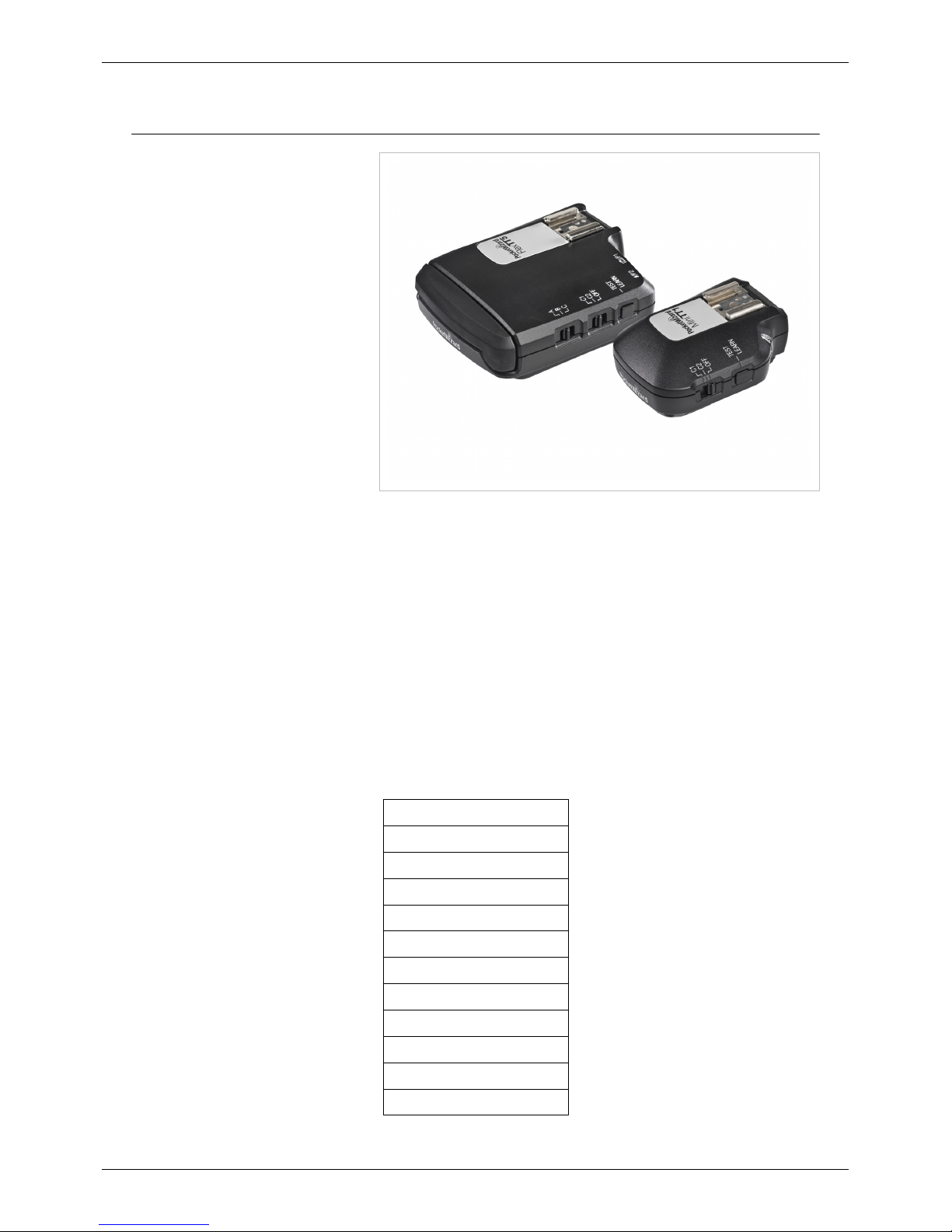
MiniTT1 and FlexTT5
Manual
MiniTT1 and FlexTT5 1
MiniTT1 and FlexTT5
Congratulations on your purchase of
the PocketWizard MiniTT1® /
FlexTT5® Wireless Photo Control
System for Canon or Nikon DSLR
cameras and flashes. You can use the
MiniTT1 Transmitter and FlexTT5
Transceiver to control single or
multiple off-camera electronic or
intelligent TTL flashes. The
PocketWizard ControlTL® System
takes the complex TTL data being sent
through the camera’s hot shoe and
digitally interprets and transmits it as a
reliable radio signal. You can now
place TTL or manual flashes anywhere
to illuminate the scene: Around
corners, out-of-sight and in bright sunlight. The MiniTT1 and FlexTT5 are compatible with any PocketWizard radio
for triggering manual flash or remote cameras.
The Canon-specific MiniTT1 and FlexTT5 radios work within the Canon E-TTL II system.
The Nikon-specific MiniTT1 and FlexTT5 radios work within the Nikon i-TTL / CLS system.
All references to TTL are exclusively for the electronic or intelligent TTL systems specific to Canon (E-TTL II) and
Nikon (i-TTL / CLS), and not film TTL.
The terms Speedlite or Speedlight are used interchangeably throughout this wiki.
This wiki contains the latest information about the operation of your radios. If you would like to download a PDF of
this information, click here and follow the instructions.
Operation
Quick Navigation
Getting Started
MiniTT1 and FlexTT5 Key Features
Safety Warnings
Nikon Compatibility
Canon Compatibility
Batteries
PocketWizard Utility
Basic Wireless TTL
Advanced Wireless TTL
Manual Flash
PowerTracking

MiniTT1 and FlexTT5 2
HyperSync
High Speed Sync
Channels
Learn Mode
Remote Camera Triggering
Factory Reset
Status LED
Mounting
Long Range Performance
MiniTT1 and FlexTT5 Specifications
FCC Notice
To quickly begin using your radio, you might be interested in the Quick Guides or other documentation at
PocketWizard.com [1].
For more detailed information, use the links below to hone in on the specific feature you are looking for. The links
are the section headings. For example, the words Getting Started below will take you straight to that section.
Getting Started
Information you should know before using your radios. Also referred to as "READ ME FIRST" information.
Key Features
Learn more about the key features of your MiniTT1 and FlexTT5. Additional information on features can also be
found at PocketWizard.com [2]
MiniTT1 and FlexTT5 FAQ
Having trouble with your MiniTT1 or FlexTT5? Check out our MiniTT1 and FlexTT5 FAQ page!
Safety Warnings
Information about operating the radios safely can be found here.
Nikon Compatibility
Find out exactly what cameras and flashes work with the Nikon-Specific ControlTL radios, and what specific
operational considerations are required for your gear.
Canon Compatibility
Find out exactly what cameras and flashes work with the Canon-specific ControlTL radios, and what specific
operational considerations are required for your gear.
Batteries
Battery types, polarity, and life expectancy information.

MiniTT1 and FlexTT5 3
PocketWizard Utility
Connect your radios to your computer via USB and control many aspects of them via the PocketWizard Utility.
Basic Wireless TTL
Simple TTL operation instructions. Use all of your Speedlites as one zone of light with the camera making the
exposure decision.
Advanced Wireless TTL
Advanced i-TTL operation instructions. Control individual zones of light. Control your remote Speedlights manually
from the camera position.
Manual Flash
Trigger any remote flash simply.
PowerTracking
Trigger a compatible remote studio flash and control its power level directly from the camera position.
HyperSync
Learn more about increasing your X-Sync speed using HyperSync.
High Speed Sync / Auto FP
Use your Speedlites with your camera's fastest shutter speeds. See Understanding HyperSync and High Speed Sync.
Channels
Channels allow you to work collaboratively with other photographers, or to work with your radios exclusively.
Learn Mode
Learn Mode is not required for normal operation of your radios, but if you are working away from the PocketWizard
Utility and in conflict with another photographer on your channel, Learn Mode allows you to change channels in the
field.
Remote Camera Triggering
In addition to triggering remote flash, your PocketWizard radios can trigger a remote camera's motor drive port.
Relay Mode is covered in this section.

MiniTT1 and FlexTT5 4
Factory Reset
Sometimes you just need the settings in your radio to be like they were when you first took them out of the box.
Status LED
This section covers the various colors and blink patterns used by the Status LED.
Mounting
Radios perform best when mounted properly.
Long Range Performance
Optimize range using these techniques.
MiniTT1 and FlexTT5 Specifications
Details on radio specifics are found here.
FCC Notice
The FCC wants you to know...
References
[1] http://www.pocketwizard.com/support/manual
[2] http://www.pocketwizard.com/products/transmitter_receiver/
MiniTT1 and FlexTT5 Key Features
You can also learn about the MiniTT1 and FlexTT5 on PocketWizard.com [2]
ControlTL
PocketWizard’s newest firmware platform taps into the camera’s digital communications to enable an entirely new
level of remote flash capability through our proven radio system. ControlTL allows remote TTL systems as well as
Manual Power Control. ControlTL firmware is configurable and upgradeable for “future-proof” continuous
improvement.
Dedicated TTL Triggering
Locking your MiniTT1 Transmitter into the hot shoe of a Canon or Nikon DSLR camera, and mounting flashes onto
FlexTT5 Transceivers gives you full flash exposure control with the freedom and reliability of a PocketWizard radio.
There are no special settings to make or modes to call up. Use the camera’s flash exposure controls for basic control
of remote flashes, or add an AC3 ZoneController or Canon/Nikon Master unit for even more flexibility.
Manual Power Control

MiniTT1 and FlexTT5 Key Features 5
Adjust the manual power settings of your remote Speedlights directly from a AC3
ZoneController, or master flash mounted on your on-camera MiniTT1 or FlexTT5. You can
independently control the power output of up to three remote groups of lights (you can have as
many lights in each group as you want) from full power down to the lowest setting through the
user interface on the back of the master flash or with the dials of the AC3 ZoneController. Now
you can work with total control with your remote lights, without leaving your shooting
position.
HyperSync
Our patent pending HyperSync® technology allows photographers to achieve faster X-sync
speeds with full power flash. That extra speed can be used to freeze action or cut ambient light
- both of which can produce results never possible before. HyperSync works with both
Speedlights and full size studio flash. All you need is a MiniTT1 or FlexTT5 on camera that
has been tuned to your specific camera and flash via the PocketWizard Utility. While
performance varies by the camera and flash equipment being used, HyperSync will get the
maximum possible out of any set-up.
High Speed Sync (Auto FP)
When HyperSync can’t keep up, the native Canon and Nikon system's High Speed Sync takes over for Speedlite
flash photography all the way to 1/8000. ControlTL gains faster recycling times and more flashes per set of batteries
when shooting in Auto FP / HSS Flash mode. Use this feature to shoot wide open in bright sun for amazing results.
Rear Curtain Sync
We've optimized Rear Curtain Sync performance with Canon cameras, and also extend via
radio the Rear Curtain Sync capabilities of Nikon cameras.
PowerTracking
When working with certain manual flashes, you can change any of your settings on your
camera and the system adjusts for those settings. Change your camera's exposure compensation
to adjust the flash output, or make adjustments in aperture or ISO and the system balances your flash for proper
exposure.
PocketWizard Utility
Programmable and Upgradeable: Use the PocketWizard Utility software with the on-board USB port to program the
MiniTT1 and FlexTT5 to any PocketWizard channel and zone as well as many other custom settings. ControlTL
radios can be upgraded whenever updates and feature enhancements are available.

6
First Steps
Getting Started
Next recommended reading: Batteries
Before You Begin
If this is the first time you are using a remote TTL flash system, we recommend you consult your camera and flash
manuals for the basics of positioning your flash units.
Review the owner’s manuals for your camera and flash system. For most basic functions when using Canon or
Nikon’s system with PocketWizard's, operation is identical. Important exceptions will be noted in this wiki.
Turn Everything OFF
All equipment should be turned OFF when
making connections. If not, unwanted
triggering may occur when inserting or
removing a flash or connecting a camera
cable.
Turn OFF your PocketWizard radios,
electronic flash units, cameras, etc.,
before changing batteries in the flashes,
cameras, or radios. See the Batteries
section for more information.
ControlTL radios use information presented
by the camera and flash when the camera
wakes up. If you do not power off your gear when making changes to your equipment, like adding a flash or
accessory to the top shoe or changing the camera body in use, then this information is missed and the radios may not
perform properly. If you do not power off the equipment, try letting your camera enter a sleep cycle when making
equipment changes: wait for the meters to turn off in the viewfinder (entering sleep), then half-press the shutter to
exit sleep. This may restore proper operation.

Getting Started 7
First Shot
The first exposure after making initial connections or powering on may not be properly exposed. The first shot is a
camera calibration shot for Canon radios and will not fire your remote flashes. Always test fire at least twice!
Transmitters
You may use a FlexTT5 as a transmitter instead of a MiniTT1 in all scenarios.
Channels
Make sure all PocketWizard radios are set to the same PocketWizard channels. The PocketWizard channel is used
instead of Nikon or Canon’s communication channel. See the Channels section for more information.
Don't use REMOTE or SLAVE mode
Always set your remote TTL flashes to standard i-TTL/E-TTL mode. Do not use MASTER, REMOTE, or SLAVE
modes on your remote flashes. The ControlTL system talks to your flash via the hot shoe and SLAVE/REMOTE
modes do not communicate through the shoe.
Canon flashes set to <SLAVE> and connected to FlexTT5 radios will have slave mode automatically turned off, but
will still function as slaves correctly.
Nikon flashes set to REMOTE and connected to FlexTT5 will not function as remotes.
Set the remote/slave group A, B, or C, via the FlexTT5 Zone Switch.
Powering On
1. Turn OFF all your PocketWizard radios,
electronic flashes, cameras, etc., before
making connections.
2. When all equipment is connected, turn
ON your equipment starting from the top
and working your way down.
1. Turn on your flash first
2. Next, turn on the PocketWizard radio
by setting the power switch to C.1 or
C.2. Verify Status LED blinks
normally (short blink every 2 seconds)
(see the PocketWizard Utility for
more information on C.1 and C.2)
3. Turn on your camera last (if using radio/flash on-camera)
The first exposure after making initial connections and powering on may not be properly exposed. The first shot is a
camera calibration shot for Canon and will not fire your remote flashes. Always test at least twice.
NOTE: With Canon radios, a few flash adjustments may not be available when the flash is in the shoe of a powered
on MiniTT1 or FlexTT5 and sitting on an active camera. For example, you cannot take a 580EX II out of
<MASTER> mode if the flash is in the hot shoe of a powered on remote FlexTT5. Turn the MiniTT1 or FlexTT5 off
and wait for the camera to sleep, or remove the flash from the shoe to access these special mode changes.

Batteries 8
Batteries
Next recommended reading: Status LED
Some PocketWizard radios require batteries.
CAUTION
Turn OFF your equipment (PocketWizard units, electronic flash units, cameras, etc.) before making
connections or changing batteries.
Battery Chemistry
FlexTT5s will operate reliably using just about any pair of ~1.5 volt AA batteries, regardless of the type of battery
chemistry. Alkaline, lithium, nickel metal hydride, nickel cadmium, and other battery chemistrys may vary
somewhat in total life expectancy, but all are compatible. PocketWizard radios will report the most accurate
remaining battery life using Alkaline batteries, since other chemistrys have a slightly different voltage discharge
curve, which is how the remaining life is measured.
Regardless of the particular battery chemistry, the MiniTT1 and FlexTT5 regulate the batter power which gives
excellent performance throughout the entire life of the batteries. The unit will continue to function normally until the
batteries are nearly exhausted.
The voltage regulation in our radios is very efficient. There is usually only a small benefit when using lithium
(non-rechargeable) batteries. Lithium batteries are designed for the quick burst high current draw found in cameras
and portable flash devices. Expect only a 10-20% longer battery life (approximate) over alkaline batteries when
using lithium batteries.
FlexTT5, Canon or Nikon
Note proper polarity
Install 2 fresh AA (IEC:LR6) batteries into
the FlexTT5 Transceiver. Make sure to note
proper polarity.
Alkaline batteries are recommended.
Rechargeable or other chemistry batteries
will also work, though life expectancy may
vary.
Life expectancy = approximately 60 hours
with alkaline batteries.

Batteries 9
MiniTT1, Canon or Nikon
Note proper polarity
The MiniTT1 saves batteries by
automatically entering an extremely low
power state when the camera enters sleep
mode, or if not on a camera and TEST is not
pressed for 10 seconds.
Install a fresh CR2450 coin cell battery into
the MiniTT1 Transmitter. Make sure to note
proper polarity. When the battery is in the
radio, you should be able to see the + sign.
Life expectancy varies based on usage
profile, as well as camera and flash models.
When using a CR2450:
• Canon MiniTT1 = 100’s of
hours/thousands of triggers
• Nikon MiniTT1 = approximately 30
hours of camera awake time
Basic Trigger Mode consumes the coin cell
battery more quickly and is not recommended when using the MiniTT1 for Nikon on a Nikon camera, or when using
the MiniTT1 for Canon on a Canon camera.
Low temperature can significantly affect coin cell performance. Always use fresh batteries in cold temperatures.
Make sure to read the Safety Warnings about temperature.
MiniTT1 and FlexTT5 Status LED
<videoflash>ooEGUQ4yX2g&loop=1&rel=0&autoplay=0|225|155</videoflash>
Look at the normal Status LED blink to determine battery level, or use the PocketWizard Utility.
LED Blink
1 Green blink = More than 50% remaining
2 Amber blinks = Warning – less than 50% remaining
3 Red blinks = Less than 25% remaining – change immediately
These battery levels are tuned for alkaline batteries in the FlexTT5 and a standard Lithium coin cell in the MiniTT1.
Other battery chemistries can work, but their battery level may not be reported accurately.
Please note: The LED battery level blinks are based on the discharge curve and voltages of standard Alkaline
batteries. Those are the most common and most predictable. Rechargeables have slightly different voltages, very
different discharge curves, and, considering the different chemistries and aging of the batteries, are less predictable
from the LED's perspective. It would be nearly impossible for us to make an LED battery level blink that
accommodated all chemistries and aging of rechargeables.
You can still use your rechargeable batteries, but you need to build your own mental map of how they perform over
time. If your rechargeables last 20 hours, then plan accordingly. If they blink amber when fully charged, then work
with that information. If they only last a few hours when the LED blinks red, then use that information. The radios
will reliably measure the voltages, but the LED colors and blinks will have different meanings for your batteries
relative to alkalines.
Altri manuali per MiniTT1
3
Questo manuale è adatto per i seguenti modelli
1
Indice


