
Purewords CNC3020 Manuale utente

Small CNC User Manual
Applicable Model:CNC3020/3040/4060 model

Table of Contents
Foreword...............................................................................3
1.Equipment overview.........................................................4
1.1.Equipment packing list..............................................................4
1.2.Names and functions of various parts of the equipment...........5
1.3.Equipment technical parameters..............................................6
2.Equipment installation and commissioning.....................6
2.1.Installation precautions.............................................................6
2.2.Installation instructions......................................................7
2.3.Control software installation...............................................9
2.4.Equipment debugging instructions.......................................9
3.Equipment instructions....................................................10
3.1.Processing flow............................................................10
3.2.Introduction to common functions of Mach3...............12
3.3.Compatible programming software..............................14
4.Tool selection......................................................................14
5.Common material processing parameters......................16
6.Equipment service.............................................................17

Foreword
First of all, thank you for purchasing and using our products. Please read
this instruction before installing your machine, so as not to cause
unnecessary trouble for your installation and use.
The equipment is tested before leaving the factory and meets the
shipping standards. Before using, please read the following precautions
carefully:
1. The machine has been rigorously tested before leaving the factory to
ensure that all functions of the machine are in good condition, but the
machine must be transported by logistics. When receiving the goods,please
make sure that the outer packaging of the product is complete and
unpacking. Please check the goods afterwards. If there is any problem, please
contact the after-sales personnel in time;
2. The machine is connected with the computer by USB, the computer
used for control should be dedicated, and as far as possible, do not install
other unrelated application software;
3.Please ensure that there is a grounding function for the power supply
socket. If there is no grounding, please perform external grounding.
4. This unit uses single-phase AC 220V, 50Hz (single-phase AC110V,
50/60Hz in some areas), if not allowed, please Do not disassemble it in order
to avoid danger;
5. When processing, it is relatively large when it comes to cutting chips.
Especially when processing metal materials, please wear protective glasses to
prevent metal chips from flying out and hurt your eyes.
6. Do not approach the spindle rotating at high speed during machining.
Do not touch the workpiece being processed by hand to avoid danger.
7.If accidents are found during work, please turn off the power in time
and wait for a while before re-use. If the problem is still not solved, please
contact the after-sales personnel.

(1).CNC Engraving machine rack----1 units
(2).CNC Engraving machine control box----1 units
(3).Test machine carving knife----5 Put
(4).Fixed clamp----4 sets
(5).Spindle chuck----1PC
(6).Spindle wrench----1 pair
(7). Allen wrench----5 put
(8). power cable----1 Articles
(9).USB cable----1 Articals
(10).Tool set----1 PC
(11).U disk ----1PC
(12).The axis of rotation----1 PC
(13).The fuse----2PC
(14).Operation manual ----1 PC
(15).software CD----1 PC
(16).Engraving machine spindle cooling pump----1 units(4060 model)
The above items are the packing list when the machine is shipped as
standard. The specific goods are subject to the purchase.
If there is any missing item, please contact customer service.
1.Engraving overview
1.1.Equipment packing list
1
2
3
4
5
678910
11
12
13
14
15
16

1.2.Names and functions of various parts of the equipment
Electric control box
switch description
3020/3040 model
Label
Button name
Key Function
1
switch
Control the power supply of the electric
control box
2
Spindle start switch
3
Spindle speed
control knob
Adjust the spindle switch and spindle speed
4
Emergency stop
button
Pressing the machine in an emergency will
stop immediately
4060 model
Control spindle start and stop
Label
name
Key Function
1
Spindle panel
Display spindle status
2
Water pump
switch
Control the start and stop of the spindle
cooling water pump
3
Spindle start
switch
4
switch
Control the power of the control box
5
Emergency stop
switch
Pressing the machine in an emergency
will stop immediately
Control spindle start and stop

1.3.Equipment technical parameters
SKU
E-3020E-3020A
E-3040E-3040A
E-4060E-4060A
Chinese name
3020 3 axis / 4 axis
3020 3 axis / 4 axis
6040 3 axis / 4 axis
Effective work
schedule
200(X)x300(Y)x55(Z)mm
300(X)x400(Y)x55(Z)mm
395(X)x600(Y)x70(Z)mm
Effective work
schedule
500*390*390(H)mm
610*450*390(H)mm
840*640*460(H)mm
Maximum
thickness
ofmaterial
≤65mm
≤65mm
≤100mm
Maximum
workpiece size
240mm * 425mm
320mm * 525mm
750mm * 480mm
working desk size
240mm * 425mm * 15mm
320mm * 525mm * 15mm
750mm * 480mm * 15mm
Frame material
6061 aluminum alloy +
6063aluminum alloy
6061 aluminum alloy + 6063aluminum
alloy
6061 aluminum alloy +
6063aluminum alloy
Drive unit (X/Y/Z)
1202 Trapezoidal screw
1202 Trapezoidal screw
New 1605 ball screw
Sliding unit X
axis
16mm Chrome plated hard shaft
16mm Chrome plated hard shaft
16mm Chrome plated hard shaft
Slide unit Y axis
16mm Chrome plated hard shaft
16mm Chrome plated hard shaft
20mm Aluminum support opticalaxis
slide
Sliding unit Z
axis
12mm Chrome plated hard shaft
12mm Chrome plated hard shaft
13mm Chrome plated hard shaft
Stepper motor
type
57 2-phase stepper motor -2A
57 2-phase stepper motor -2A
57 2-phase stepper motor -3A
Spindle motor
300W DC
300w DC
800w New water cooled spindle
Spindle speed
0~8000rpm/ min(Stepless
speedregulation )
0~8000rpm / min(Stepless
speedregulation )
0~24000rpm/min
( Frequencyconverter speed
regulation )
Airspeed
0-1000mm / min
0-1000mm / min
0-2500mm / min
Engraving speed
0-1000mm / min
( Differentmaterials )
0-1000mm / min( Differentmaterials )
0-2000mm / min
( Differentmaterials )
Repeatability
≤0.05mm
≤0.05mm
≤0.03mm
Machine weight
21.5KG/23.5KG
25.5KG/27.5KG
51KG/59KG
2.Equipment installation and commissioning
2.1.Installation precautions
(1).This machine uses a USB port to connect to the computer. When installing, you
need to connect the USB cable to the computer.
(2).The computer used for control should be dedicated. Do not install other unrelated
application software and anti-virus software as much as possible. Also, do not connect
to the network. Viruses and other application software may affect the operation of the
machine.
(3).The machine adopts single-phase A C 220V, 50Hz power supply (single-phase A C
110V, 5 0 / 60 0 z z in some areas), please ensure the correct and stable supply voltage;
(4).Since the machine has a frequency converter, the inverter will generate a lot of static
electricity during operation. Please ensure that the grounding function of the power
supply socket of the equipment is normal. If it is not grounded, it will affect the life and
normal operation of the machine.

(5).Please be sure to follow the steps of the engraving machine installation instructions
during installation. The installation may cause the machine to malfunction due to
incorrect installation by the user.
(6).If there is an y problem with the operation of the machine during the machine
debugging process, please contact the after-sales personnel for disposal. Do not
disassemble it without permission, so as to avoid danger;
(7).Do not plug or unplug the terminal at any time while powering on. At the same
time, please note that the interval between the power on and off of the device should be
above 15S. If you do not pay attention to the above problems, it may cause damage to
the control circuit.
2.2.Installation instructions
The machine can be installed by following the instructions below.
Step 1: Install the motor, and install the stepping motors of the three axes to the
corresponding shafts. The locking screws on the couplings are tightened with the
Allen key.

Step 2: Align the wire plug on the motor with the corresponding plug on the machine.
Step 3: Connect the engraving machine frame, electric control box and computer wiring
(refer to the wiring diagram for connection). The aerial plug-in cable is connected
between the rack and the electric control box. The connection will be affixed with
X, Y, Z, A (purchasing A-axis), spindle, spindle cooling water pump (4060 model)
corresponding to the aviation plug and The interfaces with the same identification
after the electric control box are connected one by one. Connect the USB cable
between the electric control box and the computer. Be sure to connect the wiring.
Otherwise, the computer will not be able to control the machine. Finally, connect the
power cable.
3020/3040 model wiring diagram
Label name
Port description
X
X-axis motor
Y
Y-axis motor
Z
Z-axis motor
A
A-axis motor
SPINDLE
Spindle motor
TOOL
Tool set
USB
Connect the data cable to the
computer
4060 model wiring diagram
Label name
Port description
X
X-axis motor
Y
Y-axis motor
Z
Z-axis motor
A
A-axis motor
TOOL
Tool set
PUMP
Spindle motor cooling water pump
VFD
Frequency conversion spindle
USB
Connect the data cable to the
computer

2.3.Control software installation
Software installation computer requirements:
1. desktop computer or laptop;
2. USB port;
3. computer system:WindowsXP/Win7/win8/win10 system;
Our company provides Mach 3 software for testing and testing. It is
only for teaching and personal research. If there is any commercial use,
please buy genuine, thank you! Mach 3 official website:
www.machsupport.com
Basic installation of Mach3 software: Please open the supplied USB flash
drive and find the installation folder.
Please confirm that the USB cable is connected before the software is
installed. Software installation steps: Double click .
Open into the installation interface, and then press the Enter key "Enter",
"Next" or "YES" until The "Finish" installation is complete:
> > Next > Yes > Next > Next > Next > Next > Determine > Finish
> Determine > Next > Yes > Next > Next > Next > Next >Yes > Finish.
2.4.Equipment debugging instructions
Step 1: Double-click to
enter the software and wait for
the software software interface
to load. The first time you start
the software, the computer
will pop up the following dialog
box, please select "BSMotion-
V2.0", "Don't ask me this again"
, "OK"
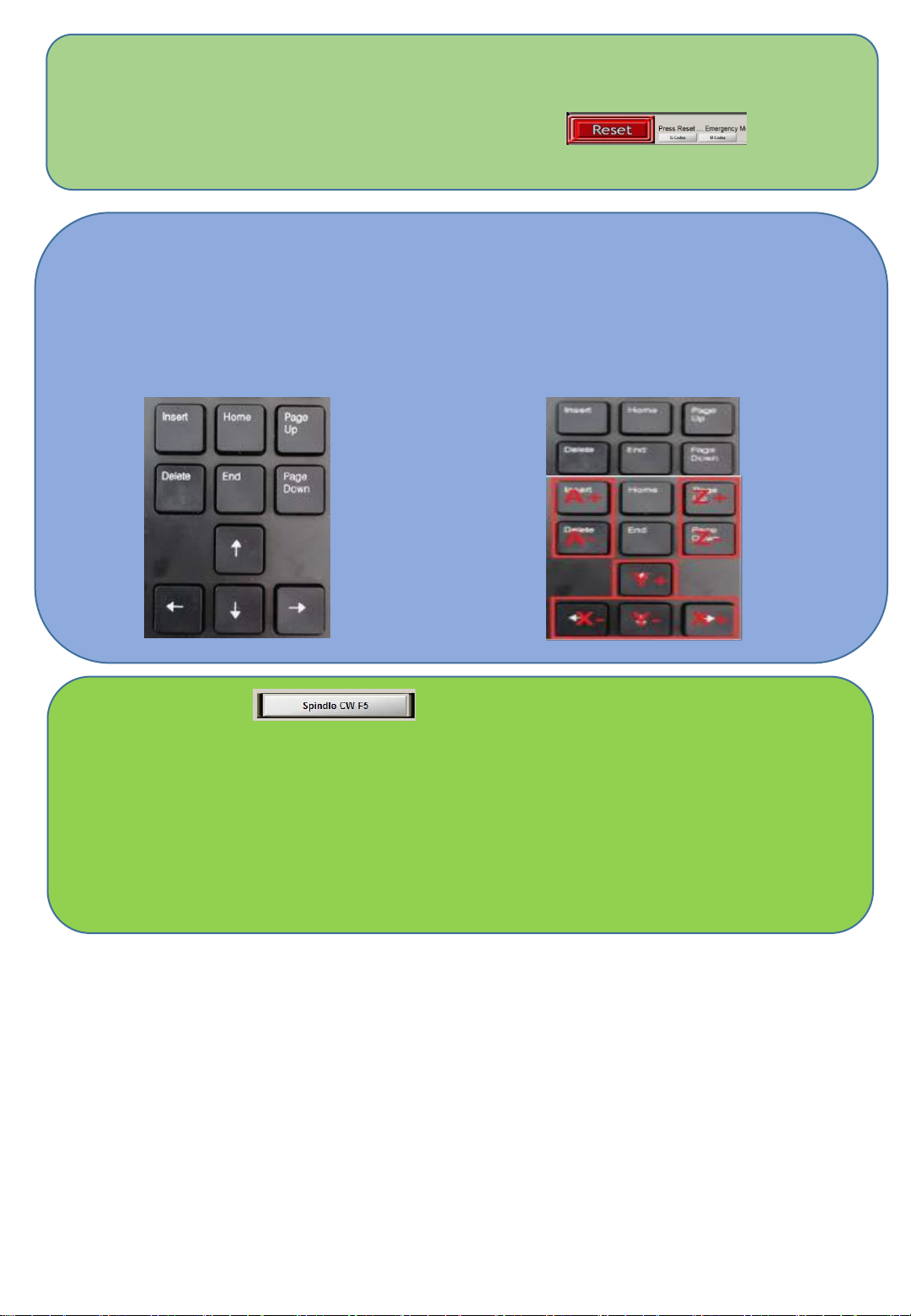
Step 2: Power on the control box and switch the power switch to ON. At
this time, the emergency reset button “Reset” in the lower left corner
of the computer control interface is flashing. Click the
“Reset” button to cancel the alarm state.
Step 3: After confirming that the emergency reset in the lower left corner
is not flashing, use the arrow keys on the keyboard and Pageup/down to
control the left and right, front and rear, and up and down movements of
the machine to confirm that the machine movement function is normal.
Step 4: Then click on the spindle speed bar in the lower
right corner of the Mach3 software. At this time, the spindle will rotate,
indicating that the spindle speed control function is normal (make
sure the spindle nut is tightened before turning on the speed).
After the above simple debugging, the machine functions are normal.
If you encounter problems, you can consult the after-sales solution.
Questo manuale è adatto per i seguenti modelli
5
Indice


