
quadient IS-280 Manuale

© 2011 Neopost USA Inc. All rights reserved. No part of this document may be reproduced or distributed in any form or by any means.
IM | IS 280 iMeter™ Postage Meter
Replacement Part Guide – PSD
For interactive step by step instructions, visit:
www.neopostinc.com/280helpdesk/ (For Neopost Customers)
www.haslerinc.com/280helpdesk/ (For Hasler Customers)
The following steps will guide you through the removal of the PSD (Postal Security Device) and
installation of a new PSD.
Replacing The PSD PSD Components
The following steps are performed when the PSD
needs to be replaced.
1. Withdrawing the PSD.
2. Installing the new PSD into to system.
3. Returning the old PSD.
4. Swapping the PSD.
Withdrawing The PSD
1. Press the Sleep/Wake
button. The power indicator
light will become green.
6. Press the down arrow
button to select
“Maintenance”.
Press “OK”.
2. From the Homescreen,
press the “MENU” button. 7. Press the down arrow
button to select
“Processes”.
Press “OK”.
3. Press the down arrow
button until “Supervisor” is
highlighted.
8. Press “OK” to continue with
this process.
4. Once “Supervisor” is
highlighted, press “OK”. 9. Press the down arrow
button to select “Withdraw
PSD”.
Press “OK”.
5. Enter the Supervisor PIN
code, “09430”.
10. Press “Next” to continue
to withdraw the meter
(PSD).
IM | IS-280
iMeter™
Postage Meter
PSD
© 2011 Neopost USA Inc. All rights reserved. No part of this document may be reproduced or distributed in any form or by any means.
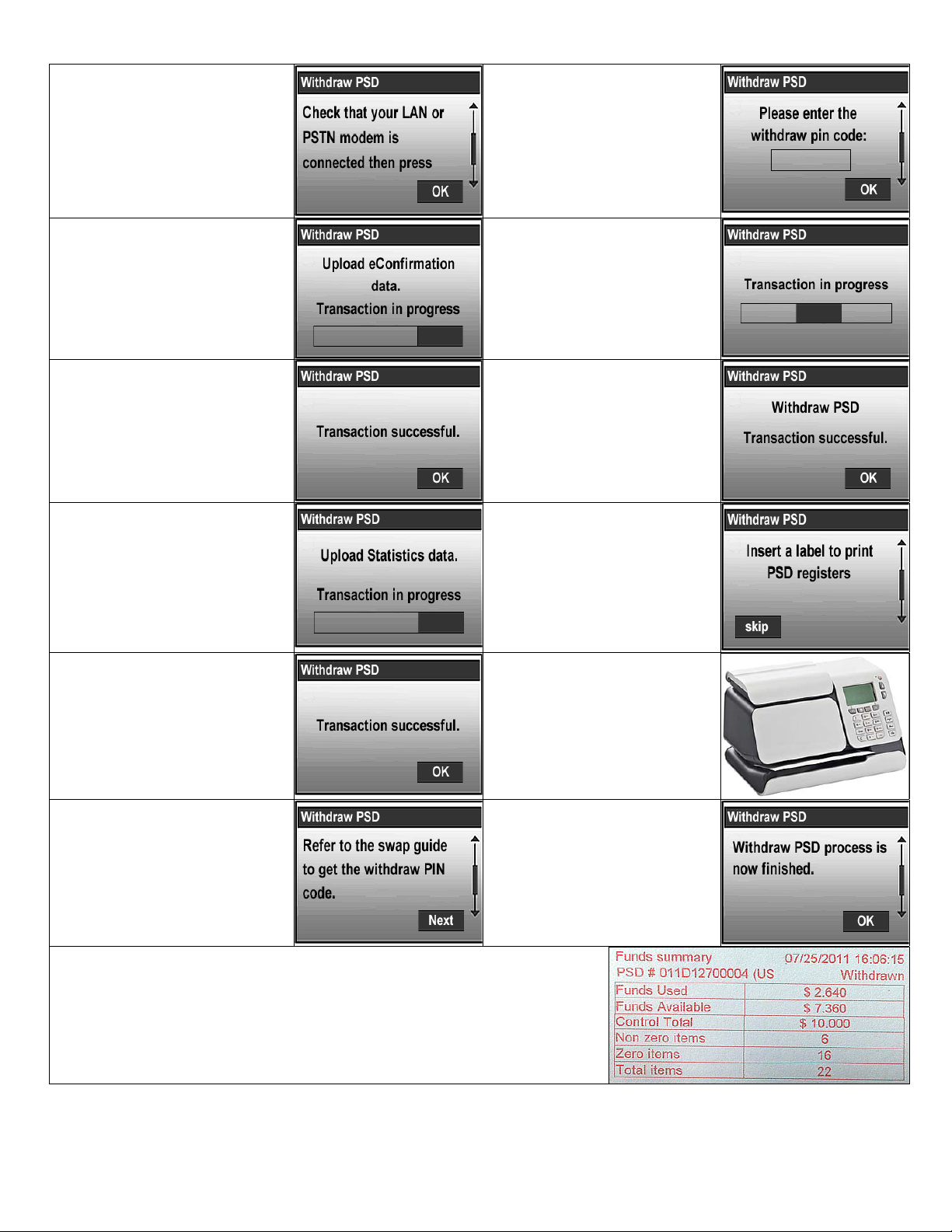
11. Ensure the LAN or phone
modem is connected to the
base and the cable from the
LAN adapter or analog
modem is connected to the
LAN or analog phone outlet.
Press “OK”.
17. Enter the withdraw PIN
code, “Refund”.
Press “OK”.
12. An eConfirmation data
upload transaction to the
online server is in
progress. Do not interrupt
this process.
18. The PSD withdrawal
transaction is in progress.
Do not interrupt this
process.
13. The eConfirmation data
upload transaction was
successful.
Press “OK”.
19. The PSD withdrawal
transaction was successful.
Press “OK”.
14. A Statistics data upload
transaction to the online
server is in progress. Do
not interrupt this process.
20. The screen will display
“Insert a label to print PSD
registers”.
15. The Statistics server call
was successful.
Press “OK”.
21. Insert a postage meter tape
into the IM | IS-280
iMeter™ postage meter.
16. Refer this replacement
guide for the withdraw PIN
code.
Press “Next”.
22. The PSD withdrawal
process is now completed.
Press “OK”.
Keep a copy of the printed Funds Summary for your records.
© 2011 Neopost USA Inc. All rights reserved. No part of this document may be reproduced or distributed in any form or by any means.
Installing The New PSD
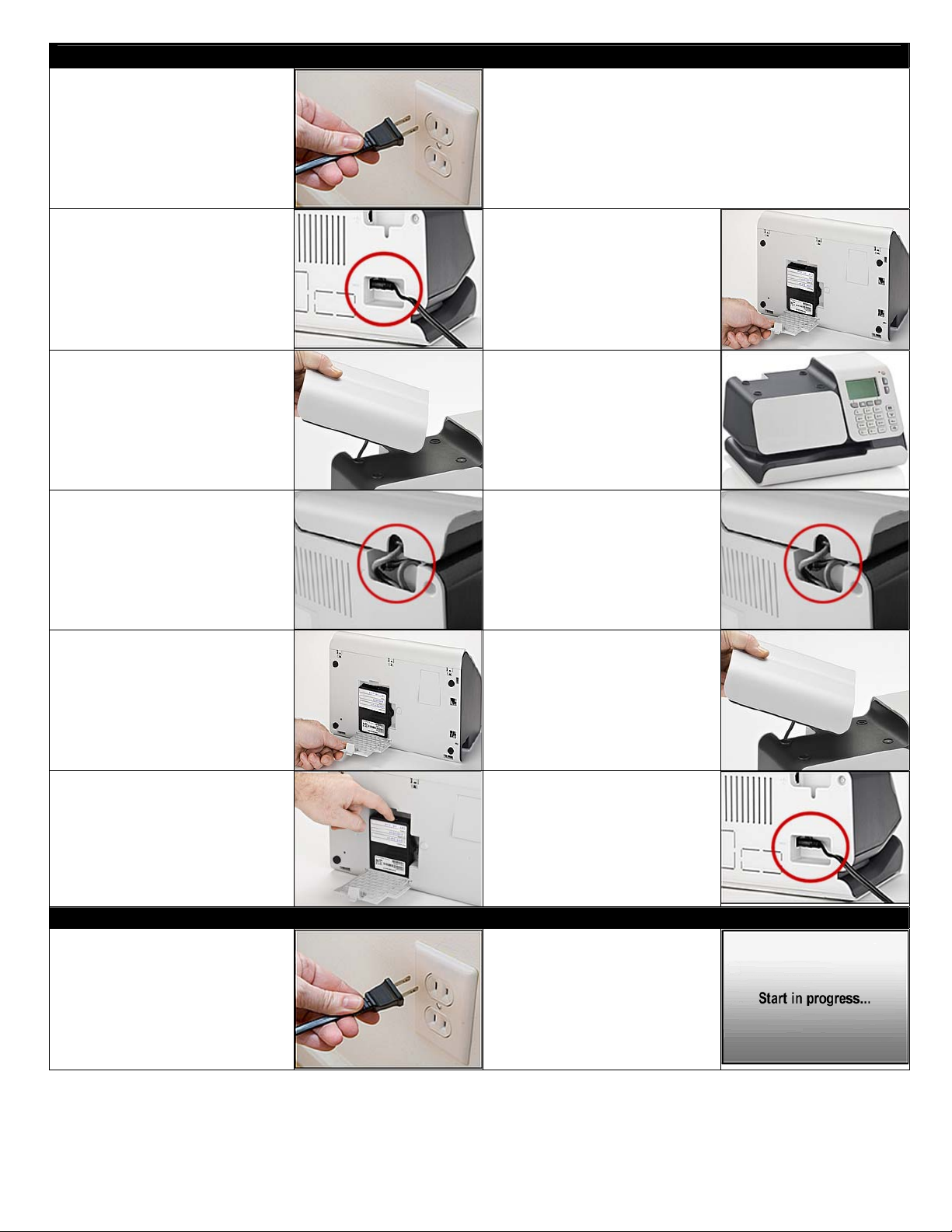
1. Disconnect the power
cable from the wall outlet.
This will turn off the IM | IS
280 iMeter™ postage
meter.
7. Remove the new PSD and prepaid shipping label
from the shipping package.
Place the old PSD into the same shipping package.
Seal the package with packing tape (not provided).
Apply the prepaid label to the package over the old
shipping label.
2. Disconnect the power
adapter from the IM | IS-
280 iMeter™ postage
meter. Put the power
adapter aside; it will be
connected to the new
base.
8. Install the new PSD by
sliding it in and then down.
Close the PSD cover. If the
PSD cover does not close
properly, the PSD is not
installed correctly.
3. Remove the scale from the
system. Set it on the side
in an upright position.
Ensure that no weight or
pressure is placed on the
scale platform.
9. Turn the IM | IS-280
iMeter™ postage meter
back to an upright position.
4. Remove the scale’s cable
from the scale compartment. 10. Tuck the scale’s cable into
the scale compartment.
5. Place the IM | IS-280
iMeter™ postage meter onto
its back to access the PSD
(meter) cover. Open the
PSD cover by pushing down
on the tab.
11. Place the scale onto the
system aligning the scale’s
feet with the indentations
on the base.
6. Remove the old PSD by
sliding it up and then out. 12. Connect the power adapter
to the back of the IM | IS-
280 iMeter™ postage
meter.
Swapping The PSD
1. Connect the power cable to
the wall outlet. This will
turn on the IM | IS 280
iMeter™ postage meter.
2. The screen will display
“Start in progress…”

© 2011 Neopost USA Inc. All rights reserved. No part of this document may be reproduced or distributed in any form or by any means.
3. The screen will display
“This process helps you to
install a new PSD.”
Press “Next”.
8. The PSD swap transaction
is in progress.
Do not interrupt this
process.
4. Ensure the LAN or phone
modem is connected to the
base and the cable from
the LAN adapter or analog
modem is connected to the
LAN or analog phone
outlet.
Press “OK”.
9. The PSD swap transaction
was successful.
Press “OK”.
5. A connection to the online
server must be performed
to complete the PSD swap
process.
Press “Next”.
10. The PSD replacement
process has now been
completed.
Press “OK”.
6. The machine is preparing
for the call.
Do not interrupt this
process.
11. A warning message will be
displayed. The new PSD
should be installed and will
be initialized after the first
postal imprint.
7. The machine is connecting
to the online server.
Do not interrupt this
process.
12. Press the Sleep/Wake
button. Before processing
mail, disconnect the power
cable from the wall outlet,
Wait 10 seconds then
connect the power cable to
the wall outlet.
If you fail to return the old PSD within ten business days,
you will be charged the full replacement value of the PSD.
For questions, please call: l-800-NEOPOST (1-800-636-7678).
Altri manuali per IS-280
8
Questo manuale è adatto per i seguenti modelli
1
Altri manuali quadient Strumento di misura


