
Quuppa LD-7L Istruzioni originali

QuuppaLD7L
InstallationGuideandSafetyInformation
1 QuuppaLD7LInstallationGuideandSafetyInformation ©2014Quuppa

Contents
Foryoursafety
Introduction
QuuppaLD7Ldimensions
SafetyInformation
Installationnotes
Selectingcompatiblemountingbracket
InstallingQuuppaLD7L
Suggestedcableandconnectorforoutdooruse
PaintingQuuppaLD7L
Productinformation
CareandMaintenance
Recycle
Copyrightandothernotices
2 QuuppaLD7LInstallationGuideandSafetyInformation ©2014Quuppa

Foryoursafety
Read these simple guidelines. Not following them may be dangerous or
illegal.Readthecompleteinstallationguideforfurtherinformation.
SWITCHONSAFETY
Do not switch the device on when the use of wireless devices is
prohibitedofwhenitmaycauseinterferenceordanger
INTERFERENCE
All wireless devices may be susceptible to interference, which
couldaffectperformance
QUALIFIEDSERVICE
Only qualified personnel may install, configure, or repair this
product
ACCESSORIES
Use only approved accessories. Do not connect incompatible
products
Whenconnectingtoanyotherdevice,readitsuserguidefordetailed
safetyinstructions.Donotconnectincompatibleproducts.
3 QuuppaLD7LInstallationGuideandSafetyInformation ©2014Quuppa

Introduction
Quuppa LD7L (HAIP Locator) is a part of the Quuppa HAIP System.
Other parts of the Quuppa HAIP system are Quuppa LD6T (HAIP Tag)
and Quuppa Positioning Engine software. The Quuppa HAIP System
allows you to locate and track any objects equipped with HAIP Tags in
an environment equipped with HAIP Locators. Quuppa LD7L is
designedforuseinindoorandoutdoorenvironments.
Read this guide carefully before having the Quuppa LD7L
professionally installed. Also, watch the Quuppa Site Planner and
Quuppa Deployment tutorial videos before starting to use the HAIP
system. For the latest guides, additional information, and downloads
relatedtoyourQuuppaproduct,gotowww.quuppa.com/support.
4 QuuppaLD7LInstallationGuideandSafetyInformation ©2014Quuppa
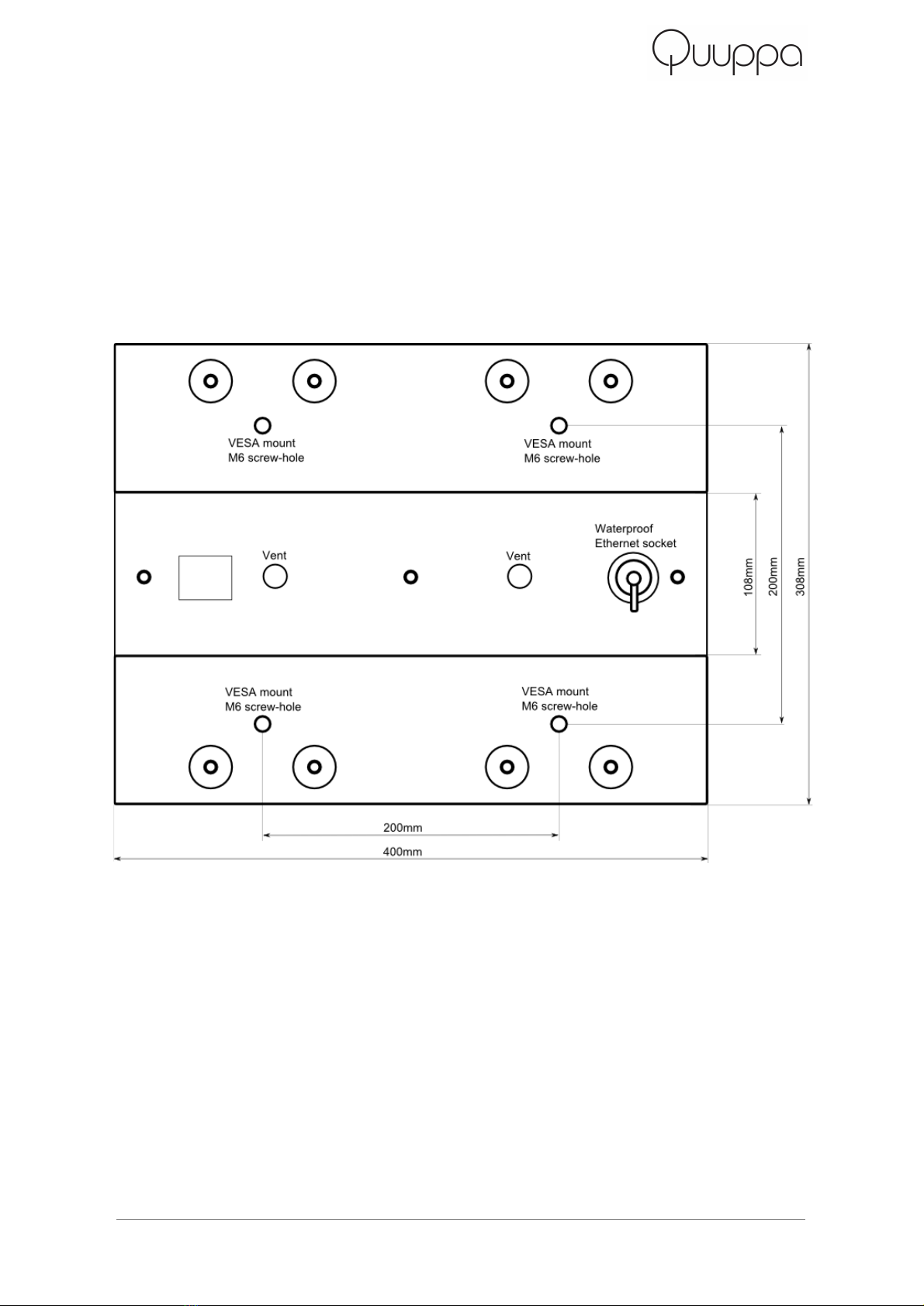
QuuppaLD7Ldimensions
Figures1and2showthedimensionsoftheQuuppaLD7L.
Figure1.RearviewoftheQuuppaLD7L
5 QuuppaLD7LInstallationGuideandSafetyInformation ©2014Quuppa
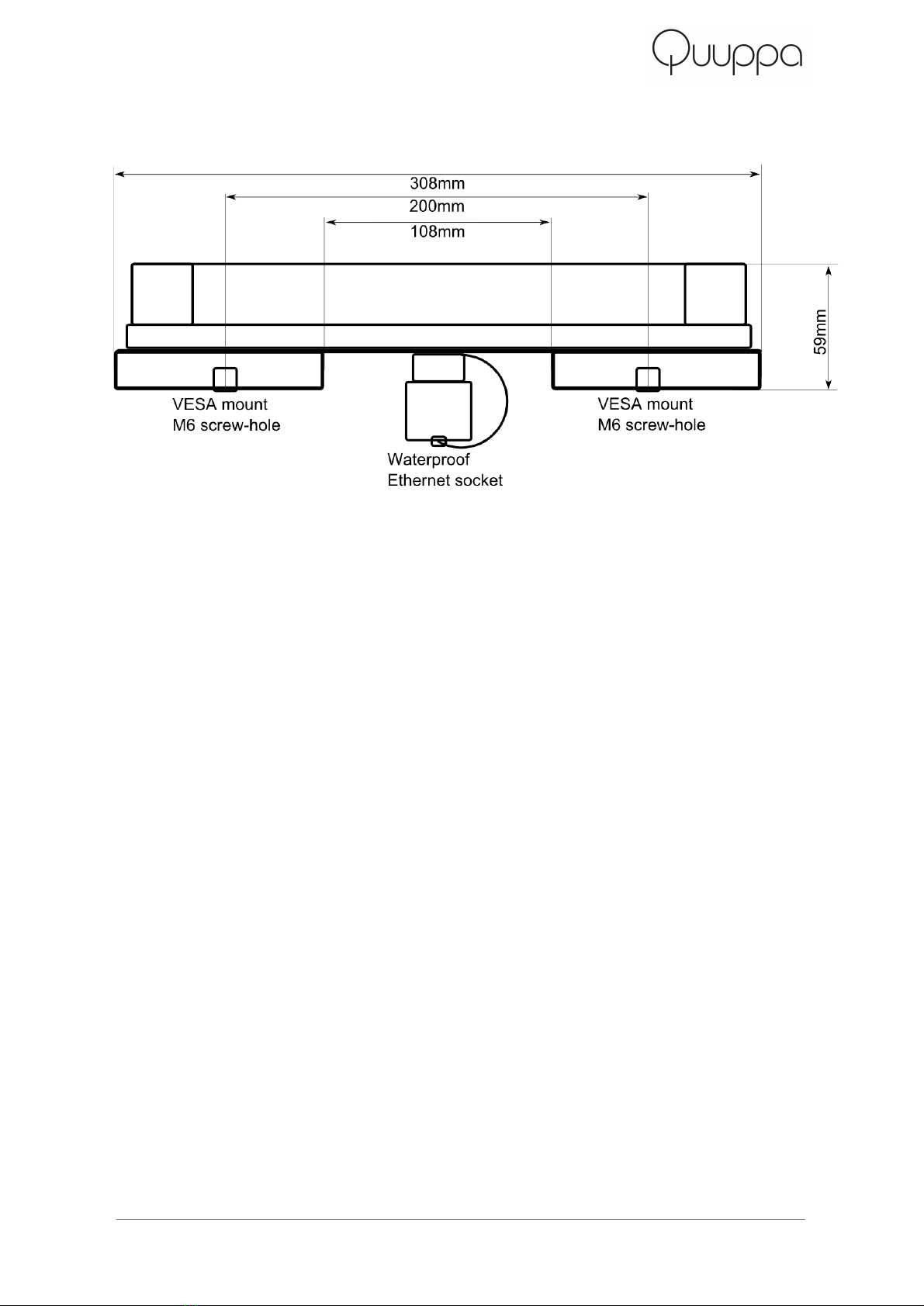
Figure2.SideviewoftheQuuppaLD7L
SafetyInformation
ObservethefollowingsafetyguidelineswheninstallingQuuppaLD7L.
● Only a qualified service technician should install or service Quuppa LD7L. Faulty
installation or service may be dangerous and may invalidate any warranty which
mayapplytoQuuppaLD7L.
● End users should remember that Quuppa LD7L comprises of complex technical
equipment that requires professional installation using special tools and expert
knowhow.
● Instructions given in this guide are general guidelines that apply to the installation
of Quuppa LD7L. However, due to the wide variety installation environments and
mounting surfaces, this guide cannot consider the individual technical
requirements relevant for any particular installation. Consult Quuppa in case you
areuncertainaboutinstallationinaspecificenvironment.
● Quuppa LD7L is designed to operate with a standard PoE (Power over
Ethernet) compatible network component connected at the Ethernet socket. For
your safety, and to prevent any damage to Quuppa LD7L, only use standard
certifiedPoEnetworkcomponents.
6 QuuppaLD7LInstallationGuideandSafetyInformation ©2014Quuppa

● When installing Quuppa LD7L, make sure the installation surface can safely
carrytheweightoftheequipmentandpossiblewindloads.
● Your service technician or dealer may be able to provide you with information on
alternatives for mounting the equipment suitably in different types of
environments.
● Do not smoke when installing the equipment. Make sure there is no source of fire
orflamenearby.
● Make sure cables are placed so that they will not be subject to mechanical wear
andtear.
Installationnotes
Quuppa LD7L should be mounted clear of any metal obstructions
(such airconditioning ducts, large ceiling trusses, building
superstructures) to the side or front of the enclosure. In case needed,
use a rigid conduit to lower the Quuppa LD7L away from these
obstructions.
Quuppa LD7L should be aimed into the intended coverage area,
therefore mount the device so that the desired mechanical tilt can be
achieved.
Selectingcompatiblemountingbracket
The mounting holes of Quuppa LD7L are arranged according to VESA
MISF, 200, Y, 6 standard (Four M6 threaded holes in 200x200mm
pattern). Select your mounting bracket according to the requirements
set by the installation environment. Make sure that the mounting bracket
cancarrytheweightofQuuppaLD7Landpossiblewindloads.
7 QuuppaLD7LInstallationGuideandSafetyInformation ©2014Quuppa

InstallingQuuppaLD7L
1. Attach the Quuppa LD7L to compatible VESA mounting bracket.
Use M6 bolts and assembly torque of 2 nM (max allowed torque is
2.5nM).
2. AttachtheVESAmountingbrackettothewall,ceiling,ormast.
3. Aim the Quuppa LD7L towards the intended coverage area and
tightenallfasteners.
4. Connect the ethernet cable to the Quuppa LD7L. Make sure the
other end of the ethernet cable is connected to a device
connectedtoQuuppaHAIPsystem.
WARNING: Always make sure that the installation surface or mast can carry the weight
oftheequipmentandpossiblewindloadsbeforeinstallation.
Not following general safety regulation can cause damage to objects or injuries to
people.RelyonqualifiedpersonnelforcarryingouttheinstallationofQuuppaLD7L.
Suggestedcableandconnectorforoutdooruse
In case you are installing Quuppa LD7L outdoors or to other humid
environments use an ethernet cable and an ethernet connector that are
designed for outdoor use. The ethernet socket of Quuppa LD7L is
Conec 1710020 and it accepts both bayonet and M28 threaded
waterproofEthernetconnectorsfromConec,forexample17100464.
In indoor environments normal Ethernet cable with RJ45connector
(Modular 8P8C) can be connected directly to the waterproof socket in
QuuppaLD7L.
8 QuuppaLD7LInstallationGuideandSafetyInformation ©2014Quuppa
PaintingQuuppaLD7L
If you wish to paint the Quuppa LD7L do not use metallic or
metallicflakepaints,whichwilldegradetheperformanceofthelocator.
Remember to cover the vents on the back of the Quuppa LD7L before
painting.
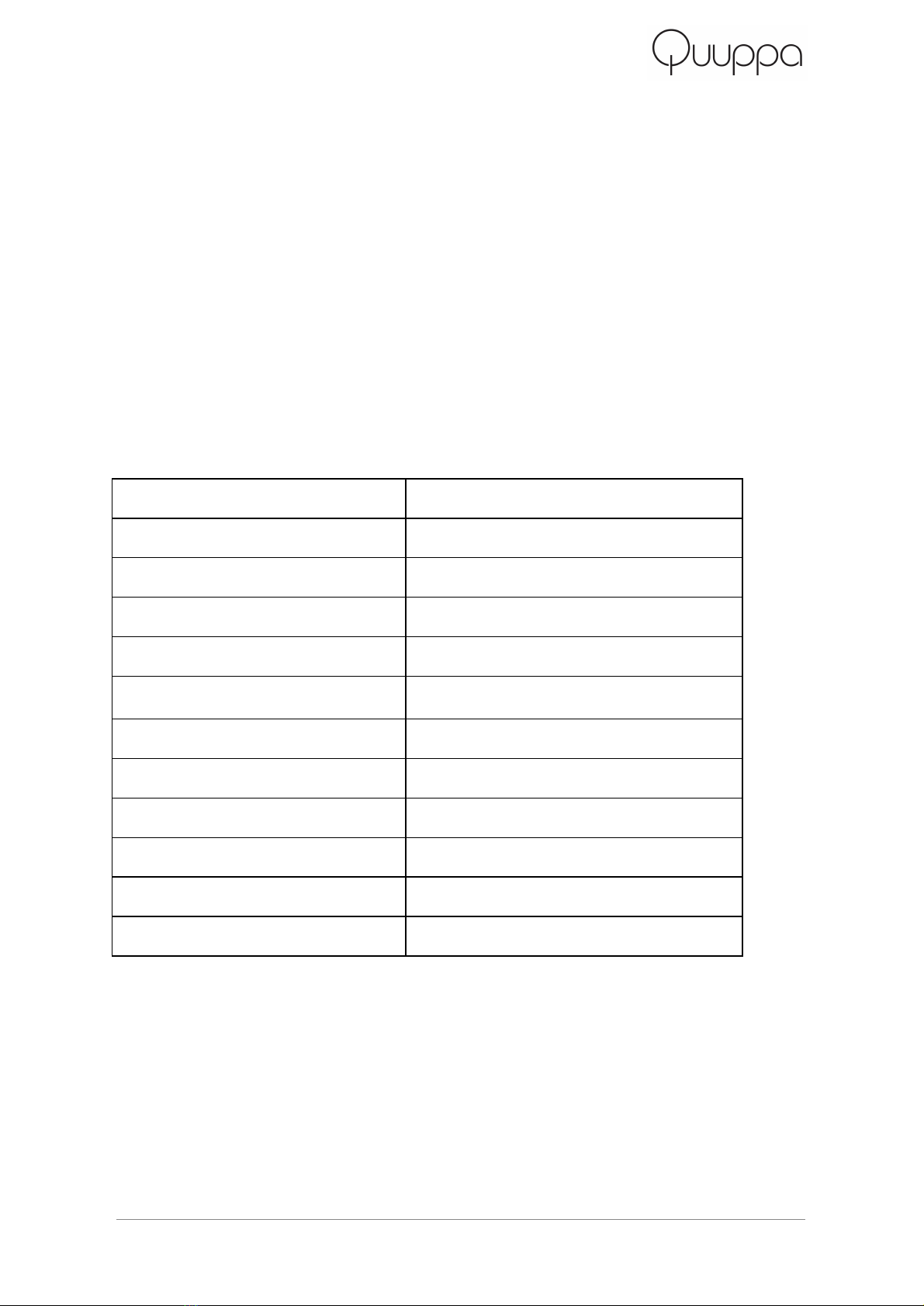
Productinformation
Operatingfrequencyrange
2400…2483MHz
Maximumtransmitpower
+6dBmEIRP
Operatingtemperaturerange
20°C…+60°C
Storagetemperaturerange
–30°C…+70°C
IPprotectionclass
IP65,dustandjettingwaterimmunity
Operatingvoltage
PoweroverEthernet,48V
Typicalpowerconsumption
2W
Length
400mm
Width
380mm
Thickness
59mm
Weight
3.8kg
Mounting
VESAMISF,200,Y,6
9 QuuppaLD7LInstallationGuideandSafetyInformation ©2014Quuppa
CareandMaintenance
Your Quuppa LD7L is a product of superior design and craftsmanship
and should be treated with care. The following suggestions will help you
protectyourwarrantycoverage.
● DonotattempttoopentheQuuppaLD7L.
● Do not use harsh chemicals, cleaning solvents, or strong
detergents to clean the Quuppa LD7L. Only use a soft, clean, dry
clothtocleanthesurfaceofQuuppaLD7L.
Recycle
Always return your used electronic products, batteries, and packaging
materials to dedicated collection points. This way you help prevent
uncontrolledwastedisposalandpromotetherecyclingofmaterials.
The crossedout wheeledbin symbol on your product,
battery, literature, or packaging reminds you that all electrical
and electronic products, batteries, and accumulators must
be taken to separate collection at the end of their working
life. This requirement applies in the European Union. Do not dispose of
theseproductsasunsortedmunicipalwaste.
10 QuuppaLD7LInstallationGuideandSafetyInformation ©2014Quuppa
Indice


