
Reed Instruments R2340 Manuale utente

Instruction
Manual
R2340
W
A
R
R
A
N
T
Y
W
A
R
R
A
N
T
Y
1 YEAR
1 AN
G
A
R
A
N
T
I
E
G
A
R
A
N
T
I
E
W
A
R
R
A
N
T
Y
W
A
R
R
A
N
T
Y
G
A
R
A
N
T
I
E
G
A
R
A
N
T
I
E
W
A
R
R
A
N
T
Y
W
A
R
R
A
N
T
Y
G
A
R
A
N
T
I
E
G
A
R
A
N
T
I
E
White background
Transparentbackground
White
Black
1 YEAR1AN
Professional Infrared
Thermometer
REED Instruments

2
Table of Contents
Introduction ................................................................................................ 4
Product Quality........................................................................................... 4
Safety ......................................................................................................... 4
Features...................................................................................................... 5
Included...................................................................................................... 5
Specications..........................................................................................6-7
Instrument Description ............................................................................... 8
Display Description .................................................................................... 9
Distance & Spot Size................................................................................ 10
Operating Instructions.........................................................................11-12
Power ON/OFF................................................................................... 11
External Contact Probe Measuring Procedure................................... 11
Non-Contact (Infrared) Temperature Measurement ........................... 11
Continuous Temperature Measurement (Trigger Lock) ...................... 12
Turning Laser ON/OFF........................................................................ 12
Measurement Modes ..........................................................................13-14
General Mode..................................................................................... 13
Infrared Reference Mode ................................................................... 13
Thermal Conduction........................................................................... 14
Dew Point Mode................................................................................. 14
Thermocouple Mode .......................................................................... 14
Setup Menu.........................................................................................15-22
Set the Time and Date...................................................................15-16
Select the Temperature Unit of Measure............................................ 16
Set the High and Low Temperature Alarms...................................16-17
Adjust Emissivity................................................................................. 17
continued...
REED Instruments

3
User scheduled Measurement Recording Interface (Set Rec.) .......... 17
View Interval Recordings (Inquiry) ...................................................... 18
Format ................................................................................................ 18
Set Recording Intervals .................................................................18-20
View/Format Recorded Logs.............................................................. 20
View Interval Recordings.................................................................... 20
Format ................................................................................................ 20
System Settings ................................................................................. 21
Enabling/Disabling Audible Alarm ...................................................... 21
Adjusting LCD Brightness Level......................................................... 21
Set Trigger Lock Time ........................................................................ 22
Set Auto Power OFF .......................................................................... 22
Factory Reset ..................................................................................... 22
System Info ........................................................................................ 22
Data Logging............................................................................................ 23
Saving Measurement Logs................................................................. 23
Transfer Files to a PC ......................................................................... 23
Charging the Battery ................................................................................ 24
Applications.............................................................................................. 24
Accessories .............................................................................................. 24
Appendix: Emissivity Chart .................................................................25-26
Troubleshooting........................................................................................ 27
Product Care ............................................................................................ 28
Product Warranty ..................................................................................... 28
Product Disposal and Recycling .............................................................. 28
Product Support....................................................................................... 29
REED Instruments

4
Introduction
Thank you for purchasing your REED R2340 Professional Infrared
Thermometer. Please read the following instructions carefully before using
your instrument. By following the steps outlined in this manual your meter
will provide years of reliable service.
Product Quality
This product has been manufactured in an ISO9001 facility and has been
calibrated during the manufacturing process to meet stated product
specications. If a certicate of calibration is required, please contact the
nearest authorized REED distributor or authorized Service Center. Please
note an additional fee for this service will apply.
Safety
• Never attempt to repair or modify the
instrument. Dismantling the product,
other than for the purpose of replacing
batteries, may cause damage that will
not be covered under the manufacturer's
warranty. Servicing should only be
provided by an authorized
service center.
• Use extreme caution when the laser beam is turned on.
• Do not let the beam enter someone's eye, another person's eye or the
eye of an animal.
• Be careful not to point the beam off a reective surface and strike
someone's eye.
• Do not allow the laser light beam to impinge on any gas which
can explode.
REED Instruments

5
Features
• Infrared thermometer with integral type K thermocouple input for
contact measurement
• Built-in laser pointer identies target area
• User-selectable °F or °C
• 55:1 Distance to Spot size ratio
• Rechargeable li-ion battery
• High resolution TFT color LCD
• Digitally adjustable emissivity
• Max, Min, Average and Differential readings
• Ambient air temperature, humidity, dew point and wet bulb
temperature measurement
• Surface heat conduction, dew point and temperature comparison
detection modes
• Audible adjustable alarm
• Internal memory stores up to 999 datapoints
• Trigger lock for continuous monitoring
• Low battery indication and auto shut off
Included
• Professional Infrared Thermometer
• USB Cable
• Type K Bead Thermocouple
• Hard Carrying Case
REED Instruments

6
Specifications
IR Temperature
Measuring Range: -58.0°F to 3362°F (-50°C to 1850°C)
Accuracy: -58.0°F to 32°F (-50°C to 0°C):
± 2.0°F + 0.1°F/°F (±1.0°C + 0.1°C/°C)
32°F to 3362°F (0°C to 1850°C):
±2.0°F or ±0.01 × t°F
(Whichever is greater)
(±1.0°C or ±0.01 × t°C
(Whichever is greater))
Resolution: 0.1°F (0.1°C)
Contact Temperature (Type K)
Measuring Range: -58.0°F to 2498°F (-50°C to 1370°C)
Accuracy: -58.0°F to 2498°F (-50°C to 1370°C):
±0.005 × t + 3.0°F (±0.005 × t + 1.5°C)
Ambient Temperature Measurement
Measuring Range: 14°F to 122°F (-10°C to 50°C)
Accuracy: 14°F to 32°F (-10°C to 0°C):
±2.0°F (±1.0°C)
32°F to 104°F (0°C to 40°C):
±1.0°F (±0.5°C)
104°F to 122°F (40°C to 50°C):
±2.0°F (±1.0°C)
Resolution: 0.1°F (0.1°C)
Relative Humidity
Measuring Range: 10% RH to 90% RH
Accuracy: ±5% RH
General Specifications
Optical Resolution (D:S): 55:1
Spectral Response: 8 to 14µm
Emissivity: 0.1 to 1.0 (Adjustable)
Response Time: 250ms continued...
REED Instruments

7
Display Type: 2.4" TFT LCD
Display Resolution : 320 x 240 pixels
Display Hold: Yes
High/Low Alarms: Yes
Max/Min: Yes
Average and Differential: Yes
Data Storage: Yes (Up to 999 groups)
F/C Switchable: Yes
Trigger Lock: Yes
Auto Shut-off: Yes (adjustable from 1 to 30 mins)
Laser Type: Class II
Low Battery Indicator: Yes
PC Connectivity: Yes
Power Supply: 3.7V 2600mAh rechargeable
Li-ion battery
Battery Life: Approx. 20 hours (Fully Charged)
Charging System: USB-C
Charge Time: 3 hours
Product Certications: CE, RoHS, UKCA
Operating Temperature: 14 to 122°F (-10 to 50°C)
Storage Temperature: -4 to 140°F (-20 to 60°C)
Operating Humidity Range: 10 to 90%
Maximum Operating Altitude: 6561' (2000m)
Maximum Storage Altitude: 39.370' (12.000m)
Dimensions: 8.07 x 4.88 x 2.56"
(205 x 124 x 65mm)
Weight: 0.82lbs (375g)
REED Instruments
8
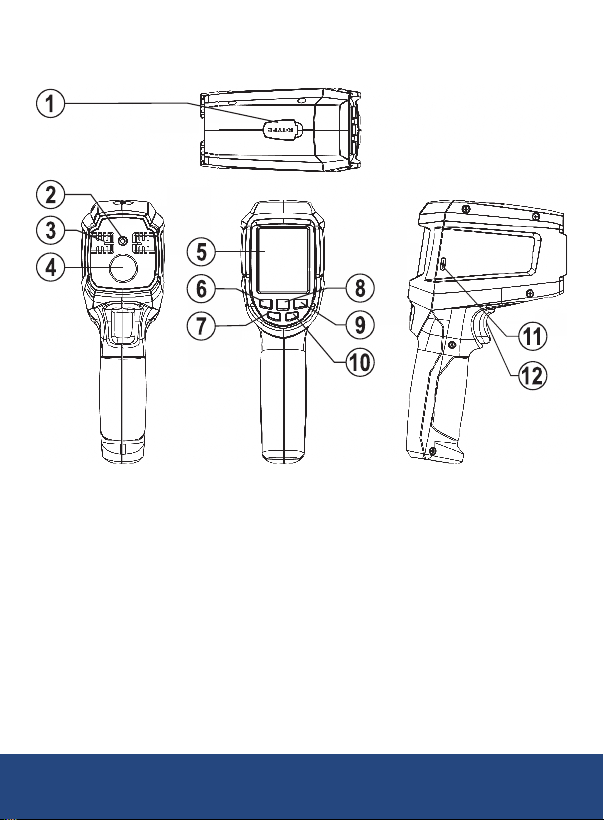
Instrument Description
1. Thermocouple Input Jack
2. Laser Pointer Beam
3. Temperature and
Humidity Sensor
4. IR Sensor
5. LCD Display
6. Left Button
7. Power Button
8. OK Button
9. Right Button
10. Back Button
11. USB-C Interface
12. Trigger
REED Instruments

9
Display Description
General
Mode
Infrared
Mode
Thermal
Bridge
Dew Point
Mode
Comparison
Mode
Item Description Item Description
10:25 AM 2021.07.21 Date and time Ambient temperature
Audio alarm Relative humidity
Laser Dew point temperature
SCAN Temperature measurement Wet bulb temperature
Appointment Type K thermocouple temperature
Battery status Infrared temperature
Lock measurement Maximum
Alarm Minimum
Range bar Average
Reference temperature (IR-Ref) Difference
Difference (IR-Ref) Difference (IR-AT)
Difference (IR-DP) Difference (comparison mode)
REED Instruments

10
Distance & Spot Size
D
The light spot diameter represents 90%
of the energy of the circle.
D
Le diamètre du point lumineux représente 90 %
de l’énergie du cercle.
D
The light spot diameter represents 90%
of the energy of the circle.
D
Le diamètre du point lumineux représente 90 %
de l’énergie du cercle.
REED Instruments
Indice
Altri manuali Reed Instruments Termometro

Reed Instruments
Reed Instruments R2330 Manuale utente

Reed Instruments
Reed Instruments R2330-NIST Manuale utente

Reed Instruments
Reed Instruments R2000 Manuale utente

Reed Instruments
Reed Instruments SMART Series Manuale utente

Reed Instruments
Reed Instruments FS-200 Manuale utente

Reed Instruments
Reed Instruments R2400 Manuale utente

Reed Instruments
Reed Instruments R2450SD Manuale utente

Reed Instruments
Reed Instruments Smart Series Manuale utente

Reed Instruments
Reed Instruments R2320 Manuale utente

Reed Instruments
Reed Instruments R2020 Manuale utente


