
Seltron RT Series Manuale utente
RT.., WT..
User Manual and Installation Instructions
ENEN

| 3
EN
INTRODUCTION
The Seltron room thermostat allows you to eciently and economically heat or cool
your rooms. With a simple user interface, you can easily set the temperature you want,
adjust the operating schedule or activate any of the user functions for a comfortable
temperature, saving mode or holiday mode.
For proper and economical use always set the actual requested temperature. Setting
a higher or lower temperature will not accelerate the heating or cooling of the rooms.
The speed of heating or cooling of rooms depends on the heating system and the
construction of your building.
Seltron smart room thermostats can also be connected to the SeltronHome platform,
which allows you to perform all settings with the Clausius BT mobile app, no matter
where you are. Learn more about the function and services of the SeltronHome
platform at www.seltron.eu and in the chapter "Operating the thermostat with smart
device".
Please read these instructions carefully before using the product and store them for
future reference.
The same applies to any modification or tampering with the device.
Do not disassemble the device! The device does not contain any components that
are serviceable by the user. In the event of an error, return the device to the seller or
contact an authorised service centre.
The power supply must be switched o when installing the thermostat!
The thermostat must be installed by a qualified person!
The electrical circuit must be protected by a fuse that does not exceed the maximum
permissible current load of the wiring. All safety regulations must be observed during
installation!
This device is not a toy, do not allow children to play with the device. Also, do not leave
the packaging accessible to children as it may present a choking hazard.
The device can be used by children of 8 and above under the supervision of their
parents.
This device may only be used indoors and must be protected from moisture, dust, and
from direct sunlight or other heat radiation.
Warnings
Thank you for purchasing the Seltron room thermostat.
Use of this device for any purpose other than that described in these instructions is
not permitted and excludes any liability for damages and warranty.

4 |
EN TABLE OF CONTENTS
Room thermostat display...........................................................................................................................6
Wireless receiver display............................................................................................................................ 7
Description of symbols................................................................................................................................ 8
Overview of data ..........................................................................................................................................12
Changing the settings.................................................................................................................................12
Switching on/o and selecting the operating mode .....................................................................13
Setting the temperature ........................................................................................................................... 14
Setting the requested day and night temperature.................................................................. 14
Setting the temperature for frost or overheating protection...............................................15
Using special functions...............................................................................................................................16
Party function ..........................................................................................................................................16
ECO function............................................................................................................................................17
Holiday function......................................................................................................................................18
Ventilation function ...............................................................................................................................19
Settings menu .............................................................................................................................................. 20
Additional and service settings...............................................................................................................21
Program timer...............................................................................................................................................22
Preset time programmes................................................................................................................... 24
Selecting the requested time programme ................................................................................. 24
Setting the time and date.........................................................................................................................25
Room thermostat information................................................................................................................26
Settings parameters ...................................................................................................................................28
Operating settings P1...........................................................................................................................29
Operating settings P2..........................................................................................................................33
Service settings S1.................................................................................................................................35
Description of operation...........................................................................................................................39
Hysteresis (H)..........................................................................................................................................39
Proportional operation (P) ...............................................................................................................40
Proportional, integral operation (PI) ............................................................................................ 40
Locking buttons ........................................................................................................................................... 41
Reset – thermostat...................................................................................................................................... 41
Reset – receiver............................................................................................................................................ 41
Operating the thermostat with smart device.................................................................................. 42
Malfunction.................................................................................................................................................... 43

| 5
EN
TABLE OF CONTENTS
Connection of the wireless thermostat to the receiver...............................................................47
Connecting wireless sensor....................................................................................................................48
Connecting wireless sensor to thermostat.................................................................................48
Connecting wireless sensor to receiver.......................................................................................48
Receiver – manual operation .................................................................................................................49
Technical data..............................................................................................................................................50
Disposal of old electrical and electronic equipment ..................................................................... 51
6 | User Manual
EN
1
2
3
4 8
5
6
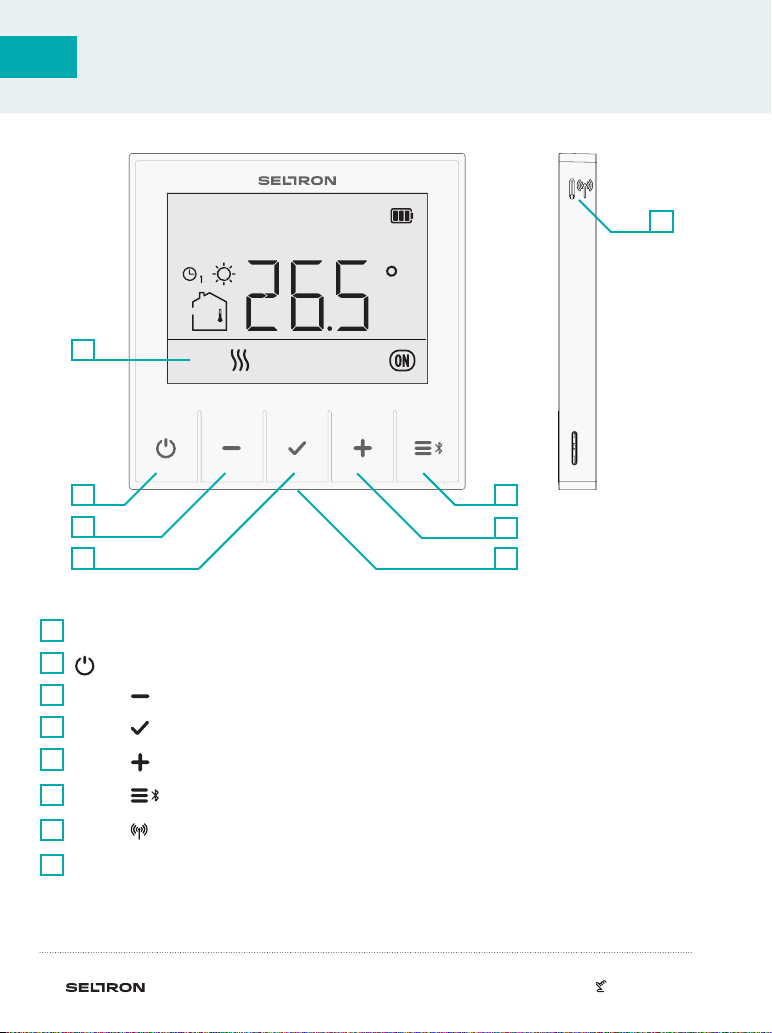
LCD display with illumination.
1
On/o button.
2
Button for reducing a setting or moving backwards.
3
Button for reviewing data and entering settings.
4
Button for increasing a setting or moving forwards.
Button for user functions and connecting to smart device.
Button to connect to the receiver.
USB port, type C, for charging built-in battery.*
5
6
7
8
ROOM THERMOSTAT DISPLAY
* In use only with RT1B, RT2B, and WT1B thermostats.
7
| 7User Manual
EN
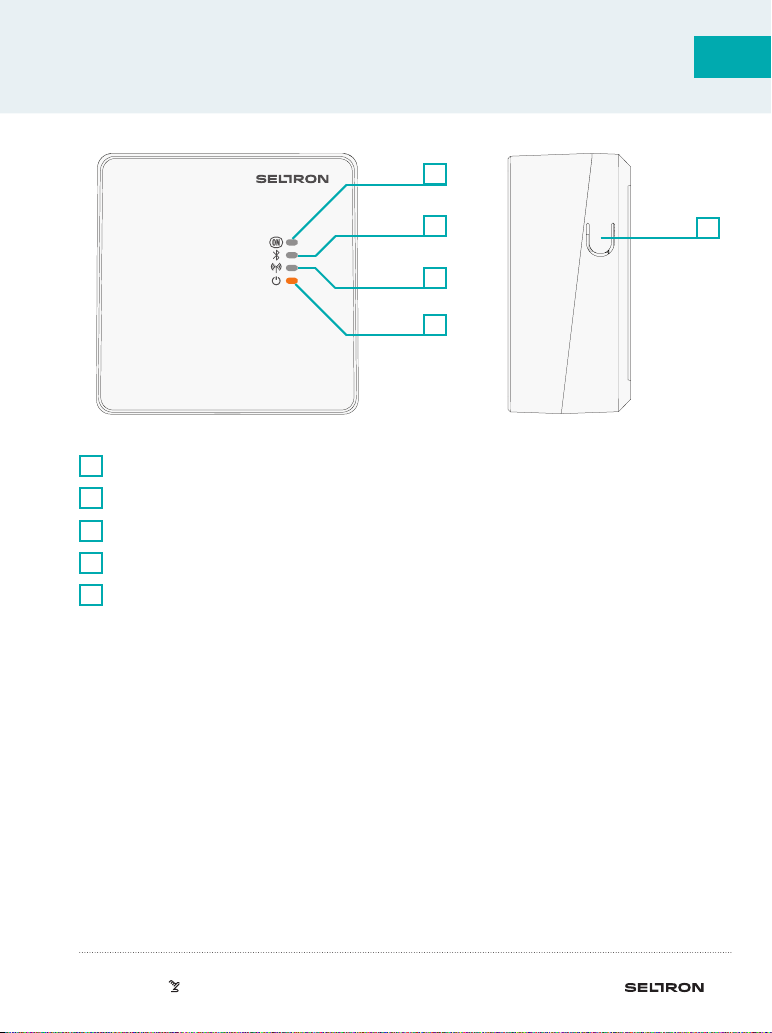
LED light that shows the status of the relay output.
1
LED light that shows the connection to the smart device.
2
LED light that shows the connection to the thermostat.
3
LED light that shows operation.
4
Manual operation/connection/reset button.
5
WIRELESS RECEIVER DISPLAY
5
4
3
1
2
8 | User Manual
EN
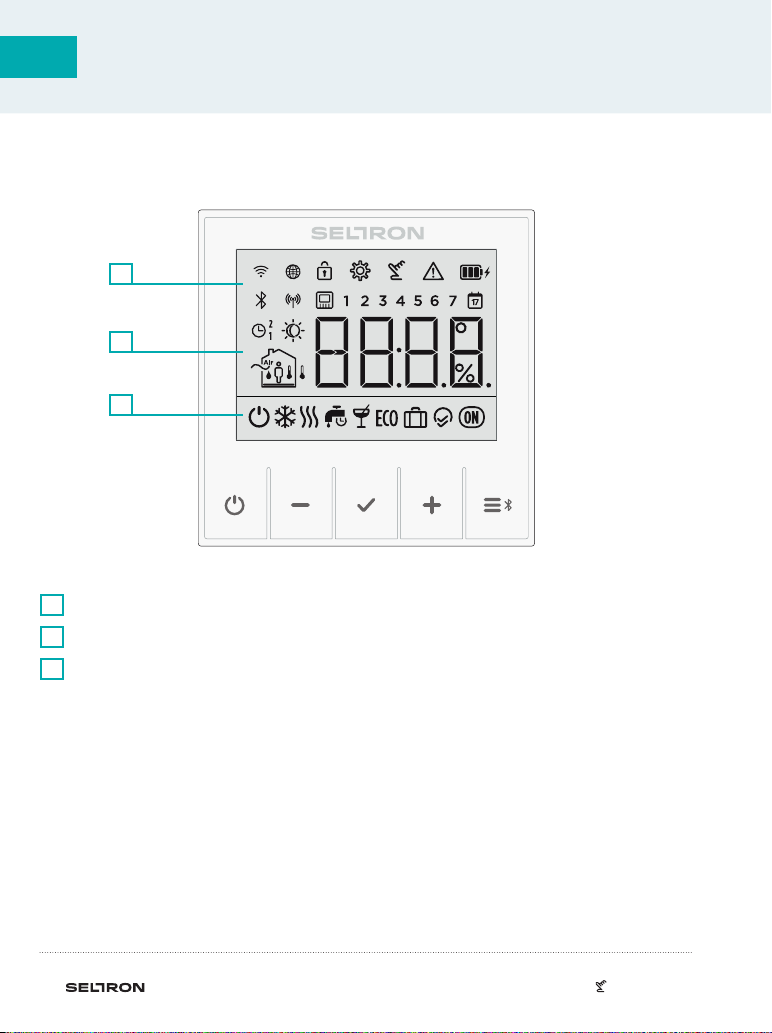
Symbols to display condition and status.
1
Display of temperatures and other climate data in the room.
2
Operating mode display.
3
DESCRIPTION OF SYMBOLS
3
2
1
| 9User Manual
EN
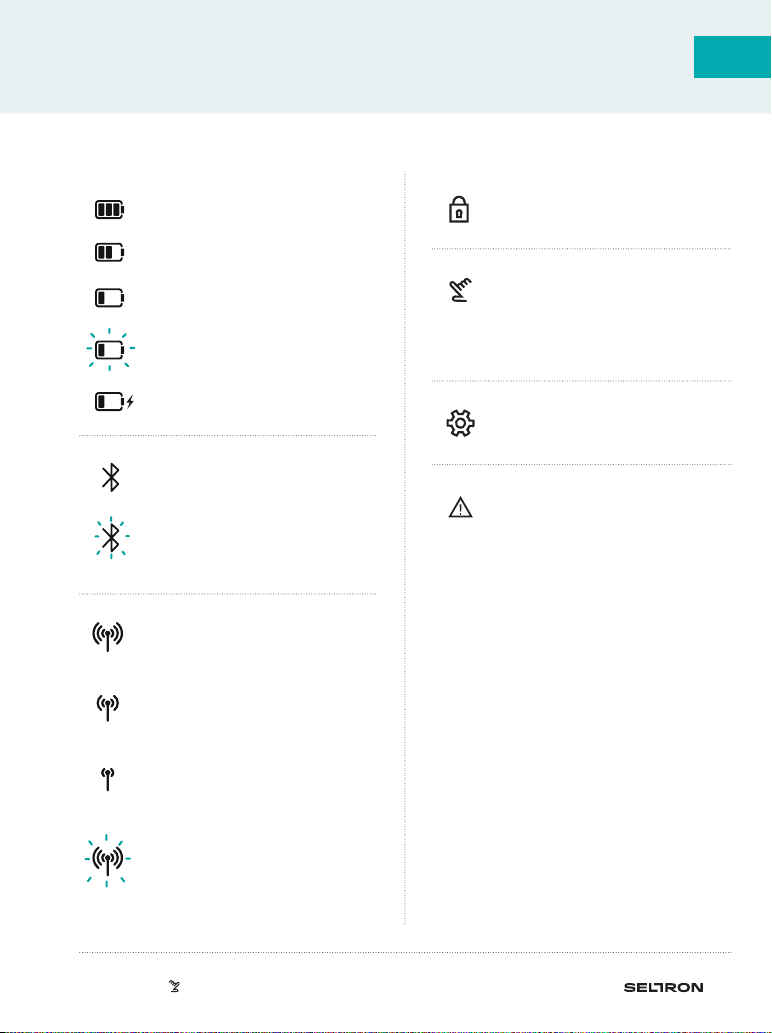
DESCRIPTION OF SYMBOLS
Event display symbols
Thermostat malfunction.*
See section “Malfunction”.
Locked buttons.
Settings menu.
Wireless connection to the
receiver is established.
The signal is excellent.
Wireless connection to the
receiver is established. The
signal is good.
Wireless connection to the
receiver is established. The
signal is weak.
The wireless connection to the
receiver is being established or
has been interrupted.
Bluetooth connection to the
smart device is established.
Bluetooth connection to
the smart device is being
established.
Manual mode
In the settings menu, this
means that the parameter
value is changed.
Battery is charging.
The battery is 100% charged.
The battery is 50% charged.
The battery is 20% charged.
Battery charging is required.
10 | User Manual
EN
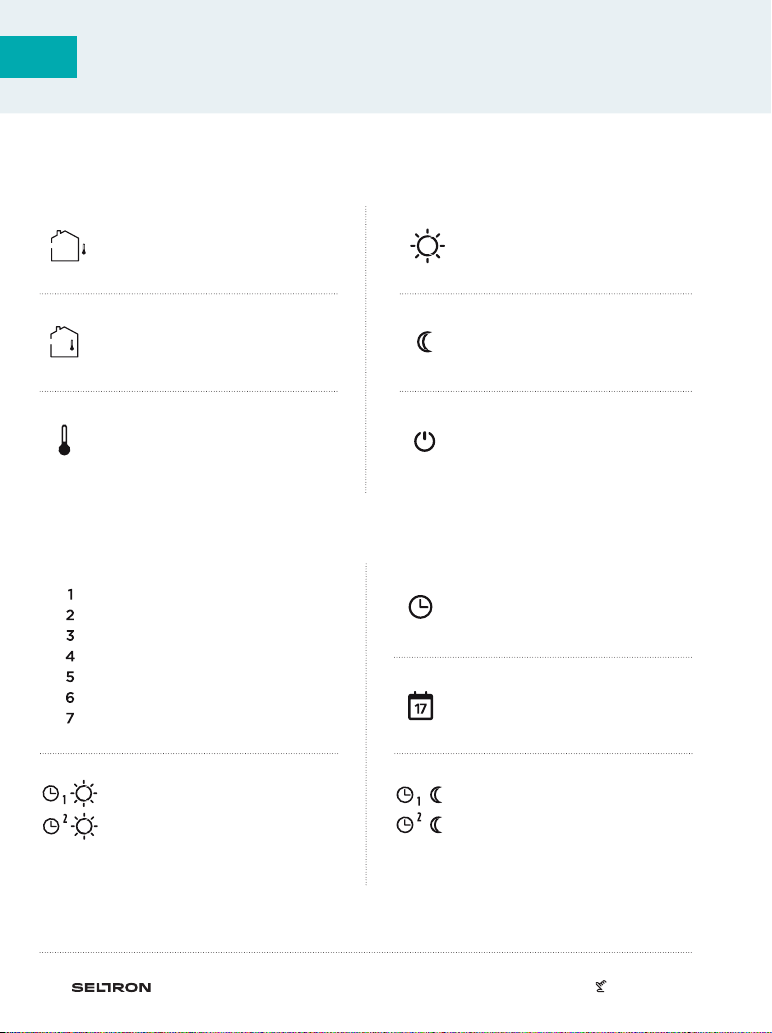
Symbols for displaying time programmes
Operation according to first (1)
or second (2) time programme
– night interval.
Monday
Tuesday
Wednesday
Thursday
Friday
Saturday
Sunday
Operation according to first (1)
or second (2) time programme
– day interval.
Date when the Holiday
function expires.
Time when the Party or Eco
function expires.
Symbols for displaying measured and requested temperatures
and other information
DESCRIPTION OF SYMBOLS
Measured outdoor
temperature.
Measured room
temperature.
Measured temperature of the
auxiliary sensor.
Requested day temperature.
Requested night temperature.
Requested temperature
for frost and overheating
protection.
Altri manuali per RT Series
1
Questo manuale è adatto per i seguenti modelli
1
Indice
Altri manuali Seltron Termostato

Seltron
Seltron RT Series Come usare

Seltron
Seltron T1 Manuale utente

Seltron
Seltron RCD20 Manuale utente

Seltron
Seltron ST Manuale utente

Seltron
Seltron RCD3 Guida all'installazione

Seltron
Seltron ST Manuale utente

Seltron
Seltron RCD20 Come usare

Seltron
Seltron ST2 Manuale utente

Seltron
Seltron RCD1 Premium Manuale utente

Seltron
Seltron RCD1 Premium Manuale utente


