
Sencor SSS 3100 Manuale utente
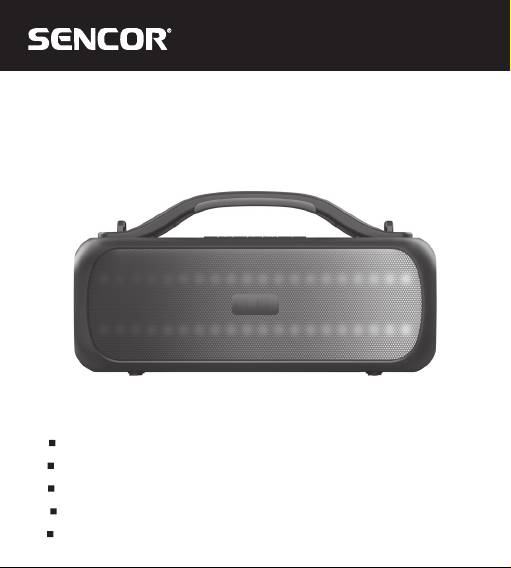
SSS 3100
EN User Manual Party Wireless Waterproof Speaker
CZ Uživatelská příručka Párty bezdrátový voděodolný reproduktor
SK Používateľská príručka Párty bezdrôtový vodovzdorný reproduktor
HU Felhasználói kézikönyv Vezeték nélküli vízálló parti hangszóró
PL Podręcznik użytkownika Bezprzewodowy głośnik wodoodporny

EN – 2
SAFETY INSTRUCTIONS
This product has been designed with the utmost safety in mind. However, incorrect
XVHPD\OHDGWRHOHFWULFVKRFNRU¿UH7KLVLVZK\XVHUVVKRXOGREVHUYHWKHIROORZLQJ
instructions when using this device.
This device uses a semiconductor unit and contains no user serviceable parts. Do
not disassemble this device, otherwise you are exposed to the risk of electric shock.
,IDQ\GDPDJHWRWKLVSURGXFWRFFXUVSOHDVHKDYHWKLVSURGXFWUHSDLUHGE\DTXDOL¿HG
service technician.
Power
Power supply of this unit must be match the serial plate data.
Heat source
Keep this unit out of heat sources like stove or direct sunlight.
Cleaning
3ULRUWRFOHDQLQJSOHDVHGLVFRQQHFWSRZHU¿UVW)RUFOHDQLQJGRQ¶WXVHOLTXLG
detergents or caustic liquids - just clean the unit with a soft cloth.
Heavy objects
Do not place heavy objects on the unit, otherwise damage might occur.
Connecting other devices
Before connecting other devices to this unit, please make sure to disconnect power.
Otherwise damage to the unit or personal injury might occur.
Faults to be repaired
If any of the following problems occurs, please disconnect power to the unit and
FRQWDFWDTXDOL¿HGVHUYLFHWHFKQLFLDQ
A. Power cord or plug is damaged.
B. Liquids or other foreign objects have penetrated inside the product.

EN – 3
& ,IWKHXQLWGRHVQRWZRUNHYHQLILW¶VEHLQJRSHUDWHGDFFRUGLQJWRWKHLQVWUXFWLRQV
GRQ¶WSUHVVDQ\EXWWRQVRWKHUWKDQWKRVHGHVFULEHGLQWKHVHLQVWUXFWLRQV
Otherwise, damage to this unit may occur along with a more demanding repair.
D. This unit has fallen on the ground from a big height.
E. Burns can be smelled from the product inside.
Maintenance
,I\RXGRQ¶WKDYHHQRXJKWHFKQLFDONQRZOHGJHQHFHVVDU\WRPDLQWDLQWKLVXQLWGRQ¶W
attempt to repair it by yourself. By removing the cover, you are exposed to a risk of
HOHFWULFVKRFN,IQHHGHGSOHDVHFRQWDFWDTXDOL¿HGVHUYLFHWHFKQLFLDQ
Replacement of parts
If you need to replace any part of this unit, ask your service technician to make
a replacement for equal spare part models. If other spare part models are used for
UHSODFHPHQWVHULRXVGDPDJHHOHFWULFVKRFNRUVKRUWHQLQJWKHXQLW¶VOLIHWLPHPD\
occur.
Safety check
After completing maintenance, ask your service technician to perform an on-site
safety check to ensure that the unit is operating safely.
Remark:
Before using this product, read these instructions carefully and keep it well for future
use.
EN – 4
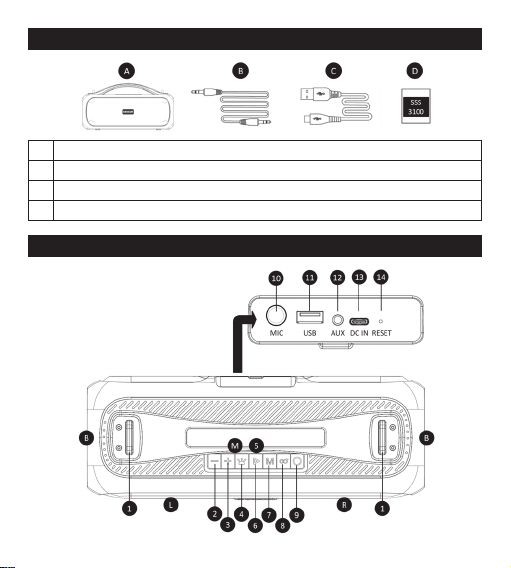
SUPPLY CONTENT
A BT speaker
B 3.5mm audio jack
C USB-C charging cable
D8VHU¶VPDQXDO
BT SPEAKER DESCRIPTION

EN – 5
SSS 3100 top side
1 Strap eyelet
23UHYLRXVWUDFNYROXPHGRZQJRWRORZHU)0VWDWLRQEXWWRQ
33UHYLRXVWUDFNYROXPHGRZQJRWRKLJKHU)0VWDWLRQEXWWRQ
4&KDQJHDGLVDEOH/('OLJKWHႇHFWVEXWWRQ
5 Battery status LED
63/$<3$86()0VWDWLRQVHDUFKEXWWRQ
7³0´EXWWRQPRGHVZLWFKLQJ%7)0$8;±,186%HQDEOHGLVDEOH
%7VSHDNHUPHVVDJHVHQDEOHGLVDEOHYRLFHQRWL¿FDWLRQV
8 TWS button
92QRႇEXWWRQ
SSS 3100 back side
10 0LFURSKRQH0,&,1MDFNPP
11 USB-A for playback from memory device
12 6RFNHWIRUDXGLR$8;,1PLQLMDFNPP
13 &KDUJLQJVRFNHW86%&
14 RESET button
Audio SSS 3100
L Left audio channel
R Right audio channel
B Passive radiator
0Integrated microphone

EN – 6
PUTTING INTO OPERATION
%HIRUH¿UVWXVHEHVXUHWRUHDGWKHVDIHW\LQVWUXFWLRQVFRQWDLQHGLQWKLV
user's manual carefully.
%HIRUH¿UVWXVHSOHDVHFKDUJHWKH%7VSHDNHUWRDPD[LPXPOHYHO+ROGGRZQWKH
SRZHURQEXWWRQWRWXUQRQWKH%7VSHDNHU7XUQLQJRQRႇLVLQGLFDWHGE\DVRXQG
VLJQDO7RWXUQWKH%7VSHDNHURႇKROGGRZQWKHSRZHURQEXWWRQ7RVZLWFKWKH
VRXUFHRIWKHPXVLFEHLQJSOD\HGSUHVV³&KDQJH6RXUFH´EULHÀ\LQWKHRQVWDWH
Attention:$IWHUDORQJHUSHULRGRILQDFWLYLW\WKHDSSOLDQFHZLOOWXUQVLWVHOIRႇ
CARRYING THE BT SPEAKER
To carry the BT speaker, use the handle located on top of the BT speaker.
Caution: always position the equipment so that it does not endanger the health of
persons in the vicinity or cause damage to property.
PAIRING DEVICES VIA BLUETOOTH
Turn on the BT speaker and search for its Bluetooth name “SSS 3100´LQWKHGHYLFH
to be paired, then start the pairing process. If you are requested to enter a pairing
FRGHZKLOH\RXUGHYLFHDQGWKH%7VSHDNHUDUHSDLULQJXVHWKHFRGH³´7R
disconnect a paired device, end the pairing session on your mobile device or hold
GRZQWKH³7:6´EXWWRQ'LVFRQQHFWLRQZLOOEHLQGLFDWHGE\WKH³'LVFRQQHFWHG´YRLFH
signal
Remark: To ensure a stable Bluetooth connection, make sure that the distance
between the BT speaker and your connected device is kept within 10 meters.

EN – 7
TWS FUNCTION
,I\RXSXUFKDVHDQRWKHU%OXHWRRWKVSHDNHU³SSS 3100´\RXFDQSDLUWKHPWRJHWKHU
IRURSWLPDOVWHUHRVRXQG)LUVWPDNHVXUH\RXUGHYLFHLVQRWFRQQHFWHGWRDQ\%7
VSHDNHU6ZLWFKRQERWK%7VSHDNHUVKROGGRZQWKH7:6EXWWRQDFFRPSDQLHGE\
WKH³7UXHZLUHOHVVPRGH´PHVVDJHRQRQHRIWKHVSHDNHUVDQGZDLWIRUWKHRWKHU
speaker to connect. Connecting both BT speakers may take some time depending
on searching for the slave BT speaker. After successful pairing, you will be informed
E\WKH³7UXHZLUHOHVVSDLUHG´YRLFHVLJQDO7KHQFRQQHFW\RXUPRELOHGHYLFHWRWKH%7
VSHDNHU&KDQJLQJWKHYROXPHOHYHOXVLQJWKHYROXPHFRQWUROEXWWRQVZLOOWDNHHႇHFW
automatically on both paired BT speakers. To exit TWS mode, press the TWS button
RQRQHRIWKHSDUWLFLSDWLQJ%7VSHDNHUVXQWLOPHVVDJH³7UXHZLUHOHVVGLVFRQQHFWHG´
sounds.
Recommendation: To ensure correct positioning of the BT speakers in the TWS
mode, always make sure that left channel is on the left and right channel on the right
side.
Left channel - master BT speaker selected by the TWS button
Right channel - slave BT speaker
Warning: The TWS function is only available in the Bluetooth mode. The connected
PLFURSKRQHZLOOWUDQVIHUYRLFHRQO\LQWRWKH%7VSHDNHUWRZKLFKLW¶VFRQQHFWHG,WLV
not possible to pair the device with another type of BT speaker with TWS function,
HYHQZLWKLQDUHHGLWLRQRISURGXFWVZLWKDGLႇHUHQW%OXHWRRWKQDPH
AUDIO AUX IN
The BT speaker is equipped with a 3.5mm jack. Your device can be connected to the
%7VSHDNHUYLDWKHVXSSOLHGDXGLRFDEOH)LUVWFRQQHFWWKHDXGLRSOXJWR\RXUGHYLFH
DQGWKHQWRWKH%7VSHDNHU¶VMDFN
Please note: before connecting your device and BT speaker, make sure that the
RXWSXWVLJQDOIURP\RXUGHYLFHLVDWWKHPLQLPXPOHYHOPLQLPXPRXWSXWYROXPH7KLV

EN – 8
will prevent the BT speaker from damage. When the audio cable is connected, the
BT speaker does not meet the water ingression protection class.
Note: In this mode, not all functions of the BT speaker are available. The Bluetooth
function is not active if the audio jack is connected to the BT speaker.
RESET BUTTON
7RUHVHWWKH%7VSHDNHULQVHUWDWKLQÀDWQRQPHWDOOLFREMHFWFDUHIXOO\LQWRWKH
RESET socket on the back. Press lightly until the button click is heard. Then switch
on the BT speaker using the power button.
RECOMMENDATION: If there is an unexpected problem with the BT speaker
connection or function, reset the BT speaker.
“M“ BUTTON
Switching playback sources:
SUHVVEULHÀ\WRFKDQJHWKHSOD\EDFNVRXUFH%7)0$8;,186%
7RGLVDEOH%7VSHDNHUQRWL¿FDWLRQDQGPHVVDJHV
+ROGGRZQWKHEXWWRQWRGLVDEOHRUHQDEOHQRWL¿FDWLRQDQGZDUQLQJ%7VSHDNHU
PHVVDJHV:KHQWXUQHGRႇDQGRQWKH%7VSHDNHUZLOOUHPHPEHUWKHODVWVHOHFWHG
mode.
Caution:LQWKHRႇVWDWHQRPHVVDJHVQRWLI\LQJDERXWWKH%7VSHDNHUVWDWHZLOOEH
shown. Charge the BT speaker as a preventive measure. Avoid using the sound at a
maximum level.
PLAY/PAUSE BUTTON
Press the Play/Pause button to start or pause music playback during Bluetooth
FRQQHFWLRQRUZKLOHD86%PHPRU\PHGLDLVLQVHUWHG,Q)0PRGHWKHEXWWRQLVXVHG
WRVFDQDQGVDYHIRXQG)0VWDWLRQV

EN – 9
VOLUME AND TRACK PLAYBACK CONTROL
7RFRQWUROWKH%7VSHDNHU¶VYROXPHEXWWRQVXVHWKHEXWWRQVRQWKH%7VSHDNHU
During playback of songs from the storage media, you can skip to the next song
E\SUHVVLQJDQGKROGLQJWKH³´EXWWRQ7RVHOHFWWKHSUHYLRXVWUDFNSUHVVDQGKROG
WKH³´EXWWRQ,Q)0PRGHORQJSUHVVWKHEXWWRQWRJRWRQH[W³´SUHYLRXV³´)0
station.
LIGHT EFFECTS
7KH%7VSHDNHULVHTXLSSHGZLWKOLJKWHႇHFWVLQWKHVSHDNHUDUHD7RFKDQJHWKHOLJKW
HႇHFWSUHVVWKH³OLJKWHႇHFWV´EXWWRQ7KHUHDUHOLJKWHႇHFWVSUHVHW7RGLVDEOHWKH
OLJKWHႇHFWSUHVV³OLJKWHႇHFWV´UHSHDWHGO\XQWLOWKH/('VJRRXW
Warning:,Q)0UDGLRPRGHWKH/('HႇHFWVDUHXQDYDLODEOHEHFDXVHRISRVVLEOH
interference.
PLAYBACK FROM USB STORAGE MEDIA
USB-A playback
Insert the USB storage disc with supported audio content in the USB slot. The USB
VRXUFHDFWLYDWHVDXWRPDWLFDOO\DQGSOD\EDFNEHJLQV2USUHVV³0RGHVZLWFK´EULHÀ\
WRVHOHFW³86%PRGH´7KHPXVLFSOD\EDFNIURPWKHFRQQHFWHGVWRUDJHZLOOVWDUW
automatically. Upload your music to the storage in the order in which it will be played
by the BT speaker.
Attention: Due to a number of devices on the market, compatibility and playback
support are not guaranteed for all media. The memory devices you want to connect
VKRXOGEHWHVWHGLQDGYDQFHDQGRUIRUPDWWHGDV)$7¿OHIRUPDW7KHSOD\EDFNRI
SURWHFWHGPHGLD¿OHVRUFRQWHQWVWRUHGLQVLGHWKHPPD\IDLO

EN – 10
FM RADIO
3UHVVWKH³0RGHVZLWFK´WRVZLWFKWKH%7VSHDNHUWR)0UDGLRPRGH
/RQJSUHVVWKHÄ3/$<3$86()0VWDWLRQVHDUFK³EXWWRQWRVWDUWWKH)0VWDWLRQ
scan.
2QFHWKHVWDWLRQVDUHIRXQGDQGVWRUHGLQWRWKH%7VSHDNHU¶VPHPRU\\RXFDQ
VZLWFKEHWZHHQWKHVWDWLRQVIRXQGE\KROGLQJGRZQWKH³´³´EXWWRQWKHQH[W
SUHYLRXVVWDWLRQVLQVHTXHQFH
Remark:)RUEHVWUHFHSWLRQSODFHWKHGHYLFHLQDQRSHQDUHDZKHUHWKH)0EDQG
will not be inhibited.
MICROPHONE INPUT
The BT speaker is equipped with one input for connecting one 6.3mm jack
microphone on the back. When the microphone is connected, the input is active. The
microphone mode volume level is factory preset and cannot be adjusted.
Warning: Avoid feedback by keeping the microphone far enough away from the SSS
3100 speakers. If you get too close, feedback will occur and may result in damage to
the speakers or the hearing of a person near the system.
CHARGING THE BT SPEAKER
A charged battery provides power for several hours of operation at normal volume
levels. A high volume consumes more battery power; therefore, we recommend
listening at normal volume levels. To charge the BT speaker, please connect the
charging adapter to the mains and then to the BT speaker.
Use your own 5V, 2A charging adapter. The battery status indicator will indicate the
charging progress. A low battery level will be indicated by an audible alert.
Indice
Altri manuali Sencor Altoparlanti

Sencor
Sencor SMC BS30 Manuale utente

Sencor
Sencor SSS 3200 KIDS Manuale utente

Sencor
Sencor SSS 1400 Manuale utente

Sencor
Sencor SSS 6800 TE Manuale utente

Sencor
Sencor Imperial BTS 600 Manuale utente

Sencor
Sencor SIRIUS 2 MINI Manuale utente

Sencor
Sencor SSS 6701 Manuale utente

Sencor
Sencor SSS 101 Manuale utente

Sencor
Sencor SSS 3900 KIDS Manuale utente

Sencor
Sencor SSS 3600 KIDS Manuale utente


