
SensorLink Radio Ohmstik Manuale utente

Operators Manual
Radio Ohmstik
Radio Linked
Micro Ohmmeter
SensorLink®Corporation
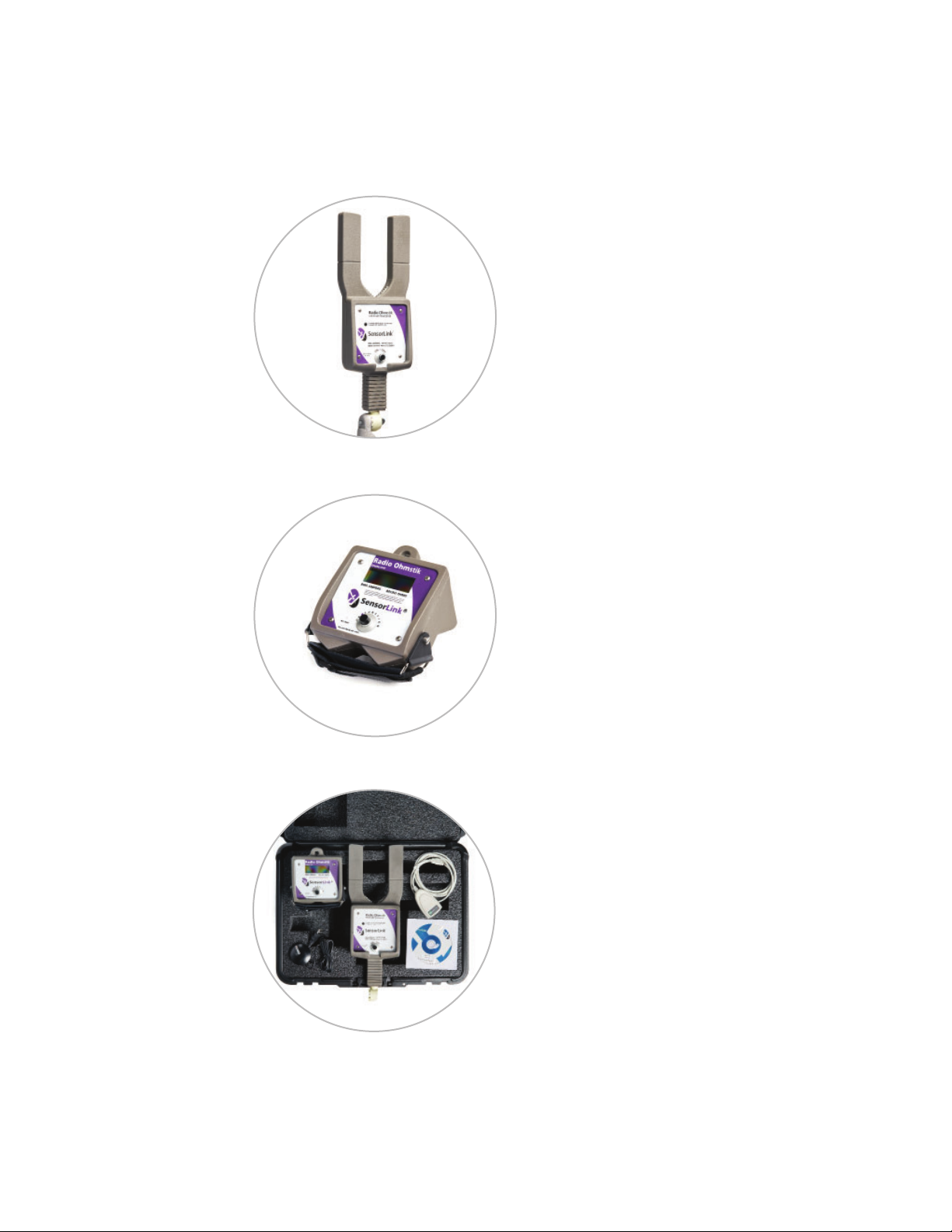
Model 8-182
Radio Ohmstik Transmitter
Model 8-184 not pictured
Model 8-180
Radio Ohmstik Display Unit
Model 6-182
Radio Ohmstik Kit
and Accessories

OPERATORS MANUAL
Radio Ohmstik
Radio Linked Live-Line Micro Ohmmeter
Table of Contents Page
Specifications 4
Safety Information 5
Theory of Operation 6
FCC and Industry Canada Statements 7
Cleaning and Transporting 7
Calculating Connector Resistance Ratio 8
Ratio Conditions and Actions 9
Radio Ohmstik Communication 10
Software Requrements and Installation 10
Communication with Software 11
Communication with Display Unit 12
Taking a Measurement 13
Reviewing the Measurement 14
Powering Off 14
Troubleshooting 15-16
Probes & Accessories 17-18
Battery Replacement 16
Warranty 19
Quality Assurance Back Cover
Available Stock Codes:
8-182 50HZ 8-182 60HZ 8-182 EURO
8-180 8-180 EURO 8-184 50HZ
8-184 60HZ 8-184 EURO

Page 4
Specifications
Model Number & Type 8-182 8-184
Type Standard Wide Jaw
Sensor Opening 2.5 in, 6.35 cm 3.86 in, 9.8 cm
Weight 2.3 lbs, 1.05 kg 4.0 lbs, 1.81 kg
Measurements
Amps 1-1400 A
Microohms 5-2500 μΩ
Accuracy
Amps ±1% 1 A
Microhms Absolute ±2% 2
Microhms Repeatability ±1% 2
Accuracy is diminished if the current is less than 15 amps 0-35kV and when current is less than 50 A while on 36-500kV
Range of Operation
Voltage Rated 500kV
Resolution
Amps 1.9-99 A 0.1 A
Amps 100-1400 A 1.0 A
Microhms 0-999 μΩ 1 μΩ
Frequency Actual frequency indicated on the unit
50Hz Calibrated 47 to 53Hz
60Hz Calibrated 57 to 63Hz
Radio
Frequency ISM 2.4 GHz
Power 63 mW, 10 mW in Europe & Japan
Range 150', (46 meters) Line of Sight, 120' (36.5 meters) in Europe & Japan
Mechanical
Battery 9 Volt Alkaline, 1 each per unit
Battery Life 6-8 Hours at 68°F or 20°C, 3-4 Hours at 32°F or 0°C
Detachable Probes Fused Probe or Adjustable Probe
Ambient Temperature -4 to +140° F, -20 to +60° C
Display Graphics LCD
Software Requirements Radio Ohmstik Software
System Requirements Windows XP, Vista, WIN 7, WIN 8, WIN 10
Hardware Requirements Minimum of two USB ports
EEC Standards Successfully passed international test standards indicated by CE

Page 5
Safety Information
Read all safety and instruction statements before using the product. Failing to
follow the safety guidelines can cause severe injury or death.
Ohmstiks are designed for use on live, overhead lines with 0 to 500KV. All
procedures appropriate for the line voltage are to be taken, including proper
work techniques, equipment, and Personal Protection Equipment.
The Ohmstik should be used only by certified personnel who have been
trained for live-line, high voltage work by their organization.
Connecting the probes in a phase to phase, phase to ground, or any
application where the voltage potential between the probes is more than 2.5
volts will cause damage to the instrument and create a system fault.
The hot stick length must be the correct for line voltage per minimum
approach distances stated in published OSHA regulations and/or provided by
the utility.
The cover plate, chuck, and entire Ohmstik are to be considered at the same
potential. Putting the cover plate, chuck, or other parts of the Ohmstik within
the air gap of adjacent phases or ground could cause a phase to phase or
phase to ground fault.
Do not alter the product in any manner.

Theory of Operation
The Radio Ohmstik Live-Line Micro Ohmmeter measures micro-ohm resistance
on conductors, connectors, splices, and switching devices positioned directly on
energized, high voltage lines. Resistance is the electrical condition of the connection
and calculating the measurements into condition ratios provides definitive and
actionable early warnings of a deteriorating fitting. If the resistance of the fitting
is outside the normal range, the connection is deteriorating. A connection with
resistance above the normal range is in a failure process, where the time to failure
depends on how high the resistance is.
The Ohmstik is placed on a splice or connector so the connection under test is
between the two electrodes. Measurement data is communicated to both the
Remote Display and the Radio Ohmstik Software on the user's laptop. At the
same time, the GPS device sends location data to the Software. When a valid
measurement is received, the software writes the data to a comma separated (CSV)
file. This combined data allows the user to map the location of the connector as well
as the measurements to analyze its condition.
Page 6

FCC & Industry Canada Statements
United States of America and Canada
Contains FCC ID: OUR-XBEEPRO
Contains Model XBee-PRO Radio, IC: 4214A-XBEEPRO
The/XBee-PRO® RF Module has been certified by the FCC for use with other
products without any further certification (as per FCC section 2.1091). Modifications
not expressly approved by Digi could void the user's authority to operate the
equipment.
This equipment has been tested and found to comply with the limits for a Class
B digital device, pursuant to Part 15 of the FCC Rules. These limits are designed
to provide reasonable protection against harmful interference in a residential
installation. This equipment generates, uses and can radiate radio frequency energy
and, if not installed and used in accordance with the instructions, may cause
harmful interference to radio communications. However, there is no guarantee that
interference will not occur in a particular installation.
If this equipment does cause harmful interference to radio or television reception,
which can be determined by turning the equipment off and on, the user is
encouraged to try to correct the interference by one or more of the following
measures: Re-orient or relocate the receiving antenna, Increase the separation
between the equipment and receiver, Connect equipment and receiver to outlets
on different circuits, or Consult the dealer or an experienced radio/TV technician for
help.
Cleaning
The Radio Ohmstik should be cleaned by wiping with a silicone hot stick wipe to
remove dirt, sand, and salt that will degrade the urethane housing.
Transporting
There are no special considerations for transporting this device.
Page 7

Calculating Connector Resistance Ratio:
Resistance ratio is calculated by comparing the resistance of the fitting over the
resistance of the conductor. Factors effecting the readings may include line tension
and wire condition (heavily birdcaged or other).
Ratio = Connector / Conductor
All fittings or splices consist of two different connectors. All connectors consist of
three resistors in series: (1) resistance of the conductor, (2) the connector, and (3)
the interface between the conductor and the connector.
The interface is the only resistor of the three that changes over time. The object of
using the Ohmstik is to measure as little of the conductor & connector as possible,
and all of the section that surrounds the interface.
EXAMPLE: A splice connector has two interfaces.
Step 1: TAKE THE CONDUCTOR MEASUREMENT
Measure a portion of the conductor equal in length to the interface portion of the
connector. Various lengths can be configured with the probes sent with the unit.
Step 2: MEASURE THE INTERFACE OF CONNECTOR SIDE A
Measure the interface of the first connector.
One contactor should be placed in just past the compressed section. On an
automatic splice, place the contactor in the middle of the connector. The second
contactor should be placed on the conductor, as close to the connector as possible
without touching the connector.
Step 3: MEASURE THE INTERFACE OF CONNECTOR SIDE B
Measure the interface of the second connector.
One contactor should be placed in just past the compressed section. On an
automatic splice, place the contactor in the middle of the connector. The second
contactor should be placed on the conductor, as close to the connector as possible
without touching the connector.
Page 8

Ratio Conditions and Actions
Evaluating any necessary actions can be completed once the ratios for the
connector are calculated. The following table shows the suggested action based on
maintaining the present load rating of the asset.
Resistance Ratio Condition of fitting Action
0.3 to 1.0 Normal Connection: Serviceable
New connections are expected to be in
the 0.3 to 0.8 range
None
1.01 to 1.2 Serviceable; Poor
Shows deterioration; Overloads &
faults may deteriorate the connection
Re-inspect in one
year, or after next
fault
1.21 to 1.5 Serviceable; Poor
Shows deterioration; Overloads &
faults may deteriorate the connection
Re-inspect in six
months, or after
next fault
1.51 to 2.0 Serviceable; Very poor
High loads, overloads, or faults may
deteriorate the connection
Schedule asset
replacement in less
than three months
2.01 to 3.0 Bad; deterioration rate is
increasing
High loads, overloads, or faults may
fail the connection. High tensions from
cold weather or wind may initiate
failure under normal loading
Schedule asset
replacement very
soon
>3.0 Failing
Normal loads, overloads, or faults may
fail the connection; High tensions from
cold weather or wind are likely to
initiate failure under normal loading
Replace as soon as
possible
*Actions required based on resistance ratios (Rfitting / Rconductor)
*These ratio conditions and actions are developed from field measurements, manufacturer
data, lab tests, failure analysis and understanding of deterioration mechanisms. This
guideline may be modified as field and test data accumulates.
Calculating the Resistance of Power Tap
Connectors:
The Ohmstik will take resistance on other Full and Limited tension connectors.
It is always best practice to take all three readings of the series and evaluate the
condition with the above table. However, due to the build and size, it may not be
possible to take all three readings in series. If evaluating based on a benchmark
measurements, or comparison to a known good fitting, a reading across the
connector can be made.
Factors effecting the reading may include line tension and wire condition (heavily
birdcaged or other).
Page 9

Radio Ohmstik Communication
The user is able to view the measurement sets on both a Display Unit and on a
laptop running Radio Ohmstik software. These communications may be used singly,
or at the same time.
With Radio Ohmstik software and GPS, the following data may be written to the
data file: Amps, Micro-Ohms, Date, Time, Comments, Latitude, and Longitude (with
the GPS USB plugged into the laptop).
Communicating to the Display Unit: The Display Unit is designed to be attached
to a hot stick or held by hand. The sensor transmits the live readings to the Display
Unit via radio. This functionality allows the user to easily see readings were taken.
Readings are not saved on the Display unit.
Communicating to the Laptop: With the Radio Ohmstik software loaded, and
the radio adapter plugged in, the Sensor will transmit the data and readings to the
laptop. The measurement set will automatically be saved as a .csv file for future
review.
Radio Ohmstik System Requirements
OPERATING SYSTEM: Radio Ohmstik Software installs onto computers running
Windows XP, VISTA, 7, 8, and 10. USB ports are needed for both GPS and Radio
communication.
NETWORK INSTALLATION: This is a single user application and is not supported
when installed onto a server.
INSTALLATION AUTHORITY: Installation will require administration rights.
Computers managed by electric utility organizations often limit the programs that
can be installed. If the user does not have admin rights they will need the assistance
of the IT department to download the software.
USB PORT PERMISSIONS: The USB GPS and USB Radio have install programs that
run the first time connected. The user may have rights to install programs but may
not be aware that the USB ports are locked on the PC. Please contact your network
administrator for permission and instructions to complete the install if drivers are
not installing automatically and need to be installed manually.
Softlink Installation
Step 1: Softlink Installer is available at www.sensorlink.com/products/ohmstik. Save
the file to the desired location. The Radio Ohmstik .exe file will automatically begin
the download when clicked.
Step 2: You must agree to the licensing agreement to proceed with the download.
Step 3: A dialog box will appear to let you know when the download is complete.
Shortcut paths will automatically load during the install.
Page 10
Questo manuale è adatto per i seguenti modelli
4
Indice
Altri manuali SensorLink Strumento di misura

SensorLink
SensorLink Varcorder 910 Series Manuale utente

SensorLink
SensorLink True RMS Ampstik 8-020 Manuale utente

SensorLink
SensorLink 8-182 Manuale utente

SensorLink
SensorLink Amcorder UG Series Manuale utente

SensorLink
SensorLink 6-120 Manuale utente

SensorLink
SensorLink Ampstik+ Manuale utente

SensorLink
SensorLink 8-117 XT 50HZ Manuale utente

SensorLink
SensorLink TMS 950 Manuale utente

SensorLink
SensorLink Swarm S2 Manuale utente


